一文搞懂GEE中多元线性回归评价指标计算方式(SST、SSR、MSE、RMSE、R2、皮尔逊相关系数等)
摘要:本文将详细介绍在GEE中如何计算SST、SSR、MSE、RMSE、R2、皮尔逊相关系数等回归评价指标。
在Google Earth Engine (GEE)中可以很方便的对featureCollection进行多元线性回归,然而GEE并没有内置的回归评价指标计算方法,网上能查到的都是一些很拙劣的教程。因此,本文将详细介绍在GEE中如何计算SST、SSR、MSE、RMSE、R2、皮尔逊相关系数等回归评价指标。
1.首先我准备了这样一组数据。
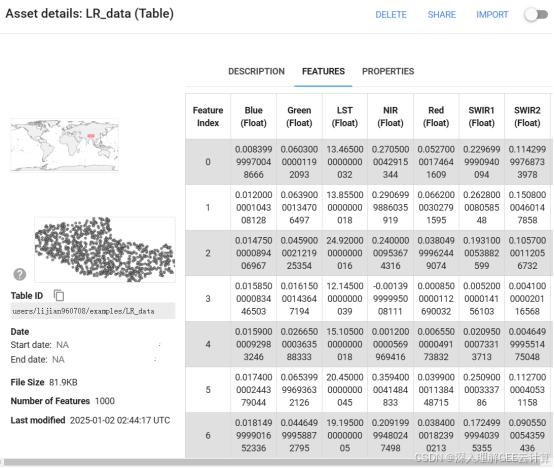
用影像的Blue、Green、Red、NIR、SWIR1、SWIR2波段来拟合LST,拟合公式如下:

代码如下:
var featureCollection = ee.FeatureCollection("users/lijian960708/examples/LR_data");
var featureCollection_size = featureCollection.size();
var x_bands = ee.List(["Blue", "Green", "Red", "NIR", "SWIR1", "SWIR2"]);
var y_bands = ee.List(["LST"]);
//添加常数项
featureCollection = featureCollection.map(function(f) {
	return f.set('constant', 1);
});
x_bands = x_bands.cat(["constant"]);
var linearRegression = featureCollection.reduceColumns({
	reducer: ee.Reducer.linearRegression({
		numX: x_bands.size(),
		numY: y_bands.size()
	}),
	selectors: x_bands.cat(y_bands) //["Blue", "Green", "Red", "NIR", "SWIR1", "SWIR2", "LST"]
});
print(linearRegression);
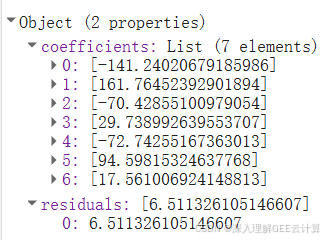
coefficients为拟合系数,residuals为残差(实际计算为RMSE)
2.为了方便矩阵计算,将自变量(Blue、Green、Red、NIR、SWIR1、SWIR2)和因变量(LST)转为ee.Array对象。
//x真实值
var x_truth_arr = ee.Array(featureCollection.reduceColumns({
	reducer: ee.Reducer.toList(x_bands.size()),
	selectors: x_bands
}).get('list'));
print("x_truth_arr", x_truth_arr);
//y真实值
var y_truth_arr = ee.Array(featureCollection.aggregate_array(y_bands.get(0))).reshape([featureCollection_size, 1]);
print("y_truth_arr", y_truth_arr);
3.计算估计值。网上有很多代码都是使用map来直接对featureCollection进行计算,比如下面这种代码。
var predictions = input.map(function(feature) {
  var x1_value = feature.get('x1');
  var x2_value = feature.get('x2');
  var predicted_y = intercept.add(slopes.get([0]).multiply(x1_value)).add(slopes.get([1]).multiply(x2_value));
  return feature.set('predicted_y', predicted_y);
});
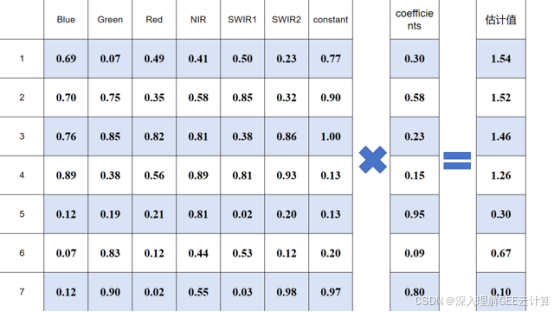
这种代码代码看着很笨重,其实完全可以用ee.Array的矩阵计算来实现的,代码如下:
//拟合系数
var coefficients = ee.Array(linearRegression.get('coefficients'));
var y_estimate_arr = x_truth_arr.matrixMultiply(coefficients);
print("y_estimate_arr", y_estimate_arr);
矩阵乘法如图所示:
4.计算真实值的平均值
var y_mean = y_truth_arr.reduce(ee.Reducer.mean(), [0]);
print("y_mean", y_mean);
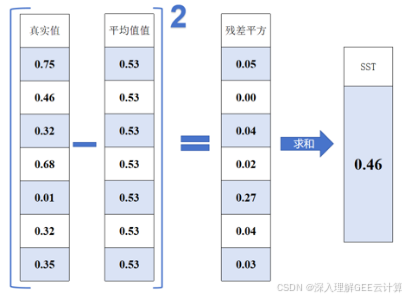
5.计算原始数据和均值之差的平方和:SST(Total sum of squares),公式如下

其中:


代码如下
var SST = y_truth_arr.subtract(y_mean.repeat(0, featureCollection_size)).pow(2).reduce(ee.Reducer.sum(), [0]).project([0]).toList().get(0);
print("SST", SST);
所涉及的矩阵运算如图所示:
6.计算和方差:SSE(The sum of squares due to error),公式如下:
代码如下
var SSE = y_truth_arr.subtract(y_estimate_arr).pow(2).reduce(ee.Reducer.sum(), [0]).project([0]).toList().get(0);
print("SSE", SSE);
所涉及的矩阵运算如图所示:
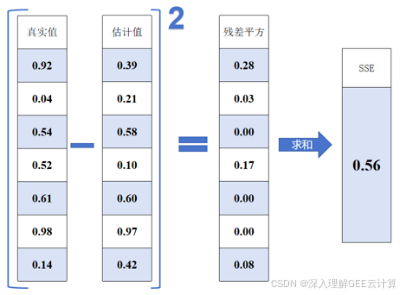
7.计算均方误差:MSE(Mean Squared Error),公式如下:

代码如下
var MSE = ee.Number.expression('SSE/n', {
	SSE: SSE,
	n: featureCollection_size
});
print("MSE", MSE);
8.均方根误差:RMSE(Root Mean Squard Error),公式如下:

代码如下
var RMSE = ee.Number.expression('MSE ** 0.5', {
	MSE: MSE
});
print("RMSE", RMSE);
9.计算决定系数:R2(R-Square),公式如下:

代码如下
var R2 = ee.Number.expression('1-(SSE/SST)', {
	SSE: SSE,
	SST: SST
});
print("R2", R2);
10.计算皮尔逊相关系数。GEE内置计算方法,代码如下
var truth_estimate = ee.Array.cat([y_truth_arr, y_estimate_arr], 1).toList();
var pearsonsCorrelation = truth_estimate.reduce(ee.Reducer.pearsonsCorrelation());
var correlation = ee.Number(ee.Dictionary(pearsonsCorrelation).get('correlation'));
print("皮尔逊相关系数", correlation);
讨论:经计算皮尔逊相关系数的平方等于决定系数:R2(R-Square),我数理统计学的不是很到位,我记得好像在什么情况下这两个数是相等,在什么情况下不能看作相等的,有没有数学大佬清楚的,可以在后台留言。
完整代码:
var featureCollection = ee.FeatureCollection("users/lijian960708/examples/LR_data");
var featureCollection_size = featureCollection.size();
var x_bands = ee.List(["Blue", "Green", "Red", "NIR", "SWIR1", "SWIR2"]);
var y_bands = ee.List(["LST"]);
//添加常数项
featureCollection = featureCollection.map(function(f) {
	return f.set('constant', 1);
});
x_bands = x_bands.cat(["constant"]);
var linearRegression = featureCollection.reduceColumns({
	reducer: ee.Reducer.linearRegression({
		numX: x_bands.size(),
		numY: y_bands.size()
	}),
	selectors: x_bands.cat(y_bands) //["Blue", "Green", "Red", "NIR", "SWIR1", "SWIR2", "LST"]
});
print(linearRegression);
//拟合系数
var coefficients = ee.Array(linearRegression.get('coefficients'));
print("coefficients", coefficients);
//残差
var residuals = ee.Number(linearRegression.getArray('residuals').toList().get(0));
print("residuals", residuals);
//x真实值
var x_truth_arr = ee.Array(featureCollection.reduceColumns({
	reducer: ee.Reducer.toList(x_bands.size()),
	selectors: x_bands
}).get('list'));
print("x_truth_arr", x_truth_arr);
//y真实值
var y_truth_arr = ee.Array(featureCollection.aggregate_array(y_bands.get(0))).reshape([featureCollection_size, 1]);
print("y_truth_arr", y_truth_arr);
//y估计值
var y_estimate_arr = x_truth_arr.matrixMultiply(coefficients);
print("y_estimate_arr", y_estimate_arr);
//y真实值的平均值
var y_mean = y_truth_arr.reduce(ee.Reducer.mean(), [0]);
print("y_mean", y_mean);
//原始数据和均值之差的平方和:SST(Total sum of squares)
var SST = y_truth_arr.subtract(y_mean.repeat(0, featureCollection_size)).pow(2).reduce(ee.Reducer.sum(), [0]).project([0]).toList().get(0);
print("SST", SST);
//和方差:SSE(The sum of squares due to error)
var SSE = y_truth_arr.subtract(y_estimate_arr).pow(2).reduce(ee.Reducer.sum(), [0]).project([0]).toList().get(0);
print("SSE", SSE);
//均方误差:MSE(Mean Squared Error)
var MSE = ee.Number.expression('SSE/n', {
	SSE: SSE,
	n: featureCollection_size
});
print("MSE", MSE);
//均方根误差:RMSE(Root Mean Squard Error)
var RMSE = ee.Number.expression('MSE ** 0.5', {
	MSE: MSE
});
print("RMSE", RMSE);
//决定系数:R2(R-Square)
var R2 = ee.Number.expression('1-(SSE/SST)', {
	SSE: SSE,
	SST: SST
});
print("R2", R2);
//皮尔逊相关系数
var truth_estimate = ee.Array.cat([y_truth_arr, y_estimate_arr], 1).toList();
var pearsonsCorrelation = truth_estimate.reduce(ee.Reducer.pearsonsCorrelation());
var correlation = ee.Number(ee.Dictionary(pearsonsCorrelation).get('correlation'));
print("皮尔逊相关系数", correlation);
print("皮尔逊相关系数的平方", correlation.pow(2));

DAMO开发者矩阵,由阿里巴巴达摩院和中国互联网协会联合发起,致力于探讨最前沿的技术趋势与应用成果,搭建高质量的交流与分享平台,推动技术创新与产业应用链接,围绕“人工智能与新型计算”构建开放共享的开发者生态。
更多推荐


 25
25 0
0- 0


 已为社区贡献1条内容

所有评论(0)