Alertmanager告警对接AI模型
Alertmanager告警对接AI模型
目标:
Alertmanager告警后对接AI模型,处理完成后发送到飞书群
前置条件:
1、已安装Alertmanager
2、已安装hermes,并配置完AI模型
3、已配置完飞书机器人,并加入飞书群
4、已打通hermes与飞书渠道
5、本方法基于docker实现
配置清单:
| IP | 组件 |
|---|---|
| 192.168.188.129 | Alertmanager |
| 192.168.188.128 | hermes + hermes-signer |
一、配置hermes
末尾添加
cat ~/.hermes/config.yaml

platforms:
  webhook:
    enabled: true
    extra:
      host: "0.0.0.0"
      port: 8644
创建webhook,自定义secret
hermes webhook subscribe alertmanager   --secret "SbTOBsHLl_GNhky2xySSa9sLGRDtYm1Jdo49VOG430k"   --deliver log   --prompt "【告警】{status} | {commonLabels.alertname} | {commonAnnotations.summary}" --deliver feishu \
  --deliver-chat-id "oc_cf524af8cf7040830ebf3c5fc0eccffc"
启动hermes
hermes gateway run
验证端口
[root@bogon .hermes]# curl http://192.168.188.128:8644/health
{"status": "ok", "platform": "webhook"}
验证业务
[root@bogon app]# SECRET=$(python3 -c "import json; print(json.load(open('/root/.hermes/webhook_subscriptions.json'))['alertmanager']['secret'])")
[root@bogon app]# PAYLOAD='{"status":"firing","alerts":[{"status":"firing","labels":{"alertname":"DebugTest","severity":"info","instance":"test"},"annotations":{"summary":"debug test"},"startsAt":"2026-07-16T03:20:00Z"}]}'
[root@bogon app]# SIG=$(printf '%s' "$PAYLOAD" | openssl dgst -sha256 -hmac "$SECRET" | awk '{print $2}')
[root@bogon app]# curl -s -X POST http://192.168.188.128:8644/webhooks/alertmanager \
  -H "Content-Type: application/json" \
  -H "X-Hub-Signature-256: sha256=$SIG" \
  -d "$PAYLOAD"
{"status": "accepted", "route": "alertmanager", "event": "unknown", "delivery_id": "1784172386030"}
二、配置Alertmanager
cat alertmanager.yml
route:
  receiver: 'hermes'
  routes:
    - receiver: hermes

receivers:
- name: hermes
  webhook_configs:
  - url: "http://192.168.188.128:9000/alert"
    send_resolved: true
重启服务
docker compose restart alertmanager
# 查看日志无报错即可
docker logs alertmanager
三、配置中间层(hermes-signer)
目录:
/opt/hermes-signer
├── docker-compose.yml
├── config
│ └── config.yaml
├── app
│ ├── Dockerfile
│ └── signer.py
└── logs
创建文件:
mkdir -p /opt/hermes-signer/{config,app,logs}
cd /opt/hermes-signer
配置
cat /opt/hermes-signer/app/Dockerfile
FROM swr.cn-north-4.myhuaweicloud.com/ddn-k8s/docker.io/python:3.9-slim
WORKDIR /app
COPY signer.py .
RUN pip install \
    flask \
    requests \
    pyyaml
CMD ["python3", "signer.py"]
cat /opt/hermes-signer/app/signer.py
from flask import Flask, request, jsonify
import requests
import hmac
import hashlib
import yaml
import logging

app = Flask(__name__)
with open("/config/config.yaml") as f:
    config = yaml.safe_load(f)
HERMES_URL = config["hermes"]["url"]
SECRET = config["hermes"]["secret"]
PORT = config["server"]["port"]
ALLOWED = config["security"]["allowed_sources"]

logging.basicConfig(
    level=logging.INFO
)

@app.route("/health")
def health():
    return jsonify({
        "status": "ok"
    })

@app.route("/alert", methods=["POST"])
def alert():
    source_ip = request.remote_addr
    if ALLOWED:
        if source_ip not in ALLOWED:
            return jsonify({
                "error":"source denied"
            }),403

    body = request.get_data()
    signature = hmac.new(
        SECRET.encode(),
        body,
        hashlib.sha256
    ).hexdigest()
    headers = {
        "Content-Type":"application/json",
        "X-Webhook-Signature":signature
    }
    r = requests.post(
        HERMES_URL,
        data=body,
        headers=headers,
        timeout=10
    )
    logging.info(
        "forward status=%s",
        r.status_code
    )
    return (
        r.text,
        r.status_code,
        {
            "Content-Type":"application/json"
        }
)

if __name__ == "__main__":
    app.run(
        host="0.0.0.0",
        port=PORT
    )
cat /opt/hermes-signer/config/config.yaml
server:
  listen: "0.0.0.0"
  port: 9000
hermes:
  url: "http://172.17.0.1:8644/webhooks/alertmanager"
  #secret: "你的Hermes webhook secret"
  secret: "SbTOBsHLl_GNhky2xySSa9sLGRDtYm1Jdo49VOG430k"
security:
  allowed_sources:
    - "192.168.188.128" #alertmanager ip
    - "127.0.0.1"
logging:
  level: "INFO"
cat /opt/hermes-signer/docker-compose.yml
services:
  hermes-signer:
    build:
      context: ./app
    container_name:
      hermes-signer
    restart:
      always
    ports:
      - "9000:9000"
    volumes:
      - ./config:/config:ro
      - ./logs:/logs
    environment:
      TZ:
        Asia/Shanghai
[root@bogon hermes-signer]# cat /tmp/alert.json
{
  "alerts": [
    {
      "status": "firing",
      "labels": {
        "alertname": "NodeDown",
        "instance": "server01",
        "severity": "critical"
      },
      "annotations": {
        "description": "服务器掉线测试"
      }
    }
  ]
}
确定docker服务正常运行
[root@bogon hermes-signer]# systemctl status docker
● docker.service - Docker Application Container Engine
     Loaded: loaded (/usr/lib/systemd/system/docker.service; disabled; preset: disabled)
     Active: active (running) since Fri 2026-07-17 09:42:08 CST; 1s ago
TriggeredBy: ● docker.socket
       Docs: https://docs.docker.com
   Main PID: 2047 (dockerd)
      Tasks: 8
     Memory: 116.9M (peak: 117.2M)
        CPU: 351ms
     CGroup: /system.slice/docker.service
             └─2047 /usr/bin/dockerd -H fd:// --containerd=/run/containerd/containerd.sock
如未启动,执行systemctl start docker
构建hermes-signer
cd /opt/hermes-signer/ && docker compose up -d
[root@bogon hermes-signer]# docker ps -a
CONTAINER ID   IMAGE                         COMMAND               CREATED         STATUS         PORTS                                         NAMES
9e25d75e5a47   hermes-signer-hermes-signer   "python3 signer.py"   3 minutes ago   Up 3 minutes   0.0.0.0:9000->9000/tcp, [::]:9000->9000/tcp   hermes-signer
验证端口
curl http://127.0.0.1:9000/health
{"status":"ok"}
验证业务,alter.json只用于测试
curl -X POST -H "Content-Type: application/json" http://127.0.0.1:9000/alert --data-binary @/tmp/alert.json
{"status": "accepted", "route": "alertmanager", "event": "unknown", "delivery_id": "1784166159295"}
问题记录:
1、WARNING gateway.platforms.webhook: [webhook] Invalid signature for route alertmanager
出现这个报错一般有三个原因:
1)hermes-signer与hermes之间的签名不匹配;
查看
[root@bogon hermes-signer]# cat config/config.yaml | grep secret
[root@bogon .hermes]# cat webhook_subscriptions.json | grep secret
与创建webhook时的secret是否一致
2)签名使用X-Webhook-Signature-V2,格式问题,缺少timestamp。
目前hermes官方文档支持X-Webhook-Signature,建议使用V1版本。
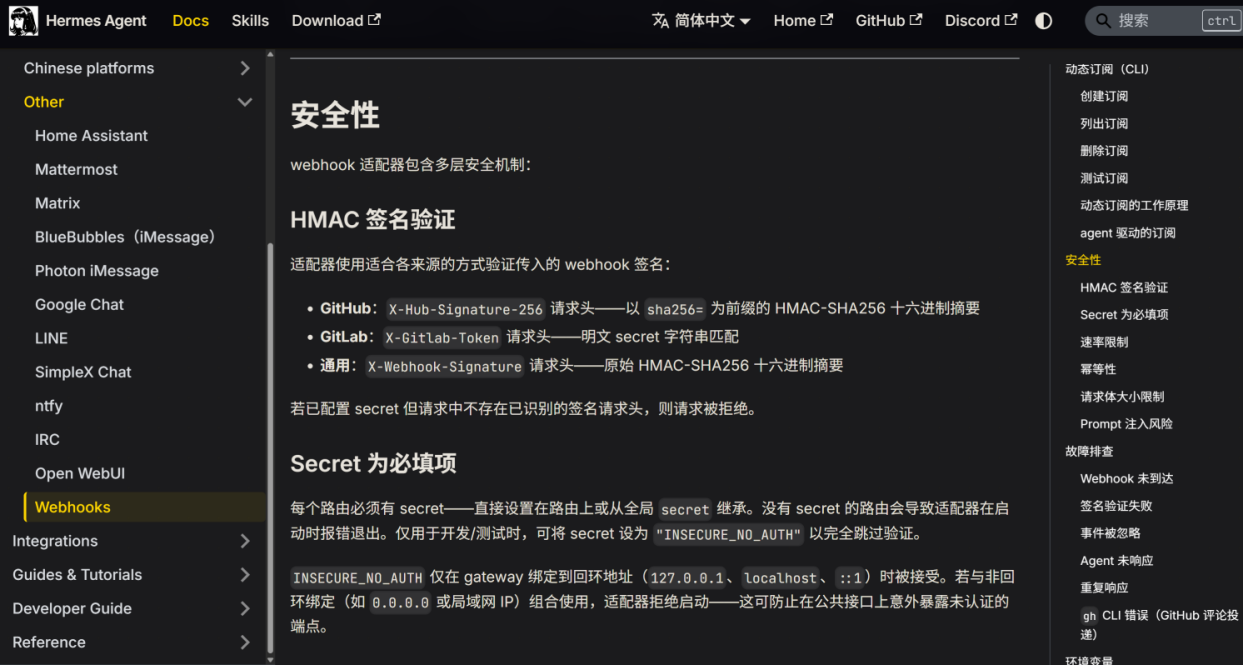
查看配置文件
[root@bogon .hermes]# cat ~/.hermes/config.yaml | grep signature_version
[root@bogon .hermes]# cat ~/.hermes/config.yaml | grep require_timestamp
没有回显则没有启用V2.
2、hermes-signer业务探测报错
报错内容
[root@bogon hermes-signer]# curl -X POST -H "Content-Type: application/json" http://127.0.0.1:9000/alert --data-binary @/tmp/alert.json
{"error":"source denied"}
原因:
hermes-signer/config/config.yaml中没有添加docker网络
解决:
ip a
6: br-dcdc695ba711: <BROADCAST,MULTICAST,UP,LOWER_UP> mtu 1500 qdisc noqueue state UP group default
    link/ether 42:6f:1e:0e:9d:e1 brd ff:ff:ff:ff:ff:ff
    inet 172.18.0.1/16 brd 172.18.255.255 scope global br-dcdc695ba711
       valid_lft forever preferred_lft forever
    inet6 fe80::406f:1eff:fe0e:9de1/64 scope link
       valid_lft forever preferred_lft forever
添加到config/config.yaml
security:
  allowed_sources:
    - "192.168.188.129" #alertmanager ip
    - "192.168.188.128"
    - "127.0.0.1"
    - "172.18.0.1"
3、其他
curl -X POST -H "Content-Type: application/json" http://127.0.0.1:9000/alert --data-binary @/tmp/alert.json
<!doctype html>
<html lang=en>
<title>500 Internal Server Error</title>
<h1>Internal Server Error</h1>
<p>The server encountered an internal error and was unable to complete your request. Either the server is overloaded or there is an error in the application.</p>
服务挂了,看日志解决吧,就不说了
附:
# Docker安装
yum install -y yum-utils
yum-config-manager --add-repo https://mirrors.aliyun.com/docker-ce/linux/centos/docker-ce.repo
yum install -y docker-ce docker-ce-cli containerd.io docker-compose-plugin
systemctl start docker

DAMO开发者矩阵,由阿里巴巴达摩院和中国互联网协会联合发起,致力于探讨最前沿的技术趋势与应用成果,搭建高质量的交流与分享平台,推动技术创新与产业应用链接,围绕“人工智能与新型计算”构建开放共享的开发者生态。
更多推荐

 7
7 0
0- 0


 已为社区贡献2条内容

所有评论(0)