Base64格式的数据和图片互相转换
·
在线
https://chat.xutongbao.top/nextjs/light/image
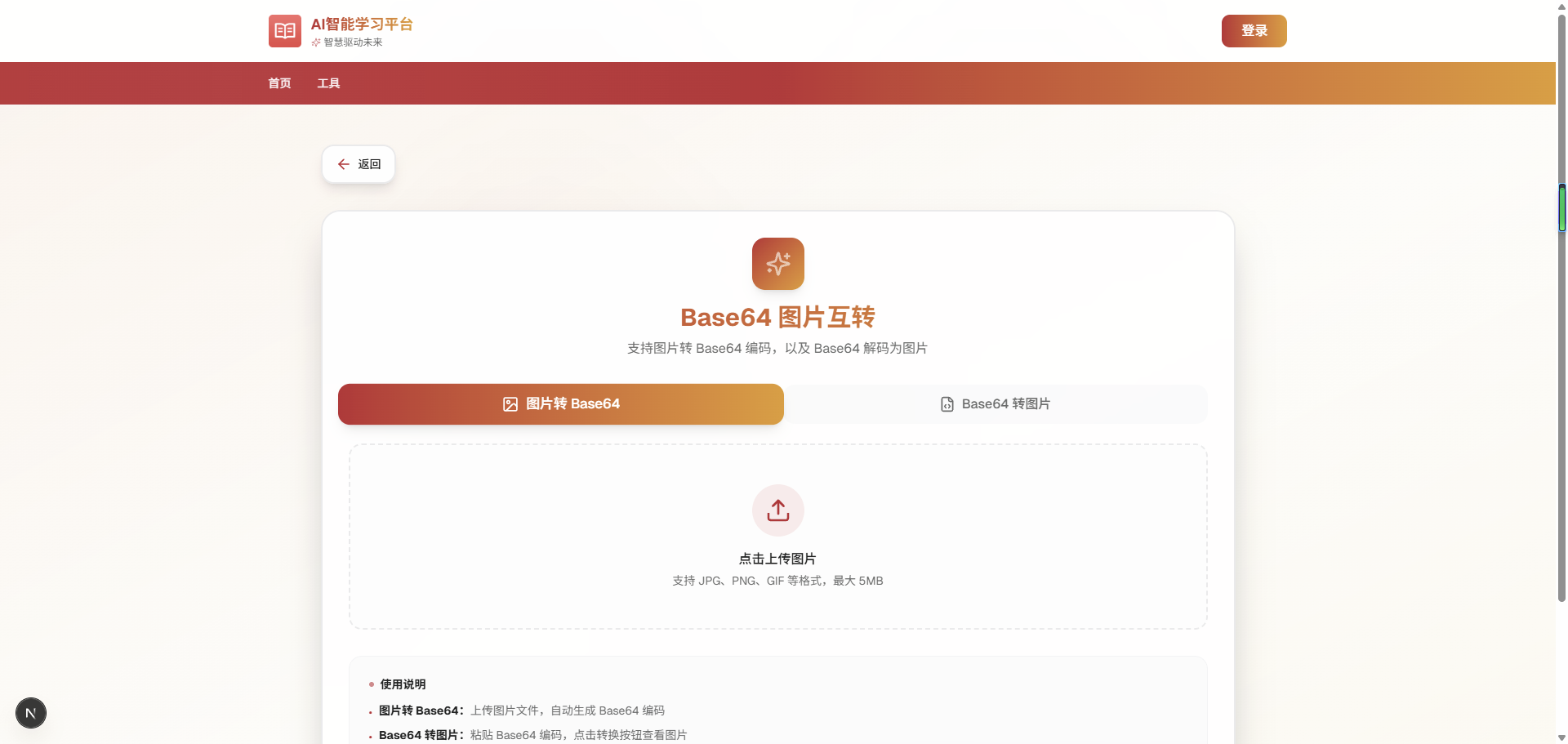
🎨 设计特点
1. 视觉效果
- 渐变背景with动态模糊圆圈动画
- 毛玻璃效果(backdrop-blur)卡片设计
- 平滑的过渡动画和悬停效果
- 渐变文字标题和图标
2. 两种转换模式
- 图片转 Base64:上传图片自动生成 Base64 编码
- Base64 转图片:粘贴 Base64 编码并转换为图片
3. 功能特性
- ✅ 拖拽上传支持
- ✅ 实时图片预览
- ✅ 一键复制 Base64 编码
- ✅ 下载转换后的图片
- ✅ 文件大小限制(5MB)
- ✅ 支持多种图片格式(JPG、PNG、GIF、WebP)
- ✅ Base64 自动识别(带或不带 data URL 前缀)
4. 用户体验
- 清空按钮快速重置
- 模式切换时自动清空数据
- 复制成功提示
- 错误提示友好
- 响应式布局
5. 设计风格
- 保留了原页面的返回按钮
- 符合项目原有的设计语言
- 使用项目的主题颜色系统(primary、secondary、accent)
- 与 url/page.tsx 页面风格一致
现在你可以访问这个页面,它将提供流畅的 Base64 图片互转体验!🚀
'use client'
import { useState, useRef } from 'react'
import Header from '@/components/header'
import {
ArrowLeft,
Upload,
Download,
Image as ImageIcon,
FileCode,
Copy,
Check,
X,
Sparkles,
RefreshCw,
} from 'lucide-react'
import { useRouter } from 'next/navigation'
type ConversionMode = 'toBase64' | 'toImage'
export default function ImageBase64Page() {
const router = useRouter()
const [mode, setMode] = useState<ConversionMode>('toBase64')
const [imageFile, setImageFile] = useState<File | null>(null)
const [imagePreview, setImagePreview] = useState<string>('')
const [base64Input, setBase64Input] = useState('')
const [base64Output, setBase64Output] = useState('')
const [copied, setCopied] = useState(false)
const fileInputRef = useRef<HTMLInputElement>(null)
// 图片转 Base64
const handleImageUpload = (e: React.ChangeEvent<HTMLInputElement>) => {
const file = e.target.files?.[0]
if (!file) return
// 检查文件类型
if (!file.type.startsWith('image/')) {
alert('请选择图片文件')
return
}
// 检查文件大小 (限制为 5MB)
if (file.size > 5 * 1024 * 1024) {
alert('图片大小不能超过 5MB')
return
}
setImageFile(file)
const reader = new FileReader()
reader.onload = (e) => {
const result = e.target?.result as string
setImagePreview(result)
setBase64Output(result)
}
reader.readAsDataURL(file)
}
// Base64 转图片
const handleBase64Convert = () => {
try {
// 清理 Base64 字符串
let cleanBase64 = base64Input.trim()
// 如果不是完整的 data URL,添加前缀
if (!cleanBase64.startsWith('data:')) {
cleanBase64 = `data:image/png;base64,${cleanBase64}`
}
// 验证 Base64
const img = new Image()
img.onload = () => {
setImagePreview(cleanBase64)
}
img.onerror = () => {
alert('无效的 Base64 编码')
}
img.src = cleanBase64
} catch (error) {
alert('Base64 解析失败')
}
}
// 复制到剪贴板
const handleCopy = async () => {
try {
await navigator.clipboard.writeText(base64Output)
setCopied(true)
setTimeout(() => setCopied(false), 2000)
} catch (error) {
alert('复制失败')
}
}
// 下载图片
const handleDownload = () => {
if (!imagePreview) return
const link = document.createElement('a')
link.href = imagePreview
link.download = `image_${Date.now()}.png`
document.body.appendChild(link)
link.click()
document.body.removeChild(link)
}
// 清空所有内容
const handleReset = () => {
setImageFile(null)
setImagePreview('')
setBase64Input('')
setBase64Output('')
if (fileInputRef.current) {
fileInputRef.current.value = ''
}
}
// 触发文件选择
const triggerFileSelect = () => {
fileInputRef.current?.click()
}
return (
<>
<Header />
<main className='min-h-screen bg-linear-to-br from-primary/5 via-background to-secondary/5 relative overflow-hidden'>
{/* 背景装饰 */}
<div className='absolute inset-0 overflow-hidden pointer-events-none'>
<div className='absolute top-20 left-1/4 w-96 h-96 bg-primary/5 rounded-full blur-3xl animate-pulse-slow' />
<div
className='absolute bottom-20 right-1/4 w-96 h-96 bg-secondary/5 rounded-full blur-3xl animate-pulse-slow'
style={{ animationDelay: '2s' }}
/>
<div
className='absolute top-1/2 left-1/2 -translate-x-1/2 -translate-y-1/2 w-96 h-96 bg-accent/5 rounded-full blur-3xl animate-pulse-slow'
style={{ animationDelay: '4s' }}
/>
</div>
{/* 内容区域 */}
<div className='relative max-w-6xl mx-auto px-4 py-12'>
{/* 返回按钮 */}
<button
onClick={() => router.push('/light')}
className='group mb-8 flex items-center gap-2 px-4 py-3 rounded-2xl bg-card/80 backdrop-blur-xl border-2 border-border hover:border-primary shadow-lg hover:shadow-xl transition-all duration-300 hover:scale-105 animate-fade-in'
>
<div className='relative'>
<div className='absolute inset-0 bg-primary/20 rounded-full blur-md scale-0 group-hover:scale-150 transition-transform duration-500' />
<ArrowLeft className='relative w-5 h-5 text-primary group-hover:text-primary transition-all duration-300 group-hover:-translate-x-1' />
</div>
<span className='text-sm font-medium text-foreground group-hover:text-primary transition-colors duration-300'>
返回
</span>
</button>
{/* 主卡片 */}
<div className='bg-card/80 backdrop-blur-xl rounded-3xl border-2 border-border shadow-2xl p-8 animate-fade-in-up'>
{/* 标题区域 */}
<div className='text-center mb-8'>
<div className='inline-flex items-center justify-center w-16 h-16 rounded-2xl bg-linear-to-br from-primary to-secondary mb-4 shadow-lg relative overflow-hidden group'>
<div className='absolute inset-0 bg-linear-to-br from-accent to-primary opacity-0 group-hover:opacity-100 transition-opacity duration-500' />
<Sparkles className='relative w-8 h-8 text-primary-foreground animate-pulse' />
</div>
<h1 className='text-3xl font-bold bg-linear-to-r from-primary to-secondary bg-clip-text text-transparent mb-2'>
Base64 图片互转
</h1>
<p className='text-muted-foreground'>
支持图片转 Base64 编码,以及 Base64 解码为图片
</p>
</div>
{/* 模式切换器 */}
<div className='flex gap-3 mb-6'>
<button
onClick={() => {
setMode('toBase64')
handleReset()
}}
className={`flex-1 py-3 px-4 rounded-xl font-medium transition-all duration-300 flex items-center justify-center gap-2
${
mode === 'toBase64'
? 'bg-linear-to-r from-primary to-secondary text-primary-foreground shadow-lg scale-105'
: 'bg-muted/50 text-muted-foreground hover:bg-muted'
}`}
>
<ImageIcon className='w-5 h-5' />
<span>图片转 Base64</span>
</button>
<button
onClick={() => {
setMode('toImage')
handleReset()
}}
className={`flex-1 py-3 px-4 rounded-xl font-medium transition-all duration-300 flex items-center justify-center gap-2
${
mode === 'toImage'
? 'bg-linear-to-r from-primary to-secondary text-primary-foreground shadow-lg scale-105'
: 'bg-muted/50 text-muted-foreground hover:bg-muted'
}`}
>
<FileCode className='w-5 h-5' />
<span>Base64 转图片</span>
</button>
</div>
{/* 图片转 Base64 模式 */}
{mode === 'toBase64' && (
<div className='space-y-6 animate-fade-in'>
{/* 上传区域 */}
<div className='space-y-4'>
<input
ref={fileInputRef}
type='file'
accept='image/*'
onChange={handleImageUpload}
className='hidden'
/>
<div
onClick={triggerFileSelect}
className='group relative border-2 border-dashed border-border hover:border-primary rounded-2xl p-12 text-center cursor-pointer transition-all duration-300 bg-muted/20 hover:bg-muted/40'
>
<div className='absolute inset-0 bg-linear-to-br from-primary/5 to-secondary/5 rounded-2xl opacity-0 group-hover:opacity-100 transition-opacity duration-300' />
<div className='relative'>
<div className='inline-flex items-center justify-center w-16 h-16 rounded-full bg-primary/10 group-hover:bg-primary/20 mb-4 transition-colors duration-300'>
<Upload className='w-8 h-8 text-primary group-hover:scale-110 transition-transform duration-300' />
</div>
<p className='text-foreground font-medium mb-1'>
点击上传图片
</p>
<p className='text-sm text-muted-foreground'>
支持 JPG、PNG、GIF 等格式,最大 5MB
</p>
</div>
</div>
{/* 图片预览 */}
{imagePreview && (
<div className='space-y-4 animate-fade-in'>
<div className='relative rounded-2xl border-2 border-border bg-muted/20 p-4 overflow-hidden'>
<div className='flex items-center justify-between mb-3'>
<h3 className='text-sm font-semibold text-foreground flex items-center gap-2'>
<ImageIcon className='w-4 h-4 text-primary' />
图片预览
</h3>
<span className='text-xs text-muted-foreground'>
{imageFile?.name}
</span>
</div>
<div className='flex justify-center bg-background/50 rounded-xl p-4'>
<img
src={imagePreview}
alt='Preview'
className='max-h-64 rounded-lg shadow-lg'
/>
</div>
</div>
{/* Base64 输出 */}
<div className='relative rounded-2xl border-2 border-border bg-muted/20 p-4'>
<div className='flex items-center justify-between mb-3'>
<h3 className='text-sm font-semibold text-foreground flex items-center gap-2'>
<FileCode className='w-4 h-4 text-primary' />
Base64 编码
</h3>
<button
onClick={handleCopy}
className='group flex items-center gap-2 px-3 py-1.5 rounded-lg bg-primary/10 hover:bg-primary/20 text-primary text-sm font-medium transition-all duration-300 hover:scale-105'
>
{copied ? (
<>
<Check className='w-4 h-4' />
<span>已复制</span>
</>
) : (
<>
<Copy className='w-4 h-4' />
<span>复制</span>
</>
)}
</button>
</div>
<textarea
value={base64Output}
readOnly
className='w-full h-32 px-4 py-3 rounded-xl border border-border bg-background/50 text-sm text-foreground font-mono resize-none focus:outline-none focus:ring-2 focus:ring-primary/20'
placeholder='Base64 编码将显示在这里...'
/>
</div>
</div>
)}
</div>
</div>
)}
{/* Base64 转图片模式 */}
{mode === 'toImage' && (
<div className='space-y-6 animate-fade-in'>
{/* Base64 输入 */}
<div className='space-y-4'>
<div className='relative rounded-2xl border-2 border-border bg-muted/20 p-4'>
<h3 className='text-sm font-semibold text-foreground mb-3 flex items-center gap-2'>
<FileCode className='w-4 h-4 text-primary' />
粘贴 Base64 编码
</h3>
<textarea
value={base64Input}
onChange={(e) => setBase64Input(e.target.value)}
className='w-full h-32 px-4 py-3 rounded-xl border border-border bg-background/50 text-sm text-foreground font-mono resize-none focus:outline-none focus:ring-2 focus:ring-primary/20 transition-all duration-300'
placeholder='粘贴 Base64 编码 (支持带或不带 data:image 前缀)'
/>
</div>
{/* 转换按钮 */}
<button
onClick={handleBase64Convert}
disabled={!base64Input.trim()}
className='w-full group relative overflow-hidden rounded-2xl bg-linear-to-r from-primary to-secondary p-0.5 hover:shadow-xl hover:shadow-primary/25 transition-all duration-300 disabled:opacity-50 disabled:cursor-not-allowed disabled:hover:shadow-none'
>
<div
className='relative bg-card/90 backdrop-blur-sm rounded-2xl px-6 py-4 group-hover:bg-transparent transition-all duration-300'
>
<div className='flex items-center justify-center gap-2 text-foreground group-hover:text-primary-foreground transition-colors duration-300'>
<RefreshCw className='w-5 h-5' />
<span className='font-medium'>转换为图片</span>
</div>
</div>
</button>
{/* 图片预览 */}
{imagePreview && (
<div className='relative rounded-2xl border-2 border-border bg-muted/20 p-4 animate-fade-in'>
<div className='flex items-center justify-between mb-3'>
<h3 className='text-sm font-semibold text-foreground flex items-center gap-2'>
<ImageIcon className='w-4 h-4 text-primary' />
转换结果
</h3>
<button
onClick={handleDownload}
className='group flex items-center gap-2 px-3 py-1.5 rounded-lg bg-primary/10 hover:bg-primary/20 text-primary text-sm font-medium transition-all duration-300 hover:scale-105'
>
<Download className='w-4 h-4' />
<span>下载</span>
</button>
</div>
<div className='flex justify-center bg-background/50 rounded-xl p-4'>
<img
src={imagePreview}
alt='Converted'
className='max-h-96 rounded-lg shadow-lg'
/>
</div>
</div>
)}
</div>
</div>
)}
{/* 操作按钮 */}
{(imagePreview || base64Input) && (
<div className='mt-6 flex gap-3 animate-fade-in'>
<button
onClick={handleReset}
className='flex-1 group flex items-center justify-center gap-2 px-6 py-3 rounded-xl bg-muted/50 hover:bg-muted text-muted-foreground hover:text-foreground font-medium transition-all duration-300 hover:scale-105'
>
<X className='w-5 h-5' />
<span>清空</span>
</button>
{mode === 'toBase64' && base64Output && (
<button
onClick={handleDownload}
className='flex-1 group relative overflow-hidden rounded-xl bg-linear-to-r from-accent to-secondary p-0.5 hover:shadow-lg hover:shadow-accent/25 transition-all duration-300'
>
<div className='relative bg-card/90 backdrop-blur-sm rounded-xl px-6 py-3 group-hover:bg-transparent transition-all duration-300'>
<div className='flex items-center justify-center gap-2 text-foreground group-hover:text-primary-foreground transition-colors duration-300'>
<Download className='w-5 h-5' />
<span className='font-medium'>下载图片</span>
</div>
</div>
</button>
)}
</div>
)}
{/* 使用说明 */}
<div className='mt-8 p-6 rounded-2xl bg-muted/50 backdrop-blur-sm border border-border/50'>
<h3 className='text-sm font-semibold text-foreground mb-3 flex items-center gap-2'>
<div className='w-1.5 h-1.5 rounded-full bg-primary animate-pulse' />
使用说明
</h3>
<ul className='space-y-2 text-sm text-muted-foreground'>
<li className='flex items-start gap-2'>
<span className='text-primary mt-0.5'>•</span>
<span>
<strong className='text-foreground'>图片转 Base64:</strong>
上传图片文件,自动生成 Base64 编码
</span>
</li>
<li className='flex items-start gap-2'>
<span className='text-primary mt-0.5'>•</span>
<span>
<strong className='text-foreground'>Base64 转图片:</strong>
粘贴 Base64 编码,点击转换按钮查看图片
</span>
</li>
<li className='flex items-start gap-2'>
<span className='text-primary mt-0.5'>•</span>
<span>支持 JPG、PNG、GIF、WebP 等常见图片格式</span>
</li>
<li className='flex items-start gap-2'>
<span className='text-primary mt-0.5'>•</span>
<span>单个图片大小限制为 5MB</span>
</li>
<li className='flex items-start gap-2'>
<span className='text-primary mt-0.5'>•</span>
<span>Base64 编码支持带或不带 data URL 前缀</span>
</li>
</ul>
</div>
</div>
</div>
</main>
{/* 自定义动画样式 */}
<style jsx>{`
@keyframes fade-in {
from {
opacity: 0;
}
to {
opacity: 1;
}
}
@keyframes fade-in-up {
from {
opacity: 0;
transform: translateY(20px);
}
to {
opacity: 1;
transform: translateY(0);
}
}
@keyframes pulse-slow {
0%,
100% {
opacity: 0.3;
transform: scale(1);
}
50% {
opacity: 0.5;
transform: scale(1.1);
}
}
.animate-fade-in {
animation: fade-in 0.5s ease-out;
}
.animate-fade-in-up {
animation: fade-in-up 0.6s ease-out;
}
.animate-pulse-slow {
animation: pulse-slow 4s ease-in-out infinite;
}
`}</style>
</>
)
}

DAMO开发者矩阵,由阿里巴巴达摩院和中国互联网协会联合发起,致力于探讨最前沿的技术趋势与应用成果,搭建高质量的交流与分享平台,推动技术创新与产业应用链接,围绕“人工智能与新型计算”构建开放共享的开发者生态。
更多推荐


 9
9 0
0- 0


 已为社区贡献7条内容

所有评论(0)