自定义公式解析16进制modbus数据,实现指定下发与物模型json数据组装,可以配置在文件或数据库中
前言
经常使用到各个厂家的传感器,每个传感器返回的数据格式与计算公式都有差异,每次去直接写代码再去发布,实际上很不方便,尤其是当某个传感器需要替换厂家时,必须得在生产中发版本,不像互联网项目,物联网项目很多是本地部署,每次实施部署成本非常大,做一些自定义得公式,配置在本地数据库中,这样增加或者更换了传感器,也无需软件开发人员介入,只要选定好传感器厂家与型号,即可实现自动匹配公式计算结果保证传感器数据物模型数据统一上报给软件系统。
整体思路
使用javaScript作为动态运算公式将运算结果result返回给java,定义RRRR为modbus报文的标记位,即采集的数值通过标记位的16进制数据,交给javaScript进行计算,返回值给到 java变量
例如:
采集温度时,定义报文格式(不同的传感器厂家,格式与公式会有一些差别):
0303**RRRR********************
计算温度时,javascript自定义公式:
var result=0;if(RRRR>32786){result=(RRRR-32786)/100;}else{result=RRRR/100;}
java核心代码
ScriptEngineManager().getEngineByName("javascript");
javascript.eval(jsCode);
javascript.getContext().getAttribute("result").toString()
SensorAnalysesServer.java 实现modbus数据解析
package com.geek.open.thingscommand.server;

import com.ctc.wstx.shaded.msv_core.datatype.xsd.regex.RegExp;
import com.geek.open.common.core.Util;
import com.geek.open.common.entity.command.SensorAnalyses;
import com.geek.open.thingscommand.services.SensorAnalysesService;
import org.openjdk.nashorn.api.scripting.NashornScriptEngineFactory;
import org.springframework.beans.factory.annotation.Autowired;
import org.springframework.stereotype.Component;

import javax.script.ScriptEngine;
import javax.script.ScriptEngineManager;
import java.util.ArrayList;
import java.util.HashMap;
import java.util.List;
import java.util.Scanner;
import java.util.regex.Matcher;
import java.util.regex.Pattern;

@Component
public class SensorAnalysesServer {

    @Autowired
    private SensorAnalysesService sensorAnalysesService;


    /**
     * 解析数据
     * @param productKey
     * @param productSecret
     * @param deviceAddress
     * @param sensorContent
     * @return
     */
    public HashMap<String,String> analyses(String productKey,String productSecret,String deviceAddress,String sensorContent)
    {
        HashMap<String,String> hashMap = new HashMap<>();
        try {

            List<SensorAnalyses> sensorAnalysesList = sensorAnalysesService.getListByDeviceAddress(productKey,productSecret,deviceAddress);

            // 从类似 ****RRRR****** 中匹配
            String regexStr = "(R){2,4}";  //匹配字符串是否为R[定位字符]
            if(sensorAnalysesList.size()>0)
            {
                ScriptEngineManager scriptEngineManager = new ScriptEngineManager();
                scriptEngineManager.registerEngineName("test",new NashornScriptEngineFactory());
                ScriptEngine javascript = scriptEngineManager.getEngineByName("js");
               // ScriptEngine javascript =  new ScriptEngineManager().getEngineByName("javascript");


                //遍历一下数据库中设定的解析公式
                for(int i=0;i<sensorAnalysesList.size();i++)
                {
                    SensorAnalyses sensorAnalyses = sensorAnalysesList.get(i);
                    sensorAnalyses.hexContent = sensorAnalyses.hexContent.replace(" ","");
                    //判断 hashMap 是否存在 fieldName 作为Key的数据,防止重复添加异常
                    if(!hashMap.containsKey(sensorAnalyses.fieldName))
                    {

                        String jsCode = sensorAnalyses.evalContent;// "var result=0;if(RRRR>32786){result=(RRRR-32786)/100;}else{result=RRRR/100;}";

                        // **0306RRRR************ 可以匹配 01030626E70B331DCE688A   需要解析
                        // 020306RRRR************ 无法匹配 01030626E70B331DCE688A   无需解析
                        String pipei = sensorAnalyses.hexContent.replace("**","[0-9a-fA-F]{2}").replace("RR","[0-9a-fA-F]{2}");
                        //System.out.println("smartbird --> pipei="+pipei);
                        //匹配到,需要解析
                        if(sensorContent.matches(pipei)) {

                            //System.out.println("smartbird --> sensorContent sensorContent="+sensorContent+";正常匹配 pipei ="+pipei + ";");

                            //查找RR位置,通过substring摘取16进制数据
                            Matcher matcher = Pattern.compile("R{2,8}").matcher(sensorAnalyses.hexContent);

                            if (matcher.find())
                            {
                                //System.out.println("GeekOpen --> start = "+matcher.start());
                                //System.out.println("GeekOpen --> end = "+matcher.end());
                                //System.out.println("GeekOpen --> sensorContent.substring() = "+sensorContent.substring(matcher.start(),matcher.end()+1));
                                String data = sensorContent.substring(matcher.start(),matcher.end());

                                System.out.println("GeekOpen --> data = "+data);
                                jsCode = jsCode.replaceAll("R{2,8}",hexToInt(data)+"");
                                System.out.println("GeekOpen --> jsCode = "+jsCode);
                            }

                            javascript.eval(jsCode);
                            hashMap.put(sensorAnalyses.fieldName,javascript.getContext().getAttribute("result").toString());
                        }
                        else
                        {
                            System.out.println("GeekOpen --> sensorContent sensorContent ="+sensorContent+";未能匹配pipei="+pipei + ";");


                        }

                    }
                }

                System.out.println("GeekOpen --> hashMap = "+Util.ObjectToJson(hashMap));
            }
            else
            {
                System.out.println("GeekOpen --> analyses 未找到当前设备需要解析的公式!");
            }
        }
        catch (Exception e)
        {
            System.out.println("GeekOpen --> analyses Error: "+e.getMessage());
        }

        return  hashMap;
    }


    /**
     * 16进制转10进制数字
     * @param hexDigit
     * @return
     */
    public int hexToInt(String hexDigit){
        //Scanner input=new Scanner(System.in);
        //System.out.print("Enter a hex digit: ");
        //String hexDigit=input.nextLine();

        int count=0;
        int value = 0;
        for(int i=0;i<hexDigit.length();i++){
            char ch=Character.toUpperCase(hexDigit.charAt(i));//将截取出的字符转换为大写字母
            if('A'<=ch&&ch<='F'){
                value=ch-'A'+10;
            }
            else if(Character.isDigit(ch)){
                value=Integer.parseInt(String.valueOf(ch));

            }
            else{
                System.out.println(ch+" is an invalid input");
                System.exit(1);
            }
            count=count*16+value;
        }
        return count;
       // System.out.println("The decimal value for the hex digit "+hexDigit+" is "+count);
    }


}
其它类源码
Entity
SensorAnalyses.java 传感器modbus数据解析公式
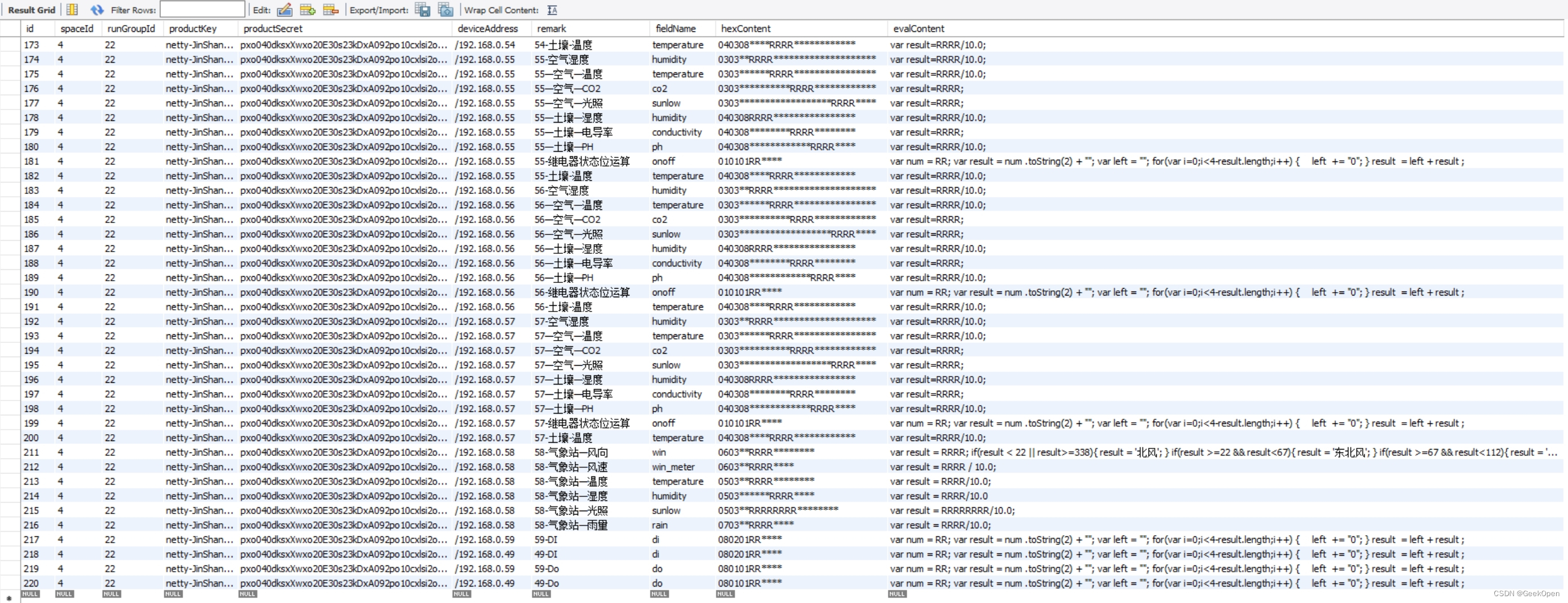
package com.geek.open.common.entity.command;

import lombok.Data;
import lombok.NoArgsConstructor;

/**
 * 传感器modbus数据解析公式
 */
@Data
@NoArgsConstructor
public class SensorAnalyses {
    /**
     * 记录标识
     */
    public int id;
    /**
     * 租用标识
     */
    public int spaceId;
    /**
     * 统一分组标识
     */
    public int runGroupId;
    /**
     * 产品key
     */
    public String productKey;
    /**
     * 产品密钥
     */
    public String productSecret;
    /**
     * 是否需要匹配的设备地址,如:/192.168.0.85,如果为空则解析所有设备的数据
     */
    public String deviceAddress;
    /**
     * 解析字段说明
     */
    public String remark;
    /**
     * 解析出的数据字段名,如:temperature
     */
    public String fieldName;
    /**
     * 16进制的数据匹配方式,如:**0304RRRR********,
     * 按长度与位置,星号匹配任意,0304匹配,并以R为变量值去执行Javascript脚本
     */
    public String hexContent;
    /**
     * 需要执行的Javascript脚本
     */
    public String evalContent;
}
DeviceCommand.java 设备指令
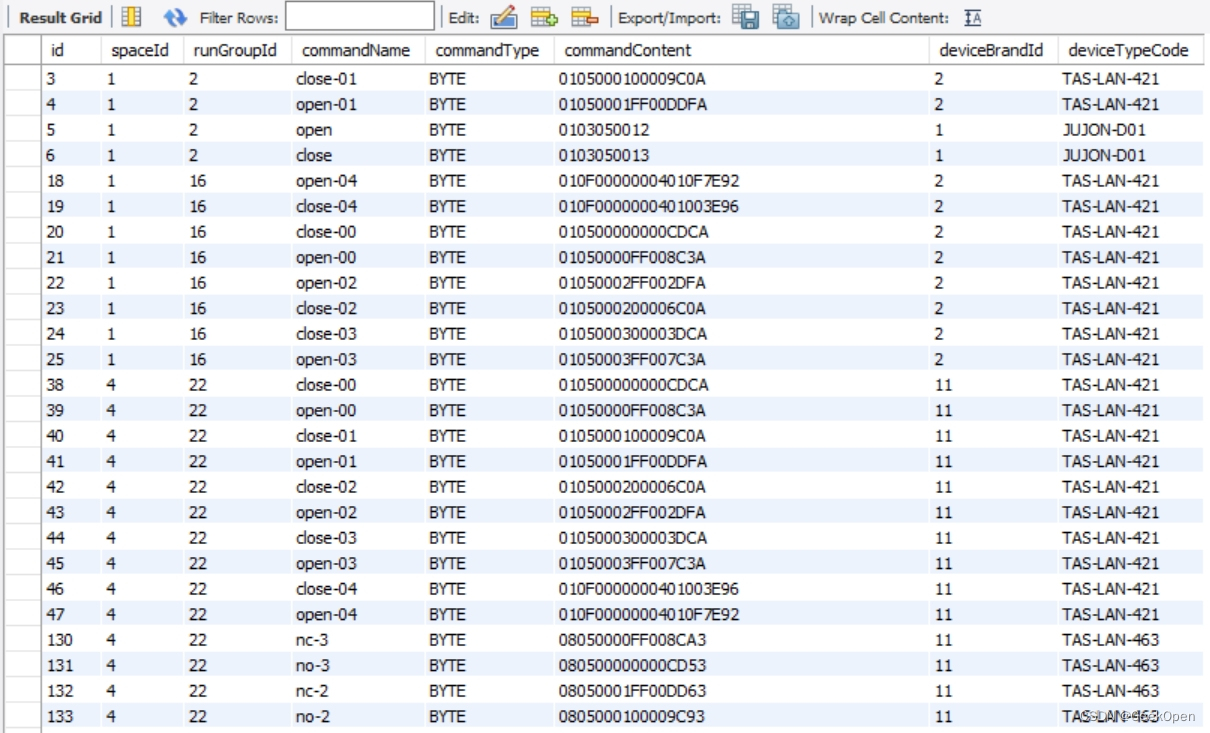
package com.geek.open.common.entity.command;


import lombok.Data;
import lombok.NoArgsConstructor;

/**
 * 设备指令
 * device.command
 */
@Data
@NoArgsConstructor
public class DeviceCommand {
    /**
     * 记录标识
     */
    public int id;
    /**
     * 租用标识
     */
    public int spaceId;
    /**
     * 统一分组标识
     */
    public int runGroupId;
    /**
     * 指令类型:byte、message
     */
    public String commandType;
    /**
     * 设备厂商标识,iot.deviceBrand.id
     */
    public int deviceBrandId;
    /**
     * 设备类型,iot.deviceType.typeCode
     * 如:TAS-LAN-463、TAS-LAN-421
     */
    public String deviceTypeCode;
    /**
     * 指令,基于 deviceType 唯一,
     * 如:open、close、on、off、01-on、02-off
     */
    public String commandName;
    /**
     * 指令转换后的内容,
     * 如:01050000FF008C3A、t0.txt="27.32"
     */
    public String commandContent;

}
Device.java 设备,一般是指DTU、机器人、智能终端
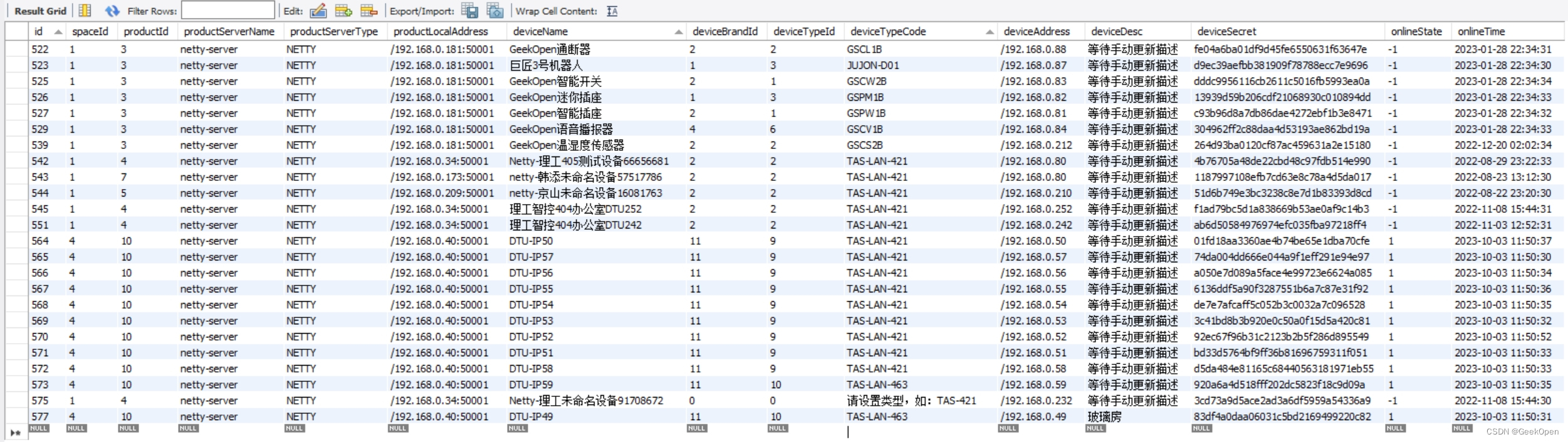
package com.geek.open.common.entity.iot;

import lombok.Data;
import lombok.NoArgsConstructor;

import java.util.Date;

@Data
@NoArgsConstructor
/**
 * 设备,一般是指DTU、机器人、智能终端
 */
public class Device {

    /**
     * 记录标识
     */
    public int id;
    /**
     * 租用标识
     */
    public  int spaceId;
    /**
     * 所属产品标识
     */
    public int productId;

    /**
     * NETTY、EMQX 部署在Cloud微服务的名称
     */
    public String productServerName;
    /**
     * 服务类型:NETTY、EMQX
     */
    public String productServerType;
    /**
     * 服务运行的地址,如:/192.168.0.181:5001
     */
    public String productLocalAddress;
    /**
     * 设备名称,仅用作展示
     */
    public String deviceName;
    /**
     * 品牌标识
     */
    public int deviceBrandId;
    /**
     * 型号标识
     */
    public int deviceTypeId;
    /**
     * 【冗余】设备类型,如:TAS-41
     */
    public String deviceTypeCode;
    /**
     * connectType=NETTY 时,deviceAddress 为 ip 地址
     */
    public String deviceAddress;
    /**
     * 设备描述
     */
    public String deviceDesc;
    /**
     * 设备密钥
     */
    public String deviceSecret;
    /**
     * 在线状态,0:未知,-1:离线,1:在线
     */
    public int onlineState;
    /**
     * 最后在线时间
     */
    public Date onlineTime;

}
DeviceTimeTask.java 定时执行指令
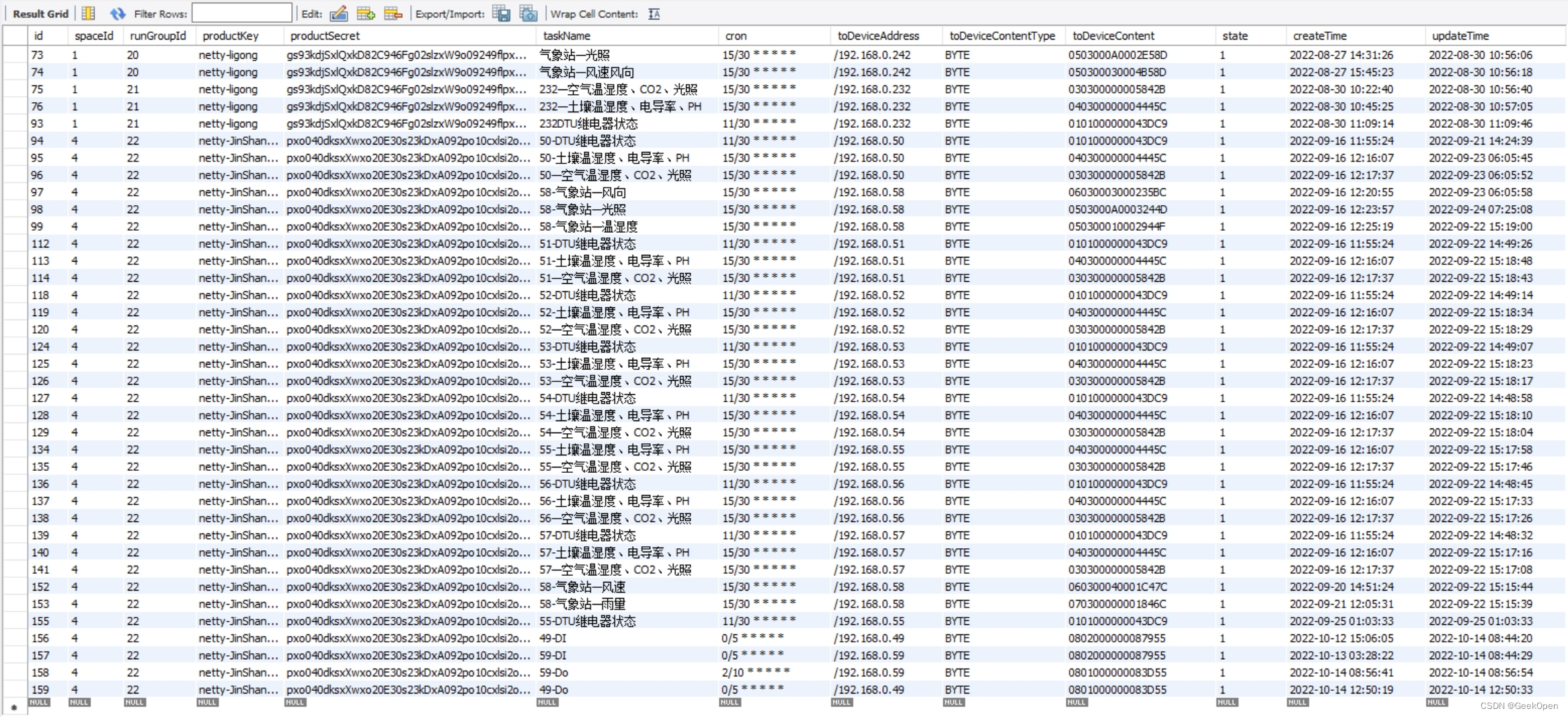
package com.geek.open.common.entity.command;


import java.util.Date;

/**
 * 定时执行指令
 */
public class DeviceTimeTask {
    /**
     * 记录标识
     */
    public int id;
    /**
     * 租用标识
     */
    public int spaceId;
    /**
     * 统一分组标识
     */
    public int runGroupId;
    /**
     * 产品key
     */
    public String productKey;
    /**
     * 产品密钥
     */
    public String productSecret;
    /**
     * 任务名称
     */
    public String taskName;
    /**
     * cron表达式
     */
    public String cron;
    /**
     * 然后准备调用哪个设备,这样就实现了联动
     */
    public String toDeviceAddress;

    /**
     * 嗲用设备用什么类型发送消息,BYTE、MESSAGE
     */
    public String toDeviceContentType;
    /**
     * 调用设备发送什么消息内容
     */
    public String toDeviceContent;
    /**
     * 状态,1:开启,0:关闭
     */
    public int state;
    /**
     * 创建时间
     */
    public Date createTime;
    /**
     * 更新时间
     */
    public Date updateTime;
}
Service
SensorAnalysesService.java 传感器modbus数据解析公式
package com.geek.open.thingscommand.services;

import com.geek.open.common.service.IService;
import com.geek.open.common.entity.command.SensorAnalyses;
import com.geek.open.thingscommand.mapper.SensorAnalysesMapper;
import org.springframework.beans.factory.annotation.Autowired;
import org.springframework.stereotype.Service;

import java.util.List;

/**
 * 传感器modbus数据解析公式
 */
@Service
public class SensorAnalysesService  extends IService<SensorAnalyses> implements SensorAnalysesMapper {

    @Autowired
    private  SensorAnalysesMapper sensorAnalysesMapper;

    /**
     * getListBySpace
     * @param spaceId
     * @return
     */
    @Override
    public List<SensorAnalyses> getListBySpace(int spaceId) {
        return sensorAnalysesMapper.getListBySpace(spaceId);
    }

    /**
     * 根据设备地址查询出公式列表,地址允许为空,即:
     * 地址为空,查询出所有为空地址的公式
     * 地址有值,查询出地址相同以及地址为空的公式
     * @param productKey
     * @param productSecret
     * @param deviceAddress
     * @return
     */
    @Override
    public List<SensorAnalyses> getListByDeviceAddress(String productKey, String productSecret, String deviceAddress) {
        return sensorAnalysesMapper.getListByDeviceAddress(productKey, productSecret, deviceAddress);
    }

    /**
     * 根据分组获得列表
     * @param runGroupId
     * @return
     */
    @Override
    public List<SensorAnalyses> getListByRunGroup(int runGroupId) {
        return sensorAnalysesMapper.getListByRunGroup(runGroupId);
    }

    /**
     * 删除分组下的记录
     * @param spaceId
     * @param runGroupId
     */
    @Override
    public void deleteByRunGroup(int spaceId, int runGroupId) {
        sensorAnalysesMapper.deleteByRunGroup(spaceId, runGroupId);
    }
}
DeviceCommandService.java 设备指令
package com.geek.open.thingscommand.services;

import com.geek.open.common.entity.command.DeviceCommand;
import com.geek.open.common.service.IService;
import com.geek.open.thingscommand.mapper.DeviceCommandMapper;
import org.springframework.beans.factory.annotation.Autowired;
import org.springframework.stereotype.Service;

import java.util.List;

/**
 * 设备指令
 */
@Service
public class DeviceCommandService  extends IService<DeviceCommand> implements DeviceCommandMapper {

    @Autowired
    private  DeviceCommandMapper deviceCommandMapper;

    /**
     * 根据指令名称获得记录
     * @param spaceId
     * @param commandName
     * @param deviceTypeCode
     * @return
     */
    @Override
    public DeviceCommand getValueByCommandName(int spaceId, String commandName, String deviceTypeCode) {
        return deviceCommandMapper.getValueByCommandName(spaceId,commandName, deviceTypeCode);
    }

    /**
     * 根据分组获得列表
     * @param runGroupId
     * @return
     */
    @Override
    public List<DeviceCommand> getListByRunGroup(int runGroupId) {
        return deviceCommandMapper.getListByRunGroup(runGroupId);
    }

    /**
     * 获得所有指令记录
     * @param spaceId
     * @return
     */
    @Override
    public List<DeviceCommand> getListBySpace(int spaceId) {
        return deviceCommandMapper.getListBySpace(spaceId);
    }

    /**
     * 删除分组下的记录
     * @param spaceId
     * @param runGroupId
     */
    @Override
    public void deleteByRunGroup(int spaceId, int runGroupId) {
        deviceCommandMapper.deleteByRunGroup(spaceId, runGroupId);
    }


}
DeviceTimeTaskService.java 指令任务
package com.geek.open.thingscommand.services;

import com.geek.open.common.service.IService;
import com.geek.open.common.entity.command.DeviceTimeTask;
import com.geek.open.thingscommand.mapper.DeviceTimeTaskMapper;
import org.springframework.beans.factory.annotation.Autowired;
import org.springframework.stereotype.Service;

import java.util.List;

/**
 * 指令任务
 */
@Service
public class DeviceTimeTaskService  extends IService<DeviceTimeTask> implements DeviceTimeTaskMapper {

    @Autowired
    private  DeviceTimeTaskMapper deviceTimeTaskMapper;


    /**
     * 获得启用的任务列表
     * @param productKey
     * @param productSecret
     * @return
     */
    @Override
    public List<DeviceTimeTask> getRunList(String productKey,String productSecret) {
        return deviceTimeTaskMapper.getRunList(productKey,productSecret);
    }

    /**
     * 根据分组获得列表
     * @param runGroupId
     * @return
     */
    @Override
    public List<DeviceTimeTask> getListByRunGroup(int runGroupId) {
        return deviceTimeTaskMapper.getListByRunGroup(runGroupId);
    }
    /**
     * 删除分组下的记录
     * @param spaceId
     * @param runGroupId
     */
    @Override
    public void deleteByRunGroup(int spaceId, int runGroupId) {
        deviceTimeTaskMapper.deleteByRunGroup(spaceId, runGroupId);
    }
}
TimeTask.java 从数据库获取定时任务并发起执行
package com.geek.open.thingscommand.server;

import com.geek.open.common.core.Util;
import com.geek.open.common.entity.command.DeviceTimeTask;
import com.geek.open.thingscommand.core.ThingsCommandSetting;
import com.geek.open.thingscommand.services.DeviceTimeTaskService;
import org.springframework.beans.factory.annotation.Autowired;
import org.springframework.context.annotation.Configuration;
import org.springframework.scheduling.TaskScheduler;
import org.springframework.scheduling.annotation.EnableScheduling;
import org.springframework.scheduling.annotation.SchedulingConfigurer;
import org.springframework.scheduling.config.CronTask;
import org.springframework.scheduling.config.ScheduledTaskRegistrar;
import org.springframework.scheduling.config.Task;
import org.springframework.scheduling.config.TriggerTask;
import org.springframework.scheduling.support.CronTrigger;

import javax.annotation.PostConstruct;
import java.time.LocalDateTime;
import java.util.ArrayList;
import java.util.HashMap;
import java.util.List;
import java.util.concurrent.ConcurrentHashMap;
import java.util.concurrent.ScheduledFuture;

@Configuration      // 1.主要用于标记配置类,兼备Component的效果。
@EnableScheduling   // 2.开启定时任务
public class TimeTask implements SchedulingConfigurer {

    @Autowired
    private DeviceTimeTaskServer deviceTimeTaskServer;

    @Autowired
    private DeviceTimeTaskService deviceTimeTaskService;

    @Autowired
    private ThingsCommandSetting thingsCommandSetting;

    private static ScheduledTaskRegistrar taskRegistrar;

    @Override
    public void configureTasks(ScheduledTaskRegistrar taskRegistrar) {
        taskRegistrar.setTriggerTasksList(getTriggerTaskList());
        TimeTask.taskRegistrar = taskRegistrar;
    }

    /**
     * 更新运行的任务,总是取消所有再重新添加任务
     */
    public void  updateTask()
    {
        //取消当前所有任务
        taskRegistrar.getScheduledTasks().forEach(v->{
            v.cancel();
        });
        //重新查询出所有任务并设置
        taskRegistrar.setTriggerTasksList(getTriggerTaskList());
        //让设置生效
        taskRegistrar.afterPropertiesSet();
        System.out.println("smartbird --> taskRegistrar.getTriggerTaskList().size() = "+taskRegistrar.getTriggerTaskList().size());
    }

    /**
     * 从数据库获得任务并设定需要执行的代码
     * @return
     */
    public   List<TriggerTask>  getTriggerTaskList()
    {
        List<DeviceTimeTask> deviceTimeTaskList = deviceTimeTaskService.getRunList(thingsCommandSetting.productKey,thingsCommandSetting.productSecret);
        List<TriggerTask> triggerTaskList = new ArrayList<>();
        for(int i=0;i<deviceTimeTaskList.size();i++)
        {
            DeviceTimeTask timeTask = deviceTimeTaskList.get(i);
            TriggerTask triggerTask = new TriggerTask(
                    ()->{
                        //需要执行的任务
                        System.out.println("GeekOpen--> "+timeTask.taskName+" cron="+timeTask.cron+" toDeviceContent="+timeTask.toDeviceContent+"-- 执行动态定时任务时间: " + LocalDateTime.now());
                        deviceTimeTaskServer.executeTask(timeTask.id);
                    },
                    triggerContext -> {
                        //设定的Cron表达式
                        return  new CronTrigger(timeTask.cron).nextExecutionTime(triggerContext);
                    }
            );
            triggerTaskList.add(triggerTask);
        }
        return  triggerTaskList;
    }

}
DeviceCommandServer.java 指令服务
package com.geek.open.thingscommand.server;

import com.geek.open.common.core.ResultException;
import com.geek.open.common.core.ResultValue;
import com.geek.open.common.entity.command.DeviceCommand;
import com.geek.open.common.entity.command.ExecuteCommandMultiParameter;
import com.geek.open.common.entity.command.ExecuteCommandParameter;
import com.geek.open.common.entity.netty.SendByteParameter;
import com.geek.open.common.entity.netty.SendMessageParameter;
import com.geek.open.common.feign.IotFeign;
import com.geek.open.common.feign.NettyFeign;
import com.geek.open.thingscommand.core.CommandUtil;
import com.geek.open.thingscommand.services.DeviceCommandService;
import org.springframework.beans.factory.annotation.Autowired;
import org.springframework.stereotype.Component;

import java.time.LocalDateTime;
import java.util.ArrayList;
import java.util.Calendar;
import java.util.List;


/**
 * 指令服务
 */
@Component
public class DeviceCommandServer {

    @Autowired
    private DeviceCommandService deviceCommandService;

    @Autowired
    private NettyFeign nettyFeign;

    @Autowired
    private IotFeign iotFeign;

    /**
     * 执行指令(单个设备)
     * @param spaceId
     * @param executeCommandParameter
     * @return
     */
    public ResultValue executeCommand(int spaceId, ExecuteCommandParameter executeCommandParameter)
    {

        DeviceCommand deviceCommand = deviceCommandService.getValueByCommandName(spaceId,executeCommandParameter.commandName, executeCommandParameter.deviceType);
        if(deviceCommand!=null)
        {
            if("byte".equals(deviceCommand.commandType.toLowerCase()))
            {
                SendByteParameter parameter = new SendByteParameter();
                parameter.address =  executeCommandParameter.deviceAddress;
                parameter.content = deviceCommand.commandContent;
                return nettyFeign.sendByte(parameter);
            }
            else if("message".equals(deviceCommand.commandType.toLowerCase()))
            {
                SendMessageParameter parameter = new SendMessageParameter();
                parameter.address = executeCommandParameter.deviceAddress;
                parameter.content = deviceCommand.commandContent;
                return nettyFeign.sendMessage(parameter);
            }
            else
            {
                throw new ResultException("不支持的commandType");
            }
        }
        else
        {
            throw  new ResultException("未找到deviceCommand");
        }
    }

    /**
     * 执行指令(多个相同类型的设备)
     * @param spaceId
     * @param executeCommandMultiParameter
     * @return
     */
    public ResultValue executeCommandMulti(int spaceId, ExecuteCommandMultiParameter executeCommandMultiParameter){

        DeviceCommand deviceCommand = deviceCommandService.getValueByCommandName(spaceId,executeCommandMultiParameter.commandName, executeCommandMultiParameter.deviceType);
        if(deviceCommand!=null)
        {
            if("byte".equals(deviceCommand.commandType.toLowerCase()))
            {
                List<SendByteParameter> parameterList = new ArrayList<>();
                for(int i=0;i<executeCommandMultiParameter.deviceAddressList.size();i++)
                {
                    SendByteParameter parameter = new SendByteParameter();
                    parameter.address = executeCommandMultiParameter.deviceAddressList.get(i);
                    parameter.content =  deviceCommand.commandContent;
                    parameterList.add(parameter);
                }
                return nettyFeign.sendByteList(parameterList);
            }
            else if("message".equals(deviceCommand.commandType.toLowerCase()))
            {
                List<SendMessageParameter> parameterList = new ArrayList<>();
                for(int i=0;i<executeCommandMultiParameter.deviceAddressList.size();i++)
                {
                    SendMessageParameter parameter = new SendMessageParameter();
                    parameter.address = executeCommandMultiParameter.deviceAddressList.get(i);
                    parameter.content =  deviceCommand.commandContent;
                    parameterList.add(parameter);
                }
                return nettyFeign.sendMessageList(parameterList);
            }
            else
            {
                throw new ResultException("不支持的commandType");
            }
        }
        else
        {
            throw  new ResultException("未找到deviceCommand");
        }
    }


}
ExecuteCommandParameter.java
package com.geek.open.common.entity.command;

import lombok.Data;
import lombok.NoArgsConstructor;

@Data
@NoArgsConstructor
public class ExecuteCommandParameter {
    public String commandName;
    public String deviceType;
    public String deviceAddress;
}
ExecuteCommandMultiParameter.java
package com.smartbird.common.entity.command;

import lombok.Data;
import lombok.NoArgsConstructor;

import java.util.List;

@Data
@NoArgsConstructor
public class ExecuteCommandMultiParameter {
    public String commandName;
    public String deviceType;
    public List<String> deviceAddressList;
}
本工程为2022年关于农业智慧大棚的实战项目,
运行一年多,一直都很稳定,大家可以随便使用

DAMO开发者矩阵,由阿里巴巴达摩院和中国互联网协会联合发起,致力于探讨最前沿的技术趋势与应用成果,搭建高质量的交流与分享平台,推动技术创新与产业应用链接,围绕“人工智能与新型计算”构建开放共享的开发者生态。
更多推荐



 0
0 0
0- 0


 已为社区贡献1条内容

所有评论(0)