vue+d3.js计算任意多边形面积
效果图代码<!DOCTYPE html><html lang="en"><head><meta charset="UTF-8"><title>arbitraryPolygon</title><script src="js/jquery-3.3.1.js" type="text/ja...
·
效果图
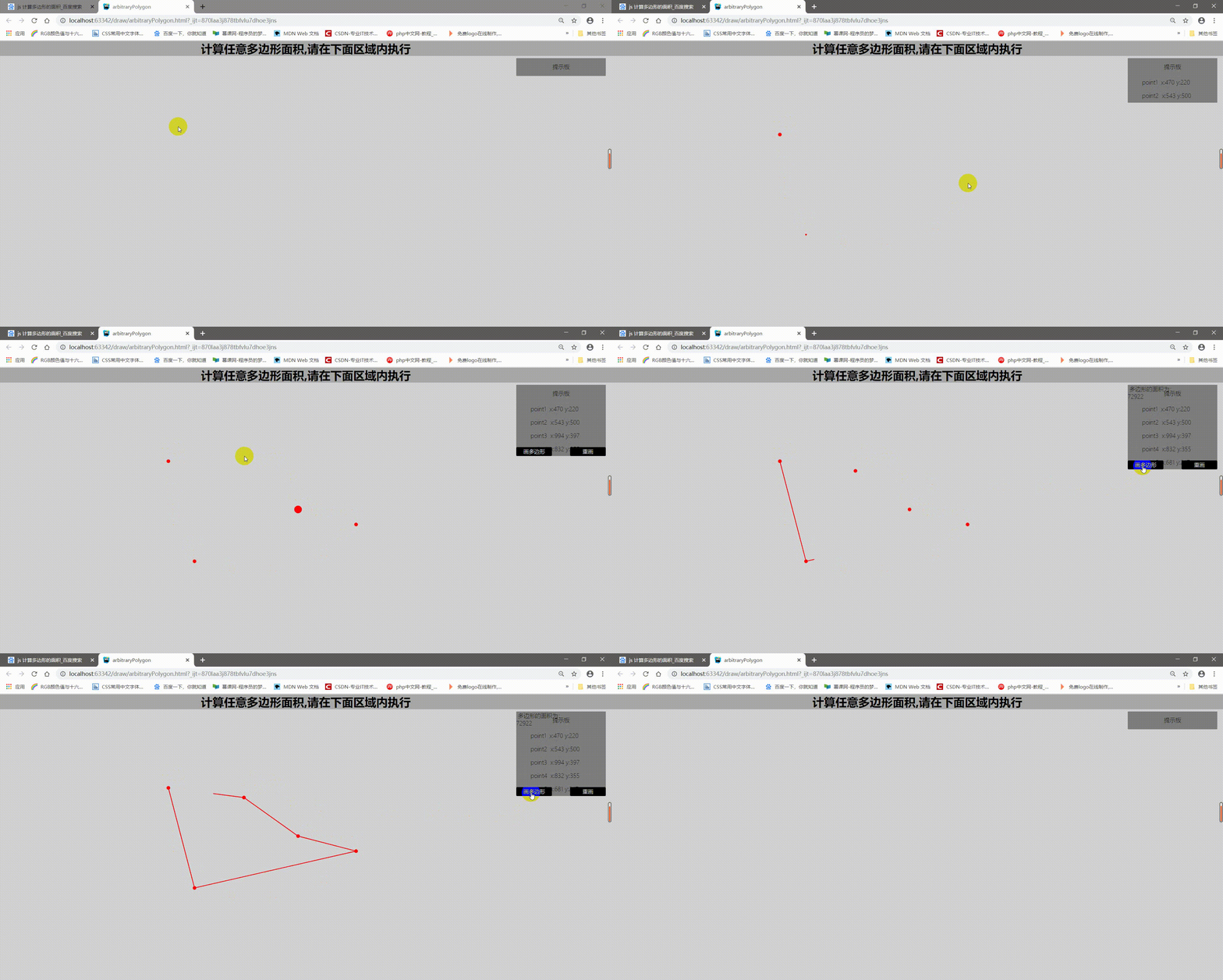
代码
<!DOCTYPE html>
<html lang="en">
<head>
<meta charset="UTF-8">
<title>arbitraryPolygon</title>
<script src="js/jquery-3.3.1.js" type="text/javascript"></script>
<script src="js/vue.js" type="text/javascript"></script>
<script src="js/d3.js"></script>
<style>
*{/*占据整个页面*/
margin: 0 0;
padding: 0 0;
}
</style>
</head>
<body>
<div id="app" >
<div v-bind:style="titleAppStyle" class="appClick" id="area">
<h1>{{titleApp}}</h1>
<svg xmlns="http://www.w3.org/2000/svg" id="svg" v-bind:style="svgStyle" v-on:click="addPoints"> </svg>
<div v-bind:style="tipDiv">
<p style="height: 50px;line-height: 50px; text-align: center">提示板</p>
<p v-for="(item,key) in pointChange" v-bind:style="tipDivP">point{{key+1}} <span>x:{{item.x}}</span> <span>y:{{item.y}}</span> </p>
<p v-bind:style="areaTip" v-if="polygonArea?true:false"> 多边形的面积为:<br>{{polygonArea}}</p>
<button v-bind:style="drawButton" v-if="dDutton" v-on:click="drawArbitraryPolygonArea">画多边形</button>
<button v-bind:style="resetButton" v-if="dDutton" v-on:click="removeSvg">重画</button>
</div>
</div>
</div>
<script type="text/javascript">
const app=new Vue({
el:"#app",
data: {
titleApp: "计算任意多边形面积,请在下面区域内执行",
titleAppStyle: {//设置样式
'text-align': 'center',
'font-weight': 'lighter',
'backgroundColor': '#A9A9A9',
'overflow': 'hidden',
'margin': '0'
},
svgStyle: {
'width': '100%',
'height': '100%',
'backgroundColor': '#D3D3D3'
},
tipDiv: {
'width': '250px',
'position': 'absolute',
'right': '1rem',
'top': '3rem',
'background-color': 'rgba(105,105,105,0.8)',
'text-align': 'left',
'color': 'black'
},
tipDivP: {
'padding': '0.5rem 2.5rem'
},
resetButton: {
'position': 'absolute',
'right': '0',
'bottom': '0',
'background-color': 'black',
'border-radius': '3px',
'border-width': '0',
'margin': '0',
'outline': 'none',
'font-size': '15px',
'font-weight': 'lighter',
'text-align': 'center',
'cursor': 'pointer',
'width': '100px',
'height': '25px',
'color': 'aliceblue'
},
drawButton: {
'position': 'absolute',
'left': '0',
'bottom': '0',
'background-color': 'black',
'border-radius': '3px',
'border-width': '0',
'margin': '0',
'outline': 'none',
'font-size': '15px',
'font-weight': 'lighter',
'text-align': 'center',
'cursor': 'pointer',
'width': '100px',
'height': '25px',
'color': 'aliceblue'
},
areaTip:{
'position': 'absolute',
'top': '.1rem'
},
arbitraryPolygonPoint: [],//存储多边形的点
arbitraryPolygonPointLength: null,
dDutton: false,
polygonArea:"",//三角形面积
joinPoint:''//连接点
},
methods:{
settingHW:function () {//该函数用于挂载时,页面大小初始化
$("#area").height(window.innerHeight);
$("#area").width(window.innerWidth);
},
addPoints:function (event){//用于添加点
this.arbitraryPolygonPoint.push({x:event.clientX,y:event.clientY});//把获取的点推入数组中
this.arbitraryPolygonPointLength=this.arbitraryPolygonPoint.length;//得到数组的长度
this.drawArbitraryPolygonPoint(this.arbitraryPolygonPoint);//每点击一次就向数组中添加点
if(this.arbitraryPolygonPointLength>=3)
{
this.dDutton=true;
}
},
drawArbitraryPolygonPoint:function(arbitraryPolygonPoint){//用于画动态点
const dSvg=d3.select("#svg");
dSvg.selectAll("circle").data(arbitraryPolygonPoint).enter().append("circle").attr('cx',function (d,i) {
return d.x;
}).attr('cy',function (d,i) {
return d.y;
}).attr('r',function (d) {
return '2';
}).attr("fill", "red").transition().duration(2000).ease(d3.easeBackIn).attr('r','20').transition().duration(500).ease(d3.easeBack).attr('r','5');//向svg中添加圆节点
},
drawArbitraryPolygonArea:function(){//用于把动态点连接起来
const dSvg=d3.select("#svg");//得到画布
for(var i=0;i<this.arbitraryPolygonPoint.length;i++)
{
this.joinPoint+=this.arbitraryPolygonPoint[i].x+" "+this.arbitraryPolygonPoint[i].y+" ";//拼接点
}
const polygon=dSvg.append('polygon').attr("class","triangle-svg").attr("points",this.joinPoint).attr("fill", "transparent").attr("stroke", "red").attr("stroke-width", 2);
const polygonLength = document.querySelector(".triangle-svg").getTotalLength();//获取 triangle-svg路径总长度
polygon.attr("stroke-dasharray",polygonLength ).attr("stroke-dashoffset",polygonLength ).transition().ease(d3.easeLinear).duration(6000).attr("stroke-dashoffset",0);
this.computeArbitraryArea();
},
computeArbitraryArea:function(){//计算多边形面积
var j;
for(var i=0;i<this.arbitraryPolygonPoint.length;i++)
{
j = (i + 1) % this.arbitraryPolygonPoint.length;//通过取模来构造循环数字
this.polygonArea += this.arbitraryPolygonPoint[i].x * this.arbitraryPolygonPoint[j].y;
this.polygonArea -= this.arbitraryPolygonPoint[i].y * this.arbitraryPolygonPoint[j].x;
}
this.polygonArea/=2;
this.polygonArea=Math.abs(this.polygonArea);
},
removeSvg:function () {//移除节点,设置初始值
$("#svg").empty();
this.arbitraryPolygonPoint=[];
this.arbitraryPolygonPointLength=null;
this.dDutton=false;
this.polygonArea="";
}
},
mounted:function () {//挂载初始化
this.settingHW();
},
computed:{//计算属性,实时动态监听
pointChange:function () {
return this.arbitraryPolygonPoint;
}
}
})
</script>
</body>
</html>

DAMO开发者矩阵,由阿里巴巴达摩院和中国互联网协会联合发起,致力于探讨最前沿的技术趋势与应用成果,搭建高质量的交流与分享平台,推动技术创新与产业应用链接,围绕“人工智能与新型计算”构建开放共享的开发者生态。
更多推荐


 0
0 0
0- 0


 已为社区贡献1条内容

所有评论(0)