

参考视频:【奥特学园】ROS机器人入门课程《ROS理论与实践》零基础教程_哔哩哔哩_bilibili
参考文档:http://www.autolabor.com.cn/book/ROSTutorials/
需求描述:
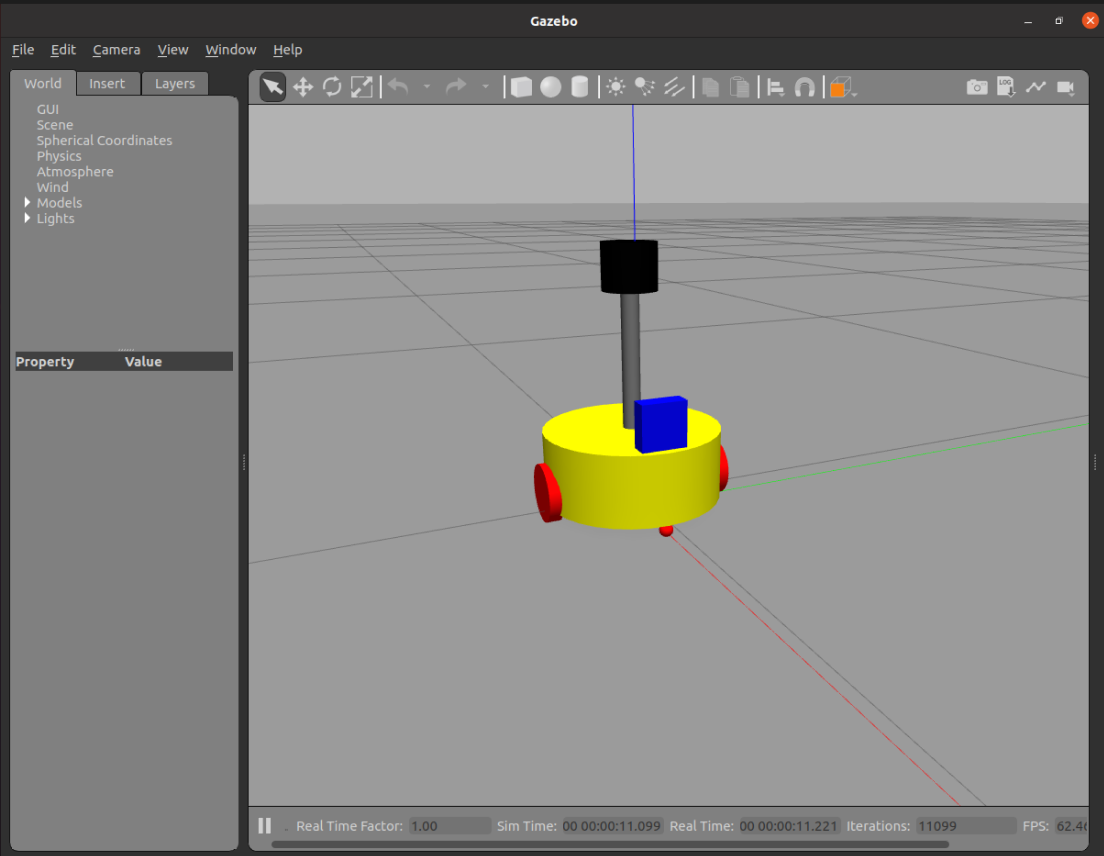
将之前的机器人模型(xacro版)显示在 gazebo 中
结果演示:
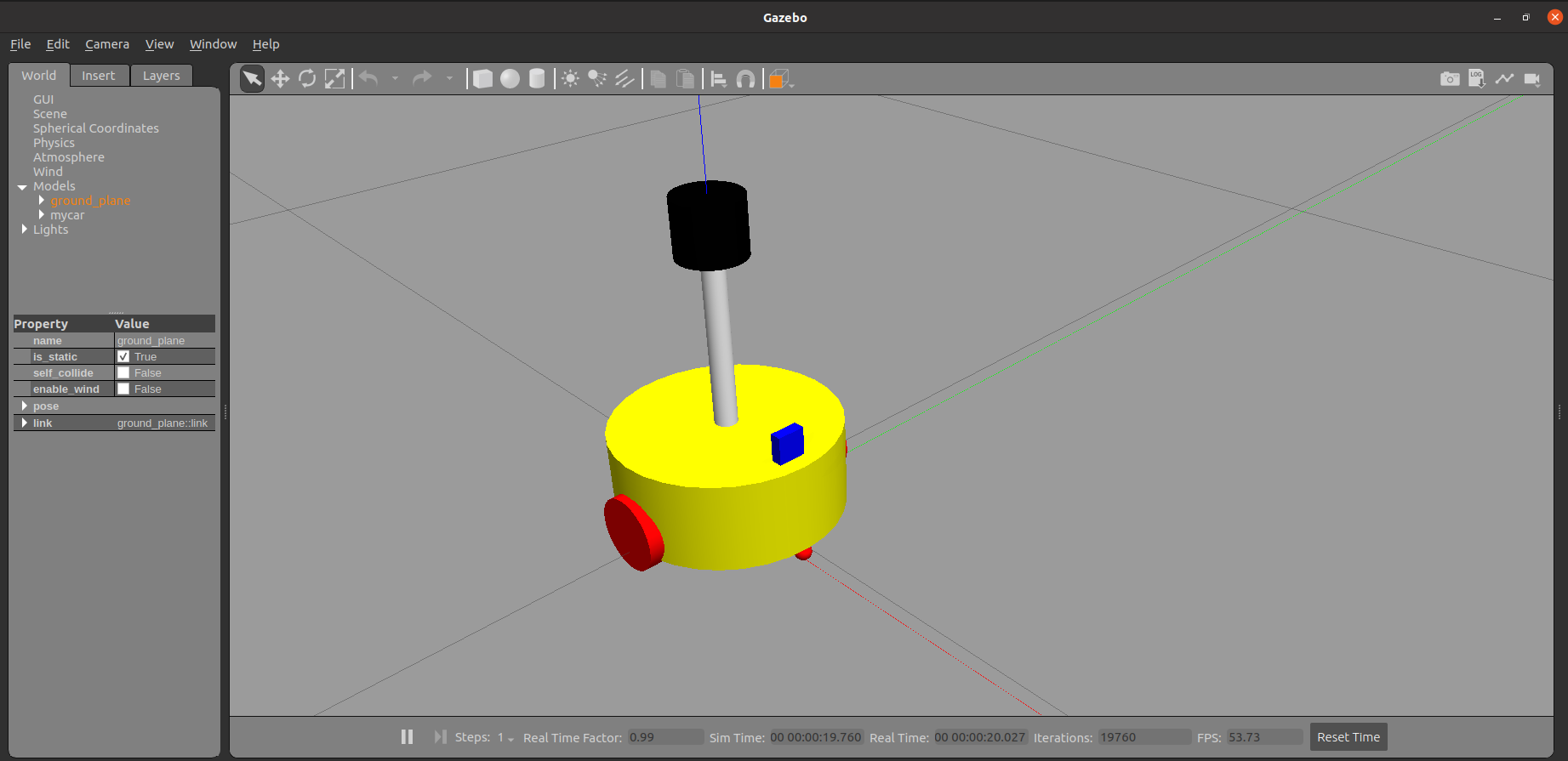 实现流程:
实现流程:
-
需要编写封装惯性矩阵算法的 xacro 文件
-
为机器人模型中的每一个 link 添加 collision 和 inertial 标签,并且重置颜色属性
-
在 launch 文件中启动 gazebo 并添加机器人模型
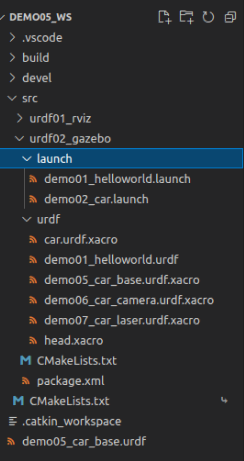
1.编写封装惯性矩阵算法的 xacro 文件
在 urdf 文件夹下新建 head.xacro 文件,并写入以下代码:
<robot name="base" xmlns:xacro="http://wiki.ros.org/xacro">
    <!-- Macro for inertia matrix -->
    <xacro:macro name="sphere_inertial_matrix" params="m r">
        <inertial>
            <mass value="${m}" />
            <inertia ixx="${2*m*r*r/5}" ixy="0" ixz="0"
                iyy="${2*m*r*r/5}" iyz="0"
                izz="${2*m*r*r/5}" />
        </inertial>
    </xacro:macro>

    <xacro:macro name="cylinder_inertial_matrix" params="m r h">
        <inertial>
            <mass value="${m}" />
            <inertia ixx="${m*(3*r*r+h*h)/12}" ixy = "0" ixz = "0"
                iyy="${m*(3*r*r+h*h)/12}" iyz = "0"
                izz="${m*r*r/2}" />
        </inertial>
    </xacro:macro>

    <xacro:macro name="Box_inertial_matrix" params="m l w h">
       <inertial>
               <mass value="${m}" />
               <inertia ixx="${m*(h*h + l*l)/12}" ixy = "0" ixz = "0"
                   iyy="${m*(w*w + l*l)/12}" iyz= "0"
                   izz="${m*(w*w + h*h)/12}" />
       </inertial>
   </xacro:macro>
</robot>
2.复制相关 xacro 文件,并设置 collision inertial 以及 color 等参数
将上几节 https://www.cnblogs.com/caiyishuai/p/15048663.html 中的
底盘文件 demo05_car_base.urdf.xacro
摄像头文件 demo06_car_camera.urdf.xacro
雷达文件 demo07_car_laser.urdf.xacro
组合文件 car.urdf.xacro
复制到 urdf 文件下
car.urdf.xacro
<robot name="my_base" xmlns:xacro="http://www.ros.org/wiki/xacro">
    <!--包含惯性矩阵文件-->
    <xacro:include filename="head.xacro" />
    <!--包含底盘、摄像头与雷达的 xacro 文件-->
    <xacro:include filename="demo05_car_base.urdf.xacro" />
    <xacro:include filename="demo06_car_camera.urdf.xacro" />
    <xacro:include filename="demo07_car_laser.urdf.xacro" />
</robot>
在 launch 文件夹下新建 demo02_car.launch 如下:
<launch>
    <!--1.需要在参数服务器中载入 urdf -->
    <param name="robot_description" command="$(find xacro)/xacro $(find urdf02_gazebo)/urdf/car.urdf.xacro" />
    <!--2.启动 Gazebo 仿真环境 -->
    <include file="$(find gazebo_ros)/launch/empty_world.launch" />
    <!--3.在 Gazebo 中添加机器人模型 -->
    <node pkg="gazebo_ros" type="spawn_model" name="spawn_model" args="-urdf -model car -param robot_description" />

</launch>
设置底盘文件 demo05_car_base.urdf.xacro collision inertial 以及 color 等参数
底盘
    <!-- 底盘属性 -->
    <xacro:property name="base_footprint_radius" value="0.001" /> <!-- base_footprint 半径  -->
    <xacro:property name="base_link_radius" value="0.1" /> <!-- base_link 半径 -->
    <xacro:property name="base_link_length" value="0.08" /> <!-- base_link 长 -->
    <xacro:property name="base_link_mass" value="2" /> <!-- base_link 长 -->
    <xacro:property name="earth_space" value="0.015" /> <!-- 离地间距 -->

    <!-- 底盘 -->
    <link name="base_footprint">
      <visual>
        <geometry>
          <sphere radius="${base_footprint_radius}" />
        </geometry>
      </visual>
    </link>

    <link name="base_link">
      <visual>
        <geometry>
          <cylinder radius="${base_link_radius}" length="${base_link_length}" />
        </geometry>
        <origin xyz="0 0 0" rpy="0 0 0" />
        <material name="green">
          <color rgba="0.0 0.8 0.3 0.5" />
        </material>
      </visual>
      <!--设置惯性矩阵-->
      <collision>
        <geometry>
          <cylinder radius="${base_link_radius}" length="${base_link_length}" />
        </geometry>
        <origin xyz="0 0 0" rpy="0 0 0" />
      </collision>
      <!--调用惯性矩阵函数-->
      <xacro:cylinder_inertial_matrix m="${base_link_mass}" r="${base_link_radius}" h="${base_link_length}" />
    </link>
    <gazebo reference="base_link">
        <material>Gazebo/Yellow</material>
    </gazebo>
驱动轮
    <!-- 驱动轮 -->
    <!-- 驱动轮属性 -->
    <xacro:property name="wheel_radius" value="0.0325" /><!-- 半径 -->
    <xacro:property name="wheel_length" value="0.015" /><!-- 宽度 -->
    <xacro:property name="wheel_mass" value="0.05" /><!-- 宽度 -->

    <!-- 驱动轮宏实现 -->
    <xacro:macro name="add_wheels" params="name flag">
      <link name="${name}_wheel">
        <visual>
          <geometry>
            <cylinder radius="${wheel_radius}" length="${wheel_length}" />
          </geometry>
          <origin xyz="0.0 0.0 0.0" rpy="${PI / 2} 0.0 0.0" />
          <material name="black" />
        </visual>
        <collision>
          <geometry>
            <cylinder radius="${wheel_radius}" length="${wheel_length}" />
          </geometry>
          <origin xyz="0.0 0.0 0.0" rpy="${PI / 2} 0.0 0.0" />
        </collision>
    <xacro:property name="wheel_mass" value="0.05" /><!-- 宽度 -->
        <xacro:cylinder_inertial_matrix m="${wheel_mass}" r="${wheel_radius}" h="${wheel_length}" />
      </link>
      <gazebo reference="${name}_wheel">
          <material>Gazebo/Red</material>
      </gazebo>
支撑轮
    <!-- 支撑轮 -->
    <!-- 支撑轮属性 -->
    <xacro:property name="support_wheel_radius" value="0.0075" /> <!-- 支撑轮半径 -->
    <xacro:property name="support_wheel_mass" value="0.01" /> <!-- 支撑轮半径 -->

    <!-- 支撑轮宏 -->
    <xacro:macro name="add_support_wheel" params="name flag" >
      <link name="${name}_wheel">
        <visual>
            <geometry>
                <sphere radius="${support_wheel_radius}" />
            </geometry>
            <origin xyz="0 0 0" rpy="0 0 0" />
            <material name="black" />
        </visual>
        <collision>
            <geometry>
                <sphere radius="${support_wheel_radius}" />
            </geometry>
            <origin xyz="0 0 0" rpy="0 0 0" />
        </collision>
        <xacro:sphere_inertial_matrix m="${support_wheel_mass}" r="${support_wheel_radius}" />
      </link>
      <gazebo reference="${name}_wheel">
        <material>Gazebo/Red</material>
      </gazebo>
最后,demo05_car_base.urdf.xacro 更改为:
<!--
    使用 xacro 优化 URDF 版的小车底盘实现:

    实现思路:
    1.将一些常量、变量封装为 xacro:property
      比如:PI 值、小车底盘半径、离地间距、车轮半径、宽度 ....
    2.使用 宏 封装驱动轮以及支撑轮实现,调用相关宏生成驱动轮与支撑轮

-->
<!-- 根标签,必须声明 xmlns:xacro -->
<robot name="my_base" xmlns:xacro="http://www.ros.org/wiki/xacro">
    <!-- 封装变量、常量 -->
    <xacro:property name="PI" value="3.141"/>
    <!-- 宏:黑色设置 -->
    <material name="black">
        <color rgba="0.0 0.0 0.0 1.0" />
    </material>
    <!-- 底盘属性 -->
    <xacro:property name="base_footprint_radius" value="0.001" /> <!-- base_footprint 半径  -->
    <xacro:property name="base_link_radius" value="0.1" /> <!-- base_link 半径 -->
    <xacro:property name="base_link_length" value="0.08" /> <!-- base_link 长 -->
    <xacro:property name="base_link_mass" value="2" /> <!-- base_link 长 -->
    <xacro:property name="earth_space" value="0.015" /> <!-- 离地间距 -->

    <!-- 底盘 -->
    <link name="base_footprint">
      <visual>
        <geometry>
          <sphere radius="${base_footprint_radius}" />
        </geometry>
      </visual>
    </link>

    <link name="base_link">
      <visual>
        <geometry>
          <cylinder radius="${base_link_radius}" length="${base_link_length}" />
        </geometry>
        <origin xyz="0 0 0" rpy="0 0 0" />
        <material name="green">
          <color rgba="0.0 0.8 0.3 0.5" />
        </material>
      </visual>
      <!--设置惯性矩阵-->
      <collision>
        <geometry>
          <cylinder radius="${base_link_radius}" length="${base_link_length}" />
        </geometry>
        <origin xyz="0 0 0" rpy="0 0 0" />
      </collision>
      <!--调用惯性矩阵函数-->
      <xacro:cylinder_inertial_matrix m="${base_link_mass}" r="${base_link_radius}" h="${base_link_length}" />
    </link>
    <gazebo reference="base_link">
        <material>Gazebo/Yellow</material>
    </gazebo>

    <joint name="base_link2base_footprint" type="fixed">
      <parent link="base_footprint" />
      <child link="base_link" />
      <origin xyz="0 0 ${earth_space + base_link_length / 2 }" />
    </joint>

    <!-- 驱动轮 -->
    <!-- 驱动轮属性 -->
    <xacro:property name="wheel_radius" value="0.0325" /><!-- 半径 -->
    <xacro:property name="wheel_length" value="0.015" /><!-- 宽度 -->
    <xacro:property name="wheel_mass" value="0.05" /><!-- 宽度 -->

    <!-- 驱动轮宏实现 -->
    <xacro:macro name="add_wheels" params="name flag">
      <link name="${name}_wheel">
        <visual>
          <geometry>
            <cylinder radius="${wheel_radius}" length="${wheel_length}" />
          </geometry>
          <origin xyz="0.0 0.0 0.0" rpy="${PI / 2} 0.0 0.0" />
          <material name="black" />
        </visual>
        <collision>
          <geometry>
            <cylinder radius="${wheel_radius}" length="${wheel_length}" />
          </geometry>
          <origin xyz="0.0 0.0 0.0" rpy="${PI / 2} 0.0 0.0" />
        </collision>
    <xacro:property name="wheel_mass" value="0.05" /><!-- 宽度 -->
        <xacro:cylinder_inertial_matrix m="${wheel_mass}" r="${wheel_radius}" h="${wheel_length}" />
      </link>
      <gazebo reference="${name}_wheel">
          <material>Gazebo/Red</material>
      </gazebo>

      <joint name="${name}_wheel2base_link" type="continuous">
        <parent link="base_link" />
        <child link="${name}_wheel" />
        <origin xyz="0 ${flag * base_link_radius} ${-(earth_space + base_link_length / 2 - wheel_radius) }" />
        <axis xyz="0 1 0" />
      </joint>
    </xacro:macro>
    <xacro:add_wheels name="left" flag="1" />
    <xacro:add_wheels name="right" flag="-1" />
    <!-- 支撑轮 -->
    <!-- 支撑轮属性 -->
    <xacro:property name="support_wheel_radius" value="0.0075" /> <!-- 支撑轮半径 -->
    <xacro:property name="support_wheel_mass" value="0.01" /> <!-- 支撑轮半径 -->

    <!-- 支撑轮宏 -->
    <xacro:macro name="add_support_wheel" params="name flag" >
      <link name="${name}_wheel">
        <visual>
            <geometry>
                <sphere radius="${support_wheel_radius}" />
            </geometry>
            <origin xyz="0 0 0" rpy="0 0 0" />
            <material name="black" />
        </visual>
        <collision>
            <geometry>
                <sphere radius="${support_wheel_radius}" />
            </geometry>
            <origin xyz="0 0 0" rpy="0 0 0" />
        </collision>
        <xacro:sphere_inertial_matrix m="${support_wheel_mass}" r="${support_wheel_radius}" />
      </link>
      <gazebo reference="${name}_wheel">
        <material>Gazebo/Red</material>
      </gazebo>

      <joint name="${name}_wheel2base_link" type="continuous">
          <parent link="base_link" />
          <child link="${name}_wheel" />
          <origin xyz="${flag * (base_link_radius - support_wheel_radius)} 0 ${-(base_link_length / 2 + earth_space / 2)}" />
          <axis xyz="1 1 1" />
      </joint>
    </xacro:macro>

    <xacro:add_support_wheel name="front" flag="1" />
    <xacro:add_support_wheel name="back" flag="-1" />

</robot>
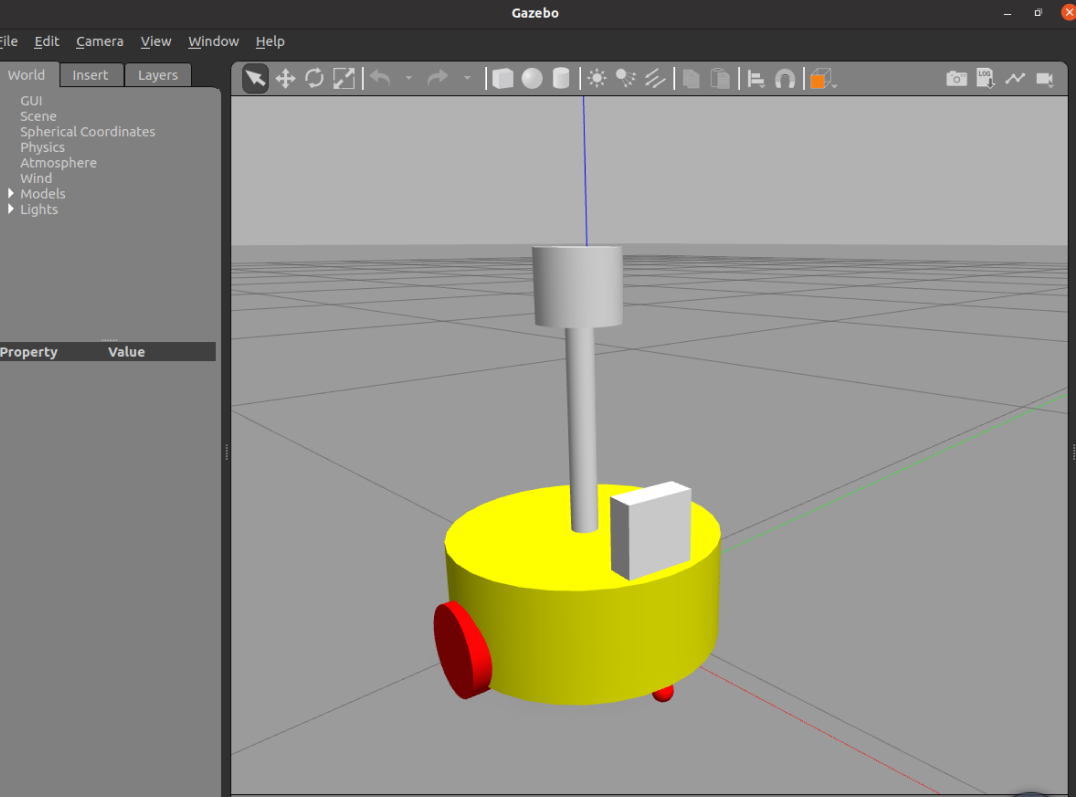
运行查看结果
设置摄像头文件 demo06_car_camera.urdf.xacro collision inertial 以及 color 等参数
<robot name="my_car" xmlns:xacro="http://www.ros.org/wiki/xacro">
    <!--摄像头部件-->
    <!--1.参数-->
    <!--
        参数:
            连杆属性:厚度、宽度、高度
            关节属性:x y z
    -->
    <xacro:property name="camera_length" value="0.02" /><!--厚度(x)-->
    <xacro:property name="camera_width" value="0.05" /><!--宽度(y)-->
    <xacro:property name="camera_height" value="0.05" /><!--高度(z)-->
    <xacro:property name="camera_mass" value="0.01" /><!--高度(z)-->

    <xacro:property name="joint_camera_x" value="0.08" /><!--x上偏移量-->
    <xacro:property name="joint_camera_y" value="0" /><!--y上偏移量-->
    <xacro:property name="joint_camera_z" value="${base_link_length / 2 + camera_height / 2}" /><!--z上偏移量-->

    <!--2.设计连杆和关节-->
    <link name="camera">
        <visual>
            <geometry>
                <box size="${camera_length} ${camera_width} ${camera_height}" />
            </geometry>
            <material name="blue">
                <color rgba="0 0.3 0.8 0.8" />
            </material>
        </visual>
        <collision>
            <geometry>
                <box size="${camera_length} ${camera_width} ${camera_height}" />
            </geometry>
        </collision>
        <xacro:Box_inertial_matrix m="${camera_mass}" l="${camera_length}" w="${camera_width}" h="${camera_height}"/>
    </link>
    <gazebo reference="camera">
        <material>Gazebo/Blue </material>
    </gazebo>

    <joint name="camera2base" type="fixed">
        <parent link="base_link" />
        <child link="camera" />
        <origin xyz="${joint_camera_x} ${joint_camera_y} ${joint_camera_z}" rpy="0 0 0" />
    </joint>
</robot>
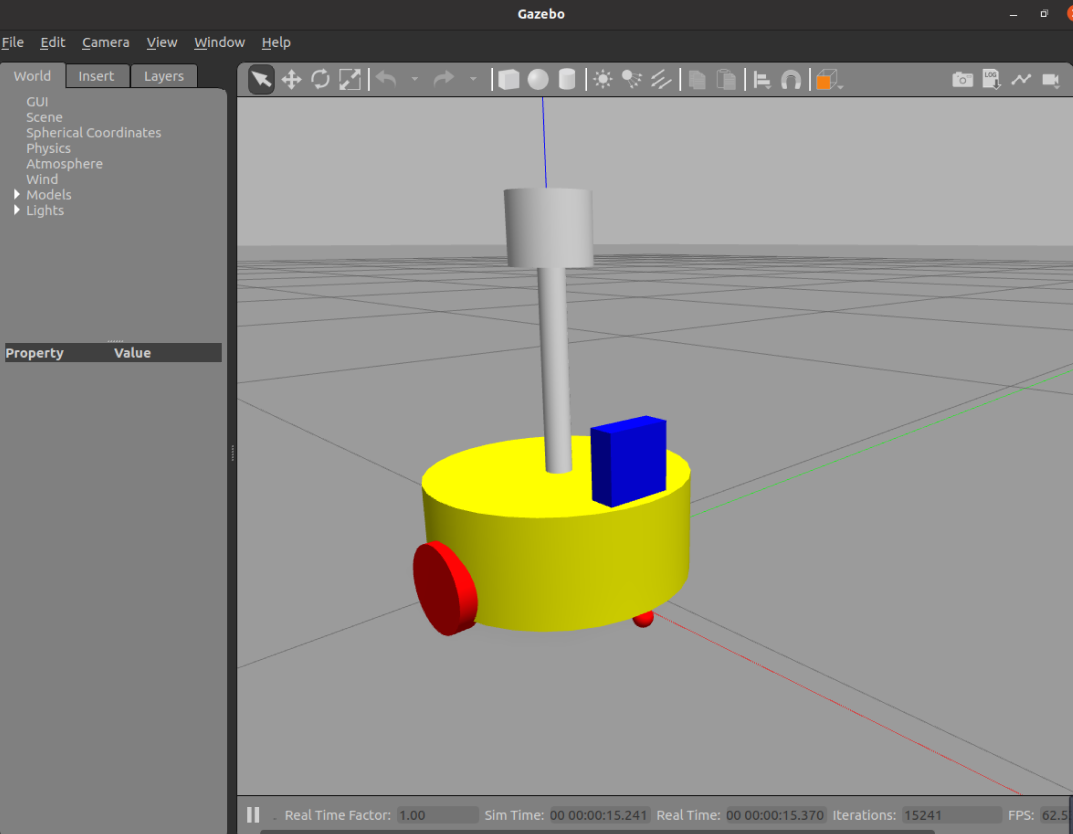
设置雷达文件 demo07_car_laser.urdf.xacro collision inertial 以及 color 等参数
<robot name="my_base" xmlns:xacro="http://www.ros.org/wiki/xacro">
    <!--雷达部件-->
    <!--参数-->
    <!--
        1.支架
            支架尺寸:半径 高度
            关节偏移量:x y z
        2.雷达
            雷达尺寸:半径 高度
            关节偏移量:x y z
    -->
    <xacro:property name="support_radius" value="0.01" />
    <xacro:property name="support_length" value="0.15" />
    <xacro:property name="support_mass" value="0.1" />

    <xacro:property name="laser_radius" value="0.03" />
    <xacro:property name="laser_length" value="0.05" />
    <xacro:property name="laser_mass" value="0.15" />

    <xacro:property name="joint_support_x" value="0" />
    <xacro:property name="joint_support_y" value="0" />
    <!-- z = 车体高度 / 2 + 支架高度 / 2-->
    <xacro:property name="joint_support_z" value="${base_link_length / 2 + support_length / 2}" />
    <xacro:property name="joint_laser_x" value="0" />
    <xacro:property name="joint_laser_y" value="0" />
    <!-- z = 支架高度 / 2 + 雷达高度 / 2-->
    <xacro:property name="joint_laser_z" value="${support_length / 2 + laser_length / 2}" />

    <!--1.支架-->
    <link name="support">
        <visual>
            <geometry>
                <cylinder radius="${support_radius}" length="${support_length}" />
            </geometry>
            <material name="red">
                <color rgba="0.8 0 0.0 0.8" />
            </material>
        </visual>
        <collision>
            <geometry>
                <cylinder radius="${support_radius}" length="${support_length}" />
            </geometry>
        </collision>
        <xacro:cylinder_inertial_matrix m="${support_mass}" r="${laser_radius}" h="${laser_length}" />
    </link>
    <gazebo reference="support">
        <material>Gazebo/Gray</material>
    </gazebo>

    <joint name="support2base" type="fixed">
        <parent link="base_link" />
        <child link="support" />
        <origin xyz="${joint_support_x} ${joint_support_y} ${joint_support_z}" rpy="0 0 0" />
    </joint>
    <!--2.雷达-->
    <link name="laser">
        <visual>
            <geometry>
                <cylinder radius="${laser_radius}" length="${laser_length}" />
            </geometry>
            <material name="yellow">
                <color rgba="1 1 0 0.8" />
            </material>
        </visual>
        <collision>
            <geometry>
                <cylinder radius="${laser_radius}" length="${laser_length}" />
            </geometry>
        </collision>
        <xacro:cylinder_inertial_matrix m="${laser_mass}" r="${laser_radius}" h="${laser_length}" />
    </link>
    <gazebo reference="laser">
        <material>Gazebo/Black</material>
    </gazebo>


    <joint name="laser2support" type="fixed">
        <parent link="support" />
        <child link="laser" />
        <origin xyz="${joint_laser_x} ${joint_laser_y} ${joint_laser_z}" rpy="0 0 0" />
    </joint>

</robot>


 已为社区贡献7条内容

所有评论(0)