Android扫地机器人自定义View
SweeperMap之前项目制作的扫地机器人自定义View,现在开源给大家.思路以及实现都比较简单,希望能给大家提供一些参考.扫地机器人地图的自定义View,支持类似于百度地图的手势缩放功能。源码大家可以到我的github上下载:https://github.com/stramChen/SweeperMap实现效果:##使用方式引入XML布局<com.xxx.xxx.AreaRoomView
·
SweeperMap
之前项目制作的扫地机器人自定义View,现在开源给大家.思路以及实现都比较简单,希望能给大家提供一些参考.
扫地机器人地图的自定义View,支持类似于百度地图的手势缩放功能。
源码大家可以到我的github上下载:
https://github.com/stramChen/SweeperMap
实现效果:
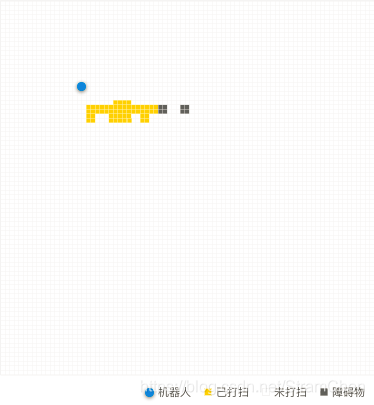
使用方式
- 引入XML布局
<com.xxx.xxx.AreaRoomView
   android:id="@+id/area_view"
   android:layout_width="match_parent"
   android:layout_height="300dp"
   android:background="@color/white" />
- 设置数据
AreaRoomView areaRoom = findViewById(R.id.area_view);
List<AreaBean> areaBeans = new ArrayList<>();
//AreaBean对应的参数为,坐标点的id,x坐标,y坐标,障碍物标识符(0无障碍物,1有障碍物)
areaBeans.add(new AreaBean(1,1,1,1));
areaBeans.add(new AreaBean(2,1,2,1));
areaBeans.add(new AreaBean(3,2,2,1));
//设置数据,true为向地图里追加,false为刷新地图从头开始追加数据
areaRoom.setDatas(areaBeans, true);
- 清除数据
areaRoom.clear();
备注:
附上底部布局
<LinearLayout
	android:layout_width="match_parent"
	android:layout_height="wrap_content"
	android:gravity="center_vertical|right"
	android:background="@color/white"
	android:orientation="horizontal">
	<View
		android:layout_width="10dp"
		android:layout_height="10dp"
		android:background="@drawable/shape_blue_point"/>
	<TextView
		android:layout_width="wrap_content"
		android:layout_height="wrap_content"
		android:layout_marginLeft="5dp"
		android:layout_marginRight="11dp"
		android:text="机器人"/>
	<View
		android:layout_width="10dp"
		android:layout_height="10dp"
		android:background="@drawable/shape_yellow_point"/>
	<TextView
		android:layout_width="wrap_content"
		android:layout_height="wrap_content"
		android:layout_marginLeft="5dp"
		android:layout_marginRight="11dp"
		android:text="已打扫"/>
	<View
		android:layout_width="10dp"
		android:layout_height="10dp"
		android:background="@drawable/shape_empty_point"/>
	<TextView
		android:layout_width="wrap_content"
		android:layout_height="wrap_content"
		android:layout_marginLeft="5dp"
		android:layout_marginRight="11dp"
		android:text="未打扫"/>
	<View
		android:layout_width="10dp"
		android:layout_height="10dp"
		android:background="@drawable/shape_gray_point"
		android:visibility="gone"/>
	<TextView
		android:layout_width="wrap_content"
		android:layout_height="wrap_content"
		android:layout_marginLeft="5dp"
		android:layout_marginRight="10dp"
		android:text="障碍物"
		android:visibility="gone"/>
</LinearLayout>
如有任何疑问,请联系邮箱569133338@qq.com

DAMO开发者矩阵,由阿里巴巴达摩院和中国互联网协会联合发起,致力于探讨最前沿的技术趋势与应用成果,搭建高质量的交流与分享平台,推动技术创新与产业应用链接,围绕“人工智能与新型计算”构建开放共享的开发者生态。
更多推荐
 2
2 0
0- 0


 已为社区贡献1条内容

所有评论(0)