Json 数据提取神器 jsonpath
·
一 JsonPath 介绍
JsonPath是一种简单的方法来提取给定JSON文档的部分内容。JSonPath有许多编程语言,如Javascript,Python和PHP,Java等;
JsonPath提供的json解析非常强大,它提供了类似正则表达式的语法
二 JsonPath 语法
JsonPath 是参照 Xpath表达式来解析XML文档的方式,JSON数据结构通常是匿名的并且不一定需要有根元素。
JsonPath 用一个抽象的名字$来表示最外层对象,即$代表整个JSON数据的值。
1 语法
语法:jsonpath.jsonpath()
参数:json对象,jsonpath表达式
返回:列表
2 操作符
| 操作符 | 描述 |
|---|---|
| $ | 要查询的根元素,这将启动所有路径表达式 |
| @ | 过滤谓词正在处理的当前节点 |
| * | 通配符。可在任何需要名称或数字的地方使用 |
| .. | 深层扫描。可在任何需要名称的地方使用 |
| .<name> | 点符号表示的子节点 |
| ['<name>' (, '<name>')] | 括号表示的子节点 |
| [<number> (, <number>)] | 数组索引或索引 |
| [ start : end ] | 数组切片运算 |
| [?(<expression>)] | 过滤表达式(表达式必须计算为bool值) |
3 函数
函数可以在路径的尾端调用——函数的输入是路径表达式的输出。函数输出由函数本身决定。Python的jsonpath库不支持???
| 函数 | 描述 | 输出类型 |
|---|---|---|
| min() | 获取数字数组的最小值 | 浮点型 |
| max() | 获取数字数组的最大值 | 浮点型 |
| avg() | 获取数字数组的平均值 | 浮点型 |
| stddev() | 获取数字数组的标准偏差 | 浮点型 |
| length() | 获取数字的长度 | 整型 |
| sum() | 获取数字数组的元素总和 | 浮点型 |
4 过滤器
过滤器是用于过滤数组的逻辑表达式。
典型的过滤器如 [?(@.age > 18)],其中@代表正在处理的当前项。可以使用逻辑运算符 && 和 || 来创建更复杂的过滤规则。
字符串文字必须用单引号或双引号括起来,如 [?(@.color == 'blue')] 或 [?(@.color == "blue")]
| 操作符 | 描述 | Python的jsonpath库是否支持 |
|---|---|---|
| == | 左等于右(注意1不等于'1') | 1 |
| != | 左不等于右 | 1 |
| < | 左边小于右边 | 1 |
| <= | 左小于或等于右 | 1 |
| > | 左大于右 | 1 |
| >= | 左大于或等于右 | 1 |
| =~ | 左边匹配右边的正则表达式,如 [?(@.name =~ /foo.*?/i)] | 0 |
| in | 左边存在于右边,如 [?(@.size in ['S', 'M'])] | 0 |
| nin | 左边不存在于右边 | 0 |
| subsetof | 左边是右边的子集,如 [?(@.sizes subnetof ['S', 'M', 'L'])] | 0 |
| anyof | 左边与右边的交集 | 0 |
| noneof | 左边与右边没有交集 [?(@.sizes noneof ['M', 'L'])] | 0 |
| size | 左边(数组或字符串)的大小与右边匹配 | 0 |
| empty | 左边(数组或字符串)为空 | 0 |
三 JsonPath 示例
以下是基于Python的示例,安装jsonpath库:pip install jsonpath
import jsonpath

jsonData = {
    "store": {
        "book": [
            {
                "category": "reference",
                "author": "Nigel Rees",
                "title": "Sayings of the Century",
                "price": 8.95
            },
            {
                "category": "fiction",
                "author": "Evelyn Waugh",
                "title": "Sword of Honour",
                "price": 12.99
            },
            {
                "category": "fiction",
                "author": "Herman Melville",
                "title": "Moby Dick",
                "isbn": "0-553-21311-3",
                "price": 8.99
            },
            {
                "category": "fiction",
                "author": "J. R. R. Tolkien",
                "title": "The Lord of the Rings",
                "isbn": "0-395-19395-8",
                "price": 22.99
            }
        ],
        "bicycle": {
            "color": "red",
            "price": 19.95,
            "author": "Wen Han",
            "isbn": "0-1-2-3",
        },
        "author": "Gavin Chen"
    },
    "expensive": 10
}

# 获取 book list下的所有 author
res1 = jsonpath.jsonpath(jsonData, '$.store.book.*.author')
res2 = jsonpath.jsonpath(jsonData, '$.store.book[*].author')
print(res1)
# ['Nigel Rees', 'Evelyn Waugh', 'Herman Melville', 'J. R. R. Tolkien']
print(res2)
# ['Nigel Rees', 'Evelyn Waugh', 'Herman Melville', 'J. R. R. Tolkien']

# 获取所有的 author
res = jsonpath.jsonpath(jsonData, '$..author')
print(res)
# ['Gavin Chen', 'Nigel Rees', 'Evelyn Waugh', 'Herman Melville', 'J. R. R. Tolkien', 'Wen Han']

# 获取 book 同级及以下的所有 author
res = jsonpath.jsonpath(jsonData, '$.store.*..author')
print(res)
# ['Nigel Rees', 'Evelyn Waugh', 'Herman Melville', 'J. R. R. Tolkien', 'Wen Han']

# 获取 第3本书信息
res = jsonpath.jsonpath(jsonData, '$.store.book[2]')
print(res)

# 获取 倒数第1本书信息
res = jsonpath.jsonpath(jsonData, '$.store.book[-1:]')
print(res)

# 获取 第1本和第3本书信息
res = jsonpath.jsonpath(jsonData, '$.store.book[0,2]')
print(res)

# 获取 第1本至第3本书信息, 符合python语法的前闭后开
res = jsonpath.jsonpath(jsonData, '$.store.book[0:3]')
print(res)

# 获取 store 层级下的所有含 isbn 的节点
res = jsonpath.jsonpath(jsonData, '$.store.[?(@.isbn)]')
print(res)
# [{'color': 'red', 'price': 19.95, 'author': 'Wen Han', 'isbn': '0-1-2-3'},
# {'category': 'fiction', 'author': 'Herman Melville', 'title': 'Moby Dick', 'isbn': '0-553-21311-3', 'price': 8.99},
# {'category': 'fiction', 'author': 'J. R. R. Tolkien', 'title': 'The Lord of the Rings', 'isbn': '0-395-19395-8', 'price': 22.99}]

# 获取 book 下的所有含 isbn 的节点
res = jsonpath.jsonpath(jsonData, '$..book[?(@.isbn)]')
print(res)
# [{'category': 'fiction', 'author': 'Herman Melville', 'title': 'Moby Dick', 'isbn': '0-553-21311-3', 'price': 8.99},
# {'category': 'fiction', 'author': 'J. R. R. Tolkien', 'title': 'The Lord of the Rings', 'isbn': '0-395-19395-8', 'price': 22.99}]

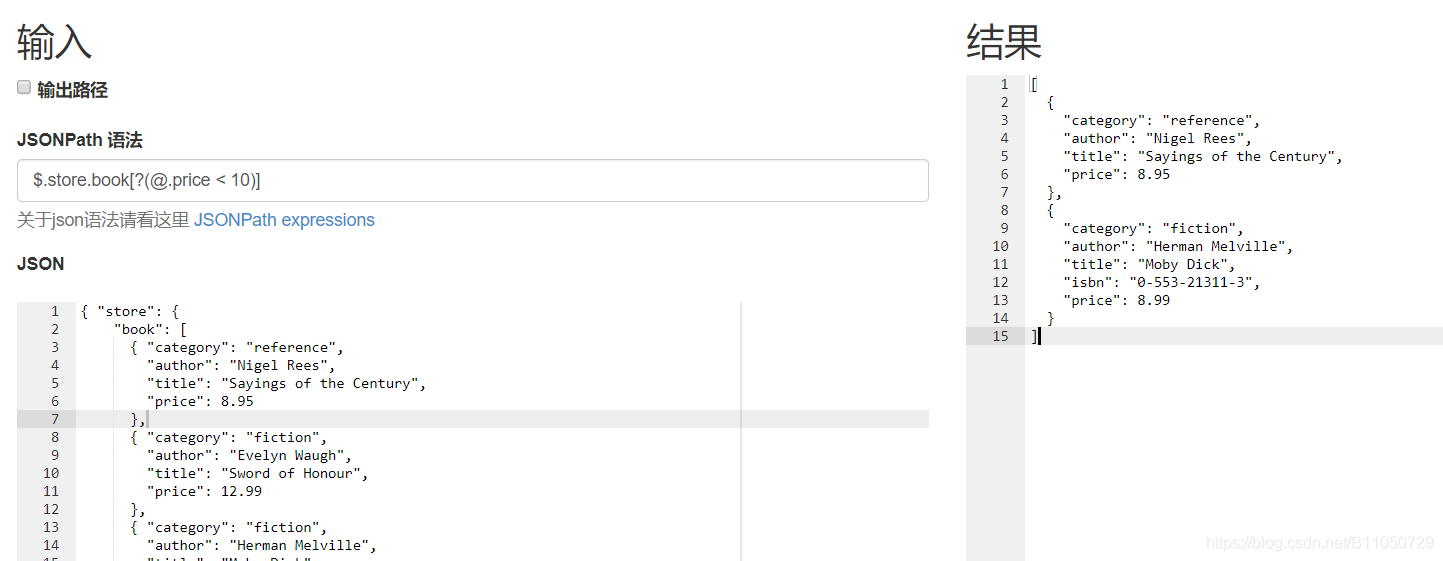
# 获取 book 下所有 price < 10 的节点
res = jsonpath.jsonpath(jsonData, '$..book[?(@.price < 10)')
print(res)
# [{'category': 'reference', 'author': 'Nigel Rees', 'title': 'Sayings of the Century', 'price': 8.95},
# {'category': 'fiction', 'author': 'Herman Melville', 'title': 'Moby Dick', 'isbn': '0-553-21311-3', 'price': 8.99}]


# 获取 book 节点下最后一本书
res = jsonpath.jsonpath(jsonData, '$..book[(@.length-1)]')
print(res)
# [{'category': 'fiction', 'author': 'J. R. R. Tolkien', 'title': 'The Lord of the Rings', 'isbn': '0-395-19395-8', 'price': 22.99}]
四 JsonPath 调试
推荐一个jsonpath在线调试小工具:http://www.e123456.com/aaaphp/online/jsonpath
参考文章:

DAMO开发者矩阵,由阿里巴巴达摩院和中国互联网协会联合发起,致力于探讨最前沿的技术趋势与应用成果,搭建高质量的交流与分享平台,推动技术创新与产业应用链接,围绕“人工智能与新型计算”构建开放共享的开发者生态。
更多推荐

 2
2 0
0- 0


 已为社区贡献3条内容

所有评论(0)