MiniMax H3 开源视频模型测评总结
启动排障记录(MinimaxH3 + RTX 4060 Ti)
一键整合包下载地址:https://pan.quark.cn/s/96a998ded0a8
坑 1:PyTorch 一碰 CUDA 就崩(access violation)
- 现象:启动即
Windows fatal exception: access violation,崩溃点在torch.cuda.current_device() - 根因:驱动 537.13 太旧。打包版 torch 2.12.1+cu130 需要驱动 ≥ R580(CUDA 13.0 要求),旧驱动让 CUDA 初始化直接硬崩
- 修法:更新 NVIDIA 驱动 → 610.88(≥580 即可)
- 临时兜底:
start.py加--cpu跳过 CUDA(验证后已移除) - 教训:先查
torch.version.cuda,再对照 NVIDIA 的驱动最低要求表,别急着怀疑代码
坑 2:生成时报 [WinError 2] 系统找不到指定的文件
- 现象:点生成后采样阶段秒挂,Triton 调
clang-cl编译cuda_utils.c失败 - 根因:Sage Attention → Triton 在 Windows 编译内核必须要 clang-cl(LLVM)。机器上 PATH 里只有一条已失效的
D:\clang+llvm-20.1.5-...(目录早删了),实际没有 LLVM - 修法:装 LLVM 18.1.8
坑 3:LLVM 版本不能乱装(22 太新)
- 现象:装好 LLVM 22 后,clang-cl 找到了但编译 exit 1
- 根因:LLVM 22 在
/std:c11下把alloca隐式声明从警告升级为硬错误;Triton 3.7.1 官方验证的是 LLVM 17/18 - 修法:降级到 18.1.8(winget 从 GitHub 直连下载超时,改用 ghproxy 镜像下载安装)
- 教训:Triton 和 LLVM 版本强绑定,认准官方组合
坑 4:MSVC 头文件残缺(malloc.h 缺失)
- 现象:加了 include 还是
alloca未声明 - 根因:这台机器的 VS BuildTools 只装了部分 C 头文件(include 目录仅 266 个文件,缺
malloc.h/stdlib.h等);编译 fallback 到 UCRT 的 malloc.h,但它只声明_alloca、没有alloca宏 - 修法:手写补了一个 MSVC 版
malloc.h(声明_alloca+#define alloca _alloca)放到 MSVC include 目录
坑 5:Triton 自己的 bug——Windows 分支漏了 malloc.h
- 现象:头都补了还是编译失败
- 根因:
driver.c里#include <malloc.h>只在#ifndef _WIN32分支里,Windows 分支漏掉了;strict C11 下alloca不是内建 - 修法:在 Windows 分支补
#include <malloc.h>(一行)
坑 6:LLVM 装到了 D 盘
- 现象:装完
C:\Program Files\LLVM找不到 clang-cl - 根因:这台机器程序文件默认路径在 D 盘
- 修法:bat 里
LLVM_PATH=D:\Program Files\LLVM\bin
坑 7:多实例抢端口/显存
- 现象:Gradio 报
WinError 10048绑定失败,ComfyUI 自动跳到 8189 - 根因:之前后台启动的实例没关,两套服务各占一份显存
- 修法:
taskkill停掉多余实例(bat 自带的端口自动检测也派上了用场)
📌 当前生效的修复文件(以后更新/重装会失效,需注意)
| 文件 | 作用 |
|---|---|
启动程序.bat | PATH 加入 D:\Program Files\LLVM\bin |
C:\Program Files (x86)\...\MSVC\14.37.32822\include\malloc.h | 补 MSVC 缺失头(VS 修复/重装会被覆盖) |
walkingwithai\Lib\site-packages\triton\backends\nvidia\driver.c | 修 Windows 分支漏 include(triton 升级会被覆盖) |
提示词
Camera: First-person perspective at eye level with authentic handheld player movement, as if recorded directly from a modern AAA military shooter. The player carries a highly detailed assault rifle with realistic animations, visible hands, tactical gloves, dynamic reload mechanics, and weapon sway. **Opening Action:** The video immediately begins with the player already aiming down a roadway inside a modern military base. Multiple enemy soldiers are visible in the distance near sandbags, barricades, and military vehicles. The player carefully tracks one target, making small aim corrections while maintaining ADS (aim down sights). Fire several controlled bursts immediately at the visible enemies, producing realistic muzzle flashes, shell casings ejecting, smoke, recoil, hit reactions, and dust impacts around the targets. Continue firing in multiple short bursts while adjusting aim between enemies, simulating authentic FPS gameplay rather than scripted animation. **Movement:** After the opening firefight, lower slightly from ADS and begin advancing cautiously along the road beside concrete barriers, Hesco walls, and parked military vehicles. Frequently check left and right corners, briefly stop to reacquire targets, then raise the weapon and fire additional controlled bursts whenever enemies appear ahead. Continue pushing forward with deliberate player-controlled movement, using cover naturally and maintaining believable tactical pacing. **Environment:** Large modern military base with guard towers, armored vehicles, shipping containers, blast barriers, damaged buildings, smoke plumes, burning debris, scattered shell casings, dust clouds, and atmospheric battlefield haze. Cool natural daylight mixed with smoke and orange firelight creates a cinematic battlefield atmosphere. **Camera Motion:** Authentic player-controlled movement with subtle head bob, weapon sway, natural mouse-look adjustments, small left-right corrections while aiming, realistic recoil, smooth tracking of moving targets, brief pauses before shooting, and fluid forward progression. Avoid cinematic camera moves—everything should feel like genuine live gameplay captured by a skilled player. **Visual Quality:** Ultra-photorealistic, AAA game graphics with realistic PBR materials, detailed weapon models, physically accurate lighting, volumetric smoke, dynamic particle effects, crisp textures, realistic bullet impacts, muzzle flash illumination, motion blur only during rapid movement, and high-end military shooter presentation. **Gameplay UI:** Display a realistic modern FPS HUD inspired by games like PUBG, Battlefield, or Call of Duty (without copying exact copyrighted assets). Include: * Central dynamic crosshair or reticle * Ammo counter with magazine and reserve ammunition * Fire mode indicator * Compass at the top * Squad/team status panel * Mini-map in the upper corner * Health bar * Tactical equipment icons (grenades, medkit) * Hit markers when bullets connect * Directional damage indicators * Kill notification feed * Objective marker in the distance * Subtle interaction prompts and realistic HUD animations The HUD should feel polished, modern, and fully integrated into the gameplay, enhancing the illusion of authentic recorded footage from a contemporary military FPS.
最终验证:Triton 内核已在 GPU 上真实编译运行成功,程序以 CUDA + Sage Attention 模式运行中。
发布日期: 2026年8月3日 | 核心关键词: MiniMax H3开源、8G显存可玩、全模态支持、视频生成
 开源视频模型终于“上桌吃饭”
2026年8月3日,MiniMax正式开源新一代通用视频模型H3,这是开源视频模型首次真正逼近闭源旗舰水平。在权威榜单Artificial Analysis中,H3的视频编辑能力位列全球第一,文生视频、图生视频能力分列第二、第三。
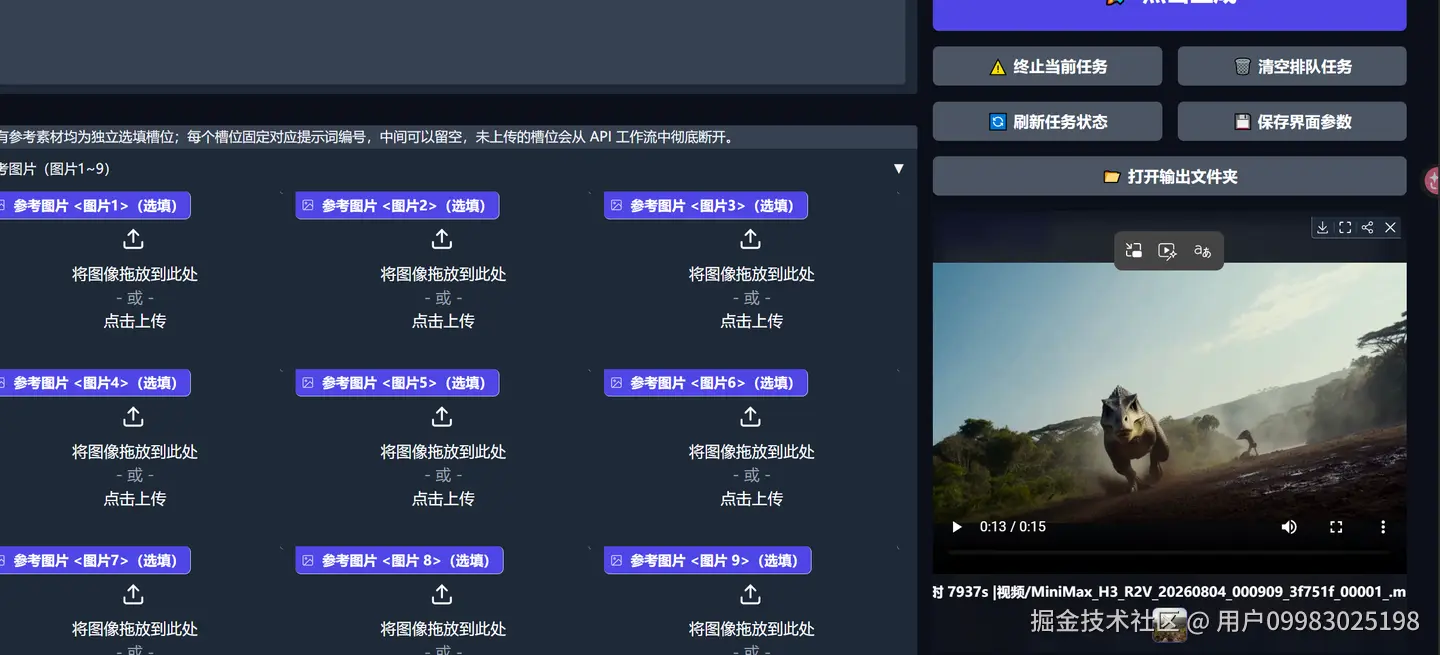
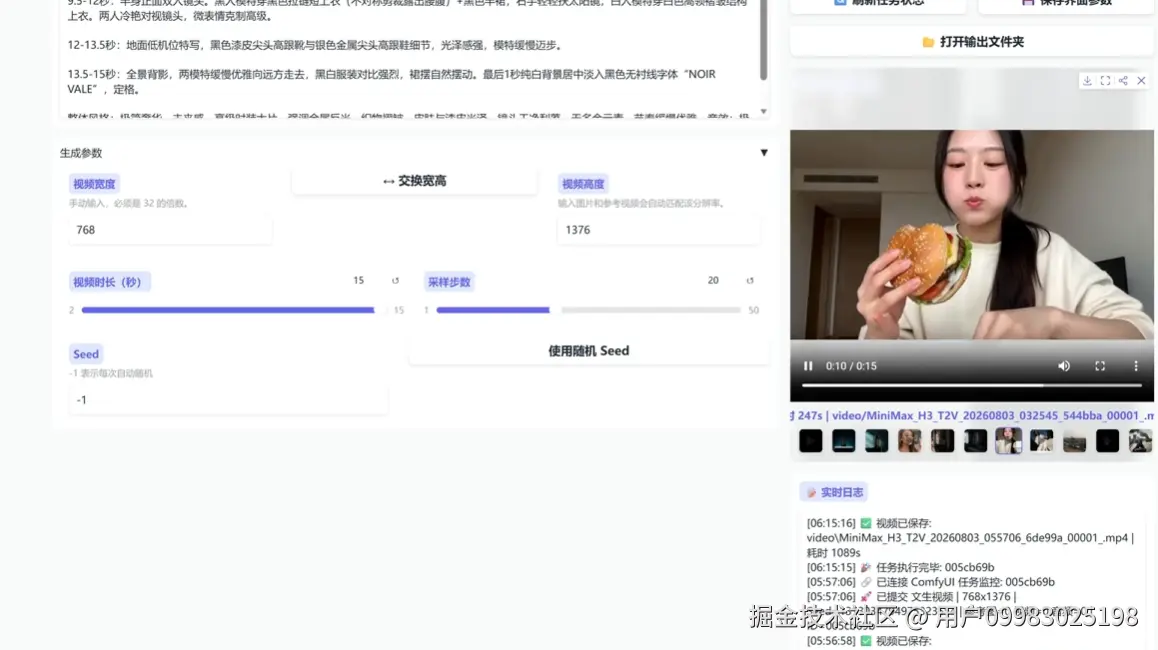
关键规格:支持4~15秒视频生成,最高2K分辨率,同步输出32kHz立体声音频,支持中英日韩法等11种语言。模型分为FL2VA(首尾帧生成)和Ref2VA(全模态参考生成)两个分区,FL2VA输入首帧即图生视频,同时输入首尾帧则自动补全中间动作;Ref2VA最多支持9张图片+3段视频+3段音频的混合参考。
本地部署门槛与性能
INT8量化版本配合24GB单卡即可运行,采用自动按层offload机制。推荐使用ComfyUI 0.27+ ,模型权重需同时存放于models/MiniMax-H3/(单文件权重)和models/diffusers/MiniMax-H3/(分片release含config.json),缺一不可。国内用户推荐通过ModelScope下载。
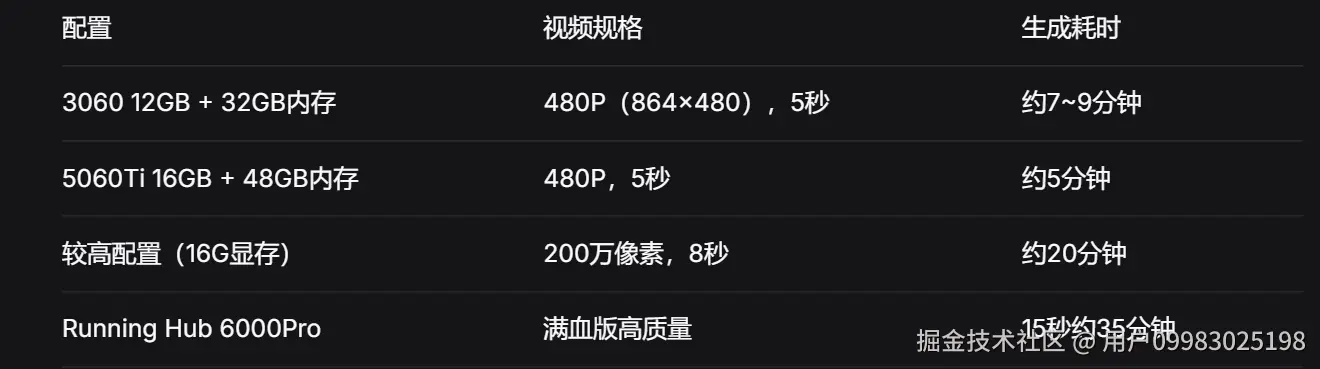
生成速度方面,官方采样50步,配合res_multistep加速可实现约2.2倍提速,21个sigma点即可达到50步Euler的质量。实测480P五秒视频约5-10分钟,具体视硬件而定。
一键整合包获取
本测评配套全套资源已整理,包含ComfyUI工作流、模型及提示词模板:
803免费版Seedance 2,Minimax-H3视频生成模型开源,影视级视频效果!文生视频 | 图生视频 | 全能参考生成视频 8G显存就能跑,支持图生/文生/首尾帧/多参考(图+视频+音频),效果接近闭源
一键整合包
下载解压双击bat启动即可使用
ComfyUI模型及工作流,
记得更新cofmyui到最新版再安装
附视频超清软件
 MiniMax H3开源视频模型——8G显存就能跑,支持图生/文生/首尾帧/多参考(图+视频+音频),效果接近闭源
对比LTX等旧模型: H3已“上桌”,效果显著提升
对比Flux 3预览版: Flux 3真实感更强、支持20秒,但参考一致性极差
综合能力: H3是目前开源视频模型中综合实力最强、最均衡的选择
缺点 生成速度慢,高分辨率耗时较长 多参考时资源消耗巨大,生成时间翻倍 量化版(INT8)细节丢失较多 优点 中文提示词理解优秀 人物面部稳定,五官、发型、服装一致性良好 音频干净,无明显爆音/炸麦 全模态输入,开源模型中领先
优点 •中文提示词理解优秀 •人物面部稳定,五官、发型、服装一致性良好 音频干净,无明显爆音/炸麦 •全模态输入,开源模型中领先
现在seedance我发现特别喜欢偷懒节省算力,各种动作能慢就慢,能拖就拖,结果就是要么运镜出问题,要么就是角色或者动作穿帮,这也是seedance现在打斗非常容易抽卡的主要原因。然后一抽卡他就多赚钱,已经黑心到没救了。不是他不行,而是字节故意的。
一句话总结
H3是视频生成开源领域的分水岭——性能追上闭源,门槛降到消费级显卡,社区生态刚刚启动。现在下载整合包,你的显卡就能跑起来。
作者:用户09983025198
链接:https://juejin.cn/post/7669725784873533467
来源:稀土掘金

DAMO开发者矩阵,由阿里巴巴达摩院和中国互联网协会联合发起,致力于探讨最前沿的技术趋势与应用成果,搭建高质量的交流与分享平台,推动技术创新与产业应用链接,围绕“人工智能与新型计算”构建开放共享的开发者生态。
更多推荐


 1
1 0
0- 0


 已为社区贡献4条内容

所有评论(0)