ROS机器人入门:用二维码控制小海龟
·
在之前的学习过程中,我从 ROS 的基础通信机制开始,逐步掌握了节点、话题、服务等核心概念。为了将这些知识应用到实际场景中,我尝试了一个结合视觉与机器人控制的综合项目——用二维码控制小海龟。如果大家感兴趣可以,动手实践一下~
项目简介
本项目通过摄像头识别二维码,控制 turtlesim 仿真器中的小海龟自动切换背景颜色和轨迹颜色,并执行对应的图形绘制动作(正方形、圆形、菱形等)。项目还实现了动作录制与回放、紧急停止等扩展功能,适合 ROS 初学者学习。
我的项目开源地址:https://github.com/yyyw-w/ros-turtle-projects.git
一、项目效果展示
1.1 整体效果图
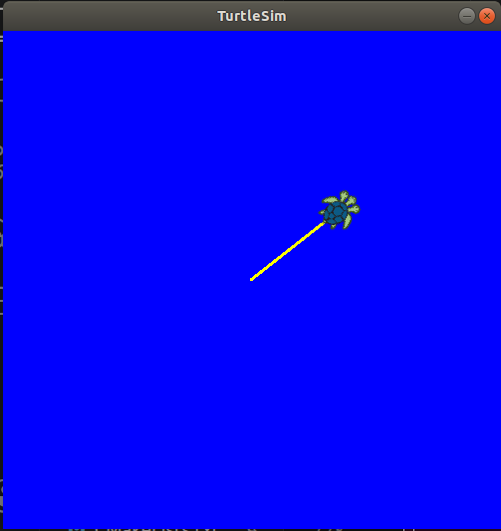
(图中:摄像头识别二维码,小海龟根据指令绘制图形)
二、环境配置
2.1 开发环境
| 项目 | 版本 |
|---|---|
| 操作系统 | Ubuntu 18.04 LTS |
| ROS版本 | ROS Melodic |
| Python版本 | Python 2.7 |
| 摄像头 | USB摄像头 |
2.2 安装依赖
# 更新软件源
sudo apt update

# 安装ROS基础包
sudo apt install ros-melodic-turtlesim

# 安装OpenCV
sudo apt install python-opencv

# 安装二维码识别库
sudo apt install python-zbar
2.3 创建工作空间
# 创建并初始化工作空间
mkdir -p ~/hyw_ws/src
cd ~/hyw_ws
catkin_make
source devel/setup.bash
2.4 创建功能包
cd ~/hyw_ws/src
catkin_create_pkg hyw_cv rospy std_msgs geometry_msgs turtlesim cv_bridge image_transport
三、核心代码实现
3.1 项目结构
hyw_ws/
├── src/
│   └── hyw_cv/
│       ├── CMakeLists.txt
│       ├── package.xml
│       ├── scripts/
│       │   └── qr_turtle.py      # 主程序
│       └── launch/
│           └── hyw_cv.launch      # 启动文件
3.2 主程序:qr_turtle.py
#!/usr/bin/env python
# -*- coding: utf-8 -*-

import rospy
import cv2
import zbar
import math
import threading
import time
from PIL import Image
from geometry_msgs.msg import Twist
from turtlesim.srv import SetPen
from std_srvs.srv import Empty

class QRTurtle:
    def __init__(self):
        rospy.init_node('qr_turtle', anonymous=False)

        # 动作映射表:二维码内容 -> (动作函数, 背景色RGB, 轨迹色RGB, 画笔粗细)
        self.action_map = {
            "square":   (self.draw_square,   (255, 0, 0),   (0, 255, 255), 3),
            "circle":   (self.draw_circle,   (255, 165, 0), (0, 90, 255),   3),
            "rhombus":  (self.draw_rhombus,  (255, 255, 0), (0, 0, 255),    3),
            "forward":  (self.move_forward,  (0, 255, 0),   (255, 0, 255),  3),
            "backward": (self.move_backward, (0, 255, 255), (255, 0, 0),    3),
            "left":     (self.rotate_left,   (0, 0, 255),   (255, 255, 0),  3),
            "right":    (self.rotate_right,  (128, 0, 128), (127, 255, 127),3),
            "record":   (self.cmd_record,    (100, 100, 100), (200, 200, 200), 1),
            "replay":   (self.cmd_replay,    (100, 100, 100), (200, 200, 200), 1),
            "stop":     (self.cmd_stop,      (100, 100, 100), (200, 200, 200), 1),
        }

        # 服务客户端
        rospy.wait_for_service('/clear')
        self.clear_srv = rospy.ServiceProxy('/clear', Empty)
        rospy.wait_for_service('/reset')
        self.reset_srv = rospy.ServiceProxy('/reset', Empty)
        rospy.wait_for_service('/turtle1/set_pen')
        self.set_pen_srv = rospy.ServiceProxy('/turtle1/set_pen', SetPen)

        # 速度发布器
        self.cmd_pub = rospy.Publisher('/turtle1/cmd_vel', Twist, queue_size=10)

        # 状态变量
        self.stop_flag = False
        self.recording = False
        self.recorded_actions = []
        self.action_thread = None

        # 去抖处理
        self.last_detected_word = ""
        self.last_detected_time = 0
        self.debounce_interval = 1.0

        # 初始化摄像头
        self.cap = cv2.VideoCapture(0)
        if not self.cap.isOpened():
            rospy.logerr("Cannot open camera")
            return

        self.scanner = zbar.ImageScanner()
        self.scanner.parse_config('enable')

        rospy.loginfo("QR Turtle started, waiting for QR code...")

        # 启动二维码识别线程
        thread = threading.Thread(target=self.qr_thread)
        thread.daemon = True
        thread.start()
        rospy.spin()

    def set_background(self, r, g, b):
        """设置背景颜色"""
        rospy.set_param('/turtlesim/background_r', r)
        rospy.set_param('/turtlesim/background_g', g)
        rospy.set_param('/turtlesim/background_b', b)
        rospy.sleep(0.1)
        self.clear_srv()

    def set_pen(self, r, g, b, width):
        """设置画笔颜色"""
        try:
            self.set_pen_srv(r, g, b, width, 0)
        except Exception as e:
            rospy.logerr("Pen set failed: %s", e)

    def reset_turtle(self):
        self.reset_srv()

    def stop_movement(self):
        twist = Twist()
        twist.linear.x = 0
        twist.angular.z = 0
        self.cmd_pub.publish(twist)

    def move_by_duration(self, linear_x, angular_z, duration, check_interval=0.05):
        twist = Twist()
        twist.linear.x = linear_x
        twist.angular.z = angular_z
        remaining = duration
        rate = rospy.Rate(int(1.0 / check_interval))
        while remaining > 0 and not self.stop_flag:
            self.cmd_pub.publish(twist)
            rate.sleep()
            remaining -= check_interval
        return not self.stop_flag

    def draw_square(self):
        for _ in range(4):
            if self.stop_flag: return
            if not self.move_by_duration(1.0, 0, 2.0): return
            if self.stop_flag: return
            if not self.move_by_duration(0, math.radians(90), 1.0): return

    def draw_circle(self):
        self.move_by_duration(1.0, math.radians(90), 6.28)

    def draw_rhombus(self):
        for i in range(4):
            if self.stop_flag: return
            if not self.move_by_duration(1.0, 0, 2.0): return
            if self.stop_flag: return
            if i % 2 == 0:
                if not self.move_by_duration(0, math.radians(60), 1.0): return
            else:
                if not self.move_by_duration(0, math.radians(120), 1.0): return

    def move_forward(self):
        self.move_by_duration(1.0, 0, 2.0)

    def move_backward(self):
        self.move_by_duration(-1.0, 0, 2.0)

    def rotate_left(self):
        if self.move_by_duration(0, math.radians(45), 1.0):
            self.move_by_duration(1.0, 0, 1.5)

    def rotate_right(self):
        if self.move_by_duration(0, -math.radians(45), 1.0):
            self.move_by_duration(1.0, 0, 1.5)

    def cmd_record(self):
        if not self.recording:
            self.recording = True
            self.recorded_actions = []
            rospy.loginfo("========== RECORDING START ==========")
        else:
            self.recording = False
            rospy.loginfo("========== RECORDING STOP ==========")
            rospy.loginfo("Recorded %d actions", len(self.recorded_actions))

    def cmd_replay(self):
        if not self.recorded_actions:
            rospy.loginfo("No recorded actions")
            return
        rospy.loginfo("========== REPLAY START ==========")
        self.stop_flag = False
        for action_name in self.recorded_actions:
            if self.stop_flag:
                rospy.loginfo("Replay interrupted by stop")
                break
            if action_name in self.action_map:
                action_func, bg, pen, width = self.action_map[action_name]
                self.set_background(bg[0], bg[1], bg[2])
                self.set_pen(pen[0], pen[1], pen[2], width)
                self.reset_turtle()
                action_func()
        rospy.loginfo("========== REPLAY END ==========")

    def cmd_stop(self):
        rospy.loginfo("========== STOP ==========")
        self.stop_flag = True
        self.stop_movement()
        self.reset_turtle()

    def execute_action(self, word):
        self.stop_flag = False
        action_func, bg, pen, width = self.action_map[word]
        self.set_background(bg[0], bg[1], bg[2])
        self.reset_turtle()
        self.set_pen(pen[0], pen[1], pen[2], width)
        action_func()

    def qr_thread(self):
        while not rospy.is_shutdown():
            ret, frame = self.cap.read()
            if ret:
                gray = cv2.cvtColor(frame, cv2.COLOR_BGR2GRAY)
                pil = Image.fromarray(gray)
                zbars = zbar.Image(pil.size[0], pil.size[1], 'Y800', pil.tobytes())
                self.scanner.scan(zbars)
                for symbol in zbars:
                    word = symbol.data.decode('utf-8').lower()
                    current_time = time.time()

                    if word == self.last_detected_word and (current_time - self.last_detected_time) < self.debounce_interval:
                        continue

                    self.last_detected_word = word
                    self.last_detected_time = current_time
                    rospy.loginfo("Detected: %s", word)

                    if word == "stop":
                        self.cmd_stop()
                        continue
                    if word == "record":
                        self.cmd_record()
                        continue
                    if word == "replay":
                        if self.action_thread is None or not self.action_thread.is_alive():
                            self.action_thread = threading.Thread(target=self.cmd_replay)
                            self.action_thread.start()
                        continue

                    if self.recording:
                        if word in self.action_map:
                            self.recorded_actions.append(word)
                            rospy.loginfo("Recorded: %s (total: %d)", word, len(self.recorded_actions))
                        continue

                    if word in self.action_map:
                        if self.action_thread is None or not self.action_thread.is_alive():
                            self.action_thread = threading.Thread(target=self.execute_action, args=(word,))
                            self.action_thread.start()

if __name__ == '__main__':
    try:
        QRTurtle()
    except rospy.ROSInterruptException:
        pass
3.3 Launch文件
<?xml version="1.0"?>
<launch>
    <node name="turtlesim" pkg="turtlesim" type="turtlesim_node" output="screen" />
    <node name="qr_turtle" pkg="hyw_cv" type="qr_turtle.py" output="screen" />
</launch>
3.4 CMakeLists.txt
cmake_minimum_required(VERSION 3.0.2)
project(hyw_cv)

find_package(catkin REQUIRED COMPONENTS
  rospy
  std_msgs
  geometry_msgs
  turtlesim
  cv_bridge
  image_transport
)

catkin_package()

catkin_install_python(PROGRAMS
  scripts/qr_turtle.py
  DESTINATION ${CATKIN_PACKAGE_BIN_DESTINATION}
)
四、编译与运行
cd ~/hyw_ws
catkin_make
source devel/setup.bash
chmod +x src/hyw_cv/scripts/qr_turtle.py
roslaunch hyw_cv hyw_cv.launch
五、二维码生成
使用 qrencode 工具生成测试二维码:
# 安装工具
sudo apt install qrencode

# 生成所有动作二维码
qrencode -o square.png "square"
qrencode -o circle.png "circle"
qrencode -o rhombus.png "rhombus"
qrencode -o forward.png "forward"
qrencode -o backward.png "backward"
qrencode -o left.png "left"
qrencode -o right.png "right"
qrencode -o record.png "record"
qrencode -o replay.png "replay"
qrencode -o stop.png "stop"
六、动作映射表
| 二维码内容 | 背景颜色 | 轨迹颜色 | 对应动作 |
|---|---|---|---|
| square | 红 #FF0000 | 青 #00FFFF | 画正方形 |
| circle | 橙 #FFA500 | 蓝绿 #005AFF | 画圆 |
| rhombus | 黄 #FFFF00 | 蓝 #0000FF | 画菱形 |
| forward | 绿 #00FF00 | 紫红 #FF00FF | 前进 |
| backward | 青 #00FFFF | 红 #FF0000 | 后退 |
| left | 蓝 #0000FF | 黄 #FFFF00 | 左转45°+前进 |
| right | 紫 #800080 | 浅绿 #7FFF7F | 右转45°+前进 |
| record | 灰 | 灰 | 开始/停止录制 |
| replay | 灰 | 灰 | 回放录制动作 |
| stop | 灰 | 灰 | 紧急停止 |
七、技术要点
| 技术点 | 实现方式 |
|---|---|
| 摄像头驱动 | OpenCV cv2.VideoCapture |
| 二维码识别 | Zbar 库 |
| 去抖处理 | 1秒内相同单词只触发一次 |
| 多线程 | 识别线程与动作执行分离 |
| 中断控制 | stop_flag 高频检查 |
八、参考资料
📌 项目开源地址
GitHub: https://github.com/yyyw-w/ros-turtle-projects.git
如果觉得项目对你有帮助,欢迎点个Star ⭐

DAMO开发者矩阵,由阿里巴巴达摩院和中国互联网协会联合发起,致力于探讨最前沿的技术趋势与应用成果,搭建高质量的交流与分享平台,推动技术创新与产业应用链接,围绕“人工智能与新型计算”构建开放共享的开发者生态。
更多推荐
 2
2 0
0- 0


 已为社区贡献1条内容

所有评论(0)