利用OpenCV计算条形物体的长度
本文提供了一种利用opencv计算条形物体长度的方法,思路新奇,实现简单,同时也提供了代码实现。
目录
0、前言
在图像处理中,我们可能会遇到求一个线条长度的场景,比如,现在有一条裂缝,需要求其长度,或者有一个长条形的零件需要知道其长度。
本文利用OpenCV和skimage两个库,提供了一个解决方案。
1、解决步骤
主要步骤包括三个部分:
- 获取物体mask;
- 提取骨骼线;
- 计算骨骼线长度;
其中,提取骨骼线的方法为:
def skeletonize(image, *, method=None):
    """Compute the skeleton of a binary image.

    Thinning is used to reduce each connected component in a binary image
    to a single-pixel wide skeleton.

    Parameters
    ----------
    image : ndarray, 2D or 3D
        An image containing the objects to be skeletonized. Zeros
        represent background, nonzero values are foreground.
    method : {'zhang', 'lee'}, optional
        Which algorithm to use. Zhang's algorithm [Zha84]_ only works for
        2D images, and is the default for 2D. Lee's algorithm [Lee94]_
        works for 2D or 3D images and is the default for 3D.

    Returns
    -------
    skeleton : ndarray
        The thinned image.

    See Also
    --------
    medial_axis

    References
    ----------
    .. [Lee94] T.-C. Lee, R.L. Kashyap and C.-N. Chu, Building skeleton models
           via 3-D medial surface/axis thinning algorithms.
           Computer Vision, Graphics, and Image Processing, 56(6):462-478, 1994.

    .. [Zha84] A fast parallel algorithm for thinning digital patterns,
           T. Y. Zhang and C. Y. Suen, Communications of the ACM,
           March 1984, Volume 27, Number 3.

    Examples
    --------
    >>> X, Y = np.ogrid[0:9, 0:9]
    >>> ellipse = (1./3 * (X - 4)**2 + (Y - 4)**2 < 3**2).astype(np.uint8)
    >>> ellipse
    array([[0, 0, 0, 1, 1, 1, 0, 0, 0],
           [0, 0, 1, 1, 1, 1, 1, 0, 0],
           [0, 0, 1, 1, 1, 1, 1, 0, 0],
           [0, 0, 1, 1, 1, 1, 1, 0, 0],
           [0, 0, 1, 1, 1, 1, 1, 0, 0],
           [0, 0, 1, 1, 1, 1, 1, 0, 0],
           [0, 0, 1, 1, 1, 1, 1, 0, 0],
           [0, 0, 1, 1, 1, 1, 1, 0, 0],
           [0, 0, 0, 1, 1, 1, 0, 0, 0]], dtype=uint8)
    >>> skel = skeletonize(ellipse)
    >>> skel.astype(np.uint8)
    array([[0, 0, 0, 0, 0, 0, 0, 0, 0],
           [0, 0, 0, 0, 0, 0, 0, 0, 0],
           [0, 0, 0, 0, 0, 0, 0, 0, 0],
           [0, 0, 0, 0, 1, 0, 0, 0, 0],
           [0, 0, 0, 0, 1, 0, 0, 0, 0],
           [0, 0, 0, 0, 1, 0, 0, 0, 0],
           [0, 0, 0, 0, 1, 0, 0, 0, 0],
           [0, 0, 0, 0, 0, 0, 0, 0, 0],
           [0, 0, 0, 0, 0, 0, 0, 0, 0]], dtype=uint8)

    """
计算骨骼线长度的方法,我们用到了 cv2.arcLength这个函数,但是它求得的是mask的周长;对于骨骼线,其周长其实就是长度的两倍,因此我们调用cv2.arcLength得到的结果需要除以2。cv2.arcLength定义如下:
def arcLength(curve, closed): # real signature unknown; restored from __doc__
    """
    arcLength(curve, closed) -> retval
    .   @brief Calculates a contour perimeter or a curve length.
    .
    .   The function computes a curve length or a closed contour perimeter.
    .
    .   @param curve Input vector of 2D points, stored in std::vector or Mat.
    .   @param closed Flag indicating whether the curve is closed or not.
    """
1.1 利用分割方法得到物体mask
这部分根据不同的业务需求,选用不同的方法,可以用深度学习相关的模型进行分割,也可以用传统方法得到;这部分不做过多介绍,总之可以得到一个mask。
1.2 提取骨骼线
对得到的mask,利用skimage库进行骨骼线提取:
from skimage.morphology import skeletonize

def get_skeleton(blobs):
    """
    骨骼提取
    """
    skeleton = skeletonize(blobs)  # ndarray, 为TRUE的元素代表骨骼线的位置
    skeleton_pts = np.argwhere(skeleton)
    return skeleton, skeleton_pts
这时,可以得到一个二值化的骨架图:
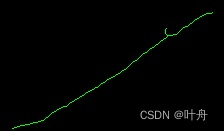
1.3 计算骨架线长度
对于上一步得到的二值化骨架图,先转化为mask(注意,这里的mask是宽度为1个像素的骨架图的mask),然后求轮廓,最后对于每个轮廓求周长的1/2,加起来即为整个骨架线的长度:
import cv2
import numpy as np

length = 0

# 求skeleton
s_skeleton, s_skeleton_pts = get_skeleton(s_instance)
# 利用骨骼线得到轮廓
s_bpixel = np.zeros_like(s_skeleton, dtype=np.uint8)
s_bpixel[s_skeleton] = 255
s_contours, _ = cv2.findContours(s_bpixel, cv2.RETR_TREE, cv2.CHAIN_APPROX_SIMPLE)
# 计算长度
for s_contour in s_contours:
    length += cv2.arcLength(s_contour, True) / 2

print("长度:", length)
这里主要是将线条长度计算的问题转换成了线条周长的计算,这样就可以利用cv2.arcLength来计算周长再除以2即为长度。
2、验证
为了验证方法的有效性,可以人工绘制一些简单的线条,然后利用上面的方法求一下长度,即可知道是否计算正确;以下是一些验证的示例:
给出一些示例(“=” 前后分别为:arcLength算出来的值、人为解释):
a. 5.656854152679443 = 4*sqrt(2)
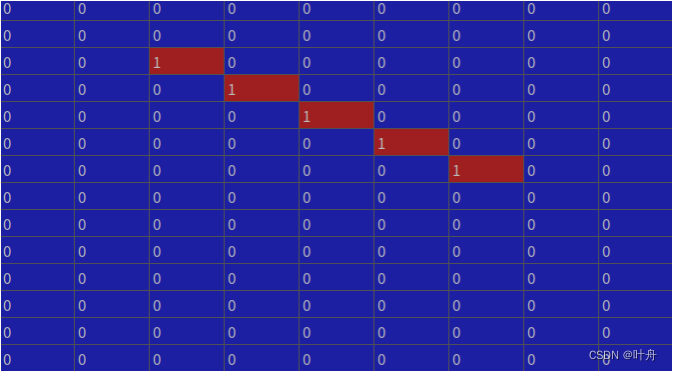
b. 7.242640614509582 = 3*sqrt(2) + 3
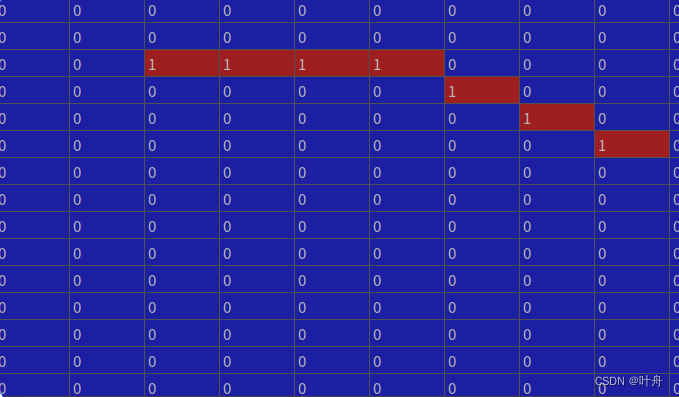
c. 4.2426406145095825 = 3*sqrt(2)
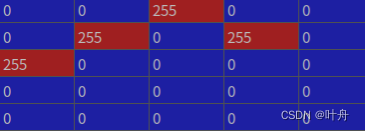
d. 9.485281374238571 = 2*3*sqrt(2) + 1
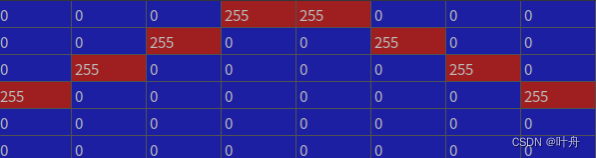
e. 11.899494936611665 = (3 + 1 + 3)* sqrt(2) + 2
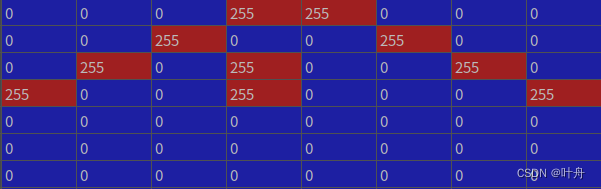
f. 5.656854249492381 = 4 * sqrt(2)
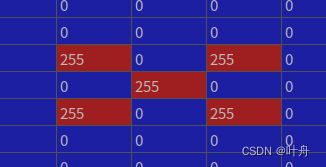
参考:

DAMO开发者矩阵,由阿里巴巴达摩院和中国互联网协会联合发起,致力于探讨最前沿的技术趋势与应用成果,搭建高质量的交流与分享平台,推动技术创新与产业应用链接,围绕“人工智能与新型计算”构建开放共享的开发者生态。
更多推荐

 1
1 0
0- 0


 已为社区贡献15条内容

所有评论(0)