人脸识别SDK(Android)之设备相机画面采集
关于人脸识别课程,不了解的可先看课程预告:重磅上线!免费带您从0到1手撸一款人脸识别SDK应用
关于人脸识别技术应用及核心技术简介,可以看之前发送的iOS课程第一篇文章:人脸识别技术应用及核心技术简介
接下来,我们将为您呈现 Android 人脸识别SDK的完整系列文章,为大家详细介绍人脸识别的核心技术及SDK开发过程,带您从0到1写一款Android版人脸识别SDK应用,Github 实战Demo地址在最后一篇文章。
本系列文章分为5篇,分别为:
-
人脸识别SDK(Android)之设备相机画面采集(即本篇)
-
人脸识别SDK(Android)之如何在Mac上构建Android NCNN库
-
人脸识别SDK(Android)之人脸识别引擎代码
-
人脸识别SDK(Android)之项目回顾总结
-
人脸识别SDK(Android)之Github示例及集成详解
设备相机画面采集
人脸识别首先需要采集到用户的人脸信息,所以本节课程我们重点介绍设备相机画面的采集。
代码核心就是通过自定义CameraView来继承TextureView来承载相机画面,我们先来看下完整代码,然后在细细讲解。
/*** 对于 TextureView 由于其作为 View hierachy 中的一个普通 View。因此我们可以通过操作 matrix ,最后再调用 TextureView#setTransform 来改变其方向;* feature 优化使用libyuv处理视频数据,效率更高*/public class MyCameraView extends TextureView implements View.OnLayoutChangeListener, Camera.PreviewCallback {private static final int MIN_FPS = 15 * 1000;private Activity mActivity;private boolean isSurfaceTextureAvailable = false;// 界面测量尺寸private int mMeasureWidth;private int mMeasureHeight;// 等待开启相机private boolean isWaitingOpenCamera = false;// 相机private Camera mCamera;// 相机预览尺寸private Camera.Size mPreviewSize;// 相机旋转角度private int mCameraAngle;// 前置摄像头private final int mCameraId = Camera.CameraInfo.CAMERA_FACING_FRONT;// 是否开启自动对焦private boolean isAutoFocusEnable = true;// 自动对焦间隔 默认5秒private long mAutoFocusInterval = 5 * 1000;// 对焦回调private Camera.AutoFocusCallback mAutoFocusCallback;// 处理对焦handlerprivate FocusHandler mFocusHandler;// 第一帧private boolean isFirstPreviewFrame = true;private int mPreviewWidth;private int mPreviewHeight;// 是否正在处理private boolean isProcessingFrame = false;// 开始检测private volatile int mDetectStatus = 0; // 0初始状态,1准备完成,2正在识别, 3识别成功,-1识别超时// 读取下一帧的任务private Runnable mPostInferenceCallback;private Handler mMainHandler;private Handler mHandler; // 识别线程private HandlerThread mHandlerThread;private IDetectCallback mDetectCallback;// 保存图片private ExecutorService mExecutorService = Executors.newFixedThreadPool(Runtime.getRuntime().availableProcessors() + 1);private SurfaceTextureListener mSurfaceTextureListener;private int mCameraStatus; // 0缺省 1opening 2open 3预览public MyCameraView(Context context) {this(context, null);}/** 在view初始化的时候就打开相机* */public MyCameraView(Context context, AttributeSet attrs) {super(context, attrs);mSurfaceTextureListener = new SurfaceTextureListener() {@Overridepublic void onSurfaceTextureAvailable(SurfaceTexture surface, int width, int height) {isSurfaceTextureAvailable = true;startPreview();}@Overridepublic void onSurfaceTextureSizeChanged(SurfaceTexture surface, int width, int height) {}@Overridepublic boolean onSurfaceTextureDestroyed(SurfaceTexture surface) {release();return true;}@Overridepublic void onSurfaceTextureUpdated(SurfaceTexture surface) {}};if (context instanceof Activity) {mActivity = (Activity) context;}setSurfaceTextureListener(mSurfaceTextureListener);addOnLayoutChangeListener(this);setOnClickListener(new OnClickListener() {public void onClick(View v) {// 强制聚焦if (mCamera == null || mCameraStatus != 3) { // 相机没有打开,获取没有进行预览return;}getFocusHandler().sendForceFocusMessage();}});mMainHandler = new Handler(Looper.getMainLooper());mHandlerThread = new HandlerThread("detect", Process.THREAD_PRIORITY_FOREGROUND);mHandlerThread.start();mHandler = new Handler(mHandlerThread.getLooper());open(); // 开启相机,这个可能属于一个比较耗时的操作。。。续优化可以放在线程中执行,webrtc就是这么做的mDetectStatus = 0;}protected synchronized void runInBackground(final Runnable r) {if (mHandler != null && r != null) {mHandler.post(r);}}protected synchronized void runInUIThread(Runnable r) {if (mMainHandler != null && r != null) {mMainHandler.post(r);}}@Overridepublic void onLayoutChange(View v, int left, int top, int right, int bottom, int oldLeft, int oldTop, int oldRight, int oldBottom) {int measuredWidth = getMeasuredWidth();int measuredHeight = getMeasuredHeight();boolean sizeChanged = mMeasureWidth != measuredWidth || mMeasureHeight != measuredHeight;if (sizeChanged) {mMeasureWidth = getMeasuredWidth();mMeasureHeight = getMeasuredHeight();if (isWaitingOpenCamera) {open();} else if (mCamera != null) {transformTexture();}}}public void setDetectCallback(IDetectCallback detectCallback) {mDetectCallback = detectCallback;}public void startDetect() {if (mDetectStatus == 0) {mDetectStatus = 1;}}/** 此方法这个逻辑int detectResult = mSmartDetector.detect(yuv, width, height);* 将采集到的相机数据交给SmartDetector_detect c++代码处理* 并会返回一个处理结果* */private void processImage(final byte[] data) {// 在子线程进行检测runInBackground(new Runnable() {@Overridepublic void run() {if ((mDetectStatus == 1 || mDetectStatus == 2)) { // 准备就绪 或者 是识别中mDetectStatus = 2;byte[] yuv;int width = mPreviewHeight;int height = mPreviewWidth;if (mCameraId == Camera.CameraInfo.CAMERA_FACING_FRONT) { // 前置yuv = ImageUtils.rotateYUVDegree270AndMirror(data, mPreviewWidth, mPreviewHeight);} else { // 后置yuv = ImageUtils.rotateYUVDegree90(data, mPreviewWidth, mPreviewHeight);}try {if (mPostInferenceCallback != null) {mPostInferenceCallback.run();}savePic(yuv);} catch (Exception e) {}}}});}private void savePic(final byte[] data) {mExecutorService.submit(new Runnable() {@Overridepublic void run() {int width = mPreviewHeight;int height = mPreviewWidth;int[] rgbBytes = new int[width * height];ImageUtils.convertYUV420SPToARGB8888(data, width, height, rgbBytes);Bitmap rgbFrameBitmap = Bitmap.createBitmap(width, height, Bitmap.Config.ARGB_8888);rgbFrameBitmap.setPixels(rgbBytes, 0, width, 0, 0, width, height);if (mDetectCallback != null) {runInUIThread(new Runnable() {@Overridepublic void run() {mDetectCallback.onSuccess(rgbFrameBitmap);}});}}});}/** 获取实时的相机数据,交给processImage方法处理* */@Overridepublic void onPreviewFrame(final byte[] data, Camera camera) {// 这个时候拿到的是YUV数据,YUV420SP ==> NV21if (isProcessingFrame || mCamera == null) { // 正在处理,直接丢弃后面的数据, 超时也不做处理return;}if (isFirstPreviewFrame) {Camera.Size previewSize = mCamera.getParameters().getPreviewSize();mPreviewWidth = previewSize.width;mPreviewHeight = previewSize.height;isFirstPreviewFrame = false;}isProcessingFrame = true; // 开始处理数据mPostInferenceCallback =new Runnable() {@Overridepublic void run() {if (data == null || mCamera == null) {return;}mCamera.addCallbackBuffer(data); // 必须调用 否则 onPreviewFrame 这个方法不会被回调 感觉和 isProcessingFrame 这个标记起到了同样的作用isProcessingFrame = false;}};processImage(data);}public void onResume() {startPreview();}public void onPause() {stopPreview();}public void onDestory() {release();}private int getViewWidth() {return mMeasureWidth;}private int getViewHeight() {return mMeasureHeight;}private void transformTexture() { // 进行一次缩放处理,保证不变形,问题可能会有白边/黑边问题if (this.mPreviewSize != null) {float viewWidth = (float) this.getViewWidth();float viewHeight = (float) this.getViewHeight();float ratio = this.getRatio(this.mPreviewSize);RectF toRect = new RectF(0.0F, 0.0F, viewHeight, viewWidth);RectF fromRect;if (this.isPortrait()) {fromRect = new RectF(0.0F, 0.0F, viewHeight, ratio * viewHeight);} else {fromRect = new RectF(0.0F, 0.0F, viewWidth / ratio, viewWidth);}Matrix matrix = new Matrix();matrix.setRectToRect(fromRect, toRect, Matrix.ScaleToFit.FILL);this.setTransform(matrix);}}private void open() { // 打开相机try {if (mMeasureWidth <= 0) {isWaitingOpenCamera = true;return;}isWaitingOpenCamera = false;if (mCameraStatus == 0) {mCameraStatus = 1;mCamera = Camera.open(mCameraId); // 开启前置摄像头Camera.CameraInfo cameraInfo = new Camera.CameraInfo();Camera.getCameraInfo(mCameraId, cameraInfo);Camera.Parameters params = mCamera.getParameters();mPreviewSize = calBestPreviewSize(params);params.setPreviewSize(mPreviewSize.width, mPreviewSize.height);int[] fps = calBestFpsRange(params);params.setPreviewFpsRange(fps[0], fps[1]); // 防止厂商修改底层代码,所以设置一下帧率范围,比如部分OV厂商低于15FPS屏幕暗mCameraAngle = getCameraAngle(mCameraId);mCamera.setDisplayOrientation(mCameraAngle);mCamera.setParameters(params);transformTexture();mCameraStatus = 2;if (isSurfaceTextureAvailable) {startPreview();}}} catch (Exception e) { // try catch 防止厂商修改底层代码,Log.e("smart", "open: " + e.toString());}}private void startPreview() {if (mCamera != null && mCameraStatus == 2 && isSurfaceTextureAvailable) { // 相机正常开启try {mCamera.setPreviewTexture(getSurfaceTexture());// setPreviewCallback 只要预览处于活动状态,就会重复调用回调。这种方法可以随时调用,保证预览是实时的。// setPreviewCallbackWithBuffer 在摄像头开启时增加一个回调函数,在每一帧出现时调用.通过addCallbackBuffer(byte[])使用一个缓存容器来显示这些数据.// 通过内存复用来提高预览的效率,但是如果没有调用这个方法addCallbackBuffer(byte[]),帧回调函数就不会被调用,也就是说在每一次回调函数调用后都必须调用addCallbackBuffer(byte[])mCamera.setPreviewCallbackWithBuffer(this);Camera.Size previewSize = mCamera.getParameters().getPreviewSize();mCamera.addCallbackBuffer(new byte[ImageUtils.getYUVByteSize(previewSize.width, previewSize.height)]);mCamera.startPreview();mCameraStatus = 3;getFocusHandler().sendAutoFocusMessage();} catch (Exception e) {}}}private void stopPreview() {if (mCamera != null && mCameraStatus == 3) {try {mCamera.stopPreview();mCamera.setPreviewCallbackWithBuffer(null);mCameraStatus = 2;} catch (Exception e) {}}}private void release() {isSurfaceTextureAvailable = false;isFirstPreviewFrame = true;mDetectStatus = 0;if (mCamera != null) {getFocusHandler().removeFocusMessage();mCamera.stopPreview();mCamera.setPreviewCallbackWithBuffer(null);mCamera.release();mCamera = null;mCameraStatus = 0;}}/*** 是否是竖屏*/private boolean isPortrait() {return getResources().getConfiguration().orientation == 1;}private int getPreviewWidth(Camera.Size size) {return isPortrait() ? size.height : size.width;}private int getPreviewHeight(Camera.Size size) {return isPortrait() ? size.width : size.height;}private float getRatio(Camera.Size size) {return (float) getPreviewWidth(size) / (float) getPreviewHeight(size);}/*** 计算最佳帧率范围*/private int[] calBestFpsRange(Camera.Parameters camPara) {List<int[]> allSupportedFps = camPara.getSupportedPreviewFpsRange();int[] bestFps = new int[2];for (int[] supportFps : allSupportedFps) {if (supportFps[1] < MIN_FPS) {continue;}bestFps = supportFps;}if (bestFps[1] <= 0) {bestFps = allSupportedFps.get(0);}return bestFps;}/*** 计算最佳尺寸*/private Camera.Size calBestPreviewSize(Camera.Parameters camPara) {List<Camera.Size> allSupportedSize = camPara.getSupportedPreviewSizes(); // 获取当前相机支持的预览尺寸Camera.Size bestSize = null; // 记录最佳尺寸final float screenRatio = (float) getViewWidth() / (float) getViewHeight(); // 计算当前view的宽高比Collections.sort(allSupportedSize, new Comparator<Camera.Size>() { // 对当前所有支持的尺寸进行排序 越接近1 越靠近前public int compare(Camera.Size size1, Camera.Size size2) {float ratio1 = getRatio(size1);float ratio2 = getRatio(size2);float diff1 = Math.abs(screenRatio - ratio1);float diff2 = Math.abs(screenRatio - ratio2);return Float.compare(diff1, diff2);}});List<Camera.Size> appropriateSizeList = new ArrayList(); // 适合的尺寸集合float proximateRatio = 0.0F;if (allSupportedSize.size() > 0) {proximateRatio = getRatio(allSupportedSize.get(0));}for (Camera.Size size : allSupportedSize) {float ratio = getRatio(size);float diff = Math.abs(ratio - proximateRatio);if ((double) diff < 0.1D) {appropriateSizeList.add(size);}}Collections.sort(appropriateSizeList, new Comparator<Camera.Size>() { // 对合适的尺寸进行排序int differSize(Camera.Size size) {return Math.abs(getViewWidth() - getPreviewWidth(size) + (getViewHeight() - getPreviewHeight(size)));}public int compare(Camera.Size o1, Camera.Size o2) {float sizeSum1 = (float) differSize(o1);float sizeSum2 = (float) differSize(o2);return Float.compare(sizeSum1, sizeSum2);}});if (appropriateSizeList.size() > 0) {bestSize = appropriateSizeList.get(0);} else if (allSupportedSize.size() > 0) {bestSize = allSupportedSize.get(0);}return bestSize;}/*** 获取相机旋转角度*/private int getCameraAngle(int cameraId) {int rotateAngle = 90;if (mActivity != null) {Camera.CameraInfo info = new Camera.CameraInfo();Camera.getCameraInfo(cameraId, info); // info.orientation 相机图像方向// 获取当前屏幕方向int rotation = mActivity.getWindowManager().getDefaultDisplay().getRotation();int degrees = 0;switch (rotation) {case Surface.ROTATION_0:degrees = 0;break;case Surface.ROTATION_90:degrees = 90;break;case Surface.ROTATION_180:degrees = 180;break;case Surface.ROTATION_270:degrees = 270;}if (1 == cameraId) { // 前置摄像头需要做一次镜像翻转处理rotateAngle = (info.orientation + degrees) % 360;rotateAngle = (360 - rotateAngle) % 360;} else {rotateAngle = (info.orientation - degrees + 360) % 360;}}return rotateAngle;}private Camera.AutoFocusCallback getAutoFocusCallback() {if (mAutoFocusCallback == null) {mAutoFocusCallback = new Camera.AutoFocusCallback() {public void onAutoFocus(boolean success, Camera camera) {getFocusHandler().sendAutoFocusMessage();}};}return mAutoFocusCallback;}private synchronized FocusHandler getFocusHandler() {if (mFocusHandler == null) {mFocusHandler = new FocusHandler(Looper.getMainLooper());}return mFocusHandler;}private final class FocusHandler extends Handler {private static final int MESSAGE_AUTO_FOCUS = 0x1001;private static final int MESSAGE_FORCE_FOCUS = 0x1002;FocusHandler(Looper looper) {super(looper);}void sendAutoFocusMessage() { // 发送自动对焦sendEmptyMessageDelayed(MESSAGE_AUTO_FOCUS, mAutoFocusInterval);}void sendForceFocusMessage() { // 发送手动强制对焦sendEmptyMessage(MESSAGE_FORCE_FOCUS);}void removeFocusMessage() {removeMessages(MESSAGE_AUTO_FOCUS);removeMessages(MESSAGE_FORCE_FOCUS);}private void performFocus() {try {mCamera.autoFocus(getAutoFocusCallback());} catch (Exception e) { // 避免傻屌厂商乱改 相机操作尽量try catch一下}}@Overridepublic void handleMessage(Message msg) {switch (msg.what) {case MESSAGE_AUTO_FOCUS: // 自动对焦if (mCamera != null && mCameraStatus == 3 && isAutoFocusEnable) { // 相机打开,预览,开启了自动对焦模式performFocus();}break;case MESSAGE_FORCE_FOCUS: // 手动点击以后强制手动对焦if (mCamera != null && mCameraStatus == 3) { // 相机打开,预览performFocus();}break;}}}}
接下我们来分析下核心流程。
1) 开启相机
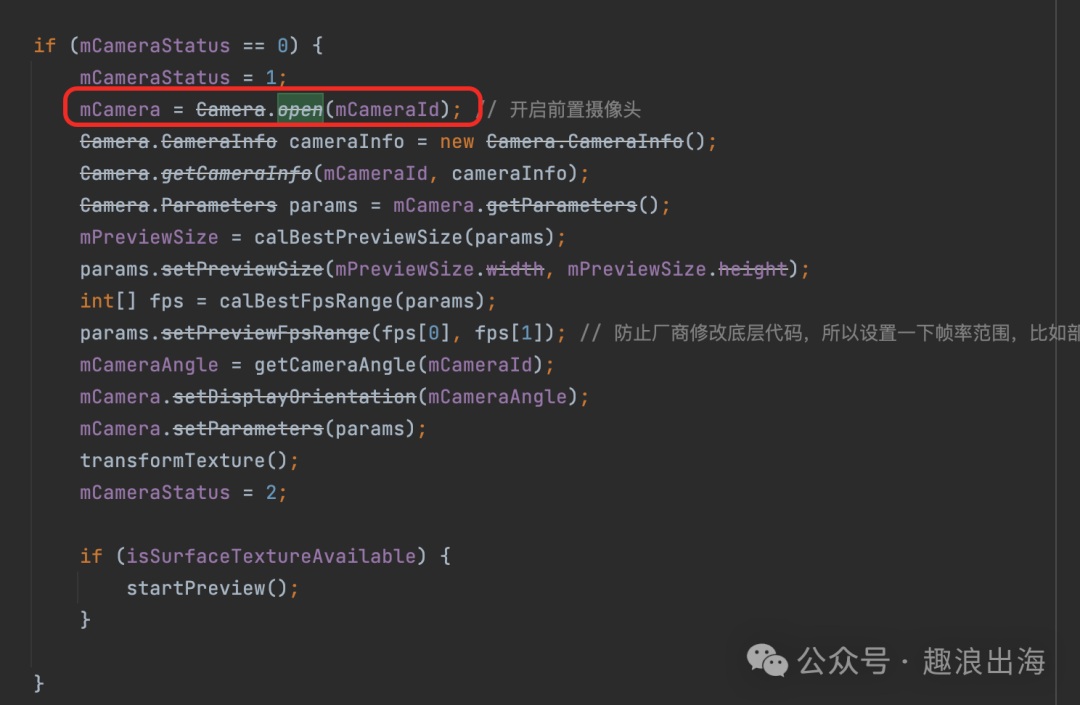
我们通过Camera.open(Camera.CameraInfo.CAMERA_FACING_FRONT)获取Camera对象,并对其进行属性设置(例如尺寸、帧率、旋转角度等)。在设置完毕后,调用startPreview方法开始预览相机数据。
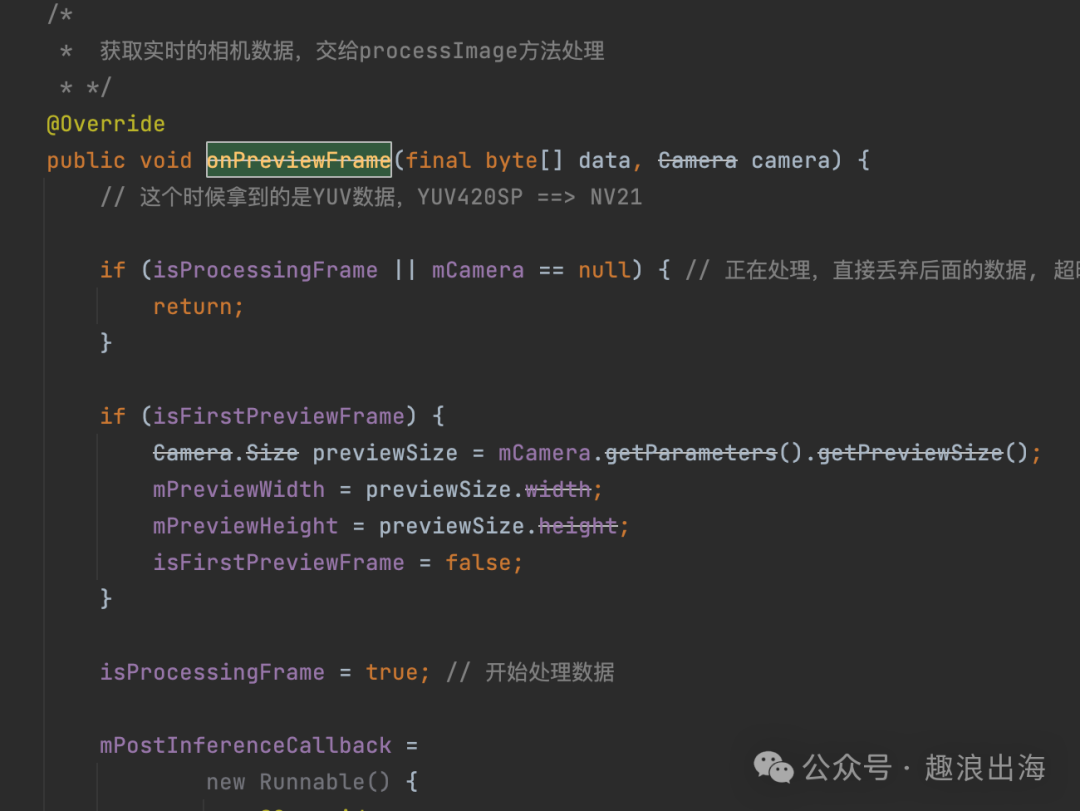
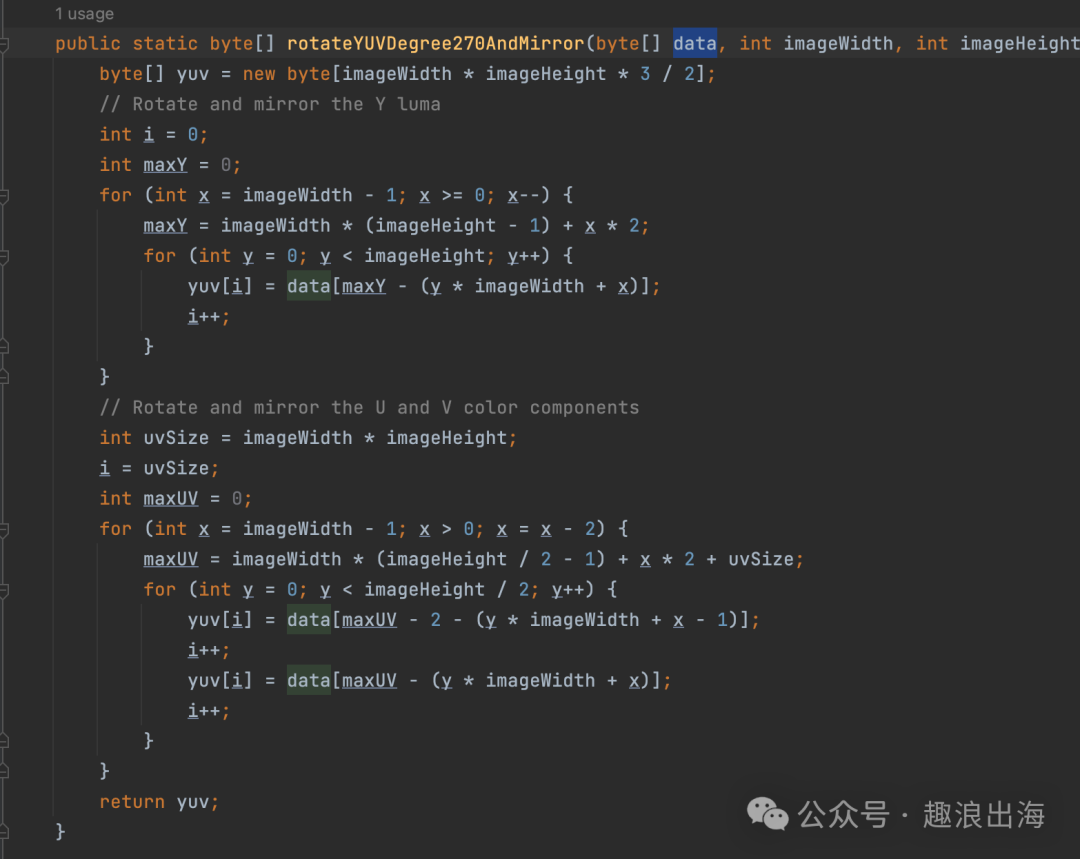
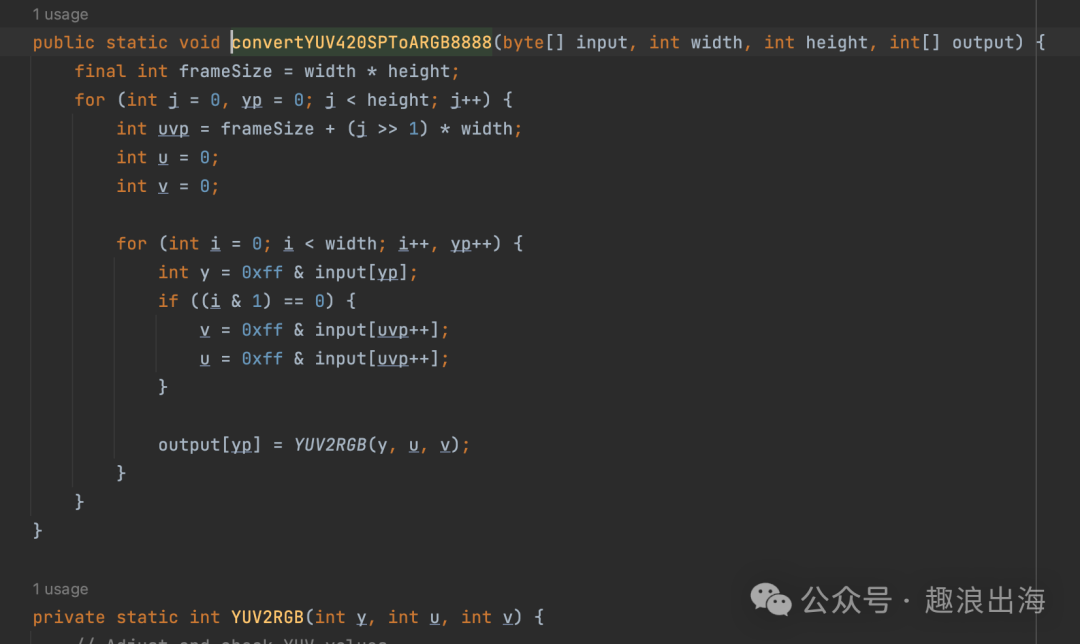
2)自定义控件MyCameraView实现了Camera.PreviewCallback,并且设置了mCamera.setPreviewCallbackWithBuffer(this),所以摄像头预览启动后,每获取到一帧数据onPreviewFrame方法就会被调用,在onPreviewFrame(final byte[] data, Camera camera) 方法中的data是NV21数据,我们需要将该数据转为yuv格式以及rgb格式的数据进行处理。
本节课程我们主要介绍了设备相机画面的采集过程,下一节课程将会介绍如何编译Android 平台的NCNN库。

DAMO开发者矩阵,由阿里巴巴达摩院和中国互联网协会联合发起,致力于探讨最前沿的技术趋势与应用成果,搭建高质量的交流与分享平台,推动技术创新与产业应用链接,围绕“人工智能与新型计算”构建开放共享的开发者生态。
更多推荐

 3
3 0
0- 0


 已为社区贡献3条内容

所有评论(0)