Pathon爬取2345天气网天气数据
·
Pathon爬取2345天气网天气数据
导入库
import requests
from bs4 import BeautifulSoup as bs
import pandas as pd
构造参数信息
- 构造url
- 进入2345天气网首页https://tianqi.2345.com/
- 滚动到页面最下面,选择历史天气,如图

- 点击进入历史天气,选择某个城市的历史天气数据,如图
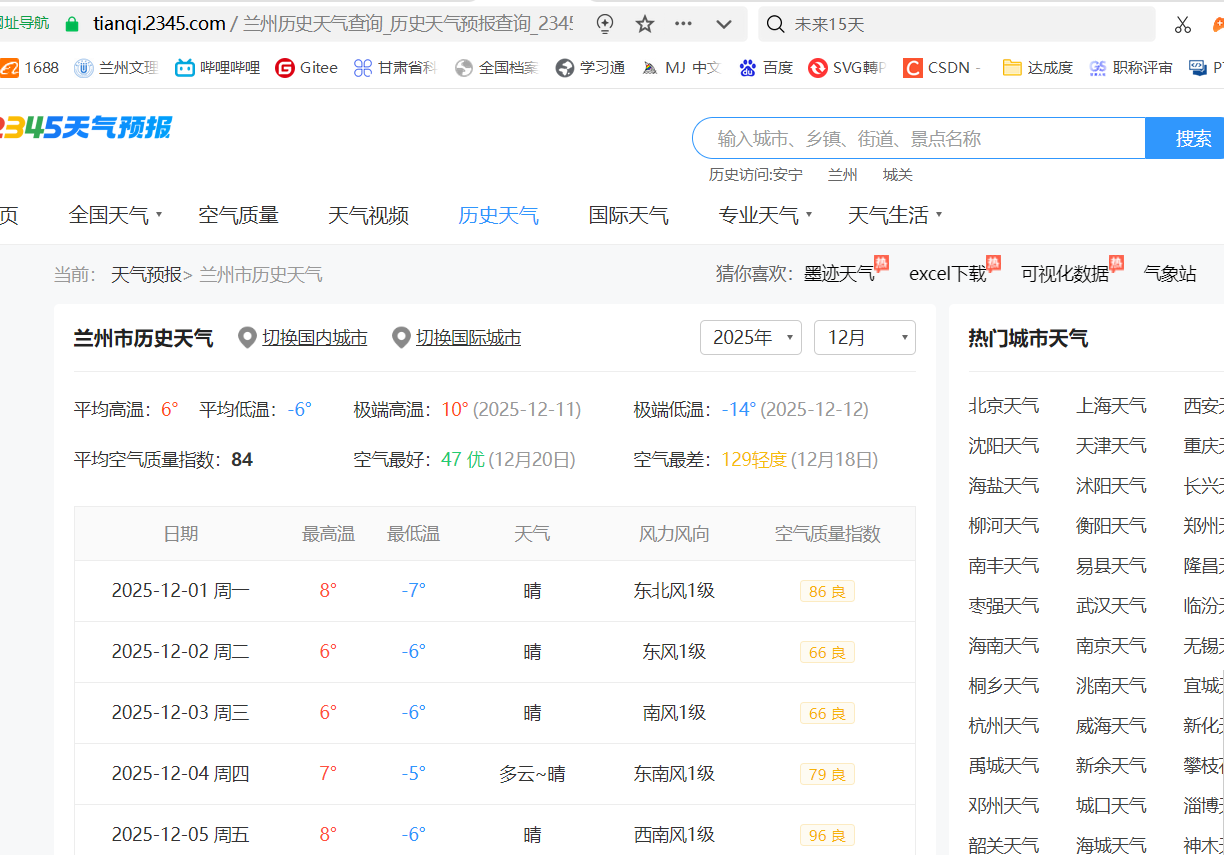 -选择浏览器的“开发者工具”,刷新浏览器页面,重新执行页面内容,在开发者工具的“网络”选项卡中选择“Fetch/XHR”,如下图所示
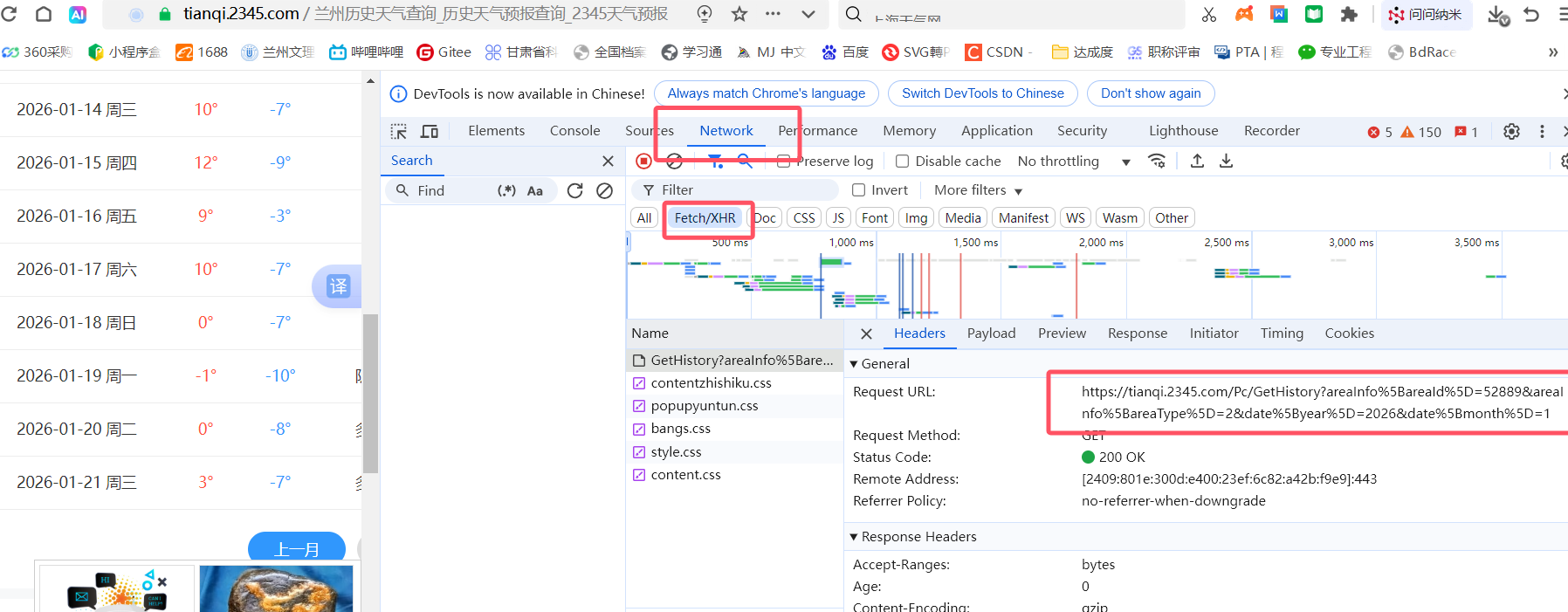
该url即为爬取页面的真实url地址,通过点击上一页、下一页观察地址的变化。
-以下构造可变的URL地址。
year=2023
month=3
url = 'https://tianqi.2345.com/Pc/GetHistory?areaInfo%5BareaId%5D=60239&areaInfo%5BareaType%5D=2&date%5B' \
              'year%5D='+str(year)+'&date%5Bmonth%5D='+str(month)
- 设置headers信息,直接复制即可。
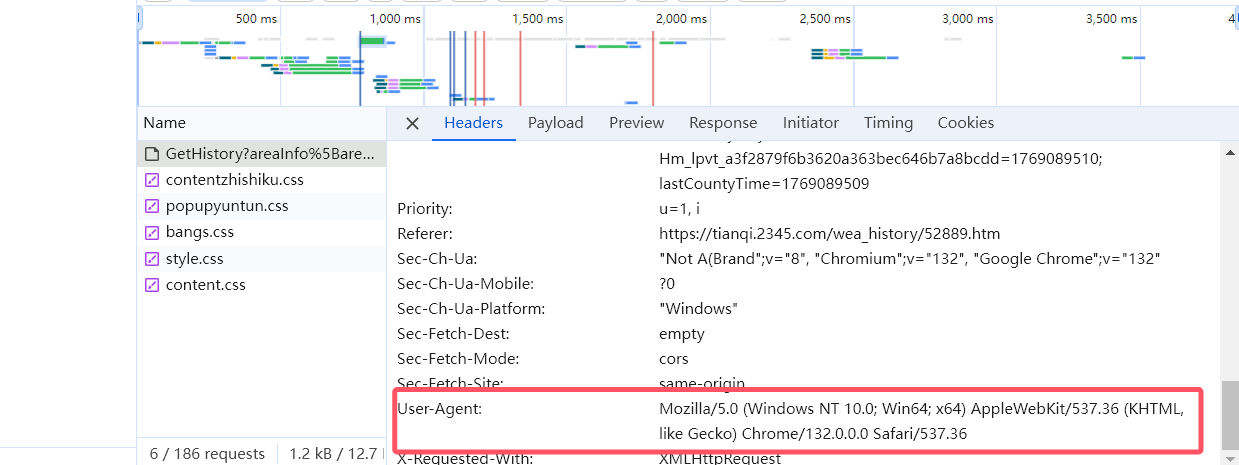 4. 如果爬取的页面有很多,可考虑将要爬取的url地址构造成一个列表,然后在后面的爬取程序中进行循环
headers = {'User-Agent': 'Mozilla/5.0 (Windows NT 10.0; Win64; x64) AppleWebKit/537.36 (KHTML, like Gecko) Chrome/104.0.5112.102 Safari/537.36 Edg/104.0.1293.63',
        'Accept': 'text/html,application/xhtml+xml,application/xml;q=0.9,image/webp,image/apng,*/*;q=0.8',
        'Connection': "keep-alive",
        'cache-control': "no-cache",
        'Referer': 'https://tianqi.2345.com/'
}
``
## 爬取网页
* **分析页面内容**
* __爬取页面内容__
* *解析爬取结果*
* _处理爬取结果_
>>> 可考虑将爬取的多个页面的数据存放在一个列表中,然后再进行遍历

```python
r = requests.get(url,headers=headers)
print(r.encoding)
print(r.apparent_encoding)
# r.encoding是根据http header推测出的编码方式,如果没有header,默认为ISO-8859-1。
# r.apparent_encoding是根据内容分析出来的编码方式,用这个代替r.encoding可以解析出中文。
# 可以在发送request请求前,先设置响应的编码方式。
# 如:r.encoding = "utf-8" 或"iso-8859-1"或"ascii"或"unicode-escape"
处理爬取内容
#encode()方法是字符串类型数据编码为字节型数据
#decode()方法是将字节型数据解码为字符型数据。
print(type(r.text))
print(type(r.content))
html_text = r.content.decode('unicode-escape')
html_text=html_text.replace("\/","/")
print(html_text)
解析爬取内容
soup = bs(html_text,'html.parser')
print(soup.prettify())
history_table=soup.find("table",{"class":"history-table"})
history_table
tr_all = history_table.find_all("tr")
print(tr_all[1])
<tr>
<td>2022-03-01 周二</td>
<td style="color:#ff5040;">7°</td>
<td style="color:#3097fd;">-2°</td>
<td>多云~晴</td>
<td>东北风1级</td>
<td><span class="history-aqi wea-aqi-3">107 轻度</span></td> </tr>
th_all=tr_all[0].find_all("th")
columns_name=list(thx.string for thx in th_all)
print(columns_name)
['日期', '最高温', '最低温', '天气', '风力风向', '空气质量指数']
td_all=tr_all[1].find_all('td')
td_all[5].text
'107 轻度'
data=[]
for trx in tr_all:
    temp=[]
    td_all=trx.find_all("td")
    for tdx in td_all:
        temp.append(tdx.text)
    data.append(temp) if len(temp)>0 else 0
data[0:5]
[['2022-03-01 周二', '7°', '-2°', '多云~晴', '东北风1级', '107 轻度'],
 ['2022-03-02 周三', '9°', '0°', '多云', '东北风1级', '86 良'],
 ['2022-03-03 周四', '8°', '0°', '阴~多云', '东北风1级', '74 良'],
 ['2022-03-04 周五', '11°', '1°', '多云', '东北风1级', '69 良'],
 ['2022-03-05 周六', '10°', '1°', '阴~多云', '北风1级', '80 良']]
pandas处理数据
df=pd.DataFrame(data,columns=columns_name)
df.head()
| 日期 | 最高温 | 最低温 | 天气 | 风力风向 | 空气质量指数 | |
|---|---|---|---|---|---|---|
| 0 | 2022-03-01 周二 | 7° | -2° | 多云~晴 | 东北风1级 | 107 轻度 |
| 1 | 2022-03-02 周三 | 9° | 0° | 多云 | 东北风1级 | 86 良 |
| 2 | 2022-03-03 周四 | 8° | 0° | 阴~多云 | 东北风1级 | 74 良 |
| 3 | 2022-03-04 周五 | 11° | 1° | 多云 | 东北风1级 | 69 良 |
| 4 | 2022-03-05 周六 | 10° | 1° | 阴~多云 | 北风1级 | 80 良 |
保存结果
df.to_excel("./data/qianqi202203.xlsx",encoding='utf_8')

DAMO开发者矩阵,由阿里巴巴达摩院和中国互联网协会联合发起,致力于探讨最前沿的技术趋势与应用成果,搭建高质量的交流与分享平台,推动技术创新与产业应用链接,围绕“人工智能与新型计算”构建开放共享的开发者生态。
更多推荐



 10
10 0
0- 0


 已为社区贡献1条内容

所有评论(0)