SLAM进阶——数据集
目录
SLAM进阶专栏部分,系统梳理了SLAM各环节的主流算法、在具身智能与大模型中的主流使用方法,配合博主自行编写的demo进行效果展示。该专栏旨在细节了解SLAM技术在具身智能领域的主流算法、及大模型对于SLAM技术的赋能。
1 寻找目标领域数据集并下载
(1)TUM数据集链接:https://cvg.cit.tum.de/data/datasets/rgbd-dataset/download
(2)KITTI数据集链接:https://www.cvlibs.net/datasets/kitti/eval_odometry.php
(3)EuRoC数据集链接:https://projects.asl.ethz.ch/datasets/doku.php?id=kmavvisualinertialdatasets
(4)FinnForest数据集链接:
https://etsin.fairdata.fi/datasets
(5)可以根据自己领域制作/寻找
2 数据集处理及运行
2.1 单目
基于ORB_SLAM2运行,执行文件为mono_tum.cc
2.2.1 图片
文件名rgb要求格式
000000.png
000001.png
000002.png
...
图片放置路径:/media/ch/WD_BLACK/dataset/S01_13Hz_summer_seq1_shortLoop/S01_13Hz/rgb
2.2.2 时间戳
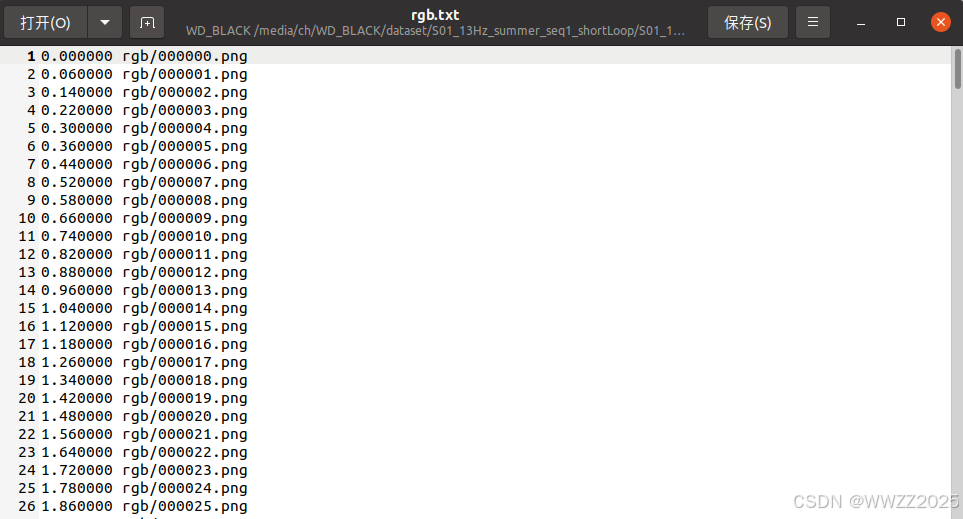
文件名rgb.txt,时间戳格式要求:
0.000000 rgb/000000.png
0.060000 rgb/000001.png
0.140000 rgb/000002.png
0.220000 rgb/000003.png
0.300000 rgb/000004.png
0.360000 rgb/000005.png
0.440000 rgb/000006.png
...
(1)拍摄时间格式
0.000000
0.060000
0.140000
0.220000
...
a.创建文本orb_timestamps.py
b.调整为图片标准形式+时间,需要写个脚本进行转换
import os

# 时间戳文件路径
TIMESTAMP_FILE = 'times_S01.txt'
# 图像子文件夹名
IMAGE_DIR = 'rgb'
# 输出文件名
OUTPUT_FILE = 'rgb.txt'
# -----------------------------------

try:
    with open(TIMESTAMP_FILE, 'r') as f:
        timestamps = [line.strip() for line in f if line.strip()]
except FileNotFoundError:
    print(f"错误:未找到文件 {TIMESTAMP_FILE},请检查路径。")
    exit()

num_images = len(timestamps)

with open(OUTPUT_FILE, 'w') as f:
    for i in range(num_images):
        # 000000.png, 000001.png 等文件名
        filename = f'{i:06d}.png'

        # 写入一行: 时间戳 文件路径/文件名
        timestamp = timestamps[i]
        line = f'{timestamp} {IMAGE_DIR}/{filename}\n'
        f.write(line)

print(f"成功生成 {num_images} 个关联,保存到 {OUTPUT_FILE}。")
c.运行指令,生成orb_timestamps.py文件
python3 orb_timestamps.pyd.检查
e.时间戳路径:rgb.txt
2.2.3 相机参数yaml编写
参数需要根据实际采集的数据集拍摄相机进行修改,yaml配置文件名Finn_s01.yaml
%YAML:1.0

#--------------------------------------------------------------------------------------------
# Camera Parameters. Adjust them!
#--------------------------------------------------------------------------------------------

# Camera calibration and distortion parameters (OpenCV)
Camera.fx: 1056.6287421208997
Camera.fy: 1056.9497022783046
Camera.cx: 952.1135175072209
Camera.cy: 592.824593628865

Camera.k1: -0.12427059109969174
Camera.k2: 0.08183525905697533
Camera.p1: 0.0
Camera.p2: 0.0
Camera.k3: -0.020818847104251116

# Camera frames per second
Camera.fps: 13.0

# Color order of the images (0: BGR, 1: RGB. It is ignored if images are grayscale)
Camera.RGB: 1

#--------------------------------------------------------------------------------------------
# ORB Parameters
#--------------------------------------------------------------------------------------------

# ORB Extractor: Number of features per image
ORBextractor.nFeatures: 4000

# ORB Extractor: Scale factor between levels in the scale pyramid
ORBextractor.scaleFactor: 1.2

# ORB Extractor: Number of levels in the scale pyramid
ORBextractor.nLevels: 8

# ORB Extractor: Fast threshold
# Image is divided in a grid. At each cell FAST are extracted imposing a minimum response.
# Firstly we impose iniThFAST. If no corners are detected we impose a lower value minThFAST
# You can lower these values if your images have low contrast
ORBextractor.iniThFAST: 10
ORBextractor.minThFAST: 3

LoopClosing.minCovisible: 4
LoopClosing.maxDistance: 50

#--------------------------------------------------------------------------------------------
# Viewer Parameters
#--------------------------------------------------------------------------------------------
Viewer.KeyFrameSize: 0.05
Viewer.KeyFrameLineWidth: 1
Viewer.GraphLineWidth: 0.9
Viewer.PointSize:2
Viewer.CameraSize: 0.08
Viewer.CameraLineWidth: 3
Viewer.ViewpointX: 0
Viewer.ViewpointY: -0.7
Viewer.ViewpointZ: -1.8
Viewer.ViewpointF: 500
yaml路径:ORB_SLAM2/Examples/Monocular/Finn_s01.yaml
2.2.4 运行测试
cd ORB_SLAM2
./Examples/Monocular/mono_tum Vocabulary/ORBvoc.txt Examples/Monocular/Finn_s01.yaml /media/ch/WD_BLACK/dataset/S01_13Hz_summer_seq1_shortLoop/S01_13Hz/
2.2 双目
2.2.1 图片
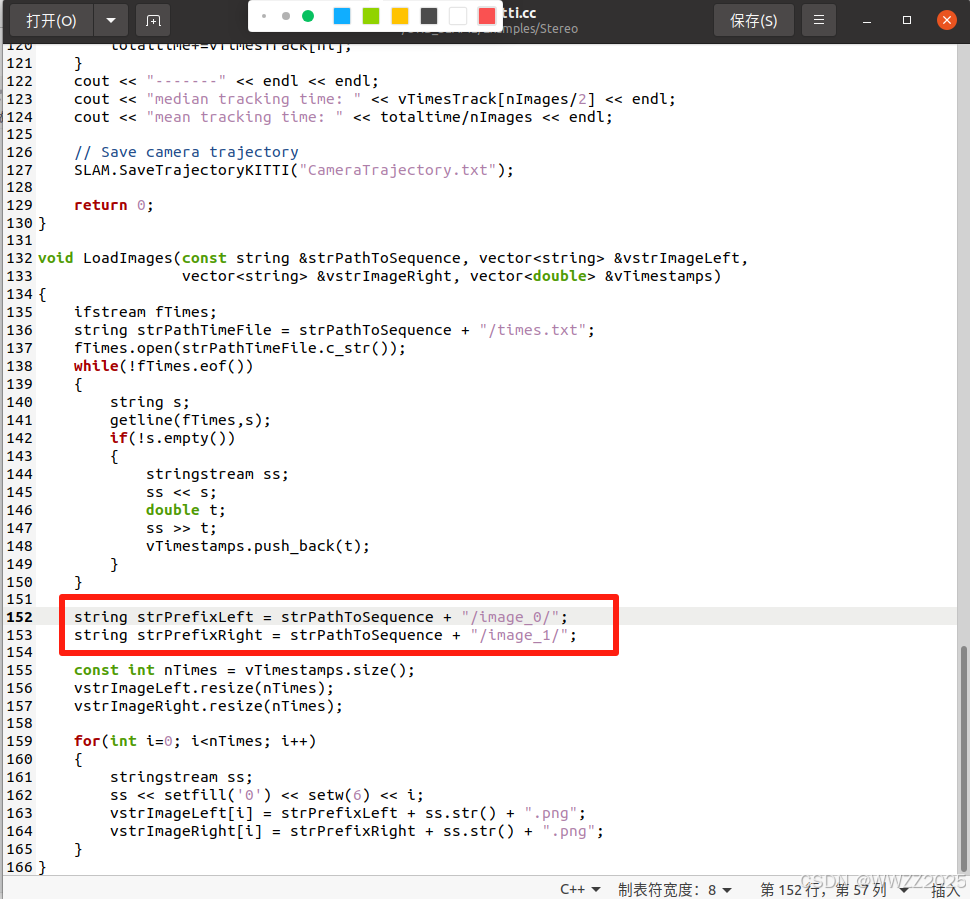
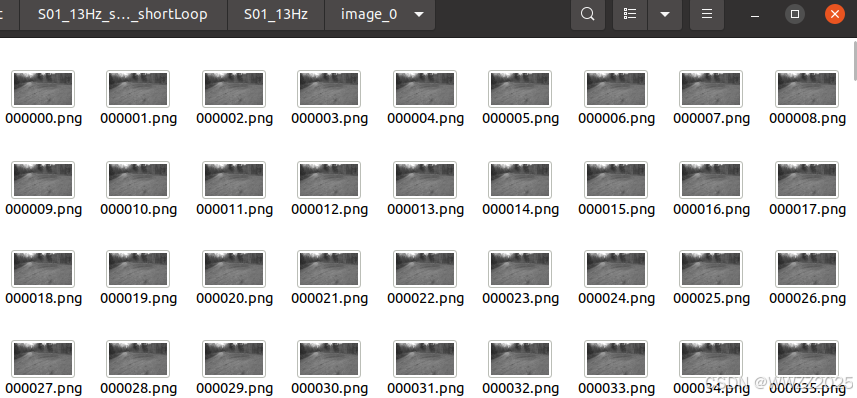
需要左、右目数据集,根据stereo_kitti.cc启动文件将左目文件夹名称改为“image_0”、右目“image_1”,左右目中图片命名格式如下:
000000.png
000001.png
000002.png
...
2.2.2 时间戳
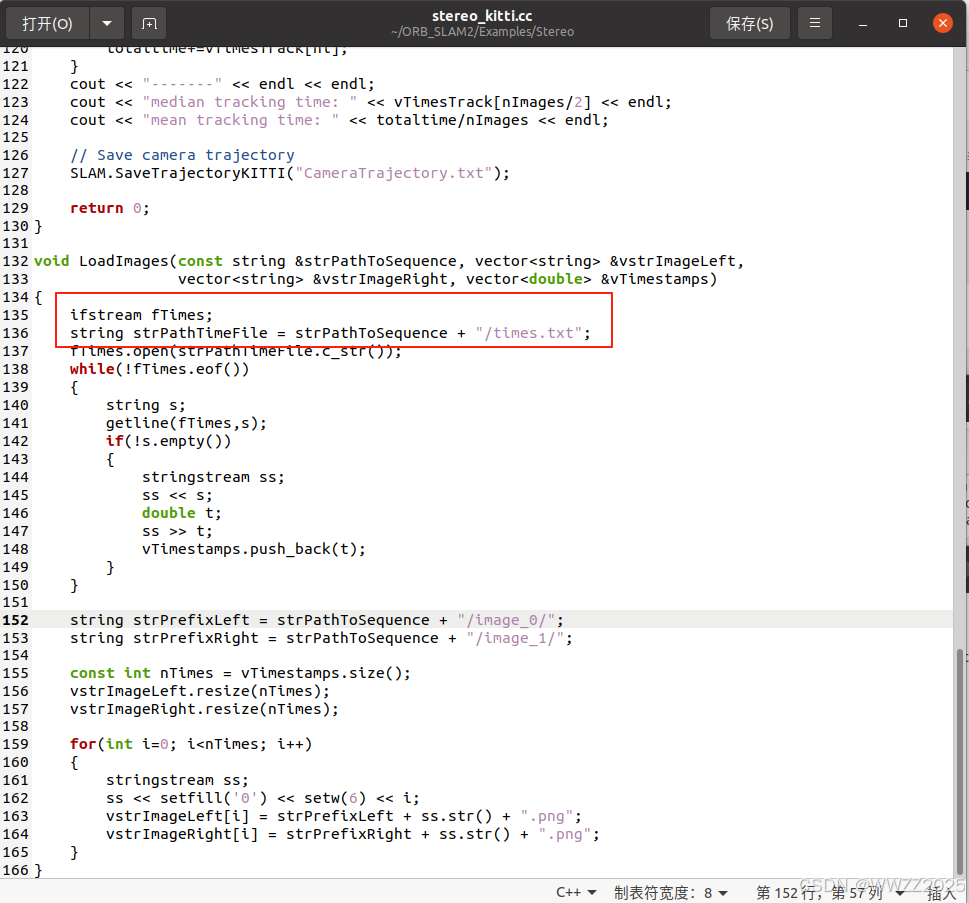
(1)根据stereo_kitti.cc启动文件,时间戳文本名称为“times.txt”
(2)时间戳文本内容格式
0.000000 image_0/000000.png image_1/000000.png
0.060000 image_0/000001.png image_1/000001.png
0.140000 image_0/000002.png image_1/000002.png
(3)数据集时间戳格式
0.000000
0.060000
0.140000
(4)左右目图片格式
(5)编写时间戳脚本
import os

# 输入文件和目录名
timestamp_file = 'times_S01.txt'  # 替换成您的原始时间戳文件名
output_file = 'timestamp_stereo.txt'
left_dir = 'image_0'
right_dir = 'image_1'
image_ext = '.png' # 图像文件扩展名

# 读取原始时间戳
with open(timestamp_file, 'r') as f:
    timestamps = [line.strip().split()[0] for line in f if line.strip()]

# 生成双目关联文件内容
output_lines = []
num_images = len(timestamps)

for i in range(num_images):
    # 确保图像文件名有足够的零填充 (6位)
    image_name = '{:06d}{}'.format(i, image_ext)

    left_path = os.path.join(left_dir, image_name)
    right_path = os.path.join(right_dir, image_name)

    # 格式:timestamp left_path right_path
    line = f"{timestamps[i]} {left_path} {right_path}\n"
    output_lines.append(line)

# 写入新的双目时间戳文件
with open(output_file, 'w') as f:
    f.writelines(output_lines)

print(f"成功生成双目时间戳文件:{output_file},共 {num_images} 行。")
(6)生成目标时间戳文本times.txt,generate_stereo_timestamps.py为脚本文件名
python3 generate_stereo_timestamps.py
2.2.3 相机参数yaml编写
注意替换相机参数,视觉参数viewer parameters可以不改。
%YAML:1.0

#--------------------------------------------------------------------------------------------
# Camera Parameters. Adjust them!
#--------------------------------------------------------------------------------------------

# Camera calibration and distortion parameters (OpenCV)
Camera.fx: 1056.6287421208997
Camera.fy: 1056.9497022783046
Camera.cx: 952.1135175072209
Camera.cy: 592.824593628865

Camera.k1: -0.12427059109969174
Camera.k2: 0.08183525905697533
Camera.p1: 0.0
Camera.p2: 0.0
Camera.k3: -0.020818847104251116

Camera.width: 2013
Camera.height: 1195

# Camera frames per second
Camera.fps: 13.0

# stereo baseline times fx
Camera.bf: 211.77668

# Color order of the images (0: BGR, 1: RGB. It is ignored if images are grayscale)
Camera.RGB: 1

# Close/Far threshold. Baseline times.
ThDepth: 35

#--------------------------------------------------------------------------------------------
# ORB Parameters
#--------------------------------------------------------------------------------------------

# ORB Extractor: Number of features per image
ORBextractor.nFeatures: 4000

# ORB Extractor: Scale factor between levels in the scale pyramid
ORBextractor.scaleFactor: 1.2

# ORB Extractor: Number of levels in the scale pyramid
ORBextractor.nLevels: 8

# ORB Extractor: Fast threshold
# Image is divided in a grid. At each cell FAST are extracted imposing a minimum response.
# Firstly we impose iniThFAST. If no corners are detected we impose a lower value minThFAST
# You can lower these values if your images have low contrast
ORBextractor.iniThFAST: 20
ORBextractor.minThFAST: 5

#--------------------------------------------------------------------------------------------
# Viewer Parameters
#--------------------------------------------------------------------------------------------
Viewer.KeyFrameSize: 0.6
Viewer.KeyFrameLineWidth: 2
Viewer.GraphLineWidth: 1
Viewer.PointSize:2
Viewer.CameraSize: 0.7
Viewer.CameraLineWidth: 3
Viewer.ViewpointX: 0
Viewer.ViewpointY: -100
Viewer.ViewpointZ: -0.1
Viewer.ViewpointF: 2000
2.2.5 运行测试
./Examples/Stereo/stereo_kitti ./Vocabulary/ORBvoc.txt ./Examples/Stereo/Finn_stereo.yaml /media/ch/WD_BLACK/dataset/S01_13Hz_summer_seq1_shortLoop/S01_13Hz/
2.3 RGB-D
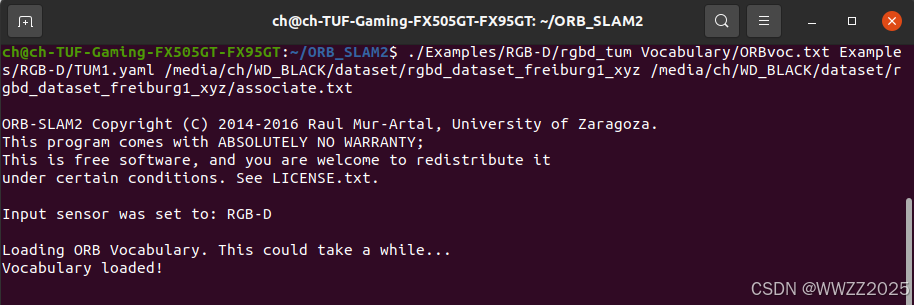
需要将RGB图片转化为png/jpg格式,深度图转为16bit-png(单位毫米),RGB-深度时间戳对齐。
指令格式:RGB-D可执行路径+词袋路径+配置文件路径+RGB文件路径+RGB-深度对齐文件路径,示例如下:

DAMO开发者矩阵,由阿里巴巴达摩院和中国互联网协会联合发起,致力于探讨最前沿的技术趋势与应用成果,搭建高质量的交流与分享平台,推动技术创新与产业应用链接,围绕“人工智能与新型计算”构建开放共享的开发者生态。
更多推荐
 9
9 0
0- 0


 已为社区贡献17条内容

所有评论(0)