从零到一:构建 Vue 2 聊天机器人应用的过程-逐字显示(完整代码)
·
从零到一:构建 Vue 2 聊天机器人应用的过程-逐字显示(完整代码)
在本篇博客中,我将分享如何使用 Vue 2 创建一个简单的聊天机器人应用。这个应用可以进行自然语言交互,提供智能问答、自动学习等功能。下面将详细介绍实现过程以及代码示例。
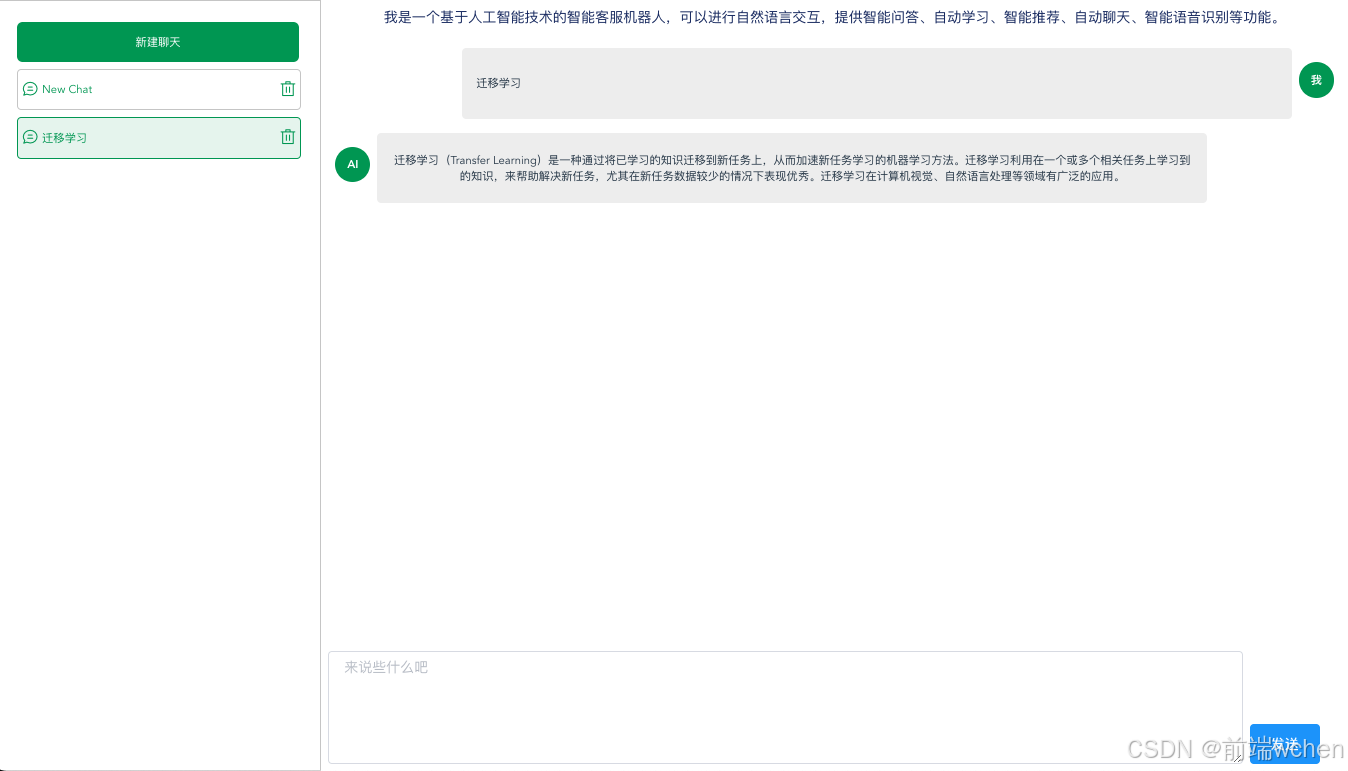
项目结构
my-chatbot/
├── src/
│   ├── components/
│   │   ├── Chatbot.vue
│   │   └── chatData.json
│   ├── App.vue
│   ├── main.js
├── package.json
实现关键点
1. 智能回复和模糊匹配
- 模糊匹配用户消息:使用
matchQuestion和findSimilarQuestion方法,实现了与chatData.json中问题的模糊匹配。 - 相似度计算:代码包含自定义的相似度计算方法
calculateSimilarity,用于对比用户输入与已有问题之间的相似度。这种实现通过编辑距离算法 (calculateEditDistance) 来衡量两个字符串的相似性,并返回最接近的答案。
2. 逐字显示消息效果
- 逐字显示:无论是用户输入的消息,还是机器人回复的内容,都会以逐字显示的方式呈现。通过
delay方法和for...of循环逐字添加字符,营造了一种动态交互效果,增强了用户体验。 - 延迟控制:通过
await this.delay(100)控制显示速度,且该速度可以灵活调整,以便用户更直观地感受到逐字显示的效果。
3. 异步操作和优化用户体验
- 按钮禁用控制:在机器人回复的过程中设置
isRobotReplying为true,禁用发送按钮,防止用户重复操作。在回复完成后恢复按钮的状态,确保了交互流畅度。 - 非阻塞的响应显示:通过
await和async,让消息逐字显示的过程在不阻塞应用的情况下运行,保证了代码的性能和响应速度。
4. 灵活的聊天管理
- 多聊天窗口支持:支持新建、删除、选择不同的聊天会话,通过
createNewChat、selectChat、deleteChat等方法管理聊天列表,并更新当前选择的聊天窗口。 - 自动标题设置:在发送消息时,将用户的第一条消息设为聊天标题,方便用户区分不同聊天。
5. 默认回复和容错处理
- 默认回复:当无法找到匹配问题或相似问题时,提供默认的机器人回复,提示用户当前问题无法解答,避免出现空白响应。
- 相似问题推荐:在无法直接匹配问题的情况下,代码尝试寻找相似问题并返回推荐答案。这种设计提升了对用户输入的包容度,即使没有精确的匹配问题,也可以提供可能的答案。
1. 创建项目
首先,我们使用 Vue CLI 创建一个新的 Vue 2 项目。执行以下命令:
vue create my-chatbot
选择 Vue 2.x 版本,完成项目初始化后进入项目目录:
cd my-chatbot
2. 安装依赖
在项目中,我们需要安装一些基本的依赖。确保安装了 Element UI 作为 UI 组件库,以便快速构建用户界面。
npm install element-ui
3. 编写 Chatbot 组件
在 src/components/ 目录下创建 Chatbot.vue 文件,编写聊天机器人的基本结构和功能。以下是 Chatbot.vue 的代码:
<template>
  <div class="chat-gpt">
      <div class="chat-gpt-left">
          <div class="item_btn" @click="createNewChat">新建聊天</div>
          <!-- 聊天列表 -->
          <div class="item_c_list">
              <div class="item_c" :class="{ active: activeIndex == index }" v-for="(chat, index) in chatList" :key="index"
                  @click="selectChat(index)">
                  <p>
                      <i class="el-icon-chat-line-round"></i>{{ chat.title }}
                  </p>
                  <p>
                      <!-- <i class="el-icon-edit" @click.stop="editChat(chat)"></i> -->
                      <i class="el-icon-delete" @click.stop="deleteChat(index)"></i>
                  </p>
              </div>
          </div>
      </div>
      <div class="chat-gpt-right" v-if="currentChat !== null">
          <div class="input-area-tit">我是一个基于人工智能技术的智能客服机器人,可以进行自然语言交互,提供智能问答、自动学习、智能推荐、自动聊天、智能语音识别等功能。
          </div>
          <div class="chat-area">
              <div v-for="(message, index) in currentChat.messages" :key="index" class="message">
                  <!-- 根据消息发送者动态添加样式 -->
                  <div v-if="message.sender === 'machine'" class="message-bubble machine-response">
                      <div class="c_name">AI</div>
                      <div class="c_cont">{{ message.text }}</div>
                  </div>
                  <div v-else-if="message.sender === 'me'" class="message-bubble user-message">
                      <div class="c_cont">{{ message.text }}</div>
                      <div class="c_name">我</div>
                  </div>
              </div>
          </div>
          <div class="input-area">
              <el-input type="textarea" v-model="formData.inputMessage" placeholder="来说些什么吧"
                  :disabled="isRobotReplying"></el-input>
              <el-button type="primary" @click="sendMessage" :disabled="isRobotReplying">发送</el-button>
          </div>
      </div>
      <div class="chat-gpt-right" v-else>
          <div>
              <p>请选择一个聊天</p>
          </div>
      </div>

  </div>
</template>
4.ChatBot 组件完整代码
<script>
import chatData from './chatData.json';
export default {
    name:'Chatbot',
  data() {
      return {
          optimizedCode: false,
          formData: {
              inputMessage: ''
          },
          messages: [],
          chatList: [], // 存储聊天列表
          currentChat: null, // 存储当前选中的聊天
          activeIndex: null,
          isRobotReplying: false, // 添加 isRobotReplying 属性
      };
  },
  mounted() {
      this.createNewChat()
  },
  methods: {
      // 创建新聊天
      createNewChat() {
          const newChat = {
              title: 'New Chat', // 聊天标题
              messages: [], // 聊天消息
          };
          this.chatList.push(newChat);
          this.formData.inputMessage = '';
          // 恢复发送按钮和输入数据
          this.isRobotReplying = false;
          this.selectChat(this.chatList.length - 1); // 选择新创建的聊天
      },
      // 选择聊天
      selectChat(index) {
          this.currentChat = this.chatList[index];
          this.activeIndex = index
      },
      // 编辑聊天
      editChat() {
          // 处理编辑聊天的逻辑
          console.log(1);

      },
      // 删除聊天
      deleteChat(index) {
          this.chatList.splice(index, 1);
          if (this.chatList.length > 0) {
              this.selectChat(0); // 选择第一个聊天
              this.activeIndex = 0
          } else {
              this.currentChat = null; // 如果没有聊天了,清空当前聊天
              this.activeIndex = null
          }
      },
      async sendMessage() {
          const userMessage = this.formData.inputMessage;

          const currentChatNow = this.currentChat; // 获取当前选中的聊天
          // 设置标题,您可以根据需要更改
          currentChatNow.title = userMessage;

          // 禁用发送按钮和输入数据
          this.isRobotReplying = true;

          // 用户消息
          const userMessageObj = { sender: 'me', text: '' };
          currentChatNow.messages.push(userMessageObj);

          const userMessageLetters = userMessage.split(''); // 将用户消息拆分成字母数组

          for (const letter of userMessageLetters) {
              userMessageObj.text += letter;
              await this.delay(100); // 添加延迟以逐字显示
          }
          // 模糊匹配用户消息与 chatData.json 中的问题
          const matchedQuestion = this.matchQuestion(userMessage);

          if (matchedQuestion) {
              const answer = matchedQuestion.answer;
              // 机器回复
              const machineResponseObj = { sender: 'machine', text: '' };
              currentChatNow.messages.push(machineResponseObj);

              const answerLetters = answer.split(''); // 将回复拆分成字母数组

              for (const letter of answerLetters) {
                  machineResponseObj.text += letter;
                  await this.delay(100); // 添加延迟以逐字显示
              }
          } else {
              // 如果未找到匹配的问题,尝试查找类似的问题并返回相关答案
              const similarQuestion = this.findSimilarQuestion(userMessage);

              if (similarQuestion) {
                  const answer = similarQuestion.answer;
                  // 机器回复
                  const machineResponseObj = { sender: 'machine', text: '' };
                  currentChatNow.messages.push(machineResponseObj);

                  const answerLetters = answer.split(''); // 将回复拆分成字母数组

                  for (const letter of answerLetters) {
                      machineResponseObj.text += letter;
                      await this.delay(100); // 添加延迟以逐字显示
                  }
              } else {
                  // 如果找不到相似的问题,您可以提供默认回复或其他处理逻辑
                  const defaultResponse = '抱歉,我暂时无法回答您的问题。';
                  // 机器回复
                  const machineResponseObj = { sender: 'machine', text: '' };
                  currentChatNow.messages.push(machineResponseObj);

                  const defaultResponseLetters = defaultResponse.split(''); // 将默认回复拆分成字母数组

                  for (const letter of defaultResponseLetters) {
                      machineResponseObj.text += letter;
                      await this.delay(100); // 添加延迟以逐字显示
                  }
              }

          }
          this.formData.inputMessage = '';

          // 恢复发送按钮和输入数据
          this.isRobotReplying = false;

      },
      async typeResponse(response, currentChatNow) {
          const characters = response.split('');
          for (const char of characters) {
              await this.delay(100); // 延迟控制逐字显示速度,可以根据需要调整
              currentChatNow.messages[currentChatNow.messages.length - 1].text += char;
          }
      },
      // 添加延迟函数
      delay(ms) {
          return new Promise(resolve => setTimeout(resolve, ms));
      },
      // 模糊匹配用户消息与 chatData.json 中的问题
      matchQuestion(userMessage) {
          const lowerCaseUserMessage = userMessage.toLowerCase();
          let bestMatch = null;
          let bestRatio = 0;

          for (const questionData of chatData) {
              const lowerCaseQuestion = questionData.question.toLowerCase();
              const similarityRatio = this.calculateSimilarity(lowerCaseUserMessage, lowerCaseQuestion);

              if (similarityRatio > bestRatio) {
                  bestRatio = similarityRatio;
                  bestMatch = questionData;
              }
          }

          // 只有当相似度大于某个阈值时才返回匹配的问题,否则返回 null
          if (bestRatio >= 0.7) {
              return bestMatch;
          } else {
              return null;
          }
      },
      // 定义 findSimilarQuestion 方法
      findSimilarQuestion(userMessage) {
          // 创建一个数组来存储匹配程度最高的问题
          let bestMatchedQuestions = [];
          let bestMatchRatio = 0;

          // 遍历 chatData 中的问题,计算与用户消息的相似度
          for (const questionData of chatData) {
              const similarityRatio = this.calculateSimilarity(userMessage.toLowerCase(), questionData.question.toLowerCase());

              // 如果相似度高于阈值,将问题添加到最佳匹配问题数组中
              if (similarityRatio > bestMatchRatio) {
                  bestMatchedQuestions = [questionData];
                  bestMatchRatio = similarityRatio;
              } else if (similarityRatio === bestMatchRatio) {
                  // 如果相似度与当前最佳匹配相等,将问题添加到最佳匹配问题数组中
                  bestMatchedQuestions.push(questionData);
              }
          }

          // 如果找到了最佳匹配问题,从中随机选择一个问题返回
          if (bestMatchedQuestions.length > 0) {
              const randomIndex = Math.floor(Math.random() * bestMatchedQuestions.length);
              return bestMatchedQuestions[randomIndex];
          } else {
              // 如果找不到相似问题,返回 null
              return null;
          }
      },
      // 计算两个字符串的相似度
      calculateSimilarity(str1, str2) {
          // 这里使用一种简单的相似度计算方法,您也可以使用更高级的算法
          const longer = str1.length > str2.length ? str1 : str2;
          const shorter = str1.length > str2.length ? str2 : str1;
          const longerLength = longer.length;

          if (longerLength === 0) {
              return 1.0;
          }

          return (longerLength - this.calculateEditDistance(longer, shorter)) / parseFloat(longerLength);
      },
      // 计算编辑距离(Edit Distance)
      calculateEditDistance(str1, str2) {
          // 这是一个常见的编辑距离算法,用于计算两个字符串之间的距离
          // 您可以根据需要使用更高级的算法
          const matrix = [];

          for (let i = 0; i <= str2.length; i++) {
              matrix[i] = [i];
          }

          for (let j = 0; j <= str1.length; j++) {
              matrix[0][j] = j;
          }

          for (let i = 1; i <= str2.length; i++) {
              for (let j = 1; j <= str1.length; j++) {
                  if (str2.charAt(i - 1) === str1.charAt(j - 1)) {
                      matrix[i][j] = matrix[i - 1][j - 1];
                  } else {
                      matrix[i][j] = Math.min(
                          matrix[i - 1][j - 1] + 1,
                          Math.min(matrix[i][j - 1] + 1, matrix[i - 1][j] + 1)
                      );
                  }
              }
          }

          return matrix[str2.length][str1.length];
      }

  }
};
</script>
样式
<style lang="scss" scoped>
$color_1: #18a058;

.chat-gpt {
  width: 100%;
  height: 100%;
  overflow: hidden;
  display: flex;
  font-size: .8333vw;

  /* 逐字显示动画 */
  .message-bubble {
      overflow: hidden;
  }

  .message-bubble[data-typing]::after {
      content: "";
      animation: typing 0.1s steps(1) infinite;
  }

  @keyframes typing {
      0% {
          width: 0;
      }

      100% {
          width: 100%;
      }
  }

  .machine-response {
      display: flex;
      align-items: flex-start;
      justify-content: flex-start;
  }

  .user-message {
      display: flex;
      align-items: flex-start;
      justify-content: flex-end;
  }

  .chat-gpt-left {
      width: 20.8333vw;
      border: 1px solid #ccc;
      display: flex;
      flex-direction: column;
      align-items: center;
      padding: 1.0417vw 1.5625vw;
      min-width: 200px;

      .item_btn {
          width: 100%;
          margin: .5208vw 0;
          background-color: $color_1;
          color: #fff;
          height: 2.9167vw;
          border-radius: .4167vw;
          display: flex;
          align-items: center;
          justify-content: center;
          cursor: pointer;
      }

      .item_c_list {
          width: 100%;
          flex: 1;
          width: 100%;
          display: flex;
          flex-direction: column;

          .item_c {
              width: 100%;
              display: flex;
              align-items: center;
              border: 1px solid #ccc;
              height: 2.9167vw;
              justify-content: space-between;
              color: $color_1;
              border-radius: .3125vw;
              margin: 0 0 .5208vw 0;
              cursor: pointer;

              p {
                  display: flex;
                  align-items: center;

                  &:nth-child(1) {
                      overflow: hidden;
                      text-overflow: ellipsis;
                      white-space: nowrap;
                      -webkit-line-clamp: 1;
                      -webkit-box-orient: vertical;
                  }
              }

              i {
                  margin: 0 .2604vw;
                  font-size: 1.25vw;
                  color: $color_1;
                  cursor: pointer;
              }

              &.active {
                  border: 1px solid $color_1;
                  background: rgba($color:  $color_1, $alpha: 0.1);
              }
          }
      }
  }

  .chat-gpt-right {
      flex: 1;
      display: flex;
      flex-direction: column;
      overflow: hidden;
      position: relative;
      padding: .5208vw;
      .input-area-tit{
          width: 100%;
          font-size:1.0417vw;
          padding: 0 0 1.5625vw 0;
          color: #1d2f6c;
      }
      .chat-area {
          flex: 1;
          display: flex;
          flex-direction: column;
          overflow-y: auto;

          .message {
              .message-bubble {
                  margin-bottom: 1.0417vw;
              }

              .c_name {
                  width: 2.6042vw;
                  height: 2.6042vw;
                  display: flex;
                  align-items: center;
                  justify-content: center;
                  background-color: #18a058;
                  border-radius: 50%;
                  color: #fff;
                  font-size: .8333vw;
                  font-weight: 600;
                  margin: 1.0417vw .5208vw 0 .5208vw;
              }

              .c_cont {
                  flex: 1;
                  border-radius: .3125vw;
                  background-color: #efefef;
                  min-height: 4.1667vw;
                  padding: .5208vw 1.0417vw;
                  max-width: calc(100% - 15.625vw);
                  display: flex;
                  align-items: center;
              }


          }
      }

      .input-area {
          width: calc(100% - 1.0417vw);
          display: flex;
          align-items: flex-end;
          height: 8.3333vw;


          .el-textarea {
              height: 100% !important;
              display: flex;

              .el-textarea__inner {
                  height: 100% !important;
              }
          }

          .el-button {
              margin: 0 .5208vw;
          }
      }
  }


}


.vue-codemirror {
  width: 100%;
  flex: 1;
  display: flex;
  flex-direction: column;
}

.CodeMirror {
  height: auto !important;
  flex: 1;
}

.CodeMirror-sizer {
  margin-bottom: 0 !important;
}
</style>
5. 在 App.vue 中使用 Chatbot 组件
打开 src/App.vue 文件,将 Chatbot 组件引入并使用:
<template>
  <div id="app">
    <Chatbot />
  </div>
</template>

<script>
import Chatbot from './components/Chatbot.vue';

export default {
  components: {
    Chatbot
  }
};
</script>

<style>
#app {
  font-family: Avenir, Helvetica, Arial, sans-serif;
  text-align: center;
  color: #2c3e50;
  margin-top: 60px;
}
</style>
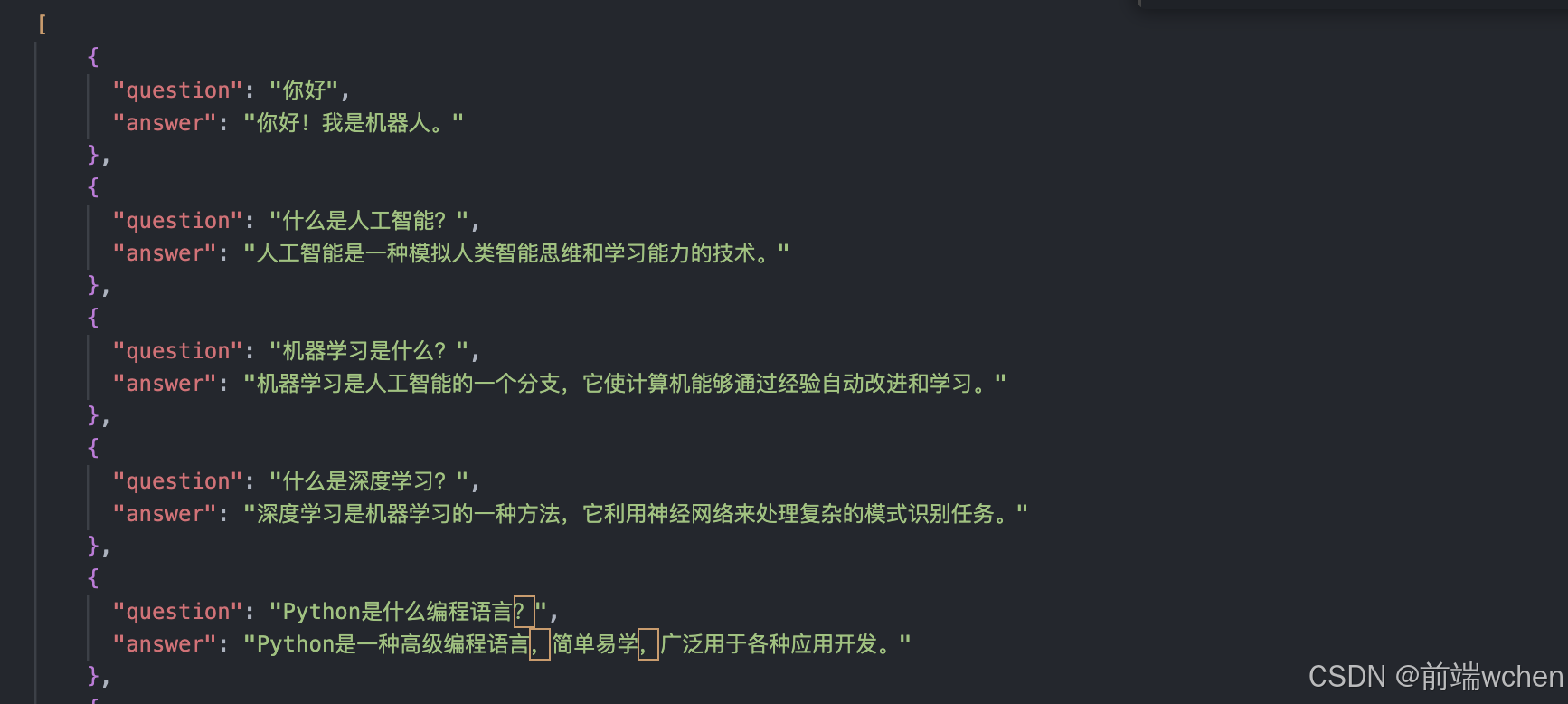
6.json 文件数据
7. 启动项目
完成所有代码后,启动项目:
npm run serve
打开浏览器,访问 http://localhost:8080,你将看到一个功能完整的聊天机器人应用。
总结
本文介绍了如何从零开始构建一个基于 Vue 2 的聊天机器人应用。你可以根据自己的需求扩展功能,比如接入后端服务、添加用户身份验证等。希望这个项目能为你提供一些灵感,助力你的开发之旅!

DAMO开发者矩阵,由阿里巴巴达摩院和中国互联网协会联合发起,致力于探讨最前沿的技术趋势与应用成果,搭建高质量的交流与分享平台,推动技术创新与产业应用链接,围绕“人工智能与新型计算”构建开放共享的开发者生态。
更多推荐

 20
20 0
0- 0


 已为社区贡献13条内容

所有评论(0)