sqlserver批量还原多个数据库
sqlserver还原单个bak文件还是比较简单的,但是sqlserver自带的还原工具中没找到批量还原的地方,因此在网上找了下资料,收集到几个脚本,在sql server中执行后将创建三个存储过程,然后调用存储过程生成批量还原数据库的sql语句,再执行即可。
参考链接:Sql Server批量还原数据库_sql批量还原数据库_良人当归的博客-CSDN博客
以下就是批量还原数据库的全过程,亲测有效!!!
一共就3步:
第一步:部署存储过程;
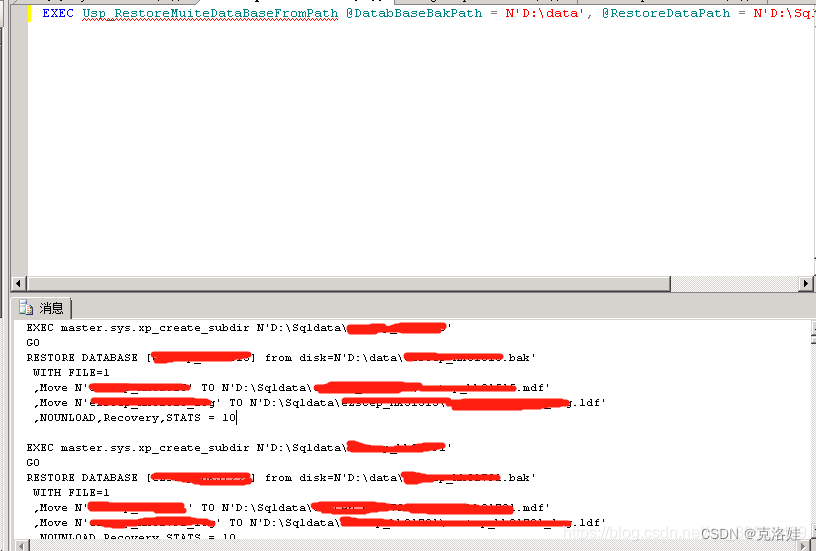
第二步:执行exec语句,
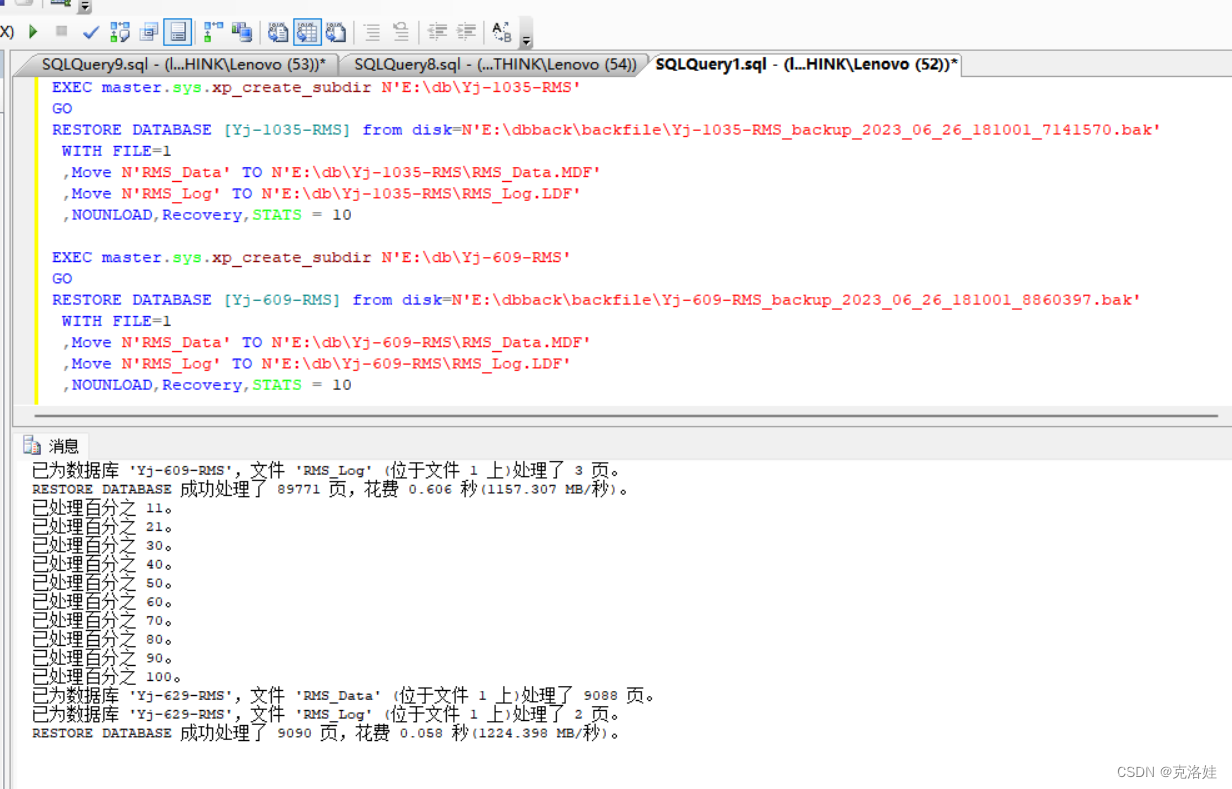
第三步:拿到第二步的执行结果生成的slq语句,再次复制到sql执行语句的地方,即可完成快速批量还原数据库。
现在开始粘贴详细步骤:
第一步:按顺序执行创建一下3个存储过程;
1.checkdisk.sql
Use master
GO
/*=================Check Restore Path Drives Exists==========================
  =====Ken.Guo                                                         ======
  =====2010.9.10                                                        ======
  =====EXEC Usp_Check_DriveExists @RestoreDataPath,@ResultCount OUTPUT ======
  ===========================================================================
*/
CREATE PROC Usp_Check_DriveExists(
      @RestoreDataPath nvarchar(200)
     ,@ResultCount int OUTPUT)
AS
BEGIN
--Check Restore Path and Size >1000M
if CHARINDEX(':',@RestoreDataPath)>0
  begin
    DECLARE @Drive nvarchar(10)
           ,@errorinfo nvarchar(500)

    DECLARE @DriveList TABLE
    (
         Drive nvarchar(10)
        ,DSize bigint
    )
    INSERT INTO @DriveList
     EXEC master.dbo.xp_fixeddrives

    SET @Drive=Left(@RestoreDataPath,CHARINDEX(':',@RestoreDataPath)-1)
    if not exists(SELECT
                      *
                  FROM  @DriveList
                  WHERE
                      Drive=@Drive
                      AND DSize>1024

               )
      begin
       set @errorinfo=N'找不到还原磁盘:'+@Drive+N' ,或者磁盘剩余空间小于1G'
       RAISERROR 50001 @errorinfo
       set @ResultCount=0
       return
      end
  end
else if(LEN(@RestoreDataPath)>1) AND CHARINDEX(':',@RestoreDataPath)=0
  begin
    set @errorinfo=N'还原路径错误:'+@RestoreDataPath+N',必须包含":" 号'
    Raiserror 50001 @errorinfo
    set @ResultCount= 0
    return
  end
 set @ResultCount= 1
end
GO
2.single.sql
Use master
GO
/*=================Usp_RestoreDataBaseFormPath=======================================
  =====Restore Single DataBase From a Back File                                ======
  =====Ken.Guo                                                                 ======
  =====2010.9.10                                                                ======
  =====Version: 2005 & 2008 SQL Server                                         ======
  =====Usp_RestoreDataBaseFormPath 'D:\databack\dbcenter.bak','D:\Data',0      ======
  =====Key Point Info:                                                         ======
  --Restore HeaderOnly  from disk='D:\data\xx.bak'
  --Restore FileListOnly from disk='D:\data\xx.bak'
  ===================================================================================
*/
CREATE PROC Usp_RestoreDataBaseFormPath
(@DatabBaseBakPath nvarchar(400),
 @RestoreDataPath nvarchar(400)='',  --RESTORE DATABASE PATH
 @IsRun smallint=0 -- 0 PRINT  1 run
)
AS
BEGIN
set nocount on

declare @dbname nvarchar(200),@SQL nvarchar(4000),@DirSQL nvarchar(1000),@errorinfo nvarchar(300)
--add path \
if (@RestoreDataPath is not null) and len(@RestoreDataPath)>1
   and (right(@RestoreDataPath,1)<>'\')
   set @RestoreDataPath=@RestoreDataPath+'\'

declare @checkdrive int
set @checkdrive=1
 exec master.dbo.Usp_Check_DriveExists @RestoreDataPath,@checkdrive output

 if(@checkdrive<>1)
    Goto ExitFLag

DECLARE @BakFileList TABLE
    (    LogicalName nvarchar(128)
        ,PhysicalName nvarchar(260)
    )

DECLARE @BakHeaderInfo TABLE
    (
        DatabaseName nvarchar(128)
    )

if Charindex('Microsoft SQL Server 2008',@@VERSION)>0
  begin
    --SQL Server 2008
    DECLARE @BakFileList2008 TABLE
    (    LogicalName nvarchar(128)
        ,PhysicalName nvarchar(260)
        ,Type char(1)
        ,FileGroupName nvarchar(128)
        ,SIZE numeric(20,0)
        ,MaxSize numeric(20,0)
        ,FileID bigint
        ,CreateLSN numeric(25,0)
        ,DropLSN numeric(25,0) NULL
        ,UniqueID uniqueidentifier
        ,ReadOnlyLSN numeric(25,0) NULL
        ,ReadWriteLSN numeric(25,0) NULL
        ,BackupSizeInBytes bigint
        ,SourceBlockSize int
        ,FileGroupID int
        ,LogGroupGUID uniqueidentifier NULL
        ,DifferentialBaseLSN numeric(25,0) NULL
        ,DifferentialBaseGUID uniqueidentifier
        ,IsReadOnly bit
        ,IsPresent bit
        ,TDEThumbprint varbinary(32)
      )

     INSERT INTO @BakFileList2008
       EXEC sp_executesql N'Restore FileListOnly From Disk=@DatabBaseBakPath',N'@DatabBaseBakPath nvarchar(260)',@DatabBaseBakPath

    DECLARE @BakHeaderInfo2008 TABLE
    (
         BackupName nvarchar(128)
        ,BackupDescription nvarchar(255)
        ,BackupType smallint
        ,ExpirationDate datetime
        ,Compressed tinyint
        ,POSITION smallint
        ,DeviceType tinyint
        ,UserName nvarchar(128)
        ,ServerName nvarchar(128)
        ,DatabaseName nvarchar(128)
        ,DatabaseVersion int
        ,DatabaseCreationDate datetime
        ,BackupSize numeric(20,0)
        ,FirstLSN numeric(25,0)
        ,LastLSN numeric(25,0)
        ,CheckpointLSN numeric(25,0)
        ,DatabaseBackupLSN numeric(25,0)
        ,BackupStartDate datetime
        ,BackupFinishDate datetime
        ,SortOrder smallint
        ,CodePage smallint
        ,UnicodeLocaleId int
        ,UnicodeComparisonStyle int
        ,CompatibilityLevel tinyint
        ,SoftwareVendorId int
        ,SoftwareVersionMajor int
        ,SoftwareVersionMinor int
        ,SoftwareVersionBuild int
        ,MachineName nvarchar(128)
        ,Flags int
        ,BindingID uniqueidentifier
        ,RecoveryForkID uniqueidentifier
        ,COLLATION nvarchar(128)
        ,FamilyGUID uniqueidentifier
        ,HasBulkLoggedData bit
        ,IsSnapshot bit
        ,IsReadOnly bit
        ,IsSingleUser bit
        ,HasBackupChecksums bit
        ,IsDamaged bit
        ,BeginsLogChain bit
        ,HasIncompleteMetaData bit
        ,IsForceOffline bit
        ,IsCopyOnly bit
        ,FirstRecoveryForkID uniqueidentifier
        ,ForkPointLSN numeric(25,0) NULL
        ,RecoveryModel nvarchar(60)
        ,DifferentialBaseLSN numeric(25,0) NULL
        ,DifferentialBaseGUID uniqueidentifier
        ,BackupTypeDescription nvarchar(60)
        ,BackupSetGUID uniqueidentifier NULL
        ,CompressedBackupSize numeric(20,0)
    )

    INSERT INTO @BakHeaderInfo2008
       EXEC sp_executesql N'Restore HeaderOnly From Disk=@DatabBaseBakPath',N'@DatabBaseBakPath nvarchar(260)',@DatabBaseBakPath

    insert into @BakHeaderInfo(DatabaseName)
    select DatabaseName from @BakHeaderInfo2008

    insert into @BakFileList(LogicalName ,PhysicalName)
    select  LogicalName ,PhysicalName from @BakFileList2008
  end
else
  begin
    --SQL Server 2005
    DECLARE @BakFileList2005 TABLE
    (
         LogicalName nvarchar(128)
        ,PhysicalName nvarchar(260)
        ,Type char(1)
        ,FileGroupName nvarchar(128)
        ,SIZE numeric(20,0)
        ,MaxSize numeric(20,0)
        ,FileID bigint
        ,CreateLSN numeric(25,0)
        ,DropLSN numeric(25,0) NULL
        ,UniqueID uniqueidentifier
        ,ReadOnlyLSN numeric(25,0) NULL
        ,ReadWriteLSN numeric(25,0) NULL
        ,BackupSizeInBytes bigint
        ,SourceBlockSize int
        ,FileGroupID int
        ,LogGroupGUID uniqueidentifier NULL
        ,DifferentialBaseLSN numeric(25,0) NULL
        ,DifferentialBaseGUID uniqueidentifier
        ,IsReadOnly bit
        ,IsPresent bit
    )

    INSERT INTO @BakFileList2005
        EXEC sp_executesql N'Restore FileListOnly From Disk=@DatabBaseBakPath',N'@DatabBaseBakPath nvarchar(260)',@DatabBaseBakPath

    DECLARE @BakHeaderInfo2005 TABLE
    (
         BackupName nvarchar(128)
        ,BackupDescription nvarchar(255)
        ,BackupType smallint
        ,ExpirationDate datetime
        ,Compressed tinyint
        ,POSITION smallint
        ,DeviceType tinyint
        ,UserName nvarchar(128)
        ,ServerName nvarchar(128)
        ,DatabaseName nvarchar(128)
        ,DatabaseVersion int
        ,DatabaseCreationDate datetime
        ,BackupSize numeric(20,0)
        ,FirstLSN numeric(25,0)
        ,LastLSN numeric(25,0)
        ,CheckpointLSN numeric(25,0)
        ,DatabaseBackupLSN numeric(25,0)
        ,BackupStartDate datetime
        ,BackupFinishDate datetime
        ,SortOrder smallint
        ,CodePage smallint
        ,UnicodeLocaleId int
        ,UnicodeComparisonStyle int
        ,CompatibilityLevel tinyint
        ,SoftwareVendorId int
        ,SoftwareVersionMajor int
        ,SoftwareVersionMinor int
        ,SoftwareVersionBuild int
        ,MachineName nvarchar(128)
        ,Flags int
        ,BindingID uniqueidentifier
        ,RecoveryForkID uniqueidentifier
        ,COLLATION nvarchar(128)
        ,FamilyGUID uniqueidentifier
        ,HasBulkLoggedData bit
        ,IsSnapshot bit
        ,IsReadOnly bit
        ,IsSingleUser bit
        ,HasBackupChecksums bit
        ,IsDamaged bit
        ,BeginsLogChain bit
        ,HasIncompleteMetaData bit
        ,IsForceOffline bit
        ,IsCopyOnly bit
        ,FirstRecoveryForkID uniqueidentifier
        ,ForkPointLSN numeric(25,0) NULL
        ,RecoveryModel nvarchar(60)
        ,DifferentialBaseLSN numeric(25,0) NULL
        ,DifferentialBaseGUID uniqueidentifier
        ,BackupTypeDescription nvarchar(60)
        ,BackupSetGUID uniqueidentifier NULL
    )

    INSERT INTO @BakHeaderInfo2005
        EXEC sp_executesql N'Restore HeaderOnly From Disk=@DatabBaseBakPath',N'@DatabBaseBakPath nvarchar(260)',@DatabBaseBakPath

    insert into @BakHeaderInfo(DatabaseName)
    select DatabaseName from @BakHeaderInfo2005

    insert into @BakFileList(LogicalName ,PhysicalName)
    select  LogicalName ,PhysicalName from @BakFileList2005

  end

--Check back file info
if not exists (select 1 from @BakFileList) OR not exists (select 1 from @BakHeaderInfo)
 begin
   set @errorinfo=N'取不到备份文件:'+@DatabBaseBakPath+N' 的信息,请检查备份文件是否正确或者版本是否兼容'
   Raiserror 50001 @errorinfo
   Goto ExitFLag
 end

--Get DataBase Name
SELECT TOP 1 @dbname=databasename FROM @BakHeaderInfo

if exists (select 1 from master.sys.databases with(nolock) where name=@dbname)
     begin

       set @errorinfo=N'数据库:'+@dbname+N'已经存在,不能还原'
       Raiserror 50001 @errorinfo
       Goto ExitFLag
     end

DECLARE @LogicalName nvarchar(200),@PhysicalName nvarchar(400)
       ,@pos int ,@endpos int,@LastPhysicalName nvarchar(400)

DECLARE db_file CURSOR
    LOCAL
    READ_ONLY
    FORWARD_ONLY
    STATIC
FOR
 SELECT
     LogicalName
    ,PhysicalName
 FROM @BakFileList

OPEN db_file

set @DirSQL=''
set @SQL=+N'RESTORE DATABASE '+QUOTENAME(@dbname)+' from disk=N'''+@DatabBaseBakPath+''''
set @SQL=@SQL+char(13)+Char(10)+N' WITH FILE=1 '

FETCH NEXT FROM db_file INTO @LogicalName,@PhysicalName

WHILE @@FETCH_STATUS=0
 begin
   ---Get DB PhysicalName
   set @endpos=0
   while CHARINDEX('\',@PhysicalName)>0
    begin
      set @pos=CHARINDEX('\',@PhysicalName,@endpos)
      if(@pos=0)
          break;
      set @endpos=@pos+1;
    end

   --create new db path
   if(len(@RestoreDataPath)>1)
      begin
          set @PhysicalName=@RestoreDataPath+@dbname+'\'+SUBSTRING(@PhysicalName,@endpos,LEN(@PhysicalName)-@endpos+1)
          set @DirSQL=N'EXEC master.sys.xp_create_subdir N'''+@RestoreDataPath+@dbname+''''
       END
    else
      begin
        if len(@DirSQL)<1 OR (SUBSTRING(@PhysicalName,1,@endpos-1)<>@LastPhysicalName)
          if(len(@DirSQL)<1)
             set @DirSQL=N'EXEC master.sys.xp_create_subdir N'''+SUBSTRING(@PhysicalName,1,@endpos-1)+''''
          else
           set @DirSQL=@DirSQL+char(13)+N'EXEC master.sys.xp_create_subdir N'''+SUBSTRING(@PhysicalName,1,@endpos-1)+''''

         ---Check Drives
         set @checkdrive=1
         exec master.dbo.Usp_Check_DriveExists @PhysicalName,@checkdrive output

         if(@checkdrive<>1)
            Goto ExitFLag

        set @LastPhysicalName=SUBSTRING(@PhysicalName,1,@endpos-1);
      END

    set @SQL=@SQL+char(13)+Char(10)+N' ,Move N'''+@LogicalName+''''+' TO N'''+@PhysicalName+''''

   FETCH NEXT FROM db_file INTO @LogicalName,@PhysicalName
 end
 set @SQL=@SQL+char(13)+Char(10)+N' ,NOUNLOAD,Recovery,STATS = 10'

if(@IsRun=0)
    print( @DirSQL+char(13)+char(10)+'GO'+char(13)+Char(10)+@SQL+char(13))
else
 begin
  print('-----------Begin Restore Database:'+@dbname+'------------------')
  exec(@DirSQL)
  exec(@SQL)
  print('-----------End Restore Database:'+@dbname+'---------------------'+char(13))
 end

 close db_file
 deallocate db_file

ExitFLag:
set nocount off
end
3.multi.sql
Use master
GO
/*=================Usp_RestoreMuiteDataBaseFromPath========================
  =====Restore Mutite DataBase File From a Path                      ======
  =====Ken.Guo                                                       ======
  =====2010.9.10                                                      ======
  =====Version: 2005 & 2008 SQL Server                               ======
  =====EXEC Usp_RestoreMuiteDataBaseFromPath 'D:\databack','',0      ======
  =========================================================================
*/
CREATE PROC Usp_RestoreMuiteDataBaseFromPath
( @DatabBaseBakPath nvarchar(400)
 ,@RestoreDataPath nvarchar(400)=''  --RESTORE DATABASE PATH
 ,@IsRun smallint=0                   -- 0 PRINT 1 run
)
AS
BEGIN
set nocount on
DECLARE @BackUpFileName nvarchar(200)
       ,@DbName nvarchar(200)
       ,@errorinfo nvarchar(400)

IF not exists(SELECT 1
              FROM master.sys.procedures WITH(NOLOCK)
              WHERE
                  name=N'Usp_RestoreDataBaseFormPath'

           )
  begin
   Raiserror 50001 N'找不到存储过程SP_RestoreDataBaseFormPath '
   Goto ExitFLag
  end

--add path \
if (@DatabBaseBakPath is not null) and len(@DatabBaseBakPath)>1
   and (right(@DatabBaseBakPath,1)<>'\')
 set @DatabBaseBakPath=@DatabBaseBakPath+'\'

--Check Restore Path and Size >1000M
DECLARE @checkdrive int
SET @checkdrive=1
 EXEC master.dbo.Usp_Check_DriveExists @RestoreDataPath,@checkdrive OUTPUT

 IF(@checkdrive<>1)
    Goto ExitFLag

DECLARE @Dir TABLE
(
     BackDBFileName nvarchar(100)
    ,DEPTH int
    ,[File] int
)

INSERT INTO @Dir EXEC xp_dirtree @DatabBaseBakPath
                     ,1
                     ,1

DELETE FROM @Dir
WHERE charindex('.bak',BackDBFileName)=0

if not exists (select top 1 1 from @Dir)
  begin
   Raiserror 50001 N'在提供的路径下没有找到合符要求的备份文件'
   Goto ExitFLag
  end

declare db_file Cursor Local Static Read_Only Forward_Only
for
select BackDBFileName from @Dir

Open db_file
Fetch Next from db_file into @BackUpFileName
while @@FETCH_STATUS=0
 begin
  --Restore DataBase
  set @BackUpFileName=@DatabBaseBakPath+@BackUpFileName
  exec master.dbo.Usp_RestoreDataBaseFormPath @BackUpFileName,@RestoreDataPath,@IsRun
  Fetch Next from db_file into @BackUpFileName
 end
Close db_file
deallocate db_file

ExitFLag:
set nocount off
end
第二步:执行exec语句,生成sql语句
存储过程执行完毕后,再执行以下命令即可生成批量还原的sql语句
EXEC Usp_RestoreMuiteDataBaseFromPath @DatabBaseBakPath = N'E:\dbback\backfile', @RestoreDataPath = N'E:\db'
语句中包含两个路径:
DatabBaseBakPath:备份文件所在路径,路径下都为.bak文件
RestoreDataPath:数据库还原路径,数据库mdf及ldf文件存放位置
下方即为生成的sql语句,复制后再执行,即可批量还原数据库。
如下图:
第三步:拿到第二步的执行结果生成的slq语句,再次复制到sql执行语句的地方,即可完成快速批量还原数据库。
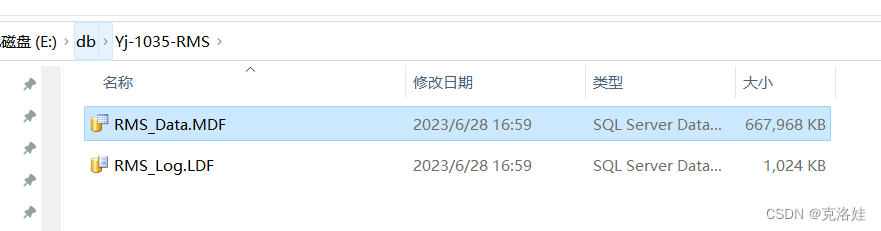
检查本地正确生成数据库文件,并打开数据库表检查数据和视图即可。一切都很完整,恢复非常迅速。

DAMO开发者矩阵,由阿里巴巴达摩院和中国互联网协会联合发起,致力于探讨最前沿的技术趋势与应用成果,搭建高质量的交流与分享平台,推动技术创新与产业应用链接,围绕“人工智能与新型计算”构建开放共享的开发者生态。
更多推荐



 0
0 0
0- 0


 已为社区贡献1条内容

所有评论(0)