flume-kafka-flink-redis:简单实时计算
简单流程:
flume监听order.txt文件,一旦有数据添加就获取order.txt中新增的数据,并传给kafka;
kakfa作为消息队列,将flume传来的数据交给flink处理,flink处理完就存储到云服务器的Redis中;
在百度云的suger大屏产品中通过API拉取从Redis中返回Json数据,达到实时展示的效果
配置准备
-
jar包:向order.txt中产生数据
-
Flume配置信息
a1.sources = r1
a1.sinks = k1
a1.channels = c1# 配置source,使用exec source定时执行tail -F命令监控日志文件
a1.sources.r1.type = exec
#外部命令 (-F只认文件名,不认文件标识id)
a1.sources.r1.command = tail -F /data/log/order.log
a1.sources.r1.charset = UTF-8
# 配置channel,使用文件暂存数据
# 配置channel组件
a1.channels.c1.type = file#元数据信息存放路径
a1.channels.c1.checkpointDir = /data/soft/apache-flume-1.9.0-bin/data/ShiXunHwWork/checkpoint#实际数据存放路径
a1.channels.c1.dataDirs = /data/soft/apache-flume-1.9.0-bin/data/ShiXunHwWork/data
a1.channels.c1.parseAsFlumeEvent = false
a1.channels.c1.capacity = 1000000
a1.channels.c1.transactionCapacity = 1000
# 配置sink,使用Kafka sink
a1.sinks.k1.type = org.apache.flume.sink.kafka.KafkaSink
a1.sinks.k1.kafka.bootstrap.servers = bigdata01:9092#将数据写到kafka中的shixunwork的topic中
a1.sinks.k1.kafka.topic = shixunwork
a1.sinks.k1.kafka.flumeBatchSize = 100
a1.sinks.k1.useFlumeEventFormat = true
a1.sinks.k1.kafka.producer.acks = -1
a1.sources.r1.channels = c1
a1.sinks.k1.channel = c1
-
flink处理kafka数据的核心代码
package ShiXunHmwork;


import com.alibaba.fastjson.JSONArray;
import com.alibaba.fastjson.JSONObject;
import org.apache.flink.api.common.functions.FlatMapFunction;
import org.apache.flink.api.common.functions.MapFunction;
import org.apache.flink.api.common.serialization.SimpleStringSchema;
import org.apache.flink.api.java.tuple.Tuple;
import org.apache.flink.api.java.tuple.Tuple2;
import org.apache.flink.streaming.api.datastream.DataStreamSource;
import org.apache.flink.streaming.api.datastream.KeyedStream;
import org.apache.flink.streaming.api.datastream.SingleOutputStreamOperator;
import org.apache.flink.streaming.api.datastream.WindowedStream;
import org.apache.flink.streaming.api.environment.StreamExecutionEnvironment;
import org.apache.flink.streaming.api.windowing.time.Time;
import org.apache.flink.streaming.api.windowing.windows.TimeWindow;
import org.apache.flink.streaming.connectors.kafka.FlinkKafkaConsumer;
import org.apache.flink.util.Collector;
import java.util.Properties;

public class Kafka_Flink_Redis {

    public static void main(String[] args) throws Exception {
        /**
         * 获取执行环境
         */

        StreamExecutionEnvironment env = StreamExecutionEnvironment.getExecutionEnvironment();

        /**
         *
         * 2. 获取数据源:DataSource ===> Kafka
         */
        //配置kafka数据源
        String topic = "shixunwork";
        Properties prop = new Properties();
        prop.setProperty("bootstrap.servers", "bigdata01:9092");
        prop.setProperty("group.id", "consumer02");  //指定消费组
        FlinkKafkaConsumer<String> FlinkKafkaStream = new FlinkKafkaConsumer<String>(topic, new SimpleStringSchema(), prop);

        DataStreamSource<String> lineStream = env.addSource(FlinkKafkaStream); //将数据源加入到执行环境中,获取输入流数据


        /**
         *
         * 3. Transform:将获得到的输入流进行处理
         */
        //3.1使用flatmap获取数据流,并切分
            //切分为一个个的 json 数据
        SingleOutputStreamOperator<String> jsonStream = lineStream.flatMap(new FlatMapFunction<String, String>() {
            //3>  �{"orderNo":"b76efa14-b7df-4264-8a4f-4f8f61480b49","totalPrice":4756,
            //          "detal":[{"goodsNo":"9003","goodsCount":2,"goodsPrice":2378,"goodsName":"全友 沙发","goodsType":"家具"}]}
            //解决类似的字符串乱码问题
            @Override
            public void flatMap(String s, Collector<String> out) throws Exception {
                String[] str = s.split("\n");  //按换行符切分
                for (String json : str) {
                    // 找到第一个 '{' 的位置
                    int startIndex = s.indexOf("{");
                    String jsonpart = s.substring(startIndex);
                    out.collect(jsonpart);  //将 json 流切分为一个个的json数据并加入到输出流中
                }
            }
        });
        //jsonStream.print();   // 测试输出,看看是否正确


        //3.2.1 使用Map方法,统计每条订单的总金额
        SingleOutputStreamOperator<Integer> totalPriceStream = jsonStream.map(new MapFunction<String, Integer>() {
            @Override
            public Integer map(String jsondata) throws Exception {
                //先对每一条json数据从String转为json提取订单总金额
                JSONObject jsonObject = JSONObject.parseObject(jsondata);  //转为json
                int TotalMoney = jsonObject.getIntValue("totalPrice");

                return TotalMoney;
            }
        });

//        totalPriceStream.print();   //测试输出

        //3.2.2:继续利用flatmap方法获取detal中的:goodsCount[商品数据]、goodsType[商品类型]
            //记得过滤数据:商品数量要大于 0
            //返回二元组:(goodsType,goodsCount)
        SingleOutputStreamOperator<Tuple2<String, Integer>> GoodsTypeTopN = jsonStream.flatMap(new FlatMapFunction<String, Tuple2<String, Integer>>() {
            @Override
            public void flatMap(String jsonlines, Collector<Tuple2<String, Integer>> out) throws Exception {
                //1. 先转为json
                JSONObject jsonObject = JSONObject.parseObject(jsonlines);
                //2. 获取detal json列表
                JSONArray jsonarray = jsonObject.getJSONArray("detal");
                //3. 遍历
                for (Object jsondata : jsonarray) {
                    //转为JsonObject
                    //{"goodsNo":"6003","goodsCount":2,"goodsPrice":2999,"goodsName":"容声 529升","goodsType":"冰箱"}
                    JSONObject jsdata = (JSONObject) jsondata;
                    //获取想用的字段
                    String goodstype = jsdata.getString("goodsType");
                    int goodscount = jsdata.getIntValue("goodsCount");
                    if (goodscount > 0) {  //过滤异常数据
                        //合并为二元组
                        Tuple2<String, Integer> tuple2 = new Tuple2<>(goodstype, goodscount);
                        out.collect(tuple2);  //加入到输入流
                    }
                }
            }
        });
        //3.2.3 flatmap--map
        SingleOutputStreamOperator<Tuple2<String, Integer>> GoodsTypeTopNMap = GoodsTypeTopN.map(new MapFunction<Tuple2<String, Integer>, Tuple2<String, Integer>>() {
            @Override
            public Tuple2<String, Integer> map(Tuple2<String, Integer> stringIntegerTuple2) throws Exception {
                return stringIntegerTuple2;
            }
        });
//        GoodsTypeTopN.print();  //测试输出

        //3.3 keyby分组
        KeyedStream<Tuple2<String, Integer>, Tuple> goodskeyStream = GoodsTypeTopNMap.keyBy(0);
        //3.4 时间窗口函数
        WindowedStream<Tuple2<String, Integer>, Tuple, TimeWindow> goodtimeStream = goodskeyStream.timeWindow(Time.seconds(2));
        //3.5 使用sum聚合
        SingleOutputStreamOperator<Tuple2<String, Integer>> goodsumStream = goodtimeStream.sum(1);
//        goodsumStream.print();  //测试输出
        /**
         * 4. 写入到 Redis中
         */

        //使用自定义类来写入Redis
        //如果这个Redis中的key:day0708,存在value,则score加,否者创建在加入
        //8.134.223.107
        //monitor

        //这个将订单总金额加入进去
        totalPriceStream.addSink(new LinkRedis("8.134.223.107",6380,"sxkeymoney"));
//        totalPriceStream.addSink(new LinkRedis("bigdata01",6379,"sxkeymoney"));
        //这个将商品类别topN加入进去
        GoodsTypeTopN.addSink(new goodsTypeRedis("8.134.223.107",6380,"sxkeytopn"));
//        goodsumStream.addSink(new goodsTypeRedis("bigdata01",6379,"sxkeytopn"));

        env.execute("Kafka_Flink_Redis");

    }
}
-
自定义Redis类:用于定义flink将数据处理后存入Redis的数据形式
- goodsTypeRedis类与LinkRedis类
package ShiXunHmwork;

import org.apache.flink.api.java.tuple.Tuple2;
import org.apache.flink.configuration.Configuration;
import org.apache.flink.streaming.api.functions.sink.RichSinkFunction;
import redis.clients.jedis.Jedis;

public class goodsTypeRedis extends RichSinkFunction<Tuple2<String,Integer>> {
    private Jedis jedis = null;  //连接对象,先定义后声明
    private String host;
    private int post;
    private String Redis_Key;  //定义要写入Redis中的key

    public goodsTypeRedis(String host,int post,String key){
        this.host = host;
        this.post = post;
        this.Redis_Key = key;
    }

    /**
     * 该方法用于于Redis建立连接
     * @param parameters
     * @throws Exception
     */
    @Override
    public void open(Configuration parameters) throws Exception {
        this.jedis = new Jedis(host,post);
    }


    /**
     * 核心函数
     * 每条数据过来的时候都会进入这个方法
     * 该方法用来解析JSON数据
     */
    //利用方法的重构实现不同的需求
    @Override
    public void invoke(Tuple2<String, Integer> value, Context context) throws Exception {
        String word = value.f0;  //获取二元组的第一个元素
        Integer count = value.f1;
        jedis.zincrby(Redis_Key,Double.parseDouble(count.toString()),word); //Redis中的方法
    }


    @Override
    public void close() throws Exception {
        if (jedis != null)
            jedis.close();
    }
}
package ShiXunHmwork;

import org.apache.flink.api.java.tuple.Tuple2;
import org.apache.flink.configuration.Configuration;
import org.apache.flink.streaming.api.functions.sink.RichSinkFunction;
import redis.clients.jedis.Jedis;


/**
 * 该类用于将Flink的数据写入到Redis中
 */
public class LinkRedis extends RichSinkFunction<Integer>{
    private Jedis jedis = null;  //连接对象,先定义后声明
    private String host;
    private int post;
    private String Redis_Key;  //定义要写入Redis中的key

    public LinkRedis(String host,int post,String key){
        this.host = host;
        this.post = post;
        this.Redis_Key = key;
    }

    /**
     * 该方法用于于Redis建立连接
     * @param parameters
     * @throws Exception
     */
    @Override
    public void open(Configuration parameters) throws Exception {
        this.jedis = new Jedis(host,post);
    }


    /**
     * 核心函数
     * 每条数据过来的时候都会进入这个方法
     * 该方法用来解析JSON数据
     */
    //利用方法的重构实现不同的需求
    @Override
    public void invoke(Integer value, Context context) throws Exception {
        jedis.zincrby(Redis_Key,Double.parseDouble(value.toString()),"TotalMoney"); //Redis中的方法
    }


    @Override
    public void close() throws Exception {
        if (jedis != null)
            jedis.close();
    }
}
- 使用springboot从Redis中获取数据,并返回json数据:springboot核心代码
package xuwei.controller;

import com.alibaba.fastjson.JSONArray;
import com.alibaba.fastjson.JSONObject;
import org.slf4j.Logger;
import org.slf4j.LoggerFactory;
import org.springframework.web.bind.annotation.RequestMapping;
import org.springframework.web.bind.annotation.RequestMethod;
import org.springframework.web.bind.annotation.RequestParam;
import org.springframework.web.bind.annotation.RestController;
import redis.clients.jedis.Jedis;
import redis.clients.jedis.Tuple;
import xuwei.utils.RedisUtils;

import java.util.Set;

/**
 * 数据接口V1.0
 * Created by xuwei
 */
@RestController//控制器类
@RequestMapping("/v1")//映射路径
public class DataController {
    private static final Logger logger = LoggerFactory.getLogger(DataController.class);
    /**
     * 测试接口
     * @param name
     * @return
     */
    @RequestMapping(value="/t1",method = RequestMethod.GET)
    public String test(@RequestParam("name") String name) {

        return "hello,"+name;
    }

    /**
     * 查询数码类的数据指标
     * @param key
     * @return
     */
    @RequestMapping(value="/nl1",method = RequestMethod.GET)
    public JSONObject getNumerical(@RequestParam("key") String key) {
        //key 相当于是redis中的key,后续根据这个key到redis中获取对应的数据
        /**
         * {
         *   "status": 0,
         *   "hitSugarSelf": true,
         *   "msg": "",
         *   "data": "371570"
         * }
         */
        JSONObject jsonObj = new JSONObject();   //可以用来创建json格式的数据
        jsonObj.put("status",0);
        jsonObj.put("hitSugarSelf",true);
        jsonObj.put("msg","");
        Jedis jedis = null;
        try{
            //获取redis连接
            jedis = RedisUtils.getJedis();
            //从redis中读取数据
            String value = jedis.get(key);
            jsonObj.put("data",value);
        }catch (Exception e){
            jsonObj.put("data","0");
        }finally {
            if(jedis!=null){
                RedisUtils.returnResource(jedis);
            }
        }
        return jsonObj;
    }


    /**
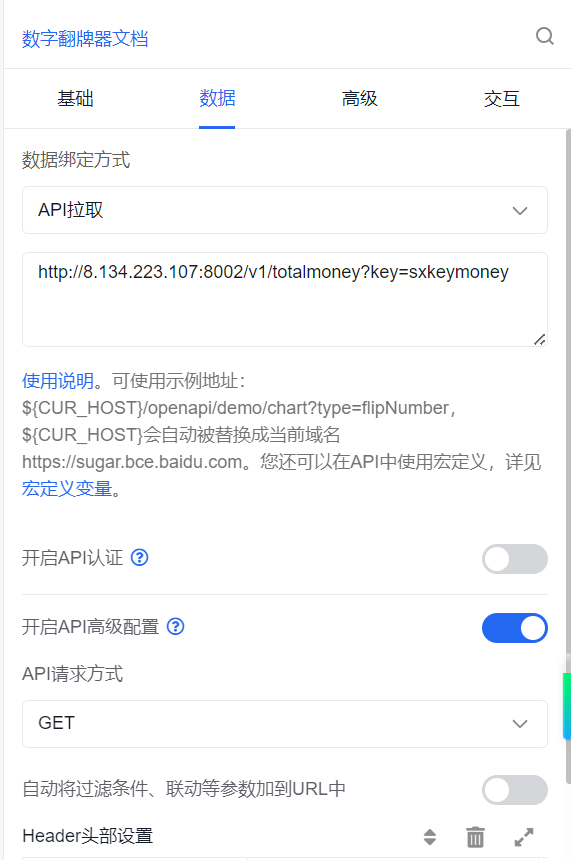
     * 该网址 http://8.134.223.107:8002/v1/totalmoney?kay=sxkeymoney
     * 用于获取总金额
     * @param key
     * @return
     */
    @RequestMapping(value="/totalmoney",method = RequestMethod.GET)
    public JSONObject totalmoney(@RequestParam("key") String key) {
        JSONObject jsonObj = new JSONObject();   //可以用来创建json格式的数据
        jsonObj.put("status",0);
        jsonObj.put("hitSugarSelf",true);
        jsonObj.put("msg","");
        Jedis jedis = null;
        try{
            //获取redis连接
            jedis = RedisUtils.getJedis();
            //从redis中读取数据

            double value = jedis.zscore("sxkeymoney","TotalMoney");
            jsonObj.put("data",value);
        }catch (Exception e){
            jsonObj.put("data","0");
        }finally {
            if(jedis!=null){
                RedisUtils.returnResource(jedis);
            }
        }
            return jsonObj;
    }


    /**
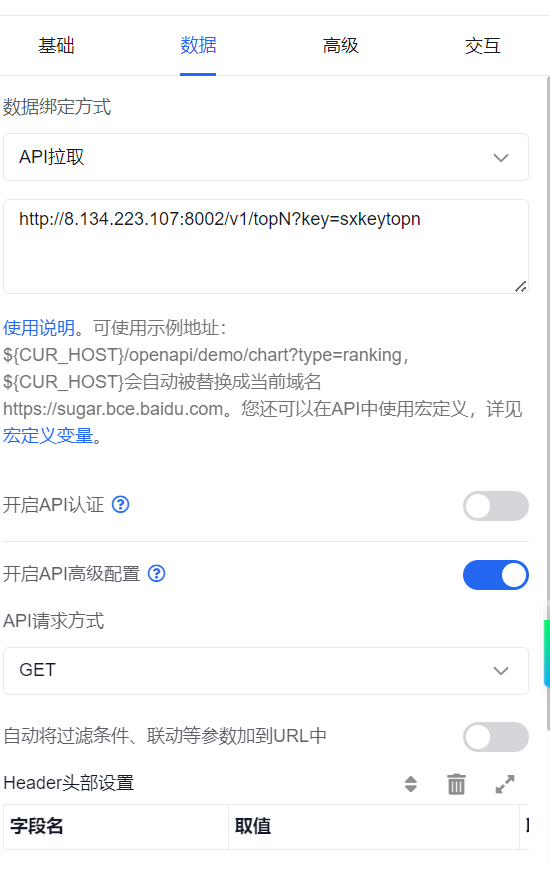
     * 该网站:http://8.134.223.107:8002/v1/topN?key=sxkeytopn
     * @param key
     * @return
     */
    @RequestMapping(value="/topN",method = RequestMethod.GET)
    public JSONObject getTopN(@RequestParam("key") String key) {
        JSONObject jsonObj = new JSONObject(true);   //可以用来创建json格式的数据
        JSONObject jsonObj01 = new JSONObject();   //可以用来创建json格式的数据 == > data
        jsonObj.put("status",0);
        jsonObj.put("hitSugarSelf",true);
        jsonObj.put("msg","");
        Jedis jedis = null;
        /**
         * 最终要返回
         * data:{"columns":[{},{}], "rows":[{},{},{}], "row":[{},{},{}]..}
         */
        try{
            //获取redis连接
            jedis = RedisUtils.getJedis();
            //阶段一,获取columns的数据
            JSONArray jsoncolumnsArray = new JSONArray();  //json数组,里面元素为json数据->jsoncolumnArray:[]
            JSONObject jsondata01 = new JSONObject();  //生成json数据,为json数组的其中一个元素-->jsondata01:{}
            JSONObject jsondata02 = new JSONObject();  //生成json数据,为json数组的另一个元素-->jsondata01:{}
            JSONObject jsondata03 = new JSONObject();  //生成json数据,为json数组的另一个元素-->jsondata01:{}
            jsondata01.put("id", "country");
            jsondata01.put("name", "类别"); //-->jsondata01:{"id":"type","name":"类别"}
            jsondata02.put("id","number");
            jsondata02.put("name","数量");  //-->jsondata02:{"id":"number","name":"数量"}
            jsondata03.put("id","gold");
            jsondata03.put("name","销售数量");  //-->jsondata02:{"id":"number","name":"数量"}
            jsoncolumnsArray.add(jsondata01);
            jsoncolumnsArray.add(jsondata02);
            jsoncolumnsArray.add(jsondata03);//-->json..Array:[{"id":"type","name":"类别"},{"id":"number","name":"数量"}]
            /*
            * jsonObj01:{"columns",[{"id":"type","name":"类别"},{"id":"number","name":"数量"}]}
            * */
            jsonObj01.put("columns",jsoncolumnsArray);  //由于data的value也是一个json,需要jsonobject
            //阶段二,获取 "rows":[{type,count},{type,count},...]
            //按 score:商品次数排序,取前5名
            JSONArray rowJsonArray = new JSONArray();;  //定义row的json列表[]
            Set<Tuple> goodsets = jedis.zrevrangeWithScores("sxkeytopn", 0, 4);
            for (Tuple tuple:goodsets){
                JSONObject rowjsonObject01 = new JSONObject();
                JSONObject rowjsonObject02 = new JSONObject();
                String goodstype = tuple.getElement();
                Double goodscount = tuple.getScore();
                rowjsonObject01.put("country",goodstype);
                rowjsonObject01.put("gold",goodscount);
                rowjsonObject01.put("number",goodscount);
                rowJsonArray.add(rowjsonObject01);
//                rowJsonArray.add(rowjsonObject02);
            }
            /*
            * jsonObj01:{"columns",[{"id":"type","name":"类别"},{"id":"number","name":"数量"}]
            *             ,"row":[{3,"xx"},{4,"xx"},{..},{..},{..}]
            *             }
            *
            * jsonObj:{ "data": {"columns",[{"id":"type","name":"类别"},{"id":"number","name":"数量"}]
             *                    ,"row":[{3,"xx"},{4,"xx"},{..},{..},{..}]
             *                   }
             *         }
            * */
            jsonObj01.put("rows",rowJsonArray);
            jsonObj.put("data",jsonObj01);

        }catch (Exception e){
            jsonObj.put("data","0");
        }finally {
            if(jedis!=null){
                RedisUtils.returnResource(jedis);
            }
        }
        return jsonObj;
    }

}
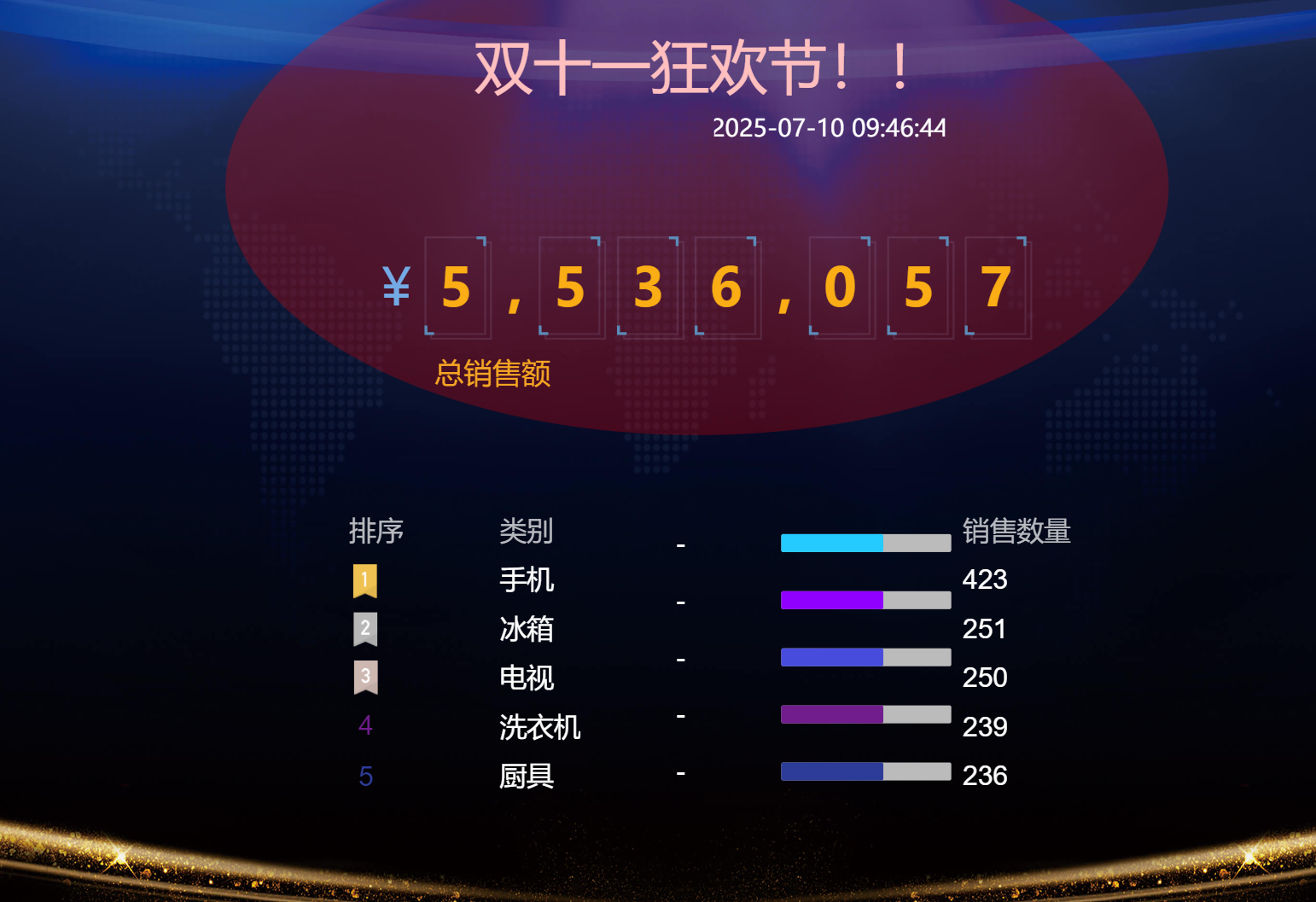
- 在百度云的suger大屏产品中通过api拉取来获取这个json数据,并实时展示
操作流程
-
开启flume服务
[root@bigdata01 apache-flume-1.9.0-bin]# bin/flume-ng agent --name a1 --conf conf --conf-file conf/shixun_file_flume_kafka_flink_redis.conf -Dflume.root.logger=INFO,console
-
开启Kafka服务
1. 先开启zookeeper服务
[root@bigdata01 apache-zookeeper-3.5.8-bin]# bin/zkServer.sh start
2. 开启kafka服务
[root@bigdata01 kafka_2.12-2.4.1]# bin/kafka-server-start.sh -daemon config/server.properties
-
运行前面的Kafka_Flink_Redis代码
-
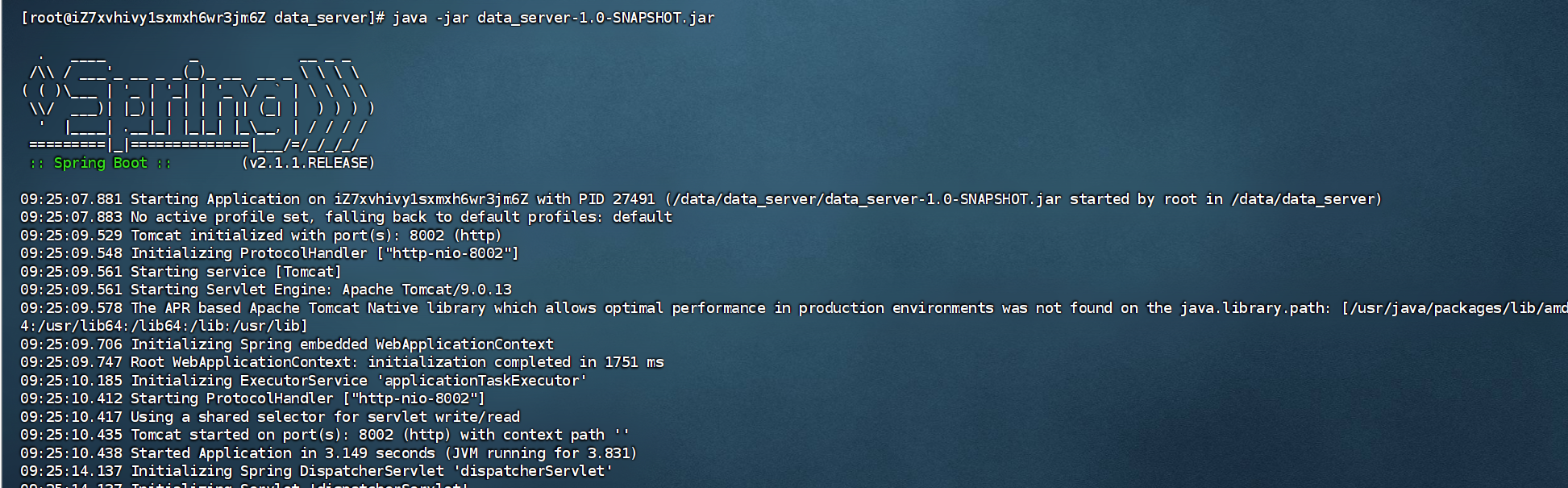
将前面的springboot代码打成jar包上传到云服务器中
-
在云服务器中运行jar包
-
在本地虚拟机中运行generate_data-1.0-SNAPSHOT-jar-with-dependencies.jar
-
开始实时计算
流程总结
- 运行generate_data-1.0-SNAPSHOT-jar-with-dependencies.jar后会一直向order.txt文件中创建数据,数据格式如下
{"orderNo":"db62805c-a0cb-40ce-a986-2480b765e150","totalPrice":20748,"detal":[{"goodsNo":"1006","goodsCount":1,"goodsPrice":4198,"goodsName":"vivo IQOO7","goodsType":"手机"},{"goodsNo":"3001","goodsCount":2,"goodsPrice":2299,"goodsName":"小米电视 55英寸 E55X","goodsType":"电视"},{"goodsNo":"1003","goodsCount":2,"goodsPrice":4699,"goodsName":"小米 11","goodsType":"手机"},{"goodsNo":"9002","goodsCount":2,"goodsPrice":128,"goodsName":"家逸 椅子","goodsType":"家具"},{"goodsNo":"4003","goodsCount":1,"goodsPrice":2298,"goodsName":"奥克斯 1.5匹京裕","goodsType":"空调"}]}
- flume会一直监听order.txt文件,一有数据新增就会采集
- flume会将数据发送到消息队列kafka中
- Kafka_Flink_Redis代码会利用flink将kafka中的数据按自定义的Redis类处理逻辑存储到云服务器的Redis中
- 云服务器中运行的springboot会将Redis中的数据获取并按要求处理成需要的json格式数据
- 百度云suger产品会通过api链接获取处理好的json格式,并展示出来

DAMO开发者矩阵,由阿里巴巴达摩院和中国互联网协会联合发起,致力于探讨最前沿的技术趋势与应用成果,搭建高质量的交流与分享平台,推动技术创新与产业应用链接,围绕“人工智能与新型计算”构建开放共享的开发者生态。
更多推荐


 27
27 0
0- 0


 已为社区贡献1条内容

所有评论(0)