MyDB - 手写数据库
MyDB
TM - 事务管理
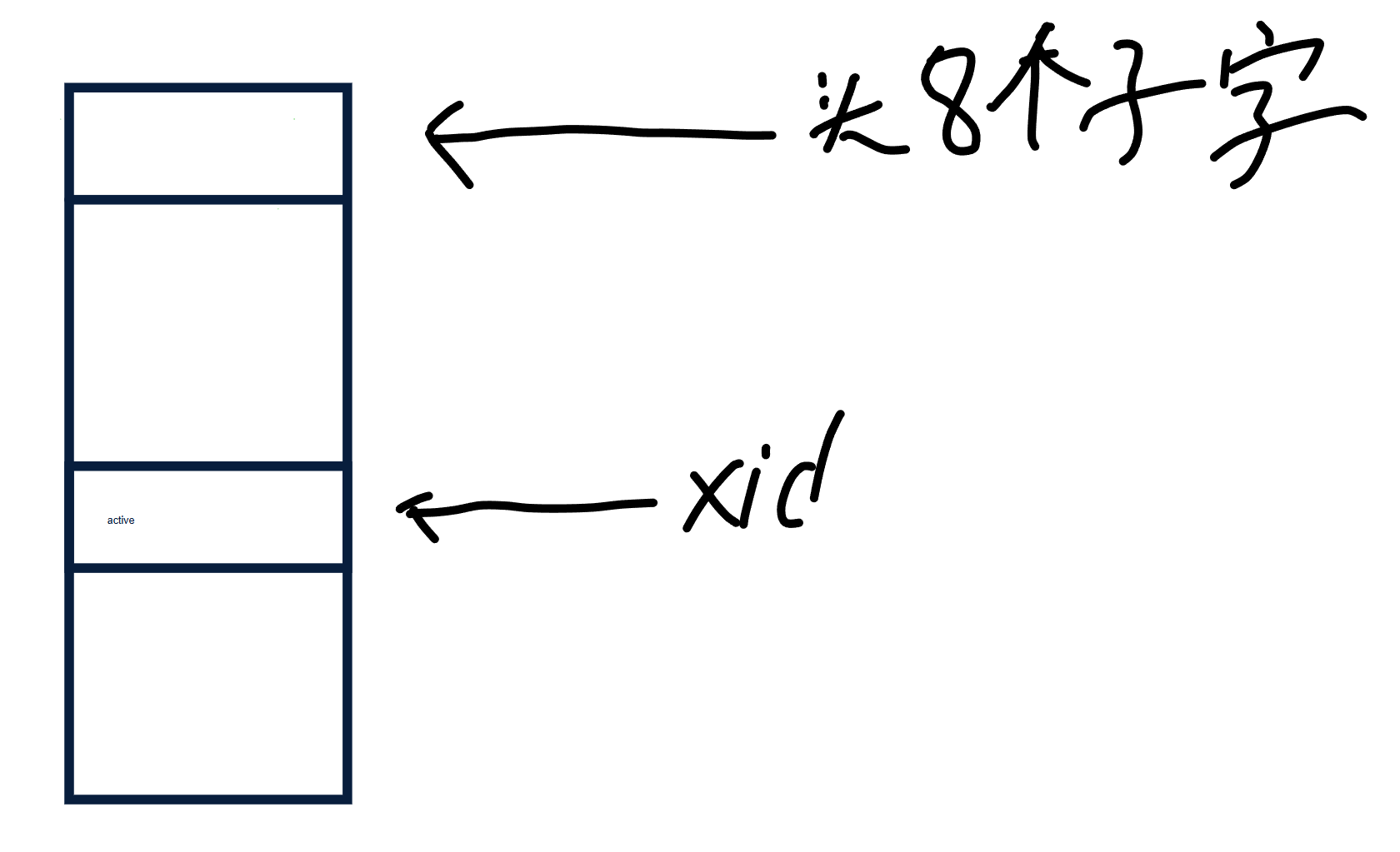
tm 模块通过维护一个 xid 文件来进行事务管理
    // XID文件头长度
    static final int LEN_XID_HEADER_LENGTH = 8;
    // 每个事务的占用长度
    private static final int XID_FIELD_SIZE = 1;

    // 事务的三种状态
    // 活跃
    private static final byte FIELD_TRAN_ACTIVE   = 0;
    // 提交
    private static final byte FIELD_TRAN_COMMITTED = 1;
    // 撤销
    private static final byte FIELD_TRAN_ABORTED  = 2;

    // 超级事务,永远为commited状态
    public static final long SUPER_XID = 0;
xid 文件头八个字节是保存最新创建的事务的 id 为 xidCounter ,通过 RandomAccessFile ,FileChannel 类来操作文件。
    // xid 事务文件
    private RandomAccessFile file;
    // xid 文件读取
    private FileChannel fc;
    // 当前事务
    private long xidCounter;
将 事务文件 类比成 数组 的话,事务的 id 相当于下标,下标对应的值就是事务的状态例如:活跃、提交、撤销 ,每个事务在事务文件中占据一个字节。
初始化
在与事务文件连接后,会检测事务文件是否合法,先通过 fc 获取 xid 文件的实际大小为 fileLen,然后通过头字节获得当前的事务 id,然后算出这个 id 在 xid 文件的位置为 end,如果 fileLen != end,说明 xid 文件异常,直接退出系统
创建事务
    public long begin() {
        counterLock.lock();
        try {
            long xid = this.xidCounter + 1;
            this.updateXID(xid, FIELD_TRAN_ACTIVE);
            this.incrXIDCounter();
            return xid;
        }  finally {
            counterLock.unlock();
        }
    }
先创建事务 id 然后根据事务 id,在事务文件中找到对应的位置写入活跃状态
DM - 数据页的缓存与管理
引用计数缓存框架
此框架的作用是向上提供缓存,向下读取文件,使用引用计数的方式来处理缓存,当从缓存读取一个数据,对应的计数加一,当上层应用不在使用该缓存时,对应的计数减一,当计数为零时,会写回文件
    // 实际缓存的数据
    private HashMap<Long, T> cache;
    // 元素的引用个数
    private HashMap<Long, Integer> references;
    // 正在获取某资源的线程
    private HashMap<Long, Boolean> getting;
    // 缓存的最大缓存资源数
    private int maxResource;
    // 缓存中元素的个数
    private int count = 0;
    // 锁
    private Lock lock;
两个抽象方法,留给实现类去实现具体
    /**
     * 当资源不在缓存时的获取行为
     */
    protected abstract T getForCache(long key) throws Exception;

    /**
     * 当资源被驱逐时的写回行为
     */
    protected abstract void releaseForCache(T obj);
获取数据的方法
    protected T get(long key) throws Exception {
        while (true) {
            lock.lock();
            if (getting.containsKey(key)) {
                // 请求的资源正在被其他线程获取
                lock.unlock();
                try {
                    Thread.sleep(1);
                }  catch (InterruptedException e) {
                    log.error(e.getMessage());
                    continue;
                }
                continue;
            }

            if (cache.containsKey(key)) {
                T obj = cache.get(key);
                references.put(key, references.getOrDefault(key, 0) + 1);
                lock.unlock();
                return obj;
            }

            if (maxResource > 0 && count >= maxResource) {
                lock.unlock();
                throw Error.CacheFullException;
            }

            count++;
            getting.put(key, true);
            lock.unlock();
            break;
        }

        T obj;
        try {
            obj = this.getForCache(key);
        } catch (Exception e) {
        	// 抛出异常,撤销此前的所有参加
            lock.lock();
            count --;
            getting.remove(key);
            lock.unlock();
            throw e;
        }

        lock.lock();
        cache.put(key, obj);
        getting.remove(key);
        references.put(key, references.getOrDefault(key, 0) + 1);
        lock.unlock();

        return obj;
    }
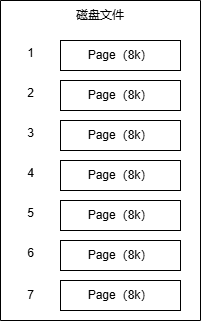
数据页的缓存与管理
Page - 数据页
    // 上锁
    void lock();
    // 解锁
    void unlock();
    // 移除一个引用
    void release();
    // 设置为脏页
    void setDirty(boolean dirty);
    // 判断是否为脏页
    boolean isDirty();
    // 获得当前页的下标
    int getPageNumber();
    // 获取数据
    byte[] getData();
PageX - 管理普通页
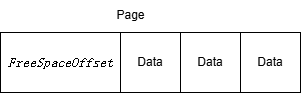
PageX 类主要用于管理普通页,它定义了普通页的结构并提供了操作普通页的方法。普通页的结构包含一个 FreeSpaceOffset(空闲空间偏移量)和实际的数据部分。下面详细讲解 PageX 类的各个部分:
类的定义和常量
public class PageX {

    private static final short OF_FREE = 0;
    private static final short OF_DATA = 2;
    public static final int MAX_FREE_SPACE = PageCache.PAGE_SIZE - OF_DATA;
OF_FREE:表示空闲空间偏移量的起始位置,值为 0。OF_DATA:表示数据部分的起始位置,值为 2。因为空闲空间偏移量占 2 个字节。MAX_FREE_SPACE:表示页面的最大空闲空间大小,等于页面总大小减去空闲空间偏移量所占的 2 个字节。
初始化页面
public static byte[] initRaw() {
    byte[] raw = new byte[PageCache.PAGE_SIZE];
    setFSO(raw, OF_DATA);
    return raw;
}

private static void setFSO(byte[] raw, short ofData) {
    System.arraycopy(Parser.short2Byte(ofData), 0, raw, OF_FREE, OF_DATA);
}
initRaw()方法:用于初始化一个新的页面。创建一个大小为PageCache.PAGE_SIZE的字节数组,并调用setFSO方法将空闲空间偏移量设置为OF_DATA。setFSO(byte[] raw, short ofData)方法:将ofData转换为 2 字节的数组,并复制到raw数组的OF_FREE位置,用于设置空闲空间偏移量。
获取空闲空间偏移量
// 获取pg的FSO
public static short getFSO(Page pg) {
    return getFSO(pg.getData());
}

private static short getFSO(byte[] raw) {
    return Parser.parseShort(Arrays.copyOfRange(raw, 0, 2));
}
getFSO(Page pg)方法:通过Page对象获取其数据,并调用另一个getFSO方法获取空闲空间偏移量。getFSO(byte[] raw)方法:从raw数组的前 2 个字节解析出空闲空间偏移量。
插入数据到页面
// 将raw插入pg中,返回插入位置
public static short insert(Page pg, byte[] raw) {
    pg.setDirty(true);
    short offset = getFSO(pg.getData());
    System.arraycopy(raw, 0, pg.getData(), offset, raw.length);
    setFSO(pg.getData(), (short)(offset + raw.length));
    return offset;
}
insert(Page pg, byte[] raw)方法:将raw数据插入到pg页面中。首先将页面标记为脏页,然后获取当前的空闲空间偏移量作为插入位置,将raw数据复制到该位置,最后更新空闲空间偏移量为插入位置加上raw数据的长度。返回插入位置。
获取页面的空闲空间大小
// 获取页面的空闲空间大小
public static int getFreeSpace(Page pg) {
    return PageCache.PAGE_SIZE - (int)getFSO(pg.getData());
}
getFreeSpace(Page pg)方法:通过页面的总大小减去当前的空闲空间偏移量,得到页面的空闲空间大小。
恢复插入和更新操作
// 将raw插入pg中的offset位置,并将pg的offset设置为较大的offset
public static void recoverInsert(Page pg, byte[] raw, short offset) {
    pg.setDirty(true);
    System.arraycopy(raw, 0, pg.getData(), offset, raw.length);

    short rawFSO = getFSO(pg.getData());
    if(rawFSO < offset + raw.length) {
        setFSO(pg.getData(), (short)(offset+raw.length));
    }
}

// 将raw插入pg中的offset位置,不更新update
public static void recoverUpdate(Page pg, byte[] raw, short offset) {
    pg.setDirty(true);
    System.arraycopy(raw, 0, pg.getData(), offset, raw.length);
}
recoverInsert(Page pg, byte[] raw, short offset)方法:用于恢复插入操作。将raw数据插入到pg页面的offset位置,并将页面标记为脏页。如果当前的空闲空间偏移量小于插入位置加上raw数据的长度,则更新空闲空间偏移量。recoverUpdate(Page pg, byte[] raw, short offset)方法:用于恢复更新操作。将raw数据插入到pg页面的offset位置,并将页面标记为脏页,不更新空闲空间偏移量。
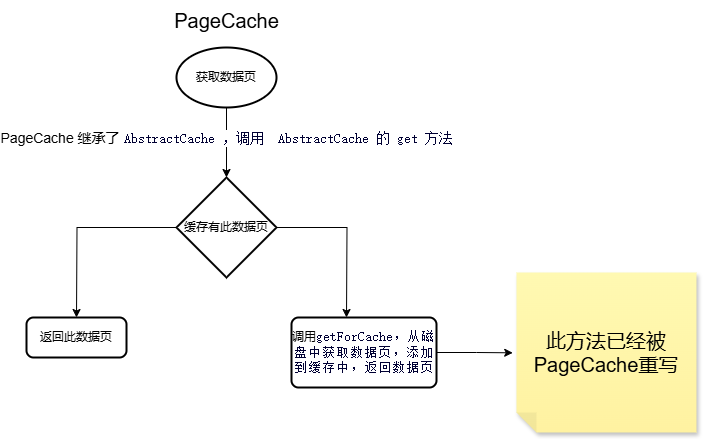
PageCache - 数据页管理
日志文件
    // 写入日志
    void log(byte[] data);
    // 将文件的大小调整到指定的长度
    void truncate(long x) throws Exception;
    // 获取日志数据,去除 Size、Checksum
    byte[] next();
    // 重定向到第一条日志
    void rewind();
    // 关闭日志系统
    void close();
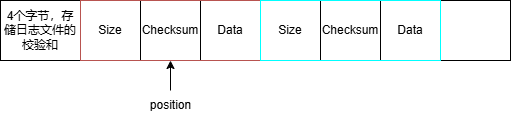
在一个日志文件中,文件开头的4个字节用于存放日志文件的校验和 xChecksum , 从第四个字节以后存入日志。
每条日志由三部分组成:
- Size :共4个字节,包含 Size、Checksum、Data
- Checksum:该条日志的校验和,用于判断该日志是否合法
- Data:该条日志的真正内容
在日志文件中,只能顺序读取
恢复策略
DM 为上层模块,提供了两种操作,分别是插入新数据(I)和更新现有数据(U)。至于为啥没有删除数据,这个会在 VM 一节叙述。
DM 的日志策略很简单,一句话就是:
在进行 I 和 U 操作之前,必须先进行对应的日志操作,在保证日志写入磁盘后,才进行数据操作。
这个日志策略,使得 DM 对于数据操作的磁盘同步,可以更加随意。日志在数据操作之前,保证到达了磁盘,那么即使该数据操作最后没有来得及同步到磁盘,数据库就发生了崩溃,后续也可以通过磁盘上的日志恢复该数据。
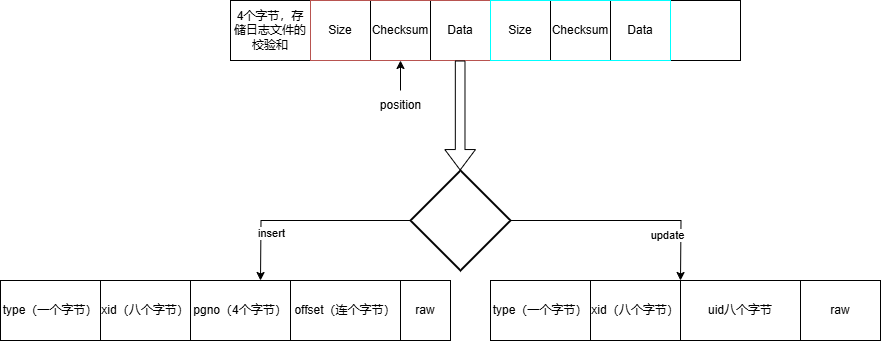
对于两种数据操作,DM 记录的日志如下:
- (Ti, I, A, x),表示事务 Ti 在 A 位置插入了一条数据 x
- (Ti, U, A, oldx, newx),表示事务 Ti 将 A 位置的数据,从 oldx 更新成 newx
在此数据库中,一个事务不会 读取 和 修改 另一个事务正在操作的数据,也就是说当根据日志恢复数据时,只需要判断该事务是否提交,如果提交了,则会进行重做,如果没有提交,则会进行逻辑删除
    // insert 类型
    private static final byte LOG_TYPE_INSERT = 0;
    // update 类型
    private static final byte LOG_TYPE_UPDATE = 1;
    // 重做
    private static final int REDO = 0;
    // 撤销
    private static final int UNDO = 1;
	// insert
    static class InsertLogInfo {
        long xid;
        int pgno;
        short offset;
        byte[] raw;
    }
	// update
    static class UpdateLogInfo {
        long xid;
        int pgno;
        short offset;
        byte[] oldRaw;
        byte[] newRaw;
    }
页面索引
PageInfo - 数据页的页号与空闲空间
public class PageInfo {
    public int pgno;
    public int freeSpace;

    public PageInfo(int pgno, int freeSpace) {
        this.pgno = pgno;
        this.freeSpace = freeSpace;
    }
}
PageIndex - 管理所有PageInfo
    // 将一页划成40个区间
    private static final int INTERVALS_NO = 40;
    private static final int THRESHOLD = PageCache.PAGE_SIZE / INTERVALS_NO;

    private Lock lock;
    private List<PageInfo>[] lists;

    @SuppressWarnings("unchecked")
    public PageIndex() {
        lock = new ReentrantLock();
        lists = new List[INTERVALS_NO + 1];
        for (int i = 0; i < INTERVALS_NO + 1; i++) {
            lists[i] = new ArrayList<>();
        }
    }
空间的单位大小为 THRESHOLD = PageCache.PAGE_SIZE / INTERVALS_NO
举例:
假如现在需要一个空闲空间大于 20 的数据页,那么就会从 list[20] 找一个数据页
public PageInfo select(int spaceSize) {
    int number = spaceSize / THRESHOLD;
    if(number < INTERVALS_NO) number ++;
    while(number <= INTERVALS_NO) {
        if(lists[number].size() == 0) {
            number ++;
            continue;
        }
        return lists[number].remove(0);
    }
    return null;
}
可以注意到,被选择的页,会直接从 PageIndex 中移除,这意味着,同一个页面是不允许并发写的。在上层模块使用完这个页面后,需要将其重新插入 PageIndex,且不移除,也会有数据溢出的 bug
DM实现
DataItem - 数据项,DM 层向上层提供的数据抽象
	static final int OF_VALID = 0;
    static final int OF_SIZE = 1;
    static final int OF_DATA = 3;

	// 数据
    private SubArray raw;
    // 旧的数据,方便撤销
    private byte[] oldRaw;
    private Lock rLock;
    private Lock wLock;
    private DataManagerImpl dm;
    // 唯一标识
    private long uid;
    private Page pg;
可以标识某个数据页的某个数据
通过 uid 是数据项的唯一标识
    //该方法将一个页面号(pgno)和一个偏移量(offset)组合成一个 64 位的唯一标识符(uid)
    public static long addressToUid(int pgno, short offset) {
        long u0 = (long)pgno;
        long u1 = (long)offset;
        return u0 << 32 | u1;
    }

其中 ValidFlag 占用 1 字节,标识了该 DataItem 是否有效。删除一个 DataItem,只需要简单地将其有效位设置为 0。DataSize 占用 2 字节,标识了后面 Data 的长度。
上层模块在获取到 DataItem 后,可以通过 data() 方法,该方法返回的数组是数据共享的,而不是拷贝实现的,所以使用了 SubArray。
@Override
public SubArray data() {
    return new SubArray(raw.raw, raw.start+OF_DATA, raw.end);
}
在上层模块试图对 DataItem 进行修改时,需要遵循一定的流程:在修改之前需要调用 before() 方法,想要撤销修改时,调用 unBefore() 方法,在修改完成后,调用 after() 方法。整个流程,主要是为了保存前相数据,并及时落日志。DM 会保证对 DataItem 的修改是原子性的。
@Override
public void before() {
    wLock.lock();
    pg.setDirty(true);
    System.arraycopy(raw.raw, raw.start, oldRaw, 0, oldRaw.length);
}

@Override
public void unBefore() {
    System.arraycopy(oldRaw, 0, raw.raw, raw.start, oldRaw.length);
    wLock.unlock();
}

@Override
public void after(long xid) {
    dm.logDataItem(xid, this);
    wLock.unlock();
}
after() 方法,主要就是调用 dm 中的一个方法,对修改操作落日志,不赘述。
在使用完 DataItem 后,也应当及时调用 release() 方法,释放掉 DataItem 的缓存(由 DM 缓存 DataItem)。
@Override
public void release() {
    dm.releaseDataItem(this);
}
PageOne - 管理第一页 ValidCheck
特殊管理第一页 ValidCheck,db启动时给100~107字节处填入一个随机字节,db关闭时将其拷贝到108~115字节,用于判断上一次数据库是否正常关闭
DataManager - 对外提供方法与 DataItem 缓存
DataManagerImpl 类是 DataManager 接口的具体实现,主要负责数据库数据的管理,包括数据的读取、插入、关闭操作,以及日志记录和页面索引的管理等功能。
	// 根据 uid 读取数据
    DataItem read(long uid) throws Exception;
    // 插入数据
    long insert(long xid, byte[] data) throws Exception;
    void close();
插入方法:
@Override
public long insert(long xid, byte[] data) throws Exception {
    byte[] raw = DataItem.wrapDataItemRaw(data);
    if(raw.length > PageX.MAX_FREE_SPACE) {
        throw Error.DataTooLargeException;
    }

    PageInfo pi = null;
    for(int i = 0; i < 5; i ++) {
        pi = pIndex.select(raw.length);
        if (pi != null) {
            break;
        } else {
            int newPgno = pc.newPage(PageX.initRaw());
            pIndex.add(newPgno, PageX.MAX_FREE_SPACE);
        }
    }
    if(pi == null) {
        throw Error.DatabaseBusyException;
    }

    Page pg = null;
    int freeSpace = 0;
    try {
        pg = pc.getPage(pi.pgno);
        byte[] log = Recover.insertLog(xid, pg, raw);
        logger.log(log);

        short offset = PageX.insert(pg, raw);

        pg.release();
        return Types.addressToUid(pi.pgno, offset);

    } finally {
        if(pg != null) {
            pIndex.add(pi.pgno, PageX.getFreeSpace(pg));
        } else {
            pIndex.add(pi.pgno, freeSpace);
        }
    }
}
- 将待插入的数据包装成 DataItem 的原始数据。
- 检查数据长度是否超过页面的最大空闲空间,如果超过则抛出异常。
- 尝试从页面索引中选择一个有足够空闲空间的页面,如果没有则创建新页面。
- 如果尝试 5 次后仍未找到合适的页面,则抛出数据库繁忙异常。
- 获取选中的页面,生成插入日志并记录,然后将数据插入页面。
- 释放页面,并返回插入数据的唯一标识符(uid)。
- 最后更新页面索引中该页面的空闲空间信息。
到目前为止,已经有两个缓存,一个是 Page , 一个是 DataItem

当第一次通过 uid 查询数据时,会先根据 uid 找到 数据页 page,然后将 page 加入缓存中,然后根据 uid 在 page 中找到数据项 DateItem,
    @Override
    protected DataItem getForCache(long uid) throws Exception {
        short offset = (short)(uid & ((1L << 16) - 1));
        uid >>>= 32;
        int pgno = (int)(uid & ((1L << 32) - 1));
        Page pg = pc.getPage(pgno);
        return DataItem.parseDataItem(pg, offset, this);
    }
当释放一个 DateItem 引用时,会将对应的 references 减一,如果 references 为零, 则会清除该缓存,对应的 page 引用也减一,如果此时 page 的引用也为零,就会将该 page 写回磁盘中
VM - 事务和数据版本的管理
记录的版本与事务隔离
Entry - 记录
DM 层向上层提供了数据项(Data Item)的概念,VM 通过管理所有的数据项,向上层提供了记录(Entry)的概念。上层模块通过 VM 操作数据的最小单位,就是记录。VM 则在其内部,为每个记录,维护了多个版本(Version)。每当上层模块对某个记录进行修改时,VM 就会为这个记录创建一个新的版本。
对于一条记录来说,MYDB 使用 Entry 类维护了其结构。虽然理论上,MVCC 实现了多版本,但是在实现中,VM 并没有提供 Update 操作,对于字段的更新操作由后面的表和字段管理(TBM)实现。所以在 VM 的实现中,一条记录只有一个版本。
entry 与 dataItem 是一一对应的关系
entry 的数据格式:
[XMIN] [XMAX] [data]
    // 创建该条记录(版本)的事务编号
    private static final int OF_XMIN = 0;
    // XMAX 则是删除该条记录(版本)的事务编号,XMAX 则在版本被删除,或者有新版本出现时填写
    private static final int OF_XMAX = OF_XMIN+8;
    // DATA 就是这条记录持有的数据
    private static final int OF_DATA = OF_XMAX+8;

    private long uid;
    private DataItem dataItem;
    private VersionManager vm;

    public static Entry newEntry(VersionManager vm, DataItem dataItem, long uid) {
        if (dataItem == null) {
            return null;
        }
        Entry entry = new Entry();
        entry.uid = uid;
        entry.dataItem = dataItem;
        entry.vm = vm;
        return entry;
    }
Transaction - 快照
为了实现可重复读,那么在开启事务时,要记录有那些事务是对当前事务不可见的
public long xid;
	// 事务级别
    public int level;
    //用于存储在事务开始时活跃的事务 ID。快照的作用是在可重复读隔离级别下,确保事务在执行过程中读取到的数据是一致的
    public Map<Long, Boolean> snapshot;
    public Exception err;
    public boolean autoAborted;

    public static Transaction newTransaction(long xid, int level, Map<Long, Transaction> active) {
        Transaction t = new Transaction();
        t.xid = xid;
        t.level = level;
        if(level != 0) {
            t.snapshot = new HashMap<>();
            for(Long x : active.keySet()) {
                t.snapshot.put(x, true);
            }
        }
        return t;
    }
死锁检测与 VM 的实现
LockTable - 依赖等待图
    // 某个XID已经获得的资源的UID列表
    private Map<Long, List<Long>> x2u;
    // UID被某个XID持有
    private Map<Long, Long> u2x;
    // 正在等待UID的XID列表
    private Map<Long, List<Long>> wait;
    // 正在等待资源的XID的锁
    private Map<Long, Lock> waitLock;
    // XID正在等待的UID
    private Map<Long, Long> waitU;
死锁检测
    private Map<Long, Integer> xidStamp;
    private int stamp;
    // 死锁检测
    private boolean hasDeadLock() {
        xidStamp = new HashMap<>();
        stamp = 1;
        for(long xid : x2u.keySet()) {
            Integer s = xidStamp.get(xid);
            if(s != null && s > 0) {
                continue;
            }
            stamp ++;
            if(dfs(xid)) {
                return true;
            }
        }
        return false;
    }

    private boolean dfs(long xid) {
        Integer stp = xidStamp.get(xid);
        if (stp != null && stp == stamp) {
            return true;
        }
        if (stp != null && stp < stamp) {
            return false;
        }
        xidStamp.put(xid, stp);

        Long uid = waitU.get(xid);
        if (uid == null) {
            return false;
        }
        Long x = u2x.get(uid);
        assert x != null;
        return dfs(x);
    }
VersionManager - VM实现
	byte[] read(long xid, long uid) throws Exception;
    long insert(long xid, byte[] data) throws Exception;
    boolean delete(long xid, long uid) throws Exception;

    long begin(int level);
    void commit(long xid) throws Exception;
    void abort(long xid);
VersionManager 也继承了 AbstractCache 实现了 Entry 的缓存
    public long insert(long xid, byte[] data) throws Exception {
        lock.lock();
        Transaction t = activeTransaction.get(xid);
        lock.unlock();

        if(t.err != null) {
            throw t.err;
        }

        byte[] raw = Entry.wrapEntryRaw(xid, data);
        return dm.insert(xid, raw);
    }
插入数据时,现根据 xid,data 生成 entry 形式的数据,然后调用 dm 模块的接口插入数据
    public byte[] read(long xid, long uid) throws Exception {
        lock.lock();
        Transaction t = activeTransaction.get(xid);
        lock.unlock();

        if(t.err != null) {
            throw t.err;
        }

        Entry entry = null;
        try {
            entry = super.get(uid);
        } catch(Exception e) {
            if(e == Error.NullEntryException) {
                return null;
            } else {
                throw e;
            }
        }
        try {
            if(Visibility.isVisible(tm, t, entry)) {
                return entry.data();
            } else {
                return null;
            }
        } finally {
            entry.release();
        }
    }
当第一次根据 uid 读取数据时,会先调用 dm 模块的接口根据 uid 读取 dataItem,然后根据这个 dataItem 获取 entry,最后判断这个 entry 对自己是否可见
到目前为止已经有了三层缓存,一层是 Page,一层是 DataItem,一层是 Entry
IM - 索引管理
IM,即 Index Manager,索引管理器,为 MyDB 提供了基于 B+ 树的聚簇索引。目前 MyDB 只支持基于索引查找数据
IM 直接基于 DM,而没有基于 VM。索引的数据被直接插入数据库文件中,而不需要经过版本管理。
Node - 节点
Node 类负责处理节点的插入、分裂和查找等操作
    static final int IS_LEAF_OFFSET = 0;
    static final int NO_KEYS_OFFSET = IS_LEAF_OFFSET+1;
    static final int SIBLING_OFFSET = NO_KEYS_OFFSET+2;
    // 该常量定义了节点头部信息的大小
    static final int NODE_HEADER_SIZE = SIBLING_OFFSET+8;
    // 这个常量是 B+ 树节点的平衡因子
    static final int BALANCE_NUMBER = 32;
    // 该常量规定了节点的总大小
    static final int NODE_SIZE = NODE_HEADER_SIZE + (2 * 8) * (BALANCE_NUMBER * 2 + 2);
Node 的结构
[LeafFlag][KeyNumber][SiblingUid]
[Son0][Key0][Son1][Key1]...[SonN][KeyN]
NODE_SIZE:
2 * 8:每个键值对和对应的子节点指针总共占用 16 字节(8 字节用于存储键,8 字节用于存储子节点的 uid)。
BALANCE_NUMBER * 2 + 2:节点最多可以存储 BALANCE_NUMBER * 2 个键值对,再加上额外的 2 个空间,以应对节点分裂和插入操作。
BPlusTree - B+树
BPlusTree 类负责管理整个 B+ 树的创建、加载、查找和插入操作
插入节点
    public void insert(long key, long uid) throws Exception {
        long rootUid = rootUid();
        InsertRes res = insert(rootUid, uid, key);
        assert res != null;
        if(res.newNode != 0) {
            updateRootUid(rootUid, res.newNode, res.newKey);
        }
    }

    private InsertRes insert(long nodeUid, long uid, long key) throws Exception {
    Node node = Node.loadNode(this, nodeUid);
    boolean isLeaf = node.isLeaf();
    node.release();

    InsertRes res = null;
    if(isLeaf) {
        res = insertAndSplit(nodeUid, uid, key);
    } else {
        long next = searchNext(nodeUid, key);
        InsertRes ir = insert(next, uid, key);
        if(ir.newNode != 0) {
            res = insertAndSplit(nodeUid, ir.newNode, ir.newKey);
        } else {
            res = new InsertRes();
        }
    }
    return res;
}

    private InsertRes insertAndSplit(long nodeUid, long uid, long key) throws Exception {
        while(true) {
            Node node = Node.loadNode(this, nodeUid);
            InsertAndSplitRes iasr = node.insertAndSplit(uid, key);
            node.release();
            if(iasr.siblingUid != 0) {
                nodeUid = iasr.siblingUid;
            } else {
                InsertRes res = new InsertRes();
                res.newNode = iasr.newSon;
                res.newKey = iasr.newKey;
                return res;
            }
        }
    }
TBM - 字段与表管理
SQL 解析
<begin statement>
    begin [isolation level (read committedrepeatable read)]
        begin isolation level read committed

<commit statement>
    commit

<abort statement>
    abort

<create statement>
    create table <table name>
    <field name> <field type>
    <field name> <field type>
    ...
    <field name> <field type>
    [(index <field name list>)]
        create table students
        id int32,
        name string,
        age int32,
        (index id name)

<drop statement>
    drop table <table name>
        drop table students

<select statement>
    select (*<field name list>) from <table name> [<where statement>]
        select * from student where id = 1
        select name from student where id > 1 and id < 4
        select name, age, id from student where id = 12

<insert statement>
    insert into <table name> values <value list>
        insert into student values 5 "Zhang Yuanjia" 22

<delete statement>
    delete from <table name> <where statement>
        delete from student where name = "Zhang Yuanjia"

<update statement>
    update <table name> set <field name>=<value> [<where statement>]
        update student set name = "ZYJ" where id = 5

<where statement>
    where <field name> (><=) <value> [(andor) <field name> (><=) <value>]
        where age > 10 or age < 3

<field name> <table name>
    [a-zA-Z][a-zA-Z0-9_]*

<field type>
    int32 int64 string

<value>
    .*
    public String peek() throws Exception {
        if(err != null) {
            throw err;
        }
        if(flushToken) {
            String token = null;
            try {
                token = next();
            } catch(Exception e) {
                err = e;
                throw e;
            }
            currentToken = token;
            flushToken = false;
        }
        return currentToken;
    }
第一次调用 peek() 时,会获取当前下标的关键字存储在 currentToken,然后下标右移,将 flushToken 置为 false,除非调用 pop(),否则下次调用 peek(),获取的关键字还是与上次一样
    private String nextMetaState() throws Exception {
        // 跳过 '\n'、' '、'\t'
        while(true) {
            // 获得当前下标的字节
            Byte b = peekByte();
            if(b == null) {
                return "";
            }
            if(!isBlank(b)) {
                break;
            }
            // 下标右移,相当于删除操作
            popByte();
        }
        byte b = peekByte();
        // 判断是否为 b == '>' || b == '<' || b == '=' || b == '*' ||b == ',' || b == '(' || b == ')‘
        if(isSymbol(b)) {
            popByte();
            return new String(new byte[]{b});
        } else if(b == '"' || b == '\'') {
            // 字符串 例如 "hello world" -> 返回 hello world
            return nextQuoteState();
        } else if(isAlphaBeta(b) || isDigit(b)) {
            // 数字
            return nextTokenState();
        } else {
            err = Error.InvalidCommandException;
            throw err;
        }
    }
字段与表
Field - 字段
Field 类在数据库系统中用于表示表的字段信息,包含了字段的基本属性(如字段名、字段类型)、索引信息以及对字段值的各种操作方法
	// 唯一标识
    long uid;
    // 所属的表
    private Table tb;
    // 字段名
    String fieldName;
    // 字段类型
    String fieldType;
    // 执行索引的根节点
    private long index;
    // B+树
    private BPlusTree bt;

StringLength 是4字节的 int 类型,IndexUid 是 8 字节的 long 类型
	public static Field loadField(Table tb, long uid) {
        byte[] raw = null;
        try {
            raw = ((TableManagerImpl)tb.tbm).vm.read(TransactionManagerImpl.SUPER_XID, uid);
        } catch (Exception e) {
            Panic.panic(e);
        }
        assert raw != null;
        return new Field(uid, tb).parseSelf(raw);
    }

    // 给字段的 fieldName、 fieldType、 index赋值
    private Field parseSelf(byte[] raw) {
        int position = 0;
        ParseStringRes res = Parser.parseString(raw);
        fieldName = res.str;
        position += res.next;
        res = Parser.parseString(Arrays.copyOfRange(raw, position, raw.length));
        fieldType = res.str;
        position += res.next;
        this.index = Parser.parseLong(Arrays.copyOfRange(raw, position, position+8));
        if(index != 0) {
            try {
                bt = BPlusTree.load(index, ((TableManagerImpl)tb.tbm).dm);
            } catch(Exception e) {
                Panic.panic(e);
            }
        }
        return this;
    }

    public static ParseStringRes parseString(byte[] raw) {
        int length = parseInt(Arrays.copyOf(raw, 4));
        String str = new String(Arrays.copyOfRange(raw, 4, 4+length));
        return new ParseStringRes(str, length+4);
    }
先读取 raw 前 4 个字节,获取字段名的长度,包装成 ParseStringRes 类,并返回,
赋值给 fieldName 后,position 加上 res.next,代表指针往后移,开始读取 fieldType,
最后八个字节,读取该字段的索引根节点。
Table - 表
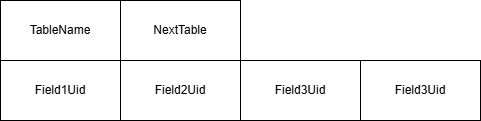
主要负责维护表的结构信息,包括表名、字段信息等,同时处理表的创建、加载、数据的插入、删除、更新和查询等操作
    TableManager tbm;
    // 表的唯一标识
    long uid;
    // 表名
    String name;
    byte status;
    // 下一个表的唯一标识
    long nextUid;
    // 表的所有字段
    List<Field> fields = new ArrayList<>();
    public static Table loadTable(TableManager tbm, long uid) {
        byte[] raw = null;
        try {
            raw = ((TableManagerImpl)tbm).vm.read(TransactionManagerImpl.SUPER_XID, uid);
        } catch (Exception e) {
            Panic.panic(e);
        }
        assert raw != null;
        Table tb = new Table(tbm, uid);
        return tb.parseSelf(raw);
    }

    private Table parseSelf(byte[] raw) {
        int position = 0;
        ParseStringRes res = Parser.parseString(raw);
        name = res.str;
        position += res.next;
        nextUid = Parser.parseLong(Arrays.copyOfRange(raw, position, position+8));
        position += 8;

        // 获取字段
        while(position < raw.length) {
            long uid = Parser.parseLong(Arrays.copyOfRange(raw, position, position+8));
            position += 8;
            fields.add(Field.loadField(this, uid));
        }
        return this;
    }
根据 uid 从磁盘读取表的数据,再通过 parseSelf(byte[] raw) 进行解析
解析Where 获取 uids :
    private List<Long> parseWhere(Where where) throws Exception {
        // 用于存储搜索范围的边界值
        long l0=0, r0=0, l1=0, r1=0;
        // 用于标记是否只有一个搜索范围
        boolean single = false;
        Field fd = null;
        // 如果 where 为 null,表示没有 WHERE 条件,需要遍历所有字段,找到第一个有索引的字段
        if(where == null) {
            for (Field field : fields) {
                if(field.isIndexed()) {
                    fd = field;
                    break;
                }
            }
            l0 = 0;
            // 将搜索范围设置为从 0 到 Long.MAX_VALUE,表示查找所有记录
            r0 = Long.MAX_VALUE;
            // 将 single 标记为 true,表示只有一个搜索范围
            single = true;
        } else {
            for (Field field : fields) {
                if(field.fieldName.equals(where.singleExp1.field)) {
                    if(!field.isIndexed()) {
                        throw Error.FieldNotIndexedException;
                    }
                    fd = field;
                    break;
                }
            }
            if(fd == null) {
                throw Error.FieldNotFoundException;
            }
            // // 解析 where 中的表达式
            CalWhereRes res = calWhere(fd, where);
            l0 = res.l0; r0 = res.r0;
            l1 = res.l1; r1 = res.r1;
            single = res.single;
        }
        List<Long> uids = fd.search(l0, r0);
        if(!single) {
        	// 根据 l1,r1 在 B+ 树搜索 uid
            List<Long> tmp = fd.search(l1, r1);
            uids.addAll(tmp);
        }
        return uids;
    }
updata :
在每次更新时,会先删除旧的(逻辑删除),然后在插入新的,最后更新索引
    public int update(long xid, Update update) throws Exception {
        List<Long> uids = parseWhere(update.where);

        // 查找要更新的字段
        Field fd = null;
        for (Field f : fields) {
            if(f.fieldName.equals(update.fieldName)) {
                fd = f;
                break;
            }
        }
        if(fd == null) {
            throw Error.FieldNotFoundException;
        }

        // 转换更新值
        Object value = fd.string2Value(update.value);

        //遍历符合条件的记录
        int count = 0;
        for (Long uid : uids) {
            byte[] raw = ((TableManagerImpl)tbm).vm.read(xid, uid);
            if(raw == null) continue;

            ((TableManagerImpl)tbm).vm.delete(xid, uid);

            Map<String, Object> entry = parseEntry(raw);
            entry.put(fd.fieldName, value);
            raw = entry2Raw(entry);
            long uuid = ((TableManagerImpl)tbm).vm.insert(xid, raw);

            count ++;

            for (Field field : fields) {
                if(field.isIndexed()) {
                    // 更新索引
                    field.insert(entry.get(field.fieldName), uuid);
                }
            }
        }
        return count;
    }
调用 parseWhere 方法解析更新条件,获取符合条件的数据记录的唯一标识符列表。
查找要更新的字段。
将更新的值转换为对象。
遍历唯一标识符列表,读取原始数据记录,删除原记录,更新数据记录,插入新记录,并更新索引。
统计更新的记录数。
TableManager - 对外提供服务
    // 版本管理器,用于处理事务的并发控制和版本管理
    VersionManager vm;
    // 数据管理器,负责数据的读写和持久化
    DataManager dm;
    // 启动器,用于加载和更新数据库的引导信息
    private Booter booter;
    // 表缓存,用于存储已加载的表,键为表名,值为 Table 对象
    private Map<String, Table> tableCache;
    // 事务表缓存,用于存储每个事务中创建的表,键为事务 ID,值为 Table 对象列表
    private Map<Long, List<Table>> xidTableCache;
创建表:
    public byte[] create(long xid, Create create) throws Exception {
        lock.lock();
        try {
            // 检查 tableCache 中是否已存在同名的表,如果存在则抛出异常
            if(tableCache.containsKey(create.tableName)) {
                throw Error.DuplicatedTableException;
            }
            // 调用 Table 类的 createTable() 方法创建新表
            Table table = Table.createTable(this, firstTableUid(), xid, create);
            // 更新引导信息,将新表的 uid 存储到引导信息中
            updateFirstTableUid(table.uid);
            // 将新表添加到 tableCache 和 xidTableCache 中
            tableCache.put(create.tableName, table);
            if(!xidTableCache.containsKey(xid)) {
                xidTableCache.put(xid, new ArrayList<>());
            }
            xidTableCache.get(xid).add(table);
            return ("create " + create.tableName).getBytes();
        } finally {
            lock.unlock();
        }
    }
其他的方法没什么好说的,都是对 Field、Table 简单封装
总结
我对这个项目最大的感受是抽象做的非常好,每一层都有一个类对外提供接口
还有三层缓存,一层是 Page,一层是 DataItem,一层是 Entry,这三层都共同继承 AbstractCache 抽象类
以及这个项目的 mvcc,在做这个项目前我一直以为是通过链表之类的来实现版本控制,没想到是通过逻辑删除外加每次插入数据记录相应的 xid 来实现的,updata 是通过插入新的数据来完成的
我对这个项目的遗憾是 B+ 树索引还是没有完全明白。。。
https://gitee.com/lbwxxc/my-db
https://shinya.click/projects/mydb/mydb0

DAMO开发者矩阵,由阿里巴巴达摩院和中国互联网协会联合发起,致力于探讨最前沿的技术趋势与应用成果,搭建高质量的交流与分享平台,推动技术创新与产业应用链接,围绕“人工智能与新型计算”构建开放共享的开发者生态。
更多推荐
 11
11 0
0- 0


 已为社区贡献1条内容

所有评论(0)