人脸识别项目实战(二):人脸识别模块实现
人脸识别项目实战(二):人脸识别模块实现
一、项目结构
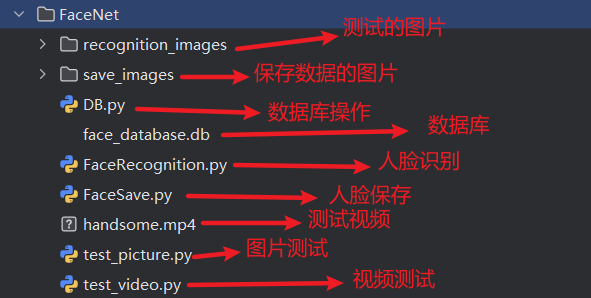
二、模块概述
人脸识别模块是系统的核心处理单元,负责在人脸检测的基础上完成身份确认。本模块基于 FaceNet 模型实现人脸特征提取,通过余弦相似度算法进行特征比对,并构建人脸特征数据库实现高效的身份匹配。
该模块主要实现以下功能:
- 基于 FaceNet 模型提取人脸特征向量(嵌入)
- 构建和管理人脸特征数据库
- 实现人脸特征比对(余弦相似度计算)
- 支持单张图片和视频流的实时人脸识别
技术栈:Python 3.10、PyTorch、FaceNet、OpenCV、NumPy、SQLite
三、FaceNet
FaceNet 是 Google 在 2015 年提出的经典人脸识别框架,其核心创新是通过端到端学习直接生成人脸的紧凑特征向量(称为 “嵌入”,Embedding),并通过向量相似度实现高效人脸识别。相比传统方法(如先分类再比对),FaceNet 跳过了中间分类层,直接优化特征向量的 “判别性”,在 LFW 等数据集上实现了 99.63% 的准确率,奠定了现代人脸识别的技术基础。但其三元组损失的训练复杂性和特征判别性不足,限制了大规模应用。
FaceNet 的核心思
直接学习一个映射函数f(x),将人脸图像x转换为固定长度(如 128 维)的特征向量f(x),使得:
- 同一个人的不同人脸图像(如不同姿态、光照)映射后的向量距离尽可能小
- 不同人的人脸图像映射后的向量距离尽可能大
通过这种方式,人脸识别简化为特征向量的相似度计算(如余弦相似度),无需依赖预定义的类别,可直接处理未见过的新人脸(“零样本” 扩展)。
网络结构:从图像到特征向量
FaceNet 的网络结构分为三部分:输入预处理→特征提取网络→特征归一化。
1. 输入预处理
输入为160×160×3 的 RGB 人脸图像,需经过严格预处理:
- 人脸对齐:基于 5 个关键点(双眼、鼻尖、左右嘴角)将人脸旋转、缩放至标准姿态;
- 光照归一化:通过直方图均衡化等方法消除光照差异;
- 像素值归一化:将像素值缩放到 [-1, 1] 范围,符合神经网络输入要求。
2. 特征提取网络
原始 FaceNet 使用Inception-v1 的改进版作为主干网络(后来衍生出 Inception-ResNet 等更高效结构),其作用是将 160×160 的图像逐步压缩为高维特征:
- 前半部分:通过卷积层(Conv)、池化层(Pooling)提取低级特征(边缘、纹理)和中级特征(眼睛、鼻子等局部结构);
- 后半部分:通过全连接层(FC)将特征压缩为 128 维向量(称为 “嵌入向量”)。
3. 特征归一化
为了方便后续相似度计算,128 维特征向量会经过L2 归一化:
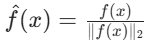
归一化后,向量的模长为 1,此时余弦相似度与欧氏距离等价(余弦相似度 = 1 - 欧氏距离 ²/2),简化了比对逻辑。
四、代码实现
安装依赖库
facenet-pytorch:
pip install facenet-pytorch

pip install opencv-python==4.9.0.80
数据库
使用 SQLite 数据库
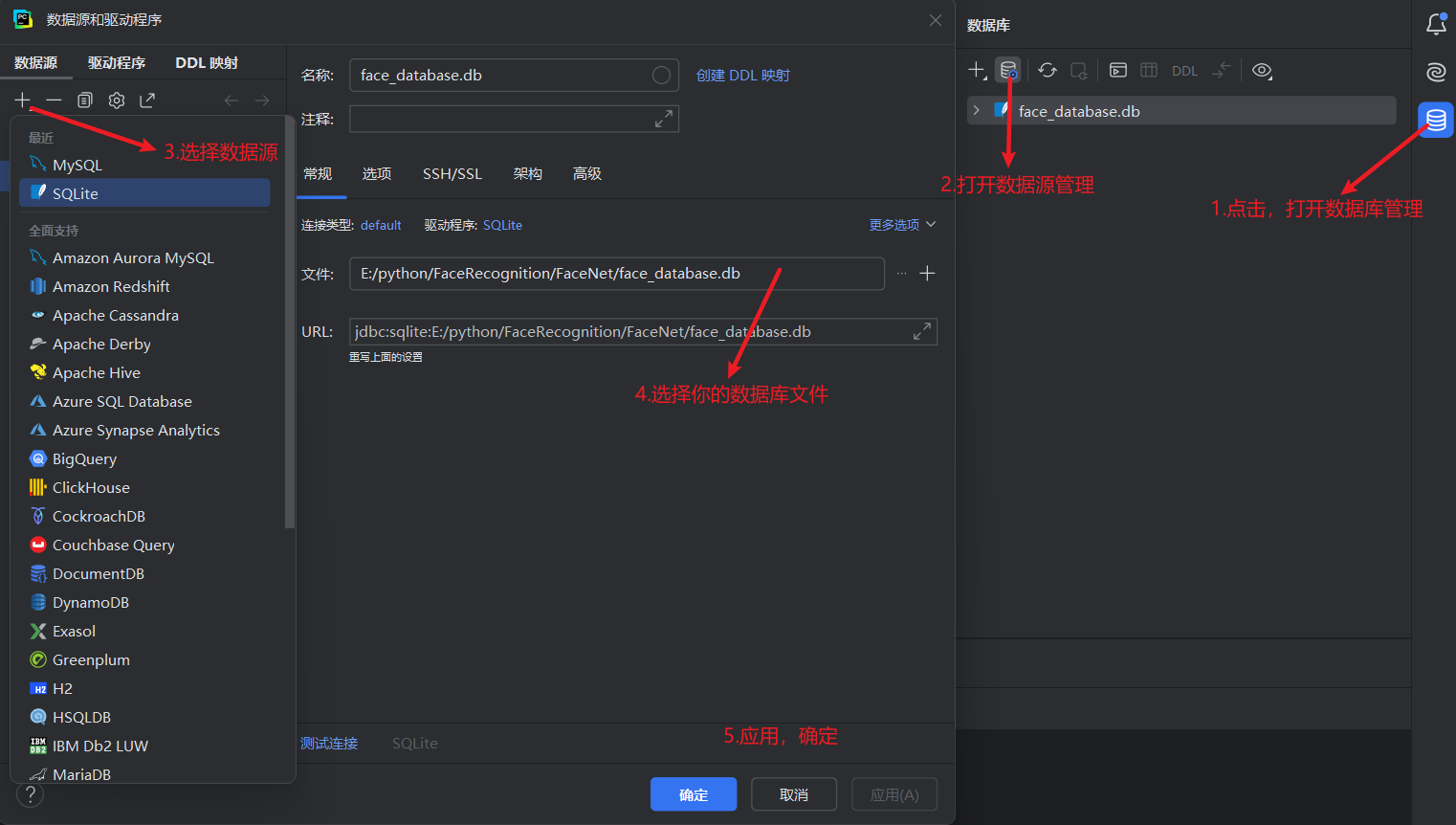
下载可视化工具

创建表
# 数据库地址
self.db_path = "./face_database.db"

# 初始化数据库表结构
self.conn = sqlite3.connect(self.db_path)
self.cursor = self.conn.cursor()

# 如果表不存在,创建人脸数据表
# 特征和图像用字节的方式保存
self.cursor.execute('''
    CREATE TABLE IF NOT EXISTS faces (
        id INTEGER PRIMARY KEY AUTOINCREMENT,
        name TEXT NOT NULL,
        created_time DATETIME DEFAULT CURRENT_TIMESTAMP,
        feature BLOB NOT NULL,
        image BLOB NOT NULL
    )
''')
self.conn.commit()
处理好特征数据的存取,在数据库中是字节,在识别时是tensor
# 将Tensor转换为字节
def tensor_to_bytes(self, tensor):
    if tensor.dim() > 1:
        tensor = tensor.squeeze()

    # 保存为numpy数组的字节形式
    np_array = tensor.cpu().numpy() if tensor.is_cuda else tensor.numpy()
    return np_array.tobytes()

# 将字节转换成Tensor
def bytes_to_tensor(self, bytes_data):
    # 从字节重建numpy数组
    # np.frombuffer得到的是不可写的 NumPy 数组
    np_array = np.frombuffer(bytes_data, dtype=np.float32)
    # PyTorch 期望张量是可写的
    # 创建可写副本
    np_array = np_array.copy()
    return torch.from_numpy(np_array).reshape(1, -1)
添加操作
# 添加操作
def insert(self, name, feature, image, ext):
    # 将特征张量转换为字节
    feature_bytes = self.tensor_to_bytes(feature)

    # # 得到图像和图片的扩展名(转字节需要)
    # image = cv2.imread(image_path)
    # ext = os.path.splitext(image_path)[1]

    # 转换图像为字节
    success, image_bytes = cv2.imencode(ext, image)
    if not success:
        raise ValueError("图像编码失败")
    # 存入时间
    created_time = datetime.datetime.now()
    # 插入
    self.cursor.execute('''
            INSERT INTO faces (name, created_time, feature, image)
            VALUES (?, ?, ?, ?)
            ''', (name, created_time, feature_bytes, image_bytes))
    # 提交
    self.conn.commit()
获取数据库的特征内容
# 获取数据库的特征内容
def select_features(self):
    # 使用 pandas 读取数据
    query = "SELECT * FROM faces"
    datas = pd.read_sql_query(query, self.conn)
    # 用一个字典存储
    features = {}
    if not datas.empty:
        for name, feature in zip(datas.name, datas.feature):
            features[name] = self.bytes_to_tensor(feature)
    return features
在当前模块中以上数据库操作就够了
完整的代码(数据库)
import datetime
import sqlite3
import cv2
import numpy as np
import pandas as pd
import torch


class DB:
    def __init__(self):
        # 数据库地址
        self.db_path = "./face_database.db"

        # 初始化数据库表结构
        self.conn = sqlite3.connect(self.db_path)
        self.cursor = self.conn.cursor()

        # 如果表不存在,创建人脸数据表
        # 特征和图像用字节的方式保存
        self.cursor.execute('''
            CREATE TABLE IF NOT EXISTS faces (
                id INTEGER PRIMARY KEY AUTOINCREMENT,
                name TEXT NOT NULL,
                created_time DATETIME DEFAULT CURRENT_TIMESTAMP,
                feature BLOB NOT NULL,
                image BLOB NOT NULL
            )
        ''')
        self.conn.commit()
        # self.conn.close()

    # 将Tensor转换为字节
    def tensor_to_bytes(self, tensor):
        if tensor.dim() > 1:
            tensor = tensor.squeeze()

        # 保存为numpy数组的字节形式
        np_array = tensor.cpu().numpy() if tensor.is_cuda else tensor.numpy()
        return np_array.tobytes()

    # 将字节转换成Tensor
    def bytes_to_tensor(self, bytes_data):
        # 从字节重建numpy数组
        # np.frombuffer得到的是不可写的 NumPy 数组
        np_array = np.frombuffer(bytes_data, dtype=np.float32)
        # PyTorch 期望张量是可写的
        # 创建可写副本
        np_array = np_array.copy()
        return torch.from_numpy(np_array).reshape(1, -1)

    # 添加操作
    def insert(self, name, feature, image, ext):
        # 将特征张量转换为字节
        feature_bytes = self.tensor_to_bytes(feature)

        # 转换图像为字节
        success, image_bytes = cv2.imencode(ext, image)
        if not success:
            raise ValueError("图像编码失败")
        # 存入时间
        created_time = datetime.datetime.now()
        # 插入
        self.cursor.execute('''
                INSERT INTO faces (name, created_time, feature, image)
                VALUES (?, ?, ?, ?)
                ''', (name, created_time, feature_bytes, image_bytes))
        # 提交
        self.conn.commit()


    # 获取数据库的特征内容
    def select_features(self):
        # 使用 pandas 读取数据
        query = "SELECT * FROM faces"
        datas = pd.read_sql_query(query, self.conn)
        # 用一个字典存储
        features = {}
        if not datas.empty:
            for name, feature in zip(datas.name, datas.feature):
                features[name] = self.bytes_to_tensor(feature)
        return features
    # 关闭数据库
    def close(self):
        self.conn.close()
保存人脸
加载模型并连接数据库
# 初始化设备
self.device = torch.device('cuda:0' if torch.cuda.is_available() else 'cpu')
print(f"Using device: {self.device}")

# 加载前面训练出来的模型,检测人脸
self.yolo_model = YOLO('../FaceDetection/runs/detect/train/weights/best.pt').to(self.device)
# 加载 FaceNet 模型,提取人脸特征
self.faceNet_model = InceptionResnetV1(pretrained='vggface2').eval()
# 定义数据库,连接数据库
self.db = DB()
预处理人脸,FaceNet对人脸对象有要求
# 对人脸图像进行预处理
def pretreatment_face(self, face):
    pred_face = cv2.cvtColor(face, cv2.COLOR_BGR2RGB)
    # 调整大小,FaceNet对图像大小有要求
    pred_face = cv2.resize(pred_face, (160, 160))
    # 归一化
    pred_face = (pred_face/255.0 - 0.5) / 0.5
    # 将图像转换成张量
    # 在 PyTorch 中,图像张量的标准格式通常要求通道维度在前
    # permute(2, 0, 1)将图像的维度从HWC (高度、宽度、通道) 转换为CHW (通道、高度、宽度)
    # 模型期望输入是4维的 [B, C, H, W]
    pred_face = torch.tensor(pred_face).permute(2, 0, 1).float().unsqueeze(0)
    return pred_face
人脸检测、提取特征并保存
# 人脸检测并提取特征
def detect_and_features(self, test_images_path):
    for root, dirs, files in os.walk(test_images_path):
        for file in files:
            img = cv2.imread(str(os.path.join(root, file)))
            results = self.yolo_model(img)
            for result in results:
                # 检测的人脸边框
                boxes = result.boxes
                # 处理人脸
                for box in boxes:
                    # 获取边框左上和右下的点
                    x1, y1, x2, y2 = np.int32(box.xyxy.cpu()[0])
                    # 裁剪人脸
                    face = img[y1:y2, x1:x2]
                    # 预处理人脸
                    pred_face = self.pretreatment_face(face)
                    # 提取人脸特征
                    with torch.no_grad():
                        face_feature = self.faceNet_model(pred_face).detach()
                    # 获取文件名(命名),扩展名(后续转换成字节需要)
                    filename, ext = os.path.splitext(file)
                    self.db.insert(filename, face_feature, img, ext)
完整的代码(保存人脸)
import json
import os
import cv2
import numpy as np
import torch
from facenet_pytorch import InceptionResnetV1
from ultralytics import YOLO
from FaceNet.DB import DB


class FaceSave:
    def __init__(self):
        # 初始化设备
        self.device = torch.device('cuda:0' if torch.cuda.is_available() else 'cpu')
        # 加载前面训练出来的模型,检测人脸
        self.yolo_model = YOLO('../FaceDetection/runs/detect/train/weights/best.pt').to(self.device)
        # 加载 FaceNet 模型,提取人脸特征
        self.faceNet_model = InceptionResnetV1(pretrained='vggface2').eval()
        # 定义数据库,连接数据库
        self.db = DB()
        # 人脸检测并提取特征
        self.detect_and_features("save_images/")
        # 关闭数据库
        self.db.close()


    # 对人脸图像进行预处理
    def pretreatment_face(self, face):
        pred_face = cv2.cvtColor(face, cv2.COLOR_BGR2RGB)
        # 调整大小,FaceNet对图像大小有要求
        pred_face = cv2.resize(pred_face, (160, 160))
        # 归一化
        pred_face = (pred_face/255.0 - 0.5) / 0.5
        # 将图像转换成张量
        # 在 PyTorch 中,图像张量的标准格式通常要求通道维度在前
        # permute(2, 0, 1)将图像的维度从HWC (高度、宽度、通道) 转换为CHW (通道、高度、宽度)
        # 模型期望输入是4维的 [B, C, H, W]
        pred_face = torch.tensor(pred_face).permute(2, 0, 1).float().unsqueeze(0)
        return pred_face

    # 人脸检测并提取特征
    def detect_and_features(self, test_images_path):
        for root, dirs, files in os.walk(test_images_path):
            for file in files:
                img = cv2.imread(str(os.path.join(root, file)))
                results = self.yolo_model(img)
                for result in results:
                    # 检测的人脸边框
                    boxes = result.boxes
                    # 处理人脸
                    for box in boxes:
                        # 获取左上和右下的坐标
                        x1, y1, x2, y2 = np.int32(box.xyxy.cpu()[0])
                        # 裁剪人脸
                        face = img[y1:y2, x1:x2]
                        # 预处理人脸
                        pred_face = self.pretreatment_face(face)
                        # 提取人脸特征
                        with torch.no_grad():
                            face_feature = self.faceNet_model(pred_face).detach()
                        # 获取文件名(命名),扩展名(后续转换成字节需要)
                        filename, ext = os.path.splitext(file)
                        # 保存
                        self.db.insert(filename, face_feature, img, ext)
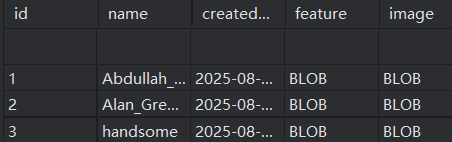
保存好的数据
识别人脸
加载模型
# 初始化设备
self.device = torch.device('cuda:0' if torch.cuda.is_available() else 'cpu')

# 加载前面训练出来的模型,检测人脸
self.yolo_model = YOLO('../FaceDetection/runs/detect/train/weights/best.pt').to(self.device)
# 加载 FaceNet 模型,提取人脸特征
self.faceNet_model = InceptionResnetV1(pretrained='vggface2').eval()
# 连接数据库
self.db = DB()
# 数据库的人脸特征
self.db_face_feature = self.db.select_features()
预处理人脸,FaceNet对人脸对象有要求
# 对人脸图像进行预处理
def pretreatment_face(self, face):
    face = cv2.cvtColor(face, cv2.COLOR_BGR2RGB)
    # 调整大小,FaceNet对图像大小有要求
    face = cv2.resize(face, (160, 160))
    # 归一化
    face = (face/255.0 - 0.5) / 0.5
    # 将图像转换成张量
    # 在 PyTorch 中,图像张量的标准格式通常要求通道维度在前
    # permute(2, 0, 1)将图像的维度从HWC (高度、宽度、通道) 转换为CHW (通道、高度、宽度)
    # 模型期望输入是4维的 [B, C, H, W]
    face = torch.tensor(face).permute(2, 0, 1).float().unsqueeze(0)
    return face
使用PIL实现中文绘制(opencv中不能绘制中文)
# 使用PIL实现中文绘制(opencv中不能绘制中文)
def put_chinese_text(self, img, text, position):
    # 转换 OpenCV BGR 图像为 PIL RGB 图像
    img_pil = Image.fromarray(cv2.cvtColor(img, cv2.COLOR_BGR2RGB))
    draw = ImageDraw.Draw(img_pil)

    # 加载中文字体
    font = ImageFont.truetype("simhei.ttf", 24)

    # 绘制中文
    draw.text(position, text, font=font, fill=(255, 0, 0))

    # 转换回 OpenCV BGR 格式
    return cv2.cvtColor(np.array(img_pil), cv2.COLOR_RGB2BGR)
人脸检测识别(对比数据库)
使用欧式距离或者余弦相似度
# 人脸检测识别(对比数据库)
    def detect_and_recognize(self, img):
        # 数据库的人脸特征
        self.db_face_feature = self.db.select_features()
        results = self.yolo_model(img)
        # 统计人脸总数
        cnt = 0
        for result in results:
            # 检测的人脸边框
            boxes = result.boxes
            # 处理人脸
            for box in boxes:
                cnt += 1
                # 获取边框坐标
                x1, y1, x2, y2 = np.int32(box.xyxy.cpu()[0])
                # 裁剪人脸
                face = img[y1:y2, x1:x2]
                # 预处理人脸
                pred_face = self.pretreatment_face(face)
                # 提取人脸特征
                with torch.no_grad():
                    face_feature = self.faceNet_model(pred_face).detach()
                # 对比数据库(欧式距离或余弦相似度计算相似度)
                best_match = None
                min_dist = float("inf")
                # max_cosine_sim = float("-1")
                for name, feature in self.db_face_feature.items():
                    # 欧式距离
                    dist = torch.norm(feature - face_feature)
                    if dist < min_dist:
                        min_dist = dist
                        best_match = name

                    # # 余弦相识度
                    # # 归一向量化
                    # feature_norm = F.normalize(feature, p=2, dim=0)
                    # # print(feature_norm.shape)
                    # face_feature_norm = F.normalize(face_feature, p=2, dim=0)
                    # # 计算余弦相似度
                    # cosine_sim = F.cosine_similarity(feature_norm, face_feature_norm).item()
                    # if cosine_sim > max_cosine_sim:
                    #     max_cosine_sim = cosine_sim
                    #     best_match = name

                if min_dist > 0.7:
                    best_match = "未知人物"
                # if max_cosine_sim < 0.55:
                #     best_match = "未知人物"
                # 绘制结果
                cv2.rectangle(img, (x1, y1), (x2, y2), (0, 255, 0), 2)
                # 使用PIL绘制中文
                img = self.put_chinese_text(img, f"{best_match} ({min_dist:.2f})", (x1, y1 - 20))
                # 没有中文以下绘制即可
                # cv2.putText(img, f"{best_match} ({min_dist:.2f})", (x1, y1 - 20), cv2.FONT_HERSHEY_SIMPLEX, 0.9, (0, 255, 0), 2)
        return cnt, img
完整的代码(人脸识别)
import cv2
import numpy as np
import torch
from PIL import ImageFont, Image, ImageDraw
from facenet_pytorch import InceptionResnetV1
from ultralytics import YOLO
import torch.nn.functional as F

from FaceNet.DB import DB


class FaceRecognition:
    def __init__(self):
        # 初始化设备
        self.device = torch.device('cuda:0' if torch.cuda.is_available() else 'cpu')

        # 加载前面训练出来的模型,检测人脸
        self.yolo_model = YOLO('../FaceDetection/runs/detect/train/weights/best.pt').to(self.device)
        # 加载 FaceNet 模型,提取人脸特征
        self.faceNet_model = InceptionResnetV1(pretrained='vggface2').eval()
        # 连接数据库
        self.db = DB()
        # 数据库的人脸特征
        self.db_face_feature = self.db.select_features()


    # 对人脸图像进行预处理
    def pretreatment_face(self, face):
        face = cv2.cvtColor(face, cv2.COLOR_BGR2RGB)
        # 调整大小,FaceNet对图像大小有要求
        face = cv2.resize(face, (160, 160))
        # 归一化
        face = (face/255.0 - 0.5) / 0.5
        # 将图像转换成张量
        # 在 PyTorch 中,图像张量的标准格式通常要求通道维度在前
        # permute(2, 0, 1)将图像的维度从HWC (高度、宽度、通道) 转换为CHW (通道、高度、宽度)
        # 模型期望输入是4维的 [B, C, H, W]
        face = torch.tensor(face).permute(2, 0, 1).float().unsqueeze(0)
        return face

    # 使用PIL实现中文绘制(opencv中不能绘制中文)
    def put_chinese_text(self, img, text, position):
        # 转换 OpenCV BGR 图像为 PIL RGB 图像
        img_pil = Image.fromarray(cv2.cvtColor(img, cv2.COLOR_BGR2RGB))
        draw = ImageDraw.Draw(img_pil)

        # 加载中文字体
        font = ImageFont.truetype("simhei.ttf", 24)

        # 绘制中文
        draw.text(position, text, font=font, fill=(255, 0, 0))

        # 转换回 OpenCV BGR 格式
        return cv2.cvtColor(np.array(img_pil), cv2.COLOR_RGB2BGR)


    # 人脸检测识别(对比数据库)
    def detect_and_recognize(self, img):
        # 数据库的人脸特征
        self.db_face_feature = self.db.select_features()
        results = self.yolo_model(img)
        # 统计人脸总数
        cnt = 0
        for result in results:
            # 检测的人脸边框
            boxes = result.boxes
            # 处理人脸
            for box in boxes:
                cnt += 1
                # 获取边框坐标
                x1, y1, x2, y2 = np.int32(box.xyxy.cpu()[0])
                # 裁剪人脸
                face = img[y1:y2, x1:x2]
                # 预处理人脸
                pred_face = self.pretreatment_face(face)
                # 提取人脸特征
                with torch.no_grad():
                    face_feature = self.faceNet_model(pred_face).detach()
                # 对比数据库(欧式距离或余弦相似度计算相似度)
                best_match = None
                min_dist = float("inf")
                # max_cosine_sim = float("-1")
                for name, feature in self.db_face_feature.items():
                    # 欧式距离
                    dist = torch.norm(feature - face_feature)
                    if dist < min_dist:
                        min_dist = dist
                        best_match = name

                    # # 余弦相识度
                    # # 归一向量化
                    # feature_norm = F.normalize(feature, p=2, dim=0)
                    # # print(feature_norm.shape)
                    # face_feature_norm = F.normalize(face_feature, p=2, dim=0)
                    # # 计算余弦相似度
                    # cosine_sim = F.cosine_similarity(feature_norm, face_feature_norm).item()
                    # if cosine_sim > max_cosine_sim:
                    #     max_cosine_sim = cosine_sim
                    #     best_match = name

                if min_dist > 0.7:
                    best_match = "未知人物"
                # if max_cosine_sim < 0.55:
                #     best_match = "未知人物"
                # 绘制结果
                cv2.rectangle(img, (x1, y1), (x2, y2), (0, 255, 0), 2)
                # 使用PIL绘制中文
                img = self.put_chinese_text(img, f"{best_match} ({min_dist:.2f})", (x1, y1 - 20))
                # 没有中文以下绘制即可
                # cv2.putText(img, f"{best_match} ({min_dist:.2f})", (x1, y1 - 20), cv2.FONT_HERSHEY_SIMPLEX, 0.9, (0, 255, 0), 2)
        return cnt, img
在图像识别中,没有使用图像增强方法,所以识别效果较差
五、人脸检测功能测试
1.图片检测
# 测试:图片检测
import cv2

from FaceNet.DB import DB
from FaceNet.FaceRecognition import FaceRecognition

recognition = FaceRecognition()
img = cv2.imread('recognition_images/Alan_Greenspan_0001.jpg')
_, img = recognition.detect_and_recognize(img)
# 关闭数据库
DB().close()
cv2.imshow('img', img)
cv2.waitKey(0)
cv2.destroyAllWindows()
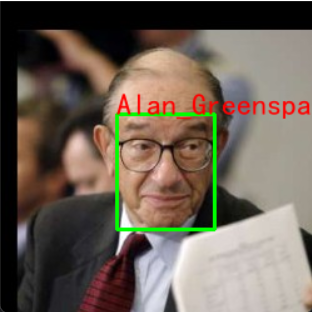
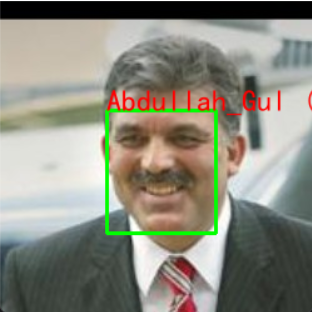
2.视频检测
视频来源:https://www.pexels.com/zh-cn
# 测试:视频检测
import cv2

from FaceNet.DB import DB
from FaceNet.FaceRecognition import FaceRecognition

# 人脸识别
recognition = FaceRecognition()
cap = cv2.VideoCapture('handsome.mp4')
# cap = cv2.VideoCapture(0)
# 遍历视频帧
while cap.isOpened():
    # 从视频中读取一帧
    success, frame = cap.read()

    if success:
        # 人脸检测识别(对比数据库)
        _, detect_frame = recognition.detect_and_recognize(frame)
        # 显示标注后的帧
        cv2.imshow("result", detect_frame)

        # 如果按下'Esc'键则退出循环
        if cv2.waitKey(1) & 0xFF == 27:
            break
    else:
        # 如果视频播放完毕,则退出循环
        break

# 关闭数据库
DB().close()
# 释放视频捕获对象并关闭显示窗口
cap.release()
cv2.destroyAllWindows()
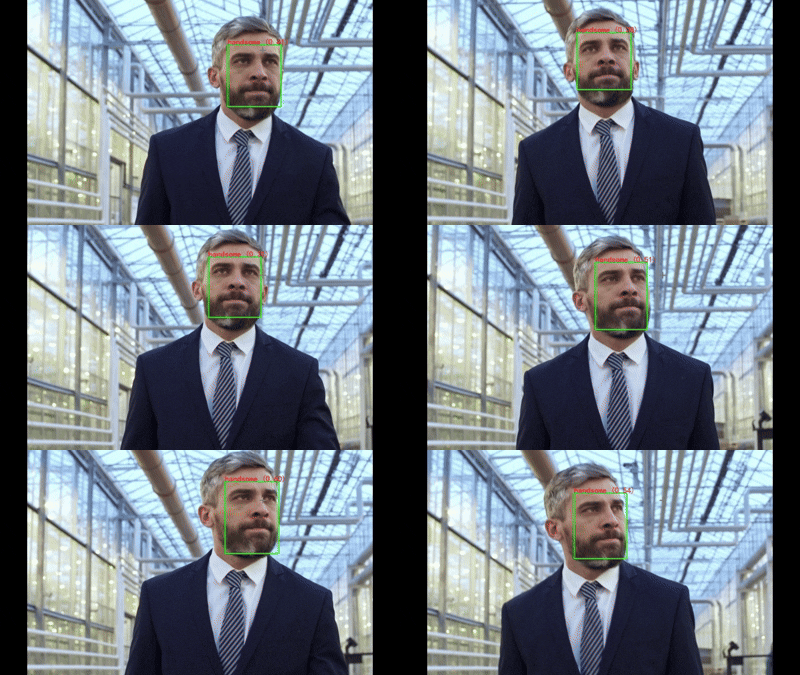
本项目及相关代码仅用于学习和研究目的,不保证其在任何场景下的准确性、完整性和可靠性。

DAMO开发者矩阵,由阿里巴巴达摩院和中国互联网协会联合发起,致力于探讨最前沿的技术趋势与应用成果,搭建高质量的交流与分享平台,推动技术创新与产业应用链接,围绕“人工智能与新型计算”构建开放共享的开发者生态。
更多推荐
 33
33 0
0- 0


 已为社区贡献2条内容

所有评论(0)