vlan综合实验
arp broadcast enable (开启ARP)dhcp enable (开启DHCP服务)配置接口(GE0/0/3)
要求:
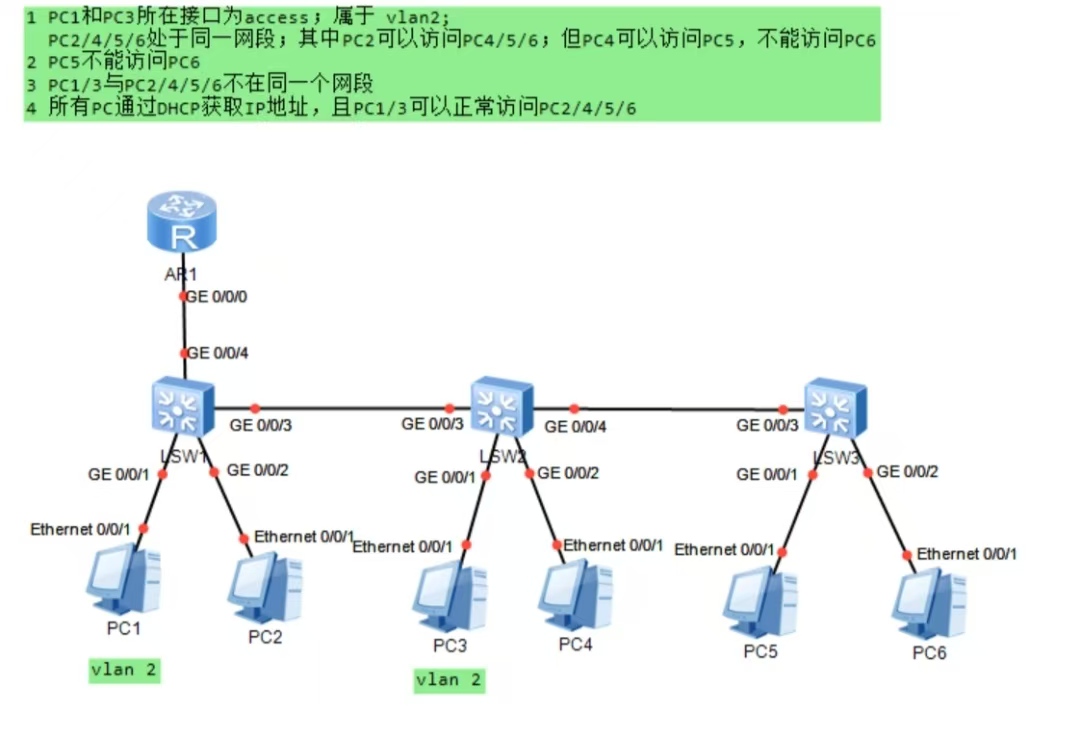
操作:
1.将对应设备名称进行修改
sysname LSW1,LWS2,LWS3,AR1
2.在所有交换机上创建地址池
vlan batch 2 3
3.LWS1配置
配置接口(GE0/0/1):
interface GigabitEthernet 0/0/1
port link-type access
port access vlan 2
配置接口(GE0/0/2):
interface GigabitEthernet 0/0/2
port link-type access
port access vlan 3
配置接口(GE0/0/4):
interface GigabitEthernet 0/0/4
port link-type trunk
port trunk allow-pass vlan 2 3
配置接口(GE0/0/3)
interface GigabitEthernet 0/0/3
port link-type trunk
port trunk allow-pass vlan 2 3
4.LWS2配置
配置接口(GE0/0/3):
interface GigabitEthernet 0/0/3
port link-type trunk
port trunk allow-pass vlan 2 3
配置接口(GE0/0/4):
interface GigabitEthernet 0/0/4
port link-type trunk
port trunk allow-pass vlan 2 3
配置接口(GE0/0/1):
interface GigabitEthernet 0/0/1
port link-type access
port access vlan 2
配置接口(GE0/0/2):
interface GigabitEthernet 0/0/2
port link-type access
port access vlan 3
5.LWS3配置
配置接口(GE0/0/3):
interface GigabitEthernet 0/0/3
port link-type trunk
port trunk allow-pass vlan 2 3
配置接口(GE0/0/1):
interface GigabitEthernet 0/0/1
port link-type access
port access vlan 3
配置接口(GE0/0/2):
interface GigabitEthernet 0/0/2
port link-type access
port access vlan 3
6.1.AR1配置
配置vlan2子接口(PC1/PC3的网关):
interface GigabitEthernet 0/0/0.1
dot1q termination vid 2
ip address 192.168.2.254 255.255.255.0
arp broadcast enable (开启ARP)
配置VLAN3子接口(PC2/4/5/6的网关):
interface GigabitEthernet 0/0/0.2
dot1q termination vid 3
ip address 192.168.3.254 255.255.255.0
arp broadcast enable
物理接口开启:
interface GigabitEthernet 0/0/0
undo shutdown
6.2.DHCP服务配置
dhcp enable (开启DHCP服务)
VLAN2地址池配置:
ip pool vlan2
gateway-list 192.168.2.254
network 192.168.2.0 mask 255.255.255.0
VLAN3地址池配置:
ip pool vlan3
gateway-list 192.168.3.254
network 192.168.3.0 mask 255.255.255.0
子接口开启DHCP全局分配:
interface GigabitEthernet 0/0/0.1
dhcp select global
interface GigabitEthernet 0/0/0.2
dhcp select global
6.3.静态IP绑定
进入VLAN3地址池,绑定各PC的MAC地址:
ip pool vlan3
static-bind ip-address 192.168.3.2 mac-address XX-XX-XX-XX-XX-XX // PC2
static-bind ip-address 192.168.3.4 mac-address XX-XX-XX-XX-XX-XX // PC4
static-bind ip-address 192.168.3.5 mac-address XX-XX-XX-XX-XX-XX // PC5
static-bind ip-address 192.168.3.6 mac-address XX-XX-XX-XX-XX-XX // PC6
6.4.ACL访问控制配置
配置ACL 3000:
acl number 3000
拒绝PC4(192.168.3.4)访问PC6(192.168.3.6):
rule deny ip source 192.168.3.4 0 destination 192.168.3.6 0
拒绝PC5(192.168.3.5)访问PC6(192.168.3.6):
rule deny ip source 192.168.3.5 0 destination 192.168.3.6 0
放行所有其他流量:
rule permit ip source any destination any
在VLAN3子接口入方向应用ACL:
interface GigabitEthernet 0/0/0.2
traffic-filter inbound acl 3000
7.全网测试验证
| 测试项 | 预期结果 |
|---|---|
| PC2 ping PC4/PC5/PC6 | 全部通 |
| PC4 ping PC5 | 通 |
| PC4 ping PC6 | 不通 |
| PC5 ping PC6 | 不通 |
| PC1/PC3 ping PC2/PC4/PC5/PC6 | 全部通 |

DAMO开发者矩阵,由阿里巴巴达摩院和中国互联网协会联合发起,致力于探讨最前沿的技术趋势与应用成果,搭建高质量的交流与分享平台,推动技术创新与产业应用链接,围绕“人工智能与新型计算”构建开放共享的开发者生态。
更多推荐
 2
2 0
0- 0


 已为社区贡献1条内容

所有评论(0)