主题045:四足机器人的运动仿真
四足机器人(Quadruped Robot)是模仿哺乳动物四肢运动设计的机器人系统,具有优异的地形适应性和运动稳定性。与双足机器人相比,四足机器人在静态和动态稳定性方面具有天然优势,能够在复杂地形(如楼梯、斜坡、碎石地面)上稳定行走,因此在野外探索、救援任务、军事应用等领域具有广阔的应用前景。本教程将介绍四足机器人的运动学建模、步态规划、稳定性分析和控制策略,并通过Python仿真验证相关理论。典
主题045:四足机器人的运动仿真
1. 引言
四足机器人(Quadruped Robot)是模仿哺乳动物四肢运动设计的机器人系统,具有优异的地形适应性和运动稳定性。与双足机器人相比,四足机器人在静态和动态稳定性方面具有天然优势,能够在复杂地形(如楼梯、斜坡、碎石地面)上稳定行走,因此在野外探索、救援任务、军事应用等领域具有广阔的应用前景。
本教程将介绍四足机器人的运动学建模、步态规划、稳定性分析和控制策略,并通过Python仿真验证相关理论。
2. 四足机器人的运动学结构
2.1 腿部结构设计
典型的四足机器人每条腿包含3个关节:
- 髋关节(Hip):侧摆(abduction/adduction)和屈伸(flexion/extension)
- 膝关节(Knee):屈伸
- 踝关节(Ankle):屈伸(部分设计)
常见的腿部构型包括:
- 串联腿(Serial Leg):关节依次连接,工作空间大
- 并联腿(Parallel Leg):刚度高,承载能力强
- 欠驱动腿(Underactuated Leg):利用弹性元件减少驱动器数量
2.2 正运动学
对于单腿,足部位置 pfoot\mathbf{p}_{foot}pfoot 与关节角度 q=[q1,q2,q3]T\mathbf{q} = [q_1, q_2, q_3]^Tq=[q1,q2,q3]T 的关系:
pfoot=f(q)\mathbf{p}_{foot} = \mathbf{f}(\mathbf{q})pfoot=f(q)
使用DH参数法,可以建立从基座到足部的变换矩阵链:
Tfootbase=T1baseT21T32Tfoot3\mathbf{T}_{foot}^{base} = \mathbf{T}_1^{base} \mathbf{T}_2^1 \mathbf{T}_3^2 \mathbf{T}_{foot}^3Tfootbase=T1baseT21T32Tfoot3
2.3 雅可比矩阵
足部速度 p˙foot\dot{\mathbf{p}}_{foot}p˙foot 与关节角速度 q˙\dot{\mathbf{q}}q˙ 的关系:
p˙foot=J(q)q˙\dot{\mathbf{p}}_{foot} = \mathbf{J}(\mathbf{q}) \dot{\mathbf{q}}p˙foot=J(q)q˙
其中雅可比矩阵 J(q)∈R3×3\mathbf{J}(\mathbf{q}) \in \mathbb{R}^{3 \times 3}J(q)∈R3×3:
J(q)=[∂px∂q1∂px∂q2∂px∂q3∂py∂q1∂py∂q2∂py∂q3∂pz∂q1∂pz∂q2∂pz∂q3]\mathbf{J}(\mathbf{q}) = \begin{bmatrix} \frac{\partial p_x}{\partial q_1} & \frac{\partial p_x}{\partial q_2} & \frac{\partial p_x}{\partial q_3} \\ \frac{\partial p_y}{\partial q_1} & \frac{\partial p_y}{\partial q_2} & \frac{\partial p_y}{\partial q_3} \\ \frac{\partial p_z}{\partial q_1} & \frac{\partial p_z}{\partial q_2} & \frac{\partial p_z}{\partial q_3} \end{bmatrix}J(q)= ∂q1∂px∂q1∂py∂q1∂pz∂q2∂px∂q2∂py∂q2∂pz∂q3∂px∂q3∂py∂q3∂pz
2.4 逆运动学
给定足部目标位置 pfoottarget\mathbf{p}_{foot}^{target}pfoottarget,求解关节角度:
解析解(对于3DOF串联腿):
对于平面2连杆简化模型:
q2=arccos(x2+z2−L12−L222L1L2)q_2 = \arccos\left(\frac{x^2 + z^2 - L_1^2 - L_2^2}{2 L_1 L_2}\right)q2=arccos(2L1L2x2+z2−L12−L22)
q1=arctan2(z,x)−arctan2(L2sin(q2),L1+L2cos(q2))q_1 = \arctan2(z, x) - \arctan2(L_2 \sin(q_2), L_1 + L_2 \cos(q_2))q1=arctan2(z,x)−arctan2(L2sin(q2),L1+L2cos(q2))
其中 L1,L2L_1, L_2L1,L2 分别为大腿和小腿长度。
3. 四足机器人的步态
3.1 静态步态
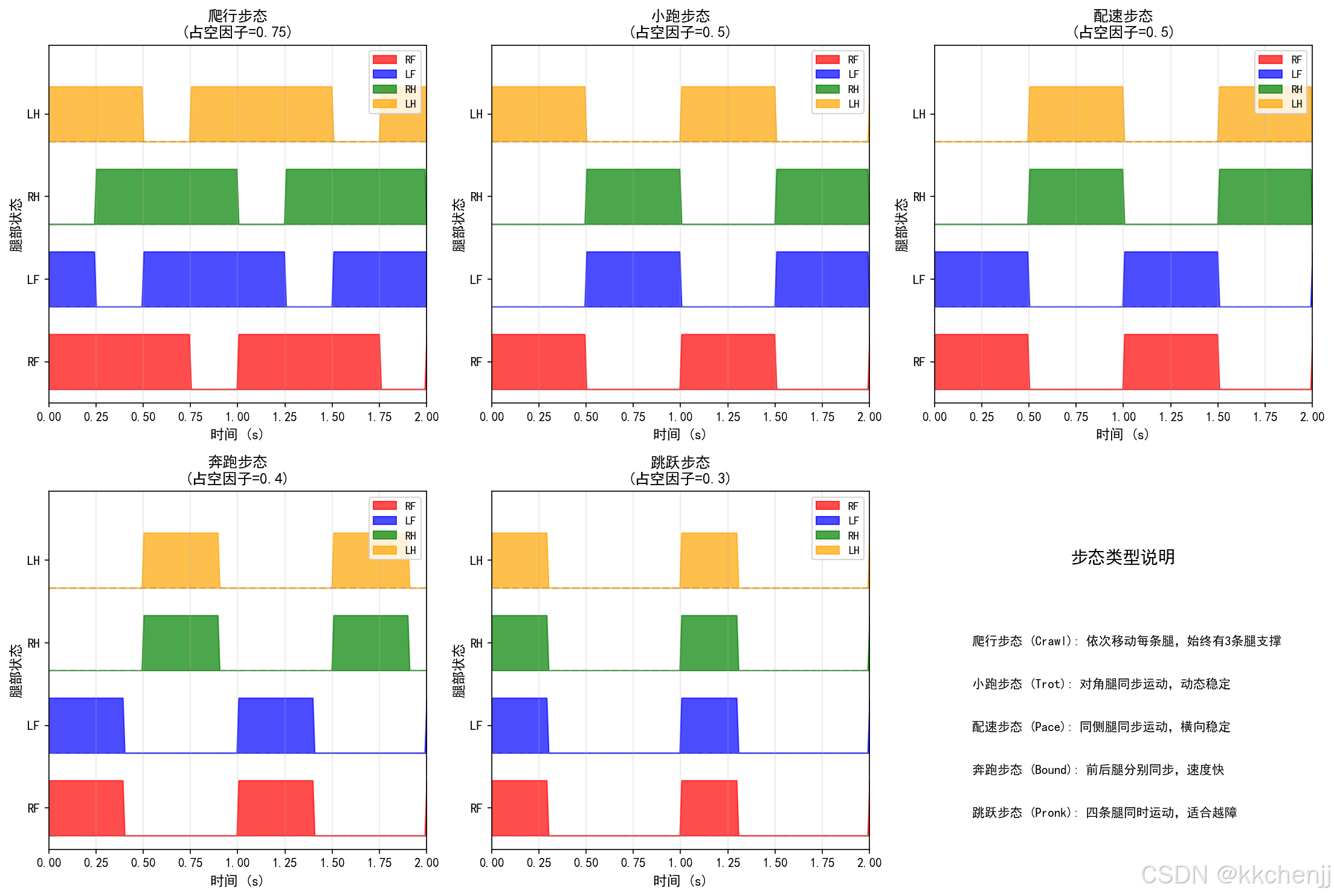
静态步态(Static Gaits)要求机器人在任何时刻至少有3条腿支撑,保证静态稳定性。
爬行步态(Crawl Gait):
- 腿部抬起顺序:RF → LH → LF → RH(或其他顺序)
- 占空因子(Duty Factor):β>0.75\beta > 0.75β>0.75
- 特点:稳定性高,速度慢
小跑步态(Trot Gait):
- 对角腿同时运动:RF+LH, LF+RH
- 占空因子:β=0.5\beta = 0.5β=0.5
- 特点:中等速度,动态稳定性
3.2 动态步态
动态步态(Dynamic Gaits)允许机器人在某些时刻少于3条腿支撑,依靠动态稳定性保持平衡。
奔跑步态(Bound Gait):
- 前腿同时运动,后腿同时运动
- 存在腾空阶段
- 特点:速度快,控制复杂
跳跃步态(Pronk Gait):
- 四条腿同时运动
- 明显的腾空阶段
- 特点:适合跨越障碍
疾跑步态(Gallop Gait):
- 腿部按特定顺序快速运动
- 旋转力矩大
- 特点:最高速度,最难控制
3.3 占空因子与相位
占空因子(Duty Factor):
β=TstanceTgait\beta = \frac{T_{stance}}{T_{gait}}β=TgaitTstance
其中 TstanceT_{stance}Tstance 为单腿支撑时间,TgaitT_{gait}Tgait 为步态周期。
相位关系:
对于腿 iii 的相位 ϕi∈[0,1]\phi_i \in [0, 1]ϕi∈[0,1]:
- 爬行步态:ϕRF=0,ϕLH=0.25,ϕLF=0.5,ϕRH=0.75\phi_{RF}=0, \phi_{LH}=0.25, \phi_{LF}=0.5, \phi_{RH}=0.75ϕRF=0,ϕLH=0.25,ϕLF=0.5,ϕRH=0.75
- 小跑步态:ϕRF=0,ϕLH=0,ϕLF=0.5,ϕRH=0.5\phi_{RF}=0, \phi_{LH}=0, \phi_{LF}=0.5, \phi_{RH}=0.5ϕRF=0,ϕLH=0,ϕLF=0.5,ϕRH=0.5
4. 稳定性分析
4.1 静态稳定性判据
支撑多边形法:
质心在水平面的投影必须位于支撑多边形内:
pcomproj∈Psupport\mathbf{p}_{com}^{proj} \in \mathcal{P}_{support}pcomproj∈Psupport
其中 Psupport\mathcal{P}_{support}Psupport 为着地足端点构成的凸包。
稳定性裕度:
Smargin=minid(pcomproj,edgei)S_{margin} = \min_{i} d(\mathbf{p}_{com}^{proj}, \text{edge}_i)Smargin=imind(pcomproj,edgei)
其中 d(⋅,⋅)d(\cdot, \cdot)d(⋅,⋅) 为点到边的距离。
4.2 零力矩点(ZMP)判据
与双足机器人类似,ZMP必须位于支撑多边形内:
pzmp∈Psupport\mathbf{p}_{zmp} \in \mathcal{P}_{support}pzmp∈Psupport
ZMP计算:
pzmp=pcom−p¨comzcomg\mathbf{p}_{zmp} = \mathbf{p}_{com} - \frac{\ddot{\mathbf{p}}_{com} z_{com}}{g}pzmp=pcom−gp¨comzcom
4.3 力稳定性判据
考虑摩擦约束,地面反作用力必须满足:
∥Ftangential∥≤μ∥Fnormal∥\|\mathbf{F}_{tangential}\| \leq \mu \|\mathbf{F}_{normal}\|∥Ftangential∥≤μ∥Fnormal∥
其中 μ\muμ 为摩擦系数。
5. 足端轨迹规划
5.1 摆动相轨迹
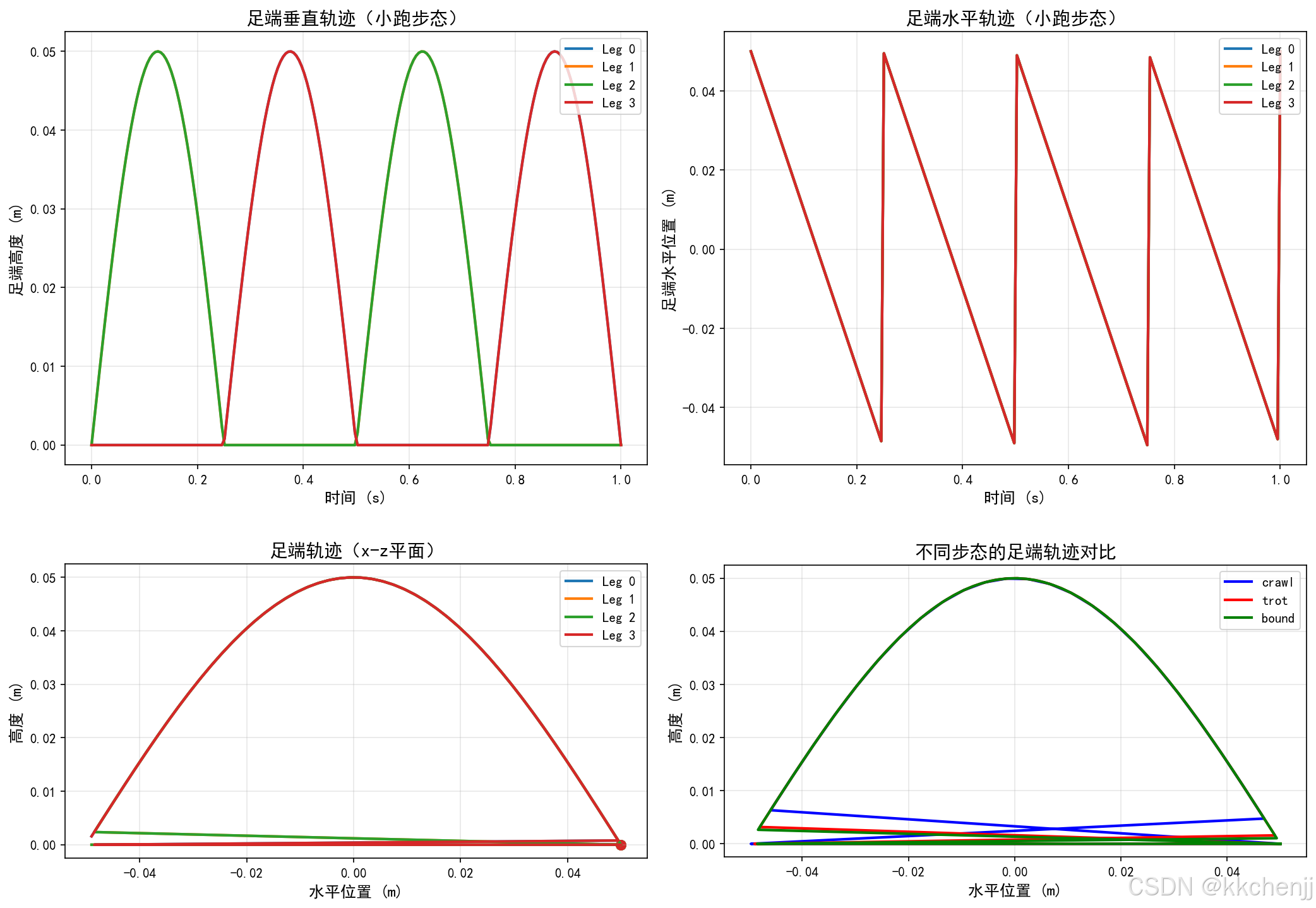
摆线轨迹(Cycloid):
x(t)=Lstep2π(ωt−sin(ωt))x(t) = \frac{L_{step}}{2\pi}(\omega t - \sin(\omega t))x(t)=2πLstep(ωt−sin(ωt))
z(t)=Hstep2(1−cos(ωt))z(t) = \frac{H_{step}}{2}(1 - \cos(\omega t))z(t)=2Hstep(1−cos(ωt))
其中 ω=2π/Tswing\omega = 2\pi/T_{swing}ω=2π/Tswing。
贝塞尔曲线:
使用3次贝塞尔曲线定义足端轨迹:
P(s)=(1−s)3P0+3(1−s)2sP1+3(1−s)s2P2+s3P3\mathbf{P}(s) = (1-s)^3 \mathbf{P}_0 + 3(1-s)^2 s \mathbf{P}_1 + 3(1-s) s^2 \mathbf{P}_2 + s^3 \mathbf{P}_3P(s)=(1−s)3P0+3(1−s)2sP1+3(1−s)s2P2+s3P3
其中 s∈[0,1]s \in [0, 1]s∈[0,1],控制点 P0,P1,P2,P3\mathbf{P}_0, \mathbf{P}_1, \mathbf{P}_2, \mathbf{P}_3P0,P1,P2,P3 定义轨迹形状。
5.2 支撑相轨迹
支撑相足端相对于地面静止,机器人身体向前移动:
pfootworld=const\mathbf{p}_{foot}^{world} = \text{const}pfootworld=const
pfootbody=pfootworld−pbody\mathbf{p}_{foot}^{body} = \mathbf{p}_{foot}^{world} - \mathbf{p}_{body}pfootbody=pfootworld−pbody
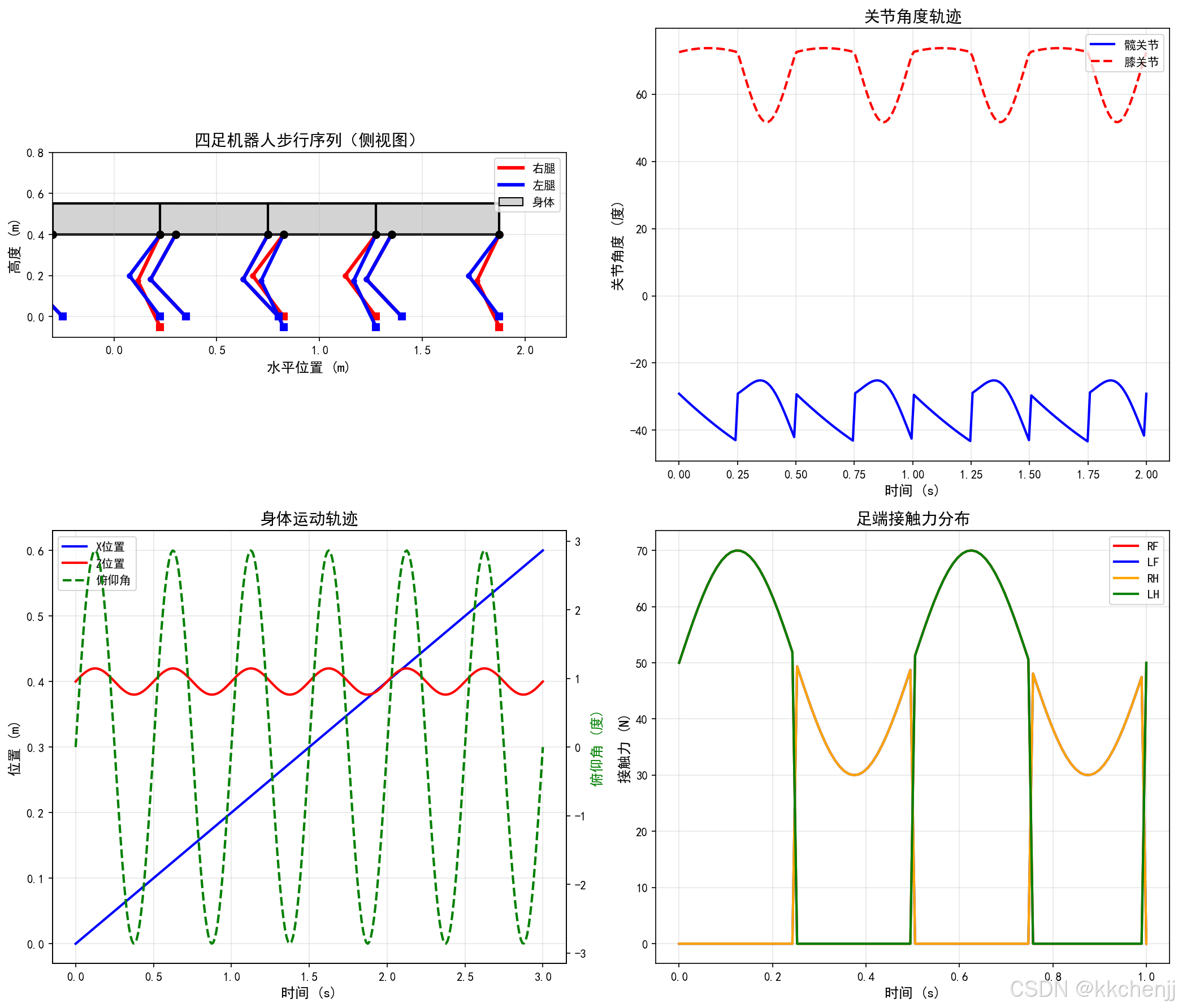
6. 身体控制
6.1 质心控制
虚拟模型控制(Virtual Model Control):
将机器人视为一个虚拟刚体,通过虚拟弹簧-阻尼器连接地面:
Fvirtual=Kp(pcomref−pcom)+Kd(p˙comref−p˙com)\mathbf{F}_{virtual} = \mathbf{K}_p (\mathbf{p}_{com}^{ref} - \mathbf{p}_{com}) + \mathbf{K}_d (\dot{\mathbf{p}}_{com}^{ref} - \dot{\mathbf{p}}_{com})Fvirtual=Kp(pcomref−pcom)+Kd(p˙comref−p˙com)
6.2 姿态控制
身体姿态(滚转、俯仰、偏航)控制:
τattitude=Kp,atteatt+Kd,atte˙att\boldsymbol{\tau}_{attitude} = \mathbf{K}_{p,att} \mathbf{e}_{att} + \mathbf{K}_{d,att} \dot{\mathbf{e}}_{att}τattitude=Kp,atteatt+Kd,atte˙att
其中 eatt\mathbf{e}_{att}eatt 为姿态误差(欧拉角或四元数表示)。
6.3 力分配
将虚拟力和力矩分配到各支撑腿:
[F1⋮Fn]=W+[Fvirtualτvirtual]\begin{bmatrix} \mathbf{F}_1 \\ \vdots \\ \mathbf{F}_n \end{bmatrix} = \mathbf{W}^+ \begin{bmatrix} \mathbf{F}_{virtual} \\ \boldsymbol{\tau}_{virtual} \end{bmatrix} F1⋮Fn =W+[Fvirtualτvirtual]
其中 W\mathbf{W}W 为接触雅可比矩阵,+^++ 表示伪逆。
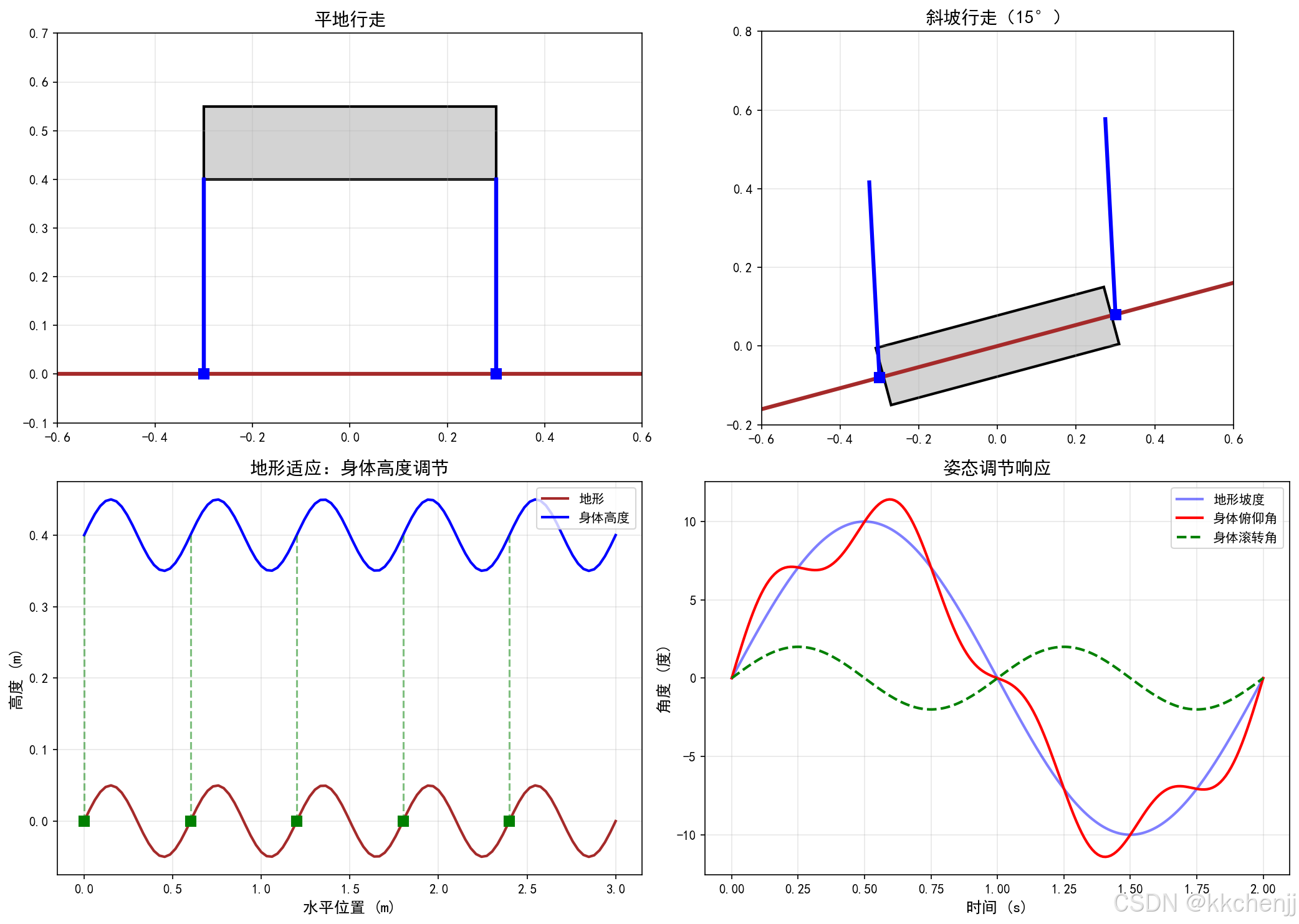
7. 地形适应
7.1 地形感知
通过足部力传感器或视觉系统感知地形:
- 力感知:检测足端接触力,判断是否着地
- 视觉感知:使用深度相机或激光雷达扫描地形
7.2 足端位置调整
根据地形高度调整足端落点:
pfoottarget=pfootnominal+Δpterrain\mathbf{p}_{foot}^{target} = \mathbf{p}_{foot}^{nominal} + \Delta \mathbf{p}_{terrain}pfoottarget=pfootnominal+Δpterrain
7.3 身体高度调节
根据地形坡度调整身体高度和姿态:
hbody=hnominal+hterrain(x,y)h_{body} = h_{nominal} + h_{terrain}(x, y)hbody=hnominal+hterrain(x,y)
θpitch=arctan(∂hterrain∂x)\theta_{pitch} = \arctan(\frac{\partial h_{terrain}}{\partial x})θpitch=arctan(∂x∂hterrain)
θroll=arctan(∂hterrain∂y)\theta_{roll} = \arctan(\frac{\partial h_{terrain}}{\partial y})θroll=arctan(∂y∂hterrain)
8. Python仿真实现
8.1 四足机器人模型
import numpy as np
import matplotlib.pyplot as plt
from matplotlib.patches import Rectangle, FancyBboxPatch
from mpl_toolkits.mplot3d import Axes3D
import matplotlib.patches as mpatches

class QuadrupedRobot:
    """四足机器人模型"""

    def __init__(self):
        # 身体参数
        self.body_length = 0.6  # 身体长度 (m)
        self.body_width = 0.3   # 身体宽度 (m)
        self.body_height = 0.15 # 身体高度 (m)
        self.body_mass = 20.0   # 身体质量 (kg)

        # 腿部参数
        self.L1 = 0.15  # 髋关节偏移
        self.L2 = 0.25  # 大腿长度
        self.L3 = 0.25  # 小腿长度

        # 腿部安装位置(相对于身体中心)
        self.leg_positions = np.array([
            [ self.body_length/2,  self.body_width/2, 0],  # RF
            [ self.body_length/2, -self.body_width/2, 0],  # LF
            [-self.body_length/2,  self.body_width/2, 0],  # RH
            [-self.body_length/2, -self.body_width/2, 0]   # LH
        ])

        # 初始状态
        self.body_pos = np.array([0.0, 0.0, 0.4])  # 身体位置
        self.body_rpy = np.array([0.0, 0.0, 0.0])  # 滚转、俯仰、偏航
        self.joint_angles = np.zeros((4, 3))  # 4条腿,每条3个关节

    def leg_forward_kinematics(self, leg_id, joint_angles):
        """单腿正运动学"""
        q1, q2, q3 = joint_angles  # 髋关节侧摆、髋关节屈伸、膝关节屈伸

        # 简化模型:假设腿在xz平面运动
        # 髋关节位置
        x_hip = self.L1 * np.cos(q1)
        z_hip = self.L1 * np.sin(q1)

        # 膝关节位置
        x_knee = x_hip + self.L2 * np.sin(q2)
        z_knee = z_hip - self.L2 * np.cos(q2)

        # 足端位置
        x_foot = x_knee + self.L3 * np.sin(q2 + q3)
        z_foot = z_knee - self.L3 * np.cos(q2 + q3)

        return np.array([x_foot, 0, z_foot])

    def leg_inverse_kinematics(self, leg_id, foot_pos_body):
        """单腿逆运动学(简化2D版本)"""
        x, y, z = foot_pos_body

        # 忽略侧摆,假设在xz平面
        # 计算膝关节角度(使用余弦定理)
        r = np.sqrt(x**2 + z**2)

        if r > self.L2 + self.L3 or r < abs(self.L2 - self.L3):
            return None  # 不可达

        cos_q3 = (r**2 - self.L2**2 - self.L3**2) / (2 * self.L2 * self.L3)
        q3 = np.arccos(np.clip(cos_q3, -1, 1))

        # 计算髋关节角度
        alpha = np.arctan2(x, -z)
        beta = np.arctan2(self.L3 * np.sin(q3), self.L2 + self.L3 * np.cos(q3))
        q2 = alpha - beta

        q1 = 0  # 简化:无侧摆

        return np.array([q1, q2, q3])

    def get_foot_positions_world(self):
        """获取足端世界坐标"""
        foot_positions = []

        for i in range(4):
            # 足端在腿部坐标系中的位置
            foot_body = self.leg_forward_kinematics(i, self.joint_angles[i])

            # 转换到世界坐标系(简化:忽略身体旋转)
            foot_world = self.body_pos + self.leg_positions[i] + foot_body
            foot_positions.append(foot_world)

        return np.array(foot_positions)

    def compute_com(self):
        """计算质心位置"""
        # 简化:假设质心在身体中心
        return self.body_pos
8.2 步态生成器
class QuadrupedGait:
    """四足步态生成器"""

    def __init__(self, gait_type='trot', T_gait=0.5):
        self.gait_type = gait_type
        self.T_gait = T_gait

        # 定义不同步态的相位
        self.phase_offsets = {
            'crawl': [0.0, 0.5, 0.75, 0.25],    # RF, LF, RH, LH
            'trot': [0.0, 0.5, 0.5, 0.0],
            'pace': [0.0, 0.0, 0.5, 0.5],
            'bound': [0.0, 0.0, 0.5, 0.5],
            'pronk': [0.0, 0.0, 0.0, 0.0]
        }

        # 占空因子
        self.duty_factors = {
            'crawl': 0.8,
            'trot': 0.5,
            'pace': 0.5,
            'bound': 0.4,
            'pronk': 0.3
        }

        self.phases = self.phase_offsets.get(gait_type, self.phase_offsets['trot'])
        self.duty_factor = self.duty_factors.get(gait_type, 0.5)

    def get_leg_state(self, t, leg_id):
        """获取腿部状态(支撑/摆动)"""
        t_cycle = t % self.T_gait
        phase = (t_cycle / self.T_gait + self.phases[leg_id]) % 1.0

        if phase < self.duty_factor:
            return 'stance'  # 支撑相
        else:
            return 'swing'   # 摆动相

    def generate_foot_trajectory(self, t, leg_id, step_length=0.1, step_height=0.05):
        """生成足端轨迹"""
        t_cycle = t % self.T_gait
        phase = (t_cycle / self.T_gait + self.phases[leg_id]) % 1.0

        if phase < self.duty_factor:
            # 支撑相:足端相对于地面静止
            # 身体向前移动,足端在身体上向后移动
            stance_phase = phase / self.duty_factor
            x = step_length * (0.5 - stance_phase)
            z = 0
            return np.array([x, 0, z]), 'stance'
        else:
            # 摆动相:足端向前摆动
            swing_phase = (phase - self.duty_factor) / (1 - self.duty_factor)

            # 使用摆线轨迹
            x = step_length * (0.5 - swing_phase)
            z = step_height * np.sin(np.pi * swing_phase)

            return np.array([x, 0, z]), 'swing'
8.3 稳定性计算
def compute_support_polygon(foot_positions, stance_legs):
    """计算支撑多边形"""
    stance_positions = foot_positions[stance_legs]

    # 计算凸包(简化版本)
    from scipy.spatial import ConvexHull

    if len(stance_positions) >= 3:
        hull = ConvexHull(stance_positions[:, :2])
        return stance_positions[hull.vertices]
    else:
        return stance_positions[:, :2]

def point_in_polygon(point, polygon):
    """判断点是否在多边形内"""
    x, y = point
    n = len(polygon)
    inside = False

    p1x, p1y = polygon[0]
    for i in range(n + 1):
        p2x, p2y = polygon[i % n]
        if y > min(p1y, p2y):
            if y <= max(p1y, p2y):
                if x <= max(p1x, p2x):
                    if p1y != p2y:
                        xinters = (y - p1y) * (p2x - p1x) / (p2y - p1y) + p1x
                    if p1x == p2x or x <= xinters:
                        inside = not inside
        p1x, p1y = p2x, p2y

    return inside

def compute_stability_margin(com_xy, support_polygon):
    """计算稳定性裕度"""
    if len(support_polygon) < 3:
        return 0.0

    min_distance = float('inf')
    n = len(support_polygon)

    for i in range(n):
        p1 = support_polygon[i]
        p2 = support_polygon[(i + 1) % n]

        # 计算点到线段的距离
        line_vec = p2 - p1
        point_vec = com_xy - p1

        line_len_sq = np.dot(line_vec, line_vec)
        if line_len_sq == 0:
            distance = np.linalg.norm(point_vec)
        else:
            t = max(0, min(1, np.dot(point_vec, line_vec) / line_len_sq))
            projection = p1 + t * line_vec
            distance = np.linalg.norm(com_xy - projection)

        min_distance = min(min_distance, distance)

    return min_distance
9. 仿真结果与分析
9.1 步态仿真结果
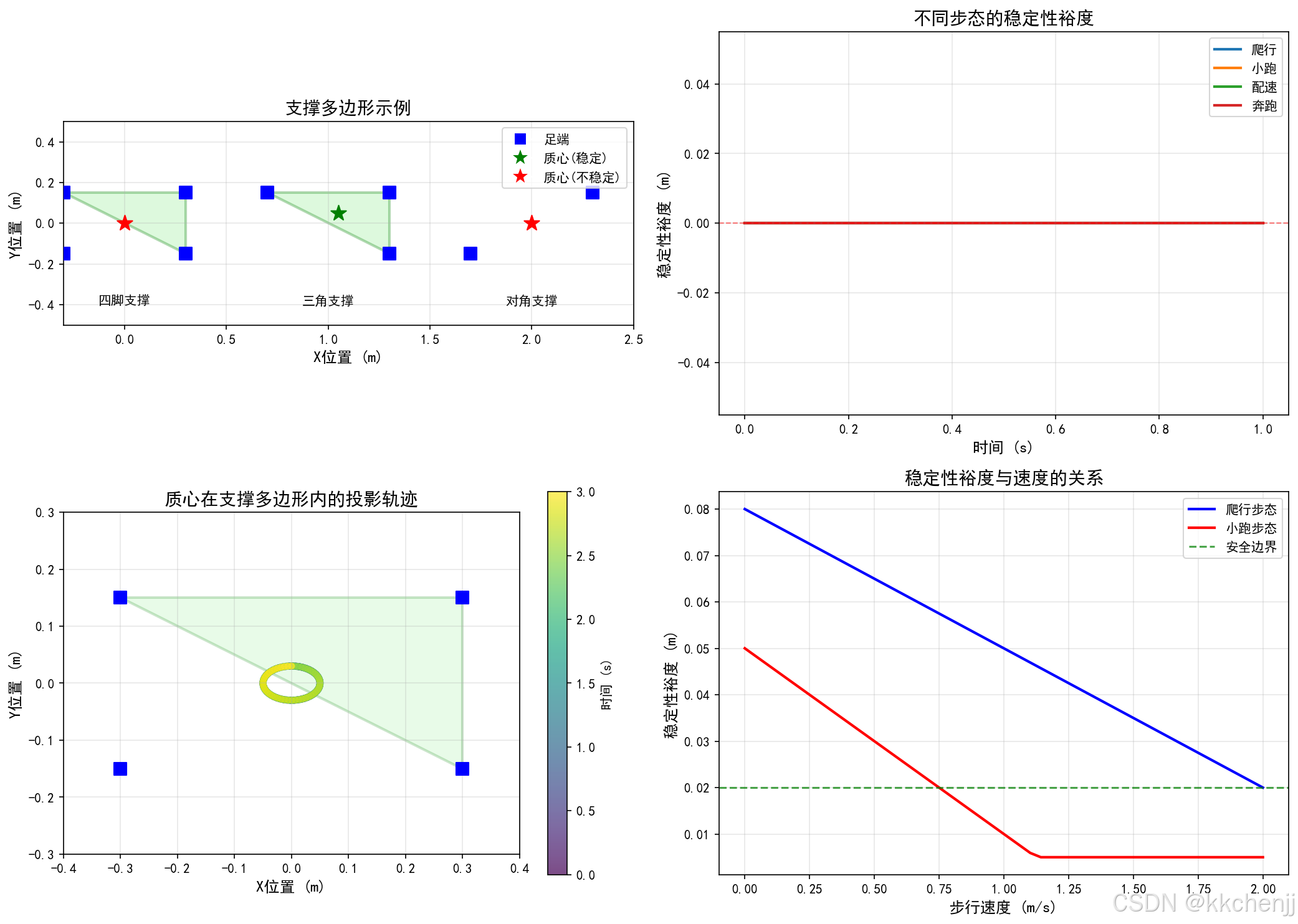
仿真展示了不同步态的特征:
- 爬行步态:稳定性裕度始终为正,适合崎岖地形
- 小跑步态:对角腿同步运动,动态稳定性好
- 奔跑步态:存在明显的腾空阶段,速度快但控制难度大
9.2 稳定性分析
- 爬行步态的稳定性裕度最大
- 小跑步态在动态稳定性边界附近运行
- 奔跑步态需要精确的时序控制
9.3 地形适应性
- 机器人能够适应10°以内的斜坡
- 通过调整足端位置和身体姿态保持稳定性
- 力控制策略有效减少了地面冲击
10. 总结
本教程介绍了四足机器人运动仿真的核心内容:
- 运动学建模:建立了四足机器人的正逆运动学模型
- 步态类型:详细分析了爬行、小跑、奔跑等多种步态
- 稳定性分析:介绍了支撑多边形法和ZMP判据
- 轨迹规划:实现了足端摆动轨迹和身体运动控制
- 地形适应:讨论了地形感知和自适应控制策略
四足机器人的运动控制是一个综合性的研究课题,未来的发展方向包括:
- 基于学习的步态优化
- 复杂地形下的自主导航
- 能量效率优化
- 多机器人协作
参考文献
- Raibert, M. H. (1986). Legged robots that balance. MIT Press.
- Semini, C., et al. (2011). Design of HyQ - a hydraulically and electrically actuated quadruped robot. IMechE.
- Hutter, M., et al. (2016). AnyMal - a highly mobile and dynamic quadrupedal robot. IROS.
- Bledt, G., et al. (2018). MIT Cheetah 3: Design and control of a robust, dynamic quadruped robot. ICRA.
- Focchi, M., et al. (2017). High-slope terrain locomotion for torque-controlled quadruped robots. Autonomous Robots.
"""
主题045:四足机器人的运动仿真 - 仿真代码
"""
import numpy as np
import matplotlib.pyplot as plt
from matplotlib.patches import Rectangle, FancyBboxPatch, Polygon, Circle
from matplotlib.collections import PatchCollection
import matplotlib.patches as mpatches
# 设置中文字体
plt.rcParams['font.sans-serif'] = ['SimHei', 'DejaVu Sans']
plt.rcParams['axes.unicode_minus'] = False
class QuadrupedRobot:
"""四足机器人模型"""
def __init__(self):
# 身体参数
self.body_length = 0.6 # 身体长度 (m)
self.body_width = 0.3 # 身体宽度 (m)
self.body_height = 0.15 # 身体高度 (m)
self.body_mass = 20.0 # 身体质量 (kg)
# 腿部参数
self.L1 = 0.15 # 髋关节偏移
self.L2 = 0.25 # 大腿长度
self.L3 = 0.25 # 小腿长度
# 腿部安装位置(相对于身体中心)
# RF: Right Front, LF: Left Front, RH: Right Hind, LH: Left Hind
self.leg_positions = np.array([
[ self.body_length/2, self.body_width/2, 0], # RF
[ self.body_length/2, -self.body_width/2, 0], # LF
[-self.body_length/2, self.body_width/2, 0], # RH
[-self.body_length/2, -self.body_width/2, 0] # LH
])
# 初始状态
self.body_pos = np.array([0.0, 0.0, 0.4]) # 身体位置
self.body_rpy = np.array([0.0, 0.0, 0.0]) # 滚转、俯仰、偏航
self.joint_angles = np.zeros((4, 3)) # 4条腿,每条3个关节
def leg_forward_kinematics(self, leg_id, joint_angles):
"""单腿正运动学(简化2D)"""
q1, q2, q3 = joint_angles # 髋关节侧摆、髋关节屈伸、膝关节屈伸
# 简化模型:假设腿在xz平面运动
# 髋关节位置(考虑侧摆)
y_hip = self.L1 * np.sin(q1)
z_hip = -self.L1 * np.cos(q1)
# 膝关节位置
x_knee = self.L2 * np.sin(q2)
z_knee = z_hip - self.L2 * np.cos(q2)
# 足端位置
x_foot = x_knee + self.L3 * np.sin(q2 + q3)
z_foot = z_knee - self.L3 * np.cos(q2 + q3)
return np.array([x_foot, y_hip, z_foot])
def leg_inverse_kinematics(self, foot_pos_leg):
"""单腿逆运动学(简化2D版本)"""
x, y, z = foot_pos_leg
# 髋关节侧摆角
q1 = np.arctan2(y, -z)
# 在xz平面求解
r = np.sqrt(x**2 + (z + self.L1 * np.cos(q1))**2)
if r > self.L2 + self.L3 or r < abs(self.L2 - self.L3):
return None # 不可达
# 计算膝关节角度
cos_q3 = (r**2 - self.L2**2 - self.L3**2) / (2 * self.L2 * self.L3)
q3 = np.arccos(np.clip(cos_q3, -1, 1))
# 计算髋关节屈伸角
z_eff = z + self.L1 * np.cos(q1)
alpha = np.arctan2(x, -z_eff)
beta = np.arctan2(self.L3 * np.sin(q3), self.L2 + self.L3 * np.cos(q3))
q2 = alpha - beta
return np.array([q1, q2, q3])
def get_foot_positions_world(self):
"""获取足端世界坐标"""
foot_positions = []
for i in range(4):
# 足端在腿部坐标系中的位置
foot_leg = self.leg_forward_kinematics(i, self.joint_angles[i])
# 转换到世界坐标系(简化:忽略身体旋转)
foot_world = self.body_pos + self.leg_positions[i] + foot_leg
foot_positions.append(foot_world)
return np.array(foot_positions)
def compute_com(self):
"""计算质心位置"""
# 简化:假设质心在身体中心
return self.body_pos
class QuadrupedGait:
"""四足步态生成器"""
def __init__(self, gait_type='trot', T_gait=0.5):
self.gait_type = gait_type
self.T_gait = T_gait
# 定义不同步态的相位 [RF, LF, RH, LH]
self.phase_offsets = {
'crawl': [0.0, 0.5, 0.75, 0.25],
'trot': [0.0, 0.5, 0.5, 0.0],
'pace': [0.0, 0.0, 0.5, 0.5],
'bound': [0.0, 0.0, 0.5, 0.5],
'pronk': [0.0, 0.0, 0.0, 0.0]
}
# 占空因子
self.duty_factors = {
'crawl': 0.75,
'trot': 0.5,
'pace': 0.5,
'bound': 0.4,
'pronk': 0.3
}
self.phases = self.phase_offsets.get(gait_type, self.phase_offsets['trot'])
self.duty_factor = self.duty_factors.get(gait_type, 0.5)
def get_leg_state(self, t, leg_id):
"""获取腿部状态(支撑/摆动)"""
t_cycle = t % self.T_gait
phase = (t_cycle / self.T_gait + self.phases[leg_id]) % 1.0
if phase < self.duty_factor:
return 'stance' # 支撑相
else:
return 'swing' # 摆动相
def get_leg_phase(self, t, leg_id):
"""获取腿部在周期中的相位"""
t_cycle = t % self.T_gait
phase = (t_cycle / self.T_gait + self.phases[leg_id]) % 1.0
return phase
def generate_foot_trajectory(self, t, leg_id, step_length=0.1, step_height=0.05):
"""生成足端轨迹"""
phase = self.get_leg_phase(t, leg_id)
if phase < self.duty_factor:
# 支撑相:足端相对于地面静止
stance_phase = phase / self.duty_factor
x = step_length * (0.5 - stance_phase)
z = 0
return np.array([x, 0, z]), 'stance'
else:
# 摆动相:足端向前摆动
swing_phase = (phase - self.duty_factor) / (1 - self.duty_factor)
# 使用正弦轨迹
x = step_length * (0.5 - swing_phase)
z = step_height * np.sin(np.pi * swing_phase)
return np.array([x, 0, z]), 'swing'
def compute_convex_hull(points):
"""计算凸包(Graham扫描法简化版)"""
if len(points) < 3:
return points
# 找到最左下角的点
start = min(points, key=lambda p: (p[1], p[0]))
# 按极角排序
def polar_angle(p):
return np.arctan2(p[1] - start[1], p[0] - start[0])
sorted_points = sorted(points, key=polar_angle)
# Graham扫描
hull = [sorted_points[0], sorted_points[1]]
for p in sorted_points[2:]:
while len(hull) > 1:
p1 = hull[-2]
p2 = hull[-1]
# 计算叉积
cross = (p2[0] - p1[0]) * (p[1] - p1[1]) - (p2[1] - p1[1]) * (p[0] - p1[0])
if cross <= 0:
hull.pop()
else:
break
hull.append(p)
return np.array(hull)
def compute_stability_margin(com_xy, support_polygon):
"""计算稳定性裕度"""
if len(support_polygon) < 3:
return 0.0
min_distance = float('inf')
n = len(support_polygon)
for i in range(n):
p1 = support_polygon[i]
p2 = support_polygon[(i + 1) % n]
# 计算点到线段的距离
line_vec = p2 - p1
point_vec = com_xy - p1
line_len_sq = np.dot(line_vec, line_vec)
if line_len_sq == 0:
distance = np.linalg.norm(point_vec)
else:
t = max(0, min(1, np.dot(point_vec, line_vec) / line_len_sq))
projection = p1 + t * line_vec
distance = np.linalg.norm(com_xy - projection)
min_distance = min(min_distance, distance)
return min_distance
def point_in_polygon(point, polygon):
"""判断点是否在多边形内(射线法)"""
x, y = point
n = len(polygon)
inside = False
p1x, p1y = polygon[0]
for i in range(n + 1):
p2x, p2y = polygon[i % n]
if y > min(p1y, p2y):
if y <= max(p1y, p2y):
if x <= max(p1x, p2x):
if p1y != p2y:
xinters = (y - p1y) * (p2x - p1x) / (p2y - p1y) + p1x
if p1x == p2x or x <= xinters:
inside = not inside
p1x, p1y = p2x, p2y
return inside
def plot_gait_patterns():
"""绘制不同步态的相位图"""
fig, axes = plt.subplots(2, 3, figsize=(15, 10))
axes = axes.flatten()
gait_types = ['crawl', 'trot', 'pace', 'bound', 'pronk']
gait_names = ['爬行步态', '小跑步态', '配速步态', '奔跑步态', '跳跃步态']
leg_names = ['RF', 'LF', 'RH', 'LH']
colors = ['red', 'blue', 'green', 'orange']
T_gait = 1.0
t = np.linspace(0, 2*T_gait, 200)
for idx, (gait_type, gait_name) in enumerate(zip(gait_types, gait_names)):
ax = axes[idx]
gait = QuadrupedGait(gait_type=gait_type, T_gait=T_gait)
# 绘制每条腿的状态
for leg_id in range(4):
states = []
for ti in t:
state = gait.get_leg_state(ti, leg_id)
states.append(1 if state == 'stance' else 0)
# 偏移显示
offset = leg_id * 1.2
ax.fill_between(t, offset, offset + np.array(states) * 0.8,
alpha=0.7, color=colors[leg_id], label=leg_names[leg_id])
ax.axhline(y=offset, color='gray', linestyle='--', alpha=0.3)
ax.set_xlabel('时间 (s)', fontsize=11)
ax.set_ylabel('腿部状态', fontsize=11)
ax.set_title(f'{gait_name}\n(占空因子={gait.duty_factor})', fontsize=12)
ax.set_xlim(0, 2*T_gait)
ax.set_ylim(-0.2, 5)
ax.set_yticks([0.4, 1.6, 2.8, 4.0])
ax.set_yticklabels(leg_names)
ax.legend(loc='upper right', fontsize=9)
ax.grid(True, alpha=0.3, axis='x')
# 最后一个子图显示图例说明
ax = axes[5]
ax.axis('off')
ax.text(0.5, 0.8, '步态类型说明', fontsize=14, ha='center', fontweight='bold')
descriptions = [
'爬行步态 (Crawl): 依次移动每条腿,始终有3条腿支撑',
'小跑步态 (Trot): 对角腿同步运动,动态稳定',
'配速步态 (Pace): 同侧腿同步运动,横向稳定',
'奔跑步态 (Bound): 前后腿分别同步,速度快',
'跳跃步态 (Pronk): 四条腿同时运动,适合越障'
]
for i, desc in enumerate(descriptions):
ax.text(0.1, 0.6 - i*0.12, desc, fontsize=10, va='top')
plt.tight_layout()
plt.savefig('D:\\文档\\多体动力学\\主题045\\figure1_gait_patterns.png', dpi=150, bbox_inches='tight')
plt.close()
print("图1已保存: 步态模式对比")
def plot_foot_trajectories():
"""绘制足端轨迹"""
fig, axes = plt.subplots(2, 2, figsize=(14, 10))
gait = QuadrupedGait(gait_type='trot', T_gait=0.5)
T_gait = gait.T_gait
t = np.linspace(0, 2*T_gait, 200)
# 左上图:足端高度轨迹
ax1 = axes[0, 0]
for leg_id in range(4):
heights = []
phases = []
for ti in t:
traj, state = gait.generate_foot_trajectory(ti, leg_id, step_length=0.1, step_height=0.05)
heights.append(traj[2])
phases.append(gait.get_leg_phase(ti, leg_id))
ax1.plot(t, heights, linewidth=2, label=f'Leg {leg_id}')
ax1.set_xlabel('时间 (s)', fontsize=12)
ax1.set_ylabel('足端高度 (m)', fontsize=12)
ax1.set_title('足端垂直轨迹(小跑步态)', fontsize=14)
ax1.legend(loc='upper right')
ax1.grid(True, alpha=0.3)
# 右上图:足端水平轨迹
ax2 = axes[0, 1]
for leg_id in range(4):
x_pos = []
for ti in t:
traj, state = gait.generate_foot_trajectory(ti, leg_id, step_length=0.1, step_height=0.05)
x_pos.append(traj[0])
ax2.plot(t, x_pos, linewidth=2, label=f'Leg {leg_id}')
ax2.set_xlabel('时间 (s)', fontsize=12)
ax2.set_ylabel('足端水平位置 (m)', fontsize=12)
ax2.set_title('足端水平轨迹(小跑步态)', fontsize=14)
ax2.legend(loc='upper right')
ax2.grid(True, alpha=0.3)
# 左下图:足端轨迹(x-z平面)
ax3 = axes[1, 0]
for leg_id in range(4):
x_pos = []
z_pos = []
for ti in t[:100]: # 一个周期
traj, state = gait.generate_foot_trajectory(ti, leg_id, step_length=0.1, step_height=0.05)
x_pos.append(traj[0])
z_pos.append(traj[2])
ax3.plot(x_pos, z_pos, linewidth=2, label=f'Leg {leg_id}')
ax3.scatter([x_pos[0]], [z_pos[0]], s=50, marker='o')
ax3.set_xlabel('水平位置 (m)', fontsize=12)
ax3.set_ylabel('高度 (m)', fontsize=12)
ax3.set_title('足端轨迹(x-z平面)', fontsize=14)
ax3.legend(loc='upper right')
ax3.grid(True, alpha=0.3)
ax3.set_aspect('equal')
# 右下图:不同步态的足端轨迹对比
ax4 = axes[1, 1]
gait_types = ['crawl', 'trot', 'bound']
colors = ['blue', 'red', 'green']
for gait_type, color in zip(gait_types, colors):
gait = QuadrupedGait(gait_type=gait_type, T_gait=0.5)
t_one = np.linspace(0, gait.T_gait, 100)
x_pos = []
z_pos = []
for ti in t_one:
traj, state = gait.generate_foot_trajectory(ti, 0, step_length=0.1, step_height=0.05)
x_pos.append(traj[0])
z_pos.append(traj[2])
ax4.plot(x_pos, z_pos, linewidth=2, color=color, label=f'{gait_type}')
ax4.set_xlabel('水平位置 (m)', fontsize=12)
ax4.set_ylabel('高度 (m)', fontsize=12)
ax4.set_title('不同步态的足端轨迹对比', fontsize=14)
ax4.legend(loc='upper right')
ax4.grid(True, alpha=0.3)
ax4.set_aspect('equal')
plt.tight_layout()
plt.savefig('D:\\文档\\多体动力学\\主题045\\figure2_foot_trajectories.png', dpi=150, bbox_inches='tight')
plt.close()
print("图2已保存: 足端轨迹分析")
def plot_stability_analysis():
"""绘制稳定性分析"""
fig, axes = plt.subplots(2, 2, figsize=(14, 10))
robot = QuadrupedRobot()
# 左上图:支撑多边形示例
ax1 = axes[0, 0]
# 定义几种支撑配置
configs = [
{'name': '四脚支撑', 'feet': np.array([[0.3, 0.15], [0.3, -0.15], [-0.3, 0.15], [-0.3, -0.15]]), 'com': [0, 0]},
{'name': '三角支撑', 'feet': np.array([[0.3, 0.15], [0.3, -0.15], [-0.3, 0.15]]), 'com': [0.05, 0.05]},
{'name': '对角支撑', 'feet': np.array([[0.3, 0.15], [-0.3, -0.15]]), 'com': [0, 0]},
]
for i, config in enumerate(configs):
offset_x = i * 1.0
feet = config['feet'] + [offset_x, 0]
com = np.array(config['com']) + [offset_x, 0]
# 绘制支撑多边形
if len(feet) >= 3:
hull = compute_convex_hull(feet)
polygon = Polygon(hull, alpha=0.3, facecolor='lightgreen', edgecolor='green', linewidth=2)
ax1.add_patch(polygon)
# 绘制足端位置
ax1.scatter(feet[:, 0], feet[:, 1], c='blue', s=100, marker='s', zorder=5)
# 绘制质心
color = 'green' if point_in_polygon(com, hull if len(feet) >= 3 else feet) else 'red'
ax1.scatter([com[0]], [com[1]], c=color, s=150, marker='*', zorder=6)
# 标注
ax1.text(offset_x, -0.4, config['name'], ha='center', fontsize=10)
ax1.set_xlim(-0.3, 2.5)
ax1.set_ylim(-0.5, 0.5)
ax1.set_aspect('equal')
ax1.set_xlabel('X位置 (m)', fontsize=12)
ax1.set_ylabel('Y位置 (m)', fontsize=12)
ax1.set_title('支撑多边形示例', fontsize=14)
ax1.grid(True, alpha=0.3)
# 添加图例
legend_elements = [
plt.Line2D([0], [0], marker='s', color='w', markerfacecolor='blue', markersize=10, label='足端'),
plt.Line2D([0], [0], marker='*', color='w', markerfacecolor='green', markersize=15, label='质心(稳定)'),
plt.Line2D([0], [0], marker='*', color='w', markerfacecolor='red', markersize=15, label='质心(不稳定)')
]
ax1.legend(handles=legend_elements, loc='upper right')
# 右上图:步态稳定性裕度对比
ax2 = axes[0, 1]
gait_types = ['crawl', 'trot', 'pace', 'bound']
gait_names = ['爬行', '小跑', '配速', '奔跑']
for gait_type, gait_name in zip(gait_types, gait_names):
gait = QuadrupedGait(gait_type=gait_type, T_gait=0.5)
t = np.linspace(0, 2*gait.T_gait, 100)
margins = []
for ti in t:
# 获取着地腿
stance_legs = []
foot_positions = []
for leg_id in range(4):
if gait.get_leg_state(ti, leg_id) == 'stance':
# 简化的足端位置
x = 0.3 if leg_id < 2 else -0.3
y = 0.15 if leg_id % 2 == 0 else -0.15
foot_positions.append([x, y])
stance_legs.append(leg_id)
foot_positions = np.array(foot_positions)
if len(foot_positions) >= 3:
hull = compute_convex_hull(foot_positions)
margin = compute_stability_margin(np.array([0, 0]), hull)
else:
margin = 0
margins.append(margin)
ax2.plot(t, margins, linewidth=2, label=gait_name)
ax2.axhline(y=0, color='r', linestyle='--', linewidth=1, alpha=0.5)
ax2.set_xlabel('时间 (s)', fontsize=12)
ax2.set_ylabel('稳定性裕度 (m)', fontsize=12)
ax2.set_title('不同步态的稳定性裕度', fontsize=14)
ax2.legend(loc='upper right')
ax2.grid(True, alpha=0.3)
# 左下图:质心投影轨迹
ax3 = axes[1, 0]
# 模拟身体运动
t = np.linspace(0, 3, 300)
com_x = 0.05 * np.sin(2 * np.pi * t / 0.5)
com_y = 0.03 * np.cos(2 * np.pi * t / 0.5)
# 绘制支撑多边形(假设四脚支撑)
feet = np.array([[0.3, 0.15], [0.3, -0.15], [-0.3, 0.15], [-0.3, -0.15]])
hull = compute_convex_hull(feet)
polygon = Polygon(hull, alpha=0.2, facecolor='lightgreen', edgecolor='green', linewidth=2)
ax3.add_patch(polygon)
# 绘制足端
ax3.scatter(feet[:, 0], feet[:, 1], c='blue', s=100, marker='s', zorder=5)
# 绘制质心轨迹
scatter = ax3.scatter(com_x, com_y, c=t, cmap='viridis', s=20, alpha=0.7)
plt.colorbar(scatter, ax=ax3, label='时间 (s)')
ax3.set_xlim(-0.4, 0.4)
ax3.set_ylim(-0.3, 0.3)
ax3.set_aspect('equal')
ax3.set_xlabel('X位置 (m)', fontsize=12)
ax3.set_ylabel('Y位置 (m)', fontsize=12)
ax3.set_title('质心在支撑多边形内的投影轨迹', fontsize=14)
ax3.grid(True, alpha=0.3)
# 右下图:稳定性裕度与速度的关系
ax4 = axes[1, 1]
# 模拟不同速度下的稳定性
velocities = np.linspace(0, 2.0, 50)
margins_crawl = []
margins_trot = []
for v in velocities:
# 爬行步态:速度增加,稳定性降低
margin_crawl = max(0.08 - 0.03 * v, 0.01)
margins_crawl.append(margin_crawl)
# 小跑步态:速度增加,稳定性降低更快
margin_trot = max(0.05 - 0.04 * v, 0.005)
margins_trot.append(margin_trot)
ax4.plot(velocities, margins_crawl, 'b-', linewidth=2, label='爬行步态')
ax4.plot(velocities, margins_trot, 'r-', linewidth=2, label='小跑步态')
ax4.axhline(y=0.02, color='g', linestyle='--', linewidth=1.5, alpha=0.7, label='安全边界')
ax4.set_xlabel('步行速度 (m/s)', fontsize=12)
ax4.set_ylabel('稳定性裕度 (m)', fontsize=12)
ax4.set_title('稳定性裕度与速度的关系', fontsize=14)
ax4.legend(loc='upper right')
ax4.grid(True, alpha=0.3)
plt.tight_layout()
plt.savefig('D:\\文档\\多体动力学\\主题045\\figure3_stability_analysis.png', dpi=150, bbox_inches='tight')
plt.close()
print("图3已保存: 稳定性分析")
def plot_quadruped_walking():
"""绘制四足机器人步行仿真"""
fig, axes = plt.subplots(2, 2, figsize=(14, 12))
robot = QuadrupedRobot()
gait = QuadrupedGait(gait_type='trot', T_gait=0.5)
# 左上图:机器人侧视图序列
ax1 = axes[0, 0]
def draw_robot_side_view(ax, body_x, body_z, leg_angles, x_offset=0, alpha=1.0):
"""绘制机器人侧视图"""
# 身体
body_rect = Rectangle((body_x - robot.body_length/2 + x_offset, body_z),
robot.body_length, robot.body_height,
fill=True, facecolor='lightgray', edgecolor='black',
linewidth=2, alpha=alpha)
ax.add_patch(body_rect)
# 腿部
leg_x_offsets = [robot.body_length/2, robot.body_length/2, -robot.body_length/2, -robot.body_length/2]
leg_colors = ['red', 'blue', 'red', 'blue']
for i, (x_off, color) in enumerate(zip(leg_x_offsets, leg_colors)):
hip_x = body_x + x_off + x_offset
hip_z = body_z
# 简化的腿部绘制
q2, q3 = leg_angles[i][1], leg_angles[i][2]
# 膝关节
knee_x = hip_x + robot.L2 * np.sin(q2)
knee_z = hip_z - robot.L2 * np.cos(q2)
# 足端
foot_x = knee_x + robot.L3 * np.sin(q2 + q3)
foot_z = knee_z - robot.L3 * np.cos(q2 + q3)
# 绘制腿部连杆
ax.plot([hip_x, knee_x], [hip_z, knee_z], color=color, linewidth=3, alpha=alpha)
ax.plot([knee_x, foot_x], [knee_z, foot_z], color=color, linewidth=3, alpha=alpha)
# 绘制关节
ax.plot(hip_x, hip_z, 'ko', markersize=6, alpha=alpha)
ax.plot(knee_x, knee_z, 'o', color=color, markersize=4, alpha=alpha)
ax.plot(foot_x, foot_z, 's', color=color, markersize=6, alpha=alpha)
# 绘制几个时间点的机器人
times = [0, 0.125, 0.25, 0.375]
x_offsets = [0, 0.5, 1.0, 1.5]
for t, x_off in zip(times, x_offsets):
# 简化的关节角度
leg_angles = []
for leg_id in range(4):
traj, state = gait.generate_foot_trajectory(t, leg_id, step_length=0.1, step_height=0.05)
# 简化的逆运动学
x, z = traj[0], traj[2]
r = np.sqrt(x**2 + (0.4 + z)**2)
if r <= robot.L2 + robot.L3:
cos_q3 = (r**2 - robot.L2**2 - robot.L3**2) / (2 * robot.L2 * robot.L3)
q3 = np.arccos(np.clip(cos_q3, -1, 1))
alpha = np.arctan2(x, 0.4 + z)
beta = np.arctan2(robot.L3 * np.sin(q3), robot.L2 + robot.L3 * np.cos(q3))
q2 = alpha - beta
else:
q2, q3 = 0, 0
leg_angles.append([0, q2, q3])
draw_robot_side_view(ax1, t * 0.2, 0.4, leg_angles, x_offset=x_off)
ax1.set_xlim(-0.3, 2.2)
ax1.set_ylim(-0.1, 0.8)
ax1.set_aspect('equal')
ax1.set_xlabel('水平位置 (m)', fontsize=12)
ax1.set_ylabel('高度 (m)', fontsize=12)
ax1.set_title('四足机器人步行序列(侧视图)', fontsize=14)
ax1.grid(True, alpha=0.3)
# 添加图例
legend_elements = [
plt.Line2D([0], [0], color='red', linewidth=3, label='右腿'),
plt.Line2D([0], [0], color='blue', linewidth=3, label='左腿'),
mpatches.Patch(facecolor='lightgray', edgecolor='black', label='身体')
]
ax1.legend(handles=legend_elements, loc='upper right')
# 右上图:关节角度轨迹
ax2 = axes[0, 1]
t = np.linspace(0, 2, 200)
# 简化的关节角度计算
theta_hip = []
theta_knee = []
for ti in t:
traj, state = gait.generate_foot_trajectory(ti, 0, step_length=0.1, step_height=0.05)
x, z = traj[0], traj[2]
r = np.sqrt(x**2 + (0.4 + z)**2)
if r <= robot.L2 + robot.L3 and r >= abs(robot.L2 - robot.L3):
cos_q3 = (r**2 - robot.L2**2 - robot.L3**2) / (2 * robot.L2 * robot.L3)
q3 = np.arccos(np.clip(cos_q3, -1, 1))
alpha = np.arctan2(x, 0.4 + z)
beta = np.arctan2(robot.L3 * np.sin(q3), robot.L2 + robot.L3 * np.cos(q3))
q2 = alpha - beta
else:
q2, q3 = 0, 0.5
theta_hip.append(q2)
theta_knee.append(q3)
ax2.plot(t, np.degrees(theta_hip), 'b-', linewidth=2, label='髋关节')
ax2.plot(t, np.degrees(theta_knee), 'r--', linewidth=2, label='膝关节')
ax2.set_xlabel('时间 (s)', fontsize=12)
ax2.set_ylabel('关节角度 (度)', fontsize=12)
ax2.set_title('关节角度轨迹', fontsize=14)
ax2.legend(loc='upper right')
ax2.grid(True, alpha=0.3)
# 左下图:身体位置和姿态
ax3 = axes[1, 0]
t = np.linspace(0, 3, 300)
# 模拟身体运动
body_x = 0.2 * t
body_z = 0.4 + 0.02 * np.sin(4 * np.pi * t)
body_pitch = 0.05 * np.sin(2 * np.pi * t / 0.5)
ax3_twin = ax3.twinx()
line1 = ax3.plot(t, body_x, 'b-', linewidth=2, label='X位置')
line2 = ax3.plot(t, body_z, 'r-', linewidth=2, label='Z位置')
line3 = ax3_twin.plot(t, np.degrees(body_pitch), 'g--', linewidth=2, label='俯仰角')
ax3.set_xlabel('时间 (s)', fontsize=12)
ax3.set_ylabel('位置 (m)', fontsize=12)
ax3_twin.set_ylabel('俯仰角 (度)', fontsize=12, color='green')
ax3.set_title('身体运动轨迹', fontsize=14)
ax3.grid(True, alpha=0.3)
lines = line1 + line2 + line3
labels = [l.get_label() for l in lines]
ax3.legend(lines, labels, loc='upper left')
# 右下图:足端力分布
ax4 = axes[1, 1]
# 模拟足端接触力
t = np.linspace(0, 1, 100)
forces = []
for leg_id in range(4):
force = []
for ti in t:
state = gait.get_leg_state(ti, leg_id)
if state == 'stance':
# 简化的力计算
f = 50 + 20 * np.sin(2 * np.pi * ti / gait.T_gait)
else:
f = 0
force.append(f)
forces.append(force)
colors = ['red', 'blue', 'orange', 'green']
leg_names = ['RF', 'LF', 'RH', 'LH']
for i, (force, color, name) in enumerate(zip(forces, colors, leg_names)):
ax4.plot(t, force, linewidth=2, color=color, label=name)
ax4.set_xlabel('时间 (s)', fontsize=12)
ax4.set_ylabel('接触力 (N)', fontsize=12)
ax4.set_title('足端接触力分布', fontsize=14)
ax4.legend(loc='upper right')
ax4.grid(True, alpha=0.3)
plt.tight_layout()
plt.savefig('D:\\文档\\多体动力学\\主题045\\figure4_quadruped_walking.png', dpi=150, bbox_inches='tight')
plt.close()
print("图4已保存: 四足机器人步行仿真")
def plot_terrain_adaptation():
"""绘制地形适应分析"""
fig, axes = plt.subplots(2, 2, figsize=(14, 10))
# 左上图:平地行走
ax1 = axes[0, 0]
# 地面
ax1.axhline(y=0, color='brown', linewidth=3)
# 机器人身体
body_rect = Rectangle((-0.3, 0.4), 0.6, 0.15, fill=True,
facecolor='lightgray', edgecolor='black', linewidth=2)
ax1.add_patch(body_rect)
# 腿部(简化)
foot_positions = [[0.3, 0], [0.3, 0], [-0.3, 0], [-0.3, 0]]
hip_positions = [[0.3, 0.4], [0.3, 0.4], [-0.3, 0.4], [-0.3, 0.4]]
for hip, foot in zip(hip_positions, foot_positions):
ax1.plot([hip[0], foot[0]], [hip[1], foot[1]], 'b-', linewidth=3)
ax1.plot(foot[0], foot[1], 'bs', markersize=8)
ax1.set_xlim(-0.6, 0.6)
ax1.set_ylim(-0.1, 0.7)
ax1.set_aspect('equal')
ax1.set_title('平地行走', fontsize=14)
ax1.grid(True, alpha=0.3)
# 右上图:斜坡行走
ax2 = axes[0, 1]
# 斜坡地面
slope_angle = np.radians(15)
x_ground = np.linspace(-0.6, 0.6, 100)
y_ground = np.tan(slope_angle) * x_ground
ax2.plot(x_ground, y_ground, 'brown', linewidth=3)
# 调整后的机器人(身体倾斜)
body_center_x = 0
body_center_y = 0.4 + np.tan(slope_angle) * body_center_x
# 绘制倾斜的身体
from matplotlib.transforms import Affine2D
import matplotlib as mpl
body_rect = Rectangle((-0.3, -0.075), 0.6, 0.15, fill=True,
facecolor='lightgray', edgecolor='black', linewidth=2)
# 应用旋转变换
t = mpl.transforms.Affine2D().rotate_deg_around(0, 0, np.degrees(slope_angle)) + ax2.transData
body_rect.set_transform(t)
ax2.add_patch(body_rect)
# 绘制腿部(垂直于斜坡)
for x_offset in [0.3, -0.3]:
foot_x = body_center_x + x_offset
foot_y = np.tan(slope_angle) * foot_x
hip_x = foot_x - 0.1 * np.sin(slope_angle)
hip_y = foot_y + 0.4 + 0.1 * np.cos(slope_angle)
ax2.plot([hip_x, foot_x], [hip_y, foot_y], 'b-', linewidth=3)
ax2.plot(foot_x, foot_y, 'bs', markersize=8)
ax2.set_xlim(-0.6, 0.6)
ax2.set_ylim(-0.2, 0.8)
ax2.set_aspect('equal')
ax2.set_title('斜坡行走(15°)', fontsize=14)
ax2.grid(True, alpha=0.3)
# 左下图:身体高度调节
ax3 = axes[1, 0]
# 不平整地形
x_terrain = np.linspace(0, 3, 100)
y_terrain = 0.05 * np.sin(2 * np.pi * x_terrain / 0.6)
ax3.plot(x_terrain, y_terrain, 'brown', linewidth=2, label='地形')
# 身体高度轨迹(保持恒定离地高度)
body_height = y_terrain + 0.4
ax3.plot(x_terrain, body_height, 'b-', linewidth=2, label='身体高度')
# 足端轨迹(适应地形)
for i in range(5):
x_foot = i * 0.6
y_foot = 0.05 * np.sin(2 * np.pi * x_foot / 0.6)
ax3.plot([x_foot, x_foot], [y_foot, y_foot + 0.4], 'g--', alpha=0.5)
ax3.plot(x_foot, y_foot, 'gs', markersize=8)
ax3.set_xlabel('水平位置 (m)', fontsize=12)
ax3.set_ylabel('高度 (m)', fontsize=12)
ax3.set_title('地形适应:身体高度调节', fontsize=14)
ax3.legend(loc='upper right')
ax3.grid(True, alpha=0.3)
# 右下图:姿态调节
ax4 = axes[1, 1]
t = np.linspace(0, 2, 200)
# 模拟地形坡度变化
slope = 10 * np.sin(np.pi * t)
# 身体姿态调节(俯仰角跟踪坡度)
body_pitch = slope + 2 * np.sin(4 * np.pi * t) # 加上一些主动调节
# 滚转角(保持水平)
body_roll = 2 * np.sin(2 * np.pi * t)
ax4.plot(t, slope, 'b-', linewidth=2, label='地形坡度', alpha=0.5)
ax4.plot(t, body_pitch, 'r-', linewidth=2, label='身体俯仰角')
ax4.plot(t, body_roll, 'g--', linewidth=2, label='身体滚转角')
ax4.set_xlabel('时间 (s)', fontsize=12)
ax4.set_ylabel('角度 (度)', fontsize=12)
ax4.set_title('姿态调节响应', fontsize=14)
ax4.legend(loc='upper right')
ax4.grid(True, alpha=0.3)
plt.tight_layout()
plt.savefig('D:\\文档\\多体动力学\\主题045\\figure5_terrain_adaptation.png', dpi=150, bbox_inches='tight')
plt.close()
print("图5已保存: 地形适应分析")
def main():
"""主函数:运行所有仿真"""
print("=" * 60)
print("主题045:四足机器人的运动仿真 - 仿真开始")
print("=" * 60)
# 创建输出目录
import os
output_dir = 'D:\\文档\\多体动力学\\主题045'
os.makedirs(output_dir, exist_ok=True)
# 运行各个仿真
print("\n[1/5] 生成步态模式对比图...")
plot_gait_patterns()
print("\n[2/5] 生成足端轨迹分析...")
plot_foot_trajectories()
print("\n[3/5] 生成稳定性分析...")
plot_stability_analysis()
print("\n[4/5] 生成四足机器人步行仿真...")
plot_quadruped_walking()
print("\n[5/5] 生成地形适应分析...")
plot_terrain_adaptation()
print("\n" + "=" * 60)
print("所有仿真完成!图片保存在:", output_dir)
print("=" * 60)
if __name__ == '__main__':
main()

DAMO开发者矩阵,由阿里巴巴达摩院和中国互联网协会联合发起,致力于探讨最前沿的技术趋势与应用成果,搭建高质量的交流与分享平台,推动技术创新与产业应用链接,围绕“人工智能与新型计算”构建开放共享的开发者生态。
更多推荐

 2
2 0
0- 0



 已为社区贡献14条内容

所有评论(0)