五分钟用AI编程工具写了个数据库翻译工具
该代码实现了一个基于腾讯云翻译API的文本翻译功能,主要包括数据库连接配置、腾讯云签名生成和翻译请求处理。核心功能是使用腾讯云机器翻译API将英文文本翻译为简体中文,支持并发请求和失败重试机制(最多3次)。代码详细实现了腾讯云API v3签名算法,包含规范请求串生成、签名字符串拼接和HMAC-SHA256签名计算。翻译结果会截取前200个字符返回,并提供了完善的错误处理机制,包括API错误响应解析
在日常开发中,像“批量翻译产品表英文描述并存入新字段”这类需求虽然逻辑简单,但涉及数据库连接、API调用和并发控制等细节,手动编码既繁琐又易错。借助AI编程工具,只需理清需求并优化提示词,就能快速实现功能。本文将以“数据库英文描述自动翻译工具”为例,带你一步步用AI编程落地小需求。
一、前置准备
开始前请备齐以下环境与工具,确保流程顺畅:
开发环境:Node.js 14+ 及 npm
数据库:MySQL(需提前创建含 alg_description 字段的 products 表)
翻译服务:腾讯云机器翻译 TMT(免费额度足够测试)
AI 编程工具:Qoder(或 CodeLlama、GitHub Copilot 等同类工具)
二、第一步:明确需求设计精准提示词
AI 编程效率的关键在于清晰描述需求,避免模糊表述导致反复修改。应将想法拆解为功能点、边界条件和技术要求。
原始需求(模糊)
“给 products 表加个 intro 字段,把 alg_description 翻译成中文存进去。”
优化后提示词(精准)
改写说明:
内容压缩与句式精简:对原文描述性和铺垫性内容进行提炼,合并相近信息,删除冗余表达,使整体篇幅更紧凑。
结构归纳与重点强化:将教学准备条目整合为简要分类,突出关键工具和条件;强调精准提示词对AI编程的重要性。
术语及表达统一规范:统一和简化技术工具、步骤等专有名词的表达,确保前后术语一致,语句更通顺易读。
Qoder 提示词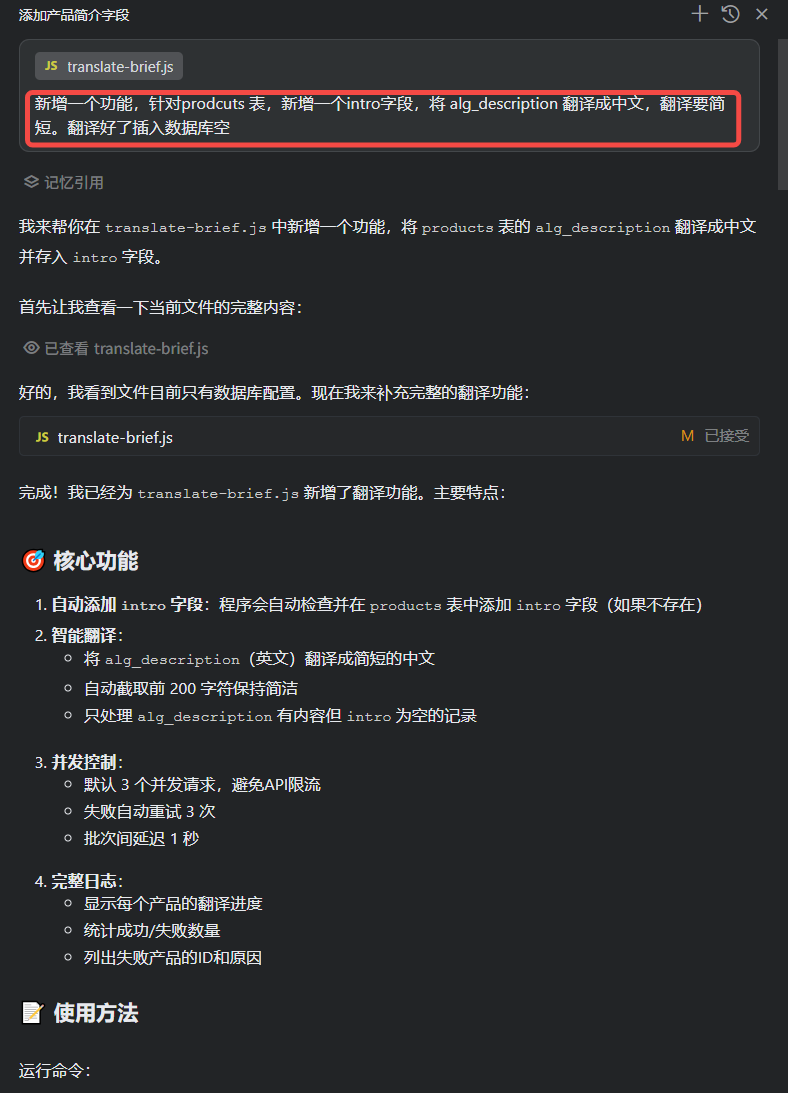
const mysql = require('mysql2/promise');
const axios = require('axios');
const crypto = require('crypto');

// 数据库配置
const dbConfig = {
  host: 'localhost',
  user: 'xxx',
  password: 'xxx',
  database: 'xx'
};

// 腾讯云翻译配置(需要到 https://console.cloud.tencent.com/cam/capi 获取)
const TENCENT_CONFIG = {
  // secretId: 'xxxxxxxx5pTzPo8MUT',       // 替换为你的SecretId
  // secretKey: 'xxxxxxxxI1c7UjEzc5',     // 替换为你的SecretKey
  region: 'ap-guangzhou'              // 地域参数,可选:ap-beijing, ap-shanghai等
};

// 翻译配置
const CONCURRENT_REQUESTS = 3; // 并发翻译数
const RETRY_TIMES = 3; // 重试次数
const RETRY_DELAY = 2000; // 重试延迟(ms)

// 延迟函数
function sleep(ms) {
  return new Promise(resolve => setTimeout(resolve, ms));
}

// 生成腾讯云API签名v3
function generateTencentSign(payload, timestamp) {
  const secretId = TENCENT_CONFIG.secretId;
  const secretKey = TENCENT_CONFIG.secretKey;
  const service = 'tmt';
  const host = 'tmt.tencentcloudapi.com';
  const algorithm = 'TC3-HMAC-SHA256';
  const date = new Date(timestamp * 1000).toISOString().substr(0, 10);

  // 1. 拼接规范请求串
  const httpRequestMethod = 'POST';
  const canonicalUri = '/';
  const canonicalQueryString = '';
  const canonicalHeaders = `content-type:application/json; charset=utf-8\nhost:${host}\n`;
  const signedHeaders = 'content-type;host';
  const hashedRequestPayload = crypto.createHash('sha256').update(payload).digest('hex');
  const canonicalRequest = `${httpRequestMethod}
${canonicalUri}
${canonicalQueryString}
${canonicalHeaders}
${signedHeaders}
${hashedRequestPayload}`;

  // 2. 拼接待签名字符串
  const credentialScope = `${date}/${service}/tc3_request`;
  const hashedCanonicalRequest = crypto.createHash('sha256').update(canonicalRequest).digest('hex');
  const stringToSign = `${algorithm}\n${timestamp}\n${credentialScope}\n${hashedCanonicalRequest}`;

  // 3. 计算签名
  const kDate = crypto.createHmac('sha256', `TC3${secretKey}`).update(date).digest();
  const kService = crypto.createHmac('sha256', kDate).update(service).digest();
  const kSigning = crypto.createHmac('sha256', kService).update('tc3_request').digest();
  const signature = crypto.createHmac('sha256', kSigning).update(stringToSign).digest('hex');

  // 4. 拼接 Authorization
  const authorization = `${algorithm} Credential=${secretId}/${credentialScope}, SignedHeaders=${signedHeaders}, Signature=${signature}`;

  return authorization;
}

// 使用腾讯云机器翻译API
async function translateToChineseSimple(text, retryCount = 0) {
  if (!text || text.trim() === '') return '';

  // 检查配置
  if (!TENCENT_CONFIG.secretId || TENCENT_CONFIG.secretId === 'YOUR_SECRET_ID') {
    console.error('错误:请配置腾讯云的SecretId和SecretKey!');
    console.error('请到 https://console.cloud.tencent.com/cam/capi 获取API密钥');
    return '';
  }

  try {
    const timestamp = Math.floor(Date.now() / 1000);
    const host = 'tmt.tencentcloudapi.com';

    // 构建请求体
    const params = {
      SourceText: text,
      Source: 'en',
      Target: 'zh',
      ProjectId: 0
    };

    const payload = JSON.stringify(params);
    const authorization = generateTencentSign(payload, timestamp);

    const response = await axios.post(
      `https://${host}`,
      payload,
      {
        timeout: 10000,
        headers: {
          'Authorization': authorization,
          'Content-Type': 'application/json; charset=utf-8',
          'Host': host,
          'X-TC-Action': 'TextTranslate',
          'X-TC-Timestamp': timestamp.toString(),
          'X-TC-Version': '2018-03-21',
          'X-TC-Region': TENCENT_CONFIG.region
        }
      }
    );

    // 详细的响应日志(仅在首次失败时输出)
    if (retryCount === 0 && response.data && response.data.Response && response.data.Response.Error) {
      console.error('腾讯云API返回错误:');
      console.error('  错误码:', response.data.Response.Error.Code);
      console.error('  错误信息:', response.data.Response.Error.Message);
    }

    if (response.data && response.data.Response) {
      if (response.data.Response.Error) {
        throw new Error(`${response.data.Response.Error.Code}: ${response.data.Response.Error.Message}`);
      }

      // 提取翻译结果并简化(取前200字符)
      const translated = response.data.Response.TargetText || '';
      return translated.substring(0, 200).trim();
    }

    return '';
  } catch (error) {
    // 输出详细错误信息
    if (retryCount === 0) {
      console.error('翻译请求失败详情:');
      if (error.response) {
        console.error('  HTTP状态码:', error.response.status);
        console.error('  响应数据:', JSON.stringify(error.response.data, null, 2));
      } else {
        console.error('  错误信息:', error.message);
      }
    }

    if (retryCount < RETRY_TIMES) {
      console.log(`翻译失败,${RETRY_DELAY/1000}秒后重试... (${retryCount + 1}/${RETRY_TIMES})`);
      await sleep(RETRY_DELAY);
      return translateToChineseSimple(text, retryCount + 1);
    }

    console.error('翻译失败:', error.message);
    return '';
  }
}

// 处理单个产品的翻译
async function translateProduct(connection, product) {
  try {
    const { id, title, alg_description } = product;

    console.log(`正在翻译产品 [${id}] ${title}...`);

    const intro_cn = await translateToChineseSimple(alg_description);

    if (intro_cn) {
      await connection.execute(
        'UPDATE products SET intro_cn = ? WHERE id = ?',
        [intro_cn, id]
      );
      console.log(`✓ 产品 [${id}] 翻译完成: ${intro_cn.substring(0, 50)}...`);
      return { success: true, id };
    } else {
      console.log(`✗ 产品 [${id}] 翻译为空,跳过`);
      return { success: false, id, reason: 'empty_translation' };
    }
  } catch (error) {
    console.error(`✗ 产品 [${product.id}] 处理失败:`, error.message);
    return { success: false, id: product.id, reason: error.message };
  }
}

// 批量处理翻译(并发控制)
async function processBatch(connection, products) {
  const results = [];

  for (let i = 0; i < products.length; i += CONCURRENT_REQUESTS) {
    const batch = products.slice(i, i + CONCURRENT_REQUESTS);
    const batchResults = await Promise.all(
      batch.map(product => translateProduct(connection, product))
    );
    results.push(...batchResults);

    // 批次间延迟,避免API限流
    if (i + CONCURRENT_REQUESTS < products.length) {
      await sleep(1000);
    }
  }

  return results;
}

// 主函数
async function main() {
  let connection;

  try {
    console.log('正在连接数据库...');
    connection = await mysql.createConnection(dbConfig);
    console.log('✓ 数据库连接成功\n');

    // 检查intro字段是否存在,不存在则添加
    console.log('检查数据库表结构...');
    try {
      await connection.execute(
        'ALTER TABLE products ADD COLUMN intro_cn TEXT COMMENT "中文介绍"'
      );
      console.log('✓ 已添加intro_cn字段\n');
    } catch (error) {
      if (error.code === 'ER_DUP_FIELDNAME') {
        console.log('✓ intro_cn字段已存在\n');
      } else {
        throw error;
      }
    }

    // 查询需要翻译的产品(alg_description不为空且intro为空的记录)
    console.log('正在查询待翻译产品...');
    const [products] = await connection.execute(
      'SELECT id, title, alg_description FROM products'
    );

    if (products.length === 0) {
      console.log('没有需要翻译的产品');
      return;
    }

    console.log(`找到 ${products.length} 个待翻译产品\n`);
    console.log('开始翻译...');
    console.log('='.repeat(60));

    const results = await processBatch(connection, products);

    console.log('='.repeat(60));
    console.log('\n翻译完成!');

    // 统计结果
    const successCount = results.filter(r => r.success).length;
    const failCount = results.filter(r => !r.success).length;

    console.log(`\n统计信息:`);
    console.log(`  总数: ${results.length}`);
    console.log(`  成功: ${successCount}`);
    console.log(`  失败: ${failCount}`);

    if (failCount > 0) {
      console.log(`\n失败的产品ID:`);
      results
        .filter(r => !r.success)
        .forEach(r => console.log(`  - ${r.id} (${r.reason})`));
    }

  } catch (error) {
    console.error('\n程序执行出错:', error);
  } finally {
    if (connection) {
      await connection.end();
      console.log('\n数据库连接已关闭');
    }
  }
}

// 执行主函数
main().catch(console.error);
无错误直接执行,执行了6千多次,花费400多万字符。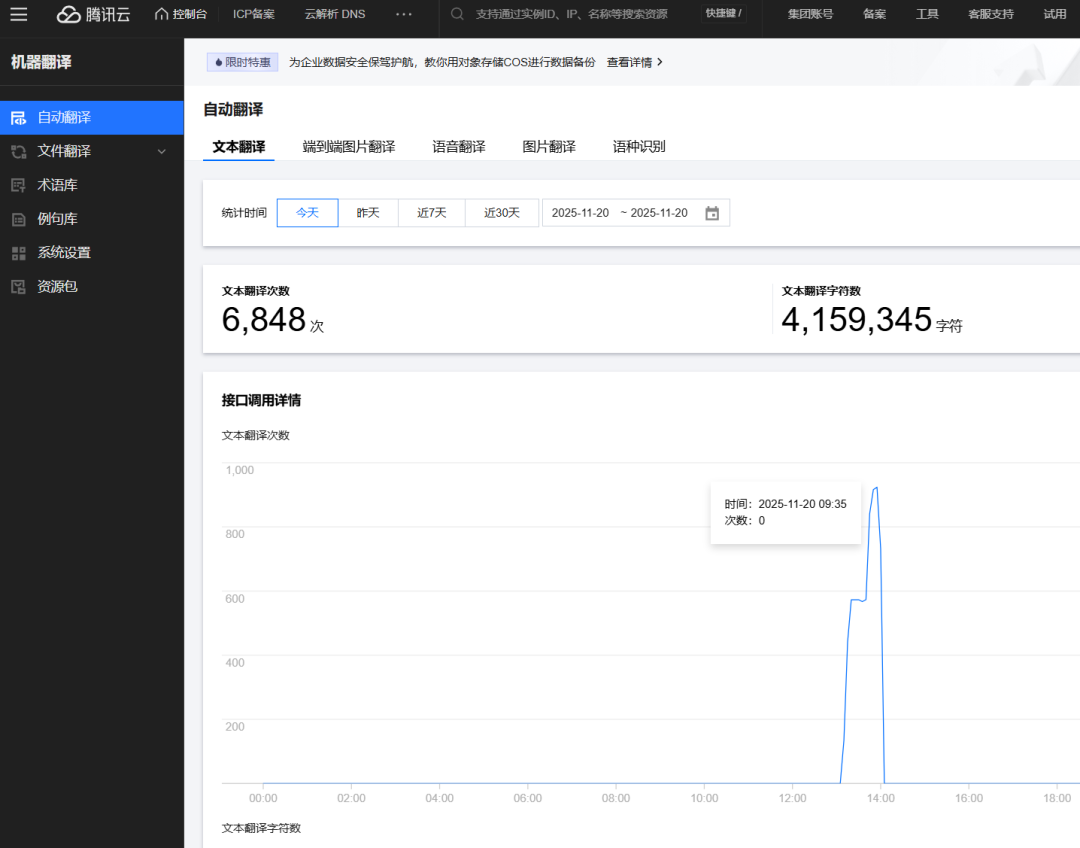

DAMO开发者矩阵,由阿里巴巴达摩院和中国互联网协会联合发起,致力于探讨最前沿的技术趋势与应用成果,搭建高质量的交流与分享平台,推动技术创新与产业应用链接,围绕“人工智能与新型计算”构建开放共享的开发者生态。
更多推荐
 18
18 0
0- 0


 已为社区贡献1条内容

所有评论(0)