在ubuntu 20.04 部署yolov5,并使用ros实现目标检测。
一、yolov5 介绍
YOLOv5是一个先进、快速且易于使用的实时目标检测模型,广泛应用于各种领域。它是由Ultralytics团队基于PyTorch框架开发的,相比于之前的YOLO版本(如YOLOv3、YOLOv4),YOLOv5在性能、精度和易用性上都有一些改进。
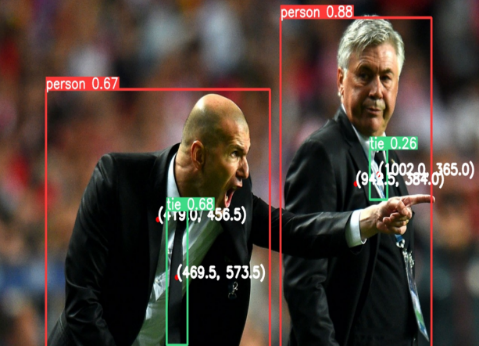
主要特点:
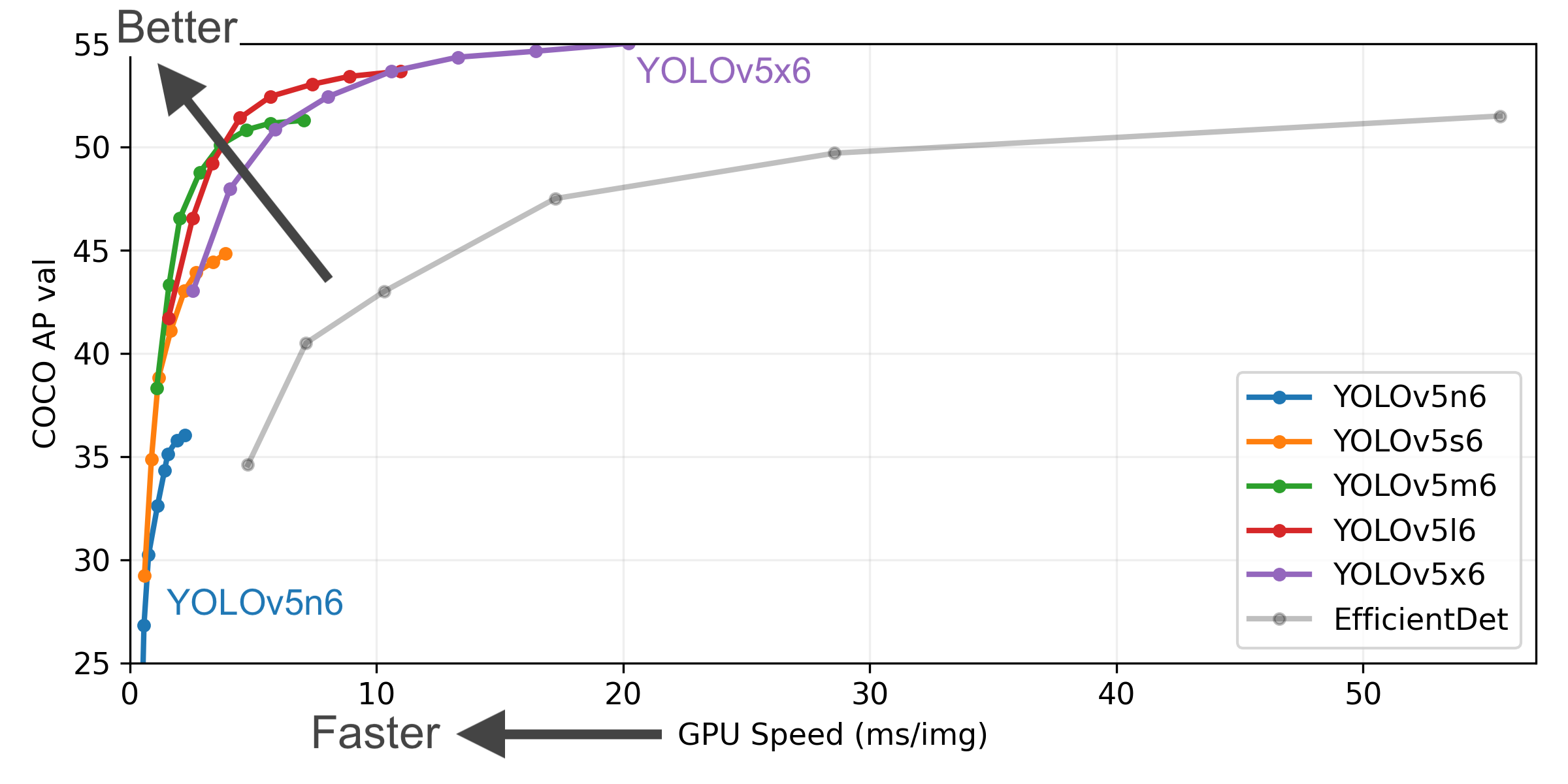
1.高效性和实时性:YOLOv5通过优化网络结构和推理过程,在高效性和实时性方面表现优异,适用于实时目标检测任务,如视频监控、自动驾驶等。
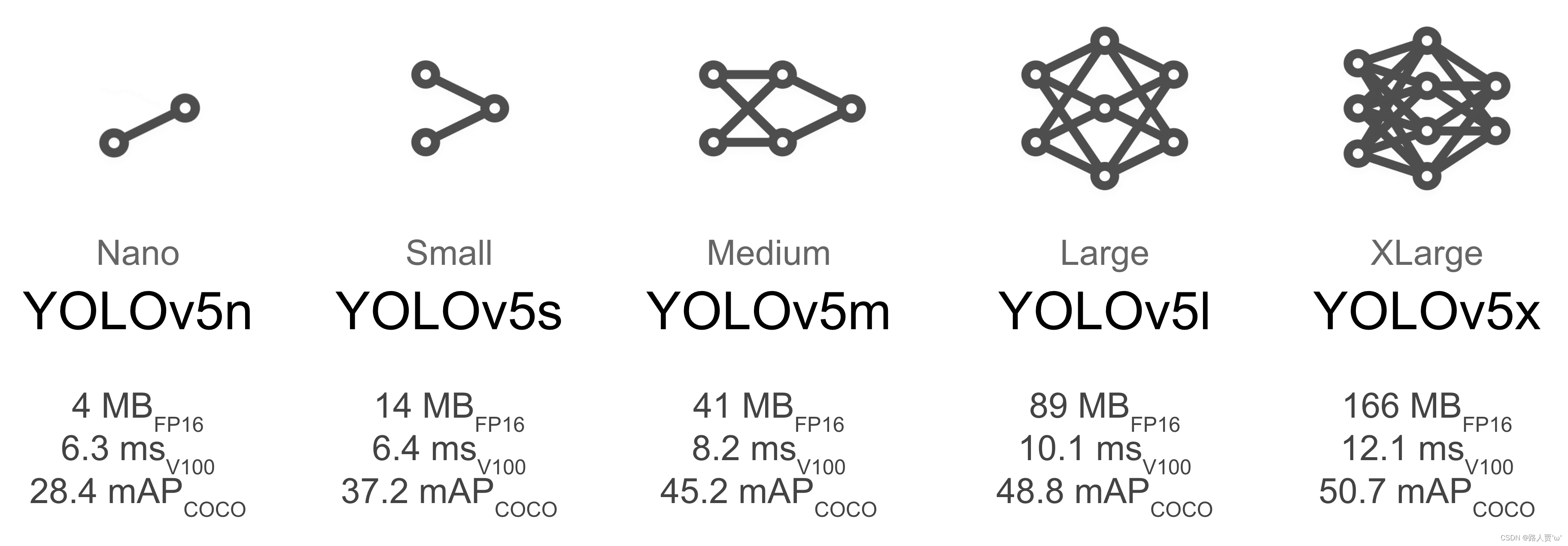
2.多种模型尺寸:YOLOv5提供了多个模型版本(如YOLOv5s、YOLOv5m、YOLOv5l、YOLOv5x),可以根据硬件性能和精度需求选择不同的模型。
3.支持多种数据集格式:YOLOv5支持多种数据集格式,包括COCO、VOC等,可以方便地进行不同任务的数据训练。
4.增强的数据增广技术:YOLOv5引入了多种数据增广方法(如随机裁剪、颜色抖动等)来提高模型的泛化能力。
5.轻量级模型 (Lightweight Models):YOLOv5 提供了非常小的模型版本(如 yolov5n, yolov5s),这些模型文件体积小,计算量低,非常适合部署在资源受限的设备上,如移动设备或嵌入式系统(边缘计算)。
github网址:
GitHub - ultralytics/yolov5: YOLOv5 🚀 in PyTorch > ONNX > CoreML > TFLite
二、安装部署yolov5
创建文件夹YOLO,克隆仓库并在 Python>=3.8.0 环境中安装依赖项软件包,确保你安装了PyTorch>=1.8。
# Clone the YOLOv5 repository
git clone https://github.com/ultralytics/yolov5

# Navigate to the cloned directory
cd yolov5

# Install required packages
pip install -r requirements.txt
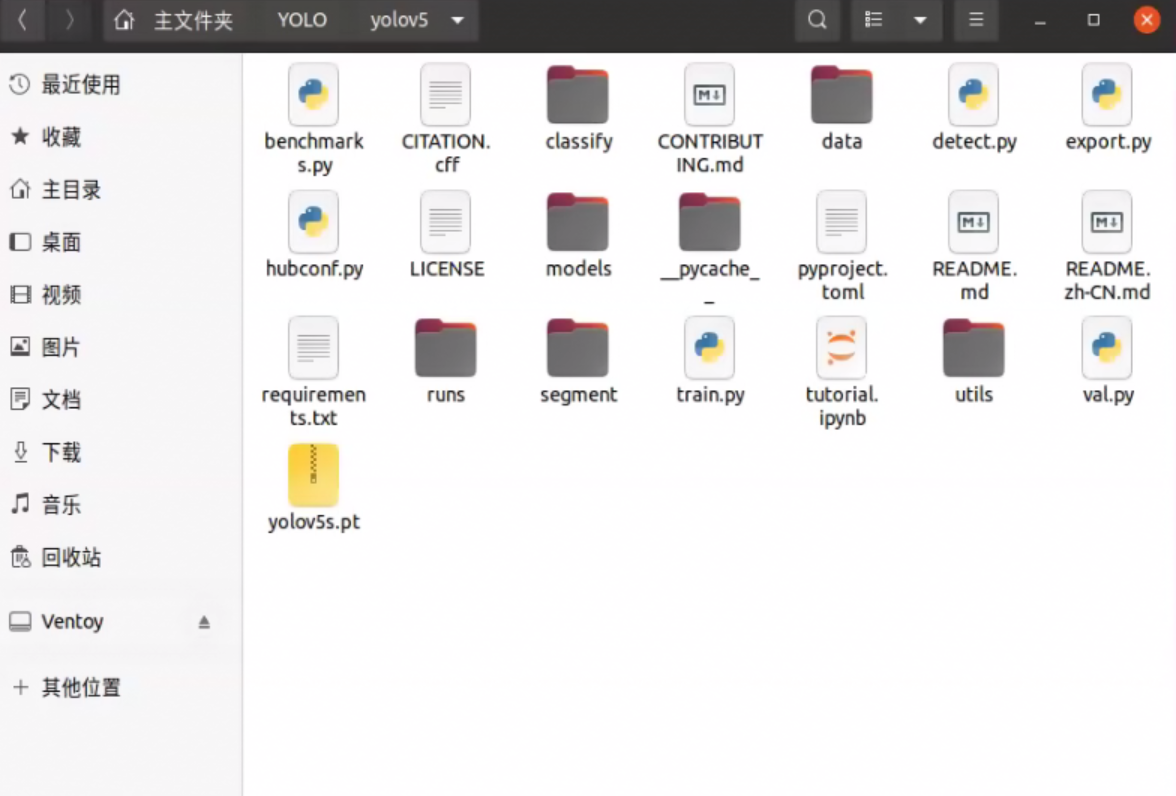
源码克隆到文件夹:
安装依赖项软件包:
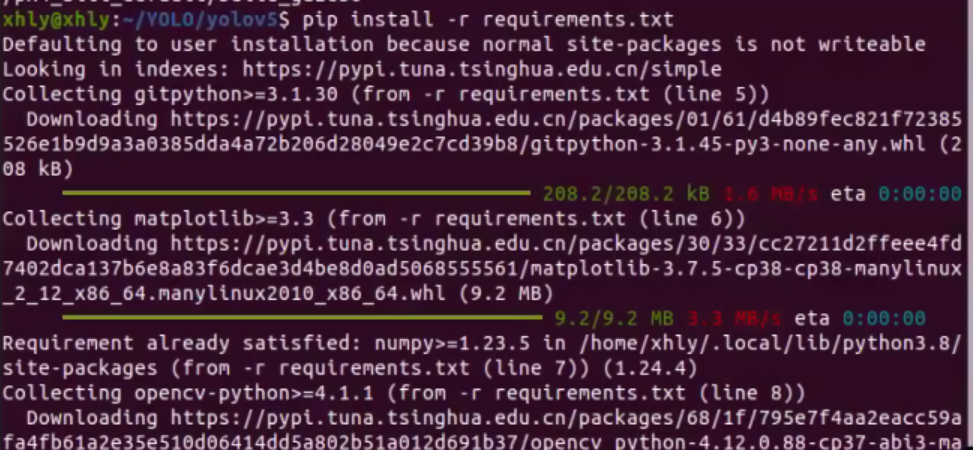
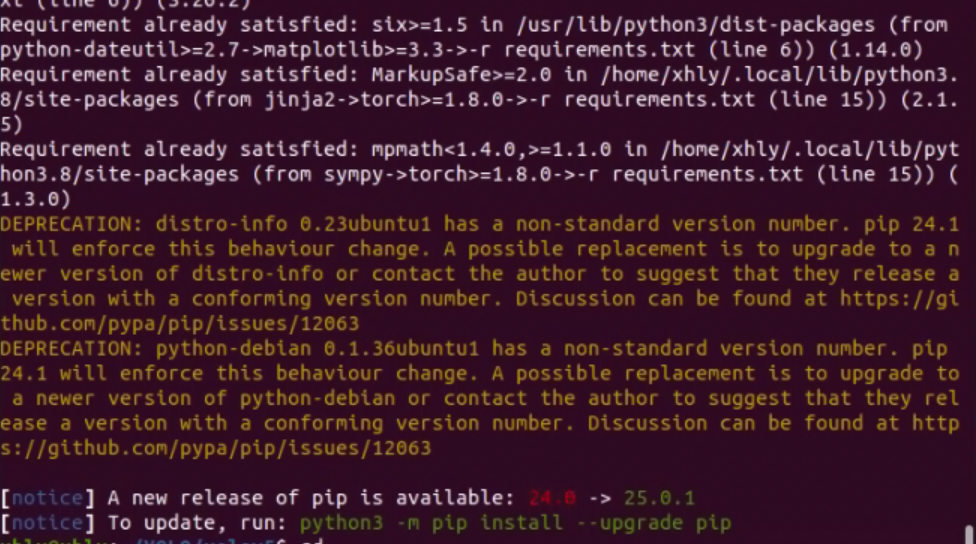
安装完成:
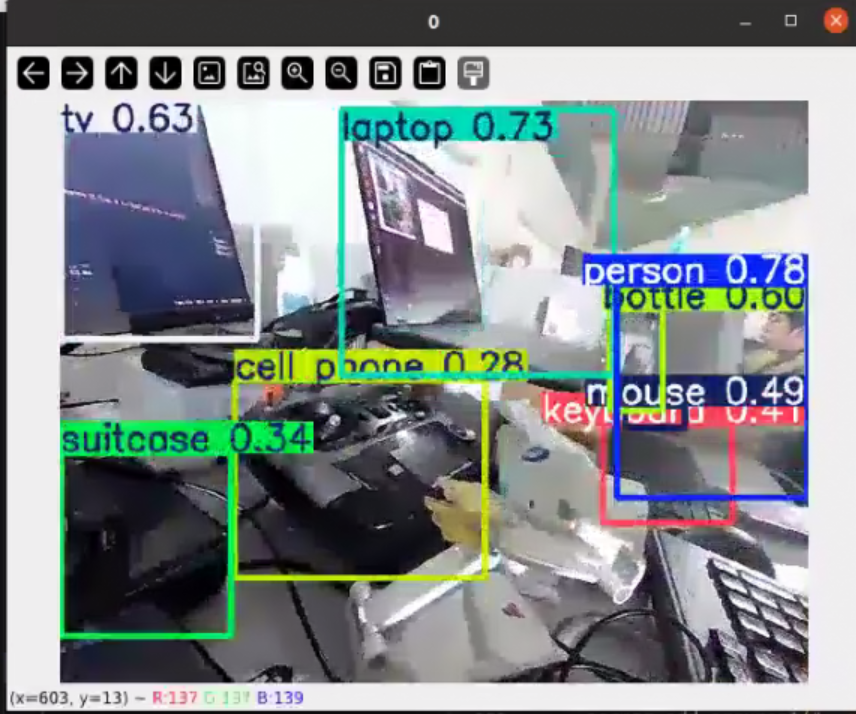
找到detect.py文件运行,即可
三、在ubuntu系统通过ros调用yolov5进行识别
方法一(创建rospy程序调用yolov5进行识别):
安装usb-cam包:
sudo apt install ros-noetic-usb-cam测试:
roslaunch usb_cam usb_cam-test.launch
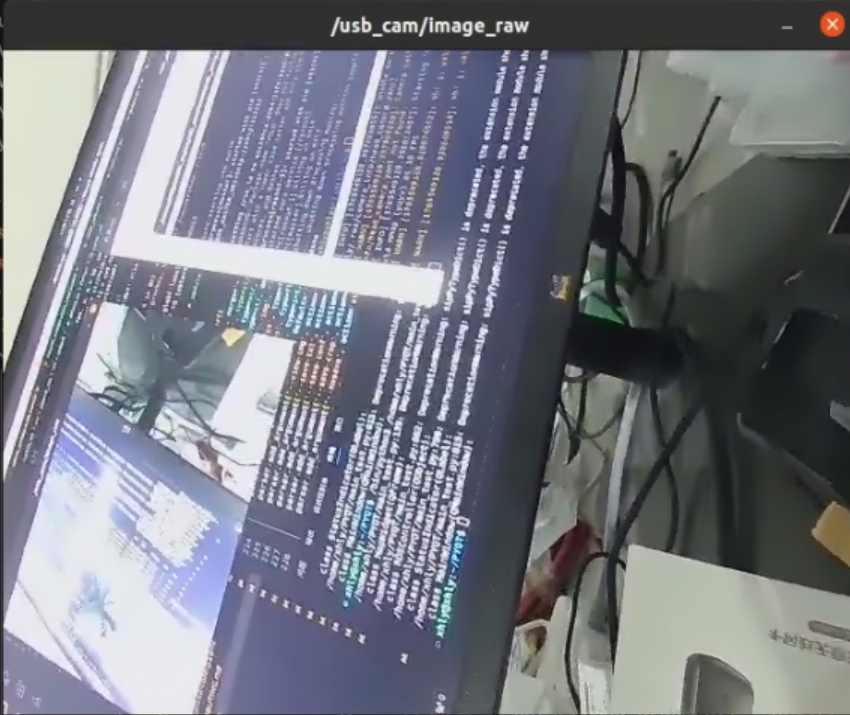
获取到话题图像:
进入 工作空间src 创建yolov5_ ros 包并添加依赖:
catkin_create_pkg yolov5_ros roscpp rospy std_msgsyolov5_node.py:
import rospy
from sensor_msgs.msg import Image
from cv_bridge import CvBridge, CvBridgeError
import cv2
import numpy as np
import torch
from yolov5_ros.msg import Detection
from geometry_msgs.msg import Point
import threading

class YoloV5Node:
    def __init__(self):
        # 初始化 ROS 节点
        rospy.init_node('yolov5_node')
        self.bridge = CvBridge()

        # 加载模型(确保使用 GPU)
        self.model = torch.hub.load(
            "/home/xhly/catkin_ws/src/yolov5_ros/scripts/yolov5",
            "custom",
            source='local',
            path='/home/xhly/catkin_ws/src/yolov5_ros/scripts/yolov5s.pt'
        )

           # ====== 关键修改1:设置只检测人(COCO类别0) ======
        self.model.classes = [0]  # COCO数据集中0对应"person"

        self.model.eval()  # 设置模型为评估模式
        if torch.cuda.is_available():
            self.model = self.model.cuda()  # 如果有 GPU,将模型转移到 GPU

        # 订阅图像话题
        self.image_sub = rospy.Subscriber("/camera/color/image_raw", Image, self.image_callback)

        # 创建发布检测结果的发布器
        self.detection_pub = rospy.Publisher('/detections', Detection, queue_size=10)
        self.position_pub = rospy.Publisher('/object_positions', Point, queue_size=10)

    def image_callback(self, data):
        try:
            # 将 ROS 图像消息转换为 OpenCV 图像
            cv_image = self.bridge.imgmsg_to_cv2(data, "bgr8")

            # 执行目标检测(对调整大小后的图像进行处理)

            results = self.model(cv_image)  # 执行目标检测
            # results = results.xyxy[0]  # 获取结果
            # results = results[results[:, 4] > 0.7]  # 过滤置信度低于 0.5 的框

            # 处理检测结果
            self.publish_results(results, cv_image)

            # 在窗口显示图像
            self.display_frame(cv_image)

        except CvBridgeError as e:
            print(e)

    def publish_results(self, results, cv_image):
        # 将结果转换为 ROS 格式并发布
        detections = []
        for *xyxy, conf, cls in results.xyxy[0]:
            x_min, y_min, x_max, y_max = xyxy
            class_name = results.names[int(cls)]

            # 绘制检测框
            cv2.rectangle(cv_image, (int(x_min), int(y_min)), (int(x_max), int(y_max)), (255, 0, 0), 2)  # 红色框
            cv2.putText(cv_image, f'{class_name} {conf:.2f}', (int(x_min), int(y_min)-10),
                        cv2.FONT_HERSHEY_SIMPLEX, 0.9, (255, 0, 0), 2)

            # 创建检测信息消息
            detection = Detection()
            detection.id = len(detections) + 1
            detection.class_name = class_name
            detection.confidence = float(conf)
            detection.x_min = float(x_min)
            detection.y_min = float(y_min)
            detection.x_max = float(x_max)
            detection.y_max = float(y_max)
            detection.x_cen = float((x_max-x_min)/2 + x_min)  # 图像中心 x 坐标
            detection.y_cen = float((y_max-y_min)/2 + y_min)  # 图像中心 y 坐标

            detections.append(detection)

            # 发布物体位置(在 3D 空间中的位置)
            position = Point()
            # position.x = 320 - detection.x_cen  # 相对 X 位置(根据分辨率调整)
            # position.y = 240 - detection.y_cen  # 相对 Y 位置(根据分辨率调整)
            position.x =detection.x_cen  # 相对 X 位置(根据分辨率调整)
            position.y =detection.y_cen  # 相对 Y 位置(根据分辨率调整)
            position.z = 0
            self.position_pub.publish(position)

        # 发布所有检测结果
        for detection in detections:
            self.detection_pub.publish(detection)

    def display_frame(self, cv_image):
        # 在窗口显示处理后的图像
        cv2.imshow("YOLOv5 Detection", cv_image)
        cv2.waitKey(1)  # 按键时保持窗口刷新

if __name__ == '__main__':
    try:
        node = YoloV5Node()
        rospy.spin()
    except rospy.ROSInterruptException:
        pass
定义Detection.msg:
# Detection.msg
uint32 id
string class_name
float32 confidence
float32 x_min
float32 y_min
float32 x_max
float32 y_max
float32 x_cen
float32 y_cen
方法二(直接修改detect.py输出得到识别信息):
detect.py:
# Ultralytics YOLOv5 🚀, AGPL-3.0 license
"""
Run YOLOv5 detection inference on images, videos, directories, globs, YouTube, webcam, streams, etc.

Usage - sources:
    $ python detect.py --weights yolov5s.pt --source 0                               # webcam
                                                     img.jpg                         # image
                                                     vid.mp4                         # video
                                                     screen                          # screenshot
                                                     path/                           # directory
                                                     list.txt                        # list of images
                                                     list.streams                    # list of streams
                                                     'path/*.jpg'                    # glob
                                                     'https://youtu.be/LNwODJXcvt4'  # YouTube
                                                     'rtsp://example.com/media.mp4'  # RTSP, RTMP, HTTP stream

Usage - formats:
    $ python detect.py --weights yolov5s.pt                 # PyTorch
                                 yolov5s.torchscript        # TorchScript
                                 yolov5s.onnx               # ONNX Runtime or OpenCV DNN with --dnn
                                 yolov5s_openvino_model     # OpenVINO
                                 yolov5s.engine             # TensorRT
                                 yolov5s.mlpackage          # CoreML (macOS-only)
                                 yolov5s_saved_model        # TensorFlow SavedModel
                                 yolov5s.pb                 # TensorFlow GraphDef
                                 yolov5s.tflite             # TensorFlow Lite
                                 yolov5s_edgetpu.tflite     # TensorFlow Edge TPU
                                 yolov5s_paddle_model       # PaddlePaddle
"""

import argparse
import csv
import os
import platform
import sys
from pathlib import Path

import torch

import rospy
from std_msgs.msg import Header
from sensor_msgs.msg import Image
from visualization_msgs.msg import Marker, MarkerArray
from cv_bridge import CvBridge
import torch
import cv2
import numpy as np
from yolov5_ros.msg import Detection
from geometry_msgs.msg import Point
from visualization_msgs.msg import Marker

FILE = Path(__file__).resolve()
ROOT = FILE.parents[0]  # YOLOv5 root directory
if str(ROOT) not in sys.path:
    sys.path.append(str(ROOT))  # add ROOT to PATH
ROOT = Path(os.path.relpath(ROOT, Path.cwd()))  # relative

from ultralytics.utils.plotting import Annotator, colors, save_one_box

from models.common import DetectMultiBackend
from utils.dataloaders import IMG_FORMATS, VID_FORMATS, LoadImages, LoadScreenshots, LoadStreams
from utils.general import (
    LOGGER,
    Profile,
    check_file,
    check_img_size,
    check_imshow,
    check_requirements,
    colorstr,
    cv2,
    increment_path,
    non_max_suppression,
    print_args,
    scale_boxes,
    strip_optimizer,
    xyxy2xywh,
)
from utils.torch_utils import select_device, smart_inference_mode


@smart_inference_mode()
def run(
    weights=ROOT / "yolov5s.pt",  # model path or triton URL
    source=ROOT / "data/images",  # file/dir/URL/glob/screen/0(webcam)
    data=ROOT / "data/coco128.yaml",  # dataset.yaml path
    imgsz=(680, 680),  # inference size (height, width)
    conf_thres=0.25,  # confidence threshold
    iou_thres=0.45,  # NMS IOU threshold
    max_det=1000,  # maximum detections per image
    device="",  # cuda device, i.e. 0 or 0,1,2,3 or cpu
    view_img=False,  # show results
    save_txt=False,  # save results to *.txt
    save_format=0,  # save boxes coordinates in YOLO format or Pascal-VOC format (0 for YOLO and 1 for Pascal-VOC)
    save_csv=False,  # save results in CSV format
    save_conf=False,  # save confidences in --save-txt labels
    save_crop=False,  # save cropped prediction boxes
    nosave=False,  # do not save images/videos
    classes=None,  # filter by class: --class 0, or --class 0 2 3
    agnostic_nms=False,  # class-agnostic NMS
    augment=False,  # augmented inference
    visualize=False,  # visualize features
    update=False,  # update all models
    project=ROOT / "runs/detect",  # save results to project/name
    name="exp",  # save results to project/name
    exist_ok=False,  # existing project/name ok, do not increment
    line_thickness=3,  # bounding box thickness (pixels)
    hide_labels=False,  # hide labels
    hide_conf=False,  # hide confidences
    half=False,  # use FP16 half-precision inference
    dnn=False,  # use OpenCV DNN for ONNX inference
    vid_stride=1,  # video frame-rate stride
):
    # 初始化ROS节点(放在函数开头)
    # rospy.init_node('yolov5_detector', anonymous=True)
    # ros_pub = ROSPublisher()
    #ros部分
    source = str(source)
    save_img = not nosave and not source.endswith(".txt")  # save inference images
    is_file = Path(source).suffix[1:] in (IMG_FORMATS + VID_FORMATS)
    is_url = source.lower().startswith(("rtsp://", "rtmp://", "http://", "https://"))
    webcam = source.isnumeric() or source.endswith(".streams") or (is_url and not is_file)
    screenshot = source.lower().startswith("screen")
    if is_url and is_file:
        source = check_file(source)  # download

    # Directories
    save_dir = increment_path(Path(project) / name, exist_ok=exist_ok)  # increment run
    (save_dir / "labels" if save_txt else save_dir).mkdir(parents=True, exist_ok=True)  # make dir

    # Load model
    device = select_device(device)
    model = DetectMultiBackend(weights, device=device, dnn=dnn, data=data, fp16=half)
    stride, names, pt = model.stride, model.names, model.pt
    imgsz = check_img_size(imgsz, s=stride)  # check image size

    # Dataloader
    bs = 1  # batch_size
    if webcam:
        view_img = check_imshow(warn=True)
        dataset = LoadStreams(source, img_size=imgsz, stride=stride, auto=pt, vid_stride=vid_stride)
        bs = len(dataset)
    elif screenshot:
        dataset = LoadScreenshots(source, img_size=imgsz, stride=stride, auto=pt)
    else:
        dataset = LoadImages(source, img_size=imgsz, stride=stride, auto=pt, vid_stride=vid_stride)
    vid_path, vid_writer = [None] * bs, [None] * bs

    # Run inference
    model.warmup(imgsz=(1 if pt or model.triton else bs, 3, *imgsz))  # warmup
    seen, windows, dt = 0, [], (Profile(device=device), Profile(device=device), Profile(device=device))
    for path, im, im0s, vid_cap, s in dataset:
        with dt[0]:
            im = torch.from_numpy(im).to(model.device)
            im = im.half() if model.fp16 else im.float()  # uint8 to fp16/32
            im /= 255  # 0 - 255 to 0.0 - 1.0
            if len(im.shape) == 3:
                im = im[None]  # expand for batch dim
            if model.xml and im.shape[0] > 1:
                ims = torch.chunk(im, im.shape[0], 0)

        # Inference
        with dt[1]:
            visualize = increment_path(save_dir / Path(path).stem, mkdir=True) if visualize else False
            if model.xml and im.shape[0] > 1:
                pred = None
                for image in ims:
                    if pred is None:
                        pred = model(image, augment=augment, visualize=visualize).unsqueeze(0)
                    else:
                        pred = torch.cat((pred, model(image, augment=augment, visualize=visualize).unsqueeze(0)), dim=0)
                pred = [pred, None]
            else:
                pred = model(im, augment=augment, visualize=visualize)
        # NMS
        with dt[2]:
            pred = non_max_suppression(pred, conf_thres, iou_thres, classes, agnostic_nms, max_det=max_det)

        # Second-stage classifier (optional)
        # pred = utils.general.apply_classifier(pred, classifier_model, im, im0s)

        # Define the path for the CSV file
        csv_path = save_dir / "predictions.csv"

        # Create or append to the CSV file
        def write_to_csv(image_name, prediction, confidence):
            """Writes prediction data for an image to a CSV file, appending if the file exists."""
            data = {"Image Name": image_name, "Prediction": prediction, "Confidence": confidence}
            file_exists = os.path.isfile(csv_path)
            with open(csv_path, mode="a", newline="") as f:
                writer = csv.DictWriter(f, fieldnames=data.keys())
                if not file_exists:
                    writer.writeheader()
                writer.writerow(data)

        # Process predictions
        for i, det in enumerate(pred):  # per image
            seen += 1
            if webcam:  # batch_size >= 1
                p, im0, frame = path[i], im0s[i].copy(), dataset.count
                s += f"{i}: "
            else:
                p, im0, frame = path, im0s.copy(), getattr(dataset, "frame", 0)

            p = Path(p)  # to Path
            save_path = str(save_dir / p.name)  # im.jpg
            txt_path = str(save_dir / "labels" / p.stem) + ("" if dataset.mode == "image" else f"_{frame}")  # im.txt
            s += "{:g}x{:g} ".format(*im.shape[2:])  # print string
            gn = torch.tensor(im0.shape)[[1, 0, 1, 0]]  # normalization gain whwh
            imc = im0.copy() if save_crop else im0  # for save_crop
            annotator = Annotator(im0, line_width=line_thickness, example=str(names))
            if len(det):
                # Rescale boxes from img_size to im0 size
                det[:, :4] = scale_boxes(im.shape[2:], det[:, :4], im0.shape).round()

                # Print results
                for c in det[:, 5].unique():
                    n = (det[:, 5] == c).sum()  # detections per class
                    s += f"{n} {names[int(c)]}{'s' * (n > 1)}, "  # add to string

                # Write results
                for *xyxy, conf, cls in reversed(det):
                    c = int(cls)  # integer class
                    label = names[c] if hide_conf else f"{names[c]}"
                    confidence = float(conf)
                    confidence_str = f"{confidence:.2f}"

                     # 在检测循环中添加:
                    #ros 部分
                    x_center = (xyxy[0] + xyxy[2]) / 2
                    y_center = (xyxy[1] + xyxy[3]) / 2
                    # print(f"({x_center:.1f},{y_center:.1f})")  # 保持原有输出

                    # 发布ROS消息
                    coord = Point()
                    coord.x = 320 - x_center
                    coord.y = 240 - y_center
                    coord_pub.publish(coord)

                    # marker = Marker()
                    # marker.header.frame_id = "world"
                    # marker.type = Marker.SPHERE
                    # marker.scale.x = marker.scale.y = marker.scale.z = 0.7
                    # marker.color.r = 1.0
                    # marker.color.a = 1.0
                    # marker.pose.position.x = 320 - x_center
                    # marker.pose.position.y =  240 - y_center
                    # marker.pose.position.x = 3.0
                    # marker.pose.position.y = 0.0
                    # marker_pub.publish(marker)

                    if save_csv:
                        write_to_csv(p.name, label, confidence_str)

                    if save_txt:  # Write to file
                        if save_format == 0:
                            coords = (
                                (xyxy2xywh(torch.tensor(xyxy).view(1, 4)) / gn).view(-1).tolist()
                            )  # normalized xywh
                        else:
                            coords = (torch.tensor(xyxy).view(1, 4) / gn).view(-1).tolist()  # xyxy
                        line = (cls, *coords, conf) if save_conf else (cls, *coords)  # label format
                        with open(f"{txt_path}.txt", "a") as f:
                            f.write(("%g " * len(line)).rstrip() % line + "\n")

                    if save_img or save_crop or view_img:  # Add bbox to image
                        c = int(cls)  # integer class
                        label = None if hide_labels else (names[c] if hide_conf else f"{names[c]} {conf:.2f}")
                        annotator.box_label(xyxy, label, color=colors(c, True))
                    if save_crop:
                        save_one_box(xyxy, imc, file=save_dir / "crops" / names[c] / f"{p.stem}.jpg", BGR=True)

            # Stream results
            im0 = annotator.result()
            if view_img:
                if platform.system() == "Linux" and p not in windows:
                    windows.append(p)
                    cv2.namedWindow(str(p), cv2.WINDOW_NORMAL | cv2.WINDOW_KEEPRATIO)  # allow window resize (Linux)
                    cv2.resizeWindow(str(p), im0.shape[1], im0.shape[0])
                cv2.imshow(str(p), im0)
                cv2.waitKey(1)  # 1 millisecond

            # Save results (image with detections)
            if save_img:
                if dataset.mode == "image":
                    cv2.imwrite(save_path, im0)
                else:  # 'video' or 'stream'
                    if vid_path[i] != save_path:  # new video
                        vid_path[i] = save_path
                        if isinstance(vid_writer[i], cv2.VideoWriter):
                            vid_writer[i].release()  # release previous video writer
                        if vid_cap:  # video
                            fps = vid_cap.get(cv2.CAP_PROP_FPS)
                            w = int(vid_cap.get(cv2.CAP_PROP_FRAME_WIDTH))
                            h = int(vid_cap.get(cv2.CAP_PROP_FRAME_HEIGHT))
                        else:  # stream
                            fps, w, h = 30, im0.shape[1], im0.shape[0]
                        save_path = str(Path(save_path).with_suffix(".mp4"))  # force *.mp4 suffix on results videos
                        vid_writer[i] = cv2.VideoWriter(save_path, cv2.VideoWriter_fourcc(*"mp4v"), fps, (w, h))
                    vid_writer[i].write(im0)

        # Print time (inference-only)
        LOGGER.info(f"{s}{'' if len(det) else '(no detections), '}{dt[1].dt * 1e3:.1f}ms")

    # Print results
    t = tuple(x.t / seen * 1e3 for x in dt)  # speeds per image
    LOGGER.info(f"Speed: %.1fms pre-process, %.1fms inference, %.1fms NMS per image at shape {(1, 3, *imgsz)}" % t)
    if save_txt or save_img:
        s = f"\n{len(list(save_dir.glob('labels/*.txt')))} labels saved to {save_dir / 'labels'}" if save_txt else ""
        LOGGER.info(f"Results saved to {colorstr('bold', save_dir)}{s}")
    if update:
        strip_optimizer(weights[0])  # update model (to fix SourceChangeWarning)


def parse_opt():
    parser = argparse.ArgumentParser()
    # parser.add_argument("--weights", nargs="+", type=str, default=ROOT / "yolov5s.pt", help="model path or triton URL")
    parser.add_argument("--weights", nargs="+", type=str, default=ROOT / "yolov5s.pt", help="model path or triton URL")
    # parser.add_argument("--source", type=str, default=ROOT / "data/images", help="file/dir/URL/glob/screen/0(webcam)")
    parser.add_argument("--source", type=str, default="6", help="file/dir/URL/glob/screen/0(webcam)")
    parser.add_argument("--data", type=str, default=ROOT / "data/coco128.yaml", help="(optional) dataset.yaml path")
    parser.add_argument("--imgsz", "--img", "--img-size", nargs="+", type=int, default=[640], help="inference size h,w")
    parser.add_argument("--conf-thres", type=float, default=0.75, help="confidence threshold")
    parser.add_argument("--iou-thres", type=float, default=0.45, help="NMS IoU threshold")
    parser.add_argument("--max-det", type=int, default=1000, help="maximum detections per image")
    parser.add_argument("--device", default="", help="cuda device, i.e. 0 or 0,1,2,3 or cpu")
    parser.add_argument("--view-img", action="store_true", help="show results")
    parser.add_argument("--save-txt", action="store_true", help="save results to *.txt")
    parser.add_argument(
        "--save-format",
        type=int,
        default=0,
        help="whether to save boxes coordinates in YOLO format or Pascal-VOC format when save-txt is True, 0 for YOLO and 1 for Pascal-VOC",
    )
    parser.add_argument("--save-csv", action="store_true", help="save results in CSV format")
    parser.add_argument("--save-conf", action="store_true", help="save confidences in --save-txt labels")
    parser.add_argument("--save-crop", action="store_true", help="save cropped prediction boxes")
    parser.add_argument("--nosave", action="store_true", help="do not save images/videos")
    parser.add_argument("--classes", nargs="+", type=int, help="filter by class: --classes 0, or --classes 0 2 3")
    parser.add_argument("--agnostic-nms", action="store_true", help="class-agnostic NMS")
    parser.add_argument("--augment", action="store_true", help="augmented inference")
    parser.add_argument("--visualize", action="store_true", help="visualize features")
    parser.add_argument("--update", action="store_true", help="update all models")
    # parser.add_argument("--project", default=ROOT / "runs/detect", help="save results to project/name")
    parser.add_argument("--project", default="0", help="save results to project/name")
    parser.add_argument("--name", default="exp", help="save results to project/name")
    parser.add_argument("--exist-ok", action="store_true", help="existing project/name ok, do not increment")
    parser.add_argument("--line-thickness", default=3, type=int, help="bounding box thickness (pixels)")
    parser.add_argument("--hide-labels", default=False, action="store_true", help="hide labels")
    parser.add_argument("--hide-conf", default=False, action="store_true", help="hide confidences")
    parser.add_argument("--half", action="store_true", help="use FP16 half-precision inference")
    parser.add_argument("--dnn", action="store_true", help="use OpenCV DNN for ONNX inference")
    parser.add_argument("--vid-stride", type=int, default=1, help="video frame-rate stride")
    opt = parser.parse_args()
    opt.imgsz *= 2 if len(opt.imgsz) == 1 else 1  # expand
    print_args(vars(opt))
    return opt


#
def main(opt):

    check_requirements(ROOT / "requirements.txt", exclude=("tensorboard", "thop"))
    run(**vars(opt))
    # rospy.init_node('yolov5_node')
    # rospy.loginfo("Hello World!!!!")
    # position_pub = rospy.Publisher(
    #     '/object_positions',
    #     Point,
    #     queue_size=3
    # )

if __name__ == "__main__":
    rospy.init_node('yolov5_detector')
    coord_pub = rospy.Publisher('/detected_coordinates', Point, queue_size=10) #发布位置信息
    # marker_pub = rospy.Publisher('/detection_marker', Marker, queue_size=10) #发布rviz位置
    opt = parse_opt()
    main(opt)
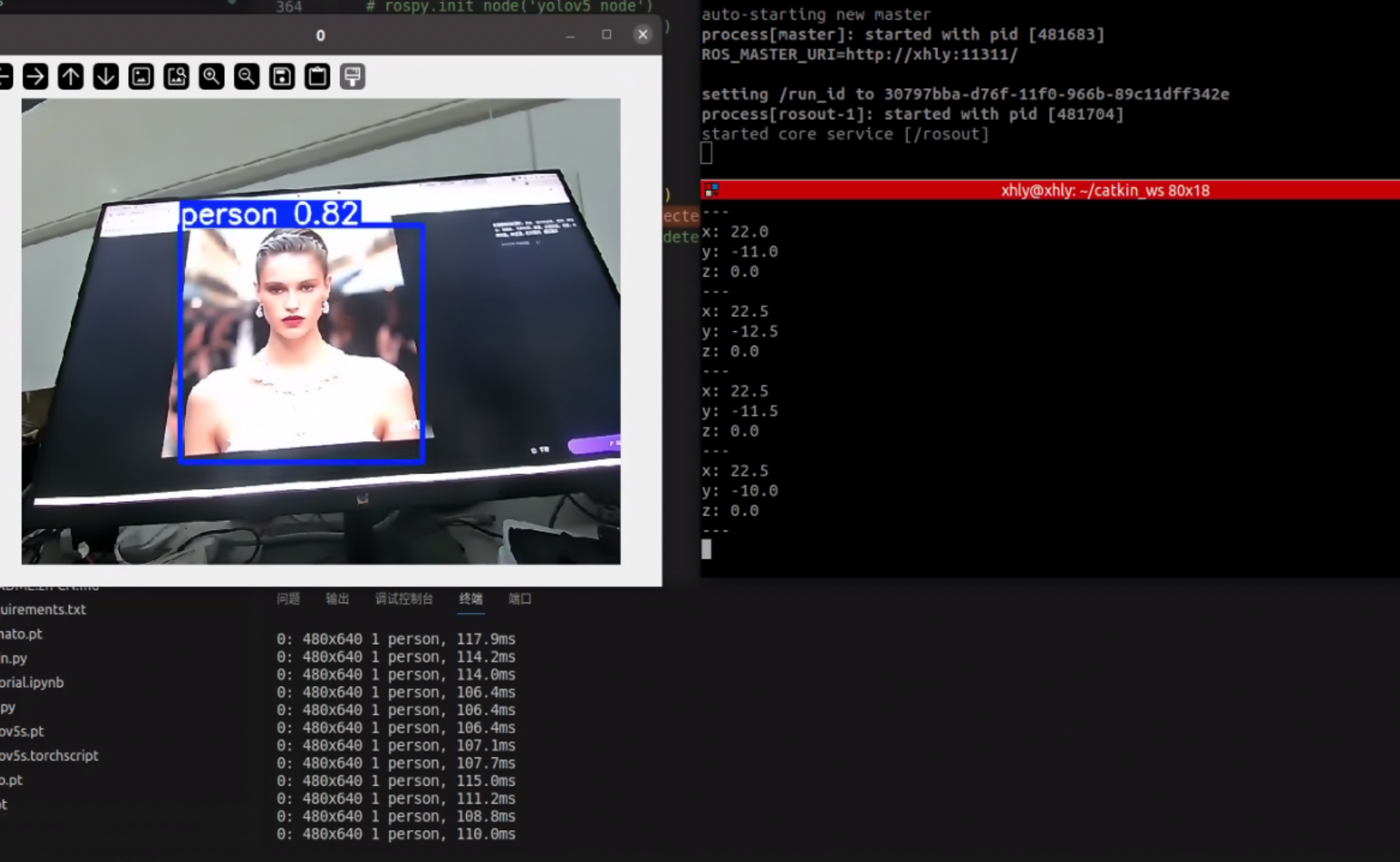
直接识别目标并获取到像素坐标位置信息:

DAMO开发者矩阵,由阿里巴巴达摩院和中国互联网协会联合发起,致力于探讨最前沿的技术趋势与应用成果,搭建高质量的交流与分享平台,推动技术创新与产业应用链接,围绕“人工智能与新型计算”构建开放共享的开发者生态。
更多推荐
 3
3 0
0- 0


 已为社区贡献1条内容

所有评论(0)