echarts 实现柱状图自动滚动展示数据(Vue3)
·
效果图:
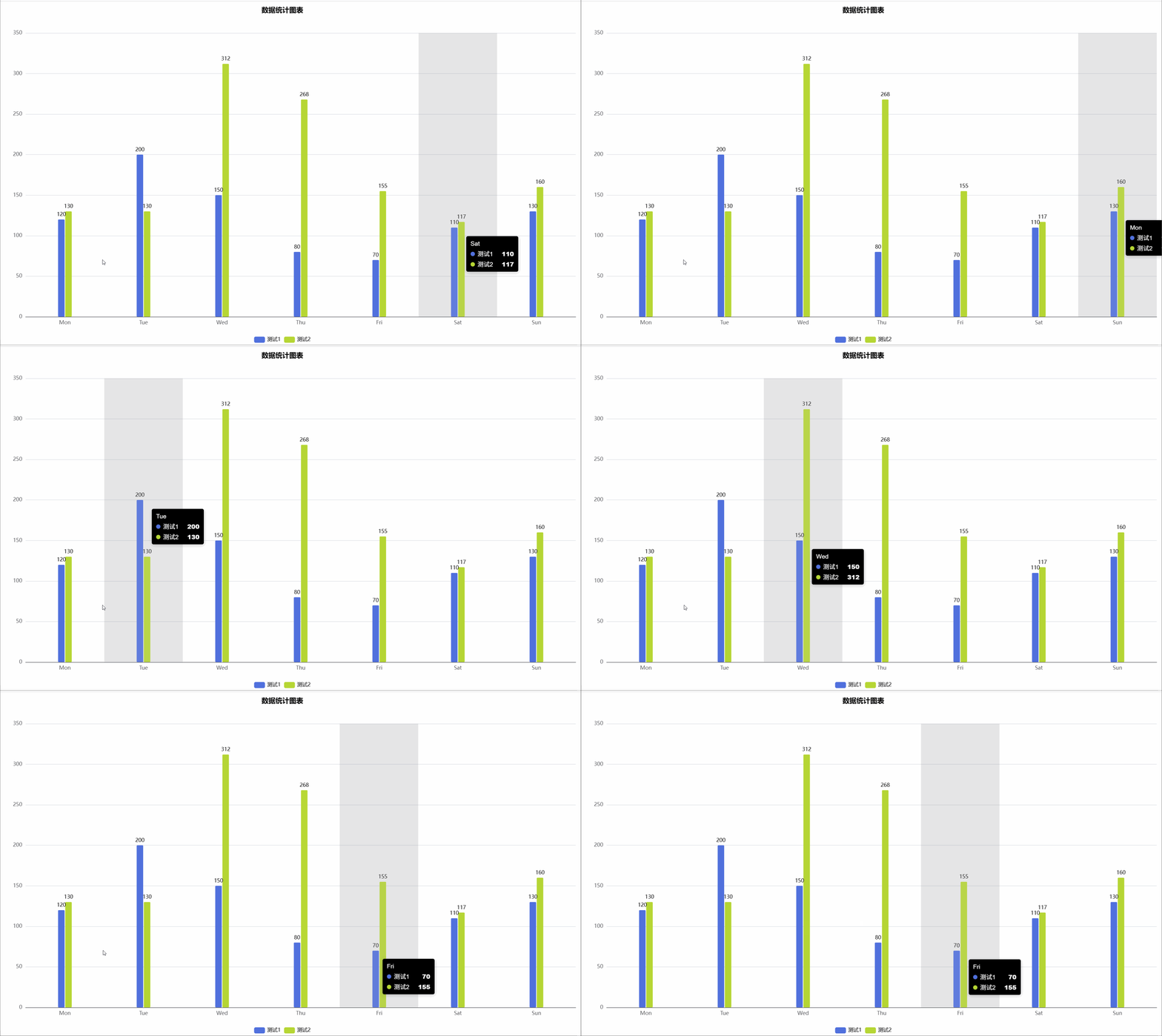
需求:
- 自动滚动展示数据:当数据量较大时,自动滚动显示不同的数据区间
- 循环播放:当滚动到末尾时,重新从头开始播放
- 鼠标交互控制:鼠标悬停时暂停动画,移开后继续播放
<template>
  <div @mouseover="mouseover" @mouseout="mouseout">
    <v-chart
      ref="vChartRef"
      :option="option"
      style="width: 100%; height: 800px"
    />
  </div>
</template>
<script setup lang="ts">
import { ref, reactive, onMounted, onBeforeUnmount, watch } from "vue";
import VChart from "vue-echarts";
import { use } from "echarts/core";
import { CanvasRenderer } from "echarts/renderers";
import { BarChart } from "echarts/charts";
import {
  DatasetComponent,
  GridComponent,
  TooltipComponent,
  LegendComponent,
  TitleComponent,
} from "echarts/components";

use([
  DatasetComponent,
  CanvasRenderer,
  BarChart,
  GridComponent,
  TooltipComponent,
  LegendComponent,
  TitleComponent,
]);

// 定义数据类型
interface ChartDataItem {
  x: string;
  y: number;
  s: string;
}

// 模拟接口数据数组
const chartData = ref<ChartDataItem[]>([
  { x: "Mon", y: 120, s: "测试1" },
  { x: "Tue", y: 200, s: "测试1" },
  { x: "Wed", y: 150, s: "测试1" },
  { x: "Thu", y: 80, s: "测试1" },
  { x: "Fri", y: 70, s: "测试1" },
  { x: "Sat", y: 110, s: "测试1" },
  { x: "Sun", y: 130, s: "测试1" },
  { x: "Mon", y: 130, s: "测试2" },
  { x: "Tue", y: 130, s: "测试2" },
  { x: "Wed", y: 312, s: "测试2" },
  { x: "Thu", y: 268, s: "测试2" },
  { x: "Fri", y: 155, s: "测试2" },
  { x: "Sat", y: 117, s: "测试2" },
  { x: "Sun", y: 160, s: "测试2" },
]);

// 获取图表实例
const vChartRef = ref();

// 获取series
const seriesItem = ref({
  type: "bar",
  barWidth: 15,
  name: "",
  label: {
    show: true,
    position: "top",
    color: "#000",
    fontSize: 12,
  },
  itemStyle: {
    borderRadius: 2,
    color: null,
  },
  data: [],
});

const getSeries = () => {
  const seriesNames = [...new Set(chartData.value.map((item) => item.s))];
  const xValues = [...new Set(chartData.value.map((item) => item.x))];

  const series = seriesNames.map((name) => {
    const seriesItemCopy = JSON.parse(JSON.stringify(seriesItem.value));
    seriesItemCopy.name = name;

    const seriesData = new Array(xValues.length).fill(null);

    chartData.value.forEach((item) => {
      if (item.s === name) {
        const index = xValues.indexOf(item.x);
        if (index !== -1) {
          seriesData[index] = item.y;
        }
      }
    });

    seriesItemCopy.data = seriesData;
    return seriesItemCopy;
  });

  return { series, xValues };
};

const option = reactive({
  tooltip: {
    trigger: "axis",
    backgroundColor: "#000",
    borderWidth: 0,
    padding: 10,
    axisPointer: {
      type: "shadow",
    },
    textStyle: {//浮框文本样式
      color: "#fff",
      fontFamily: "Arial",
      fontSize: 14,
    },
  },
  title: {
    show: true,
    text: "数据统计图表",
    subtext: "",
    left: "center",
    top: "0",
    right: "0",
    bottom: "0",
    textStyle: {
      color: "#000",
      fontSize: 16,
    },
    subtextStyle: {
      color: "#eee",
      fontSize: 14,
    },
  },
  legend: {
    show: true,
    textStyle: {
      color: "#000",
    },
  },
  xAxis: [
    {
      type: "category",
      data: <any>[],
    },
  ],
  yAxis: [
    {
      type: "value",
    },
  ],
  series: <any>[],
});

onMounted(() => {
  const { series, xValues } = getSeries();
  option.series = series;
  option.xAxis[0].data = xValues;

  setAnimate();
});

watch(
  () => option.series,
  () => {
    setShowTips();
  }
);

const isShowTips = ref(true);
const timer: any = ref(null);
let seriesDataNum = 0;
const setShowTips = () => {
  if (!isShowTips.value && isShowTips.value !== undefined) {
    clearInterval(timer.value);
    return;
  }
  clearInterval(timer.value);
  timer.value = setInterval(() => {
    let series = option.series;
    let length = series[0].data.length;
    vChartRef.value?.dispatchAction({
      type: "showTip",
      seriesIndex: 0,
      dataIndex: seriesDataNum,
    });
    seriesDataNum = seriesDataNum >= length - 1 ? 0 : seriesDataNum + 1;
  }, 2000);
};

const mouseover = () => {
  if (timer.value) clearInterval(timer.value);
  if (timechartes.value) clearInterval(timechartes.value);
};

const mouseout = () => {
  setShowTips();
  setAnimate();
};

onBeforeUnmount(() => {
  if (timer.value) clearInterval(timer.value);
  if (timechartes.value) clearInterval(timechartes.value);
});
const timechartes: any = ref(null);
let dataZoom = ref([
  {
    xAxisIndex: 0, //这里是从X轴的0刻度开始
    show: false, //是否显示滑动条,不影响使用
    type: "inside", // 这个 dataZoom 组件是 slider 型 dataZoom 组件
    startValue: 0, // 从头开始。
    endValue: 8, // 一次性展示几个。
  },
]);
const setAnimate = () => {
  if (timechartes.value) clearInterval(timechartes.value);
  timechartes.value = setInterval(() => {
    const xValuesLength = [...new Set(chartData.value.map((item) => item.x))]
      .length;
    // 每次向后滚动一个,最后一个从头开始。
    if (dataZoom.value[0].endValue === xValuesLength) {
      dataZoom.value[0].endValue = 8;
      dataZoom.value[0].startValue = 0;
    } else {
      dataZoom.value[0].endValue += 1;
      dataZoom.value[0].startValue += 1;
    }
  }, 2000);
};
</script>

DAMO开发者矩阵,由阿里巴巴达摩院和中国互联网协会联合发起,致力于探讨最前沿的技术趋势与应用成果,搭建高质量的交流与分享平台,推动技术创新与产业应用链接,围绕“人工智能与新型计算”构建开放共享的开发者生态。
更多推荐
 8
8 0
0- 0


 已为社区贡献2条内容

所有评论(0)