Android开发学习日记--利用元数据给应用设置快捷方式(支付宝为例)
·
一、效果展示
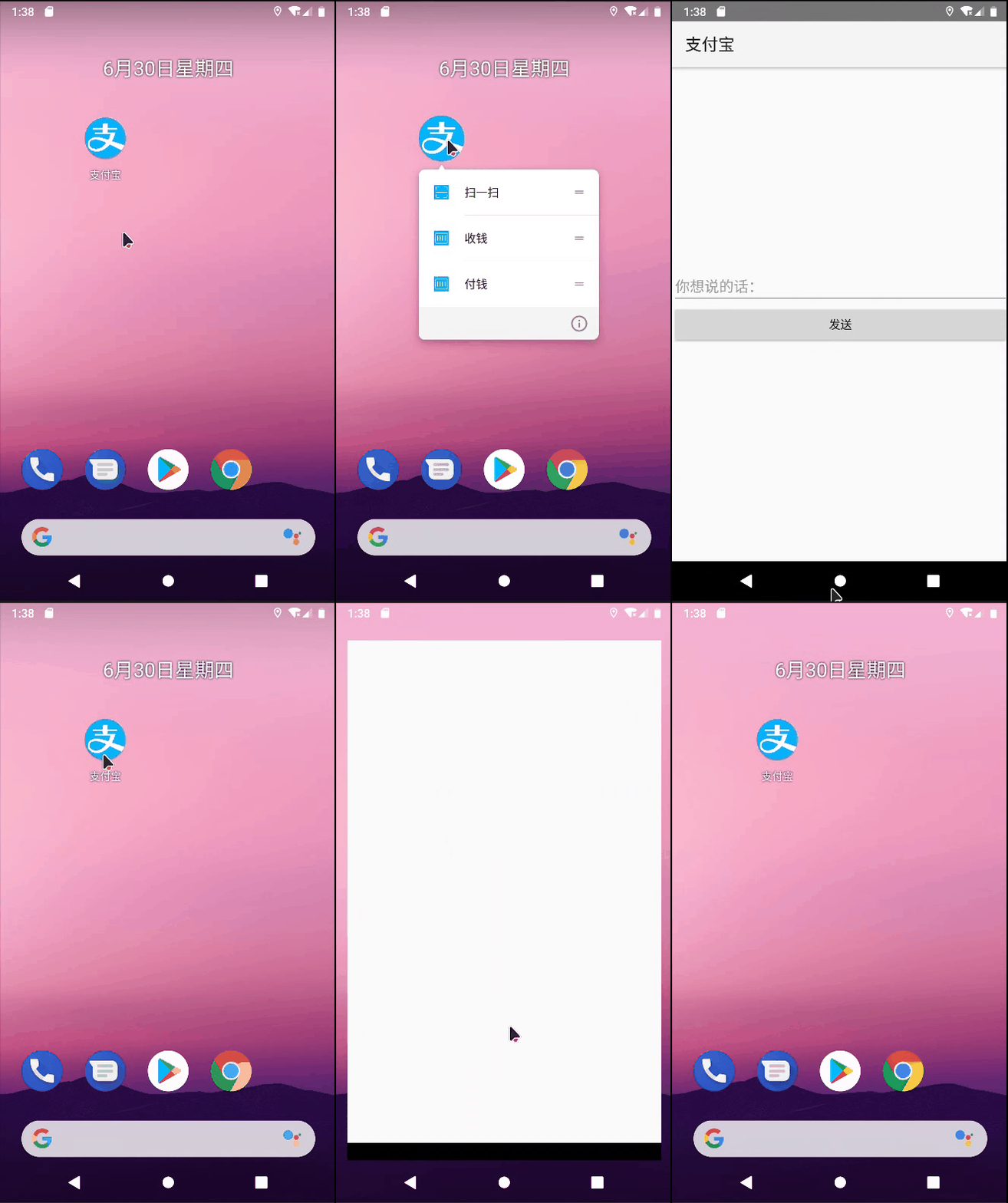
二、实现步骤
元数据不单单能传递简单的字符串参数,还能传送更复杂的资源数据,从Android 7.1开始新增的快捷方式便用到了这点。
1. 首先打开res/values目录下的strings.xml,在resources节点内部添加下述的3组(每组两个,共6个)字 符串配置,每组都代表一个菜单项,每组又分为长名称和短名称,平时优先展示长名称,当长名称放不 下时才展示短名称。这3组6个字符串的配置定义示例如下:
这里为了省事,只定义了三个字符串
<resources>
    <string name="app_name">支付宝</string>
    <string name="sao">扫一扫</string>
    <string name="shou">收钱</string>
    <string name="fu">付钱</string>
    <string name="title_activity_main2">Main2Activity</string>
</resources>
2. 接着在res目录下创建名为xml的文件夹,并在该文件夹创建shortcuts.xml,这个XML文件用来保存3组 菜单项的快捷方式定义,文件内容如下所示:(注意,文件夹名和文件名一字不能错!)
<?xml version="1.0" encoding="utf-8"?>
<shortcuts xmlns:android="http://schemas.android.com/apk/res/android">
    <shortcut
        android:shortcutId="first"      //设置id,是快捷方式的编号
        android:enabled="true"          //是否启用快捷方式,如果为false则不会显示
        android:icon="@drawable/sao"    //图标的位置
        android:shortcutShortLabel="@string/sao"   //快捷菜单短标签
        android:shortcutLongLabel="@string/sao">   //快捷菜单长标签
        <intent                                    //Intent必须要设置
            android:action="android.intent.action.VIEW"                //基础操作
            android:targetPackage="com.example.helloworld"             //目标包名
            android:targetClass="com.example.helloworld.MainActivity"/>
            //targetclass指定点击该项菜单后打开哪个活动页面
        <categories android:name="android.shortcut.conversation"  />  //官方提供的
    </shortcut>
    <shortcut
        android:shortcutId="second"
        android:enabled="true"
        android:icon="@drawable/fu"
        android:shortcutShortLabel="@string/shou"
        android:shortcutLongLabel="@string/shou">
        <intent
            android:action="android.intent.action.VIEW"
            android:targetPackage="com.example.helloworld"
            android:targetClass="com.example.helloworld.MainActivity"/>
        <categories android:name="android.shortcut.conversation"  />
    </shortcut>
    <shortcut
        android:shortcutId="third"
        android:enabled="true"
        android:icon="@drawable/fu"
        android:shortcutShortLabel="@string/fu"
        android:shortcutLongLabel="@string/fu">
        <intent
            android:action="android.intent.action.VIEW"
            android:targetPackage="com.example.helloworld"
            android:targetClass="com.example.helloworld.MainActivity"/>
        <categories android:name="android.shortcut.conversation"  />
    </shortcut>
</shortcuts>
3. 然后打开AndroidManifest.xml,找到MainActivity所在的activity节点,在该节点内部补充如下的元数据配置,其中name属性为android.app.shortcuts,而resource属性为@xml/shortcuts。这行元数据的作用,是告诉App首页有个快捷方式菜单,其资源内容参见位于xml目录下shortcuts.xml。完整的activity节点配置示例如下:
<?xml version="1.0" encoding="utf-8"?>
<manifest xmlns:android="http://schemas.android.com/apk/res/android"
    package="com.example.helloworld">

    <application
        android:allowBackup="true"
        android:icon="@mipmap/ic_launcher"
        android:label="@string/app_name"
        android:roundIcon="@mipmap/ic_launcher_round"
        android:supportsRtl="true">
        <activity
            android:name=".Main2Activity"
            android:theme="@style/AppTheme.NoActionBar" />
        <activity
            android:name=".MainActivity"
            android:launchMode="standard"
            android:theme="@style/Theme.AppCompat.Light"
            android:exported="true">
            <intent-filter>
                <action android:name="android.intent.action.VIEW" />
                <action android:name="android.intent.action.MAIN" />
                <category android:name="android.intent.category.LAUNCHER" />
            </intent-filter>
            //写在这里就行
            <meta-data android:name="android.app.shortcuts" android:resource="@xml/shortcuts"/>
        </activity>
    </application>

</manifest>

DAMO开发者矩阵,由阿里巴巴达摩院和中国互联网协会联合发起,致力于探讨最前沿的技术趋势与应用成果,搭建高质量的交流与分享平台,推动技术创新与产业应用链接,围绕“人工智能与新型计算”构建开放共享的开发者生态。
更多推荐
 0
0 0
0- 0


 已为社区贡献2条内容

所有评论(0)