Java实现文件增量数据监听
·
Java实现文件增量数据监听
使用背景
之前有一个需求是监听三方服务的输出日志,根据日志内容检查三房程序处理的数据是否正常(这里其实也可以类比日志文件的监控,手动实现不同日志级别的打印以及告警)
具体细节
1. 文件可能存在删除前面的数据或者清空数据重新写入的情况
2. 正常情况下是逐行读取数据然后再消费(之前有一个通过websocket将文件数据实时原封不动的传输出去)
遇到的问题:
- 如何知道文件某一行数据已经全部存储完了,我的思路是当文件跳转到下一行的时候,则视为当前行已经存储完毕
- 如果单行数据只存储了一部分,后面的数据因为其他原因卡住了,此时可以设置超时的等待时间,若超时了这个时间,则直接打印这行的数据
- 如果使用1中的逻辑作为判断依据,那么文件最后一行日志就可能打印不出来,此时可结合2中的逻辑,超过一定时间直接打印数据
- 文件内容不是先清空再插入,而是直接将原来的若干行数据替换为一行新的数据,此时这个新的数据比较难打印,所以我设置了两个策略,一个是每次有数据删除,则直接将存量数据全部视为新数据打印出来,另一种方式就是不打印这行新数据,这个问题其实也只会出现在文件数据不清空就直接覆盖新数据的情况,大家可以自行斟酌
手动造轮子
代码实现
import java.io.*;
import java.nio.charset.Charset;
import java.nio.charset.StandardCharsets;
import java.nio.file.*;
import java.util.concurrent.*;
import java.util.concurrent.atomic.AtomicLong;

/**
 * @author 枯灯
 * @className FileLineTailerUtil
 * @date 2025/5/26 18:37
 */
public class FileLineTailerUtil {
    private final File file;
    private final AtomicLong lastPosition;
    private volatile boolean running = true;
    private final LineListener listener;
    private final Charset charset;
    private long lineTimeoutMs;
    private RandomAccessFile raf;
    private final ScheduledExecutorService scheduler;
    private final StringBuilder currentLine = new StringBuilder();
    private final boolean START_FROM_SCRATCH_EVERY_TIME_WHEN_TRUNCATED;
    private ScheduledFuture<?> timeoutFuture;
    private Thread tailerThread;
    private WatchService watchService;

    public interface LineListener {
        void onCompleteLine(String line);
        void onError(Exception e);
    }

    public FileLineTailerUtil(File file, LineListener listener, Charset charset, boolean START_FROM_SCRATCH_EVERY_TIME_WHEN_TRUNCATED) {
        this.file = file;
        this.listener = listener;
        this.lastPosition = new AtomicLong(0);
        this.charset = charset;
        this.scheduler = Executors.newScheduledThreadPool(1);
        this.START_FROM_SCRATCH_EVERY_TIME_WHEN_TRUNCATED = START_FROM_SCRATCH_EVERY_TIME_WHEN_TRUNCATED;
        this.lineTimeoutMs = 60000;
    }

    public void setLineTimeoutMs(long lineTimeoutMs) {
        this.lineTimeoutMs = lineTimeoutMs;
    }

    public void start() {
        if (tailerThread != null && tailerThread.isAlive()) {
            return;
        }

        tailerThread = new Thread(() -> {
            try {
                // 初始检查文件是否存在
                if (!file.exists()) {
                    throw new FileNotFoundException("File not found: " + file.getAbsolutePath());
                }

                // 初始化文件状态
                long lastSize = file.length();
                int lastLineCount = countLines(file);

                // 打开文件(不锁定)
                raf = new RandomAccessFile(file, "r");
                lastPosition.set(raf.length());
                if (lastPosition.get() > 0) {
                    raf.seek(lastPosition.get());
                }

                // 设置WatchService来监听文件变化
                watchService = FileSystems.getDefault().newWatchService();
                Path path = file.getParentFile().toPath();
                path.register(watchService, StandardWatchEventKinds.ENTRY_MODIFY);

                while (running) {
                    // 检查文件是否被删除或重命名
                    if (!file.exists()) {
                        listener.onError(new FileNotFoundException("File has been deleted or renamed"));
                        Thread.sleep(1000);
                        continue;
                    }

                    // 检查文件是否被截断
                    long currentSize = file.length();
                    int currentLineCount = countLines(file);

                    if (currentSize < lastSize || currentLineCount < lastLineCount) {
                        handleFileTruncation();
                    }
                    lastSize = currentSize;
                    lastLineCount = currentLineCount;

                    // 读取新增内容
                    readNewContent();

                    // 等待文件变化事件
                    waitForFileChanges();
                }
            } catch (Exception e) {
                listener.onError(e);
            } finally {
                cleanup();
            }
        });
        tailerThread.start();
    }

    private void handleFileTruncation() throws IOException {
        System.out.println("File was truncated, resetting position");
        raf = new RandomAccessFile(file, "r");
        lastPosition.set(raf.length());
        currentLine.setLength(0);
        resetTimeout();

        if (START_FROM_SCRATCH_EVERY_TIME_WHEN_TRUNCATED) {
            raf.seek(0);
        } else if (lastPosition.get() > 0) {
            raf.seek(lastPosition.get());
        }
    }

    private void readNewContent() throws IOException {
        long filePointer = raf.getFilePointer();
        if (file.length() > filePointer) {
            byte[] buffer = new byte[(int)(file.length() - filePointer)];
            int bytesRead = raf.read(buffer);
            if (bytesRead > 0) {
                String newContent = new String(buffer, 0, bytesRead, charset);
                synchronized (this) {
                    processNewContent(newContent);
                }
                lastPosition.set(raf.getFilePointer());
            }
        }
    }

    private void waitForFileChanges() throws InterruptedException {
        WatchKey key = watchService.poll(500, TimeUnit.MILLISECONDS);
        if (key != null) {
            for (WatchEvent<?> event : key.pollEvents()) {
                if (event.context().toString().equals(file.getName())) {
                    // 文件修改事件,继续循环处理
                }
            }
            key.reset();
        }
    }

    private void cleanup() {
        closeResources();
        try {
            if (watchService != null) {
                watchService.close();
            }
        } catch (IOException e) {
            listener.onError(e);
        }
        scheduler.shutdown();
    }

    public void stop() {
        running = false;
        scheduler.shutdownNow();
        closeResources();
        if (tailerThread != null) {
            tailerThread.interrupt();
        }
    }

    private void closeResources() {
        try {
            if (raf != null) {
                raf.close();
            }
        } catch (IOException e) {
            listener.onError(e);
        }
    }

    private void resetTimeout() {
        if (timeoutFuture != null) {
            timeoutFuture.cancel(false);
        }
        timeoutFuture = null;
    }

    private void processNewContent(String newContent) {
        for (int i = 0; i < newContent.length(); i++) {
            char c = newContent.charAt(i);

            if (c == '\n') {
                // 遇到换行符,准备提交当前行
                currentLine.append(c);
                String completeLine = currentLine.toString().replaceAll("\r?\n$", "");
                listener.onCompleteLine(completeLine);
                currentLine.setLength(0);
                resetTimeout();
            } else if (c == '\r') {
                // 处理Windows换行符的第一部分
                if (i + 1 < newContent.length() && newContent.charAt(i + 1) == '\n') {
                    // 完整的\r\n换行符
                    currentLine.append("\r\n");
                    String completeLine = currentLine.toString().replaceAll("\r?\n$", "");
                    listener.onCompleteLine(completeLine);
                    currentLine.setLength(0);
                    resetTimeout();
                    i++; // 跳过下一个字符
                } else {
                    // 单独的\r,当作换行符处理
                    currentLine.append(c);
                    String completeLine = currentLine.toString().replaceAll("\r?\n$", "");
                    listener.onCompleteLine(completeLine);
                    currentLine.setLength(0);
                    resetTimeout();
                }
            } else {
                currentLine.append(c);
                // 有新内容时启动超时计时器
                if (timeoutFuture == null && lineTimeoutMs > 0) {
                    timeoutFuture = scheduler.schedule(() -> {
                        synchronized (FileLineTailerUtil.this) {
                            if (!currentLine.isEmpty()) {
                                listener.onCompleteLine(currentLine.toString());
                                currentLine.setLength(0);
                            }
                        }
                    }, lineTimeoutMs, TimeUnit.MILLISECONDS);
                }
            }
        }
    }

    private int countLines(File file) throws IOException {
        int lines = 0;
        try (InputStream is = new FileInputStream(file);
             Reader reader = new InputStreamReader(is, charset);
             BufferedReader br = new BufferedReader(reader)) {
            while (br.readLine() != null) {
                lines++;
            }
        }
        return lines;
    }
}
使用示例
    public static void main(String[] args) {
        //当文件某一行数据一直没有换到下一行,此时可以设置一个等待的超时时间,直接返回该行的数据
        long timeoutMs = 5000;
        File file = new File("/Users/kudeng/Desktop/cache.txt");
        FileLineTailerUtil tailer = new FileLineTailerUtil(file, new LineListener() {
            @Override
            public void onCompleteLine(String line) {
                System.out.println(line);
            }
            @Override
            public void onError(Exception e) {
                System.err.println("error" + e.getMessage());
            }
        }, StandardCharsets.UTF_8, true);
        tailer.setLineTimeoutMs(timeoutMs);
        tailer.start();
        Runtime.getRuntime().addShutdownHook(new Thread(tailer::stop));
    }
使用已有的工具包
hutool
maven依赖引入
<dependency>
    <groupId>cn.hutool</groupId>
    <artifactId>hutool-core</artifactId>
    <version>5.8.30</version>
</dependency>
直接使用hutool中的Tailer实现监听
import cn.hutool.core.io.file.Tailer;
import java.io.File;

/**
 * @author 枯灯
 * @className HutoolFileTailer
 * @date 2025/5/26 20:30
 */
public class HutoolFileTailer {

    public interface LineListener {
        void onLine(String line);
    }

    public static void tailLines(File file, LineListener listener) {
        new Tailer(file, new Tailer.ConsoleLineHandler() {
            @Override
            public void handle(String line) {
                listener.onLine(line);
            }

        }).start();
    }

    public static void main(String[] args) {
        HutoolFileTailer.tailLines(new File("../test.log"), line -> System.out.println("[NEW LINE] " + line));
    }
}
直接使用hutool工具包里的Tailer实现文件监听存在一些弊端,
- 无法保证数据以行为单位输出(因为没有检查一行数据是否结束)
- 有时会出现无端的换行(这个可以对数据将进行判空,为空则不输出即可,但是如果日志内部真的存在空行了,那此时就无法区分了)
- 当存量数据被一行新的内容直接覆盖时,此时新的内容不会被监听到(只有在文件内容先清空,然后刷新,然后再将新的数据存储进文件,此时数据才会被监听到)
结合hutool工具包中的监听器实现文件增量数据监听
直接使用hutool工具包中的Tailer方法其实还是无法解决文章开头描述的一些问题,不过可以借用hutool工具包中的WatchMonitor来监听文件的变动,这里我只需要监听文件是否被修改即可,也就是说我只需要复写Watcher接口类中的onModify方法即可,这样我就不需要专门写一个线程然后手动加while死循环去监听文件内容了,对应的代码如下:
代码样例
import cn.hutool.core.io.watch.SimpleWatcher;
import cn.hutool.core.io.watch.WatchMonitor;
import java.io.*;
import java.nio.charset.Charset;
import java.nio.charset.StandardCharsets;
import java.nio.file.Path;
import java.nio.file.WatchEvent;
import java.util.concurrent.*;
/**
 * @author 枯灯
 * @className StrictIncrementalTailer
 * @date 2025/5/27 00:37
 */
public class StrictIncrementalTailer {
    private final File file;
    private final Charset charset;
    private final long lineTimeoutMs;
    private RandomAccessFile raf;
    private long lastPosition;
    private final StringBuilder currentLine = new StringBuilder();
    private ScheduledExecutorService scheduler;
    private ScheduledFuture<?> timeoutFuture;

    public interface LineListener {
        void onNewLine(String line);  // 严格按行输出新增内容
        void onError(Exception e);
    }

    public StrictIncrementalTailer(File file, Charset charset, long lineTimeoutMs) {
        this.file = file;
        this.charset = charset;
        this.lineTimeoutMs = lineTimeoutMs;
    }

    public void start(LineListener listener) {
        scheduler = Executors.newScheduledThreadPool(1);

        try {
            // 初始化为文件末尾(不读取历史内容)
            raf = new RandomAccessFile(file, "r");
            lastPosition = file.length();
            raf.seek(lastPosition);

            // 设置文件监听
            WatchMonitor monitor = WatchMonitor.create(file, WatchMonitor.ENTRY_MODIFY);
            monitor.setWatcher(new SimpleWatcher() {
                @Override
                public void onModify(WatchEvent<?> event, Path currentPath) {
                    processIncrementalContent(listener);
                }
            });
            monitor.start();

        } catch (Exception e) {
            listener.onError(e);
        }
    }

    private void processIncrementalContent(LineListener listener) {
        try {
            long currentSize = file.length();

            // 仅处理新增内容(currentSize > lastPosition)
            if (currentSize > lastPosition) {
                raf.seek(lastPosition);
                byte[] buffer = new byte[(int)(currentSize - lastPosition)];
                int bytesRead = raf.read(buffer);

                if (bytesRead > 0) {
                    String newContent = new String(buffer, 0, bytesRead, charset);
                    processNewLines(newContent, listener);
                    lastPosition = raf.getFilePointer();
                }
            } else if (currentSize < lastPosition) {
                // 文件被截断时重置指针
                lastPosition = currentSize;
                currentLine.setLength(0);
                resetTimeout();
            }
        } catch (Exception e) {
            listener.onError(e);
        }
    }

    private void processNewLines(String newContent, LineListener listener) {
        for (char c : newContent.toCharArray()) {
            if (c == '\n') {
                emitCurrentLine(listener);
            } else if (c != '\r') {
                currentLine.append(c);
                startTimeoutTimer(listener);
            }
        }
    }

    private void emitCurrentLine(LineListener listener) {
        if (currentLine.length() > 0) {
            listener.onNewLine(currentLine.toString());
            currentLine.setLength(0);
            resetTimeout();
        }
    }

    private void startTimeoutTimer(LineListener listener) {
        if (timeoutFuture == null && lineTimeoutMs > 0) {
            timeoutFuture = scheduler.schedule(() -> {
                if (currentLine.length() > 0) {
                    listener.onNewLine(currentLine.toString());
                    currentLine.setLength(0);
                }
            }, lineTimeoutMs, TimeUnit.MILLISECONDS);
        }
    }

    private void resetTimeout() {
        if (timeoutFuture != null) {
            timeoutFuture.cancel(false);
            timeoutFuture = null;
        }
    }

    public void stop() {
        try {
            if (raf != null) raf.close();
            if (scheduler != null) scheduler.shutdownNow();
        } catch (IOException e) {
            // 忽略关闭异常
        }
    }
}
合并后的代码使用样例
public static void main(String[] args) {
        StrictIncrementalTailer tailer = new StrictIncrementalTailer(
                new File("../test.log"),
                StandardCharsets.UTF_8,
                30000  // 3秒超时强制输出不完整行
        );

        tailer.start(new StrictIncrementalTailer.LineListener() {
            @Override
            public void onNewLine(String line) {
                // 只会收到新增行的内容(不会重复读取历史数据)
                System.out.println("[新增] " + line);
            }

            @Override
            public void onError(Exception e) {
                System.err.println("监控错误: " + e.getMessage());
            }
        });

        // 添加优雅关闭
        Runtime.getRuntime().addShutdownHook(new Thread(tailer::stop));
    }
注意事项
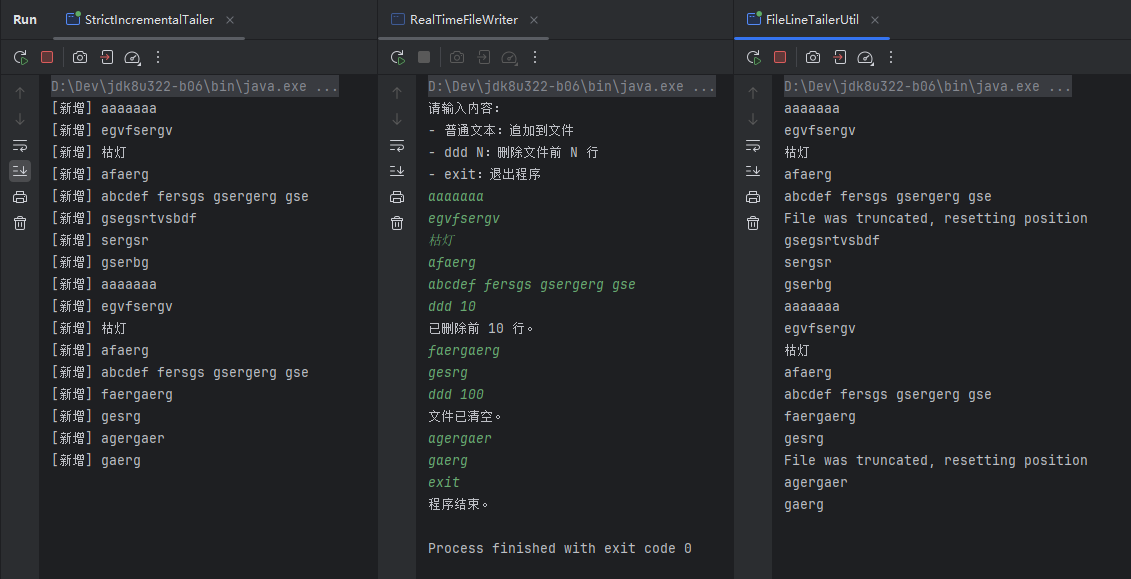
对于上述的代码逻辑,如果向测试逻辑是否有问题,最好不要直接在文件中新增数据,而是通过另外一个线程向文件写入数据,不然可能会出现文件占用的情况,然后导致file.length()方法返回的值一直为0(自己在mac上的编译器上测试没出现这种情况,但是使用windows却会出现文件占用的情况, 自己就踩了这个坑,一直以为是代码问题。。。),相应的检测代码如下:
检测代码
import java.io.*;
import java.nio.file.Files;
import java.nio.file.Path;
import java.nio.file.Paths;
import java.util.ArrayList;
import java.util.List;
import java.util.Scanner;

/**
 * @author 枯灯
 * @className RealTimeFileWriter
 * @date 2025/5/27 00:50
 */
public class RealTimeFileWriter {

    private static final String FILE_PATH = "../test.log";

    public static void main(String[] args) {
        File file = new File(FILE_PATH);

        try (FileOutputStream fos = new FileOutputStream(file, true);
             OutputStreamWriter osw = new OutputStreamWriter(fos, "UTF-8");
             BufferedWriter writer = new BufferedWriter(osw);
             Scanner scanner = new Scanner(System.in)) {

            System.out.println("请输入内容:");
            System.out.println("- 普通文本:追加到文件");
            System.out.println("- ddd N:删除文件前 N 行");
            System.out.println("- exit:退出程序");

            while (true) {
                String input = scanner.nextLine();

                if ("exit".equalsIgnoreCase(input)) {
                    System.out.println("程序结束。");
                    break;
                }

                if (input.toLowerCase().startsWith("ddd ")) {
                    try {
                        int linesToDelete = Integer.parseInt(input.split(" ")[1]);
                        deleteLines(linesToDelete);
                    } catch (Exception e) {
                        System.out.println("命令格式错误,请使用:delete N(N 为整数)");
                    }
                } else {
                    writer.write(input);
                    writer.newLine();
                    writer.flush(); // 保证实时写入
                }
            }

        } catch (IOException e) {
            e.printStackTrace();
        }
    }

    // 删除前 n 行的函数
    private static void deleteLines(int linesToDelete) {
        try {
            Path path = Paths.get(FILE_PATH);
            List<String> allLines = Files.readAllLines(path);

            if (linesToDelete >= allLines.size()) {
                // 清空文件
                Files.write(path, new ArrayList<>());
                System.out.println("文件已清空。");
            } else {
                // 写回剩余的行
                List<String> remainingLines = allLines.subList(linesToDelete, allLines.size());
                Files.write(path, remainingLines);
                System.out.println("已删除前 " + linesToDelete + " 行。");
            }

        } catch (IOException e) {
            System.out.println("删除失败:" + e.getMessage());
        }
    }
}

DAMO开发者矩阵,由阿里巴巴达摩院和中国互联网协会联合发起,致力于探讨最前沿的技术趋势与应用成果,搭建高质量的交流与分享平台,推动技术创新与产业应用链接,围绕“人工智能与新型计算”构建开放共享的开发者生态。
更多推荐

 46
46 0
0- 0


 已为社区贡献1条内容

所有评论(0)