vue3—— 9. computed计算属性
<p>原始值: {{ count }}</p><p>计算后的值: {{ doubledCount }}</p><button @click="increment">增加</button>
·
Vue3 computed计算属性
Vue3 computed计算属性
一、computed计算属性基本概念
1.1 什么是computed计算属性?
computed计算属性是Vue3提供的用于声明式地依赖响应式状态的派生值的API。它允许你定义一个依赖于其他响应式数据的属性,当依赖的数据变化时,计算属性会自动更新。
核心特点:
- 响应式依赖:自动追踪其依赖的响应式数据
- 缓存机制:只有当依赖变化时才会重新计算
- 声明式语法:以声明式方式描述派生值,更简洁易读
- 只读默认:默认情况下是只读的,可配置为可写
生活比喻:计算属性就像一个自动更新的公式。例如,当你计算"总分=语文+数学+英语"时,只要任何一门成绩变化,总分会自动更新,而不需要每次手动计算。
核心区别总结:
| 特性 | computed计算属性 | 方法 |
|---|---|---|
| 执行时机 | 依赖变化时自动执行 | 每次调用时执行 |
| 缓存 | 有缓存,依赖不变不重新计算 | 无缓存,每次调用都执行 |
| 调用方式 | 作为属性访问(无括号) | 作为方法调用(有括号) |
| 参数 | 不能接收参数 | 可以接收参数 |
| 适用场景 | 依赖固定的响应式数据派生值 | 需要参数或频繁变化的计算 |
1.3 computed计算属性的基本使用
<template>
  <div class="computed-basic">
    <h2>计算属性基本使用</h2>

    <div class="input-section">
      <label>
        姓: <input v-model="firstName" placeholder="请输入姓">
      </label>
      <label>
        名: <input v-model="lastName" placeholder="请输入名">
      </label>
    </div>

    <div class="result-section">
      <p><strong>全名:</strong> {{ fullName }}</p>
      <p><strong>全名(大写):</strong> {{ fullNameUpperCase }}</p>
      <p><strong>姓名长度:</strong> {{ nameLength }} 个字符</p>
    </div>
  </div>
</template>

<script setup>
import { ref, computed } from 'vue';

// 基本响应式数据
const firstName = ref('');
const lastName = ref('');

// 计算属性 - 全名
const fullName = computed(() => {
  // 当firstName或lastName变化时,会重新计算
  return `${firstName.value} ${lastName.value}`.trim() || '请输入姓名';
});

// 计算属性 - 全名大写
const fullNameUpperCase = computed(() => {
  // 依赖于fullName计算属性
  return fullName.value.toUpperCase();
});

// 计算属性 - 姓名长度
const nameLength = computed(() => {
  // 依赖于fullName计算属性
  return fullName.value.length;
});
</script>

<style scoped>
</style>
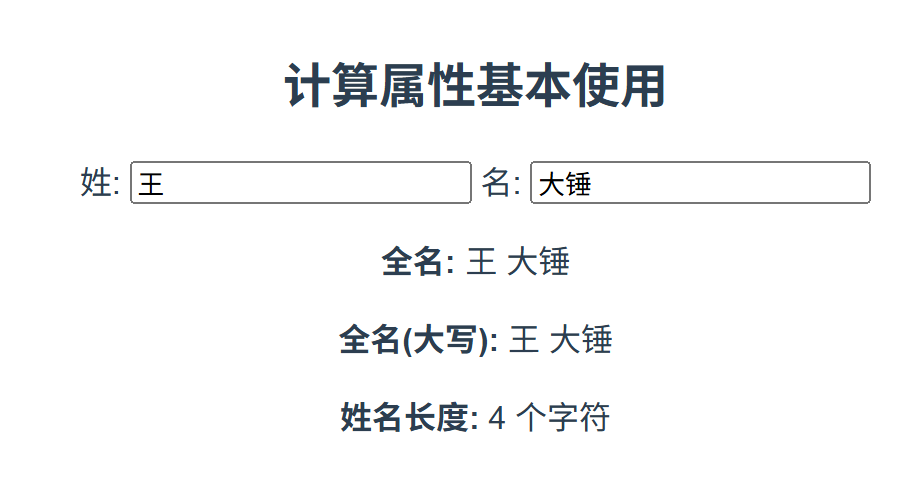
运行结果:
- 在姓和名输入框中输入内容,全名会实时更新
- 全名大写和姓名长度也会自动更新
- 如果未输入内容,显示"请输入姓名"
代码解析:
- 使用
computed()函数创建计算属性,参数是一个 getter 函数 - 计算属性的值基于 getter 函数的返回值
- 计算属性可以依赖其他计算属性(如
fullNameUpperCase依赖fullName) - 计算属性会自动追踪其依赖的响应式数据,当依赖变化时重新计算
二、computed计算属性的高级特性
2.1 可写计算属性
默认情况下,计算属性是只读的。但可以通过提供一个getter和setter函数,创建可写的计算属性。
<template>
  <div class="writable-computed">
    <h2>可写计算属性</h2>

    <div class="input-group">
      <label>姓: <input v-model="firstName"></label>
    </div>

    <div class="input-group">
      <label>名: <input v-model="lastName"></label>
    </div>

    <div class="input-group">
      <label>全名: <input v-model="fullName"></label>
    </div>

    <div class="log-section">
      <h3>操作日志:</h3>
      <ul>
        <li v-for="(log, index) in logs" :key="index" :class="{ recent: index === logs.length - 1 }">
          {{ log }}
        </li>
      </ul>
    </div>
  </div>
</template>

<script setup>
import { ref, computed } from 'vue';

// 基本数据
const firstName = ref('张');
const lastName = ref('三');
const logs = ref([]);

// 添加日志
const addLog = (message) => {
  logs.value.push(`[${new Date().toLocaleTimeString()}] ${message}`);
  // 只保留最近10条日志
  if (logs.value.length > 10) {
    logs.value.shift();
  }
};

// 可写计算属性
const fullName = computed({
  // getter - 读取时调用
  get() {
    const name = `${firstName.value} ${lastName.value}`.trim();
    addLog('读取全名: ' + name);
    return name;
  },

  // setter - 修改时调用
  set(newValue) {
    addLog('修改全名: ' + newValue);

    // 将新值拆分为名和姓
    const names = newValue.split(' ');

    if (names.length >= 2) {
      firstName.value = names[0];
      lastName.value = names.slice(1).join(' ');
    } else if (names.length === 1) {
      firstName.value = names[0];
      lastName.value = '';
    } else {
      firstName.value = '';
      lastName.value = '';
    }
  }
});

// 初始日志
addLog('组件初始化');
</script>

<style scoped>

</style>
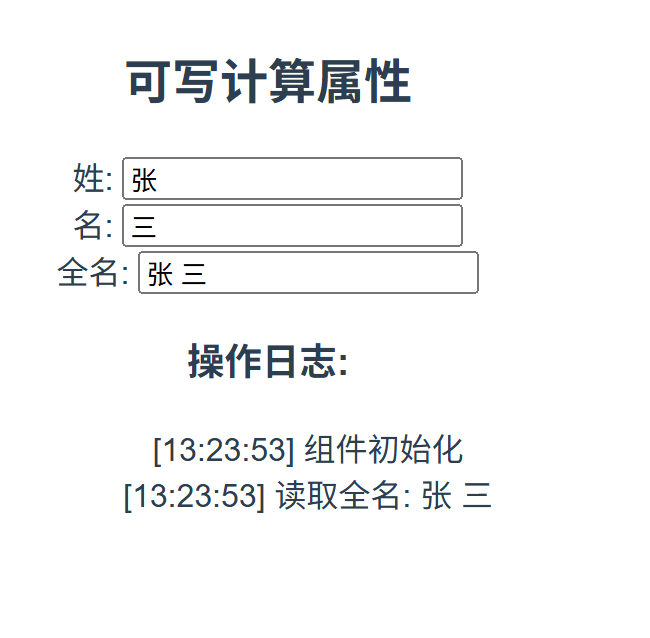
运行结果:
- 修改姓或名输入框,全名输入框会自动更新
- 修改全名输入框,姓和名输入框会自动拆分更新
- 操作日志会记录所有读取和修改操作
代码解析:
- 可写计算属性通过传递一个包含
get和set方法的对象创建 get方法:读取计算属性时调用,返回计算后的值set方法:修改计算属性时调用,接收新值,可以反向更新依赖的响应式数据- 可写计算属性适用于需要双向绑定的派生值场景
2.4 计算属性与watch的区别
计算属性和watch都可以响应数据变化,但它们的适用场景不同。
<template>
  <div class="computed-vs-watch">
    <h2>计算属性 vs watch</h2>

    <div class="input-section">
      <label>
        输入: <input v-model="inputValue" placeholder="输入一些文本">
      </label>
    </div>

    <div class="results">
      <div class="result-item">
        <h3>计算属性结果</h3>
        <p>字符数: {{ charCount }}</p>
        <p>单词数: {{ wordCount }}</p>
        <p>大写转换: {{ upperCaseText }}</p>
      </div>

      <div class="result-item">
        <h3>watch结果</h3>
        <p>最后修改时间: {{ lastUpdated }}</p>
        <p>历史字符数: {{ historyCharCounts.join(', ') }}</p>
        <p>变化次数: {{ changeCount }}</p>
      </div>
    </div>
  </div>
</template>

<script setup>
import { ref, computed, watch } from 'vue';

// 基本数据
const inputValue = ref('');
const lastUpdated = ref('');
const historyCharCounts = ref([]);
const changeCount = ref(0);

// 计算属性 - 适合派生值
const charCount = computed(() => {
  return inputValue.value.length;
});

const wordCount = computed(() => {
  if (!inputValue.value.trim()) return 0;
  return inputValue.value.trim().split(/\s+/).length;
});

const upperCaseText = computed(() => {
  return inputValue.value.toUpperCase();
});

// watch - 适合执行副作用
watch(inputValue, (newValue, oldValue) => {
  // 记录最后修改时间
  lastUpdated.value = new Date().toLocaleTimeString();

  // 记录历史字符数
  historyCharCounts.value.push(newValue.length);

  // 限制历史记录长度
  if (historyCharCounts.value.length > 5) {
    historyCharCounts.value.shift();
  }

  // 增加变化次数
  changeCount.value++;
});
</script>

<style scoped>
.computed-vs-watch {
  max-width: 800px;
  margin: 20px auto;
  padding: 20px;
  border: 1px solid #e0e0e0;
  border-radius: 6px;
}

.input-section {
  margin-bottom: 20px;
}

input {
  padding: 8px;
  width: 300px;
}

.results {
  display: flex;
  gap: 20px;
  flex-wrap: wrap;
}

.result-item {
  flex: 1;
  min-width: 300px;
  padding: 15px;
  border: 1px solid #e0e0e0;
  border-radius: 4px;
}
</style>
运行结果:
- 在输入框中输入文本:
- 计算属性实时更新字符数、单词数和大写转换结果
- watch记录最后修改时间、历史字符数和变化次数
核心区别总结:
| 特性 | computed计算属性 | watch |
|---|---|---|
| 用途 | 声明式地派生值 | 执行响应数据变化的副作用 |
| 语法 | 函数式,返回计算值 | 命令式,执行函数 |
| 缓存 | 有缓存 | 无缓存 |
| 返回值 | 必须有返回值 | 不需要返回值 |
| 适用场景 | 数据转换、过滤、组合 | 数据变化后的异步操作、复杂逻辑 |
| 依赖 | 自动追踪响应式依赖 | 需要显式指定依赖 |
三、computed计算属性的实际应用场景
3.1 数据转换和格式化
计算属性非常适合对原始数据进行转换和格式化,如日期格式化、货币格式化等。
<template>
  <div class="data-formatting">
    <h2>数据转换和格式化</h2>

    <div class="data-input">
      <label>
        原始价格: <input v-model.number="price" type="number" step="0.01" min="0">
      </label>
      <label>
        原始日期: <input v-model="rawDate" type="date">
      </label>
    </div>

    <div class="formatted-results">
      <p><strong>格式化价格:</strong> {{ formattedPrice }}</p>
      <p><strong>带符号价格:</strong> {{ priceWithSymbol }}</p>
      <p><strong>格式化日期:</strong> {{ formattedDate }}</p>
      <p><strong>相对日期:</strong> {{ relativeDate }}</p>
    </div>
  </div>
</template>

<script setup>
import { ref, computed } from 'vue';

// 原始数据
const price = ref(1234.56);
const rawDate = ref('2023-01-15');

// 格式化价格
const formattedPrice = computed(() => {
  return new Intl.NumberFormat('zh-CN', {
    minimumFractionDigits: 2,
    maximumFractionDigits: 2
  }).format(price.value);
});

// 带符号价格
const priceWithSymbol = computed(() => {
  return new Intl.NumberFormat('zh-CN', {
    style: 'currency',
    currency: 'CNY'
  }).format(price.value);
});

// 格式化日期
const formattedDate = computed(() => {
  if (!rawDate.value) return '';
  return new Intl.DateTimeFormat('zh-CN', {
    year: 'numeric',
    month: 'long',
    day: 'numeric',
    weekday: 'long'
  }).format(new Date(rawDate.value));
});

// 相对日期(如"3天前")
const relativeDate = computed(() => {
  if (!rawDate.value) return '';

  const today = new Date();
  const inputDate = new Date(rawDate.value);
  const diffTime = today - inputDate;
  const diffDays = Math.floor(diffTime / (1000 * 60 * 60 * 24));

  if (diffDays === 0) return '今天';
  if (diffDays === 1) return '昨天';
  if (diffDays === -1) return '明天';
  if (diffDays > 0) return `${diffDays}天前`;
  return `${Math.abs(diffDays)}天后`;
});
</script>

<style scoped>
.data-formatting {
  max-width: 600px;
  margin: 20px auto;
  padding: 20px;
  border: 1px solid #e0e0e0;
  border-radius: 6px;
}

.data-input {
  display: flex;
  flex-direction: column;
  gap: 15px;
  margin-bottom: 20px;
}

input {
  padding: 8px;
  width: 250px;
}

.formatted-results {
  padding: 15px;
  background-color: #f5f5f5;
  border-radius: 4px;
}

p {
  margin: 8px 0;
}
</style>
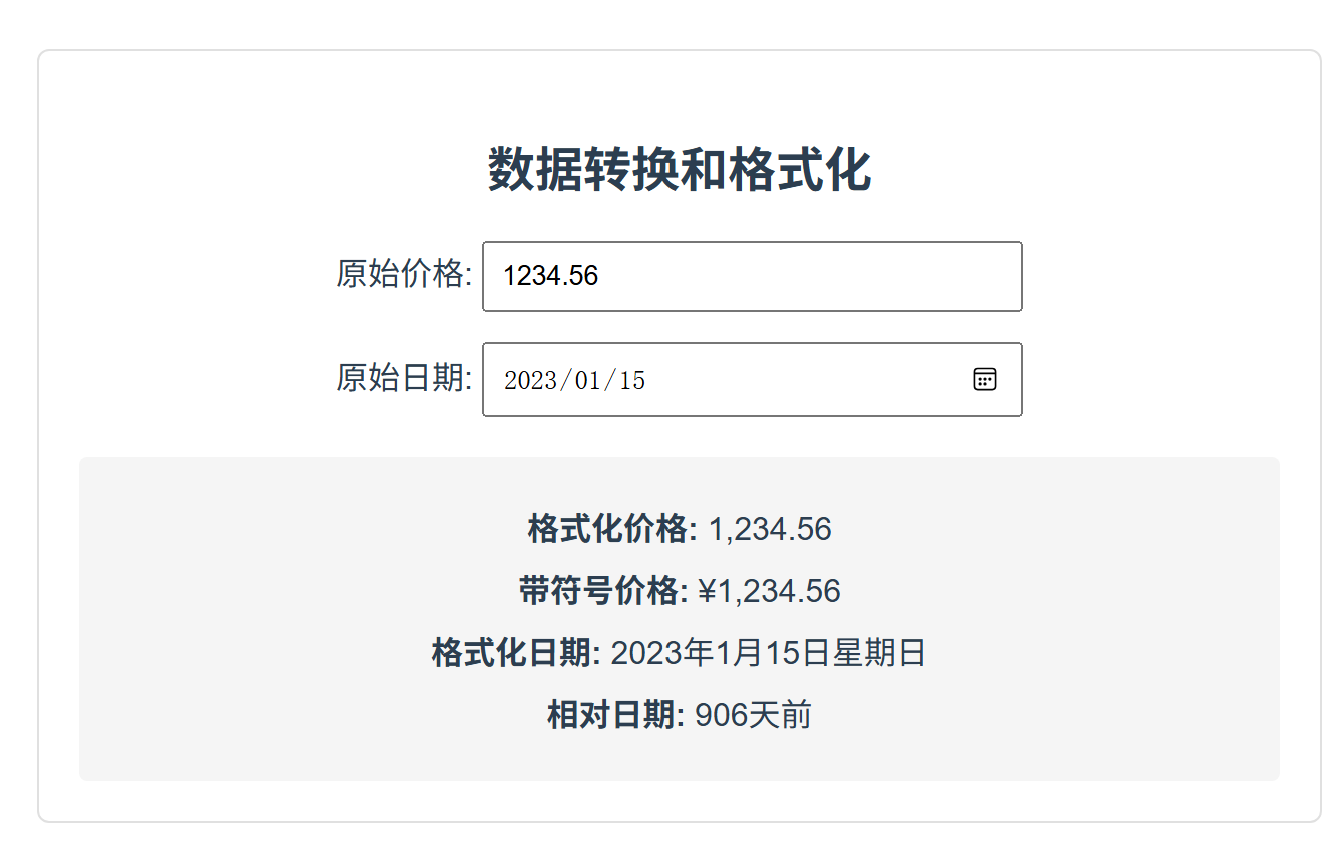
运行结果:
- 价格输入框输入1234.56,显示:
- 格式化价格: 1,234.56
- 带符号价格: ¥1,234.56
- 日期选择2023-01-15,显示:
- 格式化日期: 2023年1月15日 星期日
- 相对日期: 根据当前日期计算的相对天数
代码解析:
- 使用计算属性对价格和日期进行格式化
- 利用浏览器内置的Intl对象进行国际化格式化
- 计算属性使数据转换逻辑与模板分离,更易于维护
- 当原始数据变化时,格式化结果会自动更新
3.2 数据过滤和搜索
计算属性非常适合实现数据过滤和搜索功能,尤其是当数据量不大时。
<template>
  <div class="data-filtering">
    <h2>数据过滤和搜索</h2>

    <div class="search-controls">
      <input
        v-model="searchQuery"
        placeholder="搜索产品..."
        class="search-input"
      >

      <div class="filter-options">
        <label>
          <input type="checkbox" v-model="inStockOnly"> 仅显示有货
        </label>

        <select v-model="sortBy" class="sort-select">
          <option value="name">按名称排序</option>
          <option value="priceAsc">价格从低到高</option>
          <option value="priceDesc">价格从高到低</option>
        </select>
      </div>
    </div>

    <div class="product-list">
      <div v-if="filteredProducts.length === 0" class="no-results">
        没有找到匹配的产品
      </div>

      <div v-for="product in filteredProducts" :key="product.id" class="product-card">
        <h3>{{ product.name }}</h3>
        <p class="price">¥{{ product.price.toFixed(2) }}</p>
        <p class="stock" :class="{ outOfStock: !product.inStock }">
          {{ product.inStock ? '有货' : '缺货' }}
        </p>
      </div>
    </div>
  </div>
</template>

<script setup>
import { ref, computed } from 'vue';

// 原始产品数据
const products = ref([
  { id: 1, name: 'Vue3实战教程', price: 89.00, inStock: true },
  { id: 2, name: 'JavaScript高级程序设计', price: 129.00, inStock: true },
  { id: 3, name: 'TypeScript完全指南', price: 79.00, inStock: false },
  { id: 4, name: '前端工程化实践', price: 69.00, inStock: true },
  { id: 5, name: 'React设计模式与最佳实践', price: 99.00, inStock: false },
  { id: 6, name: 'CSS揭秘', price: 59.00, inStock: true }
]);

// 搜索和过滤条件
const searchQuery = ref('');
const inStockOnly = ref(false);
const sortBy = ref('name');

// 过滤和排序产品的计算属性
const filteredProducts = computed(() => {
  // 1. 过滤产品
  let result = [...products.value];

  // 搜索过滤
  if (searchQuery.value) {
    const query = searchQuery.value.toLowerCase();
    result = result.filter(product =>
      product.name.toLowerCase().includes(query)
    );
  }

  // 库存过滤
  if (inStockOnly.value) {
    result = result.filter(product => product.inStock);
  }

  // 2. 排序产品
  switch (sortBy.value) {
    case 'priceAsc':
      result.sort((a, b) => a.price - b.price);
      break;
    case 'priceDesc':
      result.sort((a, b) => b.price - a.price);
      break;
    case 'name':
    default:
      result.sort((a, b) => a.name.localeCompare(b.name));
  }

  return result;
});
</script>

<style scoped>
.data-filtering {
  max-width: 1000px;
  margin: 20px auto;
  padding: 20px;
  border: 1px solid #e0e0e0;
  border-radius: 6px;
}

.search-controls {
  margin-bottom: 20px;
}

.search-input {
  padding: 8px;
  width: 300px;
  margin-right: 20px;
}

.filter-options {
  display: inline-block;
  margin-left: 20px;
}

.filter-options label {
  margin-right: 20px;
}

.sort-select {
  padding: 6px;
}

.product-list {
  display: grid;
  grid-template-columns: repeat(auto-fill, minmax(200px, 1fr));
  gap: 20px;
}

.product-card {
  padding: 15px;
  border: 1px solid #e0e0e0;
  border-radius: 4px;
}

.price {
  color: #e53935;
  font-weight: bold;
}

.stock {
  color: #43a047;
}

.outOfStock {
  color: #f44336;
}

.no-results {
  grid-column: 1 / -1;
  text-align: center;
  padding: 40px;
  color: #757575;
}
</style>
运行结果:
- 在搜索框输入"vue",只显示包含"vue"的产品
- 勾选"仅显示有货",只显示有库存的产品
- 选择不同的排序选项,产品会按相应方式排序
代码解析:
- 使用一个计算属性整合过滤和排序逻辑
- 计算属性依赖于搜索关键词、库存过滤条件和排序选项
- 当任何过滤条件变化时,计算属性会重新计算并返回过滤后的结果
- 这种方式使模板非常简洁,所有逻辑集中在计算属性中
3.3 表单验证
计算属性可以用于实时表单验证,提供即时反馈。
<template>
  <div class="form-validation">
    <h2>表单验证</h2>

    <form @submit.prevent="handleSubmit">
      <div class="form-group">
        <label>用户名:</label>
        <input
          v-model="username"
          placeholder="请输入用户名"
          :class="{ invalid: !usernameValid }"
        >
        <span v-if="!usernameValid" class="error-message">{{ usernameError }}</span>
      </div>

      <div class="form-group">
        <label>邮箱:</label>
        <input
          v-model="email"
          type="email"
          placeholder="请输入邮箱"
          :class="{ invalid: !emailValid }"
        >
        <span v-if="!emailValid" class="error-message">{{ emailError }}</span>
      </div>

      <div class="form-group">
        <label>密码:</label>
        <input
          v-model="password"
          type="password"
          placeholder="请输入密码"
          :class="{ invalid: !passwordValid }"
        >
        <span v-if="!passwordValid" class="error-message">{{ passwordError }}</span>
      </div>

      <div class="form-group">
        <label>确认密码:</label>
        <input
          v-model="confirmPassword"
          type="password"
          placeholder="请确认密码"
          :class="{ invalid: !confirmPasswordValid }"
        >
        <span v-if="!confirmPasswordValid" class="error-message">{{ confirmPasswordError }}</span>
      </div>

      <button type="submit" :disabled="!formValid">提交</button>
    </form>
  </div>
</template>

<script setup>
import { ref, computed } from 'vue';

// 表单数据
const username = ref('');
const email = ref('');
const password = ref('');
const confirmPassword = ref('');

// 用户名验证
const usernameValid = computed(() => {
  return username.value.length >= 3 && username.value.length <= 20;
});

const usernameError = computed(() => {
  if (username.value.length === 0) return '';
  if (username.value.length < 3) return '用户名至少3个字符';
  if (username.value.length > 20) return '用户名最多20个字符';
  return '';
});

// 邮箱验证
const emailValid = computed(() => {
  if (!email.value) return true; // 空值暂时视为有效,提交时再强制检查
  const emailRegex = /^[^\s@]+@[^\s@]+\.[^\s@]+$/;
  return emailRegex.test(email.value);
});

const emailError = computed(() => {
  if (!email.value) return '';
  return emailValid.value ? '' : '请输入有效的邮箱地址';
});

// 密码验证
const passwordValid = computed(() => {
  if (!password.value) return true; // 空值暂时视为有效
  return password.value.length >= 6 && /[A-Z]/.test(password.value) && /[0-9]/.test(password.value);
});

const passwordError = computed(() => {
  if (!password.value) return '';
  if (password.value.length < 6) return '密码至少6个字符';
  if (!/[A-Z]/.test(password.value)) return '密码必须包含大写字母';
  if (!/[0-9]/.test(password.value)) return '密码必须包含数字';
  return '';
});

// 确认密码验证
const confirmPasswordValid = computed(() => {
  return password.value ===

DAMO开发者矩阵,由阿里巴巴达摩院和中国互联网协会联合发起,致力于探讨最前沿的技术趋势与应用成果,搭建高质量的交流与分享平台,推动技术创新与产业应用链接,围绕“人工智能与新型计算”构建开放共享的开发者生态。
更多推荐
 19
19 0
0- 0


 已为社区贡献1条内容

所有评论(0)