【空间插值】基于站点数据插值得到栅格文件(完整Python代码)
基于站点数据插值得到栅格文件(完整Python代码)
空间插值原理
🧩 插值方法简介
IDW(Inverse Distance Weighting)反距离加权法-确定性插值
逆距离加权(inverse distance weighted, IDW)插值明确地假设,距离较近的事物比距离较远的事物更相似。为了预测任何未测量位置的值,IDW使用预测位置周围的测量值。离预测位置最近的实测值对预测值的影响大于离预测位置远的实测值。IDW假设每个测量点都有一个局部影响,随着距离的增加而减弱。它为最接近预测位置的点赋予更大的权重,并且权重随着距离的变化而减小,因此称为逆距离加权。
分配给数据点的权重如下例所示:
权重窗口包含分配给每个数据点的权重列表,这些数据点用于在十字准星标记的位置生成预测值。
RBF(Radial Basis Function)径向基函数-确定性插值
径向基函数插值法(radial basis functions, RBF)是一系列精确插值技术;也就是说,表面必须通过每一个被测样本值。有五种不同的基函数:
- 利用薄板样条(Thin-plate spline)
- 带张力花键(Spline with tension)
- 完全正则样条(Completely regularized spline)
- Multiquadric函数(Multiquadric function)
- 逆多重二次函数(Inverse multiquadric function)
每个基函数都有不同的形状,产生不同的插值曲面。RBF方法是样条的一种特殊情况。
方法原理
径向基函数插值法(radial basis functions, RBF)在概念上类似于通过测量样品值拟合橡胶膜,同时最小化表面的总曲率。您选择的基函数决定了橡胶膜在这些值之间的匹配程度。
下图从概念上说明了RBF表面如何通过一系列高程样本值进行拟合。注意在横截面中,曲面经过数据值。
作为精确插值方法,RBF方法不同于全局和局部多项式插值方法,后者都是不精确的插值方法,不需要曲面经过测量点。
当将RBF与IDW(它也是一个精确的插值器)进行比较时,IDW永远不会预测高于最大测量值或低于最小测量值的值,正如您在下面的样本数据横断面中所看到的那样。
然而,RBF可以预测高于最大值和低于最小测量值的值,如下面的横截面所示。
使用交叉验证确定最优参数,其方式与IDW和局部多项式插值解释的方式相似。
KIB(Kriging Interpolation Based)克里金插值-确定性插值
通过建模空间变异结构(半变异函数)进行最佳线性无偏估计。
可模拟空间自相关性,适合具有趋势性数据。
DIB(Distance-based Interpolation Based)距离加权插值(可视为IDW变种)-确定性插值
通常为自定义的IDW/临近点插值方法。
📊 插值评估指标
| 指标 | 含义 |
|---|---|
| MSE | 均方误差 |
| MAE | 平均绝对误差 |
| MAPE | 平均绝对百分比误差 |
| SMAPE | 对称平均绝对百分比误差 |
| NSE | Nash-Sutcliffe效率系数,评估拟合优度(越接近1越好) |
📐 插值验证方法
K折交叉验证(K-Fold Cross Validation)
将数据划分为 K个等分。每轮使用 K-1 折训练,1 折验证。总共进行 K次验证。
优点:更高效,计算成本更小。
缺点:可能对划分稍微敏感(可多次shuffle重复)。
留一交叉验证(Leave-One-Out Cross Validation, LOOCV)
留一交叉验证(Leave-One-Out Cross Validation, LOOCV),属于 K 折交叉验证的一种特例,每次只留一个样本作为测试,其余作为训练。
优点:最大限度利用数据,评估稳健。
缺点:计算量大,总共进行 n次验证(n是样本数)。
举个例子(假设有5个站点):
| 轮次 | 训练数据 | 验证点 | 插值预测 | 保存真实&预测 |
|---|---|---|---|---|
| 1 | 2,3,4,5 | 1 | RHU@1估计值 | y_true[0], y_pred[0] |
| 2 | 1,3,4,5 | 2 | RHU@2估计值 | y_true[1], y_pred[1] |
| … | … | … | … | … |
| 5 | 1,2,3,4 | 5 | RHU@5估计值 | y_true[4], y_pred[4] |
案例:湿度数据(699个气象站点→栅格数据)
🎯 插值的目标:通过已知地点(气象站点)上的相对湿度数据,估计研究区域内其他未知位置的湿度值,得到连续的湿度栅格图。
🔢 所需数据
- 站点经纬度坐标(Lat,Lon)
- 站点相对湿度值(RHU)
- 研究区域边界(Shapefile)
- 目标数据:插值区域的空间分辨率(如 0.1° × 0.1°)
根据气象站点数据,绘制2020年12月1日的RHU数据分布如下:(部分图形)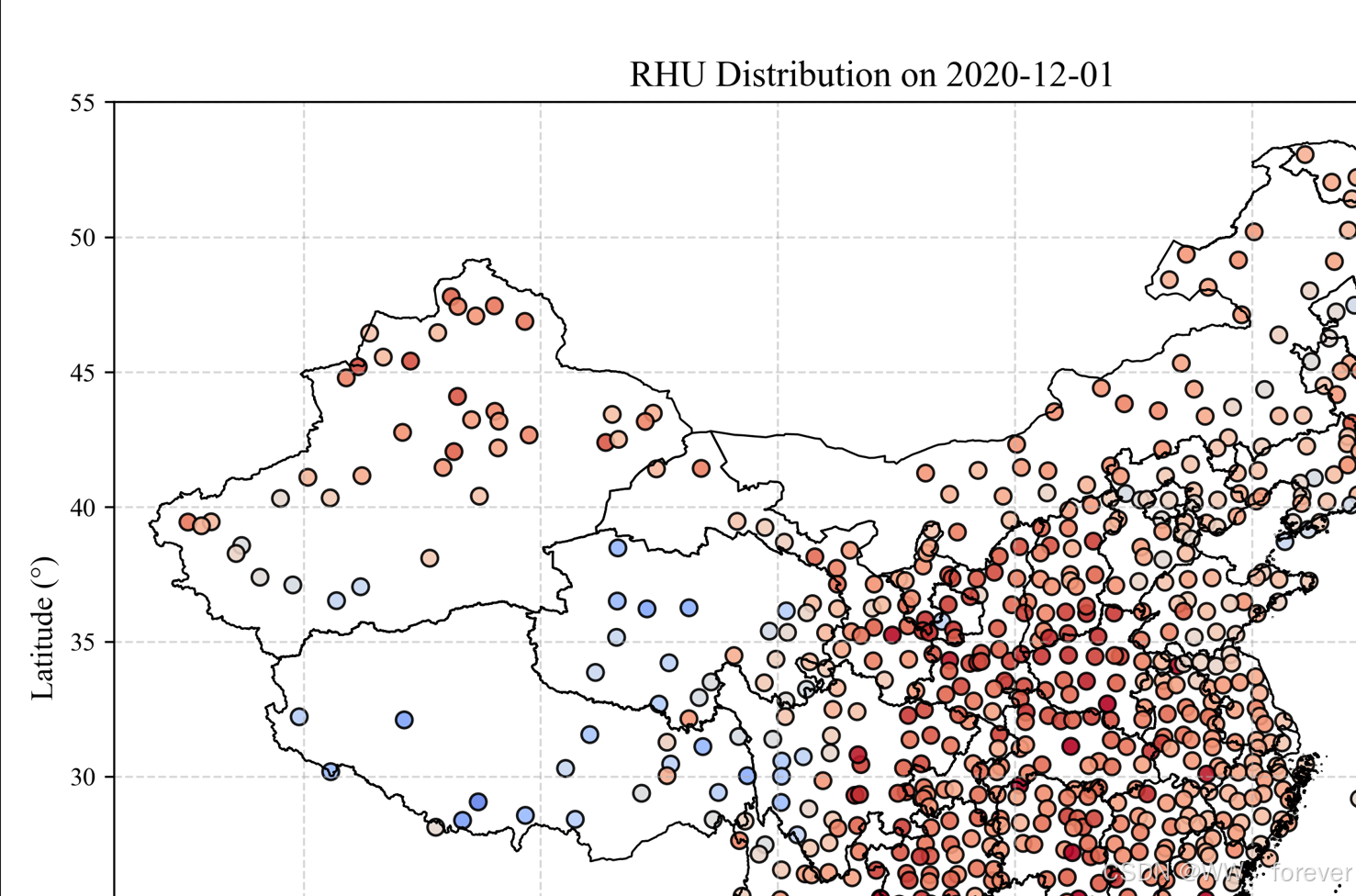
准备-Python库包安装
# 进入conda环境
conda activate myenv3.9

# 安装库包
conda install -c conda-forge pykrige

# 使用库包
from pykrige.ok import OrdinaryKriging
(Python插值代码)
完整Python代码如下:
import os
import numpy as np
import pandas as pd
import geopandas as gpd
from scipy.io import loadmat
import matplotlib.pyplot as plt
from scipy.interpolate import Rbf
from sklearn.metrics import mean_squared_error, mean_absolute_error
from shapely.geometry import Point, Polygon, MultiPolygon
from pykrige.ok import OrdinaryKriging
from sklearn.model_selection import KFold, LeaveOneOut
from rasterio.transform import from_origin
from shapely.prepared import prep
from affine import Affine  # 确保导入这一行!
import rasterio
from joblib import Parallel, delayed
from shapely.geometry import LineString, MultiLineString


plt.rcParams['font.family'] = 'Times New Roman'


def load_data_from_mat(mat_path):
    """从 .mat 文件中加载第一个非系统字段的数据"""
    data = loadmat(mat_path)
    for key in data:
        if not key.startswith("__"):
            return data[key]
    raise ValueError(f"❌ 没有找到有效变量字段于 {mat_path}")


# 插值评估函数
def evaluate_metrics(y_true, y_pred):
    mse = mean_squared_error(y_true, y_pred)
    mae = mean_absolute_error(y_true, y_pred)
    mape = np.mean(np.abs((y_true - y_pred) / y_true)) * 100
    smape = 100/len(y_true) * np.sum(2 * np.abs(y_pred - y_true) / (np.abs(y_true) + np.abs(y_pred)))
    nse = 1 - np.sum((y_true - y_pred)**2) / np.sum((y_true - np.mean(y_true))**2)
    return {"MSE": mse, "MAE": mae, "MAPE": mape, "SMAPE": smape, "NSE": nse}


def interpolate_idw_fast(x, y, z, xi, yi, power=2, radius=5):
    """
    高性能 IDW 插值函数,加入距离阈值(radius),限定影响范围
    power: 权重指数,radius: 最大影响半径(单位:度)
    """
    x = np.asarray(x)
    y = np.asarray(y)
    z = np.asarray(z)

    xi_flat = xi.ravel()
    yi_flat = yi.ravel()

    interp_values = np.empty_like(xi_flat)

    for i in range(len(xi_flat)):
        dx = x - xi_flat[i]
        dy = y - yi_flat[i]
        d = np.sqrt(dx**2 + dy**2)

        mask = d <= radius
        if not np.any(mask):
            interp_values[i] = np.nan
            continue

        d = d[mask]
        z_sel = z[mask]

        if np.any(d == 0):
            interp_values[i] = z_sel[d == 0][0]
        else:
            w = 1 / d**power
            interp_values[i] = np.sum(w * z_sel) / np.sum(w)

    return interp_values.reshape(xi.shape)

# 插值方法封装
def interpolate(method, x, y, z, xi, yi):
    if method == 'IDW':
        return interpolate_idw_fast(x, y, z, xi, yi, power=2, radius=1)
    elif method == 'DIB':
        return interpolate_idw_fast(x, y, z, xi, yi, power=1, radius=5)
    elif method == 'RBF':
        rbf = Rbf(x, y, z, function='multiquadric')
        return rbf(xi, yi)
    elif method == 'KIB':
        OK = OrdinaryKriging(
            x, y, z,
            variogram_model='spherical',
            verbose=False,
            enable_plotting=False
        )
        z_krig, _ = OK.execute('grid', xi[0], yi[:, 0])
        return z_krig
    else:
        raise ValueError(f"Unsupported method: {method}")


def raster_mask_by_shp(xi, yi, shp_path):
    gdf = gpd.read_file(shp_path)

    # 合并所有几何为一个大 Polygon(或 MultiPolygon)
    # union_geom = gdf.unary_union
    union_geom = gdf.geometry.union_all()

    prepared_geom = prep(union_geom)        # ✅ 预处理加速空间判断

    # 构造所有点(扁平化)
    flat_points = np.vstack([xi.ravel(), yi.ravel()]).T
    points = [Point(x, y) for x, y in flat_points]

    # 高效判断(几十倍加速)
    mask = np.array([prepared_geom.covers(p) for p in points])
    return mask.reshape(xi.shape)


def plot_boundary(ax, gdf, **kwargs):
    for geom in gdf.boundary.geometry:
        if isinstance(geom, LineString):
            x, y = geom.xy
            ax.plot(x, y, **kwargs)
        elif isinstance(geom, MultiLineString):
            for part in geom:
                x, y = part.xy
                ax.plot(x, y, **kwargs)

def plot_grid_and_boundary(xi, yi, gdf):
    fig, ax = plt.subplots(figsize=(8, 6))
    ax.scatter(xi, yi, s=1, alpha=0.2, color='skyblue', label="Grid Points")
    # gdf.boundary.plot(ax=ax, edgecolor='black', linewidth=1, label='Boundary')
    plot_boundary(ax, gdf, color='black', linewidth=1, label='边界')

    ax.set_xlim(xi.min(), xi.max())
    ax.set_ylim(yi.min(), yi.max())
    ax.set_aspect('equal')  # ✅ 关键设置
    ax.set_title("Boundary check", fontsize=16)
    ax.set_xlabel("Longitude (°)", fontsize=16)
    ax.set_ylabel("Latitude (°)", fontsize=16)
    ax.grid(True)
    ax.legend()
    plt.tight_layout()
    plt.show()

    plt.close()

def plot_interpolated_result(xi, yi, zi, gdf, title="Interpolated RHU"):
    fig, ax = plt.subplots(figsize=(10, 8))
    pcm = ax.pcolormesh(xi, yi, zi, cmap='coolwarm', shading='auto', vmin=20, vmax=100)
    plot_boundary(ax, gdf, color='black', linewidth=1)
    plt.colorbar(pcm, ax=ax, label='Relative Humidity (%)')
    ax.set_title(title)
    ax.set_xlabel("Longitude (°)")
    ax.set_ylabel("Latitude (°)")
    ax.set_xlim(xi.min(), xi.max())
    ax.set_ylim(yi.min(), yi.max())
    ax.set_aspect('equal')
    plt.tight_layout()
    plt.show()


def check_tif_values(tif_path):
    with rasterio.open(tif_path) as src:
        data = src.read(1)
        data = np.where(data == src.nodata, np.nan, data)
        print("✅ TIFF 文件读取成功")
        print("📏 栅格尺寸:", data.shape)
        print("📦 最大值:", np.nanmax(data))
        print("📦 最小值:", np.nanmin(data))
        print("📦 有效值数量:", np.sum(~np.isnan(data)))


# 主插值函数
def grid_interpolation(
    station_df,
    method='IDW',
    shp_path=None,
    resolution=0.1,
    save_tif=False,
    tif_path=None,
    clip_by_shp=True  # ✅ 新增参数:是否裁剪
):
    # 提取坐标和湿度值
    x = station_df['Lon'].values
    y = station_df['Lat'].values
    z = station_df['RHU'].values

    # 创建插值网格范围
    if shp_path:
        gdf = gpd.read_file(shp_path)
        bounds = gdf.total_bounds
        xmin, ymin, xmax, ymax = bounds
    else:
        xmin, ymin = x.min(), y.min()
        xmax, ymax = x.max(), y.max()

    xi = np.arange(xmin, xmax, resolution)
    yi = np.arange(ymin, ymax, resolution)
    xi, yi = np.meshgrid(xi, yi)

    print("🧭 xi 范围:", xi.min(), xi.max())
    print("🧭 yi 范围:", yi.min(), yi.max())
    if shp_path:
        print("🗺️ shapefile 边界:", gdf.total_bounds)
        # plot_grid_and_boundary(xi, yi, gdf)

    # 插值计算
    zi = interpolate(method, x, y, z, xi, yi)
    print("🌐 插值最大值:", np.nanmax(zi))
    print("🌐 插值最小值:", np.nanmin(zi))

    # 裁剪 shapefile 区域(优化版)
    if shp_path and clip_by_shp:
        print("🔍 正在进行 shapefile 区域裁剪...")
        mask = raster_mask_by_shp(xi, yi, shp_path)
        print("✅ 掩膜中有效点数:", np.sum(mask))
        zi = np.where(mask, zi, np.nan)
        print("📊 裁剪后有效值数量:", np.sum(~np.isnan(zi)))

    # 保存为 GeoTIFF(修复写入问题)
    if save_tif and tif_path:
        # 转为 float32 并设置 nodata 值
        zi = zi.astype(np.float32)
        zi[np.isnan(zi)] = -9999

        # 获取左上角坐标
        x_min = xi[0, 0]    # 最左列经度
        y_max = yi[-1, 0]   # 最上行纬度(最大)

        # 翻转 Z 方向,使第0行是北边(Y最大)
        zi = np.flipud(zi)

        # 修正 transform 设置
        transform = from_origin(x_min, y_max, resolution, resolution)
        # transform = Affine.translation(x_min, y_max) * Affine.scale(resolution, -resolution)

        with rasterio.open(
                tif_path, 'w',
                driver='GTiff',
                height=zi.shape[0],
                width=zi.shape[1],
                count=1,
                dtype='float32',
                crs='EPSG:4326',
                transform=transform,
                nodata=-9999
        ) as dst:
            dst.write(zi, 1)

        print(f"✅ 插值完成,tif 文件保存至:{tif_path}")
        print("xi range:", xi.min(), "to", xi.max())
        print("yi range:", yi.min(), "to", yi.max())
        print("Left-top corner:", xi[0, 0], yi[0, 0])  # ✅ 左上角坐标

    return xi, yi, zi


def cross_validate(
    station_df,
    method='IDW',
    cv_type='kfold',         # 'kfold' or 'loocv'
    n_splits=5,
    random_state=42,
    n_jobs=-1                # -1 表示使用所有核心
):
    """
    station_df: 包含 Lat, Lon, RHU 的 DataFrame
    method: 插值方法(IDW、RBF、KIB、DIB)
    cv_type: 'kfold' 或 'loocv'
    n_splits: 若使用kfold,设置折数
    n_jobs: 并行线程数,-1表示使用所有CPU核心
    """
    X = station_df[['Lon', 'Lat']].values
    y = station_df['RHU'].values

    if cv_type == 'loocv':
        cv = LeaveOneOut()
    elif cv_type == 'kfold':
        cv = KFold(n_splits=n_splits, shuffle=True, random_state=random_state)
    else:
        raise ValueError("cv_type must be 'kfold' or 'loocv'")

    def process_fold(train_idx, test_idx):
        train = station_df.iloc[train_idx]
        test = station_df.iloc[test_idx]

        x = train['Lon'].values
        y_ = train['Lat'].values
        z = train['RHU'].values

        xi = test['Lon'].values.reshape(-1, 1)
        yi = test['Lat'].values.reshape(-1, 1)

        preds = interpolate(method, x, y_, z, xi, yi)
        preds = np.array(preds).ravel()
        true = test['RHU'].values.ravel()

        return true, preds

    results = Parallel(n_jobs=n_jobs)(
        delayed(process_fold)(train_idx, test_idx) for train_idx, test_idx in cv.split(X, y)
    )

    y_true = np.concatenate([r[0] for r in results])
    y_pred = np.concatenate([r[1] for r in results])

    return evaluate_metrics(y_true, y_pred)


# 主函数
#####################################################################

# === 安全读取 .mat 文件 ===
station_mat_path = r"D:\6 Python Codes\20250429 InterpolationCQ\Datasets\StationID.mat"
rhu_mat_path = r"D:\6 Python Codes\20250429 InterpolationCQ\Datasets\RHU_Dec2020.mat"
stations = load_data_from_mat(station_mat_path)  # shape: (699, 3)
rhu = load_data_from_mat(rhu_mat_path)           # shape: (699, 31)

# === 读取 shp 文件 ===
China_shp_path = r"D:\6 Python Codes\20250429 InterpolationCQ\Datasets\Boundary_China\Boundary_China.shp"
china = gpd.read_file(China_shp_path)

# 加载数据
station_df = pd.DataFrame(stations, columns=["ID", "Lat", "Lon"])
station_df["RHU"] = rhu[:, 0]                # 某一天的湿度

# 删除缺失
station_df.dropna(subset=["RHU"], inplace=True)

# 执行插值
save_dir = r"D:\6 Python Codes\20250429 InterpolationCQ\Output"

xi, yi, zi = grid_interpolation(
    station_df,
    method='RBF',
    shp_path=China_shp_path,
    resolution=0.25,
    save_tif=True,
    tif_path=save_dir+"\RHU_RBF_20201201_0.1.tif",
    clip_by_shp=False  # ✅ 不做裁剪,大幅节省时间
)

# 保存完成后检查 .tif 文件是否有效
check_tif_values(r"D:\6 Python Codes\20250429 InterpolationCQ\Output\RHU_20201201.tif")

# 图像可视化检查函数
# plot_interpolated_result(xi, yi, zi, china, title="Interpolated RHU on 2020-12-01")


# 验证插值精度-K 折交叉验证(5折)
metrics = cross_validate(
    station_df=station_df,
    method='IDW',
    cv_type='kfold',
    n_splits=5,
    n_jobs=-1
)
print(metrics)

"""
# 验证插值精度-留一交叉验证(LOOCV)
metrics = cross_validate(
    station_df=station_df,
    method='RBF',
    cv_type='loocv',
    n_jobs=-1
)
print(metrics)
"""
插值后,图形如下: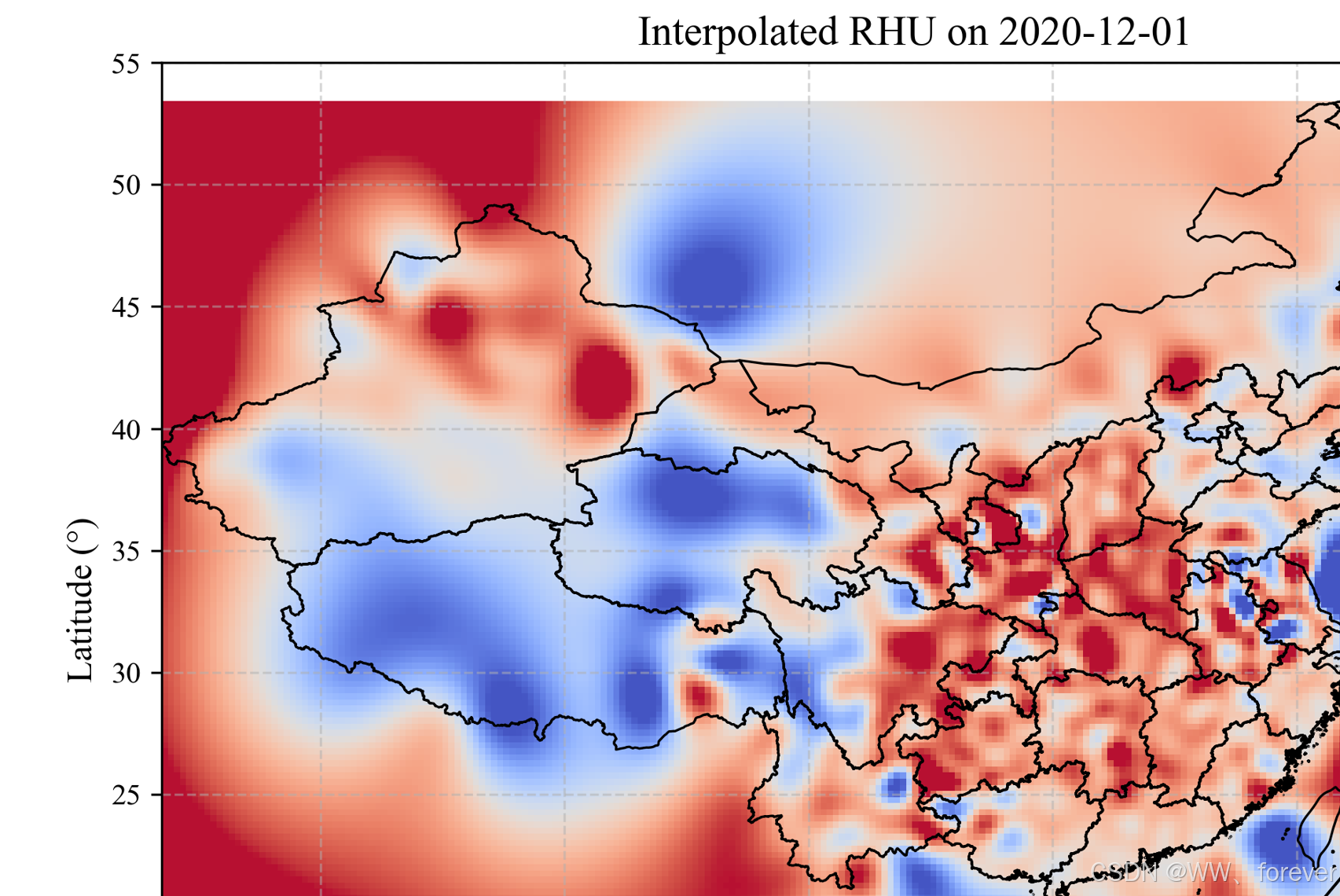
参考

DAMO开发者矩阵,由阿里巴巴达摩院和中国互联网协会联合发起,致力于探讨最前沿的技术趋势与应用成果,搭建高质量的交流与分享平台,推动技术创新与产业应用链接,围绕“人工智能与新型计算”构建开放共享的开发者生态。
更多推荐


 13
13 0
0- 0


 已为社区贡献15条内容

所有评论(0)