python 在企业微信通过群机器人发送消息
·
1.在企业微信新建一个群,最开始最好只加入自己,方便测试,以免影响他人
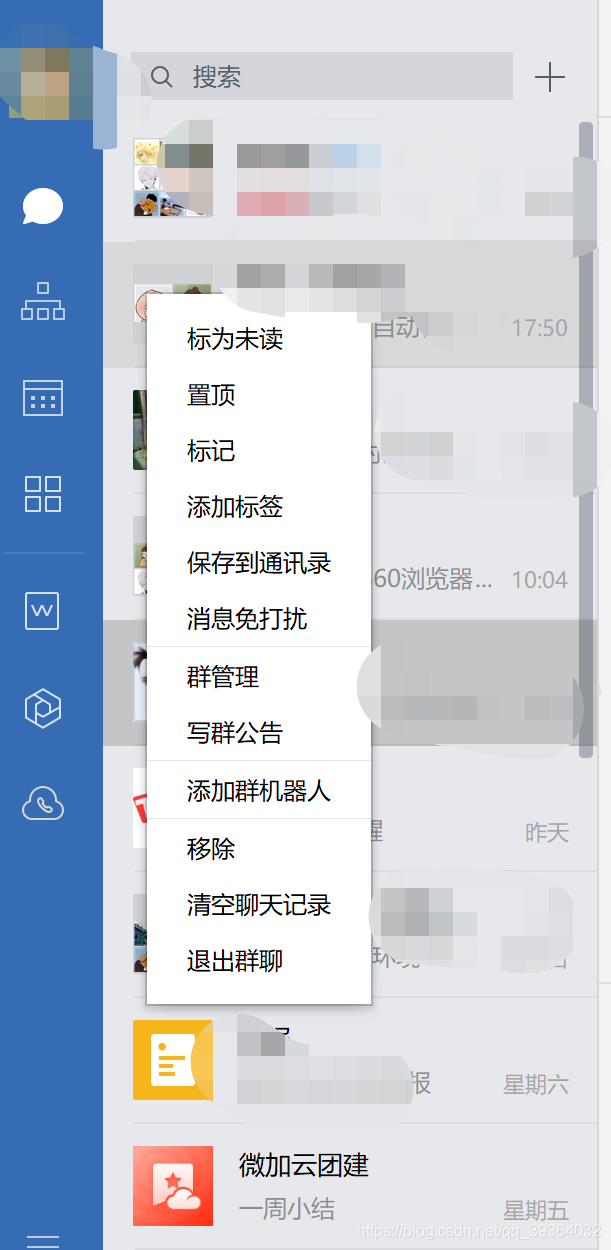
在企业微信群昵称处右键鼠标,选择添加群机器人-添加群机器人-新创建一个机器人,如下图所示:
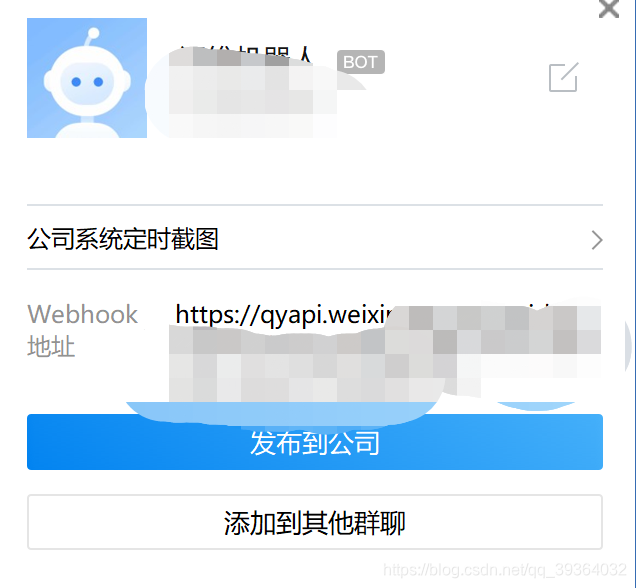
2.添加完群机器人之后,在群的联系人里面,即可看到新添加的机器人,鼠标放在机器人上,即看到webhook地址,由此可得到一个key值
3.电脑上按下win+r,输入cmd,在命令行输入 pip install WorkWeixinRobot,等待安装成功!
4.发送消息部分相关代码
from WorkWeixinRobot.work_weixin_robot import WWXRobot

wwx = WWXRobot(key='xxxxxx') //刚刚获取到的群机器人的key值


def full_print_screen(self, driver, title):
    """
    全屏截图,并发送企业微信群消息
    """
    try:
        exportUrl = r'C:\Users\Aimee\Downloads\test'
        current_time = time.strftime('%Y%m%d%H%M%S', time.localtime(time.time()))  # 格式化时间
        image_url = exportUrl + '/' + current_time + ".png"  # 组合路径与名称
        driver.get_screenshot_as_file(image_url)  # 截图
        wwx.send_image(local_file=image_url)
        wwx.send_text(content=title)
        return image_url
    except Exception:
        wwx.send_markdown(content="<font color=\"warning\">【" + title + "】截图失败</font>")
5.常用方法
1.发送文本消息 wwx.send_text(content='Hello')
2.发送markdown消息 wwx.send_markdown(content='Hello')
3.发送图片消息
3.1本地图片
wwx.send_image(local_file='local_image.jpg')
3.2在线图片
wwx.send_image(remote_url='https://www.xxxx.png')
4.发送图文消息
articles = [
    {
        'title': 'Article I',
        'description': 'Article I Description',  # 选填
        'url': 'URL I',
        'picurl': 'Article I Picture URL',  # 选填
    },
    {
        'title': 'Article II',
        'description': 'Article II Description',  # 选填
        'url': 'URL II',
        'picurl': 'Article II Picture URL',  # 选填
    }
]
wwx.send_news(articles=articles)

DAMO开发者矩阵,由阿里巴巴达摩院和中国互联网协会联合发起,致力于探讨最前沿的技术趋势与应用成果,搭建高质量的交流与分享平台,推动技术创新与产业应用链接,围绕“人工智能与新型计算”构建开放共享的开发者生态。
更多推荐

 4
4 0
0- 0


 已为社区贡献1条内容

所有评论(0)