

excel单元格文本应用
While working on a client's sales plan last week, I had to count the orders for a couple of specific customers. This tutorial shows how to count cells with specific text in Excel.
上周在制定客户的销售计划时,我不得不计算几个特定客户的订单。 本教程介绍了如何在Excel中对具有特定文本的单元格进行计数。
客户数据样本 (Customer Data Sample)
Here's a screenshot of some sample data, with the customer names in column B.
这是一些示例数据的屏幕截图,客户名称在B列中。

计算完全匹配的单元格 (Count cells that are an exact match)
In Excel, you can use the COUNTIF function to count cells that meet a specific criterion. For example, you can use this formula to count the orders that were placed by the customer, BigMart.
在Excel中,您可以使用COUNTIF函数对满足特定条件的单元格进行计数。 例如,您可以使用此公式来计算客户BigMart下的订单。
=COUNTIF($B$2:$B$14,"BigMart")
= COUNTIF($ B $ 2:$ B $ 14,“ BigMart”)
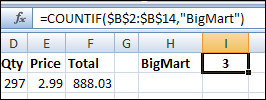
- The first argument, $B$2:$B$14, is the range that contains the cells to be counted. 第一个参数$ B $ 2:$ B $ 14是包含要计数的单元格的范围。
- The second argument, "BigMart", is the value that we want to count. 第二个参数“ BigMart”是我们要计算的值。
There are 3 cells that contain the exact text, "BigMart", so the COUNTIF formula returns 3.
有3个包含确切文本“ BigMart”的单元格,因此COUNTIF公式返回3。
在COUNTIF中使用单元格引用 (Use a cell reference in COUNTIF)
Instead of typing the text in the COUNTIF formula, you can refer to a cell that contains the text you want to count. For example, if cell H1 contains the customer name, BigMart, use this formula to count their orders.
您可以引用包含您要计数的文本的单元格,而不是在COUNTIF公式中键入文本。 例如,如果单元格H1包含客户名称BigMart,则使用此公式计算其订单。
=COUNTIF($B$2:$B$14, H1)
= COUNTIF($ B $ 2:$ B $ 14,H1)
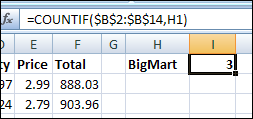
The COUNTIF formula returns 3, the same result that you got by typing the text in the formula.
COUNTIF公式返回3,与在公式中键入文本所得到的结果相同。
计算不完全匹配 (Count non-exact matches)
In the sales plan data that I worked on, there were a few variations on some customer spellings, and I wanted to count all of them. In the screenshot at the start of this article, you can see that BigMart is also listed as Big-Mart and Big Mart.
在我处理的销售计划数据中,某些客户拼写存在一些差异,我希望将所有这些都计算在内。 在本文开头的屏幕截图中,您可以看到BigMart也被列为Big-Mart和Big Mart。
使用*通配符 (Use the * wildcard)
To count all the variations, you can use the wildcard character, *, to represent any characters, or no characters, in the text string. For example, if cell H1 contains the customer name with a wildcard, Big*Mart, use this formula to count all the variations.
要计算所有变体,可以使用通配符*来表示文本字符串中的任何字符或不包含任何字符。 例如,如果单元格H1包含带有通配符Big * Mart的客户名称,则使用此公式计算所有变化。
=COUNTIF($B$2:$B$14, H1)
= COUNTIF($ B $ 2:$ B $ 14,H1)
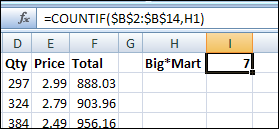
The COUNTIF formula returns 7, because it counts BigMart, Big-Mart and Big Mart.
COUNTIF公式返回7,因为它计算BigMart , Big-Mart和Big Mart 。
使用 ? 通配符 (Use the ? wildcard)
If you use the ? wildcard character instead of the * wildcard character, it represents one character.
如果使用? 通配符代替*通配符,它代表一个字符。
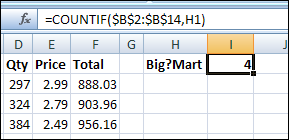
Now the COUNTIF formula returns 4, because it counts Big-Mart and Big Mart, but not BigMart. It doesn't count BigMart, because there isn't a character between the g and the M.
现在,COUNTIF公式返回4,因为它计算的是Big-Mart和Big Mart ,但不包括BigMart 。 它不算BigMart,因为在g和M之间没有字符。
更多COUNTIF示例 (More COUNTIF Examples)
For a few more examples of counting cells with specific text, visit the Excel Count Functions page on my Contextures website. _______________
有关使用特定文本对单元格进行计数的更多示例,请访问我的Contextures网站上的Excel Count Functions页面。 _______________
翻译自: https://contexturesblog.com/archives/2010/03/08/count-cells-with-specific-text-in-excel/
excel单元格文本应用


 已为社区贡献24条内容

所有评论(0)