Gewechat 个人微信免费开源框架部署手册
·
官网:
https://github.com/Devo919/Gewechat
http://218.78.116.24:10884/#/newHome
👉 Gewechat🤖
个人微信免费开源框架,支持二次开发、任意语言都可接入,Restful API接入。
框架优势:
- 简单易用,无接入难度,区别于其它开源项目,本框架无需用户安装电脑微信,无需安装手机破解插件,只需扫码登录即可使用,操作简单,目前是大厂最稳定的主流使用方案。
主要能力:
- 消息自动化、给指定对象(好友、群组)发送文本、图片、文件、emoji表情、小程序、语音等消息
- 自定义消息处理、自动回复、自定义关键字回复、AI回复、各种自定义类型、RPA自动化业务交互
- 群管理及好友管理、设置好友备注、邀请好友统计、拉好友进群等
- 各种业务模型接入,例如chatgpt、sora、大数据及客服模型
- 基于框架您可以创造更多有趣的功能...
🚀 快速入门
安装Docker
Centos Docker安装,已安装Docker可跳过
1、安装gcc相关
yum -y install gcc
yum -y install gcc-c++
2、配置镜像
yum install -y yum-utils
yum-config-manager --add-repo http://mirrors.aliyun.com/docker-ce/linux/centos/docker-ce.repo
yum makecache fast
3、安装docker
yum install docker-ce docker-ce-cli containerd.io docker-buildx-plugin docker-compose-plugin4、启动docker
systemctl start docker
# 将docker设置成开机自启动
systemctl enable docker.service
启动服务
1、拉取镜像
docker pull registry.cn-hangzhou.aliyuncs.com/gewe/gewe:latest

docker tag registry.cn-hangzhou.aliyuncs.com/gewe/gewe gewe
2、运行镜像容器
mkdir -p /root/temp
docker run -itd -v /root/temp:/root/temp -p 2531:2531 -p 2532:2532 --privileged=true --name=gewe gewe /usr/sbin/init
3、将容器设置成开机运行
docker update --restart=always gewe4、查看启动日志docker logs gewe
启动成功
[  OK  ] Set up automount Arbitrary Executable File Formats File System Automount Point.
[  OK  ] Reached target Remote File Systems.
[  OK  ] Reached target Network is Online.
[  OK  ] Reached target Swap.
[  OK  ] Started Forward Password Requests to Wall Directory Watch.
[  OK  ] Started Dispatch Password Requests to Console Directory Watch.
[  OK  ] Reached target Paths.
[  OK  ] Reached target Local Encrypted Volumes.
[  OK  ] Created slice Root Slice.
[  OK  ] Listening on /dev/initctl Compatibility Named Pipe.
[  OK  ] Created slice System Slice.
[  OK  ] Listening on udev Control Socket.
[  OK  ] Listening on Delayed Shutdown Socket.
[  OK  ] Listening on Journal Socket.
         Starting Setup Virtual Console...
         Starting Apply Kernel Variables...
         Mounting FUSE Control File System...
         Mounting Configuration File System...
         Starting Journal Service...
         Starting Load/Save Random Seed...
         Mounting Huge Pages File System...
         Mounting Debug File System...
[  OK  ] Created slice User and Session Slice.
[  OK  ] Reached target Slices.
[  OK  ] Listening on udev Kernel Socket.
         Starting udev Coldplug all Devices...
[  OK  ] Created slice system-getty.slice.
         Starting Create Static Device Nodes in /dev...
[  OK  ] Mounted Configuration File System.
[  OK  ] Mounted Debug File System.
[  OK  ] Mounted Huge Pages File System.
[  OK  ] Mounted FUSE Control File System.
[  OK  ] Started Apply Kernel Variables.
[  OK  ] Started Setup Virtual Console.
[  OK  ] Started Load/Save Random Seed.
[  OK  ] Started udev Coldplug all Devices.
[  OK  ] Started Journal Service.
         Starting Flush Journal to Persistent Storage...
[  OK  ] Started Create Static Device Nodes in /dev.
[  OK  ] Reached target Local File Systems (Pre).
[  OK  ] Reached target Local File Systems.
         Starting udev Kernel Device Manager...
[  OK  ] Started Flush Journal to Persistent Storage.
         Starting Create Volatile Files and Directories...
[  OK  ] Started Create Volatile Files and Directories.
         Starting Update UTMP about System Boot/Shutdown...
[  OK  ] Started Update UTMP about System Boot/Shutdown.
[  OK  ] Started udev Kernel Device Manager.
[  OK  ] Reached target System Initialization.
[  OK  ] Listening on D-Bus System Message Bus Socket.
[  OK  ] Reached target Sockets.
[  OK  ] Started Daily Cleanup of Temporary Directories.
[  OK  ] Reached target Timers.
[  OK  ] Reached target Basic System.
         Starting The nginx HTTP and reverse proxy server...
         Starting MySQL Server...
         Starting Permit User Sessions...
         Starting Process Monitoring and Control Daemon...
         Starting Redis persistent key-value database...
[  OK  ] Started D-Bus System Message Bus.
         Starting Login Service...
[  OK  ] Started Redis persistent key-value database.
[  OK  ] Started Permit User Sessions.
[  OK  ] Started Getty on tty1.
[  OK  ] Reached target Login Prompts.
[  OK  ] Started Login Service.
[  OK  ] Started The nginx HTTP and reverse proxy server.
[  OK  ] Started Process Monitoring and Control Daemon.
[  OK  ] Started MySQL Server.
[  OK  ] Reached target Multi-User System.
         Starting Update UTMP about System Runlevel Changes...
[  OK  ] Started Update UTMP about System Runlevel Changes.
启动失败,解决方式详见下文
Welcome to CentOS Linux 7 (Core)!

[!!!!!!] Failed to allocate manager object, freezing.
访问
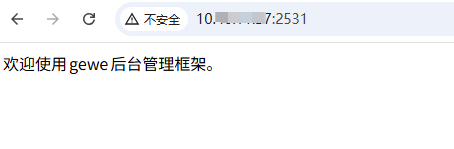
API服务调用
- API服务调用地址
http://{服务ip}:2531/v2/api/{接口名} - 文件下载地址
http://{服务ip}:2532/download/{接口返回的文件路径} - 点击此处查看详细API文档
问题:[Fix] Failed to allocate manager object, freezing
https://github.com/Devo919/Gewechat/issues/9
有些 OS 上 docker run 该镜像后日志出现 Failed to allocate manager object, freezing,该问题产生原因可能是当前系统只挂载了 cgroupv2,可用 mount | grep cgroup 检查。
How to fix
可让系统同时兼容 cgroup v1 和 v2
- edit
/etc/default/grub
GRUB_CMDLINE_LINUX="SYSTEMD_CGROUP_ENABLE_LEGACY_FORCE=1 systemd.unified_cgroup_hierarchy=0"- regenerate grub.cfg
grub-mkconfig -o /boot/grub/grub.cfg- reboot system

DAMO开发者矩阵,由阿里巴巴达摩院和中国互联网协会联合发起,致力于探讨最前沿的技术趋势与应用成果,搭建高质量的交流与分享平台,推动技术创新与产业应用链接,围绕“人工智能与新型计算”构建开放共享的开发者生态。
更多推荐

 3
3 0
0- 0


 已为社区贡献3条内容

所有评论(0)