医学影像数据之nii、dcm、png的数据格式互转
医学影像数据之nii、dcm、png的数据格式互转
医学影像数据之nii、dcm、png的数据格式互转
1. 软件或工具安装
使用工具:
- dcm2niix、FSL utilities(linux)
- python
1.1 FSL utilities
进入网址:https://fsl.fmrib.ox.ac.uk/fsl/docs/#/install/linux
点击here,自动下载安装包

上传至linux上某个目录并执行安装
  # 上传至linux上某个目录并执行安装
  python /your_dirs/fslinstaller.py
1.2 dcm2niix
conda install -c conda-forge dcm2niix
或
python -m pip install dcm2niix
2. 使用技巧 - 基于在线网页(适合单个样本的转换)
Image Converter: Convert Between Various Images (Free)
2.1 3D - 2D
注:3D指代包含多种dcm的nii文件,2D指代DCM, PNG, JPG格式的图。
-
NIFTI to DICOM : NIFTI to DICOM Converter: Convert NIFTI Image to DICOM Image (Free)
-
DICOM to NIFTI: DICOM to NIFTI Converter: Convert DICOM Image to NIFTI Image (Free)
-
NIfTI images (3D/4D) to DICOM series (2D)/PNG/JPG/TIFF:DICOM to NIFTI/DICOM to JPG Converter: Convert DICOM Image to JPG Image (Free)
2.2 2D - 2D
- DICOM to JPG: DICOM to JPG
- DICOM to PNG: DICOM to PNG Converter: Convert DICOM Image to PNG Image (Free)
PS: 网页还包括其他更多种图像(BMP/NRRD/TIFF/PDF等)的数据格式互转。
3. 使用技巧- 基于liunx(适合单个或批量)
3.1 查看影像文件基本信息
fslinfo - 查看图像头文件信息
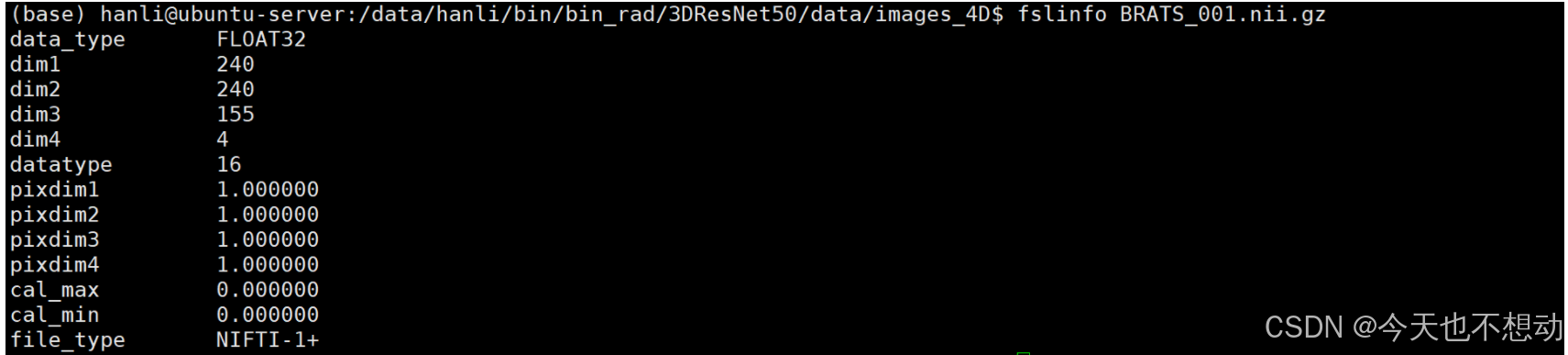
fslinfo BRATS_001.nii.gz
#解释:fslinfo 可以知道数据的类型,大小,分辨率等信息。其中,数据类型为 float32, 大小为 4x240x240x155, xyz三个方向的分辨率均为 1mm
3.2 4D - 3D 转化
fslsplit - 将 4D 文件拆分为许多 3D 文件
MRI 图像通常合并了多个序列,是为 4D 图像。fslsplit 拆解4D图像为多个 3D 图像
# 单个文件
fslsplit BRATS_001.nii.gz BRATS_001_

# 批量
ls *.nii.gz | while read i; do base_name=$(basename "$i" .nii.gz); echo fslsplit $i "${base_name}_"; done # echo是先打印要执行的命令,确定命令无误后去掉echo重新运行即可

fslmerge 将多个 3D 合并成一个 4D 图像
fslmerge -n 0 BRATS_489_merge.nii.gz brats_498_0000.nii.gz brats_498_0001.nii.gz brats_498_0002.nii.gz brats_498_0003.nii.gz

# -n = 0 表示在第 0 个维度合并图像。
3.3 3D - 2D 转化
2D转3D: dcm2niix 将多种平扫切片转为三维nii.gz的格式
dcm2niix -f "%f_%p_%t" -e n -m y -i y -o ./ -z y ./dcm/CT_vertebrae_pat01/

# 可能根据不同的层厚,成像算法, X 射线管的电流和曝光量分别生成对应nii.gz文件
# useage:
-o:指定输出目录(省略则保存到输入文件夹)。
输入目录放在最后
-m:是否合并来自同一序列的二维切片,忽略回波、曝光等信息。选项为 n(否)、y(是)或 0/1/2(默认值为 2,表示自动)。
-i:是否忽略派生的、定位器的和二维图像。选项为 y(是,默认值)或 n(否)。
-f:自定义输出文件名格式。可以使用多种占位符。
-z:是否对图像进行 gzip 压缩。选项为 y(使用 pigz)、o(使用最优 pigz)、i(使用内部 miniz)、n(否,默认值)或 3(仅对 3D 图像不压缩)。
-e:指定输出文件格式。选项为 y(输出为 NRRD 格式)、n(输出为 NIfTI 格式,默认值)或 o(输出为 MGH 格式)。
2D转3D: 基于python无差别将多张dcm合并为一个nii文件
import numpy as np
import shutil
import os
import SimpleITK as sitk

def dcm2nii_sitk(path_read, path_save):
    reader = sitk.ImageSeriesReader()
    seriesIDs = reader.GetGDCMSeriesIDs(path_read)
    N = len(seriesIDs)
    lens = np.zeros([N])
    for i in range(N):
        dicom_names = reader.GetGDCMSeriesFileNames(path_read, seriesIDs[i])
        lens[i] = len(dicom_names)
    N_MAX = np.argmax(lens)
    dicom_names = reader.GetGDCMSeriesFileNames(path_read, seriesIDs[N_MAX])
    reader.SetFileNames(dicom_names)
    image = reader.Execute()
    if not os.path.exists(path_save):
        os.mkdir(path_save)
    sitk.WriteImage(image, path_save+'/data.nii.gz')

DICOMpath = "/data/hanli/pm/CT_calculation/00.data/dcm/"  #dicom文件夹路径
Midpath = "/data/hanli/pm/CT_calculation/00.data/tmp/"  #处理中间数据路径
Resultpath = "/data/hanli/pm/CT_calculation/00.data/nii/"   #保存路径
cases = os.listdir(DICOMpath)  #获取dicom文件夹路径子文件夹名
for c in cases:  #遍历dicom文件夹路径子文件
    path_mid = os.path.join(DICOMpath , c)  #获取dicom文件夹下每一套数据的路径
    dcm2nii_sitk(path_mid , Midpath )  #将dicom转换为nii,并保存在Midpath中
    shutil.copy(os.path.join(Midpath , "data.nii.gz"), os.path.join(Resultpath , c + ".nii.gz"))
    #重新对保存后的nii文件名进行命名,并复制到Resultpath下
3D转2D: fslslice - 将 3D 文件拆分为许多 2D 文件(沿 z 轴),为nii.gz格式
fslslice BRATS_001_0000.nii.gz BRATS_001_0000
fslslice 把 3D 图像拆成 2D 的。算法会自动在名字后面加一个slice

3D转2D: 基于python将nii文件拆分为多张dcm文件
# coding=utf-8
# /usr/bin/env python
'''
Author:David Xu
Blog: https://blog.csdn.net/weixin_43229348
date: 2022/1/17 13:11
'''
import nibabel
import numpy as np
import pydicom
import os
from tqdm import tqdm


def convertNsave(arr, file_dir, index=0):
    """
    `arr`: parameter will take a numpy array that represents only one slice.
    `file_dir`: parameter will take the path to save the slices
    `index`: parameter will represent the index of the slice, so this parameter will be used to put
    the name of each slice while using a for loop to convert all the slices
    """

    dicom_file = pydicom.dcmread('./demo/dcm/CT-vertebrae-pat01-L1-S5-SpineVo/image.0001.dcm') # nii转dcm时需要一个参考dcm文件用于提供元数据,从而确保转换后的 DICOM 文件具有正确的上下文信息,并能被 PACS 系统和其他 DICOM 查看器正确解释和使用。参考dcm的文件可通过在线nii转dicom网页随机转换一个样本的dcm文件,然后该院的所有nii文件都可以参考该dcm文件进行分解。
    arr = arr.astype('uint16')
    dicom_file.Rows = arr.shape[0]
    dicom_file.Columns = arr.shape[1]
    dicom_file.PhotometricInterpretation = "MONOCHROME2"
    dicom_file.SamplesPerPixel = 1
    dicom_file.BitsStored = 16
    dicom_file.BitsAllocated = 16
    dicom_file.HighBit = 15
    dicom_file.PixelRepresentation = 1
    dicom_file.PixelData = arr.tobytes()
    dicom_file.save_as(os.path.join(file_dir, f'slice{index}.dcm'))


def nifti2dicom_1file(nifti_dir, out_dir):
    """
    This function is to convert only one nifti file into dicom series

    `nifti_dir`: the path to the one nifti file
    `out_dir`: the path to output
    """

    nifti_file = nibabel.load(nifti_dir)
    nifti_array = nifti_file.get_fdata()
    number_slices = nifti_array.shape[2]

    for slice_ in tqdm(range(number_slices)):
        convertNsave(nifti_array[:, :, slice_], out_dir, slice_)


def nifti2dicom_mfiles(nifti_dir, out_dir=''):
    """
    This function is to convert multiple nifti files into dicom files

    `nifti_dir`: You enter the global path to all of the nifti files here.
    `out_dir`: Put the path to where you want to save all the dicoms here.

    PS: Each nifti file's folders will be created automatically, so you do not need to create an empty folder for each patient.
    """

    files = os.listdir(nifti_dir)
    for file in files:
        in_path = os.path.join(nifti_dir, file)
        out_path = os.path.join(out_dir, file)
        os.mkdir(out_path)
        nifti2dicom_1file(in_path, out_path)

type = "O2O"# O2O M2M
if __name__ == '__main__':
    if type == "O2O":
        # 将单个nifti文件转为dicom序列
        input_image = "./CT_vertebrae_pat01_L1_S5_SpineVol.nii.gz"
        output_path = "dcm/CT_vertebrae_pat01_L1_S5_SpineVol/"
        os.makedirs(output_path, exist_ok=True)
        nifti2dicom_1file(input_image, output_path)
    if type == "M2M":
        # 将多个nifti文件转为多个dicom序列
        input_image_dir = "test_dir"
        output_path = "dicom_output"
        os.makedirs(output_path, exist_ok=True)
        nifti2dicom_mfiles(input_image_dir, output_path)
2.4 2D转化
dcm转png:单张dcm文件转为单张png或jpg文件
import pydicom as dicom
import os
import cv2
import PIL # optional
import matplotlib.pyplot as plt

# make it True if you want in PNG format
PNG = False
# Specify the .dcm folder path
folder_path = "../demo/TCGA-17-Z013/3.000000-Chest2-35251/"
# Specify the output jpg/png folder path
jpg_folder_path = "./tmp/"
images_path = os.listdir(folder_path)
for n, image in enumerate(images_path):
    ds = dicom.dcmread(os.path.join(folder_path, image))
    pixel_array_numpy = ds.pixel_array
    # 确保图像为灰度图(单通道)
    if len(pixel_array_numpy.shape) > 2 and pixel_array_numpy.shape[2] == 3:
        pixel_array_numpy = cv2.cvtColor(pixel_array_numpy, cv2.COLOR_BGR2GRAY)

    if PNG == True:
        image = image.replace('.dcm', '.jpg')
    else:
        image = image.replace('.dcm', '.png')
    cv2.imwrite(os.path.join(jpg_folder_path, image), pixel_array_numpy)

print(len(os.listdir(folder_path)),"dcm files need covert!")
print('{} image converted'.format(n+1))
4. REF:

DAMO开发者矩阵,由阿里巴巴达摩院和中国互联网协会联合发起,致力于探讨最前沿的技术趋势与应用成果,搭建高质量的交流与分享平台,推动技术创新与产业应用链接,围绕“人工智能与新型计算”构建开放共享的开发者生态。
更多推荐

 15
15 0
0- 0


 已为社区贡献4条内容

所有评论(0)