echarts实现3D地图,轮播功能、背景图片、鼠标悬浮展示数据,附源码!
echarts实现3D地图,轮播功能、背景图片、鼠标悬浮展示数据,附源码!
·
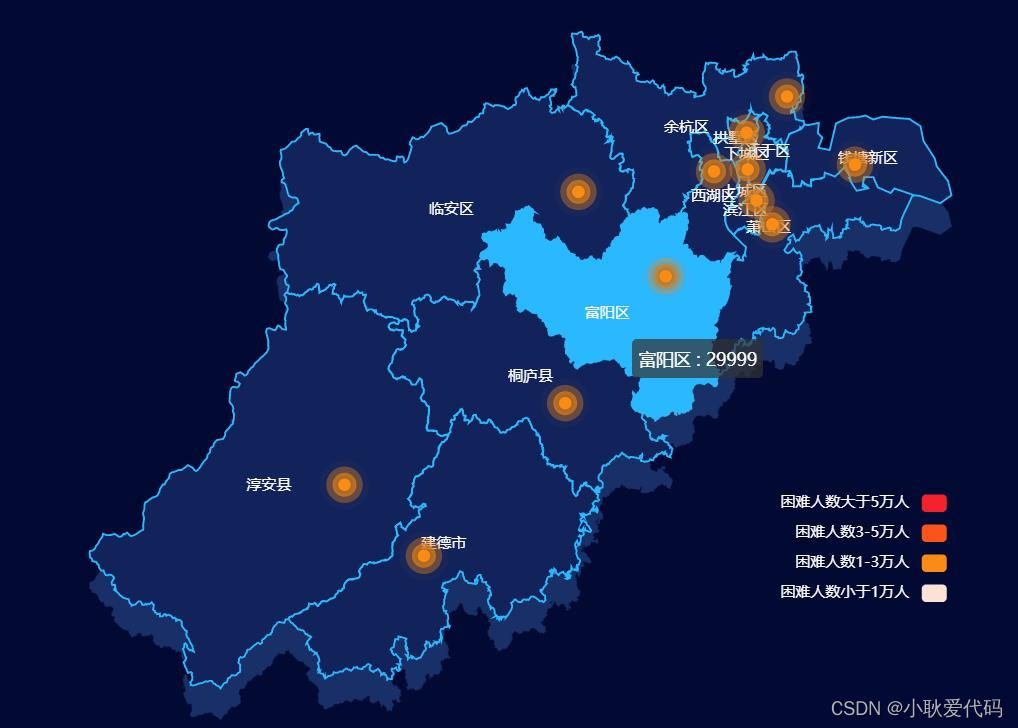
一、图片效果
由于本地图片上传失败,无法展示完整的,不过是在此图的基础上加了轮播和底纹
二、 代码
<!DOCTYPE html>
<html>
<head>
<meta charset="utf-8">
<title></title>
<!-- 此处js文件是本地引入,也可通过cdn方式引入 -->
<!-- 自行查找 ,链接在这: https://www.bootcdn.cn/ -->
<script type="text/javascript" src="./echarts/echarts-4.9.0/echarts.min.js"></script>
<script type="text/javascript" src="./echarts/echarts-gl.min.js"></script>
<script type="text/javascript" src="./other/jquery-1.8.3.min.js"></script>
</head>
<body>
<div id="main" style="overflow: hidden;height: 100vh;width: 100%;"></div>
<img class="img" style="display: none;"
src="https://gimg2.baidu.com/image_search/src=http%3A%2F%2Fd00.paixin.com%2Fthumbs%2F1711618%2F12817405%2Fstaff_1024.jpg&refer=http%3A%2F%2Fd00.paixin.com&app=2002&size=f9999,10000&q=a80&n=0&g=0n&fmt=auto?sec=1668149863&t=ae2c0cbdb0017b607bc941a15374d6ae"
alt="" srcset="">
</body>
<style>
* {
margin: 0;
padding: 0;
}
</style>
<script type="text/javascript">
// 在此处将所需要的地图数据导入即可
// 获取json数据下载地址(两处都可下载,阿里云服务最近好像在升级):
// http://datav.aliyun.com/tools/atlas/#&lat=26.942316376557397&lng=106.598937&zoom=7
// https://hxkj.vip/demo/echartsMap
var uploadedDataURL = "./echarts/hangzhou.json";
var myChart = echarts.init(document.getElementById('main'));
var img = document.querySelector('.img')
$.getJSON(uploadedDataURL, function(geoJson) {
console.log('geoJson', geoJson)
echarts.registerMap('hanzhou', geoJson);
myChart.hideLoading();
var mapDate = [{
name: '滨江区',
value: [120.185306, 30.18046, 29999]
},
{
name: '拱墅区',
value: [120.160939, 30.328885, 29999]
},
{
name: '钱塘区',
value: [120.493972, 30.322904, 29999]
},
{
name: '上城区',
value: [120.219068, 30.288987, 29999]
},
{
name: '西湖区',
value: [120.08362, 30.200766, 29999]
}
];
option = {
backgroundColor: '#020933',
title: {
top: 20,
text: '“困难人数” - 杭州市',
subtext: '',
x: 'center',
textStyle: {
color: '#ccc'
}
},
tooltip: {
trigger: 'item',
formatter: function(params) {
// console.log(params)
//由于下方的data数据拿错了导致这里显示undefine,在此重新修改了一下
return params.data.name + ' : ' + params.data.value[2];
}
},
visualMap: {
min: 0,
max: 1000000,
right: 100,
seriesIndex: 1,
type: 'piecewise',
bottom: 100,
textStyle: {
color: '#FFFF'
},
splitList: [{
gt: 50000,
color: '#F5222D',
label: '困难人数大于5万人'
}, //大于5万人
{
gte: 30000,
lte: 50000,
color: '#FA541C ',
label: '困难人数3-5万人'
}, //3-5万人
{
gte: 10000,
lte: 30000,
color: '#FA8C16',
label: '困难人数1-3万人'
}, //1-3万人
{
lte: 10000,
color: '#fbe1d6',
label: '困难人数小于1万人'
}
]
},
geo: {
map: 'hanzhou',
aspectScale: 0.75, //长宽比
zoom: 1.1,
roam: false,
itemStyle: {
normal: {
areaColor: '#013C62',
shadowColor: '#182f68',
shadowOffsetX: 0,
shadowOffsetY: 25
},
emphasis: {
areaColor: '#2AB8FF',
borderWidth: 0,
color: 'green',
label: {
show: false
}
}
}
},
series: [{
type: 'map',
roam: true,
label: {
normal: {
show: true,
textStyle: {
color: '#fff'
}
},
emphasis: {
textStyle: {
color: '#fff'
}
}
},
itemStyle: {
normal: {
borderColor: '#2ab8ff',
borderWidth: 1.5,
// areaColor: '#12235c'
// 此处修改地图的底纹
// 注:官方指定支持为 HTMLImageElement, HTMLCanvasElement,不支持路径字符串
// 在上方元素添加img图片然后将获取到ref赋值写在此处即可
areaColor: {
image: img,
repeat: 'repeat'
}
},
emphasis: {
areaColor: '#2AB8FF',
borderWidth: 0,
color: 'green'
}
},
zoom: 1.1,
roam: false,
map: 'hanzhou', //使用
data: mapDate // 此处应为轮播地图显示的数据
},
{
type: 'effectScatter',
coordinateSystem: 'geo',
showEffectOn: 'render',
rippleEffect: {
period: 15,
scale: 4,
brushType: 'fill'
},
hoverAnimation: true,
itemStyle: {
normal: {
color: '#ffff',
shadowBlur: 10,
shadowColor: '#333'
}
},
data: mapDate //此处为鼠标悬浮上去之后展示的数据
}
]
};
// 可以使用阿里云提供的地图数据
/**
此版本通过设置geoindex && seriesIndex: [1] 属性来实现geo和map共存,来达到hover散点和区域显示tooltip的效果
默认情况下,map series 会自己生成内部专用的 geo 组件。但是也可以用这个 geoIndex 指定一个 geo 组件。这样的话,map 和 其他 series(例如散点图)就可以共享一个 geo 组件了。并且,geo 组件的颜色也可以被这个 map series 控制,从而用 visualMap 来更改。
当设定了 geoIndex 后,series-map.map 属性,以及 series-map.itemStyle 等样式配置不再起作用,而是采用 geo 中的相应属性。
http://echarts.baidu.com/option.html#series-map.geoIndex
并且加了pin气泡图标以示数值大小
*/
// var uploadedDataURL = "/asset/get/s/data-1482909892121-BJ3auk-Se.json";
// myChart.showLoading();
let index = -1;
var timer = setInterval(function() {
// 隐藏提示框
myChart.dispatchAction({
type: 'hideTip',
seriesIndex: 0,
dataIndex: index
});
// 显示提示框
myChart.dispatchAction({
type: 'showTip',
seriesIndex: 0,
dataIndex: index + 1
});
// 取消高亮指定的数据图形
myChart.dispatchAction({
type: 'downplay',
seriesIndex: 0,
dataIndex: index
});
// 高亮指定的数据图形
myChart.dispatchAction({
type: 'highlight',
seriesIndex: 0,
dataIndex: index + 1
});
index++;
if (index > 13) {
index = -1;
}
}, 2000);
myChart.on('mousemove', function(e) {
clearInterval(timer);
myChart.dispatchAction({
type: 'downplay',
seriesIndex: 0
});
myChart.dispatchAction({
type: 'highlight',
seriesIndex: 0,
dataIndex: e.dataIndex
});
myChart.dispatchAction({
type: 'showTip',
seriesIndex: 0,
dataIndex: e.dataIndex
});
}); //---------------------------------------------鼠标移入静止播放
myChart.on('mouseout', function(e) {
clearInterval(timer);
myChart.dispatchAction({
type: 'downplay',
seriesIndex: 0,
dataIndex: e.dataIndex
}); //鼠标移出后先把上次的高亮取消
timer = setInterval(function() {
// 隐藏提示框
myChart.dispatchAction({
type: 'hideTip',
seriesIndex: 0,
dataIndex: index
});
// 显示提示框
myChart.dispatchAction({
type: 'showTip',
seriesIndex: 0,
dataIndex: index + 1
});
// 取消高亮指定的数据图形
myChart.dispatchAction({
type: 'downplay',
seriesIndex: 0,
dataIndex: index
});
// 高亮指定的数据图形
myChart.dispatchAction({
type: 'highlight',
seriesIndex: 0,
dataIndex: index + 1
});
index++;
if (index > 13) {
index = -1;
}
}, 2000);
});
myChart.setOption(option);
});
window.addEventListener('resize', function() {
myChart.resize()
})
</script>
</html>
原文链接: https://www.makeapie.cn/echarts_content/xr1Ilwr5PO.html
代码中间部分加了注释可以看一下
新手上路,还请多多指教!

DAMO开发者矩阵,由阿里巴巴达摩院和中国互联网协会联合发起,致力于探讨最前沿的技术趋势与应用成果,搭建高质量的交流与分享平台,推动技术创新与产业应用链接,围绕“人工智能与新型计算”构建开放共享的开发者生态。
更多推荐
 2
2 0
0- 0


 已为社区贡献1条内容

所有评论(0)