(LangGraph教程)2. State and Memory——Lesson 5:Chatbot聊天机器人消息总结与记忆(记忆功能,消息摘要,上下文压缩)
https://academy.langchain.com/courses/intro-to-langgraph
https://github.com/shangxiang0907/langchain-academy
(未索引)
Chatbot with message summarization 支持消息摘要的聊天机器人
Review 回顾
We’ve covered how to customize graph state schema and reducer.
我们已介绍如何自定义图状态模式(schema)和规约器(reducer)。
We’ve also shown a number of ways to trim or filter messages in graph state.
我们还展示了多种在图状态中裁剪或过滤消息的方法。
Goals 目标
Now, let’s take it one step further!
现在,让我们更进一步!
Rather than just trimming or filtering messages, we’ll show how to use LLMs to produce a running summary of the conversation.
我们将不仅裁剪或过滤消息,还将演示如何使用 LLM 生成对话的持续摘要。
This allows us to retain a compressed representation of the full conversation, rather than just removing it with trimming or filtering.
这使我们能够保留整个对话的压缩表示,而非仅通过裁剪或过滤将其移除。
We’ll incorporate this summarization into a simple Chatbot.
我们将把该摘要功能整合进一个简单的聊天机器人中。
And we’ll equip that Chatbot with memory, supporting long-running conversations without incurring high token cost / latency.
我们还将为该聊天机器人配备记忆能力,以支持长时间运行的对话,同时避免高昂的 token 开销 / 延迟。
%%capture --no-stderr
%pip install --quiet -U langchain_core langgraph langchain_openai
import os, getpass

def _set_env(var: str):
    if not os.environ.get(var):
        os.environ[var] = getpass.getpass(f"{var}: ")

from dotenv import find_dotenv, load_dotenv

load_dotenv(find_dotenv(usecwd=True))
_set_env("OPENAI_API_KEY")
We’ll use LangSmith for tracing.
我们将使用 LangSmith 进行 追踪(tracing)。
_set_env("LANGSMITH_API_KEY")
os.environ["LANGSMITH_TRACING"] = "true"
os.environ["LANGSMITH_PROJECT"] = "langchain-academy"
import os
from langchain_openai import ChatOpenAI
model = ChatOpenAI(model=os.getenv("OPENAI_MODEL", "qwen-plus"), base_url=os.getenv("OPENAI_BASE_URL", "https://dashscope.aliyuncs.com/compatible-mode/v1"),temperature=0)
We’ll use MessagesState, as before.
我们将继续使用 MessagesState。
In addition to the built-in messages key, we’ll now include a custom key (summary).
除内置的 messages 键外,我们现在还将添加一个自定义键(summary)。
from langgraph.graph import MessagesState
class State(MessagesState):
    summary: str
We’ll define a node to call our LLM that incorporates a summary, if it exists, into the prompt.
我们将定义一个节点,用于调用我们的 LLM;该节点会在提示词(prompt)中纳入已有摘要(如果存在)。
from langchain_core.messages import SystemMessage, HumanMessage, RemoveMessage

# Define the logic to call the model
def call_model(state: State):

    # Get summary if it exists
    summary = state.get("summary", "")

    # If there is summary, then we add it
    if summary:

        # Add summary to system message
        system_message = f"Summary of conversation earlier: {summary}"

        # Append summary to any newer messages
        messages = [SystemMessage(content=system_message)] + state["messages"]

    else:
        messages = state["messages"]

    response = model.invoke(messages)
    return {"messages": response}
We’ll define a node to produce a summary.
我们将定义一个用于生成摘要的节点。
Note, here we’ll use RemoveMessage to filter our state after we’ve produced the summary.
注意:此处我们将使用 RemoveMessage 在生成摘要后对状态进行过滤。
def summarize_conversation(state: State):

    # First, we get any existing summary
    summary = state.get("summary", "")

    # Create our summarization prompt
    if summary:

        # A summary already exists
        summary_message = (
            f"This is summary of the conversation to date: {summary}\n\n"
            "Extend the summary by taking into account the new messages above:"
        )

    else:
        summary_message = "Create a summary of the conversation above:"

    # Add prompt to our history
    messages = state["messages"] + [HumanMessage(content=summary_message)]
    response = model.invoke(messages)

    # Delete all but the 2 most recent messages
    delete_messages = [RemoveMessage(id=m.id) for m in state["messages"][:-2]]
    return {"summary": response.content, "messages": delete_messages}
We’ll add a conditional edge to determine whether to produce a summary based on the conversation length.
我们将添加一条条件边,根据对话长度决定是否生成摘要。
from langgraph.graph import END
from typing_extensions import Literal
# Determine whether to end or summarize the conversation
def should_continue(state: State) -> Literal ["summarize_conversation",END]:

    """Return the next node to execute."""

    messages = state["messages"]

    # If there are more than six messages, then we summarize the conversation
    if len(messages) > 6:
        return "summarize_conversation"

    # Otherwise we can just end
    return END
Adding memory 添加记忆
Recall that state is transient to a single graph execution.
This limits our ability to have multi-turn conversations with interruptions.
这限制了我们处理带中断的多轮对话的能力。
As introduced at the end of Module 1, we can use persistence to address this!
如模块 1 末尾所介绍,我们可以使用 持久化(persistence) 来解决此问题!
LangGraph can use a checkpointer to automatically save the graph state after each step.
LangGraph 可借助检查点器(checkpointer)在每一步之后自动保存图状态。
This built-in persistence layer provides memory, allowing LangGraph to resume from the last state update.
这一内置持久化层提供了记忆能力,使 LangGraph 能从上一次状态更新处恢复执行。
As we previously showed, one of the easiest to work with is MemorySaver, an in-memory key-value store for Graph state.
如前所示,其中最容易使用的之一是 MemorySaver —— 一种用于图状态的内存内键值存储。
All we need to do is compile the graph with a checkpointer, and our graph has memory!
我们只需在编译图时传入一个检查点器,该图便具备了记忆能力!
from IPython.display import Image, display
from langgraph.checkpoint.memory import MemorySaver
from langgraph.graph import StateGraph, START

# Define a new graph
workflow = StateGraph(State)
workflow.add_node("conversation", call_model)
workflow.add_node(summarize_conversation)

# Set the entrypoint as conversation
workflow.add_edge(START, "conversation")
workflow.add_conditional_edges("conversation", should_continue)
workflow.add_edge("summarize_conversation", END)

# Compile
memory = MemorySaver()
graph = workflow.compile(checkpointer=memory)
display(Image(graph.get_graph().draw_mermaid_png()))
Threads 线程(Threads)
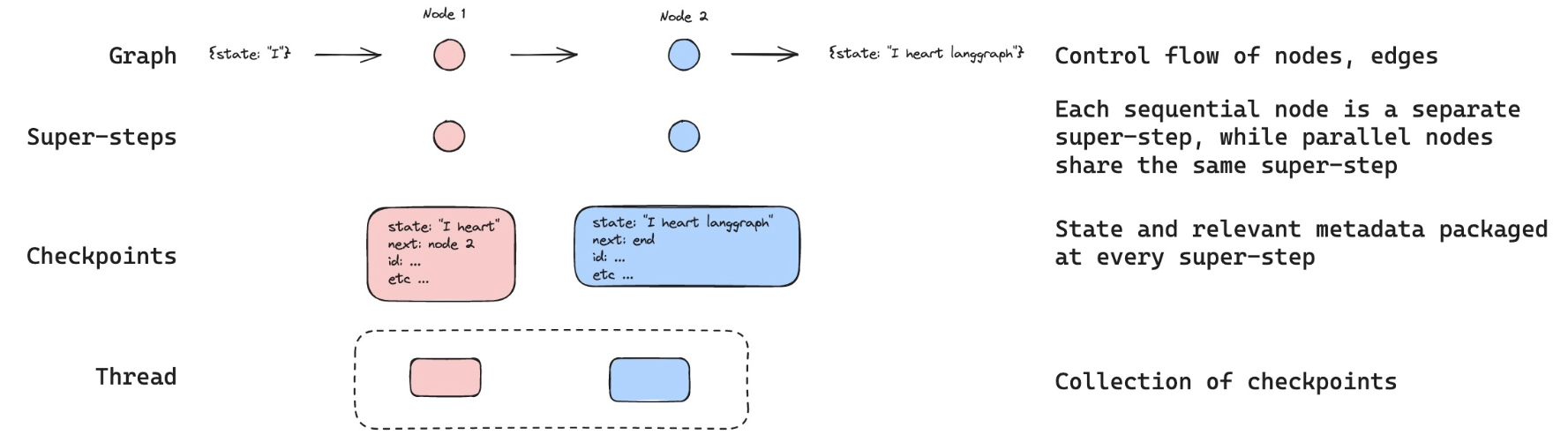
The checkpointer saves the state at each step as a checkpoint.
检查点器会将每一步的状态作为检查点保存。
These saved checkpoints can be grouped into a thread of conversation.
这些已保存的检查点可被归组为一个对话“线程(thread)”。
Think about Slack as an analog: different channels carry different conversations.
可类比 Slack:不同频道承载不同对话。
Threads are like Slack channels, capturing grouped collections of state (e.g., conversation).
线程类似于 Slack 频道,用于捕获一组有组织的状态(例如对话)。
Below, we use configurable to set a thread ID.
下方我们使用 configurable 设置线程 ID。
# Create a thread
config = {"configurable": {"thread_id": "1"}}

# Start conversation
input_message = HumanMessage(content="hi! I'm Lance")
output = graph.invoke({"messages": [input_message]}, config)
for m in output['messages'][-1:]:
    m.pretty_print()

input_message = HumanMessage(content="what's my name?")
output = graph.invoke({"messages": [input_message]}, config)
for m in output['messages'][-1:]:
    m.pretty_print()

input_message = HumanMessage(content="i like the 49ers!")
output = graph.invoke({"messages": [input_message]}, config)
for m in output['messages'][-1:]:
    m.pretty_print()
==================================[1m Ai Message [0m==================================

Hello Lance! How can I assist you today?
==================================[1m Ai Message [0m==================================

You mentioned that your name is Lance. How can I help you today?
==================================[1m Ai Message [0m==================================

That's great! The San Francisco 49ers have a rich history and a passionate fan base. Do you have a favorite player or a memorable game that you particularly enjoyed?
Now, we don’t yet have a summary of the state because we still have < = 6 messages.
目前,我们尚无状态摘要,因为我们仍只有 ≤ 6 条消息。
This was set in should_continue.
该阈值在 should_continue 中设定。
    # If there are more than six messages, then we summarize the conversation
    if len(messages) > 6:
        return "summarize_conversation"
We can pick up the conversation because we have the thread.
由于我们拥有线程,因此可以继续之前的对话。
graph.get_state(config).values.get("summary","")
''
The config with thread ID allows us to proceed from the previously logged state!
携带线程 ID 的 config 使我们能从先前记录的状态继续执行!
input_message = HumanMessage(content="i like Nick Bosa, isn't he the highest paid defensive player?")
output = graph.invoke({"messages": [input_message]}, config)
for m in output['messages'][-1:]:
    m.pretty_print()
==================================[1m Ai Message [0m==================================

Yes, as of September 2023, Nick Bosa became the highest-paid defensive player in NFL history. He signed a five-year contract extension with the San Francisco 49ers worth $170 million, with $122.5 million guaranteed. Bosa is known for his exceptional skills as a defensive end and has been a key player for the 49ers.
graph.get_state(config).values.get("summary","")
'Lance introduced himself and mentioned that he is a fan of the San Francisco 49ers, specifically highlighting his admiration for Nick Bosa. The conversation noted that as of September 2023, Nick Bosa became the highest-paid defensive player in NFL history with a five-year, $170 million contract extension with the 49ers.'
LangSmith
Let’s review the trace!
让我们回顾一下追踪结果!
主要讲了什么,能解决什么问题,实际开发有什么用
这篇主要讲:如何用 LangGraph 构建一个能够长期对话、自动压缩历史消息,并记住不同用户会话的 Chatbot。
核心不是简单删除旧消息,而是:
把旧消息压缩成一段“滚动摘要”,保留最近几条原始消息,后续回答时同时参考摘要和新消息。
一、整体运行逻辑
每次用户发送消息后:
-
LangGraph 根据
thread_id找回这段对话之前的状态。 -
call_model调用 LLM 回答用户。 -
检查当前消息是否超过 6 条。
-
如果没有超过,直接结束。
-
如果超过:
- 让 LLM 总结历史对话;
- 将摘要保存到
summary; - 删除旧消息;
- 只保留最近两条消息。
-
下次对话时,将历史摘要作为
SystemMessage发给模型。
可以简单理解成:
历史摘要 + 最近消息 + 当前问题 → LLM回答
例如原来有几十条聊天记录,最终状态可能变成:
{
    "summary": "用户叫 Lance,喜欢 49ers 和 Nick Bosa……",
    "messages": [
        最近一条用户消息,
        最近一条 AI 回复
    ]
}
二、关键代码分别有什么作用
1. 扩展状态
class State(MessagesState):
    summary: str
除了保存原始消息 messages,再增加一个 summary 字段,用于保存历史对话摘要。
2. 回答时加入历史摘要
system_message = f"Summary of conversation earlier: {summary}"
messages = [SystemMessage(content=system_message)] + state["messages"]
模型虽然看不到已经删除的旧消息,但能够通过摘要了解之前聊过什么。
3. 增量更新摘要
if summary:
    summary_message = (
        f"This is summary of the conversation to date: {summary}\n\n"
        "Extend the summary by taking into account the new messages above:"
    )
这不是每次重新总结全部历史,而是:
旧摘要 + 新消息 → 新摘要
所以它是一种“滚动摘要”。
4. 删除旧消息
delete_messages = [
    RemoveMessage(id=m.id)
    for m in state["messages"][:-2]
]
生成摘要之后,删除较早的原始消息,只保留最近两条。
5. 设置摘要触发条件
if len(messages) > 6:
    return "summarize_conversation"
消息超过 6 条才生成摘要,避免每轮对话都额外调用一次 LLM。
6. 用 Checkpointer 持久化状态
memory = MemorySaver()
graph = workflow.compile(checkpointer=memory)
Checkpointer 会保存图的状态,让下一次请求能够恢复之前的:
messagessummary- 图执行状态
7. 用 thread_id 区分会话
config = {
    "configurable": {
        "thread_id": "1"
    }
}
相同 thread_id 会继续同一段对话,不同 ID 对应不同会话。
实际项目中可以这样映射:
thread_id = 用户ID + 会话ID
例如:
user_123:conversation_001
user_123:conversation_002
user_456:conversation_001
三、它解决了什么问题
1. 上下文越来越长
普通 Chatbot 往往会把全部历史消息发送给模型:
第1轮 + 第2轮 + ... + 第100轮 + 当前问题
对话越长:
- Token 消耗越大;
- API 成本越高;
- 响应速度越慢;
- 最终可能超过模型上下文窗口。
滚动摘要将大量历史压缩为一小段文字,能够控制上下文长度。
2. 直接裁剪会导致失忆
如果简单删除最早的消息:
messages = messages[-10:]
模型可能忘记:
- 用户姓名;
- 用户偏好;
- 之前确定的需求;
- 已经做过的决定;
- 项目背景。
摘要可以在删除旧消息前提取其中的重要信息。
3. HTTP 请求之间没有天然记忆
后端每次收到的 API 请求本身通常是独立的。如果没有数据库或状态存储,模型不知道用户上次说过什么。
Checkpointer 通过 thread_id 找回状态,让多次请求组成连续对话。
4. 多个会话容易混在一起
使用不同的 thread_id,可以隔离:
- 不同用户;
- 同一用户的不同聊天窗口;
- 不同任务或 Agent 执行流程。
四、实际开发有什么用
客服机器人
可以记住:
- 用户之前反馈的问题;
- 已经尝试过的解决办法;
- 产品型号;
- 工单进展。
避免每次都要求用户重新描述。
AI 求职助手
对你的 JobCopilot 很有用。例如摘要可以保存:
用户目标是新加坡的 AI Platform、ML Infra 和 LLM Agent 岗位;
需要公司提供 EP;
不考虑自动驾驶感知岗位;
期望国际化团队。
即使已经聊了很多轮,Agent 仍能依据这些条件:
- 筛选职位;
- 修改简历;
- 生成招聘方回复;
- 准备面试问题。
编程 Agent
摘要可以记录:
- 项目架构;
- 已修改的文件;
- 已定位的问题;
- 已尝试但失败的方案;
- 用户要求遵守的技术约束。
这样长时间调试时,不需要把全部日志和聊天记录反复发给模型。
多步骤工作流
例如旅行规划、研究助手或数据分析 Agent,可以记录:
- 已完成步骤;
- 当前结论;
- 尚未处理的问题;
- 用户已经确认的选择。
五、这种方案的优点
- 显著减少长对话的 Token 消耗;
- 降低响应延迟;
- 避免超过上下文窗口;
- 比直接删除旧消息保留更多语义;
- 能够通过
thread_id支持多个独立会话; - 摘要、消息和业务状态都可以放进 LangGraph State。
六、需要注意的缺点
摘要可能遗漏或写错信息
LLM 摘要并不是无损压缩。摘要反复更新后,可能出现:
- 忘记细节;
- 日期或数字出错;
- 误解用户意图;
- 错误内容被不断继承。
所以订单号、金额、权限、用户明确偏好等重要数据,不应该只存进自然语言摘要。
更可靠的做法是分开保存:
class State(MessagesState):
    summary: str
    user_profile: dict
    confirmed_requirements: list[str]
    current_task: dict
即:
- 非结构化聊天历史 → 使用摘要;
- 重要事实和业务数据 → 使用结构化字段或数据库。
摘要也需要一次额外的模型调用
触发摘要时,一轮对话实际上会调用模型两次:
- 回答用户;
- 更新摘要。
因此阈值不能设置得太低。实际项目可以根据 Token 数量触发,而不只是根据消息数量触发。
MemorySaver 不适合正式生产环境
MemorySaver 只保存在当前进程内:
- 服务重启后可能丢失;
- 多实例部署时无法共享;
- 不适合长期保存大量用户会话。
生产环境通常应换成数据库支持的 Checkpointer,例如 PostgreSQL、Redis或其他持久化存储方案。
一句话总结
这篇文章展示的是一种 “短期原始上下文 + 长期压缩摘要 + Checkpointer 持久化 + thread_id 会话隔离” 的 Chatbot 记忆方案。
它最适合解决:
对话持续很久,但又不能把全部历史消息一直发送给模型的问题。

DAMO开发者矩阵,由阿里巴巴达摩院和中国互联网协会联合发起,致力于探讨最前沿的技术趋势与应用成果,搭建高质量的交流与分享平台,推动技术创新与产业应用链接,围绕“人工智能与新型计算”构建开放共享的开发者生态。
更多推荐
 0
0 0
0- 0


 已为社区贡献81条内容

所有评论(0)