uniapp小程序tab栏切换实现数据加载
·
记录我在写小程序左右切换tab栏时遇到的问题
在开发过程自己手写的tab栏+swiper组件联动的切换加载数据的功能遇到了一些问题,例如每一次切换都要向服务器发送一条请求数据导致页面卡顿等,在此将自己的优化思路分享一下。
前言
市面上有许许多多的类似的插件,包括DCloud插件市场中即插即用的插件也有很多,但要封装的东西太多,如果公司有个性化的需求改起来比较麻烦,所以我就自己手写了一套,这样改底层代码也方便的多,并不用去看插件文档。
提示:以下是本篇文章正文内容,下面案例可供参考
一、创建tab组件
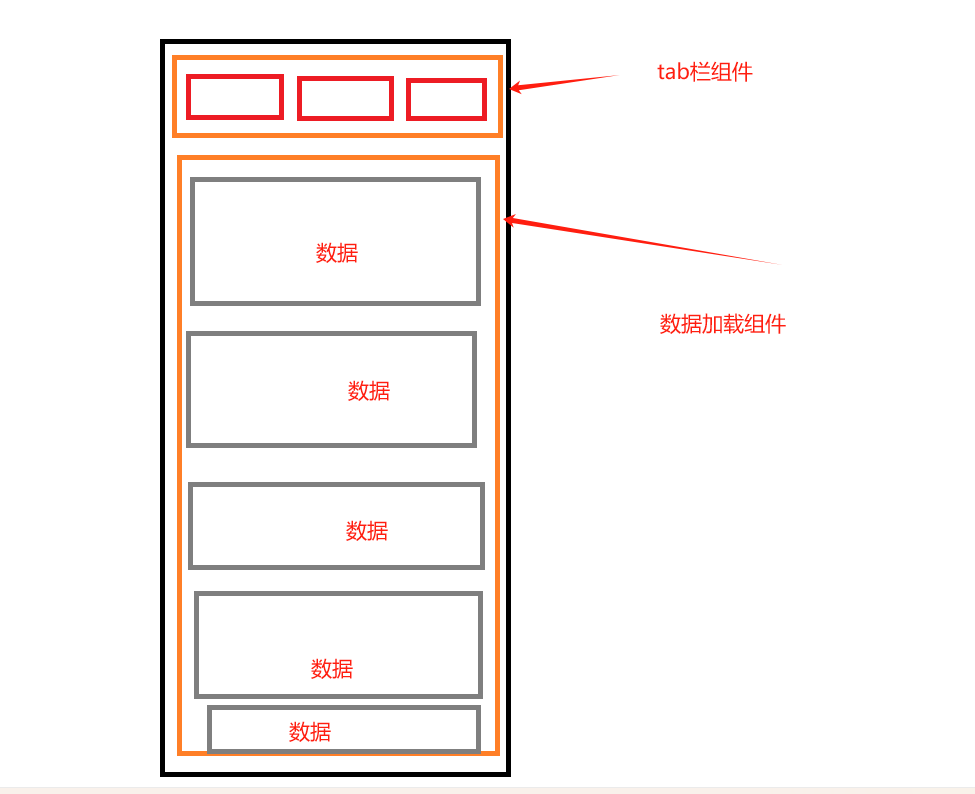
这里我使用是uniapp自带的scroll-view组件实现横向滚动栏的切换,单独将tab-bar独立出来作为一个头部组件,并且如果选择的状态超过一定数量,会超出屏幕宽度,那么就设置scroll-left的距离让scroll-view随着我们的选择,选中的那个元素始终在屏幕中。进一步参数设置可以去看uniapp官方文档。
避免滚动频繁还做了节流操作,throttleTime是节流时间。
<template>
  <view class="tab-container">
    <scroll-view
      @touchmove.stop
      v-if="tabs.length > 5"
      class="tab-scroll"
      show-scrollbar
      scroll-x
      :scroll-left="scrollLeft"
      :scroll-into-view="scrollIntoView"
      :scroll-with-animation="true"
      style="white-space: nowrap; height: 80rpx"
    >
      <view
        v-for="(item, index) in tabs"
        :key="index"
        class="tab-item scroll-item"
        style="
          width: 140rpx;
          display: inline-flex;
          height: 80rpx;
          line-height: 80rpx;
          overflow: hidden;
          text-overflow: ellipsis;
          white-space: nowrap;
        "
        @tap="handleTabClick(item, index)"
        :class="activeIndex === index ? 'tab-active' : ''"
        :id="'tab' + index"
      >
        <text class="tab-text">{{ item.label }}</text>
      </view>
    </scroll-view>
    <view v-else class="tab-list">
      <view
        v-for="(item, index) in tabs"
        :key="index"
        class="tab-item"
        @tap="handleTabClick(item, index)"
        :class="activeIndex === index ? 'tab-active' : ''"
      >
        <text class="tab-text">{{ item.label }}</text>
      </view>
    </view>
  </view>
</template>

<script setup>
import { ref, watch, nextTick } from 'vue'
const scrollLeft = ref(0)
const lastThrottleTime = ref(0)
const scrollIntoView = ref('')

// Define props
const props = defineProps({
  tabs: {
    type: Array,
    default: () => ['默认值1','默认值2'],
  },
  activeIndex: {
    type: Number,
    default: 0,
  },
  throttleTime: {
    type: Number,
    default: 0,
  },
})

const activeIndex = ref(props.activeIndex)

watch(
  () => props.activeIndex,
  (newVal) => {
    activeIndex.value = newVal
    scrollLeft.value = newVal * 80
  }
)

// Emit events
const emit = defineEmits(['tabChange'])

const handleTabClick = async (item, index) => {
  const now = Date.now()
  if (now - lastThrottleTime.value < props.throttleTime) {
    // 500ms 的节流时间
    return
  }
  lastThrottleTime.value = now
  activeIndex.value = index
  scrollIntoView.value = 'tab' + index

  scrollLeft.value = index * 80

  await nextTick() // 等待 DOM 更新
  emit('tabChange', {...item,index})
}
</script>

<style lang="scss" scoped>
.scroll-item {
  width: 140rpx;
  display: inline-flex;
  height: 80rpx;
  line-height: 80rpx;
  overflow: hidden;
  text-overflow: ellipsis;
  white-space: nowrap;
}
.tab-item {
  height: 88rpx;
  display: flex;
  align-items: center;
  justify-content: center;
  font-size: 28rpx;
  color: #000000;
  position: relative;
  transition: all 0.2s;
  padding: 0 20rpx;

  .scroll-list & {
    flex: none;
  }

  &:not(.scroll-list) {
    flex: 1;
  }

  &.tab-active {
    color: #ffffff;
    font-weight: bold;

    &::after {
      content: '';
      position: absolute;
      bottom: 0;
      left: 50%;
      transform: translateX(-50%);
      width: 40%;
      height: 4rpx;
      background-color: #ffffff;
      border-radius: 2rpx;
    }
  }
}
.tab-container {
  width: 100%;

  .tab-scroll {
    ::-webkit-scrollbar{
      display: none;
    }
    width: 100%;
    /* 使用微信小程序支持的方式隐藏滚动条 */
    scrollbar-width: none;
    -ms-overflow-style: none;
  }

  .tab-list {
    display: flex;
    padding: 0 20rpx;

    &.scroll-list {
      display: inline-flex;
    }
  }

  .tab-content {
    flex: 1;
  }
}
</style>
在其他组件中引用
- tabs:数组列表,要切换的元素
- handleTabChange:切换tab栏触发的事件
- activeIndex:当前切换第几个元素(当前索引)
- throttleTime:节流时间
 <TabComponent
      :tabs="tabList"
      @tabChange="handleTabChange"
      :activeIndex="swiperCurrent"
      :throttleTime="1000"
    />
二、数据加载组件
页面上的组件编写就是这样的
<view class="water-container">
  <swiper
        style="margin-top: 10rpx"
        class="swiper-container"
        @change="handleSwiperChange"
        :current="swiperCurrent"
      >
        <swiper-item v-for="(tab, index) in tabList" :key="index">
          <scroll-view
            scroll-y
            class="scroll-container"
            @scrolltolower="handleScrollToLower"
          >
        	  <!-- 加载循环的的数据 根据当前索引展示数据 把请求回来的数据存放到对应的所以数组里 -->
          	<view v-for="(item, index) in tabDataCache[swiperCurrent].data"></view>
          </scroll-view>
		</swiper-item>
	</swiper>
</view>
import { onLoad,onPullDownRefresh } from '@dcloudio/uni-app'
import { orderWaterTabList } from 'js文件'
const pageData = {
  pageNo: 0,
  pageSize: 10,
}
const tabList = ref(orderWaterTabList)
const isLoading = ref(true)
const lastThrottleTime = ref(0)
const debounce = ref(false)
// 流水数组
const waterList = ref([])
// 上拉刷新
onPullDownRefresh(() => {
  isOverlay.value = true
  // 清除当前tab的缓存
  const currentTabValue = tabList.value[swiperCurrent.value].value
  const cacheIndex = tabDataCache.value.findIndex(
    (item) => item.value === currentTabValue
  )
  if (cacheIndex !== -1) {
    tabDataCache.value[cacheIndex].data = []
    tabDataCache.value[cacheIndex].isCached = false
  }
  viewInit(true)
})
// 处理swiper切换
const handleSwiperChange = (e) => {
  const newIndex = e.detail.current
  if (swiperCurrent.value !== newIndex) {
    isOverlay.value = true
    changTab(newIndex)
  }
}
// 触发点击tab的事件
const handleTabChange = (item) => {
  const now = Date.now()
  if (now - lastThrottleTime.value < 1000) {
    return
  }
  lastThrottleTime.value = now

  const newIndex = tabList.value.findIndex((tab) => tab.value === item.value)
  if (newIndex !== swiperCurrent.value) {
    isOverlay.value = true
    swiperCurrent.value = newIndex
    if (item.types === pageData.getType()) return
    viewInit()
  }
}
//改变tab栏切换事件
const changTab = (index) => {
  if (swiperCurrent.value === index) return
  swiperCurrent.value = index
  viewInit()
}
const viewInit = (isPullDown = false) => {
  const currentTabValue = tabList.value[swiperCurrent.value].value

  // 检查缓存中是否有数据
  const cachedData = tabDataCache.value.find(
    (item) => item.value === currentTabValue
  )
  if (cachedData && cachedData.isCached) {
    waterList.value = cachedData.data
    if (isPullDown) {
      uni.stopPullDownRefresh()
    }
    isLoading.value = false
    return
  }

  waterList.value = []
  isLoading.value = true
  pageData.setPageConfig(0, 10)
  pageData.setType(orderWaterTabList[swiperCurrent.value].types)
  getServerData()
  if (isPullDown) {
    uni.stopPullDownRefresh()
  }
 }
//这里是请求回来的数据处理方法
const HandleresData = (e)=>{
// 最后返回的数据为空,则不进行追加数据
  if (e.data.length === 0 && pageData.getPageNo() != 0) {
    pageData.setPageNo(pageData.getPageNo() - 1)
    isLoading.value = false
    isOverlay.value = false
    return
  }

  const currentTabValue = tabList.value[swiperCurrent.value].value

  // 是否是上拉
  if (pageData.getPageNo() == 0) {
    waterList.value = e.data
    // 更新缓存
    const existingCacheIndex = tabDataCache.value.findIndex(
      (item) => item.value === currentTabValue
    )
    if (existingCacheIndex !== -1) {
      tabDataCache.value[existingCacheIndex].data = e.data
      tabDataCache.value[existingCacheIndex].isCached = true
    }
  } else {
    waterList.value = [...waterList.value, ...e.data]
    // 更新缓存
    const existingCacheIndex = tabDataCache.value.findIndex(
      (item) => item.value === currentTabValue
    )
    if (existingCacheIndex !== -1) {
      tabDataCache.value[existingCacheIndex].data = waterList.value
      tabDataCache.value[existingCacheIndex].isCached = true
    }
  }

  isLoading.value = false
  // 延迟关闭遮罩,确保数据渲染完成
  setTimeout(() => {
    isOverlay.value = false
  }, 500)
}
const tabList = ref(orderWaterTabList)
// 流水数组
const waterList = ref([])
const lastThrottleTime = ref(0)
const debounce = ref(false)

// 初始化tabDataCache,为每个tab创建初始结构
const tabDataCache = ref(
  orderWaterTabList.map((tab) => ({
    value: tab.value,
    data: [],
    isCached: false, // 添加缓存控制标志
  }))
)
// 上滑触底
const handleScrollToLower = async () => {
  if (debounce.value) return
  debounce.value = true
//在这里发请求重新获取数据
  debounce.value = false
}

const getServerData = () => {
  //发请求获取数据
  HandleresData("返回的数据")
}

onLoad(() => {
//获取第一页数据
  getServerData()
}
export const orderWaterTabList = [
    {
        label: '全部',
        value: 'all',
        types: null
    },
    {
        label: '收入1',
        value: 'recharge',
        types: [
            'type1',
            'type2',
            'type3'
        ]
    },
    {
        label: '收入2',
        value: 'userTransfer',
        types: [
            'type1',
            'type2',
            'type3'
        ]
    }
]
通过上述方法进行联动,将后端所需要的参数类型根据orderWaterTabList中的types所存的数据传递过去,返回对应types的数据,将返回的数据存入到tabDataCache数组中,然后根据滚动的当前索引swiperCurrent作为tabDataCache的索引去拿到对应的数据,然后再判断是否存在,为空再发请求,不为空就直接用存在tabDataCache[swiperCurrent]的数据即可。

DAMO开发者矩阵,由阿里巴巴达摩院和中国互联网协会联合发起,致力于探讨最前沿的技术趋势与应用成果,搭建高质量的交流与分享平台,推动技术创新与产业应用链接,围绕“人工智能与新型计算”构建开放共享的开发者生态。
更多推荐

 11
11 0
0- 0


 已为社区贡献1条内容

所有评论(0)