SCS 46.Seurat v5解析单细胞空转数据(Xenium)

简 介
Seurat用于分析新的空间解析数据类型。分析高度多重成像捕获的新数据类型。与基于测序的技术不同,这些数据集通常是针对特定目标的(即对预先选定的一组基因进行分析)。然而,可以分辨出单个分子——保留单细胞(和亚细胞)分辨率。这些方法还经常捕捉细胞边界(分割)。
示例分析由Xenium平台生成的数据。如何加载每条转录本的位置数据、细胞与基因矩阵、细胞分割和细胞质心信息,这些信息可在Xenium输出中找到。结果的Seurat对象将包含每个细胞的基因表达谱、每个细胞的质心和边界以及每个检测到的个体转录本的位置。每个细胞的基因表达谱类似于标准单细胞RNA测序,并且可以使用相同的工具进行分析。
软件安装devtools::install_github("dmcable/spacexr", build_vignettes = FALSE)
#remotes::install_github("dmcable/spacexr")
BiocManager::install('glmGamPoi')
#remotes::install_github("dmcable/spacexr")
BiocManager::install('glmGamPoi')
若spacexr软件包非常大,一般下载速度过慢,可能总会出现 time out,因此可以采取下面的下载方式:git clone https://github.com/dmcable/spacexr.git
本地安装即可:devtools::install("./spacexr")library(Seurat)
library(spacexr)
library(ggplot2)
数据读取
此分析使用来自10x Genomics的数据集,该数据集提供在新鲜冷冻的小鼠脑组织用于Xenium Explorer Demo中,可按如下描述下载。这些分析步骤也适用于较大的全冠状切片,但执行时间会更长。wget https://cf.10xgenomics.com/samples/xenium/1.0.2/Xenium_V1_FF_Mouse_Brain_Coronal_Subset_CTX_HP/Xenium_V1_FF_Mouse_Brain_Coronal_Subset_CTX_HP_outs.zip
unzip Xenium_V1_FF_Mouse_Brain_Coronal_Subset_CTX_HP_outs.zip
首先,读取数据集并创建一个Seurat对象。提供Xenium运行的数据文件夹的路径作为输入路径。RNA数据存储在Seurat对象的Xenium分析中。path <- "./Xenium_V1_FF_Mouse_Brain_Coronal_Subset_CTX_HP_outs"
# Load the Xenium data
xenium.obj <- LoadXenium(path, fov = "fov")# remove cells with 0 counts
xenium.obj <- subset(xenium.obj, subset = nCount_Xenium > 0)
实例操作
空间信息被加载到Seurat对象的中,以“视场”(FOV)的名称被加载。最初,所有数据都加载到名为FOV中。稍后,们将制作一个裁剪的FOV,放大到感兴趣的区域。
QC图
Seurat提供的标准QC图可通过Xenium分析获得。这里是每个细胞基因的小提琴图(nFeature_Xenium)和每个细胞转录本计数(nCount_Xenium)。
VlnPlot(xenium.obj, features = c("nFeature_Xenium", "nCount_Xenium"), ncol = 2, pt.size = 0)
绘制标记基因
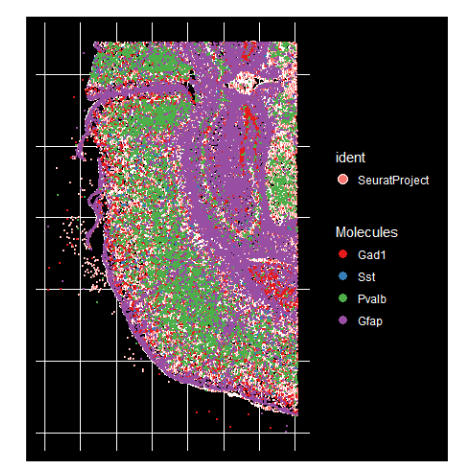
利用ImageDimPlot()绘制了标记基因Gad1、Pvalb和Sst,Gfap在组织中的位置。
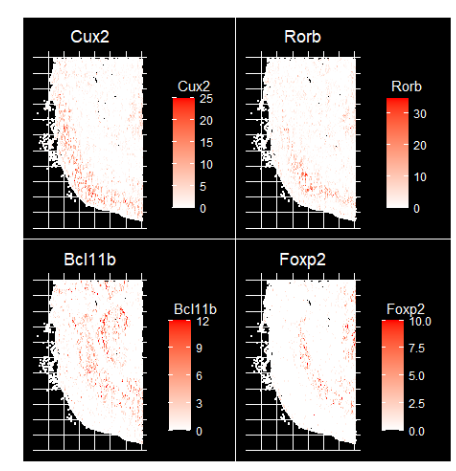
ImageDimPlot(xenium.obj, fov = "fov", molecules = c("Gad1", "Sst", "Pvalb", "Gfap"), nmols = 20000)使用ImageFeaturePlot()函数在单细胞水平上可视化一些关键层标记基因的表达水平,该函数类似于用于在二维嵌入上可视化表达的FeaturePlot()函数。手动调整每个基因的最大阈值(max.cutoff)到其计数分布的大约第90百分位(可以通过max.cutoff='q90'指定),以提高对比度。
绘制标记基因的表达水平
ImageFeaturePlot(xenium.obj,
                 features = c("Cux2", "Rorb", "Bcl11b", "Foxp2"),
                 max.cutoff = c(25, 35, 12, 10),
                 size = 0.75,
                 cols = c("white", "red")
                 )
放大选定区域
使用Crop()函数放大选定区域。放大后,可视化细胞分割边界以及单个分子。
cropped.coords <- Crop(xenium.obj[["fov"]], x = c(1200, 2900), y = c(3750, 4550), coords = "plot")
xenium.obj[["zoom"]] <- cropped.coords
# visualize cropped area with cell segmentations & selected molecules
DefaultBoundary(xenium.obj[["zoom"]]) <- "segmentation"
ImageDimPlot(xenium.obj, fov = "zoom", axes = TRUE, border.color = "white", border.size = 0.1, cols = "polychrome",
coord.fixed = FALSE, molecules = c("Gad1", "Sst", "Npy2r", "Pvalb", "Nrn1"), nmols = 10000)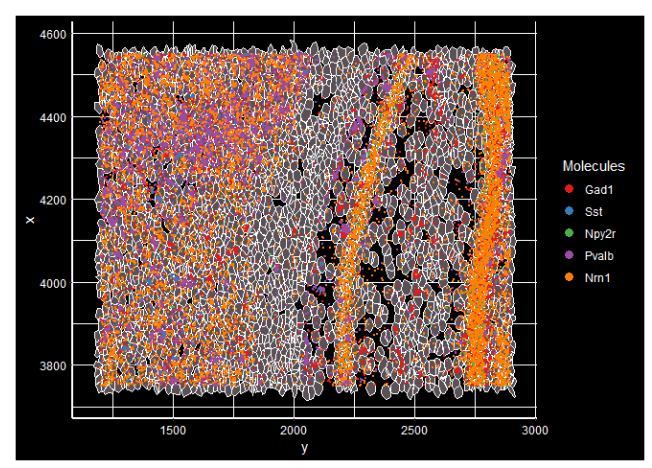
预处理
使用SCTransform进行标准化,然后进行标准的降维和聚类。
xenium.obj <- SCTransform(xenium.obj, assay = "Xenium")xenium.obj <- RunPCA(xenium.obj, npcs = 30, features = rownames(xenium.obj))## PC_ 1
## Positive: Slc17a7, Nrn1, Epha4, Neurod6, Nwd2, Gad1, Cpne4, Rasgrf2, Rims3, Lamp5
## 2010300C02Rik, Dkk3, Slc17a6, Pvalb, Garnl3, Cpne6, Fhod3, Plcxd2, Gad2, Tmem132d
## Kcnh5, Dner, Calb1, Bhlhe22, Bcl11b, Nell1, Bdnf, Rasl10a, Satb2, Arc
## Negative: Igf2, Dcn, Fmod, Slc13a4, Fn1, Aldh1a2, Col1a1, Ly6a, Cldn5, Spp1
## Gfap, Nr2f2, Gjb2, Cyp1b1, Acta2, Pecam1, Adgrl4, Pdgfra, Acvrl1, Kdr
## Cd93, Ccn2, Cobll1, Fgd5, Sox17, Igfbp5, Carmn, Lyz2, Pglyrp1, Emcn
## PC_ 2
## Positive: Slc17a7, Fn1, Igf2, Nrn1, Cldn5, Epha4, Neurod6, Ly6a, Dcn, Rasgrf2
## Lamp5, Fmod, Aldh1a2, Dkk3, 2010300C02Rik, Slc13a4, Car4, Nwd2, Pecam1, Gad1
## Col1a1, Igfbp4, Spp1, Cpne4, Rims3, Igfbp6, Acvrl1, Cpne6, Adgrl4, Calb1
## Negative: Gjc3, Opalin, Sox10, Gfap, Clmn, Vwc2l, Zfp536, Sema6a, Gpr17, Gng12
## Tmem163, Prox1, Adamtsl1, Dpy19l1, Cobll1, Cdh20, Arhgef28, Igfbp5, Chrm2, Sema3d
## Carmn, Aqp4, Fign, Pdgfra, Cspg4, Ntsr2, Lyz2, Siglech, Adamts2, Rmst
## PC_ 3
## Positive: Slc13a4, Igf2, Dcn, Fmod, Aldh1a2, Nwd2, Col1a1, Vat1l, Calb2, Spp1
## Pdgfra, Gjb2, Necab2, Slc17a6, Cyp1b1, Syt6, Nr2f2, Nrp2, Dner, Slit2
## Col6a1, Cpne4, Spag16, Strip2, Sncg, Thsd7a, Ppp1r1b, Gucy1a1, Mapk4, Chat
## Negative: Cldn5, Ly6a, Adgrl4, Fn1, Pecam1, Acvrl1, Kdr, Cd93, Pglyrp1, Sox17
## Emcn, Car4, Nostrin, Fgd5, Zfp366, Mecom, Slfn5, Paqr5, Arc, Cabp7
## Cobll1, Laptm5, Acsbg1, Gjc3, Siglech, Opalin, Kctd12, Ntsr2, Trem2, Sema6a
## PC_ 4
## Positive: Nwd2, Calb2, Slc17a6, Necab2, Syt6, Vat1l, Nrp2, Sncg, Cpne4, Cldn5
## Ly6a, Dner, Gucy1a1, Thsd7a, Chat, Kctd8, Tmem163, Tacr1, Tmem255a, Cacna2d2
## Adgrl4, Pecam1, Cntnap4, Rmst, Cbln1, Fn1, Kdr, Cd93, Inpp4b, Acvrl1
## Negative: Slc17a7, Dkk3, Cabp7, Neurod6, 2010300C02Rik, Arc, Epha4, Igfbp4, Bcl11b, Fmod
## Meis2, Laptm5, Dcn, Gad1, Bhlhe22, Aldh1a2, Cpne6, Rasl10a, Lamp5, Col1a1
## Col6a1, Igfbp6, Gfap, Satb2, Trem2, Cplx3, Gm2115, Gfra2, Garnl3, Siglech
## PC_ 5
## Positive: Gad1, Pvalb, Gad2, Rab3b, Opalin, Gjc3, Dpy19l1, Cdh13, Sox10, Garnl3
## Parm1, Rims3, Tmem132d, Lamp5, Neto2, Vip, Btbd11, Cntnap4, Plcxd2, Ccn2
## Cort, Penk, Fn1, Fhod3, Zfp536, Spp1, Col6a1, Nxph3, Sst, Dcn
## Negative: Cabp7, Gfap, Aqp4, Laptm5, Ntsr2, Trem2, Siglech, Acsbg1, Cd53, Slc39a12
## 2010300C02Rik, Kctd12, Cpne4, Cd300c2, Bhlhe22, Gm2115, Ikzf1, Rfx4, Necab2, Igfbp5
## Sipa1l3, Cpne6, Cd68, Clmn, Rmst, Nwd2, Nrp2, Orai2, Spi1, Prdm8xenium.obj <- RunUMAP(xenium.obj, dims = 1:30)xenium.obj <- FindNeighbors(xenium.obj, reduction = "pca", dims = 1:30)xenium.obj <- FindClusters(xenium.obj, resolution = 0.3)使用DimPlot()在UMAP空间中或使用ImageDimPlot()叠加在图像上,根据每个细胞所属的聚类对其进行着色来可视化聚类结果。
DimPlot(xenium.obj)
可以将之前观察的标记物表达水平可视化在UMAP坐标上。
FeaturePlot(xenium.obj, features = c("Cux2", "Bcl11b", "Foxp2", "Gad1", "Sst", "Gfap"))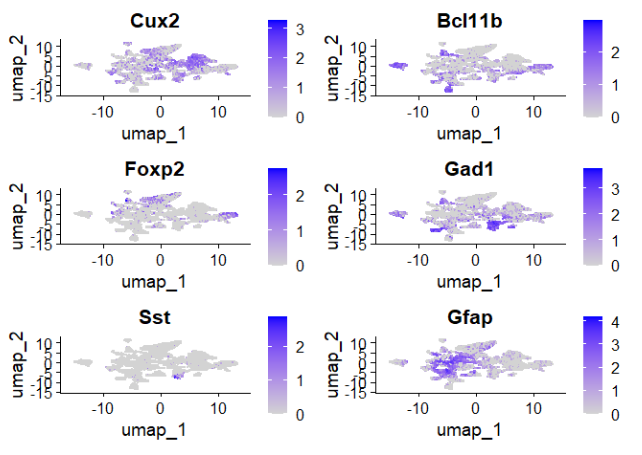
现在使用ImageDimPlot()函数,根据上一步确定的聚类标签来对细胞位置进行着色。
ImageDimPlot(xenium.obj, cols = "polychrome", size = 0.75)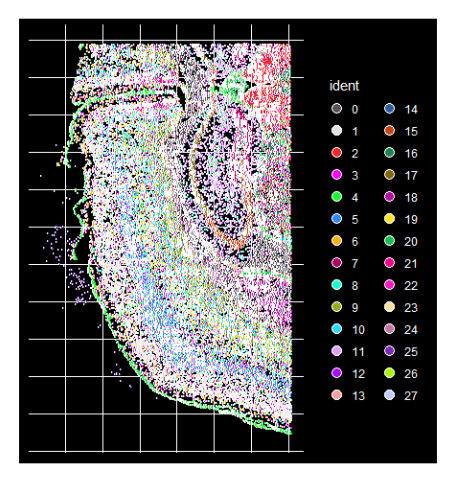
计算空间生态位
利用每个细胞的位置信息,计算空间生态位。我们使用来自艾伦脑科学研究所的大脑皮层参考数据来标注细胞,因此我们首先将数据集裁剪到大脑皮层。使用Slc17a7表达来帮助确定皮层区域。
p1 <- ImageFeaturePlot(xenium.obj, features = "Slc17a7", axes = TRUE, max.cutoff = "q90")p1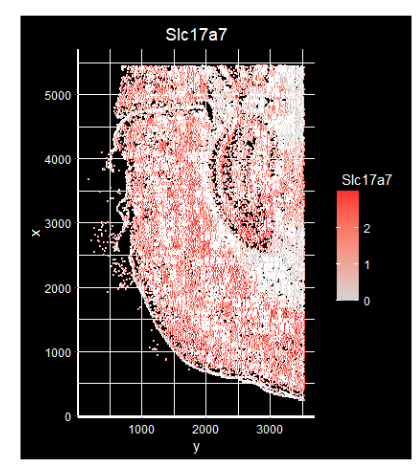
crop <- Crop(xenium.obj[["fov"]], x = c(600, 2100), y = c(900, 4700))
xenium.obj[["crop"]] <- crop
p2 <- ImageFeaturePlot(xenium.obj, fov = "crop", features = "Slc17a7", size = 1, axes = TRUE, max.cutoff = "q90")
p2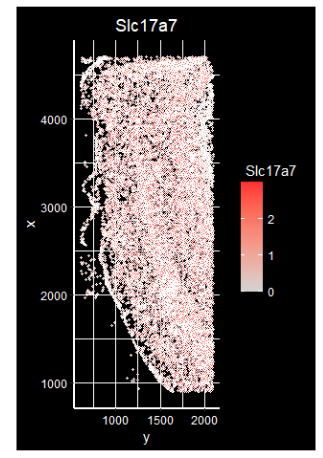
鲁棒细胞类型分解(RCTD)
FindTransferAnchors 可用于整合空间转录组数据集中的点级别数据,而 Seurat v5 还包括对鲁棒细胞类型分解(RCTD)的支持,这是一种计算方法,用于从空间数据集中解卷积点级别数据,当提供单细胞 RNA 测序参考时。RCTD 已被证明能够准确注释来自多种技术的空间数据,包括 SLIDE-seq、Visium 和 10x Xenium 原位空间平台。
从Seurat查询和参考对象中提取计数、聚类和位置信息,以构建RCTD用于注释的参考和空间RNA对象。注释结果随后添加到Seurat对象中。
query.counts <- GetAssayData(xenium.obj, assay = "Xenium", slot = "counts")[, Cells(xenium.obj[["crop"]])]coords <- GetTissueCoordinates(xenium.obj[["crop"]], which = "centroids")
rownames(coords) <- coords$cell
coords$cell <- NULL
query <- SpatialRNA(coords, query.counts, colSums(query.counts))
# allen.corted.ref can be downloaded here:
# https://www.dropbox.com/s/cuowvm4vrf65pvq/allen_cortex.rds?dl=1
allen.cortex.ref <- readRDS("allen_cortex.rds")
allen.cortex.ref <- UpdateSeuratObject(allen.cortex.ref)Idents(allen.cortex.ref) <- "subclass"
# remove CR cells because there aren't enough of them for annotation
allen.cortex.ref <- subset(allen.cortex.ref, subset = subclass != "CR")
counts <- GetAssayData(allen.cortex.ref, assay = "RNA", slot = "counts")
cluster <- as.factor(allen.cortex.ref$subclass)
names(cluster) <- colnames(allen.cortex.ref)
nUMI <- allen.cortex.ref$nCount_RNA
names(nUMI) <- colnames(allen.cortex.ref)
nUMI <- colSums(counts)
levels(cluster) <- gsub("/", "-", levels(cluster))
reference <- Reference(counts, cluster, nUMI)
# run RCTD with many cores
RCTD <- create.RCTD(query, reference, max_cores = 8)RCTD <- run.RCTD(RCTD, doublet_mode = "doublet")annotations.df <- RCTD@results$results_df
annotations <- annotations.df$first_type
names(annotations) <- rownames(annotations.df)
xenium.obj$predicted.celltype <- annotations
keep.cells <- Cells(xenium.obj)[!is.na(xenium.obj$predicted.celltype)]
xenium.obj <- subset(xenium.obj, cells = keep.cells)虽然之前的分析是独立考虑每个细胞,但空间数据使我们能够不仅通过其邻域,还能通过更广泛的空间背景来定义细胞。在Seurat v5中,引入了对空间数据进行‘生态位’分析的支持,这将组织区域(‘生态位’)划分为由不同相邻细胞类型组成的区域。为每个细胞考虑‘局部邻域’,即由其k个最近邻组成,并统计该邻域中存在的每种细胞类型的数量。然后使用k均值聚类将具有相似邻域的细胞分组到空间生态位中。
细胞周围空间邻近的细胞类型组成
在Seurat内部调用BuildNicheAssay函数,构建一个名为niche的新分析,包含每个细胞周围空间邻近的细胞类型组成。还会返回一个名为niches的元数据列,其中包含基于生态位分析的聚类分配。
xenium.obj <- BuildNicheAssay(object = xenium.obj, fov = "crop", group.by = "predicted.celltype", niches.k = 5, neighbors.k = 30)根据细胞类型身份或生态位身份对细胞进行分组。确定的生态位明显划分了皮层中的神经元层。
library(ggplot2)
cellte.plot <- ImageDimPlot(xenium.obj, group.by = "predicted.celltype", size = 1.5, cols = "polychrome", dark.background = F) + ggtitle("Cell type")
niche.plot <- ImageDimPlot(xenium.obj, group.by = "niches", size = 1.5, dark.background = F) +le("Niches") +
scale_fill_manual(values = c("#442288", "#6CA2EA", "#B5D33D", "#FED23F", "#EB7D5B"))celltype.plot | niche.plot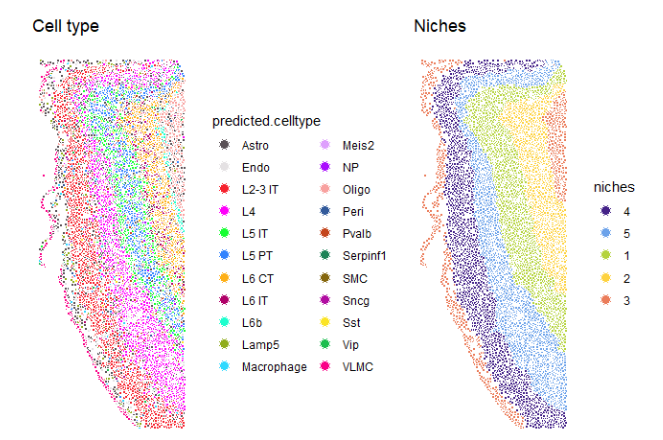
此外,观察到每个生态位组成都丰富了特定的细胞类型。
table(xenum.obj$predicted.celltype, xenium.oj$niches)## 1 2 3 4 5
## Astro 159 133 315 275 303
## Endo 78 66 83 106 195
## L2-3 IT 1 5 8 1623 122
## L4 71 6 4 135 1949
## L5 IT 694 75 1 1 79
## L5 PT 742 21 6 38 47
## L6 CT 46 918 0 1 1
## L6 IT 37 262 8 13
## L6b 0 97 3 0 0
## Lamp5 10 10 61 64 22
## Macrophage 22 10 21 26 33
## Meis2 0 0 0 0 1
## NP 79 6 0 0 1
## Oligo 75 131 278 53 79
## Peri 10 11 7 15 25
## Pvalb 69 48 3 49 97
## Serpinf1 1 1 0 5 4
## SMC 1 0 0 0 3
## Sncg 1 7 2 24 1
## Sst 42 20 0 17 31
## Vip 8 3 6 16 25
## VLMC 6 3 262 7 28
DAMO开发者矩阵,由阿里巴巴达摩院和中国互联网协会联合发起,致力于探讨最前沿的技术趋势与应用成果,搭建高质量的交流与分享平台,推动技术创新与产业应用链接,围绕“人工智能与新型计算”构建开放共享的开发者生态。
更多推荐


 0
0 0
0- 0


 已为社区贡献42条内容

所有评论(0)