cmake配置计算机图形学作业C2Cpp
直接用cmake exe版本的GUI。(在官网的binary disrtributions中可以找到)
在configure的时候先后遇到两个问题:
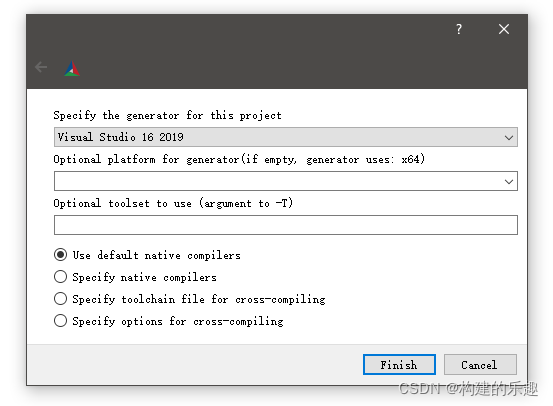
1.显示 no visual studio instance,这种情况只要你安装了visual studio就没问题,只是你没选对,file-delete cache,然后重新选。我使用的是vs2019,如下
2 显示git clone超时问题。
Selecting Windows SDK version 10.0.19041.0 to target Windows 10.0.19042.
[Project] CppPractices 1.0
find package: UCMake 0.6.0
UCMake 0.6.0 not found
fetch: https://github.com/Ubpa/UCMake with tag 0.6.0
用于 .NET Framework 的 Microsoft (R) 生成引擎版本 16.11.1+3e40a09f8
版权所有(C) Microsoft Corporation。保留所有权利。

  Performing download step (git clone) for 'ucmake-populate'
  Cloning into 'ucmake-src'...
  fatal: unable to access 'https://github.com/Ubpa/UCMake/': Failed to connect to github.com port 443 after 21060 ms: Timed out
  Cloning into 'ucmake-src'...
  fatal: unable to access 'https://github.com/Ubpa/UCMake/': Failed to connect to github.com port 443 after 21097 ms: Timed out
  Cloning into 'ucmake-src'...
  fatal: unable to access 'https://github.com/Ubpa/UCMake/': Failed to connect to github.com port 443 after 21084 ms: Timed out
  CMake Error at ucmake-subbuild/ucmake-populate-prefix/tmp/ucmake-populate-gitclone.cmake:31 (message):
  -- Had to git clone more than once:
            3 times.
    Failed to clone repository: 'https://github.com/Ubpa/UCMake'


C:\Program Files (x86)\Microsoft Visual Studio\2019\Community\MSBuild\Microsoft\VC\v160\Microsoft.CppCommon.targets(241,5): error MSB8066: “D:\my_codeworkspace\USTC_CG-master\Homeworks\0_CppPratices\samples\_deps\ucmake-subbuild\CMakeFiles\3c153561c4e4f74be9b4d226ff0d62c6\ucmake-populate-download.rule;D:\my_codeworkspace\USTC_CG-master\Homeworks\0_CppPratices\samples\_deps\ucmake-subbuild\CMakeFiles\3c153561c4e4f74be9b4d226ff0d62c6\ucmake-populate-update.rule;D:\my_codeworkspace\USTC_CG-master\Homeworks\0_CppPratices\samples\_deps\ucmake-subbuild\CMakeFiles\3c153561c4e4f74be9b4d226ff0d62c6\ucmake-populate-patch.rule;D:\my_codeworkspace\USTC_CG-master\Homeworks\0_CppPratices\samples\_deps\ucmake-subbuild\CMakeFiles\3c153561c4e4f74be9b4d226ff0d62c6\ucmake-populate-configure.rule;D:\my_codeworkspace\USTC_CG-master\Homeworks\0_CppPratices\samples\_deps\ucmake-subbuild\CMakeFiles\3c153561c4e4f74be9b4d226ff0d62c6\ucmake-populate-build.rule;D:\my_codeworkspace\USTC_CG-master\Homeworks\0_CppPratices\samples\_deps\ucmake-subbuild\CMakeFiles\3c153561c4e4f74be9b4d226ff0d62c6\ucmake-populate-install.rule;D:\my_codeworkspace\USTC_CG-master\Homeworks\0_CppPratices\samples\_deps\ucmake-subbuild\CMakeFiles\3c153561c4e4f74be9b4d226ff0d62c6\ucmake-populate-test.rule;D:\my_codeworkspace\USTC_CG-master\Homeworks\0_CppPratices\samples\_deps\ucmake-subbuild\CMakeFiles\d9f081bfbc45a02e8b8625aa3e7f4600\ucmake-populate-complete.rule;D:\my_codeworkspace\USTC_CG-master\Homeworks\0_CppPratices\samples\_deps\ucmake-subbuild\CMakeFiles\2bed7f4e8aaa8b5f6fe7f4c40774f4c5\ucmake-populate.rule”的自定义生成已退出,代码为 1。 [D:\my_codeworkspace\USTC_CG-master\Homeworks\0_CppPratices\samples\_deps\ucmake-subbuild\ucmake-populate.vcxproj]

CMake Error at D:/cmake-3.22.1-windows-x86_64/share/cmake-3.22/Modules/FetchContent.cmake:1087 (message):
  Build step for ucmake failed: 1
Call Stack (most recent call first):
  D:/cmake-3.22.1-windows-x86_64/share/cmake-3.22/Modules/FetchContent.cmake:1216:EVAL:2 (__FetchContent_directPopulate)
  D:/cmake-3.22.1-windows-x86_64/share/cmake-3.22/Modules/FetchContent.cmake:1216 (cmake_language)
  D:/cmake-3.22.1-windows-x86_64/share/cmake-3.22/Modules/FetchContent.cmake:1259 (FetchContent_Populate)
  cmake/InitUCMake.cmake:15 (FetchContent_MakeAvailable)
  CMakeLists.txt:7 (Ubpa_InitUCMake)


Configuring incomplete, errors occurred!
See also "D:/my_codeworkspace/USTC_CG-master/Homeworks/0_CppPratices/samples/CMakeFiles/CMakeOutput.log".
Failed to connect to github.com port 443 after 21091 ms: Timed out
这种情况是因为开了代理造成的,这时候需要把代理关掉,github才允许你clone
还有更好的办法:
进入USTC_CG-master\Homeworks\0_CppPratices\samples\cmake目录,打开InitUCMake.cmake文件,修改里面的国外github地址为国内的镜像站即可。
3.
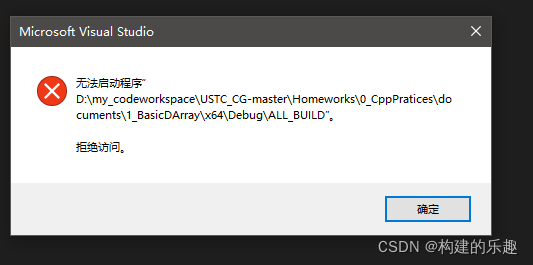
这个问题还没解决。
参考:
https://blog.csdn.net/zyw1120172694/article/details/120888157
得到解决办法:vs中右键想运行的项目(文件夹中共有12个项目),设为启动项目即可。
C2CPP需要完成的任务见:
https://github.com/Ubpa/USTC_CG/tree/master/Homeworks/0_CppPratices/project
构造函数的重载:
构造函数 ,是一种特殊的方法。主要用来在创建对象时初始化对象, 即为对象成员变量赋初始值,总与new运算符一起使用在创建对象的语句中。特别的一个类可以有多个构造函数 ,可根据其参数个数的不同或参数类型的不同来区分它们 即构造函数的重载。
拷贝构造函数:
https://www.runoob.com/cplusplus/cpp-copy-constructor.html
是一种借助已有实例定义新实例的方式。
预编译头:
预编译头(precompiled header)是程序设计时把头文件编译为中间格式(如目标文件),以节约在开发过程中编译器反复编译该头文件的开销。 C语言、C++语言、Objective C语言等都有类似的技术。
https://zh.wikipedia.org/wiki/%E9%A2%84%E7%BC%96%E8%AF%91%E5%A4%B4
初始化表:
与其他函数不同,构造函数除了有名字,参数列表和函数体之外,还可以有初始化列表,初始化列表以冒号开头,后跟一系列以逗号分隔的初始化字段。
在c2cpp中的答案有这个初始化列表:
DArray::DArray(const DArray& arr)
	: m_pData(new double[arr.m_nSize]), m_nSize(arr.m_nSize)
{
	for (int i = 0; i < m_nSize; i++)
		m_pData[i] = arr.m_pData[i];
}
m_pdata和m_nSize是早就在头文件中定义好的。
private:
	double* m_pData; // the pointer to the array memory
	int m_nSize; // the size of the array
友元
友元可以是一个函数,该函数被称为友元函数;友元也可以是一个类,该类被称为友元类,在这种情况下,整个类及其所有成员都是友元。
如果要声明函数为一个类的友元,需要在类定义中该函数原型前使用关键字 friend.
C++的权限控制
https://www.cnblogs.com/ygyy/p/11570052.html
static_cast
https://blog.csdn.net/u014624623/article/details/79837849
size_t
一种数据类型。
在64位系统是long long unsigned int;
在非64位系统是long unsigned int

DAMO开发者矩阵,由阿里巴巴达摩院和中国互联网协会联合发起,致力于探讨最前沿的技术趋势与应用成果,搭建高质量的交流与分享平台,推动技术创新与产业应用链接,围绕“人工智能与新型计算”构建开放共享的开发者生态。
更多推荐

 2
2 0
0- 0


 已为社区贡献8条内容

所有评论(0)