策略路由实验
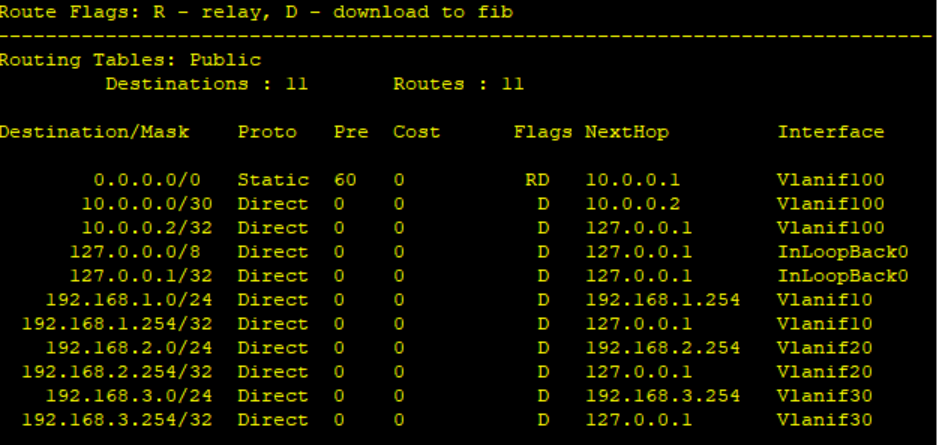
1.内网划分财务 VLAN10、研发 VLAN20、服务器 VLAN30
[SW1]interface GigabitEthernet 0/0/1
[SW1-GigabitEthernet0/0/1] port link-type access
[SW1-GigabitEthernet0/0/1] port default vlan 10
[SW1-GigabitEthernet0/0/1]quit
[SW1]interface GigabitEthernet 0/0/2
[SW1-GigabitEthernet0/0/2] port link-type access
[SW1-GigabitEthernet0/0/2] port default vlan 20
[SW1-GigabitEthernet0/0/2]quit
[SW1]interface GigabitEthernet 0/0/3
[SW1-GigabitEthernet0/0/3] port link-type access
[SW1-GigabitEthernet0/0/3] port default vlan 30
[SW1-GigabitEthernet0/0/3]quit
[SW1]interface GigabitEthernet 0/0/4
[SW1-GigabitEthernet0/0/4] port link-type access
[SW1-GigabitEthernet0/0/4] port default vlan 100
[SW1-GigabitEthernet0/0/4]quit
[SW1]interface Vlanif 10
[SW1-Vlanif10] ip address 192.168.1.254 255.255.255.0
[SW1-Vlanif10]quit
[SW1]
[SW1]interface Vlanif 20
[SW1-Vlanif20] ip address 192.168.2.254 255.255.255.0
[SW1-Vlanif20]quit
[SW1]
[SW1]interface Vlanif 30
[SW1-Vlanif30] ip address 192.168.3.254 255.255.255.0
[SW1-Vlanif30]quit
[SW1]
[SW1]interface Vlanif 100
[SW1-Vlanif100] ip address 10.0.0.2 255.255.255.252
[SW1-Vlanif100]quit
[SW1]ip route-static 0.0.0.0 0 10.0.0.1
2.FW1 初始化、安全区域划分、接口 IP
firewall zone trust
set priority 85
add interface GigabitEthernet 1/0/0
quit
firewall zone untrust
set priority 5
add interface GigabitEthernet 1/0/1
add interface GigabitEthernet 1/0/2
quit
interface GigabitEthernet 1/0/0
ip address 10.0.0.1 255.255.255.252
quit
interface GigabitEthernet 1/0/1
ip address 14.0.0.2 255.255.255.0
quit
interface GigabitEthernet 1/0/2
ip address 12.0.0.2 255.255.255.0
quit
ip route-static 192.168.0.0 255.255.0.0 10.0.0.2
3.公网路由器 R4(电信 ISP)、R2(联通 ISP)、R3(互联网核心)OSPF 配置(公网 OSPF 全网互通)
R4(电信 ISP)
[R4]interface GigabitEthernet 0/0/0
[R4-GigabitEthernet0/0/0] ip address 14.0.0.3 255.255.255.0
[R4-GigabitEthernet0/0/0]quit
[R4]
[R4]interface GigabitEthernet 0/0/1
[R4-GigabitEthernet0/0/1]
Aug 10 2026 22:04:07-08:00 R4 %%01IFNET/4/LINK_STATE(l)[0]:The line protocol IP
on the interface GigabitEthernet0/0/0 has entered the UP state. ip address 100.1
.1.1 255.255.255.0
[R4-GigabitEthernet0/0/1]quit
[R4]
[R4]interface GigabitEthernet 0/0/2
[R4-GigabitEthernet0/0/2] ip address 34.0.0.1 255.255.255.0
[R4-GigabitEthernet0/0/2]quit
[R4]
[R4]interface GigabitEthernet 0/0/3
[R4-GigabitEthernet0/0/3] ip address 101.1.1.254 255.255.255.0
[R4-GigabitEthernet0/0/3]quit
[R4]ospf 1 router-id 4.4.4.4
[R4-ospf-1] area 0
[R4-ospf-1-area-0.0.0.0] network 14.0.0.0 0.0.0.255
[R4-ospf-1-area-0.0.0.0] network 100.1.1.0 0.0.0.255
[R4-ospf-1-area-0.0.0.0] network 34.0.0.0 0.0.0.255
[R4-ospf-1-area-0.0.0.0] network 101.1.1.0 0.0.0.255
[R4-ospf-1-area-0.0.0.0]quit
[R4-ospf-1]quit

R2(联通 ISP)
[R2]interface GigabitEthernet 0/0/0
[R2-GigabitEthernet0/0/0] ip address 12.0.0.3 255.255.255.0
[R2-GigabitEthernet0/0/0]
Aug 10 2026 22:06:48-08:00 R2 %%01IFNET/4/LINK_STATE(l)[0]:The line protocol IP
on the interface GigabitEthernet0/0/0 has entered the UP state.quit
[R2]
[R2]interface GigabitEthernet 0/0/1
[R2-GigabitEthernet0/0/1] ip address 23.0.0.1 255.255.255.0
[R2-GigabitEthernet0/0/1]quit
[R2]
[R2]interface GigabitEthernet 0/0/2
[R2-GigabitEthernet0/0/2] ip address 200.1.1.1 255.255.255.0
[R2-GigabitEthernet0/0/2]quit
[R2]
[R2]interface GigabitEthernet 0/0/3
[R2-GigabitEthernet0/0/3] ip address 102.1.1.254 255.255.255.0
[R2-GigabitEthernet0/0/3]quit
[R2]ospf 1 router-id 2.2.2.2
[R2-ospf-1] area 0
[R2-ospf-1-area-0.0.0.0] network 12.0.0.0 0.0.0.255
[R2-ospf-1-area-0.0.0.0] network 23.0.0.0 0.0.0.255
[R2-ospf-1-area-0.0.0.0] network 200.1.1.0 0.0.0.255
[R2-ospf-1-area-0.0.0.0] network 102.1.1.0 0.0.0.255
[R2-ospf-1-area-0.0.0.0]quit
[R2-ospf-1]quit
R3(互联网核心)
[R3]interface GigabitEthernet 0/0/0
[R3-GigabitEthernet0/0/0] ip address 34.0.0.2 255.255.255.0
[R3-GigabitEthernet0/0/0]quit
[R3]
[R3]interface GigabitEthernet 0/0/1
[R3-GigabitEthernet0/0/1] ip address 23.0.0.2 255.255.255.0
[R3-GigabitEthernet0/0/1]quit
[R3]
[R3]interface GigabitEthernet 0/0/2
[R3-GigabitEthernet0/0/2]
Aug 10 2026 22:02:49-08:00 R3 %%01IFNET/4/LINK_STATE(l)[0]:The line protocol IP
on the interface GigabitEthernet0/0/0 has entered the UP state.
Aug 10 2026 22:02:49-08:00 R3 %%01IFNET/4/LINK_STATE(l)[1]:The line protocol IP
on the interface GigabitEthernet0/0/1 has entered the UP state. ip address 50.0.
0.254 255.255.255.0
[R3-GigabitEthernet0/0/2]quit
[R3]ospf 1 router-id 3.3.3.3
[R3-ospf-1] area 0
[R3-ospf-1-area-0.0.0.0] network 34.0.0.0 0.0.0.255
[R3-ospf-1-area-0.0.0.0] network 23.0.0.0 0.0.0.255
[R3-ospf-1-area-0.0.0.0] network 50.0.0.0 0.0.0.255
[R3-ospf-1-area-0.0.0.0]quit
[R3-ospf-1]quit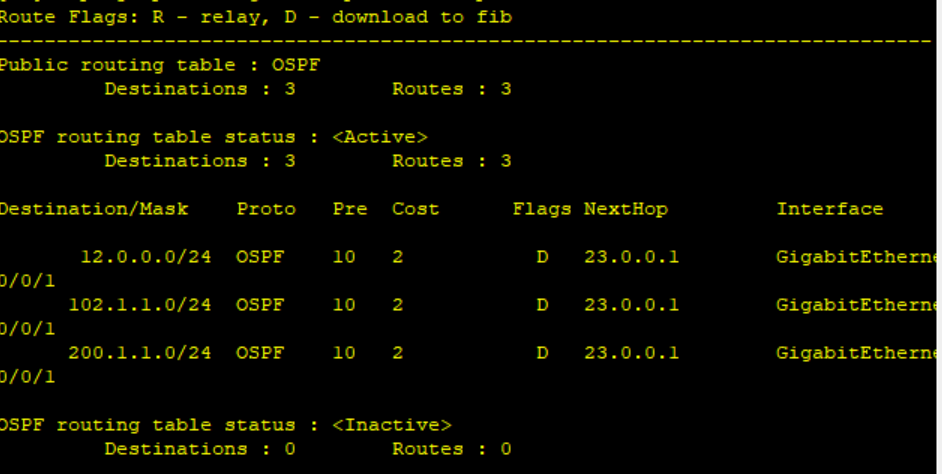
FW1(防火墙)—— 默认路由 + OSPF 引入
ip route-static 0.0.0.0 0 14.0.0.3 preference 60
ip route-static 0.0.0.0 0 12.0.0.3 preference 70
ospf 1 router-id 1.1.1.1
import-route static
area 0 network 14.0.0.0
0.0.0.255 network 12.0.0.0 0.0.0.255
quit
quit
4.5.策略路由 + IP-LINK 链路探测
ip-link check enable
ip-link name Telecom
destination 100.1.1.2
track interface GigabitEthernet 1/0/1
quit
ip-link name Unicom
destination 200.1.1.2
track interface GigabitEthernet 1/0/2
quit
ip address-set Finance type object
address 192.168.1.0 mask 255.255.255.0
quit
ip address-set RD type object
address 192.168.2.0 mask 255.255.255.0
quit
ip address-set WebServer type object
address 192.168.3.1 mask 255.255.255.255
quit
ip address-set FTP_Server type object
address 50.0.0.0 mask 255.255.255.0
quit
acl number 3000
rule permit ip source 192.168.1.0 0.0.0.255 destination 50.0.0.0 0.0.0.255
quit
acl number 3001
rule permit ip source 192.168.2.0 0.0.0.255 destination 50.0.0.0 0.0.0.255
quit
policy-based-route PBR_FTP permit node 10
if-match acl 3000
apply next-hop 14.0.0.3
apply track ip-link Telecom
quit
policy-based-route PBR_FTP permit node 20
if-match acl 3001
apply next-hop 12.0.0.3
apply track ip-link Unicom
quit
interface GigabitEthernet 1/0/0
policy-based-route PBR_FTP
quit
6.AAA 认证(财务密码认证,研发匿名)
user-group finance_group
user-group rd_group
local-user finance_user password cipher Finance@123
local-user finance_user service-type web
local-user finance_user user-group finance_group
local-user rd_user password cipher
local-user rd_user service-type web
local-user rd_user user-group rd_group
quit
7.NAT 配置
nat server protocol tcp global 100.1.1.10 www inside 192.168.3.1 www
nat server protocol tcp global 200.1.1.10 www inside 192.168.3.1 www
nat address-group 1 14.0.0.10 14.0.0.20
nat address-group 2 12.0.0.10 12.0.0.20
nat-policy
rule name finance_nat
source-zone trust
destination-zone untrust
source-address address-set Finance
action source-nat address-group 1
rule name rd_nat
source-zone trust
destination-zone untrust
source-address address-set RD
action source-nat address-group 2
quit
8.精准安全策略
security-policy
rule name finance_to_internet
source-zone trust
destination-zone untrust
source-address address-set Finance
action permit
rule name rd_to_internet
source-zone trust
destination-zone untrust
source-address address-set RD
action permit
rule name internet_to_web
source-zone untrust destination-zone trust
destination-address address-set WebServer
action permit
rule default
action deny
quit

DAMO开发者矩阵,由阿里巴巴达摩院和中国互联网协会联合发起,致力于探讨最前沿的技术趋势与应用成果,搭建高质量的交流与分享平台,推动技术创新与产业应用链接,围绕“人工智能与新型计算”构建开放共享的开发者生态。
更多推荐

 3
3 0
0- 0


 已为社区贡献2条内容

所有评论(0)