华为 USG 防火墙旁挂负载分担双机热备完整 eNSP 实验
目录
3.2 双核心交换机 SW1、SW2(VRF+OSPF 双进程)
3.2.2 SW2 完整配置(与 SW1 对称,VRRP 优先级互换)
3.3 防火墙 FW1、FW2 完整全套配置(HRP 负载分担核心)
问题 1:本实验防火墙采用负载分担模式,和普通一主一备模式区别?
一、实验整体拓扑 & 设备网段规划
1. 实验拓扑图
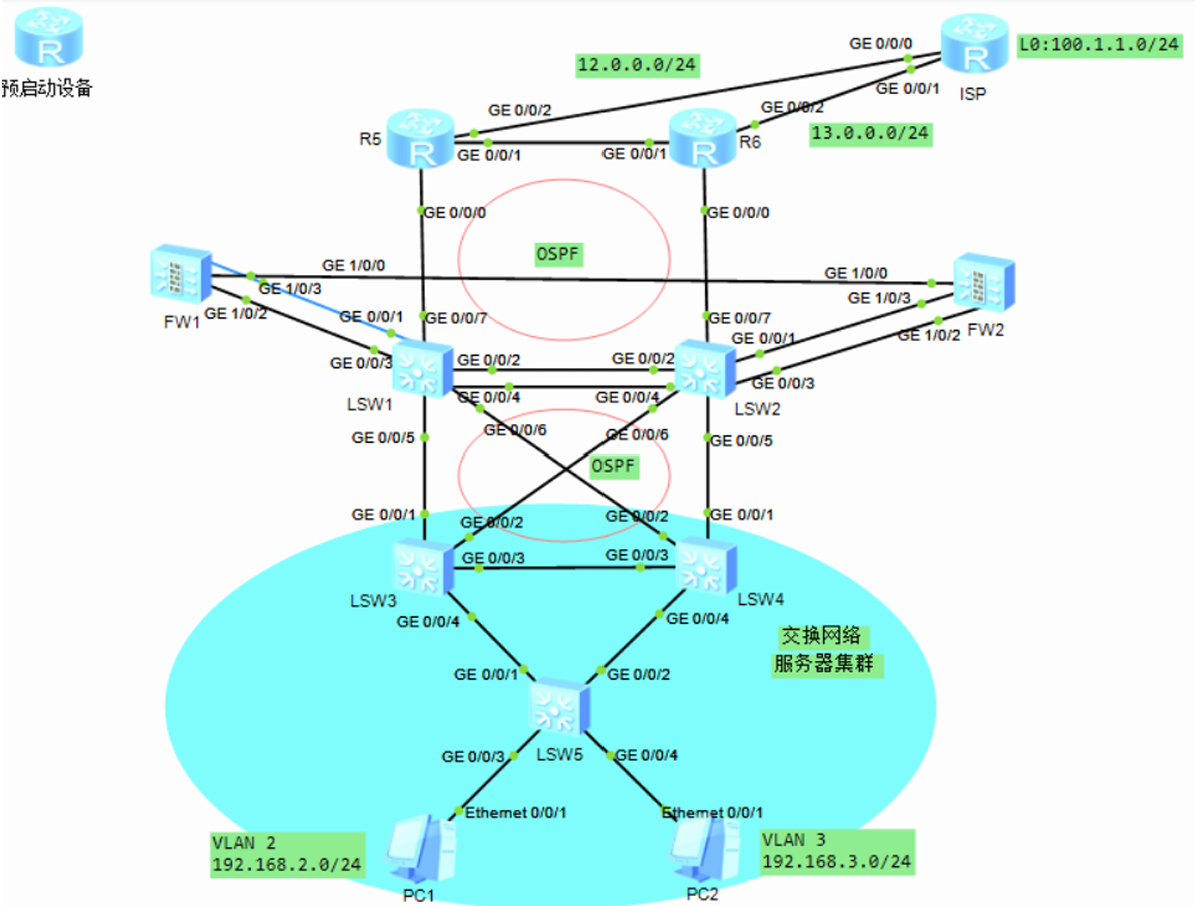
拓扑内所有设备说明
- 下层接入交换机:SW3、SW4、SW5(S5700 三层交换机,处理 PC 接入二层转发)
- 双核心交换机:SW1、SW2(三层核心,部署 VRF 虚拟路由隔离内网 / 公网路由)
- 安全防火墙:FW1、FW2(华为 USG6000V,旁挂在两台核心交换机,HR 负载分担双机热备)
- 出口边界路由器:R5、R6(分别模拟电信、两条互联网出口线路)
- 互联网模拟设备:ISP(环回接口 100.1.1.1 作为外网测试地址)
- 终端 PC:PC1(VLAN2 192.168.2.100/24)、PC2(VLAN3 192.168.3.100/24)
2. 全网 VLAN 与 IP 网段明细
(1)终端业务网段
VLAN 2:192.168.2.0/24,PC1 地址 192.168.2.100,网关 192.168.2.254 VLAN 3:192.168.3.0/24,PC2 地址 192.168.3.100,网关 192.168.3.254
(2)接入层→核心互联网段
VLAN103:10.10.3.0/24(SW3 ↔ SW1) VLAN203:10.20.3.0/24(SW4 ↔ SW2)
(3)双核心 SW1、SW2 互联网段
VLAN102:10.10.2.0/24(SW1 GE0/05 ↔ SW2 GE0/05)
(4)核心 ↔ 防火墙互联 VLAN
VLAN401:10.40.1.0/24 VLAN402:10.40.2.0/24
(5)防火墙 ↔ 出口路由器互联 VLAN
VLAN403:10.40.3.0/24 VLAN404:10.40.4.0/24
(6)防火墙 HR 心跳专用网段
10.10.10.0/30 FW1 心跳口 IP:10.10.10.1 FW2 心跳口 IP:10.10.10.2
(7)出口路由器互联网段
R5 互联网口:12.0.0.0/24 R6 互联网口:13.0.0.0/24 ISP 环回测试地址:LoopBack0 100.1.1.1/24
二、实验业务流量需求
1. PC1(VLAN2)流量规则
正常无故障路径:PC1 → SW5 → SW3 → SW1(VRF 内网)→ FW1 → R5 → 互联网 100.1.1.1 故障切换路径(FW1/SW1/R5 任意设备 / 链路损坏):PC1 → SW5 → SW4 → SW2 → FW2 → R6 访问外网
2. PC2(VLAN3)流量规则
正常无故障路径:PC2 → SW5 → SW4 → SW2(VRF 内网)→ FW2 → R6 → 互联网 100.1.1.1 故障切换路径(FW2/SW2/R6 任意设备 / 链路损坏):PC2 → SW5 → SW3 → SW1 → FW1 → R5 访问外网
3. 组网硬性技术要求
- 下层 SW3/SW4/SW5 部署 MSTP 多实例生成树,VLAN2 实例 1 主根 SW3、VLAN3 实例 2 主根 SW4,实现二层流量负载均衡;
- 双核心 SW1、SW2 配置 VRF 虚拟路由转发,隔离内网业务路由和外网出口路由,避免路由表冲突;
- FW1、FW2 采用 HRP 负载分担模式,两组反向 VRRP 备份,同时承载不同 VLAN 流量,互为备份;
- 全网分两套 OSPF 进程:进程 1 负责内网接入网段、进程 2 负责核心与出口公网网段;
- 防火墙配置子接口 Dot1q 封装识别 VLAN,划分 Trust/DMZ/Untrust 安全区域,配置全域上网安全策略;
- 出口 R5/R6 配置源 NAT,内网私网地址转换公网访问互联网;
- 所有 VRRP 开启上行接口故障跟踪,链路断开自动降低优先级触发切换。
三、分层完整设备配置
3.1 下层接入交换机配置:SW3、SW4、SW5
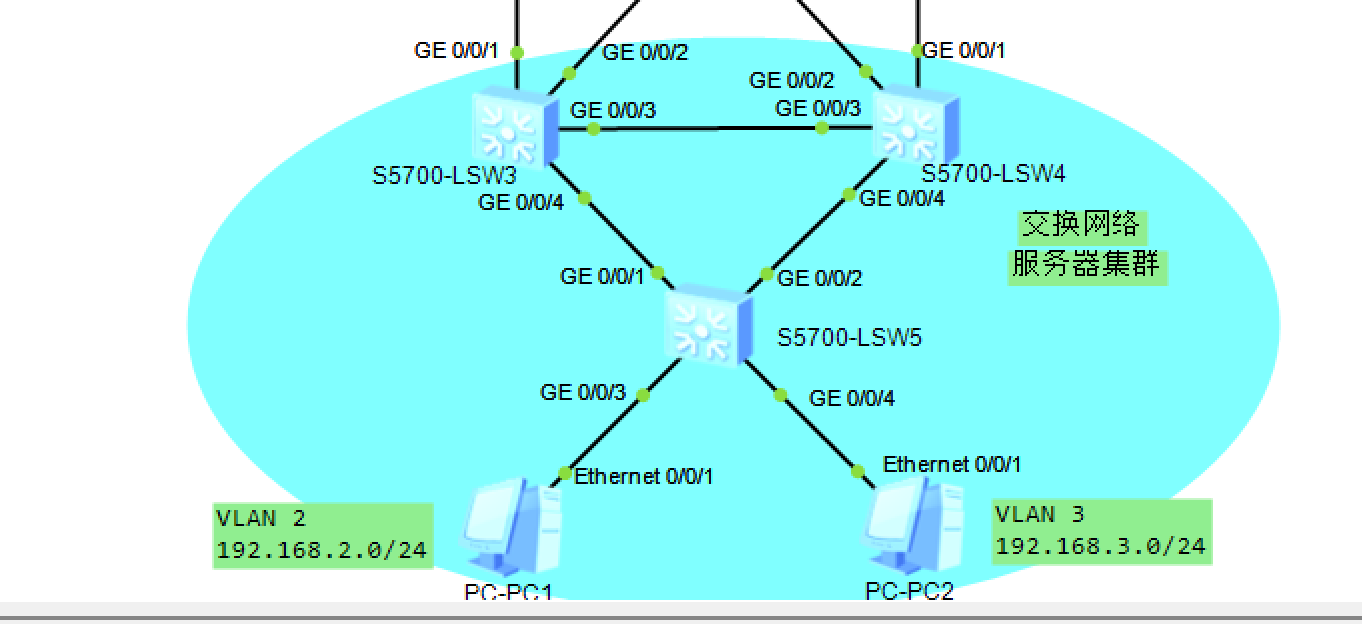
3.1.1 SW3 完整全部配置
sysname SW3
# 第一步:必须先创建VLAN!!!
vlan batch 2 3 103 203

# 业务VLANIF
interface Vlanif 2
 ip address 192.168.2.1 255.255.255
 vrrp vrid 1 virtual-ip 192.168.2.254
 vrrp vrid 1 priority 120
 vrrp vrid 1 preempt-mode timer delay 20
 vrrp vrid 1 track interface GigabitEthernet 0/0/1 reduced 15
 vrrp vrid 1 track interface GigabitEthernet 0/0/2 reduced 15

interface Vlanif 3
 ip address 192.168.3.1 255.255.255
 vrrp vrid 1 virtual-ip 192.168.3.254

# 上联核心物理接口
interface GigabitEthernet 0/0/1
 port link-type access
 port default vlan 103
 undo stp enable

interface GigabitEthernet 0/0/2
 port link-type access
 port default vlan 203
 undo stp enable

# 创建Vlanif三层接口(只有vlan已经batch创建完,这条命令才不会报错)
interface Vlanif 103
 ip address 10.10.3.3 255.255.255

interface Vlanif 203
 ip address 10.20.3.3 255.255.255

# MSTP配置
stp enable
stp mode mstp
stp region-configuration
 region-name aa
 instance 1 vlan 2
 instance 2 vlan 3
 active region-configuration
stp instance 1 root primary
stp instance 2 root secondary
stp instance 0 root primary

# OSPF
ospf 1 router-id 3.3.3.3
 area 0
  network 192.168.2.0 0.0.0.255
  network 192.168.3.0 0.0.0.255
  network 10.10.3.0 0.0.0.255
  network 10.20.3.0 0.0.0.255
silent-interface Vlanif 2
silent-interface Vlanif 3
3.1.2 SW4 完整全部配置
sysname SW4
# 补全缺失VLAN 2 3 104 204
vlan batch 2 3 104 204

interface GigabitEthernet 0/0/3
 port link-type trunk
 port trunk allow-pass vlan 2 3
interface GigabitEthernet 0/0/4
 port link-type trunk
 port trunk allow-pass vlan 2 to 3

stp enable
stp mode mstp
stp region-configuration
 region-name aa
 instance 1 vlan 2
 instance 2 vlan 3
 active region-configuration

# 使用完整stp instance命令,避免模拟器识别报错
stp instance 1 root secondary
stp instance 2 root primary
stp instance 0 root secondary

interface Vlanif 2
 ip address 192.168.2.2 255.255.255
 vrrp vrid 1 virtual-ip 192.168.2.254

interface Vlanif 3
 ip address 192.168.3.2 255.255.255
 vrrp vrid 1 virtual-ip 192.168.3.254
 vrrp vrid 1 priority 120
 vrrp vrid 1 preempt-mode timer delay 20
 vrrp vrid 1 track interface GigabitEthernet 0/0/1 reduced 15
 vrrp vrid 1 track interface GigabitEthernet 0/0/2 reduced 15

# 上联SW2接口
interface GigabitEthernet 0/0/1
 port link-type access
 port default vlan 204
 undo stp enable

interface GigabitEthernet 0/0/2
 port link-type access
 port default vlan 104
 undo stp enable

interface Vlanif 104
 ip address 10.10.4.4 255.255.255

interface Vlanif 204
 ip address 10.20.4.4 255.255.255

ospf 1 router-id 4.4.4.4
 area 0
  network 192.168.2.0 0.0.0.255
  network 192.168.3.0 0.0.0.255
  network 10.10.4.0 0.0.0.255
  network 10.20.4.0 0.0.0.255

silent-interface Vlanif 2
silent-interface Vlanif 3
3.1.3 SW5 完整全部配置(二层汇聚交换机)
sysname SW5
vlan batch 2 3
#下联PC接入口
interface Ethernet 0/0/1
 port link-type access
 port default vlan 2
interface Ethernet 0/0/2
 port link-type access
 port default vlan 3
#上联SW3、SW4 Trunk口
interface GigabitEthernet 0/0/1
 port link-type trunk
 port trunk allow-pass vlan 2 3
interface GigabitEthernet 0/0/2
 port link-type trunk
 port trunk allow-pass vlan 2 3

stp enable
stp mode mstp
stp region-configuration
 region-name aa
 instance 1 vlan 2
 instance 2 vlan 3
 active region-configuration
3.2 双核心交换机 SW1、SW2(VRF+OSPF 双进程)
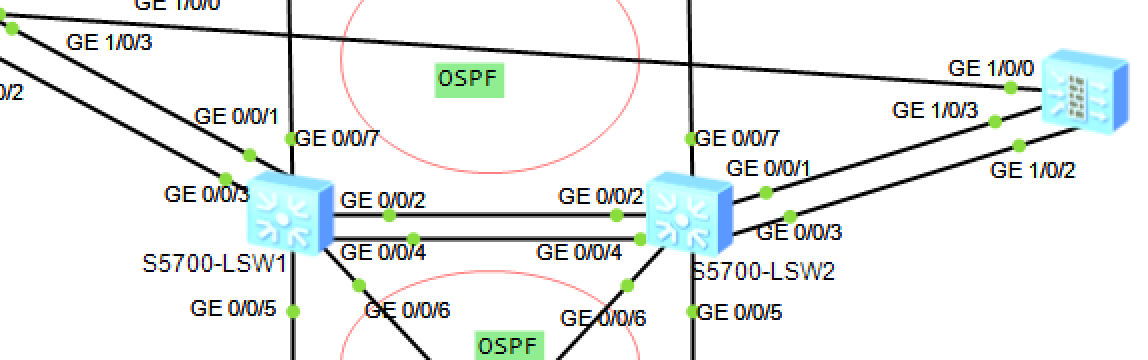
3.2.1 SW1 完整配置
sysname SW1
# 创建VRF虚拟路由实例,隔离内网业务路由
ip vpn-instance VRF
 ipv4-family
  route-distinguisher 100:1
  vpn-target 100:1 export-import

# 全局VLAN创建
vlan batch 102 103 104 401 402 403 404

# SW1与SW2互联VLAN102
interface GigabitEthernet 0/0/5
 port link-type trunk
 port trunk allow-pass vlan 102
 undo port trunk allow-pass vlan 1

interface Vlanif 102
 ip address 10.10.2.1 255.255.255.0

# 对接SW3 VLAN103接口,绑定VRF
interface GigabitEthernet 0/0/6
 port link-type access
 port default vlan 103

interface Vlanif 103
 ip binding vpn-instance VRF
 ip address 10.10.3.1 255.255.255.0

# 对接SW4 VLAN104接口
interface GigabitEthernet 0/0/7
 port link-type access
 port default vlan 104

interface Vlanif 104
 ip binding vpn-instance VRF
 ip address 10.10.4.1 255.255.255.0

# 对接FW1/FW2内网侧VLAN401、402
interface GigabitEthernet 0/0/2
 port link-type trunk
 port trunk allow-pass vlan 401 402
 undo port trunk allow-pass vlan 1

interface Vlanif 401
 ip binding vpn-instance VRF
 ip address 10.40.1.1 255.255.255.0
 vrrp vrid 1 virtual-ip 10.40.1.100
 vrrp vrid 1 priority 120
 vrrp vrid 1 preempt-mode timer delay 60

interface Vlanif 402
 ip binding vpn-instance VRF
 ip address 10.40.2.1 255.255.255.0
 vrrp vrid 2 virtual-ip 10.40.2.100

# 对接出口路由器VLAN403、404(公网侧)
interface GigabitEthernet 0/0/3
 port link-type trunk
 port trunk allow-pass vlan 403 404
 undo port trunk allow-pass vlan 1

interface Vlanif 403
 ip address 10.40.3.1 255.255.255.0
 vrrp vrid 3 virtual-ip 10.40.3.100
 vrrp vrid 3 priority 120
 vrrp vrid 3 preempt-mode timer delay 60

interface Vlanif 404
 ip address 10.40.4.1 255.255.255.0
 vrrp vrid 4 virtual-ip 10.40.4.100

# 静态默认路由(VRF内网流量下发防火墙)
ip route-static vpn-instance VRF 0.0.0.0 0 10.40.1.200
ip route-static vpn-instance VRF 0.0.0.0 0 10.40.2.200 preference 70

# 回程汇总路由,外网回包引流
ip route-static 192.168.0.0 255.255.0.0 10.40.3.200
ip route-static 192.168.0.0 255.255.0.0 10.40.4.200 preference 70

# OSPF进程1:VRF内业务内网
ospf 1 router-id 1.1.1.1 vpn-instance VRF
 area 0
  network 192.168.2.0 0.0.0.255
  network 192.168.3.0 0.0.0.255
  network 10.10.3.0 0.0.0.255
  network 10.10.4.0 0.0.0.255

# OSPF进程2:公网、核心互联网段,router‑id不能和ospf1重复
ospf 2 router-id 2.2.2.2
 area 0
  network 10.10.2.0 0.0.0.255
  network 10.40.3.0 0.0.0.255
  network 10.40.4.0 0.0.0.255

# OSPF引入静态路由
ospf 2
 import-route static
ospf 1 vpn-instance VRF
 import-route static
3.2.2 SW2 完整配置(与 SW1 对称,VRRP 优先级互换)
sysname SW2
ip vpn-instance VRF
 ipv4-family
  route-distinguisher 100:1
  vpn-target 100:1 export-import
vlan batch 102 203 204 401 402 403 404
# SW1与SW2互联VLAN102
interface GigabitEthernet 0/0/5
 port link-type trunk
 port trunk allow-pass vlan 102
 undo port trunk allow-pass vlan 1
interface Vlanif 102
 ip address 10.10.2.2 255.255.255.0
# 对接SW4 VLAN203
interface GigabitEthernet 0/0/6
 port link-type access
 port default vlan 203
interface Vlanif 203
 ip binding vpn-instance VRF
 ip address 10.20.3.2 255.255.255.0
# 对接SW3 VLAN204
interface GigabitEthernet 0/0/7
 port link-type access
 port default vlan 204
interface Vlanif 204
 ip binding vpn-instance VRF
 ip address 10.20.4.2 255.255.255.0
# 对接FW内网VLAN401、402
interface GigabitEthernet 0/0/3
 port link-type trunk
 port trunk allow-pass vlan 401 402
 undo port trunk allow-pass vlan 1
interface Vlanif 401
 ip binding vpn-instance VRF
 ip address 10.40.1.2 255.255.255.0
 vrrp vrid 1 virtual-ip 10.40.1.100
interface Vlanif 402
 ip binding vpn-instance VRF
 ip address 10.40.2.2 255.255.255.0
 vrrp vrid 2 virtual-ip 10.40.2.100
 vrrp vrid 2 priority 120
 vrrp vrid 2 preempt-mode timer delay 60
# 对接出口路由器VLAN403、404
interface GigabitEthernet 0/0/4
 port link-type trunk
 port trunk allow-pass vlan 403 404
 undo port trunk allow-pass vlan 1
interface Vlanif 403
 ip address 10.40.3.2 255.255.255.0
 vrrp vrid 3 virtual-ip 10.40.3.100
interface Vlanif 404
 ip address 10.40.4.2 255.255.255.0
 vrrp vrid 4 virtual-ip 10.40.4.100
 vrrp vrid 4 priority 120
 vrrp vrid 4 preempt-mode timer delay 60
# 静态默认路由(VRF内网)
ip route-static vpn-instance VRF 0.0.0.0 0 10.40.2.200
ip route-static vpn-instance VRF 0.0.0.0 0 10.40.1.200 preference 70
# 回程汇总路由
ip route-static 192.168.0.0 255.255.0.0 10.40.4.200
ip route-static 192.168.0.0 255.255.0.0 10.40.3.200 preference 70
# OSPF 1 绑定VRF,router-id=2.2.2.2
ospf 1 router-id 2.2.2.2 vpn-instance VRF
 area 0
  network 192.168.2.0 0.0.0.255
  network 192.168.3.0 0.0.0.255
  network 10.20.3.0 0.0.0.255
  network 10.20.4.0 0.0.0.255
# OSPF 2 全局公网,修改router-id避免冲突
ospf 2 router-id 4.4.4.2
 area 0
  network 10.10.2.0 0.0.0.255
  network 10.40.1.0 0.0.0.255
  network 10.40.2.0 0.0.0.255
  network 10.40.3.0 0.0.0.255
  network 10.40.4.0 0.0.0.255
# 引入静态路由
ospf 2
 import-route static
ospf 1 vpn-instance VRF
 import-route static
3.3 防火墙 FW1、FW2 完整全套配置(HRP 负载分担核心)
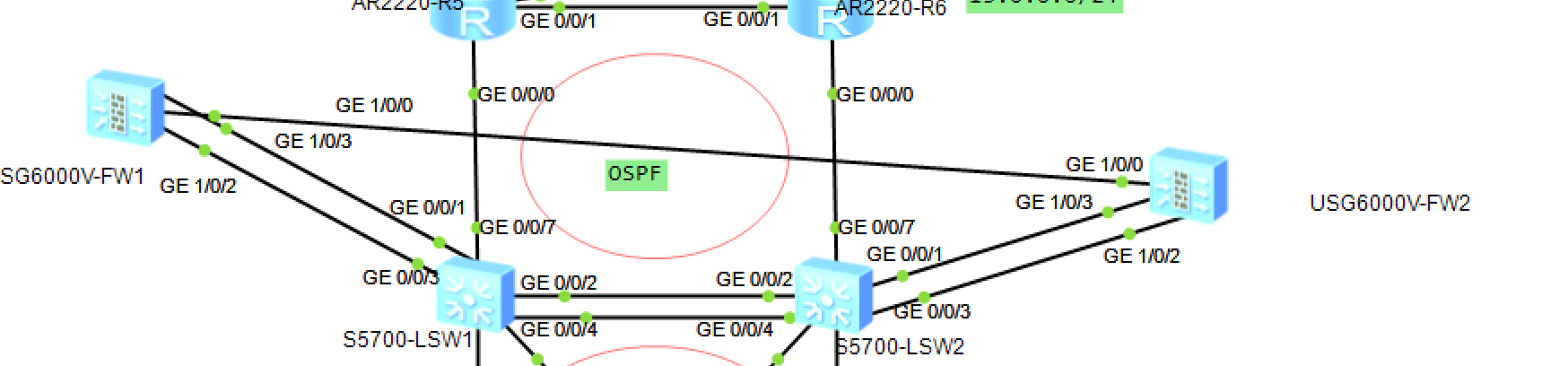
3.3.1 FW1 完整全部配置
sysname FW1
# HR心跳直连接口(对接FW2 GE1/0/0)
interface GigabitEthernet 1/0/0
 mode route
 ip address 10.10.10.1 255.255.255.0
# 心跳接口划入DMZ区域
firewall zone dmz
 add interface GigabitEthernet 1/0/0

# 下联核心交换机子接口(Dot1q封装VLAN401/402)
interface GigabitEthernet 1/0/1
 mode route
interface GigabitEthernet 1/0/1.401
 vlan-type dot1q 401
 ip address 10.40.1.10 255.255.255.0
interface GigabitEthernet 1/0/1.402
 vlan-type dot1q 402
 ip address 10.40.2.10 255.255.255.0
# 下联接口划入Trust内网区域
firewall zone trust
 add interface GigabitEthernet 1/0/1.401
 add interface GigabitEthernet 1/0/1.402

# 上联出口路由器子接口VLAN403/404
interface GigabitEthernet 1/0/2
 mode route
interface GigabitEthernet 1/0/2.403
 vlan-type dot1q 403
 ip address 10.40.3.10 255.255.255.0
interface GigabitEthernet 1/0/2.404
 vlan-type dot1q 404
 ip address 10.40.4.10 255.255.255.0
# 上联接口划入Untrust外网区域
firewall zone untrust
 add interface GigabitEthernet 1/0/2.403
 add interface GigabitEthernet 1/0/2.404

# 负载分担VRRP配置(401、403为主;402、404为备)
interface GigabitEthernet 1/0/1.401
 vrrp vrid 5 virtual-ip 10.40.1.200 active
interface GigabitEthernet 1/0/1.402
 vrrp vrid 6 virtual-ip 10.40.2.200 standby
interface GigabitEthernet 1/0/2.403
 vrrp vrid 7 virtual-ip 10.40.3.200 active
interface GigabitEthernet 1/0/2.404
 vrrp vrid 8 virtual-ip 10.40.4.200 standby

# HRP双机热备全局配置
hrp enable
hr interface GigabitEthernet 1/0/0 remote 10.10.10.2
hrp mirror session enable
hrp standby config enable
hrp loadbalance-device

# 静态路由
# 回程内网汇总路由
ip route-static 192.168.0.0 255.255.0.0 10.40.1.100
ip route-static 192.168.0.0 255.255.0.0 10.40.2.100 preference 70
# 上网默认路由
ip route-static 0.0.0.0 0 10.40.3.100
ip route-static 0.0.0.0 0 10.40.4.100 preference 70

# 全域安全策略
security-policy
 rule name trust_to_untrust
  source-zone trust
  destination-zone untrust
  source-address 192.168.0.0 mask 255.255.0.0
  action permit
# 心跳区域互通策略
rule name heartbeat
 source-zone dmz
 destination-zone dmz
 action permit
# 放行OSPF协议报文
rule name ospf_permit
 service protocol ospf
 action permit
3.3.2 FW2 完整全部配置
sysname FW2
# HR心跳接口,对端FW1 10.10.1.1
interface GigabitEthernet 1/0/0
 mode route
 ip address 10.10.10.2 255.255.255.0
firewall zone dm
 add interface GigabitEthernet 1/0/0

# 下联核心子接口
interface GigabitEthernet 1/0/2
 mode route
interface GigabitEthernet 1/0/2.401
 vlan-type dot1q 401
 ip address 10.40.1.20 255.255.255.0
interface GigabitEthernet 1/0/2.402
 vlan-type dot1q 402
 ip address 10.40.2.20 255.255.255.0
firewall zone trust
 add interface GigabitEthernet 1/0/2.401
 add interface GigabitEthernet 1/0/2.402

# 上联出口子接口
interface GigabitEthernet 1/0/1
 mode route
interface GigabitEthernet 1/0/1.403
 vlan-type dot1q 403
 ip address 10.40.3.20 255.255.255.0
interface GigabitEthernet 1/0/1.404
 vlan-type dot1q 404
 ip address 10.40.4.20 255.255.255.0
firewall zone untrust
 add interface GigabitEthernet 1/0/1.403
 add interface GigabitEthernet 1/0/1.404

# VRRP反向主备(402、404主;401、403备)
interface GigabitEthernet 1/0/2.401
 vrrp vrid 5 virtual-ip 10.40.1.200 standby
interface GigabitEthernet 1/0/2.402
 vrrp vrid 6 virtual-ip 10.40.2.200 active
interface GigabitEthernet 1/0/1.403
 vrrp vrid 7 virtual-ip 10.40.3.200 standby
interface GigabitEthernet 1/0/1.404
 vrrp vrid 8 virtual-ip 10.40.4.200 active

# HRP负载分担双机热备
hrp enable
hr interface GigabitEthernet 1/0/0 remote 10.10.10.1
hrp mirror session enable
hrp standby config enable
hrp loadbalance-device

# 静态路由
ip route-static 192.168.0.0 255.255.0.0 10.40.1.100
ip route-static 192.168.0.0 255.255.0.0 10.40.2.100 preference 70
ip route-static 0.0.0.0 0 10.40.4.100
ip route-static 0.0.0.0 0 10.40.3.100 preference 70

# 全域安全策略
security-policy
 rule name trust_to_untrust
  source-zone trust
  destination-zone untrust
  source-address 192.168.0.0 mask 255.255.0.0
  action permit
rule name heartbeat
 source-zone dmz
 destination-zone dmz
 action permit
rule name ospf_permit
 service protocol ospf
 action permit
3.4 出口 R5、R6、ISP 完整配置
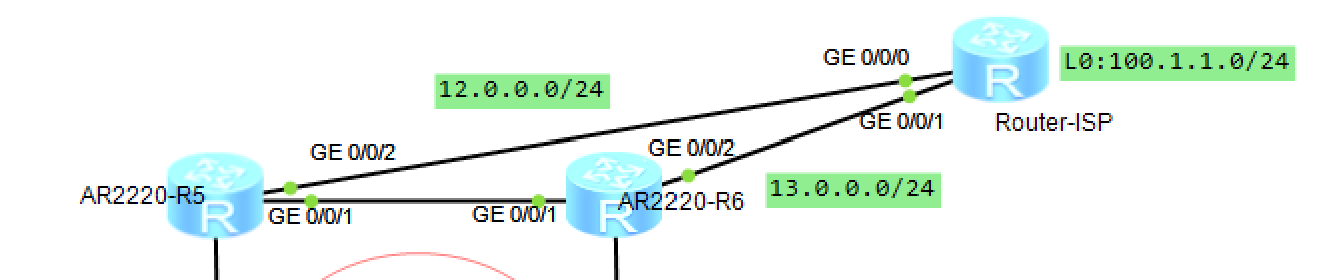
3.4.1 R5(电信出口路由器)
sysname R5
interface GigabitEthernet 0/0/0
 ip address 10.40.3.5 255.255.255.0
interface GigabitEthernet 0/0/2
 ip address 12.0.0.1 255.255.255.0
# 互联网NAT配置
acl number 2000
 rule permit source 192.168.0.0 0.0.255.255
interface GigabitEthernet 0/0/2
 nat outbound 2000
# OSPF进程1
ospf 1 router-id 3.3.3.3
 area 0
  network 10.40.3.0 0.0.0.255
  network 12.0.0.0 0.0.0.255
# 向OSPF下发默认路由
default-route-advertise always
# 默认路由指向ISP
ip route-static 0.0.0.0 0 12.0.0.100
3.4.2 R6(联通出口路由器)
sysname R6
interface GigabitEthernet 0/0/0
 ip address 10.40.4.6 255.255.255.0
interface GigabitEthernet 0/0/2
 ip address 13.0.0.1 255.255.255.0
acl number 2000
 rule permit source 192.168.0.0 0.0.255.255
interface GigabitEthernet 0/0/2
 nat outbound 2000
ospf 1 router-id 4.4.4.4
 area 0
  network 10.40.4.0 0.0.0.255
  network 13.0.0.0 0.0.0.255
default-route-advertise always
ip route-static 0.0.0.0 0 13.0.0.100
3.4.3 ISP 互联网模拟设备
sysname ISP
interface GigabitEthernet 0/0/0
 ip address 12.0.0.100 255.255.255.0
interface GigabitEthernet 0/0/1
 ip address 13.0.0.100 255.255.255.0
# 外网测试环回口
interface LoopBack 0
 ip address 100.1.1.1 255.255.255.0
# 回程静态路由,确保内网回包可达
ip route-static 192.168.0.0 255.255.0.0 12.0.0.1
ip route-static 192.168.0.0 255.255.0.0 13.0.0.1
四、全套验证查看命令
1. 下层交换机 MSTP 验证
display st brief
2. VRRP 网关状态查看
display vrrp brief
3. VRF 路由表查看(核心交换机)
display ip routing-table vpn-instance VRF
4. OSPF 邻居与路由查看
display ospf peer brief
display ospf routing
5. 防火墙 HRP 负载分担状态
display hr state
display hrp brief
6. 防火墙会话表(验证同步效果)
display firewall session table
7. 防火墙安全区域、安全策略
display zone
display security-policy rule all
五、连通性测试截图 & 故障切换测试效果
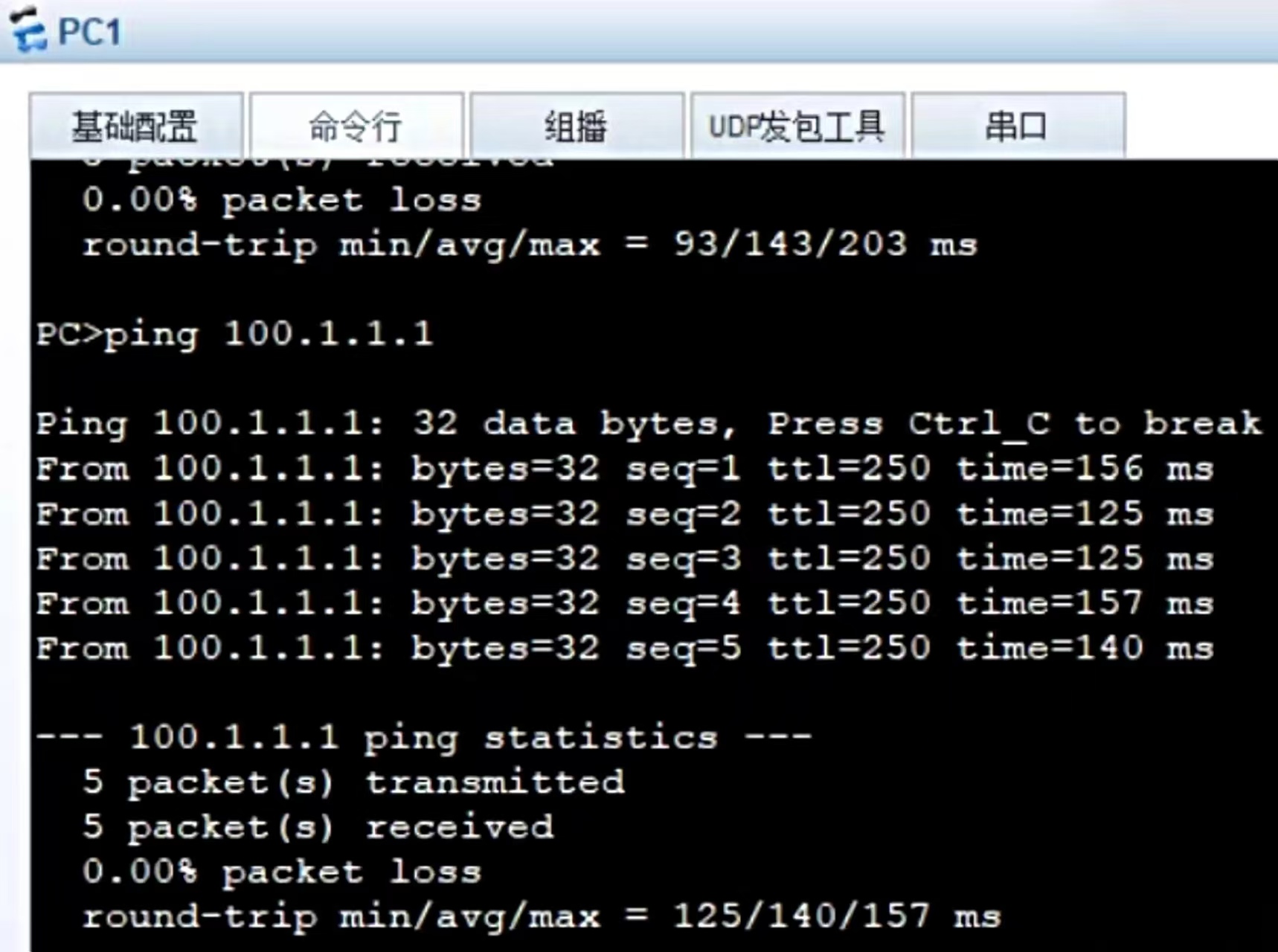
1. 正常 PC1 访问外网测试
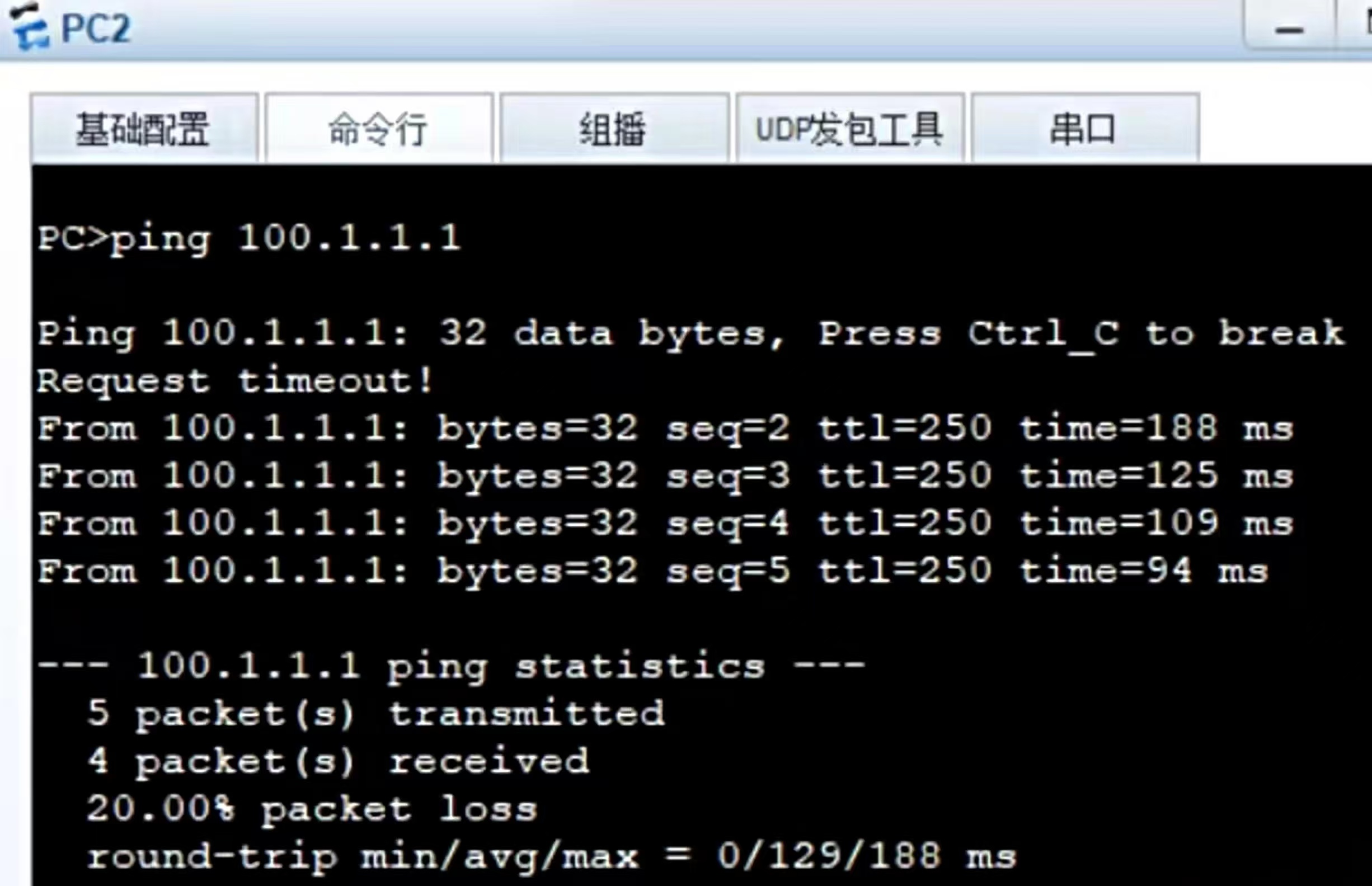
2. 正常 PC2 访问外网测试
3. 故障切换测试步骤
- 保持 PC 持续长 ping 外网 100.1.1.1;
- 手动 shutdown FW1 上联接口,模拟出口链路故障;
- 观察 ping 结果:仅丢失 1~2 个数据包,3 秒内流量切换至 FW2;
- 查看 FW2
display hr state变为 Master 主设备; - 恢复 FW1 接口,等待 60 秒抢占延迟,流量自动切回 FW1,会话表同步,网页不刷新不断开。
六、核心技术原理完整总结
1. MSTP 多实例生成树作用
普通单实例 STP 全网只有一根根桥,一半链路闲置;MSTP 可以划分多个实例,不同 VLAN 使用不同根桥,二层两条链路同时转发,实现接入层流量负载均衡,同时自动阻断二层环路,防止广播风暴。
2. VRF 虚拟路由转发核心作用
单台物理交换机内划分多套完全隔离的路由表,内网业务网段、外网出口网段路由互相隔离,路由条目不会冲突,大型多业务园区、政企数据中心标准方案。
3. HRP 负载分担双机热备原理
普通主备模式一台防火墙闲置;本实验两组反向 VRRP 备份组,FW1 承载 VLAN2 流量、FW2 承载 VLAN3 流量,两台设备同时工作充分利用硬件性能;任意一台设备故障,另一台接管全部流量,HR 心跳线实时同步安全策略、会话表、NAT 映射,切换后已有网络连接不会中断。
4. VRRP、VGMP、HRP 三者分工
- VRRP:提供统一虚拟网关 IP,内网终端、交换机统一指向虚拟 IP,无需修改终端网关;
- VGMP:华为防火墙私有协议,统一整机上下所有 VRRP 组主备状态,不会出现 “内网主、外网备” 流量分裂故障;
- HRP:心跳线同步两台防火墙全部配置、动态会话表,故障切换业务无感知。
5. 旁挂组网优缺点
优点
- 内网 PC、服务器互访流量可绕过防火墙,防火墙整机全部故障内网办公不受影响;
- 维护升级防火墙时可单台离线,不需要全网断网割接;
- 按需引流,内网大流量互访不占用防火墙性能。
缺点
- 内网流量存在绕过防火墙的可能性,安全管控不如串联部署严格;
- 负载分担场景必须严格保证来回路径一致,否则会话表匹配失败丢包。
6. OSPF 双进程设计原因
区分内网业务网段和外网出口网段,隔离内网路由与互联网路由,路由计算互不干扰,大型园区组网减少路由条目,收敛速度更快。
七、实验高频故障排查
- PC 无法 ping 通外网 100.1.1.1 排查:防火墙 Trust→Untrust 安全策略未放行;出口 R5/R6 NAT 未配置;OSPF 未下发默认路由。
- HRP 状态显示异常、无法协商主备 排查:心跳接口未划入 DMZ 区域;心跳接口安全策略未放通;两台防火墙心跳 IP 不在同一网段。
- OSP 邻居无法建立 排查:接口 VLAN 网段 network 未宣告;两端 OSPF 区域号不一致;接口 STP 阻断无法收发协议报文。
- 链路断开后 VRRP 不自动切换 排查:VRRP 未配置 track 监控上行接口,无法感知链路故障,不会自动降低优先级。
- 故障切换后网页直接断开 排查:未开启 hrp mirror session 会话同步,备用防火墙无会话表,回程报文全部丢弃。
- PC 内网互通正常,不能访问互联网 排查:出口路由器 NAT 策略未匹配私网 192.168.0.0 网段;防火墙未下发默认路由指向出口 VRRP。
八、简答题
问题 1:本实验防火墙采用负载分担模式,和普通一主一备模式区别?
答:普通主备模式一台防火墙闲置,硬件资源浪费;负载分担配置两组反向 VRRP 备份组,两台防火墙同时承载不同 VLAN 业务流量,硬件性能充分利用;任意设备故障,另一台自动接管全部流量,互为备份。
问题 2:VRF 虚拟路由转发的作用是什么?
答:在同一台三层交换机内创建多套独立隔离路由表,实现内网业务网段与外网出口网段路由隔离,防止路由条目冲突,适用于多业务分区企业园区。
问题 3:MSTP 相比普通单实例 STP 优势?
答:单实例 STP 全网仅一根根桥,冗余链路全部阻塞闲置;MSTP 划分多个生成树实例,不同 VLAN 使用不同根桥,两条上行链路同时转发,二层流量负载均衡,同时消除环路。
问题 4:防火墙旁挂部署相比串联部署优缺点?
答:优点:内网互通流量可绕过防火墙,设备故障内网不瘫痪;单台防火墙离线维护无需全网断网;可选择性引流降低设备负载。 缺点:内网流量存在绕过防火墙的安全盲区,全网流量无法统一管控。
问题 5:HRP、VGMP、VRRP 三者各自功能?
答:VRRP 提供统一虚拟网关 IP;VGMP 统一整机所有 VRRP 主备状态,避免状态分裂;HRP 心跳通道同步防火墙安全策略、会话表,故障切换原有连接不中断。

DAMO开发者矩阵,由阿里巴巴达摩院和中国互联网协会联合发起,致力于探讨最前沿的技术趋势与应用成果,搭建高质量的交流与分享平台,推动技术创新与产业应用链接,围绕“人工智能与新型计算”构建开放共享的开发者生态。
更多推荐

 2
2 0
0- 0


 已为社区贡献3条内容

所有评论(0)