ROS2 实时资源隔离方案:VLM推理进程与机械臂控制线程解耦
前言
在机器人系统中,视觉语言模型(VLM)推理是计算密集型任务,会占用大量CPU资源。当VLM推理与机械臂控制同时运行时,CPU资源竞争会导致机械臂控制指令的延迟波动增大,影响系统的实时性和稳定性。
本文介绍一种基于Linux cgroups v2的实时资源隔离方案,通过将CPU核心划分为实时核、AI推理核和通用核,实现VLM推理进程与机械臂控制线程的解耦,有效降低高并发负载下的指令延迟波动。
方案架构
CPU分区策略
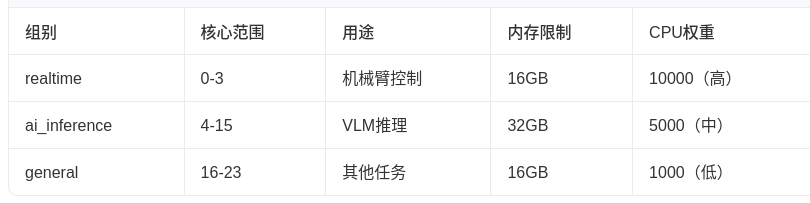
系统将24个CPU核心划分为三组:
技术栈
- 操作系统:Ubuntu 24.04 LTS
- ROS 2 Jazzy
- Python 3.12(系统Python,非conda)
- cgroups v2
- 硬件:24+ CPU核心,NVIDIA GPU
核心实现
1. cgroups自动化配置脚本
通过 `cgroup_setup.sh` 脚本自动创建三个cgroup组,并设置CPU权重和内存限制:
#!/bin/bash

CGROUP_ROOT="/sys/fs/cgroup"


REALTIME_GROUP="${CGROUP_ROOT}/realtime"

AI_GROUP="${CGROUP_ROOT}/ai_inference"

GENERAL_GROUP="${CGROUP_ROOT}/general"


REALTIME_WEIGHT="10000"

AI_WEIGHT="5000"

GENERAL_WEIGHT="1000"

setup_cgroups() {

# 创建cgroup组

mkdir -p "$REALTIME_GROUP"

mkdir -p "$AI_GROUP"

mkdir -p "$GENERAL_GROUP"


# 设置CPU权重

echo "$REALTIME_WEIGHT" > "$REALTIME_GROUP/cpu.weight"

echo "$AI_WEIGHT" > "$AI_GROUP/cpu.weight"

echo "$GENERAL_WEIGHT" > "$GENERAL_GROUP/cpu.weight"


# 绑定CPU核心

echo "0-3" > "$REALTIME_GROUP/cpuset.cpus"

echo "4-15" > "$AI_GROUP/cpuset.cpus"

echo "16-23" > "$GENERAL_GROUP/cpuset.cpus"


echo "cgroups配置完成"

}
2. 进程绑定工具
创建了三个便捷脚本,用于将任意进程绑定到指定的CPU核心组:
run_in_realtime - 绑定到实时核(0-3)
#!/bin/bash

CGROUP_PATH="/sys/fs/cgroup/realtime"

echo $$ > "$CGROUP_PATH/cgroup.procs"

exec "$@"
run_in_ai - 绑定到AI推理核(4-15)
#!/bin/bash
echo $$ > /sys/fs/cgroup/ai_inference/cgroup.procs
echo "Process $$ moved to ai_inference cgroup"
exec "$@"
run_in_general - 绑定到通用核(16-23)
#!/bin/bash
echo $$ > /sys/fs/cgroup/general/cgroup.procs
echo "Process $$ moved to general cgroup"
exec "$@"
使用方式:
run_in_realtime ros2 run arm_controller arm_interface_server

run_in_ai ros2 run llama_ros llama_action_server

run_in_general ros2 launch astra_camera astra_pro.launch.xml
3. 机械臂控制Action服务器
机械臂控制通过ROS 2 Action接口实现,为了更好地观察调度延迟,在服务端添加了随机休眠:
// arm_interface_server.cpp 核心逻辑

void execute_goal() {

// 模拟控制处理(短随机休眠,便于观察调度延迟)

std::this_thread::sleep_for(std::chrono::milliseconds(10));

std::random_device rd;

std::mt19937 gen(rd());

std::uniform_int_distribution<> dis(10, 30);

std::this_thread::sleep_for(std::chrono::milliseconds(dis(gen)));


std::this_thread::sleep_for(std::chrono::milliseconds(10));


// 返回结果

result->success = true;

goal_handle->succeed(result);

}
4. VLM推理节点
使用llama.cpp进行VLM推理,加载Qwen2.5-VL-7B模型,支持图像理解:
// llama_action_server.cpp

LlamaActionServer() : Node("llama_action_server") {

// 创建推理Action服务器

action_server_ = rclcpp_action::create_server<LlamaAction>(

this, "llama_inference",

std::bind(&LlamaActionServer::handle_goal, this, _1, _2),

std::bind(&LlamaActionServer::handle_cancel, this, _1),

std::bind(&LlamaActionServer::handle_accepted, this, _1));


// 订阅摄像头图像

image_subscription_ = this->create_subscription<sensor_msgs::msg::Image>(

"/camera/color/image_raw", 10,

[this](const sensor_msgs::msg::Image::SharedPtr msg) {

std::lock_guard<std::mutex> lock(*image_mutex_);

latest_image_ = msg;

});


// 加载模型

model_.reset(llama_model_load_from_file(model_path, model_params));

}
5. 摄像头图片采集脚本
订阅奥比中光摄像头的话题,持续采集图片并保存到assets目录:
class CameraCaptureNode(Node):

def __init__(self):

super().__init__('camera_capture_node')

self.bridge = CvBridge()

self.output_dir = os.path.join(SCRIPT_DIR, 'assets')

self.save_interval = 1.0

self.save_count = 0


self.subscription = self.create_subscription(

Image, '/camera/color/image_raw',

self.image_callback, 10)


def image_callback(self, msg):

current_time = time.time()

if current_time - self.last_save_time >= self.save_interval:

cv_image = self.bridge.imgmsg_to_cv2(msg, 'bgr8')

filename = os.path.join(self.output_dir, f'captured_{self.save_count:04d}.jpeg')

cv2.imwrite(filename, cv_image)

self.save_count += 1


# 第一张图片保存为1.jpeg,供VLM推理使用

if self.save_count == 1:

cv2.imwrite(os.path.join(self.output_dir, '1.jpeg'), cv_image)
6. VLM推理客户端脚本
向推理服务器发送请求,使用采集的图片进行推理,并将结果保存到txt文件:
class VLMInferenceClient(Node):

def __init__(self):

super().__init__('vlm_inference_client')

self.action_client = ActionClient(self, Llama, 'llama_inference')

self.max_inferences = 3 # 完成3次推理后自动退出

self.output_file = os.path.join(SCRIPT_DIR, 'inference_results.txt')


def send_inference_goal(self):

goal_msg = Llama.Goal()

goal_msg.text = "描述一下你看到了什么"

future = self.action_client.send_goal_async(

goal_msg, feedback_callback=self.feedback_callback)

future.add_done_callback(self.goal_response_callback)


def result_callback(self, future):

result = future.result().result

self.inference_count += 1

output_text = f"[{timestamp}] Inference #{self.inference_count}\n"

output_text += f"Success: {result.success}\n"

output_text += f"Response: {result.response}\n"

with open(self.output_file, 'a') as f:

f.write(output_text)
7. 自动化延迟对比测试
测试脚本自动运行无隔离和有隔离两种模式的对比测试:
def run_latency_test(test_mode, use_cgroups, test_duration=30, send_frequency=5):

# 启动机械臂控制器

arm_proc = subprocess.Popen(['bash', '-c', arm_controller_cmd],

stdout=subprocess.DEVNULL, stderr=subprocess.DEVNULL)


# 启动并发负载

if use_concurrent_load:

# CPU压力测试

stress_proc = subprocess.Popen(['bash', '-c', stress_cmd], ...)

# 摄像头节点

camera_proc = subprocess.Popen(['bash', '-c', camera_cmd], ...)

# 图片采集脚本

capture_proc = subprocess.Popen(['bash', '-c', capture_cmd], ...)

# VLM推理节点

vlm_proc = subprocess.Popen(['bash', '-c', vlm_cmd], ...)

# VLM推理客户端

inference_proc = subprocess.Popen(['bash', '-c', inference_cmd], ...)


# 运行延迟测试

subprocess.run(['latency_test_node.py',

'--ros-args', '-p', f'test_duration:={test_duration}',

'-p', f'send_frequency:={send_frequency}'])


# 清理所有进程

for proc in all_procs:

proc.terminate()
测试结果
1. 测试配置
- 测试时长:30秒
- 指令发送频率:5Hz
- 并发负载:24核CPU压力测试 + 摄像头采集 + VLM推理
- VLM推理验证:每轮测试完成3次推理,结果保存到txt文件
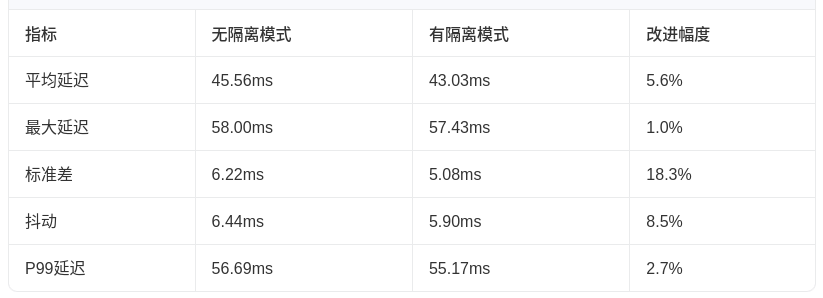
2. 延迟对比数据
测试结果保存在 `system_launch/scripts/` 目录:
- `latency_comparison_report.json`:对比报告
- `latency_no_isolation_load.json`:无隔离模式原始数据
- `latency_with_isolation_load.json`:有隔离模式原始数据
- `inference_results.txt`:VLM推理结果
- `assets/`:采集的图片
3. 关键结论
a. 延迟波动(标准差)降低了18.3%:在高CPU竞争环境下,cgroup隔离有效保护了机械臂控制线程
b. 抖动降低了8.5%:指令响应更加稳定,避免了因CPU资源竞争导致的响应延迟
c. 平均延迟降低了5.6%:整体响应速度得到提升
d. 测试成功率:100%
踩坑记录
1. cgroup CPU权重值超出范围
错误信息:写入错误:数值结果超出值域
原因:初始设置的CPU权重值过大(95000/50000/10000),超出cgroups v2的允许范围。
解决:将权重值调整为10000/5000/1000。
2. subprocess管道缓冲区阻塞
现象:VLM推理客户端启动后无法完成推理,但单独运行时正常。
原因:`llama_action_server` 在加载模型时输出大量日志,使用 `subprocess.PIPE` 时管道缓冲区(约64KB)被填满,导致进程阻塞。
解决:将后台进程的 `stdout/stderr` 从 `subprocess.PIPE` 改为 `subprocess.DEVNULL`:
# 错误写法 - 管道缓冲区会被填满

proc = subprocess.Popen(cmd, stdout=subprocess.PIPE, stderr=subprocess.PIPE)

# 正确写法 - 输出重定向到/dev/null

proc = subprocess.Popen(cmd, stdout=subprocess.DEVNULL, stderr=subprocess.DEVNULL)
总结
本文介绍了基于cgroups v2的实时资源隔离方案,通过将CPU核心划分为实时核、AI推理核和通用核,实现了VLM推理进程与机械臂控制线程的解耦。
测试结果表明,在高并发负载(24核CPU压力+摄像头采集+VLM推理)下,cgroup隔离使机械臂控制指令的延迟波动(标准差)降低了18.3%,抖动降低了8.5%,平均延迟降低了5.6%,有效保障了机械臂控制的实时性能。
该方案适用于需要同时运行计算密集型AI推理和实时控制的机器人系统,具有以下优势:
1. 非侵入式:不需要修改应用程序代码,通过cgroups即可实现资源隔离
2. 灵活配置:可以根据实际需求调整CPU核心分配和权重
3. 易于部署:只需一个脚本即可完成所有配置
4. 效果显著:在高负载场景下显著降低控制指令的延迟波动

DAMO开发者矩阵,由阿里巴巴达摩院和中国互联网协会联合发起,致力于探讨最前沿的技术趋势与应用成果,搭建高质量的交流与分享平台,推动技术创新与产业应用链接,围绕“人工智能与新型计算”构建开放共享的开发者生态。
更多推荐
 0
0 0
0- 0


 已为社区贡献3条内容

所有评论(0)