012-最简单的跨数据中心大二层解决方案
你只要会配置分布式网关,你就会配置跨中心的大二层VXLAN。
文档合集打包工程文件请评论区留言666,或私信作者获取。

端到端的跨中心vxlan文章发布后,(详见文章合集SDN网络技术原理)大家对于跨中心的骨干网部署EVPN是否能减少隧道的数量进行了讨论。首先说下生产环境通常的做法,跨中心骨干网不跑evpn-vxlan,只跑路由协议或SRv6或MPLS。那么针对网友提出的骨干网跑VXLAN能不能减少隧道的数量呢?答案是能减少,但是不推荐。
目前华为在跨中心的大二层互访的网络中提供了3种解决方案,第1种就是端到端的VXLAN,就是011章节讲述的。(详细细节参见上一篇文章);第2种是handoff vlan的方式实现跨中心的二层或三层互访。本章节具体讲述的就是第2种跨中心的大二层解决方案,俗称最简单的跨数据中心的大二层解决方案。本质就是三个分布式的网关vxlan通过vlan子接口的方式连接起来。
本案例也从侧面说明通过跨中心的DCI-VTEP设备之间建立VXLAN隧道,减少数据中心数据中心之间端到端VXLAN隧道的数量。映射网友此前的想法。
一、需求背景
2023年XX市的XX分行要和XX县区的XXX支行实现大二层互联,两个分支机构之间通过长途专线互联,要求两个分支机构之间的网络互不影响。当时给出的解决方案是通过handoff vlan的方式实现数据不同分支机构之间的二层互访。
但是2026年初,该县支行需要跨网段访问市分行的一台服务器上报数据,同时市支行多个应用需要跨网段与县支行互访。要求不改变现网结构的情况下,实现跨网段互访。
二、网络架构
在这里简化下网络架构,所有节点的双设备均简化为1台设备。
需求构造:
1. 市级分行A和县级支行B,通过handoff vlan的方式实现大二层互通。两个机构内部均有10.1.1.0/24、10.1.2.0/24网段。
2. 在handoff vlan的基础上实现,跨数据中心、跨网段的三层互通。即实现分行A的10.1.1.10访问支行B的10.1.2.20。
网络拓扑与互联地址如图:
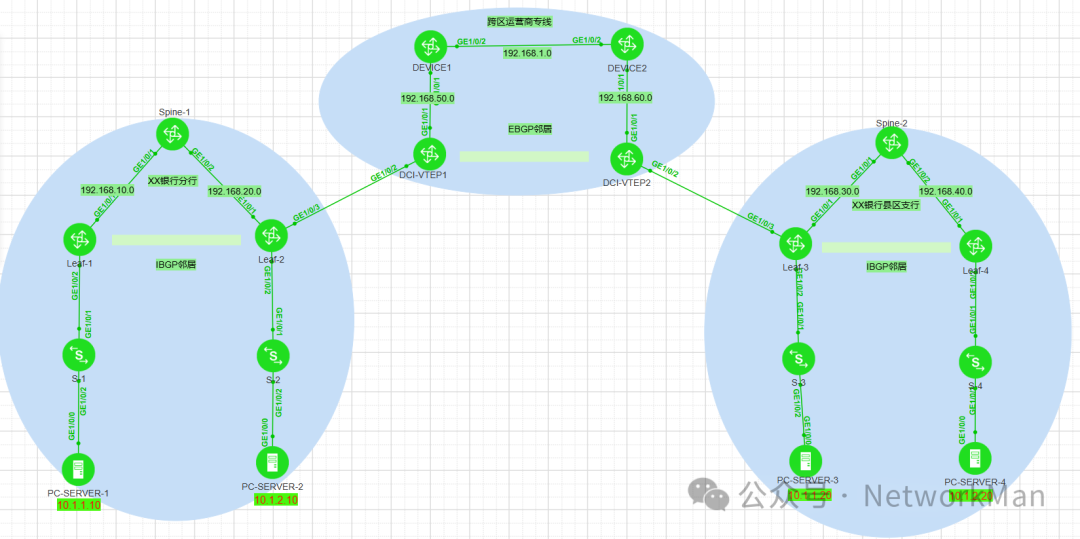
三、配置思路
handoff vlan 的含义就是实现vxlan的终结,通过vlan的方式提交给VTEP节点,两个中心之间的网络可以最大限度的保持独立。本质是三段式vxlan,也是三个分布式vxlan的组合。
(1)在A中心、B中心、出口DCI设备之间分别建立各自区域的分布式的vxlan架构。
(2)在leaf2和DCI-1互联的接口上分别配置vxlan接入配置。要求两边封装的vlan相同。
(3)在Leaf3和DCI-2互联的接口上分别配置vxlan接入配置。要求两边封装的vlan相同。
(4)leaf1和leaf2、leaf3和leaf4、DCI-1和DCI-2设备之间分别建立vxlan隧道。
四、详细配置步骤
1. Leaf1交换机配置
<Leaf1>
sysname Leaf1
evpn-overlay enable
ip vpn-instance a
 ipv4-family
  route-distinguisher 100:1
  vpn-target 100:1 export-extcommunity evpn
  vpn-target 100:1 import-extcommunity evpn
 vxlan vni 5010
#
bridge-domain 10
 vxlan vni 10
 #
 evpn
  route-distinguisher 10:1
  vpn-target 11:1 export-extcommunity
  vpn-target 100:1 export-extcommunity
  vpn-target 11:1 import-extcommunity
#
bridge-domain 20
 vxlan vni 20
 #
 evpn
  route-distinguisher 20:1
  vpn-target 20:1 export-extcommunity
  vpn-target 100:1 export-extcommunity
  vpn-target 20:1 import-extcommunity
#
interface Vbdif10
 ip binding vpn-instance a
 ip address 10.1.1.254 255.255.255.0
 mac-address 0010-5e00-0010
 vxlan anycast-gateway enable
 arp collect host enable
#
interface Vbdif20
 ip binding vpn-instance a
 ip address 10.1.2.254 255.255.255.0
 mac-address 0010-5e00-0020
 vxlan anycast-gateway enable
 arp collect host enable
#
interface MEth0/0/0
 ip binding vpn-instance _management_vpn_
#
interface GE1/0/1
 undo portswitch
 ip address 192.168.10.2 255.255.255.0
#
interface GE1/0/2
#
interface GE1/0/2.1 mode l2
 encapsulation dot1q vid 10
 bridge-domain 10
#
interface GE1/0/2.2 mode l2
 encapsulation dot1q vid 20
 bridge-domain 20
#
interface LoopBack0
 ip address 5.5.5.5 255.255.255.255
#
interface Nve1
 source 5.5.5.5
 vni 10 head-end peer-list protocol bgp
 vni 20 head-end peer-list protocol bgp
#
bgp 100
 private-4-byte-as enable
 peer 6.6.6.6 as-number 100
 peer 6.6.6.6 connect-interface LoopBack0
 #
 ipv4-family unicast
  peer 6.6.6.6 enable
 #
 l2vpn-family evpn
  policy vpn-target
  peer 6.6.6.6 enable
  peer 6.6.6.6 advertise irb
#
ospf 1
 area 0.0.0.0
  network 5.5.5.5 0.0.0.0
  network 192.168.10.0 0.0.0.255
#
<Leaf1>
2. Leaf2交换机配置
<Leaf2>
sysname Leaf2
evpn-overlay enable
#
ip vpn-instance a
 ipv4-family
  route-distinguisher 100:1
  vpn-target 100:1 export-extcommunity evpn
  vpn-target 100:1 import-extcommunity evpn
 vxlan vni 5010
#
bridge-domain 10
 vxlan vni 10
 #
 evpn
  route-distinguisher 10:2
  vpn-target 11:1 export-extcommunity
  vpn-target 100:1 export-extcommunity
  vpn-target 11:1 import-extcommunity
#
bridge-domain 20
 vxlan vni 20
 #
 evpn
  route-distinguisher 20:2
  vpn-target 100:1 export-extcommunity
  vpn-target 20:1 export-extcommunity
  vpn-target 20:1 import-extcommunity
#
interface Vbdif10
 ip binding vpn-instance a
 ip address 10.1.1.254 255.255.255.0
 mac-address 0010-5e00-0010
 vxlan anycast-gateway enable
 arp collect host enable
#
interface Vbdif20
 ip binding vpn-instance a
 ip address 10.1.2.254 255.255.255.0
 mac-address 0010-5e00-0020
 vxlan anycast-gateway enable
 arp collect host enable
#
interface GE1/0/1
 undo portswitch
 ip address 192.168.20.2 255.255.255.0
#
interface GE1/0/2
#
interface GE1/0/2.1 mode l2
 encapsulation dot1q vid 10
 bridge-domain 10
#
interface GE1/0/2.2 mode l2
 encapsulation dot1q vid 20
 bridge-domain 20
#
interface GE1/0/3
#
interface GE1/0/3.1 mode l2
 encapsulation dot1q vid 10
 bridge-domain 10
#
interface GE1/0/3.2 mode l2
 encapsulation dot1q vid 20
 bridge-domain 20
#
interface LoopBack0
 ip address 6.6.6.6 255.255.255.255
#
interface Nve1
 source 6.6.6.6
 vni 10 head-end peer-list protocol bgp
 vni 20 head-end peer-list protocol bgp
#
interface NULL0
#
bgp 100
 private-4-byte-as enable
 peer 5.5.5.5 as-number 100
 peer 5.5.5.5 connect-interface LoopBack0
 #
 ipv4-family unicast
  peer 5.5.5.5 enable
 #
 l2vpn-family evpn
  policy vpn-target
  peer 5.5.5.5 enable
  peer 5.5.5.5 advertise irb
#
ospf 1
 area 0.0.0.0
  network 6.6.6.6 0.0.0.0
  network 192.168.20.0 0.0.0.255
#
<Leaf2>
3. Leaf3交换机配置
<Leaf3>
sysname Leaf3
evpn-overlay enable
ip vpn-instance a
 ipv4-family
  route-distinguisher 100:1
  vpn-target 100:1 export-extcommunity evpn
  vpn-target 100:1 import-extcommunity evpn
 vxlan vni 5010
#
bridge-domain 10
 vxlan vni 10
 #
 evpn
  route-distinguisher 10:3
  vpn-target 22:2 export-extcommunity
  vpn-target 100:1 export-extcommunity
  vpn-target 22:2 import-extcommunity
#
bridge-domain 20
 vxlan vni 20
 #
 evpn
  route-distinguisher 20:3
  vpn-target 23:2 export-extcommunity
  vpn-target 100:1 export-extcommunity
  vpn-target 23:2 import-extcommunity
#
interface Vbdif10
 ip binding vpn-instance a
 ip address 10.1.1.254 255.255.255.0
 mac-address 0010-5e00-0010
 vxlan anycast-gateway enable
 arp collect host enable
#
interface Vbdif20
 ip binding vpn-instance a
 ip address 10.1.2.254 255.255.255.0
 mac-address 0010-5e00-0020
 vxlan anycast-gateway enable
 arp collect host enable

interface GE1/0/1
 undo portswitch
 ip address 192.168.30.2 255.255.255.0
#
interface GE1/0/2
#
interface GE1/0/2.1 mode l2
 encapsulation dot1q vid 10
 bridge-domain 10
#
interface GE1/0/2.2 mode l2
 encapsulation dot1q vid 20
 bridge-domain 20
#
interface GE1/0/3
#
interface GE1/0/3.1 mode l2
 encapsulation dot1q vid 10
 bridge-domain 10
#
interface GE1/0/3.2 mode l2
 encapsulation dot1q vid 20
 bridge-domain 20
#
interface LoopBack0
 ip address 7.7.7.7 255.255.255.255
#
interface Nve1
 source 7.7.7.7
 vni 10 head-end peer-list protocol bgp
 vni 20 head-end peer-list protocol bgp
#
bgp 200
 private-4-byte-as enable
 peer 8.8.8.8 as-number 200
 peer 8.8.8.8 connect-interface LoopBack0
 #
 ipv4-family unicast
  peer 8.8.8.8 enable
 #
 l2vpn-family evpn
  policy vpn-target
  peer 8.8.8.8 enable
  peer 8.8.8.8 advertise irb
#
ospf 1
 area 0.0.0.0
  network 7.7.7.7 0.0.0.0
  network 192.168.30.0 0.0.0.255
#
<Leaf3>
4. Leaf4交换机配置
<Leaf4>
sysname Leaf4
evpn-overlay enable
ip vpn-instance a
 ipv4-family
  route-distinguisher 100:1
  vpn-target 100:1 export-extcommunity evpn
  vpn-target 100:1 import-extcommunity evpn
 vxlan vni 5010
#
bridge-domain 10
 vxlan vni 10
 #
 evpn
  route-distinguisher 10:4
  vpn-target 22:2 export-extcommunity
  vpn-target 100:1 export-extcommunity
  vpn-target 22:2 import-extcommunity
#
bridge-domain 20
 vxlan vni 20
 #
 evpn
  route-distinguisher 20:4
  vpn-target 100:1 export-extcommunity
  vpn-target 23:2 export-extcommunity
  vpn-target 23:2 import-extcommunity
#
interface Vbdif10
 ip binding vpn-instance a
 ip address 10.1.1.254 255.255.255.0
 mac-address 0010-5e00-0010
 vxlan anycast-gateway enable
 arp collect host enable
#
interface Vbdif20
 ip binding vpn-instance a
 ip address 10.1.2.254 255.255.255.0
 mac-address 0010-5e00-0020
 vxlan anycast-gateway enable
 arp collect host enable
#
interface GE1/0/1
 undo portswitch
 ip address 192.168.40.2 255.255.255.0
#
interface GE1/0/2
#
interface GE1/0/2.1 mode l2
 encapsulation dot1q vid 10
 bridge-domain 10
#
interface GE1/0/2.2 mode l2
 encapsulation dot1q vid 20
 bridge-domain 20

interface LoopBack0
 ip address 8.8.8.8 255.255.255.255
#
interface Nve1
 source 8.8.8.8
 vni 10 head-end peer-list protocol bgp
 vni 20 head-end peer-list protocol bgp
#               #
bgp 200
 private-4-byte-as enable
 peer 7.7.7.7 as-number 200
 peer 7.7.7.7 connect-interface LoopBack0
 #
 ipv4-family unicast
  peer 7.7.7.7 enable
 #
 l2vpn-family evpn
  policy vpn-target
  peer 7.7.7.7 enable
  peer 7.7.7.7 advertise irb
#
ospf 1
 area 0.0.0.0
  network 8.8.8.8 0.0.0.0
  network 192.168.40.0 0.0.0.255
#
return
<Leaf4>
5. DCI-1交换机配置
<DCI-1>
sysname DCI-1
evpn-overlay enable
ip vpn-instance a
 ipv4-family
  route-distinguisher 100:1
  vpn-target 100:1 export-extcommunity evpn
  vpn-target 100:1 import-extcommunity evpn
 vxlan vni 5010
#
bridge-domain 10
 vxlan vni 10
 #
 evpn
  route-distinguisher 10:5
  vpn-target 33:3 export-extcommunity
  vpn-target 100:1 export-extcommunity
  vpn-target 33:3 import-extcommunity
#
bridge-domain 20
 vxlan vni 20
 #
 evpn
  route-distinguisher 20:5
  vpn-target 34:3 export-extcommunity
  vpn-target 100:1 export-extcommunity
  vpn-target 34:3 import-extcommunity
#
interface Vbdif10
 ip binding vpn-instance a
 ip address 10.1.1.254 255.255.255.0
 mac-address 0010-5e00-0010
 vxlan anycast-gateway enable
 arp collect host enable
#
interface Vbdif20
 ip binding vpn-instance a
 ip address 10.1.2.254 255.255.255.0
 mac-address 0010-5e00-0020
 vxlan anycast-gateway enable
 arp collect host enable
#
interface GE1/0/1
 undo portswitch
 ip address 192.168.50.2 255.255.255.0
#
interface GE1/0/2
#
interface GE1/0/2.1 mode l2
 encapsulation dot1q vid 10
 bridge-domain 10
#
interface GE1/0/2.2 mode l2
 encapsulation dot1q vid 20
 bridge-domain 20

interface LoopBack0
 ip address 9.9.9.9 255.255.255.255
#
interface Nve1
 source 9.9.9.9
 vni 10 head-end peer-list protocol bgp
 vni 20 head-end peer-list protocol bgp
#
interface NULL0
#
bgp 100
 private-4-byte-as enable
 peer 10.10.10.10 as-number 200
 peer 10.10.10.10 ebgp-max-hop 255
 peer 10.10.10.10 connect-interface LoopBack0
 #
 ipv4-family unicast
  peer 10.10.10.10 enable
 #
 l2vpn-family evpn
  policy vpn-target
  peer 10.10.10.10 enable
  peer 10.10.10.10 advertise irb
#
ospf 1
 area 0.0.0.0
  network 9.9.9.9 0.0.0.0
  network 192.168.50.0 0.0.0.255
#
<DCI-1>
6. DCI-2交换机配置
<DCI-2>
sysname DCI-2
evpn-overlay enable
#
ip vpn-instance a
 ipv4-family
  route-distinguisher 100:1
  vpn-target 100:1 export-extcommunity evpn
  vpn-target 100:1 import-extcommunity evpn
 vxlan vni 5010
#
bridge-domain 10
 vxlan vni 10
 #
 evpn
  route-distinguisher 11:6
  vpn-target 33:3 export-extcommunity
  vpn-target 100:1 export-extcommunity
  vpn-target 33:3 import-extcommunity
#
bridge-domain 20
 vxlan vni 20
 #
 evpn
  route-distinguisher 20:6
  vpn-target 34:3 export-extcommunity
  vpn-target 100:1 export-extcommunity
  vpn-target 34:3 import-extcommunity
#
interface Vbdif10
 ip binding vpn-instance a
 ip address 10.1.1.254 255.255.255.0
 mac-address 0010-5e00-0010
 vxlan anycast-gateway enable
 arp collect host enable
#
interface Vbdif20
 ip binding vpn-instance a
 ip address 10.1.2.254 255.255.255.0
 mac-address 0010-5e00-0020
 vxlan anycast-gateway enable
 arp collect host enable
#
interface GE1/0/1
 undo portswitch
 ip address 192.168.60.2 255.255.255.0
#
interface GE1/0/2
#
interface GE1/0/2.1 mode l2
 encapsulation dot1q vid 10
 bridge-domain 10
#
interface GE1/0/2.2 mode l2
 encapsulation dot1q vid 20
 bridge-domain 20
#
interface LoopBack0
 ip address 10.10.10.10 255.255.255.255
#
interface Nve1
 source 10.10.10.10
 vni 10 head-end peer-list protocol bgp
 vni 20 head-end peer-list protocol bgp
#
bgp 200
 private-4-byte-as enable
 peer 9.9.9.9 as-number 100
 peer 9.9.9.9 ebgp-max-hop 255
 peer 9.9.9.9 connect-interface LoopBack0
 #
 ipv4-family unicast
  peer 9.9.9.9 enable
 #
 l2vpn-family evpn
  policy vpn-target
  peer 9.9.9.9 enable
  peer 9.9.9.9 advertise irb
#
ospf 1
 area 0.0.0.0
  network 10.10.10.10 0.0.0.0
  network 192.168.60.0 0.0.0.255
#
<DCI-2>
7. Spine-1交换机配置
<Spine1>
sysname Spine1
interface GE1/0/1
 undo portswitch
 ip address 192.168.10.1 255.255.255.0
#
interface GE1/0/2
 undo portswitch
 ip address 192.168.20.1 255.255.255.0
#
interface LoopBack0
 ip address 3.3.3.3 255.255.255.255
#
ospf 1
 area 0.0.0.0
  network 3.3.3.3 0.0.0.0
  network 192.168.10.0 0.0.0.255
  network 192.168.20.0 0.0.0.255
<Spine1>
8. Spine-2交换机配置
<Spine2>
sysname Spine2
interface GE1/0/1
 undo portswitch
 ip address 192.168.30.1 255.255.255.0
#
interface GE1/0/2
 undo portswitch
 ip address 192.168.40.1 255.255.255.0

interface LoopBack0
 ip address 4.4.4.4 255.255.255.255
#
ospf 1
 area 0.0.0.0
  network 4.4.4.4 0.0.0.0
  network 192.168.30.0 0.0.0.255
  network 192.168.40.0 0.0.0.255
#
<Spine2>
9. PE-1交换机配置
<PE-1>
sysname PE-1
interface GE1/0/1
 undo portswitch
 ip address 192.168.50.1 255.255.255.0
#
interface GE1/0/2
 undo portswitch
 ip address 192.168.1.1 255.255.255.0
#
interface LoopBack0
 ip address 1.1.1.1 255.255.255.255
#
ospf 1
 area 0.0.0.0
  network 1.1.1.1 0.0.0.0
  network 192.168.1.0 0.0.0.255
  network 192.168.50.0 0.0.0.255

<PE-1>
10.PE-2交换机配置
<PE-2>
sysname PE-2
interface GE1/0/1
 undo portswitch
 ip address 192.168.60.1 255.255.255.0
#
interface GE1/0/2
 undo portswitch
 ip address 192.168.1.2 255.255.255.0

interface LoopBack0
 ip address 2.2.2.2 255.255.255.255
#
ospf 1
 area 0.0.0.0
  network 2.2.2.2 0.0.0.0
  network 192.168.1.0 0.0.0.255
  network 192.168.60.0 0.0.0.255

<PE-2>
五、配置结果
1. vxlan隧道截图



2. 连通性测试截图
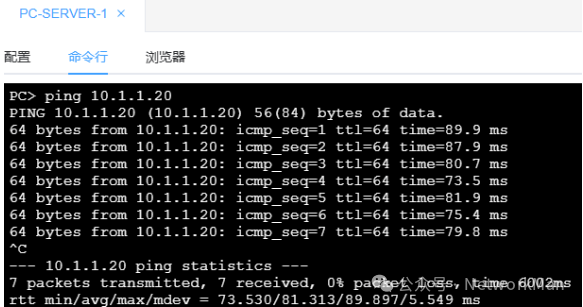
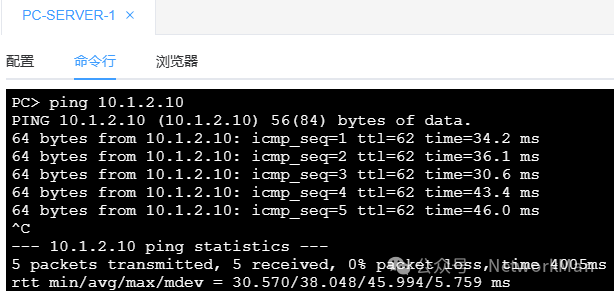
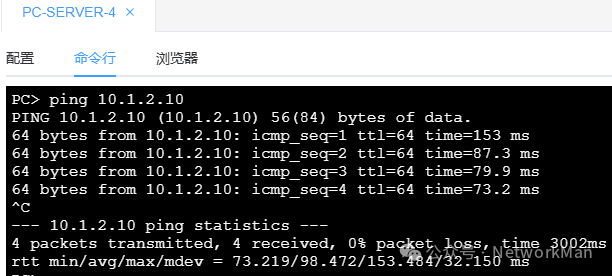
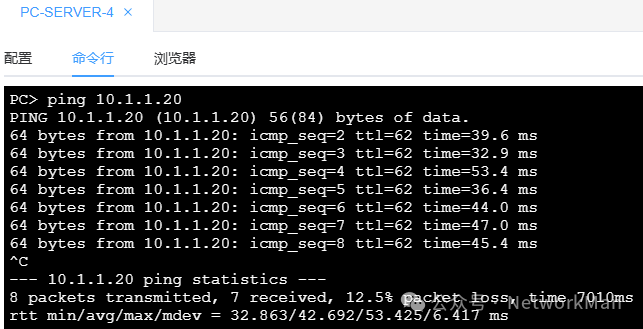
3. ensp_pro又一个BUG。
跨中心时,跨网段不能通信。但不要担心,原理没有问题,就是模拟器的bug。
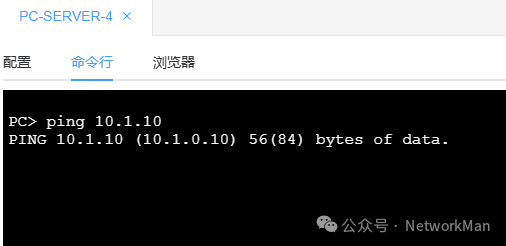
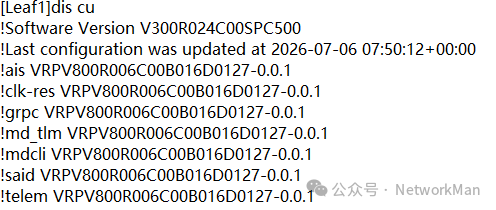
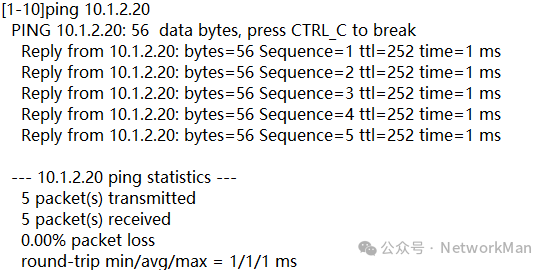
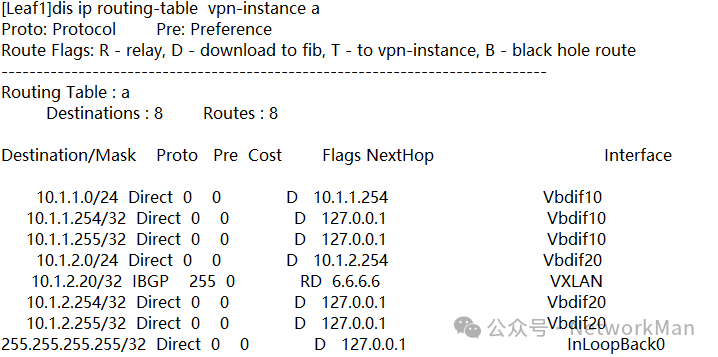
4. 为了验证这个BUG我使用真机进行了测试
真机的版本信息:
真机的ping测试结果:
真机的arp:
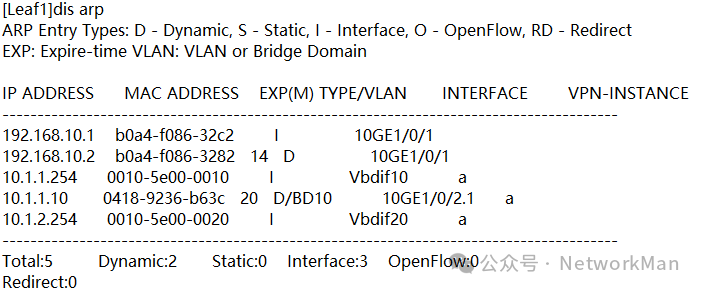
真机的路由:

DAMO开发者矩阵,由阿里巴巴达摩院和中国互联网协会联合发起,致力于探讨最前沿的技术趋势与应用成果,搭建高质量的交流与分享平台,推动技术创新与产业应用链接,围绕“人工智能与新型计算”构建开放共享的开发者生态。
更多推荐

 13
13 0
0- 0


 已为社区贡献1条内容

所有评论(0)