MP交换机双链路链型堆叠VST+堆叠分裂检测配置
一 用户需求
实现Device0、Device1形成链形堆叠系统,其中Device0成为主控设备。并且配置MAD LACP以及MAD BFD堆叠分裂检测配置
二 组网拓扑
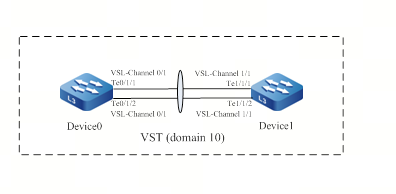
三 配置步骤
3.1 Device0设备配置
#在Device0上配置虚拟交换成员设备编号为0,并配置域编号为10,优先级为255。
Device0#configure terminal
Device0(config)#switch virtual member 0
Do you want to modify member id(Yes|No)?y
% Member ID 0 config will take effect only after the exec command 'switch mode virtual' is issued
Device0(config-vst-member-0)#domain 10
% Domain ID 10 config will take effect only after the exec command 'switch mode virtual' is issued
Device0(config-vst-member-0)#priority 255
Device0(config-vst-member-0)#exit
#在Device0上创建虚拟交换链路接口1,并将端口tengigabitethernet1/1和tengigabitethernet1/2加入虚拟交换链路接口1。
Device0(config)#vsl-channel 1
Device0(config-vsl-channel-1)#exit
Device0(config)#interface tengigabitethernet 1/1-1/2
Device0(config-if-range)#vsl-channel 1 mode on
Device0(config-if-range)#exit
#在Device0上保存配置。
Device0#write
Are you sure to overwrite /flash/startup (Yes|No)?y
Building Configuration...done
Write to startup file ... OK
Write to mode file... OK
3.2 Device1设备配置
#在Device1上配置虚拟交换成员设备编号为1,并配置域编号为10,优先级为200。
Device1#configure terminal
Device1(config)#switch virtual member 1
Do you want to modify member id(Yes|No)?y
% Member ID 1 config will take effect only after the exec command 'switch mode virtual' is issued
Device1(config-vst-member-1)#domain 10
% Domain ID 10 config will take effect only after the exec command 'switch mode virtual' is issued
Device1(config-vst-member-1)#priority 200
Device1(config-vst-member-1)#exit
#在Device1上创建虚拟交换链路接口1,并将端口tengigabitethernet1/1和tengigabitethernet1/2加入虚拟交换链路接口1。
Device1(config)#vsl-channel 1
Device1(config-vsl-channel-1)#exit
Device1(config)#interface tengigabitethernet 1/1-1/2
Device1(config-if-range)#vsl-channel 1 mode on
Device1(config-if-range)#exit
#在Device1上保存配置。
Device1#write
Are you sure to overwrite /flash/startup (Yes|No)?y
Building Configuration...done
Write to startup file ... OK
Write to mode file... OK
3.3 Device0和Device1设备切换为堆叠模式
#配置Device0运行模式为堆叠模式。
Device0#switch mode virtual
This command will convert all interface names to naming convention “interface-type member-number/slot/interface” ,
Please make sure to save current configuration.Do you want to proceed? (yes|no)?y
Converting interface names Building configuration…
Copying the startup configuration to backup file named “startup-backupalone”…
Please wait…system reloading is in progress!
Ok
Reset system!
Jul 30 2014 17:36:14: %SYS-5-RELOAD: Reload requested
#配置Device1运行模式为堆叠模式。
Device1#switch mode virtual
This command will convert all interface names to naming convention “interface-type member-number/slot/interface” ,
Please make sure to save current configuration.Do you want to proceed? (yes|no)?y
Converting interface names Building configuration…
Copying the startup configuration to backup file named “startup-backupalone”…
Please wait…system reloading is in progress!
Ok
Reset system!
Jul 30 2014 17:36:20: %SYS-5-RELOAD: Reload requested
3.4 测试最终结果状态
#在Device0上查看,已经形成链形堆叠系统,且Device0为主控设备。
Device0#show switch virtual
Codes: L - local-device,I - isolate-device
Virtual Switch Mode : VIRTUAL
Virtual Switch DomainId : 10
Virtual Switch mac-address : 0001.7a6a.001b
--------------- VST MEMBER INFORMATION ------------------
CODE MemberID Role Pri LocalVsl RemoteVsl
---- -------- ------ ---- --------------- ---------------
L 0 Master 255 vsl-channel 0/1 vsl-channel 1/1
1 Member 200 vsl-channel 1/1 vsl-channel 0/1
四 MAD LACP堆叠分裂检测配置
4.1 两台堆叠设备MAD LACP配置
#在Device0上创建VLAN2,并创建动态汇聚组1,配置汇聚组1链路类型为Trunk,允许 VLAN 2的业务通过。
Device0#configure terminal
Device0(config)#vlan 2
Device0(config-vlan2)#exit
Device0(config)#link-aggregation 1 mode lacp
Device0(config)#link-aggregation 1
Device0(config-link-aggregation1)#switchport mode trunk
Device0(config-link-aggregation1)#switchport trunk allowed vlan add 2
Device0(config-link-aggregation1)#exit
#在Device0上将端口gigabitethernet0/0/1,gigabitethernet1/0/1加入汇聚组1。
Device0(config)#interface gigabitethernet 0/0/1,1/0/1
Device0(config-if-range)#link-aggregation 1 active
Device0(config-if-range)#exit
#在Device0的汇聚组1上使能MAD LACP功能。
Device0(config)#link-aggregation 1
Device0(config-link-aggregation1)#mad enable
Device0(config-link-aggregation1)#exit
4.2 接入交换机动态链路聚合配置
#在Device2创建VLAN2,并创建动态汇聚组1,配置汇聚组1链路类型为Trunk,允许 VLAN2的业务通过。
Device2#configure terminal
Device2(config)#vlan 2
Device2(config-vlan2)#exit
Device2(config)#link-aggregation 1 mode lacp
Device2(config)#link-aggregation 1
Device2(config-link-aggregation1)#switchport mode trunk
Device2(config-link-aggregation1)#switchport trunk allowed vlan add 2
Device2(config-link-aggregation1)#exit
#在Device2上将端口gigabitethernet0/1,gigabitethernet0/2加入汇聚组1。
Device2(config)#interface gigabitethernet 0/1,0/2
Device2(config-if-range)#link-aggregation 1 active
Device2(config-if-range)#exit
五 MAD BFD堆叠分裂检测配置
5.1 两台堆叠设备MAD BFD配置
#在Device0上创建VLAN2,以及VLAN2接口。
Device0#configure terminal
Device0(config)#vlan 2
Device0(config-vlan2)#exit
Device0(config)#interface vlan 2
Device0(config-if-vlan2)#exit
#在Device0的VLAN 2接口上使能MAD BFD功能,并配置所有成员编号对应设备的MAD IP地址。
Device0(config)#interface vlan 2
Device0(config-if-vlan2)#mad bfd enable
Device0(config-if-vlan2)#mad member 0 ip address 192.168.1.1 255.255.0.0
Device0(config-if-vlan2)#mad member 1 ip address 192.168.1.2 255.255.0.0
Device0(config-if-vlan2)#exit
#在Device0上配置端口gigabitethernet0/0/1,gigabitethernet1/0/1的链路类型为Trunk,并且加入MAD BFD的检测VLAN。
Device0(config)#interface gigabitethernet 0/0/1,1/0/1
Device0(config-if-range)#switchport mode trunk
Device0(config-if-range)#switchport trunk allowed vlan add 2
Device0(config-if-range)#exit
#在Device0上关闭端口gigabitethernet0/0/1,gigabitethernet1/0/1的生成树功能。
Device0(config)#interface gigabitethernet 0/0/1,1/0/1
Device0(config-if-range)#no spanning-tree enable
Device0(config-if-range)#exit
5.2 接入交换机配置
#在Device2上创建VLAN2,并配置端口gigabitethernet0/1,gigabitethernet0/2的链路类型为Trunk,允许 VLAN 2的业务通过。
Device2(config)#vlan 2
Device2(config-vlan2)#exit
Device2(config)#interface gigabitethernet 0/1,0/2
Device2(config-if-range)#switchport mode trunk
Device2(config-if-range)#switchport trunk allowed vlan add 2
Device2(config-if-range)#exit
#在Device2上关闭端口gigabitethernet0/1,gigabitethernet0/2的生成树功能。
Device2(config)#interface gigabitethernet 0/1,0/2
Device2(config-if-range)#no spanning-tree enable
Device2(config-if-range)#exit
六 VST堆叠与堆叠分裂检测相关状态命令查看
show switch virtual //显示虚拟交换域的基础信息
show switch virtual local config //显示本地虚拟交换成员设备的基础配置信息
show switch virtual local current //显示本地虚拟交换成员设备的基础运行信息
show switch virtual member member-id [ config | current ] //显示虚拟交换成员设备的基础信息
show switch virtual topo //显示本地虚拟交换成员设备到虚拟交换域中其他虚拟交换成员设备的转发路径信息
show switch vsl-channel [vsl-channel-id ] //显示虚拟交换域中虚拟交换链路接口的信息
show vslp { lmp | rrp } //显示虚拟交换域中LMP/RRP协议的参数信息
show mad bfd 查看设备的MAD BFD信息
show mad lacp //查看设备的MAD LACP信息
show mad status //查看设备的MAD LACP信息。#当Device1因虚拟交换链路接口故障从堆叠系统分裂出去后,以Device0为主控设备的堆叠系统的MAD状态为Active状态,以Device1为主控设备的堆叠系统的MAD状态为Recovery状态。

DAMO开发者矩阵,由阿里巴巴达摩院和中国互联网协会联合发起,致力于探讨最前沿的技术趋势与应用成果,搭建高质量的交流与分享平台,推动技术创新与产业应用链接,围绕“人工智能与新型计算”构建开放共享的开发者生态。
更多推荐
 6
6 0
0- 0


 已为社区贡献11条内容

所有评论(0)