ROS2-10章:机器人的控制多节点启动文件Launch-解决小海龟无法跟随后退动作
目录
1.1.1 XML 格式 (test_turtlesim_launch.xml) 4
1.1.2 YAML 格式 (test_turtlesim_launch.yaml) 4
2.2 修改test_turtlesim_launch.py代码... 6
一、Launch文件简介
在ROS2中,Launch文件是管理多节点、参数配置和系统启动的核心工具。与ROS1的XML格式不同,ROS2推荐使用Python编写Launch文件,这提供了极大的灵活性(如条件判断、循环、动态参数生成等)。
1.1. Launch文件基本结构
ROS2的Launch文件本质上是一个Python脚本,需要返回一个 LaunchDescription 对象。目前使用于描述系统启动时候的配置,控制管理整个ros2程序的启动。在Launch文件可以设置要运行的节点、什么时候运行、配置节点传递那些参数。还负责监控启动进程的状态,主要包括节点和参数两大部分:
节点定义了要启动的节点,节点名称、报名、执行文件路径等信息;
参数用于设置节点的参数,可以是命令行参数、ros2服务器参数、私有参数。
ros2提供了Python、XML、YAML 三种格式的Launch文件规范。
python格式的Laubch文件,示例代码如下(test_turtlesim_launch.py)
|
# turtlesim_mimic.launch.py from launch import LaunchDescription # 导入Launch描述符容器 from launch_ros.actions import Node # 导入ROS2节点启动动作 def generate_launch_description(): #固定入口函数,ros2 launch 会自动调用它 return LaunchDescription([ # 返回一个包含所有启动项的列表 # 节点1: turtlesim1 仿真器 Node( package='turtlesim', # 节点所属的功能包名 namespace='turtlesim1', # 核心:命名空间隔离 executable='turtlesim_node', # 可执行文件名(对应 CMakeLists.txt 中 add_executable 的名称,编译该文件后生成的运行文件名称) name='sim' # 节点在图中的逻辑名称 ), # 节点2: turtlesim2 仿真器 Node( package='turtlesim', namespace='turtlesim2', executable='turtlesim_node', name='sim' ), # 节点3: mimic 节点(让 turtlesim2 跟随 turtlesim1) Node( package='turtlesim', executable='mimic', name='mimic', remappings=[ ('/input/pose', '/turtlesim1/turtle1/pose'), # 第1步:偷看 ('/output/cmd_vel', '/turtlesim2/turtle1/cmd_vel'), # 第2步:指挥 ] ), ]) |
||
注意事项:
Remapping 工作原理图解:逻辑: 读取 pose → 计算误差 → 输出 cmd_vel ①:发布: /output/cmd_vel ──remap──▶ /turtlesim2/turtle1/cmd_vel ②:订阅: /input/pose ──remap──▶ /turtlesim1/turtle1/pose; |
1.1. Launch文件3中代码示例
上文已经输出了Python示例代码,同样的功能代码如下示例XML、YAML;
1.1.1 XML 格式 (test_turtlesim_launch.xml)
XML 格式的结构非常直观,使用标签(Tags)来表示节点和重映射关系。
|
<launch> <!-- 节点1: 第一只小海龟 --> <node pkg="turtlesim" exec="turtlesim_node" name="sim" namespace="turtlesim1" output="screen" /> <!-- 节点2: 第二只小海龟 --> <node pkg="turtlesim" exec="turtlesim_node" name="sim" namespace="turtlesim2" output="screen" /> <!-- 节点3: mimic 跟随节点 --> <node pkg="turtlesim" exec="mimic" name="mimic" output="screen"> <!-- 话题重映射 --> <remap from="/input/pose" to="/turtlesim1/turtle1/pose" /> <remap from="/output/cmd_vel" to="/turtlesim2/turtle1/cmd_vel" /> </node> </launch> |
1.1.2 YAML 格式 (test_turtlesim_launch.yaml)
YAML 格式通过缩进来表示层级关系,代码看起来更简洁,但可读性因人而异。
|
launch: # 节点1: 第一只小海龟 - node: pkg: turtlesim exec: turtlesim_node name: sim namespace: turtlesim1 output: screen # 节点2: 第二只小海龟 - node: pkg: turtlesim exec: turtlesim_node name: sim namespace: turtlesim2 output: screen # 节点3: mimic 跟随节点 - node: pkg: turtlesim exec: mimic name: mimic output: screen # 话题重映射 remap: - from: /input/pose to: /turtlesim1/turtle1/pose - from: /output/cmd_vel to: /turtlesim2/turtle1/cmd_vel |
二、Launch文件的运行
在test_turtlesim_launch的Launch文件中我们实现的功能是让小海龟2跟随小海龟1移动。如下代码我们使用Python代码并且添加一个控制功能,通过命令行参数动态的控制是否启动mimic节点,从而控制是否启动小海龟2跟随小海龟1 运动;
2.1 创建test_launch功能包
在 ~/ros2_ws/src路径下创一个test_launch功能包
|
root@LHAYR:~/ros2_ws# cd src/ #第一步:创建功能包 root@LHAYR:~/ros2_ws/src# ros2 pkg create --build-type ament_python test_launch #第二步:创建 launch 目录 root@LHAYR:~/ros2_ws/src/test_launch# mkdir -p ~/ros2_ws/src/test_launch/launch 第三步:创建三个 launch 文件(进入cd ~/ros2_ws/src/test_launch/launch) root@LHAYR:~/ros2_ws/src/test_launch# cd ~/ros2_ws/src/test_launch/launch root@LHAYR:~/ros2_ws/src/test_launch/launch# touch test_turtlesim_launch.py root@LHAYR:~/ros2_ws/src/test_launch/launch# 第四步:打开 vs code编译器 root@LHAYR:~/ros2_ws/src/test_launch# code . |
2.2 修改test_turtlesim_launch.py代码
test_turtlesim_launch.py 代码如下,
|
from launch import LaunchDescription from launch.actions import DeclareLaunchArgument from launch.conditions import IfCondition from launch.substitutions import LaunchConfiguration from launch_ros.actions import Node def generate_launch_description(): # 1. 声明一个名为 'start_mimic' 的启动参数 # default_value='true' 表示如果不传参,默认启动 mimic 节点 start_mimic_arg = DeclareLaunchArgument( 'start_mimic', default_value='true', description='Whether to start the mimic node' ) # 2. 定义 turtlesim 节点(这两个节点始终启动,不受参数影响) turtle1_node = Node( package='turtlesim', namespace='turtlesim1', executable='turtlesim_node', name='sim' ) turtle2_node = Node( package='turtlesim', namespace='turtlesim2', executable='turtlesim_node', name='sim' ) # 3. 定义 mimic 节点,并加上 condition=IfCondition(...) mimic_node = Node( package='turtlesim', executable='mimic', name='mimic', remappings=[ ('/input/pose', '/turtlesim1/turtle1/pose'), ('/output/cmd_vel', '/turtlesim2/turtle1/cmd_vel'), ], # 核心:只有当 start_mimic 参数为 True 时,这个节点才会被启动 condition=IfCondition(LaunchConfiguration('start_mimic')) ) return LaunchDescription([ start_mimic_arg, turtle1_node, turtle2_node, mimic_node, ]) |
|
场景 1:启动所有节点(默认行为) 你不传任何参数,start_mimic会使用默认值true,两只小海龟、mimic节点都会启动: 指令:ros2 launch <your_package_name> test_turtlesim_launch.py |
|
场景 2:只启动两只小海龟,不启动 mimic 在命令行末尾加上 start_mimic:=false,mimic 节点就会被跳过: 指令:ros2 launch <your_package_name> test_turtlesim_launch.py start_mimic:=false |
2.2 修改setup.py代码
在setup.py代码如下,
|
import os from glob import glob from setuptools import find_packages, setup package_name = 'test_launch' setup( name=package_name, version='0.0.0', packages=find_packages(exclude=['test']), data_files=[ ('share/ament_index/resource_index/packages', ['resource/' + package_name]), ('share/' + package_name, ['package.xml']), (os.path.join('share', package_name, 'launch'), glob(os.path.join('launch', '*'))), ], install_requires=['setuptools'], zip_safe=True, maintainer='root', maintainer_email='root@todo.todo', description='TODO: Package description', license='TODO: License declaration', extras_require={ 'test': [ 'pytest', ], }, entry_points={ 'console_scripts': [ ], }, ) |
|
第一步:在顶部加两行导入 import os from glob import glob from[L1] setuptools import find_packages, setup |
|
第二步:只修改 data_files 部分 data_files=[ ('share/ament_index/resource_index/packages', ['resource/' + package_name]), ('share/' + package_name, ['package.xml']), (os.path.join('share', package_name, 'launch'), glob(os.path.join('launch', '*'))), ], |
2.3 编译,加载,运行
先回到cd ~/ros2_ws中
|
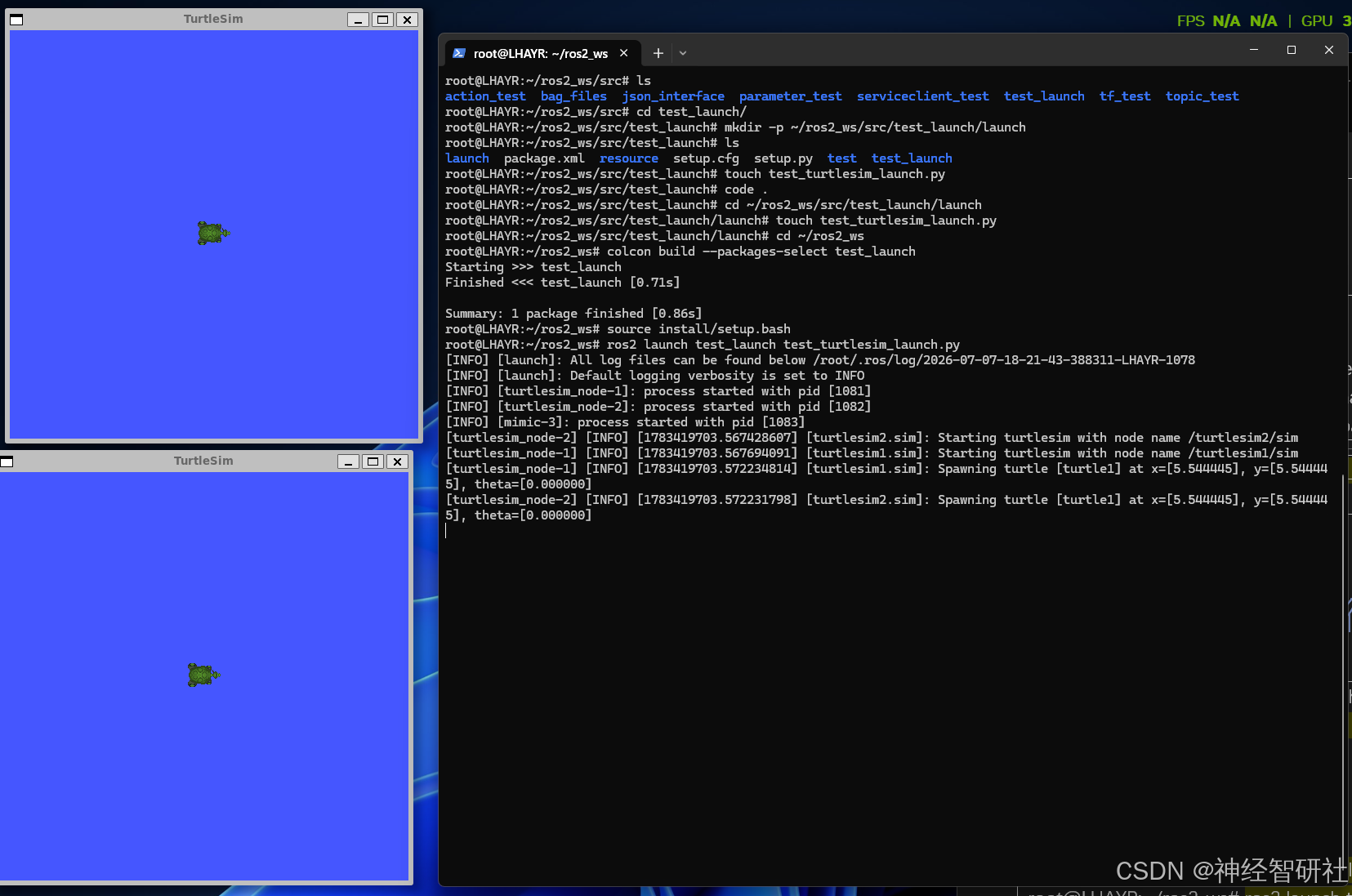
root@LHAYR:~/ros2_ws/src/test_launch/launch# cd ~/ros2_ws root@LHAYR:~/ros2_ws# colcon build --packages-select test_launch Starting >>> test_launch Finished <<< test_launch [0.71s] Summary: 1 package finished [0.86s] root@LHAYR:~/ros2_ws# source install/setup.bash root@LHAYR:~/ros2_ws# ros2 launch test_launch test_turtlesim_launch.py [INFO] [launch]: All log files can be found below /root/.ros/log/2026-07-07-18-21-43-388311-LHAYR-1078 [INFO] [launch]: Default logging verbosity is set to INFO [INFO] [turtlesim_node-1]: process started with pid [1081] [INFO] [turtlesim_node-2]: process started with pid [1082] [INFO] [mimic-3]: process started with pid [1083] [turtlesim_node-2] [INFO] [1783419703.567428607] [turtlesim2.sim]: Starting turtlesim with node name /turtlesim2/sim [turtlesim_node-1] [INFO] [1783419703.567694091] [turtlesim1.sim]: Starting turtlesim with node name /turtlesim1/sim [turtlesim_node-1] [INFO] [1783419703.572234814] [turtlesim1.sim]: Spawning turtle [turtle1] at x=[5.544445], y=[5.544445], theta=[0.000000] [turtlesim_node-2] [INFO] [1783419703.572231798] [turtlesim2.sim]: Spawning turtle [turtle1] at x=[5.544445], y=[5.544445], theta=[0.000000] |
|
( 运行指令(默认启动所有节点)) 运行结果:ros2 launch test_launch test_turtlesim_launch.py
|
2.4 验证小海龟2不跟随运动
|
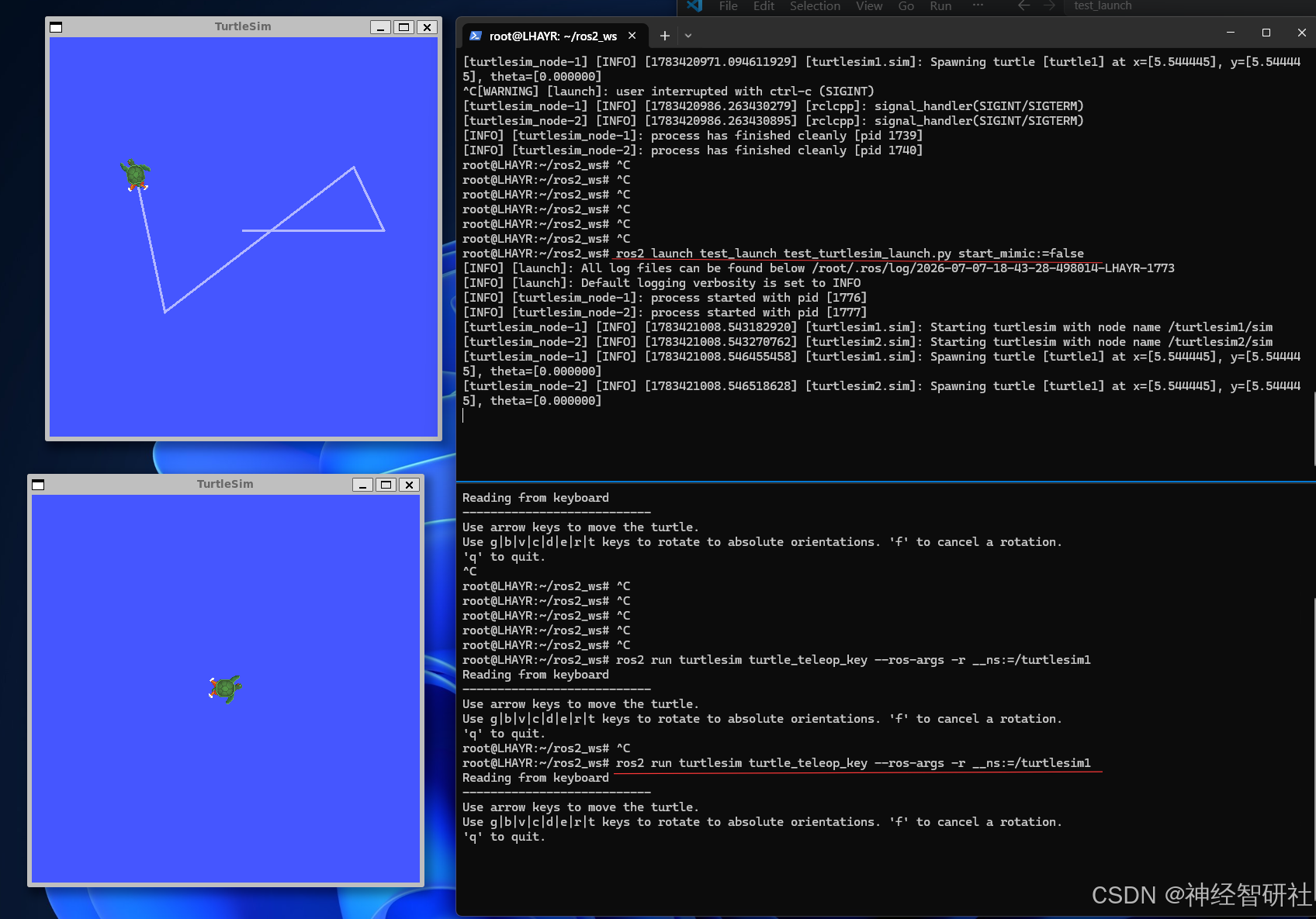
终端1:Ctrl+C关闭上述运行程序 运行指令(通过命令行参数动态控制)(海龟 1,海龟 2 就不动了)。 ros2 launch test_launch test_turtlesim_launch.py start_mimic:=false
终端2:运行键盘控制指令,仅控制小海龟1
|
||||
|
|
2.5 验证小海龟2跟随运动
|
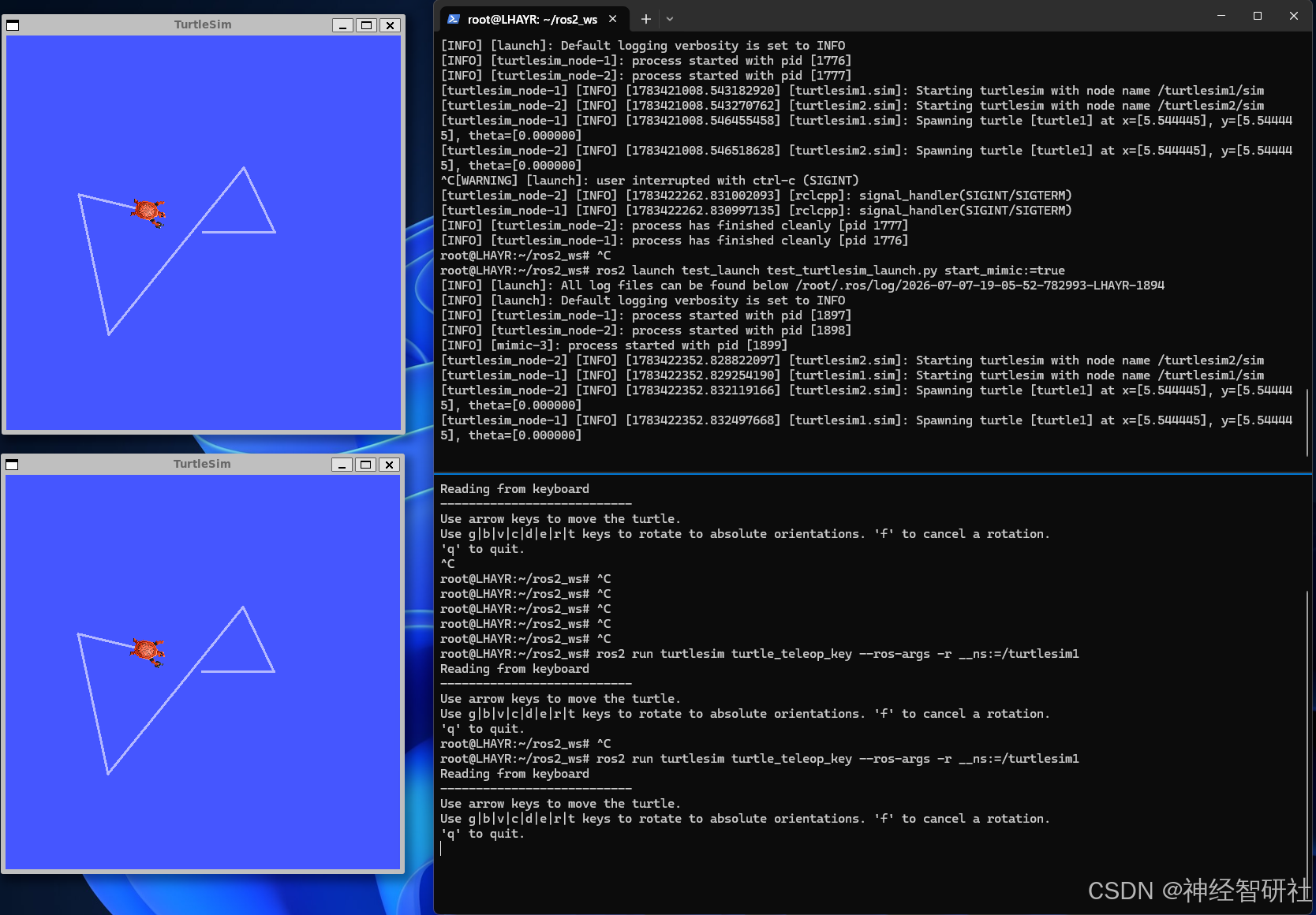
终端1:Ctrl+C关闭上述运行程序 运行指令(通过命令行参数动态控制)(海龟 1,海龟 2 就不动了)。 ros2 launch test_launch test_turtlesim_launch.py start_mimic:=true
终端2:直接控制无需重新运行
|
||||
|
|
第三章 功能包中添加Launch文件
3.1 进入创建目录
进入要创建Launch文件的功能包,先创建一个launch文件夹,再进入这个launch文件夹里面,创建一个launch文件(.py 这里示例都用python编写);
|
root@LHAYR:~/ros2_ws# cd src root@LHAYR:~/ros2_ws/src# cd test_launch root@LHAYR:~/ros2_ws/src/ test_launch # mkdir -p launch root@LHAYR:~/ros2_ws/src/ test_launch #cd launch root@LHAYR:~/ros2_ws/src/ test_launch/launch # toudh test_launch.py |
备注:这里沿用第二章的创建过程以及修改setup.py 程序;
3.2 细说示例程序
启动运行,加载环境变量,启动launch文件
|
root@LHAYR:~/ros2_ws# source install/setup.bash root@LHAYR:~/ros2_ws# ros2 launch test_launch launch test_turtlesim_launch.py file 'launch' was not found in the share directory of package 'test_launch' which is at '/root/ros2_ws/install/test_launch/share/test_launch' root@LHAYR:~/ros2_ws# ros2 launch test_launch test_turtlesim_launch.py [INFO] [launch]: All log files can be found below /root/.ros/log/2026-07-08-12-38-52-500639-LHAYR-2090 [INFO] [launch]: Default logging verbosity is set to INFO [INFO] [turtlesim_node-1]: process started with pid [2093] [INFO] [turtlesim_node-2]: process started with pid [2094] [INFO] [mimic-3]: process started with pid [2095] [turtlesim_node-1] [INFO] [1783485532.873146306] [turtlesim1.sim]: Starting turtlesim with node name /turtlesim1/sim [turtlesim_node-2] [INFO] [1783485532.873437514] [turtlesim2.sim]: Starting turtlesim with node name /turtlesim2/sim [turtlesim_node-1] [INFO] [1783485532.876884504] [turtlesim1.sim]: Spawning turtle [turtle1] at x=[5.544445], y=[5.544445], theta=[0.000000] [turtlesim_node-2] [INFO] [1783485532.876984339] [turtlesim2.sim]: Spawning turtle [turtle1] at x=[5.544445], y=[5.544445], theta=[0.000000] |
终端2 输入话题查看指令,能看到运行中的话题ros2 topic list -t
|
root@LHAYR:~/ros2_ws# ros2 topic list -t /parameter_events [rcl_interfaces/msg/ParameterEvent] /rosout [rcl_interfaces/msg/Log] root@LHAYR:~/ros2_ws# ros2 topic list /parameter_events /rosout /turtlesim1/turtle1/cmd_vel /turtlesim1/turtle1/color_sensor /turtlesim1/turtle1/pose /turtlesim2/turtle1/cmd_vel /turtlesim2/turtle1/color_sensor /turtlesim2/turtle1/pose root@LHAYR:~/ros2_ws# |
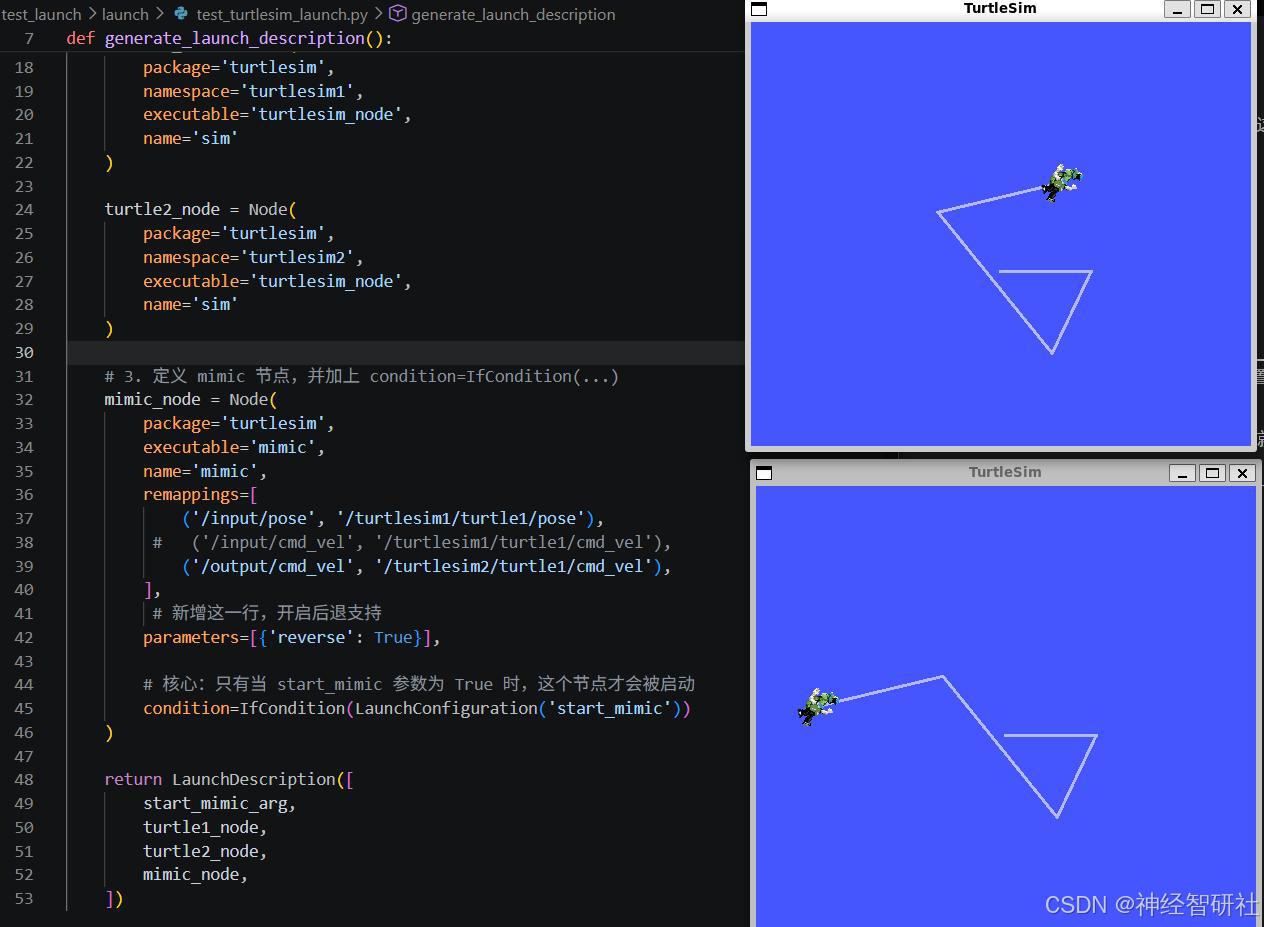
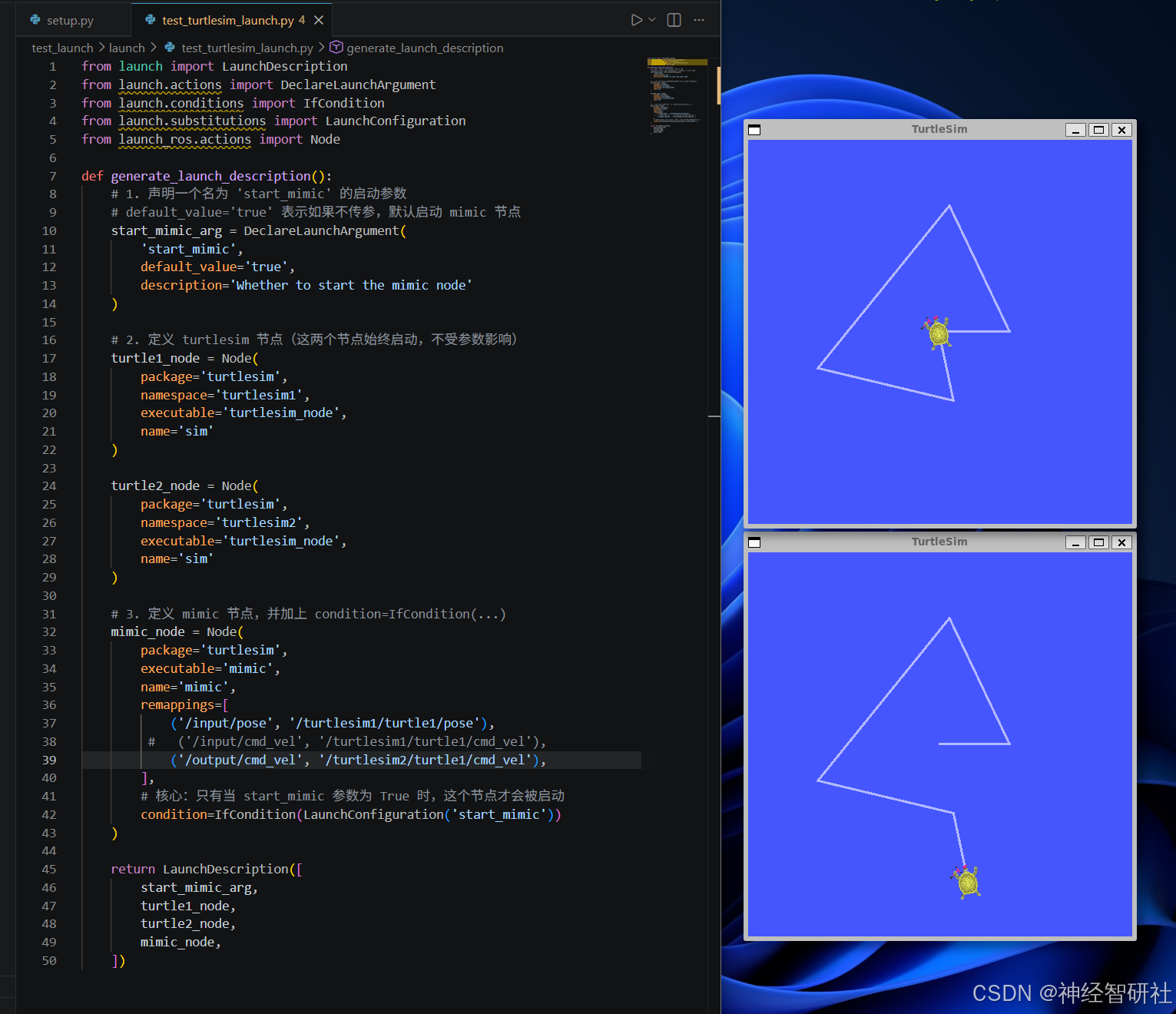
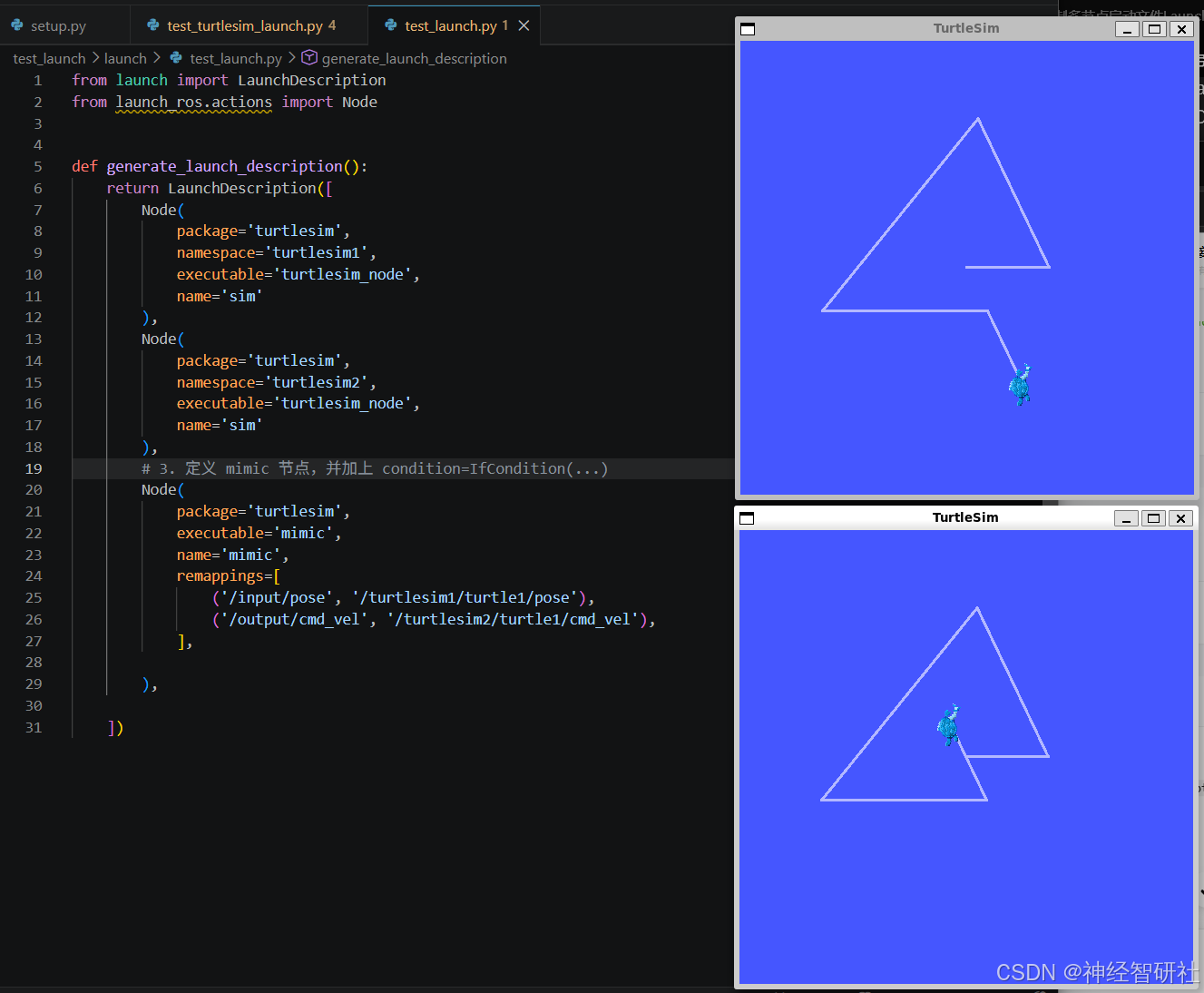
经过测试,上述小海龟2好跟随小海龟1号,是由bug的。就是控制小海龟1号后退,小海龟2号不退反而前进;原因是再launch文件 test_turtlesim_launch.py 代码程序里mimic的节点 ('/input/pose', '/turtlesim1/turtle1/pose'),
|
remappings=[ # ('/input/pose', '/turtlesim1/turtle1/pose'), ('/input/cmd_vel', '/turtlesim1/turtle1/cmd_vel'), ('/output/cmd_vel', '/turtlesim2/turtle1/cmd_vel'), ], # 核心:只有当 start_mimic 参数为 True 时,这个节点才会被启动 condition=IfCondition(LaunchConfiguration('start_mimic')) ) |
||||||
|
||||||
|
“不能后退” 的问题('/input/pose', '/turtlesim1/turtle1/pose') 意思是:让 2 号龟看 1 号的位置,自己算着追过去; 想要完全同步(包括后退),必须改成:('/input/cmd_vel', '/turtlesim1/turtle1/cmd_vel') 这样就是: 1 号怎么动,2 号立刻一模一样动。 |
第四章 小海龟无法跟随后退动作
4.1 解决小海龟无法后退跟随的问题
这是一个非常敏锐的观察!小海龟 2 无法跟随小海龟 1 的后退动作,并不是因为你的 Launch 文件配置写错了,而是因为官方的 mimic 节点代码本身就不支持这个参数。
1. 为什么 parameters=[{'reverse': True}] 不生效?
在 ROS2 中,通过 Launch 文件传递 parameters 时,目标节点必须在自己的代码里**声明(declare)并读取(get)**这个参数,它才会生效。
官方的 turtlesim/mimic 节点是一个非常基础的演示程序,它的源码里只读取了输入/输出话题,根本没有声明和读取 reverse 这个参数。因此,即使你在 Launch 文件里强行传给它 reverse: True,它也会直接忽略,依然按照默认的“正向跟随”逻辑运行。
4.2完整可用节点
完整可用节点:test_launch/test_launch/mimic_follower.py:
|
import rclpy from rclpy.node import Node from turtlesim.msg import Pose from geometry_msgs.msg import Twist import math class MimicFollower(Node): def __init__(self): super().__init__("mimic_follower") self.pose1 = None self.pose2 = None # 订阅两只乌龟的位姿 self.sub_pose1 = self.create_subscription( Pose, "/turtlesim1/turtle1/pose", self.cb_pose1, 10 ) self.sub_pose2 = self.create_subscription( Pose, "/turtlesim2/turtle1/pose", self.cb_pose2, 10 ) # 发布速度给 turtle2 self.pub_cmd = self.create_publisher( Twist, "/turtlesim2/turtle1/cmd_vel", 10 ) # 固定频率控制 self.timer = self.create_timer(0.01, self.control_loop) def cb_pose1(self, msg): self.pose1 = msg def cb_pose2(self, msg): self.pose2 = msg def control_loop(self): if self.pose1 is None or self.pose2 is None: return # 位置误差 dx = self.pose1.x - self.pose2.x dy = self.pose1.y - self.pose2.y dist = math.hypot(dx, dy) # 角度误差 + 最短路径归一化 target_angle = math.atan2(dy, dx) angle_err = target_angle - self.pose2.theta angle_err = math.atan2(math.sin(angle_err), math.cos(angle_err)) # P 控制器 twist = Twist() twist.linear.x = dist * 2.0 twist.angular.z = angle_err * 8.0 # 安全限幅 twist.linear.x = min(twist.linear.x, 2.0) twist.angular.z = max(min(twist.angular.z, 2.0), -2.0) self.pub_cmd.publish(twist) def main(args=None): rclpy.init(args=args) node = MimicFollower() rclpy.spin(node) node.destroy_node() rclpy.shutdown() if __name__ == "__main__": main() |
4.3.修改 setup.py 入口
|
entry_points={ 'console_scripts': [ 'mimic_follower = test_launch.mimic_follower:main', ], }, |
4.4 修改 launch 文件
|
from launch import LaunchDescription from launch.actions import DeclareLaunchArgument from launch.conditions import IfCondition from launch.substitutions import LaunchConfiguration from launch_ros.actions import Node def generate_launch_description(): start_mimic_arg = DeclareLaunchArgument( 'start_mimic', default_value='true', description='Whether to start mimic follower' ) turtle1 = Node( package='turtlesim', namespace='turtlesim1', executable='turtlesim_node', name='sim' ) turtle2 = Node( package='turtlesim', namespace='turtlesim2', executable='turtlesim_node', name='sim' ) mimic_node = Node( package='test_launch', executable='mimic_follower', name='mimic_follower', condition=IfCondition(LaunchConfiguration('start_mimic')) ) return LaunchDescription([ start_mimic_arg, turtle1, turtle2, mimic_node, ]) |
4.5 运行命令
|
cd ~/ros2_ws colcon build --packages-select test_launch source install/setup.bash ros2 launch test_launch test_turtlesim_launch.py |
|
键盘控制: ros2 run turtlesim turtle_teleop_key --ros-args -r __ns:=/turtlesim1 |

DAMO开发者矩阵,由阿里巴巴达摩院和中国互联网协会联合发起,致力于探讨最前沿的技术趋势与应用成果,搭建高质量的交流与分享平台,推动技术创新与产业应用链接,围绕“人工智能与新型计算”构建开放共享的开发者生态。
更多推荐



 2
2 0
0- 0


 已为社区贡献3条内容

所有评论(0)