基于扩展卡尔曼滤波器EKF的同步定位与地图构建SLAM算法,结合了里程计观测器,并使用 Aruco 标记进行定位和地图构建附matlab代码
✅作者简介:热爱科研的Matlab仿真开发者,擅长毕业设计辅导、数学建模、数据处理、算法改进、程序设计科研仿真。
🍎 往期回顾关注个人主页:完整代码获取 定制创新 论文复现私信
🍊个人信条:做科研,博学之、审问之、慎思之、明辨之、笃行之,是为:博学慎思,明辨笃行。
🔥 内容介绍
实现了基于扩展卡尔曼滤波器(EKF)的同步定位与地图构建(SLAM)算法,结合了里程计观测器,并使用 Aruco 标记进行定位和地图构建。以下是对代码的详细分析:
1. 类定义
-
ekf_slam_simu类:实现了 EKF - SLAM 算法的模拟版本。-
input_velocity:根据输入的速度和时间步长,预测机器人的状态和协方差。 -
input_measurements:根据测量到的地标中心和 ID,更新机器人的状态和协方差,包括添加新地标。 -
output_robot:输出机器人的当前状态和协方差。 -
output_landmarks:输出地标的 ID、位置和协方差。 -
state_t:存储机器人的估计状态向量,初始为[theta; state_t; y]。 -
Cov_t:估计状态的协方差矩阵。 -
state_t_pre和Cov_t_pre:预测的状态和协方差。 -
sigxy、sigth、siglm:分别为线速度、角速度和地标测量的协方差。 -
idx2num:从状态向量索引到地标 ID 的映射。 -
属性:
-
方法:
-
-
ekf_slam类:实现了 EKF - SLAM 算法的另一个版本,与ekf_slam_simu类似,但在一些计算细节上有所不同,例如input_measurements方法中计算Gz和Gx矩阵的部分。 -
odometry_observer类:里程计观测器,用于估计机器人的位姿和地标位置。-
odometry_observer:构造函数,初始化位姿和地标数组。 -
input_measurements:根据输入的测量数据、时间步长和速度,更新机器人位姿和地标位置。 -
output_state:输出机器人的位姿和检测到的地标的位置及 ID。 -
P_hat:机器人的位姿矩阵。 -
p_hat:存储每个地标位置的单元格数组。 -
gaink、gainl:增益参数。 -
iterate:迭代次数。 -
c_params:映射内部编号到外部 ID 的参数。 -
属性:
-
方法:
-
2. 主程序部分
-
初始化:
-
清除工作区变量并添加必要的路径,加载 Aruco 字典和相机参数。
-
加载数据集
data_test.mat。 -
初始化最大迭代次数
i_max、标记长度marker_length、机器人初始状态state和 EKF - SLAM 对象EKF。 -
初始化速度变量
forward_v和angular_v,以及存储数据的单元格数组data1。
-
-
循环部分:
-
在第一个子图中使用
draw_image函数绘制带有检测到的 Aruco 标记的图像。 -
在第二个子图中使用
draw_path函数绘制机器人的路径、估计状态以及地标的位置和协方差。 -
使用
Aruco_detector函数检测图像中的 Aruco 标记,获取地标中心landmark_centres和 IDmarker_nums。 -
调用
EKF.input_measurements方法,根据测量数据更新机器人的状态和协方差。 -
从数据集中读取图像
img和时间步长dt。 -
EKF 预测:调用
EKF.input_velocity方法,根据当前速度预测机器人的状态和协方差。 -
测量与更新:
-
输出状态:调用
EKF.output_robot和EKF.output_landmarks方法,获取机器人的状态、协方差以及地标的信息。 -
积分运动学:更新速度
forward_v和angular_v,并使用integrate_kinematics函数更新机器人的状态。 -
停止检测:使用
Stop_mark函数检测是否需要停止,若需要则增加停止计数num_stop。 -
绘图:
-
3. 关键功能说明
-
EKF - SLAM:通过预测和更新步骤,结合机器人的速度输入和地标的测量数据,不断估计机器人的位置和地图中的地标位置。预测步骤基于机器人的运动模型,更新步骤则利用地标测量来修正预测结果。
-
Aruco 检测:使用
Aruco_detector函数检测图像中的 Aruco 标记,为 EKF - SLAM 提供地标测量数据。 -
位姿估计与地图构建:里程计观测器
odometry_observer通过对检测到的地标进行处理,估计机器人的位姿和地标位置,与 EKF - SLAM 的结果相互补充,共同实现定位和地图构建功能。
总体而言,这段代码通过结合 EKF - SLAM 算法、Aruco 标记检测以及里程计观测,实现了一个完整的机器人定位与地图构建系统,并通过可视化展示了系统的运行结果。
⛳️ 运行结果
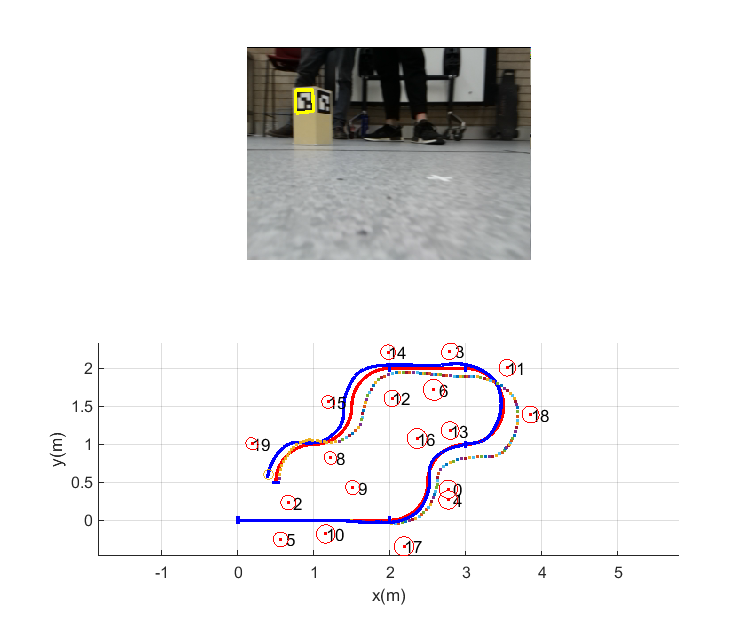
📣 部分代码
%PiBot MATLAB interface for PenguinPi robot
%
% A PiBot object provides methods to obtain status from, and control, a wireless
% PenguinPi robot.
%
% Methods::
% PiBot constructor
% char info in human readable form
% display display information about selfect
%
% Robot control:
% setVelocity set motor velocity
% stop stop all motors
% getCurrent get battery voltage
% getVoltage get battery current
% resetEncoder zero the hardware encoder counters
% resetPose zero the onboard pose estimator
%
% Camera:
% getImage get image from camera
%
% User interface:
% setLED set LEDS 2-4
% pulseLED pulse LEDS 2-4
% setLEDArray set the blue LED array
% getButton get user button status
% getDIP get value of DIP switch
% printfOLEDn display text to OLED display
% setScreen select OLED screen
%
% Localizer:
% getLocalizerPose get robot pose from overhead localizer
% getLocalizerImage get IR image from overhead localizer
% (c) 2019 Peter Corke
classdef PiBot < handle
properties(Access = public)
robot
localizer
groupNum
end
methods
function self = PiBot(robotURL, localizerURL, groupNum)
%PiBot.PiBot Construct a PiBot selfect
%
% PB = PiBot(IP) creates an object used for communications with the robot
% connected via the IP address which is given as a string in dot format.
%
% eg. pb = PiBot('10.0.0.20')
%
% PB = PiBot(IP, IP2, G) creates an object used for communications with the robot
% and the localizer. The robot's IP address is IP and the localizer's IP address
% is IP2. Both are given as strings in dot format. G is an integer representing
% the team's group number.
%
% Notes::
% - This is a handle class object.
%
% See also PiBot.setVelocity, PiBot.getImage.
assert(ischar(robotURL), 'Robot robot must be a character array')
v = regexp(robotURL, '^\d+\.\d+\.\d+\.\d+$');
assert(~isempty(v) && v==1, 'IP address is invalid, can only can contain digits and dots')
self.robot = "http://" + string(robotURL) + ":8080";
self.localizer = [];
if nargin == 3
assert(ischar(localizerURL), 'Localizer robot must be a character array')
self.localizer = "http://" + string(localizerrobot) + ":8080";
self.groupNum = groupNum;
elseif nargin ~= 1
error('must be 1 or 3 arguments')
end
end
function s = char(self)
% Link.cchar Convert to string
%
% s = PB.char() is a string showing robot parameters in a compact single line format.
%
% See also PiBot.display.
s = sprintf('PenguinPi robot at %s', self.robot);
if ~isempty(self.localizer)
s = strcat(s, ', with localizer at %s', self.localizer);
end
end
function display(self)
% PibBot.display Display parameters
%
% PB.display() displays the robot parameters in compact single line format.
%
% See also PiBot.char.
disp( char(self));
end
% function delete(self)
% end
function stat = setVelocity(self, varargin)
%PiBot.setVelocity Set the speeds of the motors
%
% PB.setVelocity(Vleft, Vright) sets the velocities of the two motors to
% the values Vleft and Vright respectively.
%
% PB.setVelocity(VEL, T) sets the speeds of the two motors to the values in
% the 2-vector VEL = [Vleft, Vright] and the motion runs for T seconds.
% Timing is done locally on the RPi.
%
% PB.setVelocity(VEL, T, ACC) as above but the speed ramps up and down at
% the end of the motion over ACC seconds. The constant velocity part of
% the motion lasts for T-ACC seconds, the total motion time is T+2*ACC
% seconds. This profile moves the same distance as a rectangular speed
% profile over T seconds.
%
% STAT = PB.setVelocity(...) as for any of the above call formats, but
% returns a structure that contains the encoder count and dead-reckoned
% pose at the end of the motion.
%
% Notes::
% - The motor speed is 10V encoders per second.
% - If T is given the total distance travelled is 10V*T encoders.
% - If ACC is also given the total distance travelled is 10V*(T-ACC)
% encoders.
%
% See also PiBot.stop.
tout = weboptions("Timeout",20);
if length(varargin{1}) == 1
% then (SA, SB) classic format
vel(1) = varargin{1}; vel(2) = varargin{2};
assert(all(isreal(vel)), 'arguments must be real');
vel = round(vel); % convert to int
vel = min(max(vel, -100), 100); % clip
json = webread(self.robot+"/robot/set/velocity", "value", vel);
elseif length(varargin{1}) == 2
% then (SPEED), (SPEED, T) or (SPEED, T, A)
vel = varargin{1};
assert(all(isreal(vel)), 'arguments must be real');
vel = round(vel); % convert to int
vel = min(max(vel, -100), 100); % clip
if length(varargin) == 1
json = webread(self.robot+"/robot/set/velocity", "value", vel, tout);
elseif length(varargin) >= 2
duration = varargin{2};
assert(duration > 0, 'duration must be positive');
assert(duration < 20, 'duration must be < network timeout');
if length(varargin) >= 3
accel = varargin{3};
assert(accel < duration/2, 'accel must be < accel/2');
json = webread(self.robot+"/robot/set/velocity", "value", vel, "time", duration, "acceleration", accel, tout);
else
json = webread(self.robot+"/robot/set/velocity", "value", vel, "time", duration, tout);
end
end
end
if nargout > 0
stat = jsondecode(json);
end
end
function stat = stop(self)
%PiBot.stop Stop all motors
%
% PB.stop() stops all motors.
%
% STAT = PB.stop() as above but returns a structure that contains the encoder
% count and dead-reckoned pose at the end of the motion.
%
% See also PiBot.setVelocity.
json = webread(self.robot+"/robot/stop");
if nargout > 0
stat = jsondecode(json);
end
end
function resetEncoder(self)
%PiBot.resetEncoder Stop all motors and reset encoders
%
% PB.resetEncoder() stop all motors and reset encoders.
%
% See also PiBot.stop, PiBot.setMotorSpeed.
webread(self.robot+"/robot/hw/reset");
end
function resetPose(self)
%PiBot.resetPose Reset the onboard pose estimator
%
% PB.resetPose() will zero the estimated state of the onboard
% pose estimator, x=y=theta=0
%
webread(self.robot+"/robot/pose/reset");
end
function v = getVoltage(self)
%PiBot.getVoltage Get battery voltage
%
% PB.getVoltage() is the battery voltage in volts.
%
% See also PiBot.getCurrent.
v = str2num( webread(self.robot+"/battery/get/voltage") ) /1000.0;
end
function c = getCurrent(self)
%PiBot.getCurrent Get battery current
%
% PB.getCurrent() is the battery voltage in amps.
%
% See also PiBot.getCurrent.
c = str2num( webread(self.robot+"/battery/get/current") ) /1000.0;
end
function setLED(self, i, s)
%PiBot.setLED Set yellow LED
%
% PB.setLED(num, state) sets the yellow LED num to the state.
%
% Notes::
% - LED number must in the range 2 to 4.
% - state is an integer (0 or 1), or a logical (false or true).
%
% See also PiBot.pulseLed.
assert(i>=2 && i<=4, 'invalid LED');
assert(s==0 || s==1, 'invalid state')
webread(self.robot+"/led/set/state", "id", i, "value", s);
end
function pulseLED(self, i, duration)
%PiBot.pulseLED Pulse yellow LED
%
% PB.pulseLED(num, time) pulses the yellow LED num to the on state
% for time (in seconds).
%
% Notes::
% - LED number must in the range 2 to 4.
% - pulse time is in the range 0 to 0.255 seconds.
%
% See also PiBot.pulseLed.
assert(i>=2 && i<=4, 'invalid LED');
assert(duration>0 && duration<=0.255, 'invalid duration')
webread(self.robot+"/led/set/count", "id", i, "value", duration*1000);
end
function d = getDIP(self)
%PiBot.getDIP Get value of DIP switch
%
% PB.getDIP() is the value of the DIP switch.
%
% Notes::
% - SW4 is the LSB
% - SW3 and SW4 are used by the onboard software
d = webread(self.robot+"/hat/dip/get");
end
function b = getButton(self)
%PiBot.getButton Get user button
%
% PB.getButton() is the number of times the rightmost button has been
% pushed since the last call to this function.
b = webread(self.robot+"/hat/button/get");
end
function setLEDArray(self, v)
%PiBot.setLEDArray sets the blue LED array
%
% PB.setLEDArray(v) sets the blue LED array on top of the robot to the
% 16-bit integer value v. Each bit represents an LED in the array. The
% LSB is the bottom right LED and number increasing upwards and to the
% left.
webread(self.robot+"/hat/ledarray/set", "value", v);
end
function printfOLED(self, varargin)
%PiBot.printfOLED write formatted text to OLED display
%
% PB.printfOLED(fmt, ...) has printf() like semantics and writes a
% string to the user text screen of the OLED display. The display is
% only 21x4 characters. New strings are written at the bottom and
% scroll up. Long lines are wrapped. Line feed (\n) starts a new
% line and form feed (\f) clears the screen. The display is automatically
% to the USER TEXT screen.
%
% eg.
% pb.printfOLED('hello world!\n');
% pb.printfOLED('the answer is %d\n', 42)
webread(self.robot+"/hat/screen/print", "value", sprintf(varargin{:}));
end
function setScreen(self, S)
%PiBot.setScreen select screen on OLED
%
% PB.setScreen(i) sets the OLED display to show information screen S. The OLED
% display can show a number of information screens and they can be selected
% using the leftmost button or this method where S is:
%
% 0 IP address
% 1 user text, see printfOLED
% 2 battery level
% 3 encoder values
% 4 controller values
% 5 system statistics
% 6 control loop timing data
% 7 error messages
% 8 last datagram received
webread(self.robot+"/hat/screen/set", "value", screen);
end
function img = getImage(self)
%PiBot.getImagee Get image from camera
%
% PB.getImage() is an RGB image captured from the front camera of the
% robot.
%
% See also PiBot.getCurrent.
img = webread(self.robot+"/camera/get");
end
end
end
% function im = getLocalizerImage(self)
% %PiBot.getLocalizerImage get overhead image from localizer
% %
% % IM = PiBot.getLocalizerImage() is the infra-red image captured
% % by the camera in the overhead localizer system.
% %
% % Notes::
% % - Requires that the object was initialized for the localizer
% % - The image is greyscale
% %
%
% if ~isempty(self.localizer)
% im = webread(self.localizer+"/camera/get", "group", self.groupNum);
% else
% im = [];
% end
% end
%
% function p = getLocalizerPose(self)
% %PiBot.getLocalizerPose get robot pose from localizer
% %
% % X = PiBot.getLocalizerPose() is the pose of the robot as a structure with
% % elements x, y and theta.
% %
% % Notes::
% % - Requires that the object was initialized for the localizer
% % - Requires that the robot is on the arena under the localizer
% %
%
% if ~isempty(self.localizer)
% p = jsondecode( webread(self.localizer+"/pose/get", "group", self.groupNum) );
% else
% p = [];
% end
% end
%
% function print_json(j1, j2)
% state1 = jsondecode(j1);
% state2 = jsondecode(j2);
% fprintf('Initial\n');
% state1.encoder
% state1.pose
% fprintf('Final\n');
% state2.encoder
% state2.pose
% end
🔗 参考文献
🍅更多免费数学建模和仿真教程关注领取

DAMO开发者矩阵,由阿里巴巴达摩院和中国互联网协会联合发起,致力于探讨最前沿的技术趋势与应用成果,搭建高质量的交流与分享平台,推动技术创新与产业应用链接,围绕“人工智能与新型计算”构建开放共享的开发者生态。
更多推荐
 7
7 0
0- 0


 已为社区贡献91条内容

所有评论(0)