大麦网爬虫演唱会数据爬取(含完整代码+代码复用流程)
一、需求背景
需要从大麦网爬虫,拉取一批未来2026年2月-3月的演唱会信息列表报备给航司。爬虫信息:演出名称,演出时间,演出城市. (PS:演出价格可自行轻微调整添加)
二、研发方案
|
目标拆解 |
|
一、系统整体架构
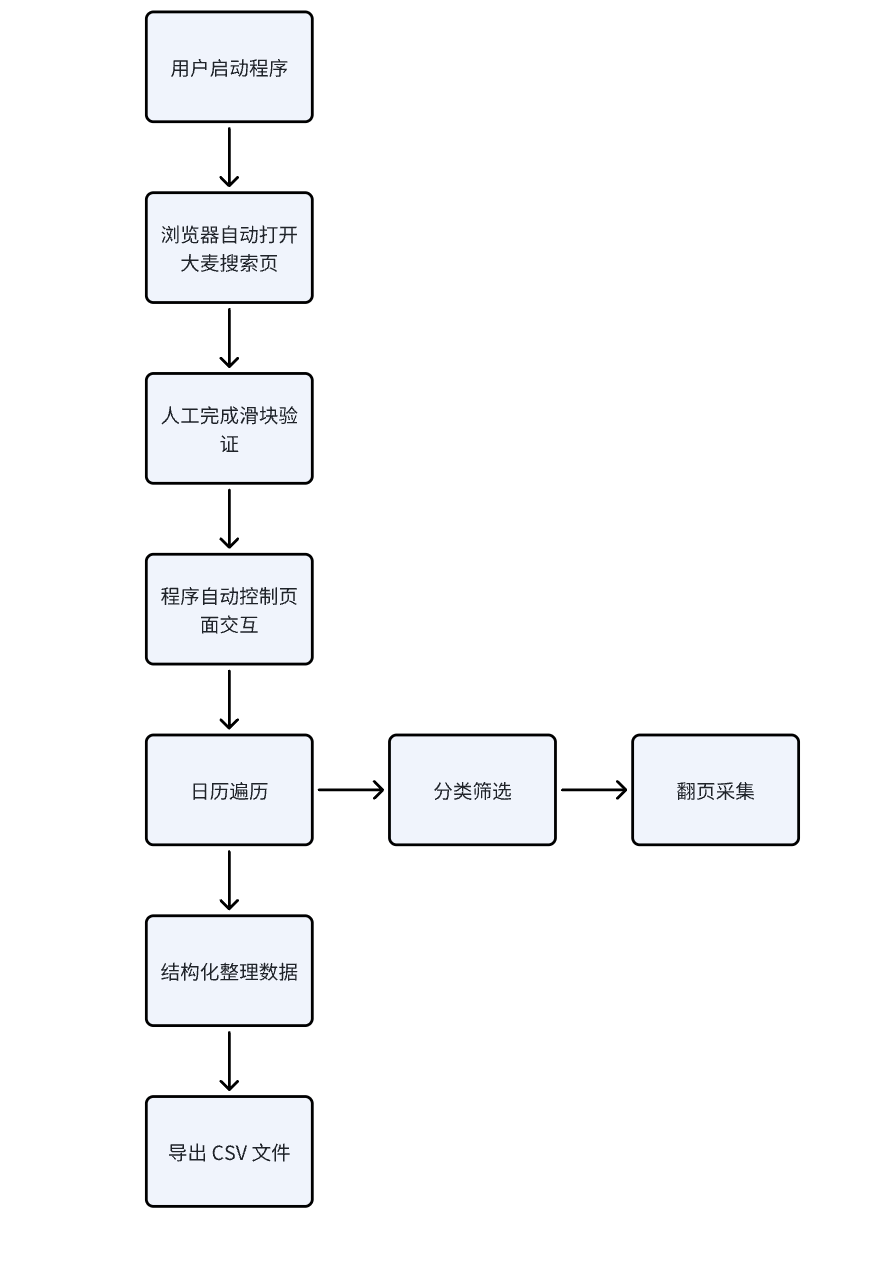
二、模块化函数设计
| 模块 | 功能 |
| open_calendar | 打开日历 |
| get_current_year_month | 获取当前年月 |
| is_exceed_end_month | 是否超过结束月 |
| get_clickable_days | 获取可点击日期 |
| get_day_number | 获取日期数字 |
| click_date | 选择日期 |
| click_next_month | 日历翻月 |
| crawl_current_page | 翻页采集 |
| wait_cards | 等待加载 |
三、核心实现思路
反爬与稳定性处理
-
使用真实 Chrome 浏览器运行
-
关闭自动化特征标识:
--disable-blink-features=AutomationControlled -
首次运行人工完成滑块验证
-
控制访问频率,增加随机等待时间,避免高频请求
日历自动遍历设计
大麦网采用分页日历结构,每月独立展示。核心策略:
-
初始定位到「返回今天」
-
获取当前年月
-
获取当月全部可点击日期
-
逐日点击
-
当月结束后翻至下一月
实现逻辑:
while 当前月份 ≤ 2026年3月:
    获取当月日期列表
    for 每一天:
        点击日期
        执行采集
    翻月
特殊处理:
-
自动跳过历史日期
-
自动终止超过 3 月 31 日的采集
-
识别 today / disabled 等特殊 DOM 状态
分类筛选机制
-
通过 XPath 精准定位分类按钮:
//span[contains(@class,'factor-content-item')] -
动态匹配:
categories = ["演唱会"] -
支持扩展至其他分类。
分页自动抓取策略
-
定位「下一页」按钮
-
判断可用状态
-
自动滚动并点击
-
循环直到末页
实现逻辑:
while 存在下一页:
    采集当前页
    点击下一页
数据解析与清洗
从卡片文本中拆解关键信息:
-
标题 → 演出名称
-
包含 “.” “周” → 时间字段
-
包含 “|” → 城市字段
-
自动过滤价格信息
三、代码复用操作流程
一、前置准备(首次使用 / 环境变更时执行)
环境检查与依赖安装
-
确认电脑已安装 Python
-
打开终端 / 命令提示符,执行以下命令安装所需依赖:
pip install selenium python-dateutilChrome 浏览器与驱动配置
-
确认电脑安装了 Chrome 浏览器,且版本与
chromedriver匹配 -
修改代码中
CHROMEDRIVER_PATH变量为个人本地的 chromedriver 路径:
CHROMEDRIVER_PATH = r"D:\chromedriver-win64\chromedriver.exe" # 替换为自己的路径
注意:如果 Chrome 浏览器更新后驱动不兼容,需到 ChromeDriver 官网 下载对应版本的驱动。
二、代码配置(如变更需求)
核心参数调整
打开代码文件,修改以下关键配置项(根据爬取需求):
| 配置项 | 作用 | 修改示例 |
| END_DATE | 爬取的结束日期 | END_DATE = datetime(2026, 5, 31)(爬取到 2026 年 5 月 31 日) |
| categories | 爬取的演出分类 | categories = ["演唱会", "音乐会", "话剧歌剧"](同时爬取多分类) |
| filename | 结果保存的 CSV 文件名 | filename = "damai_concert_202605.csv"(自定义文件名) |
辅助参数确认
-
URL:默认是大麦网搜索页,无需修改(除非页面 URL 变更) -
is_exceed_end_month函数:如果修改了END_DATE的年份 / 月份,需同步修改该函数内的判断逻辑:
def is_exceed_end_month(year, month):
    if year > 2026:  # 改为END_DATE的年份
        return True
    elif year == 2026 and month > 5:  # 改为END_DATE的月份
        return True
    return False
如果修改了 categories,需同步修改crawl_current_page函数中对卡片信息的拆解逻辑:
for line in lines:
    line = line.strip()
    if not line:
        continue
    if "¥" in line or "元" in line:
        continue
    if line in ["话剧歌剧", "音乐会", "演唱会"] : # 改为所需的分类
        continue
    if "." in line and ("-" in line or "周" in line):
        time_show = line
    elif "|" in line:
        place = line
三、代码运行步骤
启动程序
人机验证处理
程序运行后会自动打开 Chrome 浏览器并访问大麦网,此时会出现:
请完成验证后回车继续...-
手动完成页面上的滑块验证
-
验证通过后,在终端按下回车键,程序开始自动爬取
监控运行过程
-
终端会实时输出爬取进度(当前月份、日期、页数、单条数据)
-
遇到异常会提示错误信息,可根据提示排查
结果查看
-
程序运行完成后,会在代码同目录生成 CSV 文件
-
终端会输出爬取数据总量:
📊 共爬取 XXX 条数据
四、代码
import time
import random
import csv
import re
from datetime import datetime

from selenium import webdriver
from selenium.webdriver.common.by import By
from selenium.webdriver.chrome.service import Service
from selenium.webdriver.support.ui import WebDriverWait
from selenium.webdriver.support import expected_conditions as EC

# ===============================
# 配置
# ===============================
CHROMEDRIVER_PATH = r"D:\chromedriver-win64\chromedriver.exe"   # 修改为自己chrome驱动器位置
URL = "https://search.damai.cn/search.htm?order=1"

END_DATE = datetime(2026, 3, 31)   # 自定义爬取的结束年月日

# ===============================
# 等待卡片加载
# ===============================
def wait_cards(driver, timeout=15):
    try:
        WebDriverWait(driver, timeout).until(
            EC.presence_of_element_located((
                By.CSS_SELECTOR,
                "div.items"
            ))
        )
        return True
    except:
        return False

# ===============================
# 打开日历操作
# ===============================
def open_calendar(driver):
    try:
        calendar_btn = driver.find_element(
            By.XPATH,
            "//div[contains(@class,'factor-calendar')]"
        )
        driver.execute_script("arguments[0].click();", calendar_btn)
        time.sleep(2)

        # 等待日历加载
        WebDriverWait(driver, 10).until(
            EC.presence_of_element_located((
                By.XPATH,
                "//div[contains(@class,'calendar-header')]"
            ))
        )
        return True
    except Exception as e:
        print(f"    ❌ 打开日历失败: {e}")
        return False

# ===============================
# 获取当前年月
# ===============================
def get_current_year_month(driver):
    header = driver.find_element(
        By.XPATH,
        "//div[contains(@class,'calendar-header')]"
    ).text.strip()

    # 移除所有不需要的内容
    header = header.replace("返回今天", "").replace("<", "").replace(">", "").strip()

    # 提取年月 - 示例: "2026 年 2 月"
    match = re.search(r'(\d+)\s*年\s*(\d+)\s*月', header)

    if match:
        year = int(match.group(1))
        month = int(match.group(2))
        return year, month
    else:
        raise Exception(f"无法解析年月: {header}")

# ===============================
# 检查是否超过结束月份
# ===============================
def is_exceed_end_month(year, month):
    if year > 2026:
        return True
    elif year == 2026 and month > 3:
        return True
    return False

# ===============================
# 获取可点击日期
# ===============================
def get_clickable_days(driver):
    return driver.find_elements(
        By.XPATH,
        "//div[contains(@class,'calendar-content-item') "
        "and not(contains(@class,'calendar-content-item-disabled'))]"
    )

# ===============================
# 获取日期数字
# ===============================
def get_day_number(day_div):
    try:
        day_text = day_div.find_element(
            By.XPATH,
            ".//span[contains(@class,'calendar-content-item-day')]"
        ).text.strip()

        if day_text.isdigit():
            return int(day_text)
    except:
        pass
    return None

# ===============================
# 点击指定日期
# ===============================
def click_date(driver, target_day):
    try:
        day_elements = get_clickable_days(driver)

        for elem in day_elements:
            if get_day_number(elem) == target_day:
                driver.execute_script("arguments[0].click();", elem)
                time.sleep(2)
                return True

        return False
    except Exception as e:
        print(f"    ❌ 点击日期 {target_day} 失败: {e}")
        return False

# ===============================
# 翻月
# ===============================
def click_next_month(driver):
    btn = driver.find_element(
        By.XPATH,
        "//span[contains(@class,'calendar-nav-right')]"
    )

    driver.execute_script("arguments[0].click();", btn)
    time.sleep(2)

# ===============================
# 爬当前页面数据
# ===============================
def crawl_current_page(driver, category, all_data):
    page = 1

    while True:
        print(f"    📄 第 {page} 页")

        if not wait_cards(driver):
            break

        cards = driver.find_elements(
            By.CSS_SELECTOR,
            "div.items"
        )

        if not cards:
            break

        for card in cards:
            try:
                title = card.find_element(
                    By.CSS_SELECTOR,
                    "div.items__txt__title a"
                ).text.strip()
            except:
                continue

            raw = card.text.strip()
            lines = raw.split("\n")

            place = ""
            time_show = ""

            for line in lines:
                line = line.strip()

                if not line:
                    continue

                if "¥" in line or "元" in line:
                    continue

                if line in ["演唱会"]:   # 分类名: ["话剧歌剧", "音乐会", "演唱会"]
                    continue

                if "." in line and ("-" in line or "周" in line):
                    time_show = line

                elif "|" in line:
                    place = line

            item = {
                "分类": category,
                "名称": title,
                "地点": place,
                "时间": time_show
            }

            all_data.append(item)
            print("      ", item)

        # 翻页
        try:
            next_btn = driver.find_element(
                By.CSS_SELECTOR,
                "button.btn-next"
            )

            if not next_btn.is_enabled():
                break

            driver.execute_script(
                "arguments[0].scrollIntoView({block:'center'});",
                next_btn
            )
            time.sleep(1)

            driver.execute_script(
                "arguments[0].click();",
                next_btn
            )

            time.sleep(2 + random.random())
            page += 1

        except:
            break

# ===============================
# 主程序
# ===============================
def main():
    try:
        options = webdriver.ChromeOptions()
        options.add_argument("--disable-blink-features=AutomationControlled")
        options.add_experimental_option("excludeSwitches", ["enable-automation"])
        options.add_experimental_option('useAutomationExtension', False)

        service = Service(CHROMEDRIVER_PATH)
        driver = webdriver.Chrome(service=service, options=options)
        driver.implicitly_wait(10)

        driver.get(URL)
        time.sleep(5)

        input("请完成验证后回车继续...")

        # ===============================
        # 分类
        # ===============================
        categories = ["演唱会"]   # 自定义分类: categories = ["话剧歌剧", "音乐会", "演唱会"]

        def get_category_xpath(name):
            return f"//span[contains(@class,'factor-content-item') and normalize-space(text())='{name}']"

        all_data = []
        start_today = True

        # ===============================
        # 初始化:只在第一次打开日历时返回今天
        # ===============================
        print("\n🔄 初始化日历...")
        if not open_calendar(driver):
            print("❌ 无法打开日历,程序退出")
            driver.quit()
            return

        # 只在最开始点击一次"返回今天"
        try:
            driver.find_element(
                By.XPATH,
                "//span[contains(@class,'calendar-back')]"
            ).click()
            time.sleep(2)
            print("✅ 已返回今天")
        except:
            print("⚠️ 未找到'返回今天'按钮")

        # ===============================
        # 日历主循环
        # ===============================
        while True:
            year, month = get_current_year_month(driver)
            print(f"\n📅 当前月份: {year}-{month}")

            # 先检查当前月份是否超过3月,直接结束循环
            if is_exceed_end_month(year, month):
                print("✅ 当前月份已超过3月底,结束爬取")
                break

            # 获取当前月份所有可点击日期的数字列表
            days = get_clickable_days(driver)
            day_numbers = []

            for day_div in days:
                day_num = get_day_number(day_div)
                if day_num is not None:
                    day_numbers.append(day_num)

            print(f"📋 可用日期: {day_numbers}")

            # 用于判断是否需要跳出循环
            should_break = False

            # 遍历日期数字
            for day_num in day_numbers:
                cur_date = datetime(year, month, day_num)

                # 跳过今天之前
                if start_today:
                    today = datetime.now()
                    if cur_date.date() < today.date():
                        continue
                    start_today = False

                # 超过3月底结束
                if cur_date > END_DATE:
                    print(f"✅ 日期 {cur_date.strftime('%Y-%m-%d')} 已到3月底,结束当前月份处理")
                    should_break = True
                    break  # 跳出日期循环

                print(f"\n➡️ 日期: {cur_date.strftime('%Y-%m-%d')}")

                # 点击日期
                if not click_date(driver, day_num):
                    print(f"    ⚠️ 无法点击日期 {day_num},跳过")
                    # 重新打开日历继续
                    if not open_calendar(driver):
                        should_break = True
                        break
                    continue

                # ===============================
                # 分类循环
                # ===============================
                for name in categories:
                    print(f"  🎯 分类: {name}")

                    try:
                        cate_xpath = get_category_xpath(name)
                        driver.find_element(By.XPATH, cate_xpath).click()
                        time.sleep(2)

                        if not wait_cards(driver):
                            print("    ❌ 无数据")
                            continue

                        crawl_current_page(driver, name, all_data)
                    except Exception as e:
                        print(f"    ❌ 处理分类失败: {e}")
                        continue

                # 处理完一个日期后,需要重新打开日历选择下一个日期
                if not open_calendar(driver):
                    print("❌ 无法重新打开日历")
                    should_break = True
                    break

            # 如果是因为日期超过3月31日触发的结束,直接跳出主循环,不翻月
            if should_break and cur_date > END_DATE:
                break

            # 只有当前月份未超过3月,且不是因为日期超限结束,才翻月
            if not is_exceed_end_month(year, month):
                print("\n➡️ 翻到下月")
                click_next_month(driver)
            else:
                break

        # ===============================
        # 保存 CSV
        # ===============================
        filename = "damai_result(02.29~03.31).csv"

        with open(filename, "w", newline="", encoding="utf-8-sig") as f:
            writer = csv.writer(f)
            writer.writerow(["分类", "名称", "地点", "时间"])

            for item in all_data:
                writer.writerow([
                    item["分类"],
                    item["名称"],
                    item["地点"],
                    item["时间"]
                ])

        print(f"\n✅ 数据保存完成: {filename}")
        print(f"📊 共爬取 {len(all_data)} 条数据")
        driver.quit()

    except Exception as e:
        print(f"❌ 程序出错: {e}")
        import traceback
        traceback.print_exc()
        if 'driver' in locals():
            driver.quit()

if __name__ == "__main__":
    main()
DAMO开发者矩阵,由阿里巴巴达摩院和中国互联网协会联合发起,致力于探讨最前沿的技术趋势与应用成果,搭建高质量的交流与分享平台,推动技术创新与产业应用链接,围绕“人工智能与新型计算”构建开放共享的开发者生态。
更多推荐

 20
20 0
0- 0


 已为社区贡献1条内容

所有评论(0)