Windows 10+dlib19.17+face_recognition:使用人脸识别对家庭照片进行分类,4-6秒/张(一)单线程
在Windows 10环境中安装好了dlib19.17和face_recognition,具体过程请参考:
https://blog.csdn.net/weixin_41943311/article/details/91866987
https://blog.csdn.net/weixin_41943311/article/details/98482615
想一想能干啥用?第一个冒出来的想法是用人脸识别对存在电脑中的家庭照片(常规大小,比如3~5MB/张)进行分类,简单说:就是先识别某人的人脸,然后对目录下的所有照片进行遍历,找到有某人的所有照片,并把这些照片统一复制到一个新的目录下。
简单写了一个程序,代码如下(可以支持中文目录和中文文件名):
# -*- coding: UTF-8 -*-

import dlib
import face_recognition
import numpy as np
from datetime import datetime
import os
import shutil

# 从图片中加载已知的人脸并获得编码
steve_image = face_recognition.load_image_file("f:/images/steve.jpg")
steve_face_encoding = face_recognition.face_encodings(steve_image)[0]

lucy_image = face_recognition.load_image_file("f:/images/lucy.jpg")
lucy_face_encoding = face_recognition.face_encodings(lucy_image)[0]

known_face_encodings = [
    steve_face_encoding,
    lucy_face_encoding,
]

known_face_names = [
    "Steve",
    "Lucy",
]

# 测试起始时间
t1 = datetime.now()
t10 = t1 - t1
t20 = t10
t30 = t10
t40 = t10
t50 = t10
count_checked, count_copied = 0, 0

# 遍历目录下的所有.jpg文件
f = os.walk("f:\images")
for path,d,filelist in f:
    for filename in filelist:
        if filename.endswith('jpg'):
            image_path = os.path.join(path, filename)
            # 加载图片
            t00 = datetime.now()
            unknown_image = face_recognition.load_image_file(image_path)
            t10 += datetime.now() - t00
            count_checked += 1

            # 找到图中所有人脸的位置
            t00 = datetime.now()
            face_locations = face_recognition.face_locations(unknown_image)
            #face_locations = face_recognition.face_locations(unknown_image, number_of_times_to_upsample=0, model="cnn")
            t20 += datetime.now() - t00

            # 根据位置加载人脸编码的列表
            t00 = datetime.now()
            face_encodings = face_recognition.face_encodings(unknown_image, face_locations)
            t30 += datetime.now() - t00

            # 遍历所有人脸编码,与已知人脸对比
            for (top, right, bottom, left), face_encoding in zip(face_locations, face_encodings):
                # 获得对比结果,tolerance值越低比对越严格
                t00 = datetime.now()
                matches = face_recognition.compare_faces(known_face_encodings, face_encoding, tolerance=0.4)
                t40 += datetime.now() - t00

                # 获得比对成功的姓名(未做进一步处理),并复制文件到指定目录
                name = "Unknown"
                if True in matches:
                    first_match_index = matches.index(True)
                    name = known_face_names[first_match_index]
                    # 若同一个图片中有多个已知人脸,重复复制文件会报错
                    try:
                        t00 = datetime.now()
                        shutil.copy(image_path,"f:/images_family")
                        t50 += datetime.now() - t00
                        count_copied += 1
                        break
                    except shutil.Error:
                        break

# 测试结束时间
t2 = datetime.now()
# 显示总的时间开销
print('%d pictures checked, and %d pictures copied with known faces.' %(count_checked, count_copied))
print('time spend: %d seconds, %d microseconds.' %((t2-t1).seconds, (t2-t1).microseconds))
print('load_image_file time: %d seconds, %d microseconds.' %(t10.seconds, t10.microseconds))
print('face_locations  time: %d seconds, %d microseconds.' %(t20.seconds, t20.microseconds))
print('face_encodings  time: %d seconds, %d microseconds.' %(t30.seconds, t30.microseconds))
print('compare_faces   time: %d seconds, %d microseconds.' %(t40.seconds, t40.microseconds))
print('shutil.copy     time: %d seconds, %d microseconds.' %(t50.seconds, t50.microseconds))
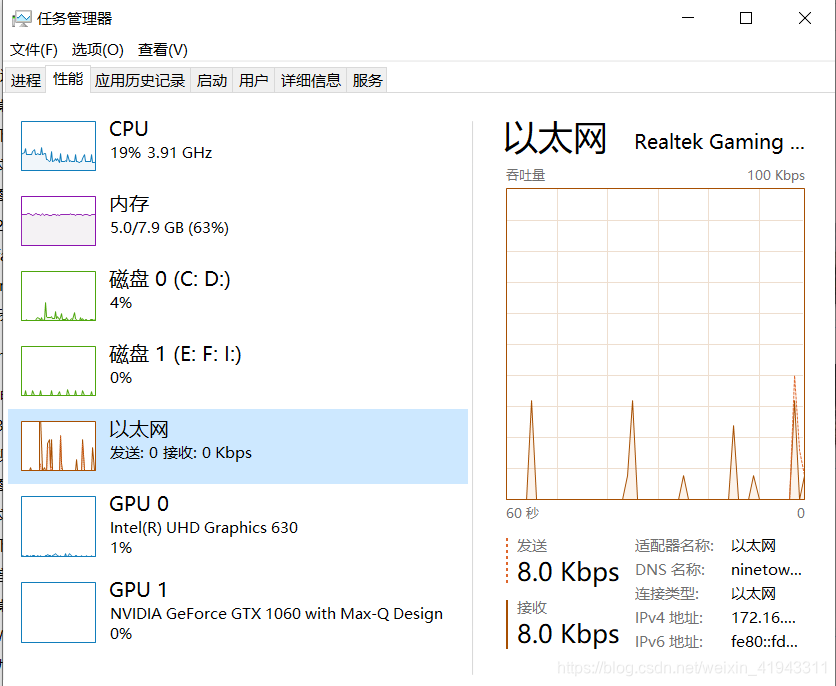
实际运行的目录(f:\images)下有9个文件夹,102个文件,其中有99张照片,共311MB,平均每张照片大小在3MB左右。程序在PyCharm中运行,运行时CPU负载为16%-33%之间(没有用到GPU,因为使用800x600以上图片识别人脸时,NVIDIA GeForce GTX 1060动态内存分配时内存不足报错 ):
最终总耗时为564.9秒,平均每个文件要处理5.7秒,总共找到16张符合人脸特征的照片:
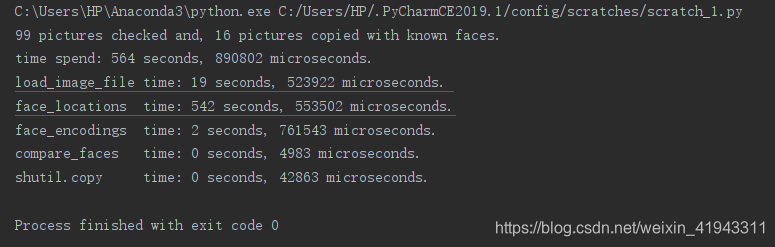
其中,主要的时间是花费在将图片文件加载为数组(占比:3.5%),以及在图片中找到所有的人脸(占比:96.1%)。
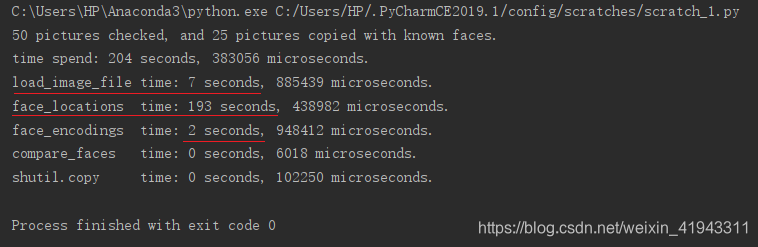
改用以人像为主的4个文件夹,53个文件,其中有50张照片,共162MB,平均每张照片大小在3MB左右(最大的照片6720x4480,约12MB),最终总耗时为204.4秒,平均每个文件要处理4.1秒,总共找到25张符合人脸特征的照片(可以在密集的人群中找到很小的人脸):
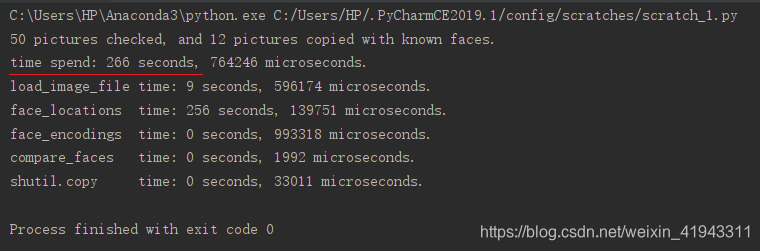
用风景照片替换其中的28张人像图片,4个文件夹,53个文件,其中有50张照片,共178MB,平均每张照片大小在3.5MB左右,最终总耗时为266.8秒,平均每个文件要处理5.3秒,总共找到12张符合人脸特征的照片(看起来,处理不包含人像的风景照片更费时间):
这样的结果,并不算快,看看怎么能继续改进一下呢?改进的方法可能包括:
(1)使用多线程/多进程;
(2)用YOLO v3发现人脸?
(完)
下一篇:Windows 10+dlib19.17+face_recognition:使用人脸识别对家庭照片进行分类,4-6秒/张(二)并行加速

DAMO开发者矩阵,由阿里巴巴达摩院和中国互联网协会联合发起,致力于探讨最前沿的技术趋势与应用成果,搭建高质量的交流与分享平台,推动技术创新与产业应用链接,围绕“人工智能与新型计算”构建开放共享的开发者生态。
更多推荐


 1
1 0
0- 0


 已为社区贡献4条内容

所有评论(0)