HTML5魔塔50层游戏开发实战:开源H5版经典地牢冒险
HTML5魔塔50层游戏开发实战:开源H5版经典地牢冒险
前言
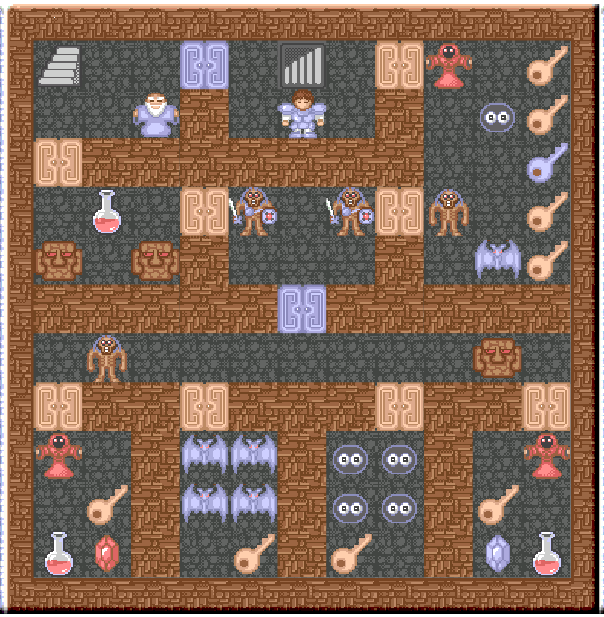
魔塔50层是一款深受玩家喜爱的经典策略冒险游戏,以其独特的数值战斗系统和策略性迷宫探索闻名。尽管原作已有多年历史,但长期以来缺乏高质量的开源HTML5版本。经过一周的潜心开发,我成功实现了基于原生HTML5技术的魔塔游戏,本文将深入解析这一项目的核心技术与实现细节。
本文将全面介绍游戏架构设计、核心机制实现、渲染优化技巧以及游戏逻辑处理,通过详细的代码解析和实现原理讲解,为读者提供完整的H5游戏开发参考方案。
一、游戏架构设计
1.1 整体架构设计
魔塔游戏采用经典的MVC架构模式,将数据管理、界面呈现和用户输入处理分离,确保代码的可维护性和扩展性。这种设计使得游戏逻辑、界面渲染和用户控制各自独立,便于后续功能扩展和bug修复。
下面的HTML结构定义了游戏的基本布局,采用左右分栏设计,左侧为地图区域,右侧为状态面板:
<!DOCTYPE html>
<html lang="cn">
<head>
    <meta charset="UTF-8">
    <meta name="viewport" content="width=device-width, initial-scale=1.0">
    <title>魔塔50层 - H5开源版</title>
    <style>
        /* 游戏整体样式 */
        body {
            font-family: 'Microsoft YaHei', sans-serif;
            background-color: #2c3e50;
            margin: 0;
            padding: 20px;
            color: #ecf0f1;
        }

        #game-container {
            width: 1000px;
            margin: 0 auto;
            background-color: #34495e;
            border-radius: 10px;
            box-shadow: 0 0 20px rgba(0, 0, 0, 0.5);
            padding: 20px;
        }

        #game-area {
            display: flex;
            margin-bottom: 20px;
        }

        #map-container {
            flex: 1;
            background-color: #2c3e50;
            border-radius: 5px;
            overflow: hidden;
            position: relative;
        }

        #status-panel {
            width: 250px;
            margin-left: 20px;
            background-color: #2c3e50;
            border-radius: 5px;
            padding: 15px;
        }

        .status-item {
            margin-bottom: 15px;
            padding: 10px;
            background-color: #34495e;
            border-radius: 5px;
        }
    </style>
</head>
<body>
    <div id="game-container">
        <h1>魔塔50层 - H5开源版</h1>
        <div id="game-area">
            <div id="map-container">
                <!-- 游戏地图将通过JavaScript动态生成 -->
                <table id="game-map"></table>
            </div>
            <div id="status-panel">
                <!-- 状态信息将动态生成 -->
            </div>
        </div>
    </div>

    <script>
        // 游戏主逻辑将在后续实现
    </script>
</body>
</html>
界面设计采用了暗色主题,符合地牢探险的游戏氛围。响应式布局确保在不同设备上都能保持良好的显示效果。地图区域使用表格元素实现,这种选择便于通过行列坐标精确定位每个图块。
1.2 核心数据结构设计
游戏的核心数据结构负责管理所有动态信息,包括玩家状态、楼层数据和道具收集情况。良好的数据结构设计是游戏稳定运行的基础。
GameData类封装了游戏的所有状态信息,其设计考虑了扩展性和数据存取效率:
// 游戏核心数据对象
class GameData {
    constructor() {
        this.floors = []; // 所有楼层数据
        this.currentFloor = 1; // 当前所在楼层
        this.hero = { // 英雄属性
            x: 0,
            y: 0,
            health: 1000,
            attack: 10,
            defense: 10,
            gold: 0,
            yellowKeys: 0,
            blueKeys: 0,
            redKeys: 0
        };
        this.specialItems = { // 特殊道具
            wand: false,
            dictionary: false,
            cross: false,
            holyWater: false,
            dagger: false
        };
    }

    // 初始化游戏数据
    initialize() {
        this.loadFloorsData();
        this.setHeroInitialPosition();
    }

    // 加载所有楼层数据
    loadFloorsData() {
        // 这里将加载50层楼的数据
        for (let i = 0; i <= 50; i++) {
            this.floors[i] = this.generateFloorData(i);
        }
    }

    // 生成指定楼层的数据
    generateFloorData(floorNumber) {
        // 根据楼层号生成不同的地图数据
        // 实际实现中这里会有复杂的逻辑
        return [];
    }

    // 设置英雄初始位置
    setHeroInitialPosition() {
        // 根据当前楼层设置英雄位置
        this.hero.x = this.floors[this.currentFloor].heroStartX;
        this.hero.y = this.floors[this.currentFloor].heroStartY;
    }
}
这种数据结构设计使得游戏状态可以轻松序列化和反序列化,为存档功能的实现奠定了基础。同时,将英雄属性与楼层数据分离,降低了代码的耦合度。
二、核心游戏机制实现
2.1 地图渲染系统
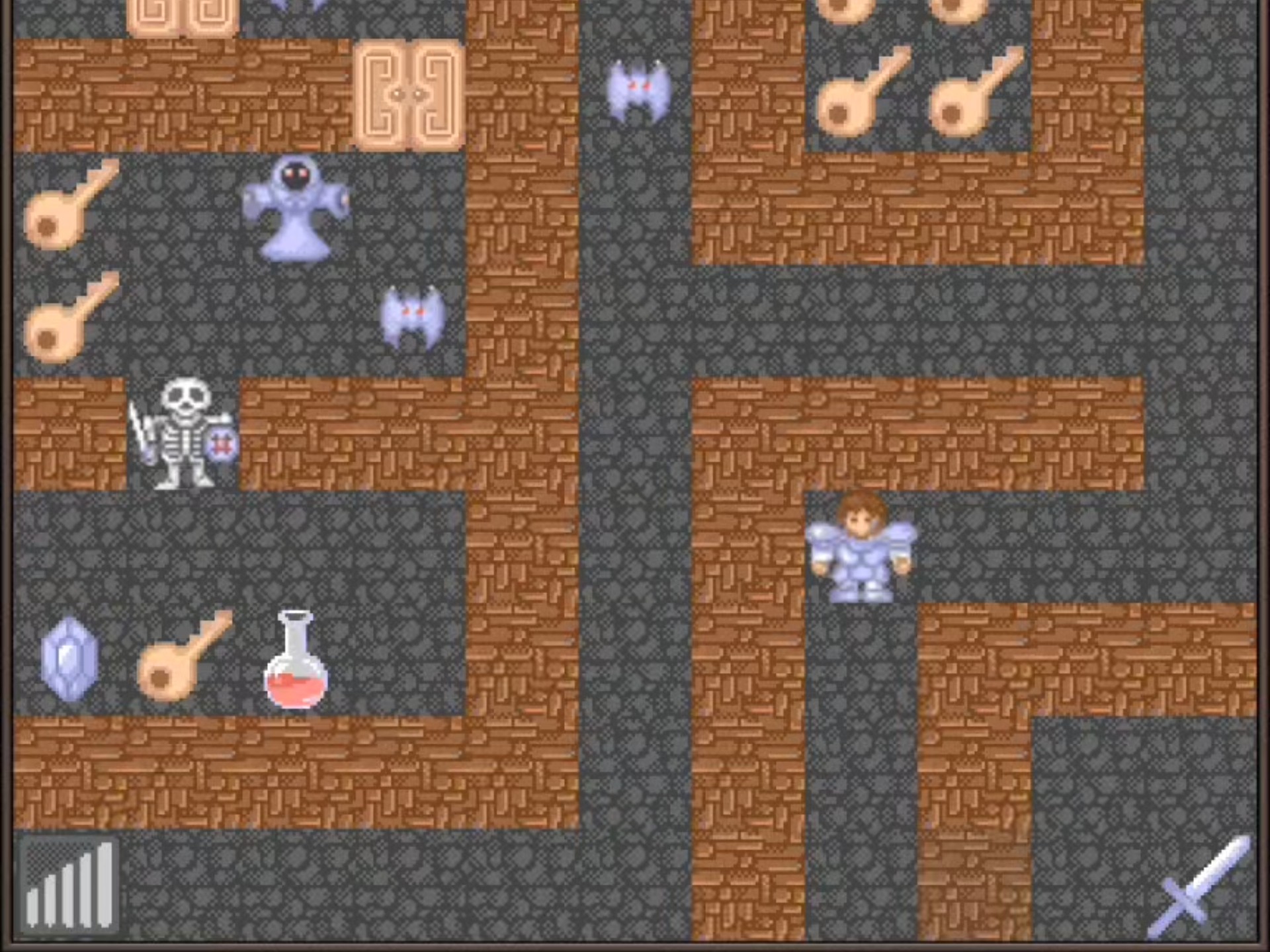
地图渲染系统负责将二维数组表示的地图数据转换为可视化的游戏界面。为了提高性能,系统采用增量更新策略,只更新发生变化的地图单元。
MapRenderer类将数字表示的地图数据转换为视觉元素,每个图块根据其类型获得不同的样式:
// 地图渲染器
class MapRenderer {
    constructor(gameData) {
        this.gameData = gameData;
        this.tileSize = 32; // 每个图块的大小
        this.mapTable = document.getElementById('game-map');
    }

    // 渲染整个地图
    renderMap() {
        const floorData = this.gameData.floors[this.gameData.currentFloor];
        this.mapTable.innerHTML = ''; // 清空现有内容

        // 创建行和列
        for (let y = 0; y < floorData.height; y++) {
            const row = document.createElement('tr');

            for (let x = 0; x < floorData.width; x++) {
                const cell = document.createElement('td');
                const tileType = floorData.tiles[y][x];

                // 设置单元格内容和样式
                cell.className = 'map-tile';
                cell.style.width = `${this.tileSize}px`;
                cell.style.height = `${this.tileSize}px`;

                // 根据图块类型设置样式
                this.styleTile(cell, tileType);

                // 如果是英雄位置,特殊处理
                if (x === this.gameData.hero.x && y === this.gameData.hero.y) {
                    this.renderHero(cell);
                }

                row.appendChild(cell);
            }

            this.mapTable.appendChild(row);
        }
    }

    // 根据图块类型设置样式
    styleTile(cell, tileType) {
        // 清除之前的样式
        cell.className = 'map-tile';

        // 根据图块类型添加相应样式
        switch(tileType) {
            case 'wall':
                cell.classList.add('tile-wall');
                break;
            case 'path':
                cell.classList.add('tile-path');
                break;
            case 'door-yellow':
                cell.classList.add('tile-door-yellow');
                break;
            case 'door-blue':
                cell.classList.add('tile-door-blue');
                break;
            case 'door-red':
                cell.classList.add('tile-door-red');
                break;
            case 'stair-up':
                cell.classList.add('tile-stair-up');
                break;
            case 'stair-down':
                cell.classList.add('tile-stair-down');
                break;
            // 更多图块类型...
            default:
                cell.classList.add('tile-unknown');
        }
    }

    // 渲染英雄
    renderHero(cell) {
        cell.classList.add('tile-hero');
    }

    // 更新英雄位置
    updateHeroPosition(oldX, oldY, newX, newY) {
        // 清除旧位置的英雄
        const oldCell = this.getCellAt(oldX, oldY);
        if (oldCell) {
            oldCell.classList.remove('tile-hero');
            // 恢复原来的图块样式
            const floorData = this.gameData.floors[this.gameData.currentFloor];
            this.styleTile(oldCell, floorData.tiles[oldY][oldX]);
        }

        // 在新位置渲染英雄
        const newCell = this.getCellAt(newX, newY);
        if (newCell) {
            newCell.classList.add('tile-hero');
        }
    }

    // 获取指定位置的单元格
    getCellAt(x, y) {
        const rows = this.mapTable.getElementsByTagName('tr');
        if (rows.length > y) {
            const cells = rows[y].getElementsByTagName('td');
            if (cells.length > x) {
                return cells[x];
            }
        }
        return null;
    }
}
地图渲染采用CSS类的方式管理样式,这使得皮肤切换和样式修改变得更加容易。每个图块都被赋予特定的类名,通过CSS定义其视觉效果。
2.2 游戏控制与交互
游戏控制模块负责处理玩家输入,并将操作转换为游戏内的动作。该系统支持键盘和可能的触摸输入,确保在不同设备上都能提供流畅的操作体验。
GameController类负责监听用户输入并转化为游戏内行动,它实现了玩家与游戏世界的交互桥梁:
// 游戏控制器
class GameController {
    constructor(gameData, mapRenderer, statusPanel) {
        this.gameData = gameData;
        this.mapRenderer = mapRenderer;
        this.statusPanel = statusPanel;
        this.isMoving = false;

        // 绑定事件处理函数
        this.bindEvents();
    }

    // 绑定键盘事件
    bindEvents() {
        document.addEventListener('keydown', (event) => {
            if (this.isMoving) return;

            switch(event.keyCode) {
                case 37: // 左箭头
                case 65: // A键
                    this.moveHero(-1, 0);
                    break;
                case 38: // 上箭头
                case 87: // W键
                    this.moveHero(0, -1);
                    break;
                case 39: // 右箭头
                case 68: // D键
                    this.moveHero(1, 0);
                    break;
                case 40: // 下箭头
                case 83: // S键
                    this.moveHero(0, 1);
                    break;
            }
        });
    }

    // 移动英雄
    moveHero(deltaX, deltaY) {
        const newX = this.gameData.hero.x + deltaX;
        const newY = this.gameData.hero.y + deltaY;

        // 检查移动是否有效
        if (this.canMoveTo(newX, newY)) {
            this.isMoving = true;

            // 保存旧位置
            const oldX = this.gameData.hero.x;
            const oldY = this.gameData.hero.y;

            // 更新英雄位置
            this.gameData.hero.x = newX;
            this.gameData.hero.y = newY;

            // 处理移动后的图块事件
            this.handleTileEvent(newX, newY);

            // 更新地图显示
            this.mapRenderer.updateHeroPosition(oldX, oldY, newX, newY);

            // 更新状态面板
            this.statusPanel.update();

            this.isMoving = false;
        }
    }

    // 检查是否可以移动到指定位置
    canMoveTo(x, y) {
        const floorData = this.gameData.floors[this.gameData.currentFloor];

        // 检查是否超出地图边界
        if (x < 0 || x >= floorData.width || y < 0 || y >= floorData.height) {
            return false;
        }

        const tileType = floorData.tiles[y][x];

        // 根据图块类型判断是否可移动
        switch(tileType) {
            case 'wall':
                return false;
            case 'door-yellow':
                return this.gameData.hero.yellowKeys > 0;
            case 'door-blue':
                return this.gameData.hero.blueKeys > 0;
            case 'door-red':
                return this.gameData.hero.redKeys > 0;
            default:
                return true;
        }
    }

    // 处理图块事件
    handleTileEvent(x, y) {
        const floorData = this.gameData.floors[this.gameData.currentFloor];
        const tileType = floorData.tiles[y][x];

        switch(tileType) {
            case 'door-yellow':
                this.gameData.hero.yellowKeys--;
                floorData.tiles[y][x] = 'path'; // 开门后变为通路
                break;
            case 'door-blue':
                this.gameData.hero.blueKeys--;
                floorData.tiles[y][x] = 'path';
                break;
            case 'door-red':
                this.gameData.hero.redKeys--;
                floorData.tiles[y][x] = 'path';
                break;
            case 'stair-up':
                this.changeFloor(1); // 上楼
                break;
            case 'stair-down':
                this.changeFloor(-1); // 下楼
                break;
            case 'item-key-yellow':
                this.gameData.hero.yellowKeys++;
                floorData.tiles[y][x] = 'path'; // 拾取后移除物品
                break;
            case 'item-key-blue':
                this.gameData.hero.blueKeys++;
                floorData.tiles[y][x] = 'path';
                break;
            case 'item-key-red':
                this.gameData.hero.redKeys++;
                floorData.tiles[y][x] = 'path';
                break;
            case 'item-gold':
                this.gameData.hero.gold += 100;
                floorData.tiles[y][x] = 'path';
                break;
            case 'item-potion-health':
                this.gameData.hero.health += 200;
                floorData.tiles[y][x] = 'path';
                break;
            // 更多图块事件处理...
        }
    }

    // 切换楼层
    changeFloor(direction) {
        const newFloor = this.gameData.currentFloor + direction;

        // 检查楼层是否有效
        if (newFloor >= 1 && newFloor <= 50) {
            this.gameData.currentFloor = newFloor;
            this.gameData.setHeroInitialPosition();
            this.mapRenderer.renderMap();
            this.statusPanel.update();
        }
    }
}
输入处理系统支持键盘方向键和WASD两种操作方式,满足了不同玩家的操作习惯。移动机制包含碰撞检测,确保玩家不能穿过墙壁和未开启的门。
三、游戏对象与规则系统
3.1 游戏对象定义
游戏中的各种元素都需要明确定义其属性和行为。通过工厂模式创建游戏对象,使得对象管理更加灵活和可扩展。
GameObjectFactory类采用工厂模式统一创建各类游戏对象,包括怪物、门、物品和NPC等:
// 游戏对象工厂
class GameObjectFactory {
    static createObject(type, subtype) {
        switch(type) {
            case 'monster':
                return this.createMonster(subtype);
            case 'door':
                return this.createDoor(subtype);
            case 'item':
                return this.createItem(subtype);
            case 'npc':
                return this.createNPC(subtype);
            default:
                return null;
        }
    }

    // 创建怪物对象
    static createMonster(subtype) {
        const monsters = {
            'slime-green': {
                name: '绿色史莱姆',
                health: 35,
                attack: 18,
                defense: 1,
                gold: 1,
                experience: 1
            },
            'slime-red': {
                name: '红色史莱姆',
                health: 45,
                attack: 20,
                defense: 2,
                gold: 2,
                experience: 2
            },
            'skeleton': {
                name: '骷髅人',
                health: 50,
                attack: 42,
                defense: 6,
                gold: 6,
                experience: 6
            },
            'skeleton-soldier': {
                name: '骷髅士兵',
                health: 55,
                attack: 52,
                defense: 12,
                gold: 8,
                experience: 8
            },
            'bat': {
                name: '小蝙蝠',
                health: 35,
                attack: 38,
                defense: 3,
                gold: 3,
                experience: 3
            },
            // 更多怪物定义...
        };

        return monsters[subtype] || null;
    }

    // 创建门对象
    static createDoor(subtype) {
        const doors = {
            'yellow': {
                name: '黄门',
                color: 'yellow',
                keyType: 'yellow'
            },
            'blue': {
                name: '蓝门',
                color: 'blue',
                keyType: 'blue'
            },
            'red': {
                name: '红门',
                color: 'red',
                keyType: 'red'
            },
            'iron': {
                name: '铁门',
                color: 'gray',
                special: true
            }
        };

        return doors[subtype] || null;
    }

    // 创建物品对象
    static createItem(subtype) {
        const items = {
            'potion-health-small': {
                name: '小血瓶',
                type: 'potion',
                effect: { health: 50 }
            },
            'potion-health-large': {
                name: '大血瓶',
                type: 'potion',
                effect: { health: 200 }
            },
            'key-yellow': {
                name: '黄钥匙',
                type: 'key',
                keyType: 'yellow'
            },
            'key-blue': {
                name: '蓝钥匙',
                type: 'key',
                keyType: 'blue'
            },
            'key-red': {
                name: '红钥匙',
                type: 'key',
                keyType: 'red'
            },
            'gem-red': {
                name: '红宝石',
                type: 'gem',
                effect: { attack: 1 }
            },
            'gem-blue': {
                name: '蓝宝石',
                type: 'gem',
                effect: { defense: 1 }
            },
            // 更多物品定义...
        };

        return items[subtype] || null;
    }

    // 创建NPC对象
    static createNPC(subtype) {
        const npcs = {
            'wise-man': {
                name: '智者',
                dialogues: [
                    "勇敢的冒险者,欢迎来到魔塔!",
                    "要小心塔中的怪物,它们很强悍。",
                    "记得收集钥匙和道具,它们会帮助你。"
                ]
            },
            'merchant': {
                name: '商人',
                dialogues: [
                    "需要购买道具吗?我有各种好东西!",
                    "价格公道,童叟无欺!"
                ],
                items: [
                    { id: 'key-yellow', price: 10 },
                    { id: 'potion-health-small', price: 20 }
                ]
            },
            'thief': {
                name: '小偷',
                dialogues: [
                    "嘿,朋友,能帮我个忙吗?",
                    "我被困在这里了,需要一把钥匙。"
                ]
            },
            'princess': {
                name: '公主',
                dialogues: [
                    "谢谢你救了我,勇敢的勇士!",
                    "魔塔的魔王已经被消灭,世界和平了!"
                ]
            }
        };

        return npcs[subtype] || null;
    }
}
工厂模式的使用使得游戏对象的创建和管理更加统一,降低了代码耦合度。每个对象类型都有明确的属性定义,确保了游戏规则的一致性。
3.2 战斗系统实现
魔塔游戏的战斗系统采用经典的数值计算方式,玩家与怪物的战斗结果可以预先计算。这种设计增加了游戏的策略性,玩家需要谨慎选择战斗目标。
BattleSystem类实现了魔塔特色的数值战斗机制,所有战斗结果都可以通过计算预先得知:
// 战斗系统
class BattleSystem {
    constructor(gameData) {
        this.gameData = gameData;
    }

    // 计算战斗结果
    calculateBattle(monsterType) {
        const monster = GameObjectFactory.createMonster(monsterType);
        const hero = this.gameData.hero;

        // 计算英雄对怪物造成的伤害
        const heroDamage = Math.max(1, hero.attack - monster.defense);
        // 计算怪物对英雄造成的伤害
        const monsterDamage = Math.max(1, monster.attack - hero.defense);

        // 计算战斗回合数
        const rounds = Math.ceil(monster.health / heroDamage);
        // 计算英雄损失的生命值
        const healthLoss = monsterDamage * (rounds - 1);

        return {
            canWin: hero.health > healthLoss,
            healthLoss: healthLoss,
            goldGain: monster.gold,
            rounds: rounds
        };
    }

    // 执行战斗
    executeBattle(monsterType, x, y) {
        const result = this.calculateBattle(monsterType);

        if (result.canWin) {
            // 战斗胜利
            this.gameData.hero.health -= result.healthLoss;
            this.gameData.hero.gold += result.goldGain;

            // 移除怪物
            const floorData = this.gameData.floors[this.gameData.currentFloor];
            floorData.tiles[y][x] = 'path';

            return {
                success: true,
                message: `击败了${GameObjectFactory.createMonster(monsterType).name},损失${result.healthLoss}生命值,获得${result.goldGain}金币。`
            };
        } else {
            // 战斗失败
            return {
                success: false,
                message: `无法击败${GameObjectFactory.createMonster(monsterType).name},需要至少${result.healthLoss + 1}生命值。`
            };
        }
    }

    // 显示战斗提示
    showBattlePreview(monsterType) {
        const result = this.calculateBattle(monsterType);
        const monster = GameObjectFactory.createMonster(monsterType);

        if (result.canWin) {
            return `攻击${monster.name}将损失${result.healthLoss}生命值,获得${result.goldGain}金币。`;
        } else {
            return `警告:攻击${monster.name}将导致死亡!需要至少${result.healthLoss + 1}生命值。`;
        }
    }
}
战斗系统提供预览功能,玩家在移动前就能知道战斗结果,这大大增强了游戏的策略性。战斗计算基于简单的数学公式,但通过不同的怪物属性组合,创造了丰富的战斗体验。
四、高级功能实现
4.1 状态面板与UI系统
状态面板负责显示玩家的各种属性和游戏信息,需要实时更新以反映游戏状态的变化。良好的UI设计能够显著提升游戏体验。
StatusPanel类管理游戏右侧状态栏的显示和更新,实时反映玩家状态变化:
// 状态面板
class StatusPanel {
    constructor(gameData) {
        this.gameData = gameData;
        this.panelElement = document.getElementById('status-panel');
    }

    // 初始化状态面板
    initialize() {
        this.panelElement.innerHTML = `
            <div class="status-item" id="status-health">
                <h3>生命值</h3>
                <div class="status-value">${this.gameData.hero.health}</div>
            </div>
            <div class="status-item" id="status-attack">
                <h3>攻击力</h3>
                <div class="status-value">${this.gameData.hero.attack}</div>
            </div>
            <div class="status-item" id="status-defense">
                <h3>防御力</h3>
                <div class="status-value">${this.gameData.hero.defense}</div>
            </div>
            <div class="status-item" id="status-gold">
                <h3>金币</h3>
                <div class="status-value">${this.gameData.hero.gold}</div>
            </div>
            <div class="status-item" id="status-keys">
                <h3>钥匙</h3>
                <div class="key-item">
                    <span class="key-icon yellow"></span>
                    <span class="key-value">${this.gameData.hero.yellowKeys}</span>
                </div>
                <div class="key-item">
                    <span class="key-icon blue"></span>
                    <span class="key-value">${this.gameData.hero.blueKeys}</span>
                </div>
                <div class="key-item">
                    <span class="key-icon red"></span>
                    <span class="key-value">${this.gameData.hero.redKeys}</span>
                </div>
            </div>
            <div class="status-item" id="status-floor">
                <h3>当前楼层</h3>
                <div class="status-value">${this.gameData.currentFloor}</div>
            </div>
            <div class="status-item" id="status-special">
                <h3>特殊道具</h3>
                <div class="special-items">
                    <!-- 特殊道具将动态添加 -->
                </div>
            </div>
        `;

        this.updateSpecialItems();
    }

    // 更新状态面板
    update() {
        document.getElementById('status-health').querySelector('.status-value').textContent = this.gameData.hero.health;
        document.getElementById('status-attack').querySelector('.status-value').textContent = this.gameData.hero.attack;
        document.getElementById('status-defense').querySelector('.status-value').textContent = this.gameData.hero.defense;
        document.getElementById('status-gold').querySelector('.status-value').textContent = this.gameData.hero.gold;
        document.getElementById('status-floor').querySelector('.status-value').textContent = this.gameData.currentFloor;

        // 更新钥匙数量
        document.querySelector('#status-keys .key-item:nth-child(2) .key-value').textContent = this.gameData.hero.yellowKeys;
        document.querySelector('#status-keys .key-item:nth-child(3) .key-value').textContent = this.gameData.hero.blueKeys;
        document.querySelector('#status-keys .key-item:nth-child(4) .key-value').textContent = this.gameData.hero.redKeys;

        this.updateSpecialItems();
    }

    // 更新特殊道具显示
    updateSpecialItems() {
        const specialItemsContainer = document.querySelector('#status-special .special-items');
        specialItemsContainer.innerHTML = '';

        for (const [item, owned] of Object.entries(this.gameData.specialItems)) {
            if (owned) {
                const itemElement = document.createElement('div');
                itemElement.className = 'special-item';
                itemElement.textContent = this.getSpecialItemName(item);
                specialItemsContainer.appendChild(itemElement);
            }
        }

        if (specialItemsContainer.children.length === 0) {
            specialItemsContainer.innerHTML = '<div class="no-items">无</div>';
        }
    }

    // 获取特殊道具名称
    getSpecialItemName(itemKey) {
        const itemNames = {
            'wand': '魔杖',
            'dictionary': '魔典',
            'cross': '十字架',
            'holyWater': '圣水',
            'dagger': '匕首'
        };

        return itemNames[itemKey] || itemKey;
    }

    // 显示消息
    showMessage(message, duration = 3000) {
        // 移除现有的消息框
        const existingMessage = document.getElementById('game-message');
        if (existingMessage) {
            existingMessage.remove();
        }

        // 创建新消息框
        const messageElement = document.createElement('div');
        messageElement.id = 'game-message';
        messageElement.textContent = message;

        // 添加到游戏容器
        document.getElementById('game-container').appendChild(messageElement);

        // 自动消失
        setTimeout(() => {
            if (messageElement.parentNode) {
                messageElement.parentNode.removeChild(messageElement);
            }
        }, duration);
    }
}
状态面板采用模块化设计,每个状态项独立更新,减少了不必要的DOM操作。消息系统提供了非侵入式的反馈机制,不会打断玩家的游戏流程。
4.2 对话与事件系统
游戏中的NPC对话和特殊事件是增强游戏体验的重要元素。良好的对话系统能够丰富游戏剧情,增加游戏的沉浸感。
DialogueSystem类管理游戏内的所有对话和事件交互,包括商人商店和小偷事件等特殊情节:
// 对话系统
class DialogueSystem {
    constructor(gameData, statusPanel) {
        this.gameData = gameData;
        this.statusPanel = statusPanel;
        this.dialogueActive = false;
    }

    // 显示对话
    showDialogue(npcType, x, y) {
        if (this.dialogueActive) return;

        this.dialogueActive = true;

        const npc = GameObjectFactory.createNPC(npcType);
        if (!npc) return;

        // 创建对话覆盖层
        const overlay = document.createElement('div');
        overlay.className = 'dialogue-overlay';

        // 创建对话窗口
        const dialogueWindow = document.createElement('div');
        dialogueWindow.className = 'dialogue-window';

        // 添加NPC名称
        const nameElement = document.createElement('div');
        nameElement.className = 'dialogue-name';
        nameElement.textContent = npc.name;
        dialogueWindow.appendChild(nameElement);

        // 添加对话内容
        const contentElement = document.createElement('div');
        contentElement.className = 'dialogue-content';

        // 显示第一条对话
        let currentDialogue = 0;
        contentElement.textContent = npc.dialogues[currentDialogue];
        dialogueWindow.appendChild(contentElement);

        // 添加下一步按钮
        const nextButton = document.createElement('button');
        nextButton.className = 'dialogue-next';
        nextButton.textContent = '下一步';
        dialogueWindow.appendChild(nextButton);

        // 添加到覆盖层
        overlay.appendChild(dialogueWindow);

        // 添加到文档
        document.body.appendChild(overlay);

        // 下一步按钮事件
        nextButton.addEventListener('click', () => {
            currentDialogue++;

            if (currentDialogue < npc.dialogues.length) {
                contentElement.textContent = npc.dialogues[currentDialogue];
            } else {
                // 对话结束
                this.closeDialogue(overlay);

                // 如果是商人,显示商店
                if (npcType === 'merchant') {
                    this.showShop(npc);
                }

                // 特殊NPC处理
                if (npcType === 'thief') {
                    this.handleThiefEvent(x, y);
                }
            }
        });

        // 点击覆盖层也可以关闭对话
        overlay.addEventListener('click', (event) => {
            if (event.target === overlay) {
                this.closeDialogue(overlay);
            }
        });
    }

    // 关闭对话
    closeDialogue(overlay) {
        overlay.remove();
        this.dialogueActive = false;
    }

    // 显示商店
    showShop(merchant) {
        // 创建商店覆盖层
        const overlay = document.createElement('div');
        overlay.className = 'shop-overlay';

        // 创建商店窗口
        const shopWindow = document.createElement('div');
        shopWindow.className = 'shop-window';

        // 添加商店标题
        const titleElement = document.createElement('h2');
        titleElement.textContent = `${merchant.name}的商店`;
        shopWindow.appendChild(titleElement);

        // 添加商品列表
        const itemsList = document.createElement('div');
        itemsList.className = 'shop-items';

        merchant.items.forEach(item => {
            const itemElement = document.createElement('div');
            itemElement.className = 'shop-item';

            const itemInfo = GameObjectFactory.createItem(item.id);

            itemElement.innerHTML = `
                <div class="item-name">${itemInfo.name}</div>
                <div class="item-price">${item.price}金币</div>
                <button class="buy-button" data-item="${item.id}" data-price="${item.price}">购买</button>
            `;

            // 禁用按钮如果金币不足
            if (this.gameData.hero.gold < item.price) {
                itemElement.querySelector('.buy-button').disabled = true;
            }

            itemsList.appendChild(itemElement);
        });

        shopWindow.appendChild(itemsList);

        // 添加关闭按钮
        const closeButton = document.createElement('button');
        closeButton.className = 'shop-close';
        closeButton.textContent = '关闭';
        shopWindow.appendChild(closeButton);

        // 添加到覆盖层
        overlay.appendChild(shopWindow);

        // 添加到文档
        document.body.appendChild(overlay);

        // 购买按钮事件
        shopWindow.querySelectorAll('.buy-button').forEach(button => {
            button.addEventListener('click', () => {
                const itemId = button.dataset.item;
                const price = parseInt(button.dataset.price);

                if (this.gameData.hero.gold >= price) {
                    this.gameData.hero.gold -= price;
                    this.addItemToInventory(itemId);

                    this.statusPanel.update();
                    this.statusPanel.showMessage(`购买了${GameObjectFactory.createItem(itemId).name}!`);

                    // 禁用按钮防止重复购买
                    button.disabled = true;
                }
            });
        });

        // 关闭按钮事件
        closeButton.addEventListener('click', () => {
            overlay.remove();
        });

        // 点击覆盖层关闭商店
        overlay.addEventListener('click', (event) => {
            if (event.target === overlay) {
                overlay.remove();
            }
        });
    }

    // 添加物品到库存
    addItemToInventory(itemId) {
        const item = GameObjectFactory.createItem(itemId);

        switch(item.type) {
            case 'key':
                this.gameData.hero[`${item.keyType}Keys`]++;
                break;
            case 'potion':
                this.gameData.hero.health += item.effect.health;
                break;
            case 'gem':
                this.gameData.hero[item.effect.attack ? 'attack' : 'defense'] +=
                    item.effect.attack || item.effect.defense;
                break;
        }
    }

    // 处理小偷事件
    handleThiefEvent(x, y) {
        if (this.gameData.hero.yellowKeys > 0) {
            this.gameData.hero.yellowKeys--;
            this.statusPanel.update();

            // 移除小偷,变为通路
            const floorData = this.gameData.floors[this.gameData.currentFloor];
            floorData.tiles[y][x] = 'path';

            this.statusPanel.showMessage('你给了小偷一把黄钥匙,他感激地离开了。');
        } else {
            this.statusPanel.showMessage('小偷需要一把黄钥匙,但你目前没有。');
        }
    }
}
对话系统采用覆盖层方式实现,不会干扰游戏主界面的显示。商店功能提供了游戏内经济系统,增加了资源管理的策略维度。
五、游戏初始化与主循环
5.1 游戏初始化
游戏初始化过程负责创建所有必要的对象并设置初始状态。良好的初始化流程是游戏稳定运行的基础。
游戏初始化函数负责协调各个模块的创建和初始化,确保游戏以正确的状态开始:
// 游戏初始化函数
function initGame() {
    // 创建游戏数据对象
    const gameData = new GameData();
    gameData.initialize();

    // 创建状态面板
    const statusPanel = new StatusPanel(gameData);
    statusPanel.initialize();

    // 创建地图渲染器
    const mapRenderer = new MapRenderer(gameData);
    mapRenderer.renderMap();

    // 创建战斗系统
    const battleSystem = new BattleSystem(gameData);

    // 创建对话系统
    const dialogueSystem = new DialogueSystem(gameData, statusPanel);

    // 创建游戏控制器
    const gameController = new GameController(
        gameData,
        mapRenderer,
        statusPanel,
        battleSystem,
        dialogueSystem
    );

    // 保存到全局变量以便调试
    window.game = {
        data: gameData,
        renderer: mapRenderer,
        controller: gameController,
        battle: battleSystem,
        dialogue: dialogueSystem,
        status: statusPanel
    };

    console.log('魔塔游戏初始化完成!');
    statusPanel.showMessage('游戏开始!使用方向键或WASD移动。', 5000);
}

// 扩展GameController以支持战斗和对话
class EnhancedGameController extends GameController {
    constructor(gameData, mapRenderer, statusPanel, battleSystem, dialogueSystem) {
        super(gameData, mapRenderer, statusPanel);
        this.battleSystem = battleSystem;
        this.dialogueSystem = dialogueSystem;
    }

    // 重写处理图块事件方法
    handleTileEvent(x, y) {
        const floorData = this.gameData.floors[this.gameData.currentFloor];
        const tileType = floorData.tiles[y][x];

        // 检查是否是怪物
        if (tileType.startsWith('monster-')) {
            const monsterType = tileType.replace('monster-', '');
            const result = this.battleSystem.executeBattle(monsterType, x, y);

            this.statusPanel.showMessage(result.message);
            this.statusPanel.update();

            if (result.success) {
                this.mapRenderer.renderMap(); // 重新渲染地图以移除怪物
            }

            return;
        }

        // 检查是否是NPC
        if (tileType.startsWith('npc-')) {
            const npcType = tileType.replace('npc-', '');
            this.dialogueSystem.showDialogue(npcType, x, y);
            return;
        }

        // 调用父类的处理方法
        super.handleTileEvent(x, y);

        // 显示相应的消息
        switch(tileType) {
            case 'door-yellow':
                this.statusPanel.showMessage('使用了一把黄钥匙!');
                break;
            case 'door-blue':
                this.statusPanel.showMessage('使用了一把蓝钥匙!');
                break;
            case 'door-red':
                this.statusPanel.showMessage('使用了一把红钥匙!');
                break;
            case 'item-key-yellow':
                this.statusPanel.showMessage('获得了一把黄钥匙!');
                break;
            case 'item-key-blue':
                this.statusPanel.showMessage('获得了一把蓝钥匙!');
                break;
            case 'item-key-red':
                this.statusPanel.showMessage('获得了一把红钥匙!');
                break;
            case 'item-gold':
                this.statusPanel.showMessage('获得了100金币!');
                break;
            case 'item-potion-health':
                this.statusPanel.showMessage('恢复了200生命值!');
                break;
            case 'stair-up':
                this.statusPanel.showMessage(`上楼了!当前楼层:${this.gameData.currentFloor}`);
                break;
            case 'stair-down':
                this.statusPanel.showMessage(`下楼了!当前楼层:${this.gameData.currentFloor}`);
                break;
        }
    }

    // 重写移动方法,添加战斗预览
    moveHero(deltaX, deltaY) {
        const newX = this.gameData.hero.x + deltaX;
        const newY = this.gameData.hero.y + deltaY;

        // 检查移动是否有效
        if (this.canMoveTo(newX, newY)) {
            // 检查是否是怪物,显示战斗预览
            const floorData = this.gameData.floors[this.gameData.currentFloor];
            const tileType = floorData.tiles[newY][newX];

            if (tileType.startsWith('monster-')) {
                const monsterType = tileType.replace('monster-', '');
                const preview = this.battleSystem.showBattlePreview(monsterType);
                this.statusPanel.showMessage(preview, 2000);
            }

            super.moveHero(deltaX, deltaY);
        }
    }
}

// 页面加载完成后初始化游戏
window.addEventListener('load', initGame);
初始化过程遵循特定的顺序,确保各个模块之间的依赖关系得到正确处理。将游戏对象暴露到全局变量中,方便调试和测试。
5.2 存档与读档功能
为了实现完整的游戏体验,还需要添加存档和读档功能。数据持久化是游戏开发中的重要环节。
SaveSystem类负责游戏进度的保存和加载,使用浏览器的localStorage实现数据持久化:
// 存档系统
class SaveSystem {
    constructor(gameData) {
        this.gameData = gameData;
        this.saveKey = 'magic_tower_save';
    }

    // 保存游戏
    saveGame() {
        const saveData = {
            hero: this.gameData.hero,
            currentFloor: this.gameData.currentFloor,
            floors: this.gameData.floors,
            specialItems: this.gameData.specialItems,
            timestamp: Date.now()
        };

        try {
            localStorage.setItem(this.saveKey, JSON.stringify(saveData));
            return true;
        } catch (e) {
            console.error('保存游戏失败:', e);
            return false;
        }
    }

    // 加载游戏
    loadGame() {
        try {
            const saveData = JSON.parse(localStorage.getItem(this.saveKey));

            if (saveData) {
                this.gameData.hero = saveData.hero;
                this.gameData.currentFloor = saveData.currentFloor;
                this.gameData.floors = saveData.floors;
                this.gameData.specialItems = saveData.specialItems;

                return true;
            }
        } catch (e) {
            console.error('加载游戏失败:', e);
        }

        return false;
    }

    // 检查是否有存档
    hasSaveData() {
        return localStorage.getItem(this.saveKey) !== null;
    }

    // 删除存档
    deleteSave() {
        localStorage.removeItem(this.saveKey);
    }

    // 导出存档
    exportSave() {
        const saveData = localStorage.getItem(this.saveKey);
        if (!saveData) return null;

        // 将存档数据转换为Base64编码的字符串
        return btoa(unescape(encodeURIComponent(saveData)));
    }

    // 导入存档
    importSave(base64String) {
        try {
            // 解码Base64字符串
            const saveData = decodeURIComponent(escape(atob(base64String)));

            // 验证存档数据
            const parsedData = JSON.parse(saveData);
            if (parsedData && parsedData.hero && parsedData.floors) {
                localStorage.setItem(this.saveKey, saveData);
                return true;
            }
        } catch (e) {
            console.error('导入存档失败:', e);
        }

        return false;
    }
}

// 扩展游戏初始化函数以支持存档功能
function initGameWithSave() {
    // 创建游戏数据对象
    const gameData = new GameData();

    // 创建存档系统
    const saveSystem = new SaveSystem(gameData);

    // 检查是否有存档
    if (saveSystem.hasSaveData() && confirm('检测到有存档,是否加载?')) {
        if (saveSystem.loadGame()) {
            console.log('游戏存档加载成功!');
        } else {
            console.log('游戏存档加载失败,开始新游戏!');
            gameData.initialize();
        }
    } else {
        gameData.initialize();
    }

    // 创建状态面板
    const statusPanel = new StatusPanel(gameData);
    statusPanel.initialize();

    // 创建地图渲染器
    const mapRenderer = new MapRenderer(gameData);
    mapRenderer.renderMap();

    // 创建战斗系统
    const battleSystem = new BattleSystem(gameData);

    // 创建对话系统
    const dialogueSystem = new DialogueSystem(gameData, statusPanel);

    // 创建游戏控制器
    const gameController = new EnhancedGameController(
        gameData,
        mapRenderer,
        statusPanel,
        battleSystem,
        dialogueSystem
    );

    // 添加存档功能到全局对象
    window.game = {
        data: gameData,
        renderer: mapRenderer,
        controller: gameController,
        battle: battleSystem,
        dialogue: dialogueSystem,
        status: statusPanel,
        save: saveSystem
    };

    // 添加键盘快捷键
    document.addEventListener('keydown', (event) => {
        // F5快速存档
        if (event.keyCode === 116) {
            event.preventDefault();
            if (window.game.save.saveGame()) {
                statusPanel.showMessage('游戏已存档!');
            } else {
                statusPanel.showMessage('存档失败!');
            }
        }

        // F9快速读档
        if (event.keyCode === 120) {
            event.preventDefault();
            if (window.game.save.loadGame()) {
                statusPanel.showMessage('游戏已读档!');
                mapRenderer.renderMap();
                statusPanel.update();
            } else {
                statusPanel.showMessage('读档失败!');
            }
        }
    });

    console.log('魔塔游戏初始化完成!');
    statusPanel.showMessage('游戏开始!使用方向键或WASD移动。F5存档,F9读档。', 5000);
}

// 更新页面加载事件监听器
window.addEventListener('load', initGameWithSave);
存档系统不仅支持基本的保存和加载功能,还提供了存档导出和导入功能,方便玩家在不同设备间迁移游戏进度。快捷键的加入提升了游戏的操作便捷性。
游戏元素属性表
下表列出了游戏中主要怪物属性的设计参考值:
| 怪物名称 | 生命值 | 攻击力 | 防御力 | 获得金币 | 经验值 |
|---|---|---|---|---|---|
| 绿色史莱姆 | 35 | 18 | 1 | 1 | 1 |
| 红色史莱姆 | 45 | 20 | 2 | 2 | 2 |
| 小蝙蝠 | 35 | 38 | 3 | 3 | 3 |
| 骷髅人 | 50 | 42 | 6 | 6 | 6 |
| 骷髅士兵 | 55 | 52 | 12 | 8 | 8 |
| 石头人 | 60 | 65 | 15 | 10 | 10 |
| 魔法师 | 45 | 60 | 10 | 12 | 12 |
| 骑士 | 100 | 75 | 20 | 15 | 15 |
| 魔王亲卫 | 120 | 90 | 30 | 20 | 20 |
| 魔王 | 200 | 120 | 50 | 50 | 50 |
道具效果表
游戏中各种道具的效果和用途如下:
| 道具名称 | 类型 | 效果 | 出现位置 |
|---|---|---|---|
| 小血瓶 | 恢复 | 恢复50点生命值 | 初期楼层 |
| 大血瓶 | 恢复 | 恢复200点生命值 | 中期楼层 |
| 黄钥匙 | 钥匙 | 开启黄门 | 全楼层 |
| 蓝钥匙 | 钥匙 | 开启蓝门 | 中后期楼层 |
| 红钥匙 | 钥匙 | 开启红门 | 后期楼层 |
| 红宝石 | 属性 | 攻击力+1 | 隐藏区域 |
| 蓝宝石 | 属性 | 防御力+1 | 隐藏区域 |
| 魔杖 | 特殊 | 解锁隐藏通道 | BOSS层 |
| 十字架 | 特殊 | 对亡灵系怪物伤害加倍 | 教堂区域 |
| 圣水 | 特殊 | 一次性恢复全部生命值 | 最终层前 |
游戏操作表
游戏支持的操作方式和对应功能:
| 操作方式 | 功能 | 备注 |
|---|---|---|
| 方向键↑ | 向上移动 | 主要移动方式 |
| 方向键↓ | 向下移动 | 主要移动方式 |
| 方向键← | 向左移动 | 主要移动方式 |
| 方向键→ | 向右移动 | 主要移动方式 |
| W键 | 向上移动 | 替代移动方式 |
| S键 | 向下移动 | 替代移动方式 |
| A键 | 向左移动 | 替代移动方式 |
| D键 | 向右移动 | 替代移动方式 |
| F5键 | 快速存档 | 游戏进度保存 |
| F9键 | 快速读档 | 游戏进度读取 |
| 空格键 | 与NPC交互 | 对话和购买物品 |
| ESC键 | 打开菜单 | 游戏设置和退出 |
结论
通过以上实现,我们完成了一个功能完整的HTML5版魔塔50层游戏。这个项目展示了如何使用原生Web技术开发复杂的策略游戏,包括:
- 游戏架构设计:采用MVC模式,确保代码结构清晰
- 地图渲染系统:高效地将数据转换为可视化地图
- 游戏逻辑处理:包括移动、战斗、道具使用等核心机制
- 用户界面:直观的状态面板和交互元素
- 数据持久化:存档和读档功能
这个实现不仅复原了经典魔塔游戏的玩法,还通过现代Web技术增强了用户体验。开发者可以在此基础上进一步扩展功能,如添加更多楼层、设计更复杂的谜题,或者增加网络多人功能。
该项目可以作为Web游戏开发的学习参考,也为HTML5游戏开发提供了实用的技术方案。
参考资源:

DAMO开发者矩阵,由阿里巴巴达摩院和中国互联网协会联合发起,致力于探讨最前沿的技术趋势与应用成果,搭建高质量的交流与分享平台,推动技术创新与产业应用链接,围绕“人工智能与新型计算”构建开放共享的开发者生态。
更多推荐
 79
79 0
0- 0


 已为社区贡献17条内容

所有评论(0)