具身智能从DRL-robot-navigation学起
0. 简介
在这个数字化和智能化日益加速的时代,机器人技术正在逐渐改变我们的生活方式。 DRL-robot-navigation是一个非常不错的入门开源项目,它利用深度强化学习(Deep Reinforcement Learning, DRL)让机器人实现自主导航,通过模拟环境训练机器人,使其能够学习如何在复杂环境中有效地移动,避开障碍物并达到目标位置。其核心技术是基于TensorFlow实现的深度Q网络(Deep Q-Network, DQN),这是一种被广泛应用于强化学习的神经网络模型。
1. 环境安装
1.1 ROS安装
ROS安装参考鱼香ROS的一步安装教程,按照步骤安装Ros1-noetic即可:
wget http://fishros.com/install -O fishros && . fishros
1.2 miniconda安装
应当先安装Ros,后安装miniconda,防止出现兼容问题。
wget https://repo.anaconda.com/miniconda/Miniconda3-latest-Linux-x86_64.sh
chmod +x Miniconda3-latest-Linux-x86_64.sh
./Miniconda3-latest-Linux-x86_64.sh
echo 'export PATH=$HOME/miniconda3/bin:$PATH' >> ~/.bashrc
虚拟环境中有base环境和DRL环境,很烦的一点是每次打开终端都会默认进入base环境中,输入指令即可默认进入正常终端
conda config --set auto_activate_base false
1.3 DRL-robot-navigation源码配置
由于有路径问题,建议将其安装在 /home 目录下
cd ~
git clone https://github.com/reiniscimurs/DRL-robot-navigation -b Noetic
cd ~/DRL-robot-navigation/catkin_ws
catkin_make_isolated
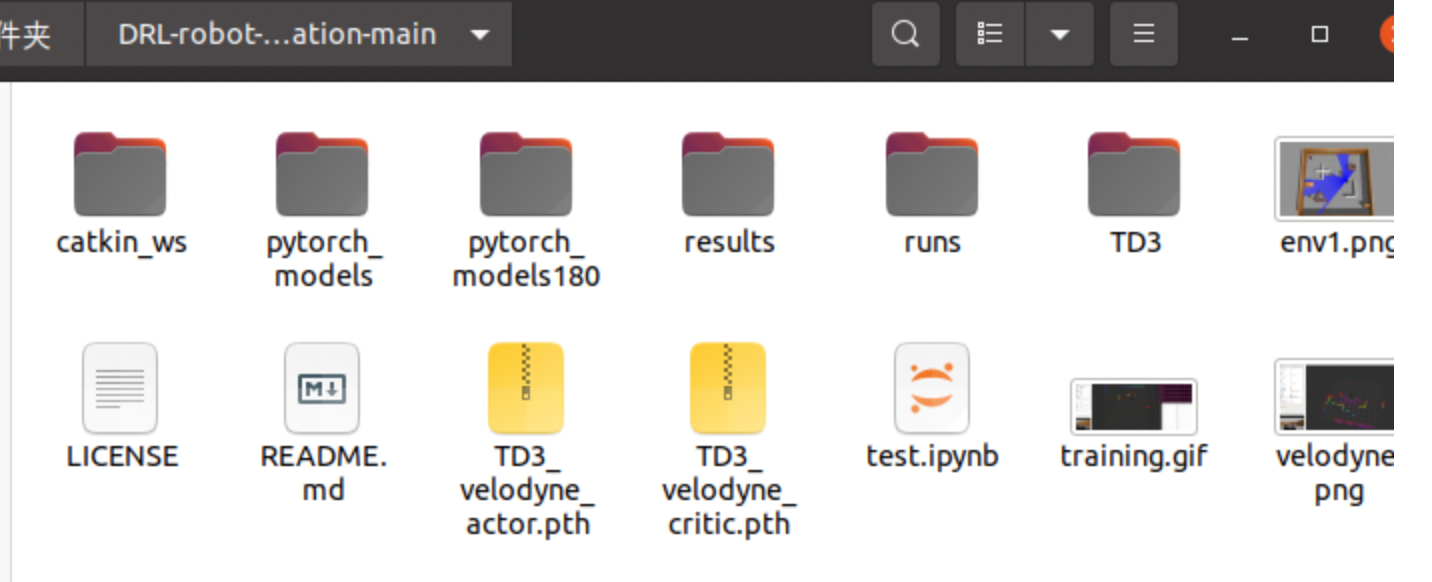
其中 **catkin_ws ** 为ROS工作空间,包含了gazebo仿真环境、p3dx小车模型、velody激光雷达模型等。但其主要任务就是打开一个仿真环境
TD3 中包含了文章中介绍的算法,这份程序是一个普通的 Python 文件(train_velodyne_td3.py)在最外层,里面会去调用 catkin_ws 里的 ROS 资源(velodyne_env.py),包括开启 Gazebo、RViz 和 ROS 控制程序。其内部结构如下:!
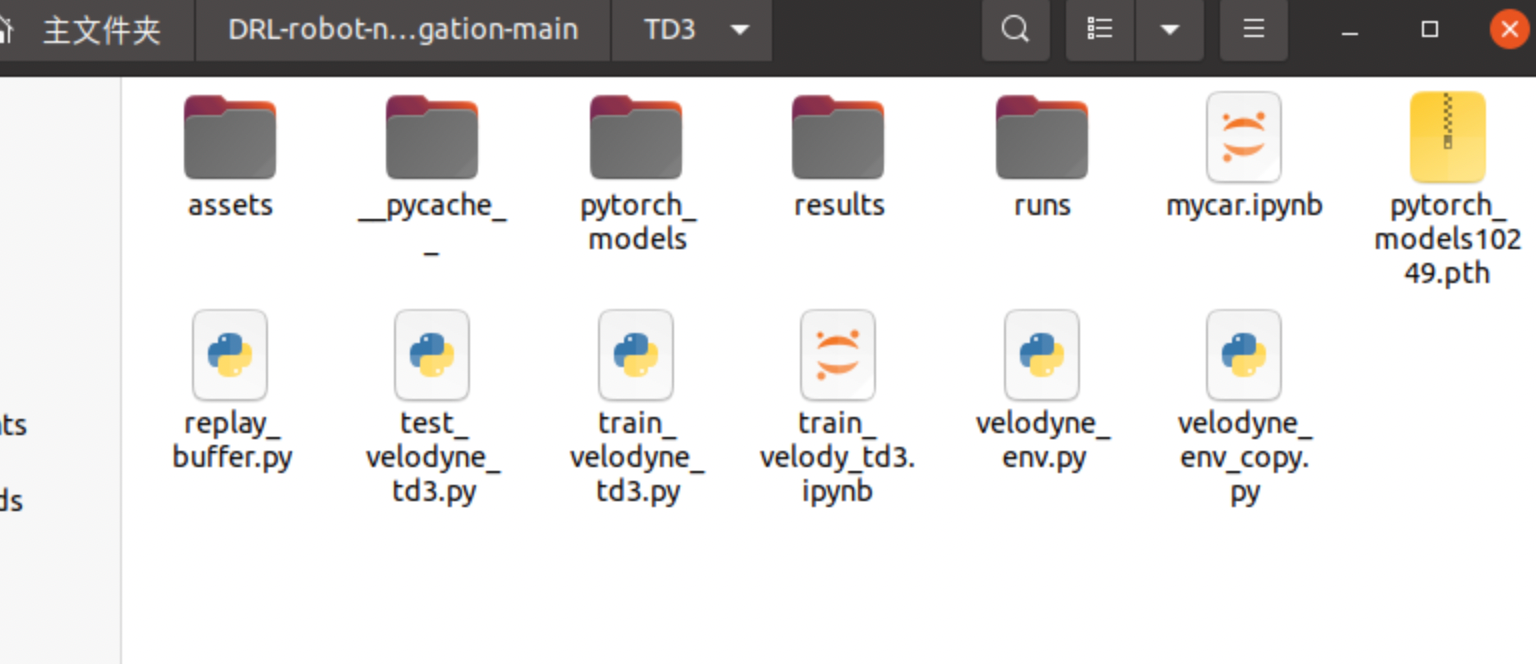
velodyne_env 是发送订阅数据、处理数据、获取状态、计算奖励等功能的代码,相当于gym中的环境部分
train_velodyne_td3 是训练代码,其中包括了网络结构以及训练部分。
1.4 环境搭建配置
这里已经建立好 Anaconda 环境,下面就是创建conda环境python 3.8,并且构建 Pytorch-GPU
conda create -n DRL python=3.8
$ conda activate DRL
$ export ROS_HOSTNAME=localhost
$ export ROS_MASTER_URI=http://localhost:11311
$ export ROS_PORT_SIM=11311
$ export GAZEBO_RESOURCE_PATH=/usr/share/gazebo-11/:~/DRL-robot-navigation/catkin_ws/src/multi_robot_scenario/launch
$ cd ~/DRL-robot-navigation/catkin_ws
$ source devel_isolated/setup.bash
$ source /usr/share/gazebo/setup.bash
此外,还需要 Gazebo 模型的数据库:
git clone https://github.com/osrf/gazebo_models.git
接着将 gazebo_model 中所有的文件夹与文件复制到 ~/.gazebo/models 目录中,切记是“里面”的所有文件夹,而不是 gazebo_model 文件夹本身。如果想要显示 Gazebo 界面,可以修改以下文件:
~/DRL-robot-navigation/catkin_ws/src/multi_robot_scenario/launch/empty_world.launch
将 arg 的 gui 改为 true。
<launch>
    <include file="$(find gazebo_ros)/launch/empty_world.launch">
        <arg name="world_name" value="$(find multi_robot_scenario)/launch/TD3.world"/>
        <arg name="paused" value="false"/>
        <arg name="use_sim_time" value="true"/>
        <arg name="gui" value="true"/>
        <arg name="headless" value="false"/>
        <arg name="debug" value="false"/>
      </include>
</launch>
在编译过程中,可能会出现各种各样的库缺失,具体缺失的内容可以读取报错信息,然后安装
# No module named 'yaml'
conda install -c conda-forge pyyaml
# No module named 'rospkg'
pip install rospkg
# No module named 'squaternion'
pip install squaternion
# No module named 'attr'
pip install attrs
# No module named 'defusedxml'
pip install defusedxml
# No module named 'netifaces'
pip install netifaces
最后,进入到TD3文件夹下,打开终端,cd到路径,python运行。这样就可以进行训练了
cd ~/DRL-robot-navigation/TD3
python3 velodyne_td3.py
在后续的训练过程中,遇到过一个动态链接问题为: ImportError: /lib/x86_64-linux-gnu/libstdc++.so.6: version 'GLIBCXX_3.4.29' not found 可以参考动态链接问题这个文章,但是最好不要这么干,因为
/lib/x86_64-linux-gnu/是最关键的系统库链接,稍有不慎会有问题。同时需要保持整个对libstdc++.so.6操作都在su下
sudo ln -f -s /usr/local/anaconda3/envs/habitat/lib/libstdc++.so.6 /usr/lib/x86_64-linux-gnu/libstdc++.so.6
1.5 打开仿真环境(在velodyne_env.py函数中调用了multi_robot_scenario.launch)
打开一个新的终端
cd DRL-robot-navigation-main/catkin_ws/
catkin_make
source devel/setup.sh
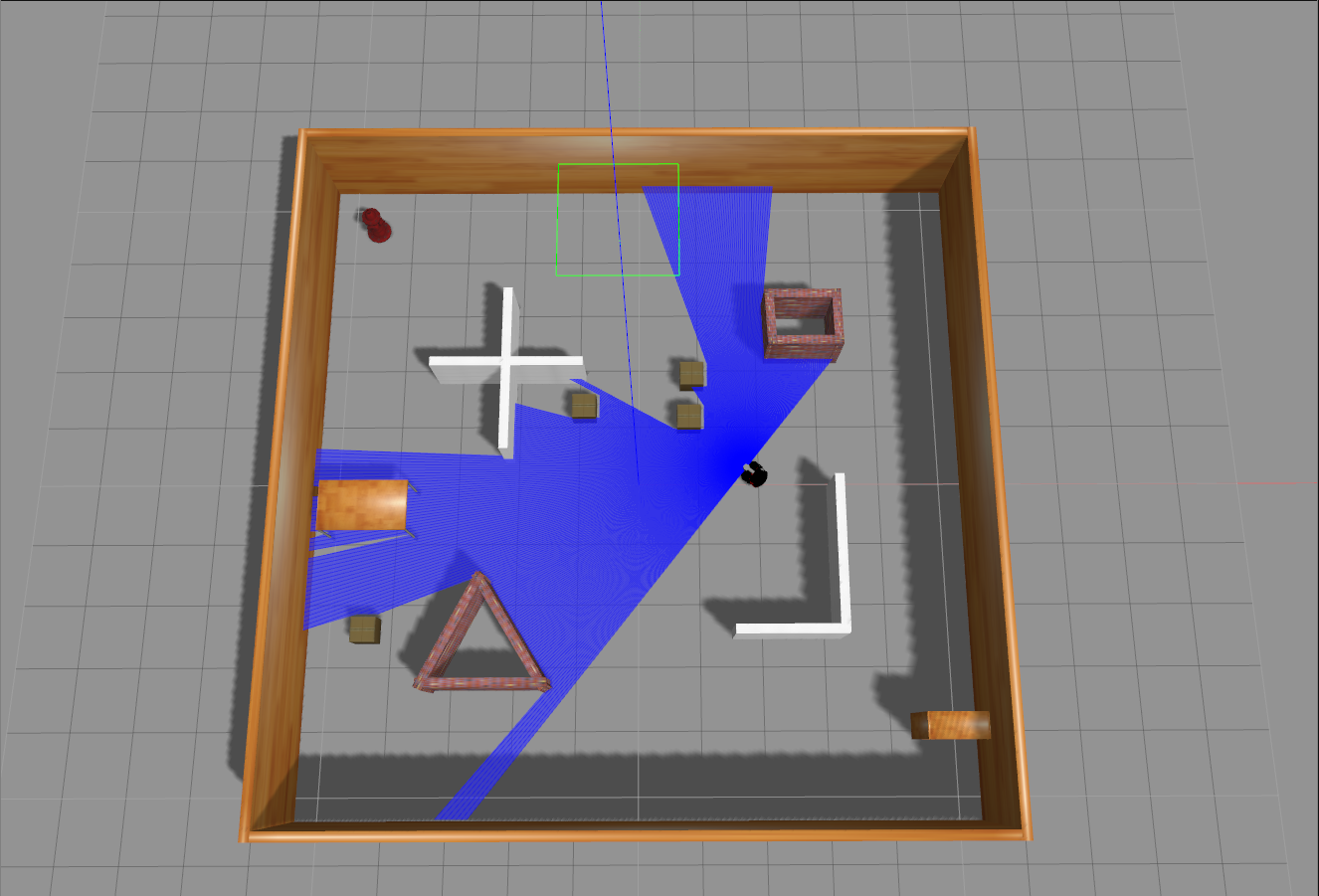
roslaunch multi_robot_scenario TD3_world.launch
发现这里并没有我们需要的机器人模型,所以我们还需要打开launch文件夹下的pioneer3dx.gazebo.launch文件,则新建一个终端
cd DRL-robot-navigation-main/catkin_ws/
source devel/setup.sh
roslaunch multi_robot_scenario pioneer3dx.gazebo.launch
2. 代码解析
2.1 velody_env.py文件
这一部分就是重置gazebo仿真器,然后按照TB3信息来规划,并给出reward值。有一个最重要的部分是,我们需要在每一次执行action的时候,让这个action运行那么0.1或者0.05秒,这样我们的小车才能够正常的运行一段距离。如果不设置这个运行时间的话,小车的action就会以最快的速度发布,那么根本就没有办法正常运行,step也会瞬间爆炸。
import math
import os
import random
import subprocess
import time
from os import path

import numpy as np
import rospy
import sensor_msgs.point_cloud2 as pc2
from gazebo_msgs.msg import ModelState
from geometry_msgs.msg import Twist
from nav_msgs.msg import Odometry
from sensor_msgs.msg import PointCloud2
from squaternion import Quaternion
from std_srvs.srv import Empty
from visualization_msgs.msg import Marker
from visualization_msgs.msg import MarkerArray

GOAL_REACHED_DIST = 0.3 # 机器人达到目标的距离阈值
COLLISION_DIST = 0.35 # 机器人与障碍物发生碰撞的距离阈值
TIME_DELTA = 0.1 # 机器人在每次动作后等待的时间


# 检查给定的 (x, y) 坐标是否位于障碍物上
def check_pos(x, y):
    # 是否在多个预设的障碍物区域内。如果在这些区域内,返回 False
    goal_ok = True

    if -3.8 > x > -6.2 and 6.2 > y > 3.8:
        goal_ok = False

    if -1.3 > x > -2.7 and 4.7 > y > -0.2:
        goal_ok = False

    if -0.3 > x > -4.2 and 2.7 > y > 1.3:
        goal_ok = False

    if -0.8 > x > -4.2 and -2.3 > y > -4.2:
        goal_ok = False

    if -1.3 > x > -3.7 and -0.8 > y > -2.7:
        goal_ok = False

    if 4.2 > x > 0.8 and -1.8 > y > -3.2:
        goal_ok = False

    if 4 > x > 2.5 and 0.7 > y > -3.2:
        goal_ok = False

    if 6.2 > x > 3.8 and -3.3 > y > -4.2:
        goal_ok = False

    if 4.2 > x > 1.3 and 3.7 > y > 1.5:
        goal_ok = False

    if -3.0 > x > -7.2 and 0.5 > y > -1.5:
        goal_ok = False

    if x > 4.5 or x < -4.5 or y > 4.5 or y < -4.5:
        goal_ok = False

    return goal_ok


class GazeboEnv:
    """用于与 Gazebo 环境交互的类,包含机器人控制、状态管理和环境重置等功能
    launchfile:Gazebo 的启动文件路径
    environment_dim:环境的维度,用于表示机器人周围的障碍物
    """
    def __init__(self, launchfile, environment_dim):
        self.environment_dim = environment_dim
        self.odom_x = 0
        self.odom_y = 0

        self.goal_x = 1
        self.goal_y = 0.0

        self.upper = 5.0
        self.lower = -5.0
        self.velodyne_data = np.ones(self.environment_dim) * 10# 初始化激光雷达数据
        self.last_odom = None

        self.set_self_state = ModelState()# 初始化机器人的状态
        self.set_self_state.model_name = "r1"# 机器人的名称
        self.set_self_state.pose.position.x = 0.0
        self.set_self_state.pose.position.y = 0.0
        self.set_self_state.pose.position.z = 0.0
        self.set_self_state.pose.orientation.x = 0.0
        self.set_self_state.pose.orientation.y = 0.0
        self.set_self_state.pose.orientation.z = 0.0
        self.set_self_state.pose.orientation.w = 1.0

        self.gaps = [[-np.pi / 2 - 0.03, -np.pi / 2 + np.pi / self.environment_dim]]# 初始化激光雷达的扫描角度
        for m in range(self.environment_dim - 1):
            self.gaps.append(
                [self.gaps[m][1], self.gaps[m][1] + np.pi / self.environment_dim]
            )# 每个激光雷达的扫描角度
        self.gaps[-1][-1] += 0.03

        port = "11311"
        subprocess.Popen(["roscore", "-p", port])# 启动 ROScore

        print("Roscore launched!")

        # Launch the simulation with the given launchfile name
        rospy.init_node("gym", anonymous=True)
        if launchfile.startswith("/"):# 如果是绝对路径
            fullpath = launchfile
        else:
            fullpath = os.path.join(os.path.dirname(__file__), "assets", launchfile)
        if not path.exists(fullpath):# 如果文件不存在
            raise IOError("File " + fullpath + " does not exist")

        subprocess.Popen(["roslaunch", "-p", port, fullpath])# 启动 Gazebo
        print("Gazebo launched!")

        # 初始化 Gazebo 环境,设置初始状态和 ROS 相关的发布者和订阅者
        self.vel_pub = rospy.Publisher("/r1/cmd_vel", Twist, queue_size=1)
        self.set_state = rospy.Publisher(
            "gazebo/set_model_state", ModelState, queue_size=10
        )
        self.unpause = rospy.ServiceProxy("/gazebo/unpause_physics", Empty)# 恢复 Gazebo 的物理仿真
        self.pause = rospy.ServiceProxy("/gazebo/pause_physics", Empty)# 暂停 Gazebo 的物理仿真
        self.reset_proxy = rospy.ServiceProxy("/gazebo/reset_world", Empty)# 重置 Gazebo 的仿真世界
        self.publisher = rospy.Publisher("goal_point", MarkerArray, queue_size=3)# 发布目标点的位置
        self.publisher2 = rospy.Publisher("linear_velocity", MarkerArray, queue_size=1)# 发布线速度
        self.publisher3 = rospy.Publisher("angular_velocity", MarkerArray, queue_size=1)# 发布角速度
        self.velodyne = rospy.Subscriber(
            "/velodyne_points", PointCloud2, self.velodyne_callback, queue_size=1
        )# 订阅 Velodyne 激光雷达的数据
        self.odom = rospy.Subscriber(
            "/r1/odom", Odometry, self.odom_callback, queue_size=1
        )# 订阅机器人的里程计数据

    # 处理来自 Velodyne 激光雷达的数据,更新距离信息。
    def velodyne_callback(self, v):
        data = list(pc2.read_points(v, skip_nans=False, field_names=("x", "y", "z")))# 读取激光雷达的数据
        self.velodyne_data = np.ones(self.environment_dim) * 10# 初始化激光雷达数据
        for i in range(len(data)):
            if data[i][2] > -0.2:# 如果激光雷达的高度大于 -0.2
                dot = data[i][0] * 1 + data[i][1] * 0# 计算激光雷达的方向
                mag1 = math.sqrt(math.pow(data[i][0], 2) + math.pow(data[i][1], 2))# 计算激光雷达的距离
                mag2 = math.sqrt(math.pow(1, 2) + math.pow(0, 2))# 计算激光雷达的距离
                beta = math.acos(dot / (mag1 * mag2)) * np.sign(data[i][1])# 计算激光雷达的角度
                dist = math.sqrt(data[i][0] ** 2 + data[i][1] ** 2 + data[i][2] ** 2)# 计算激光雷达的距离

                for j in range(len(self.gaps)):
                    if self.gaps[j][0] <= beta < self.gaps[j][1]:# 如果激光雷达的角度在指定范围内
                        self.velodyne_data[j] = min(self.velodyne_data[j], dist)# 更新激光雷达的距离
                        break

    # 处理来自里程计的数据,更新机器人的位置
    def odom_callback(self, od_data):
        self.last_odom = od_data

    # 执行给定的动作并返回新的状态
    # action:包含线性和角速度的动作数组
    def step(self, action):
        target = False

        # 发布速度命令,等待一段时间,然后暂停物理仿真
        vel_cmd = Twist()
        vel_cmd.linear.x = action[0]
        vel_cmd.angular.z = action[1]
        self.vel_pub.publish(vel_cmd)
        self.publish_markers(action)

        rospy.wait_for_service("/gazebo/unpause_physics")# 等待 Gazebo 恢复物理仿真
        try:
            self.unpause()# 恢复物理仿真
        except (rospy.ServiceException) as e:
            print("/gazebo/unpause_physics service call failed")

        # 等待一段时间,然后暂停物理仿真
        time.sleep(TIME_DELTA)

        rospy.wait_for_service("/gazebo/pause_physics")
        try:
            pass
            self.pause()
        except (rospy.ServiceException) as e:
            print("/gazebo/pause_physics service call failed")

        # 读取激光雷达数据,判断是否发生碰撞
        done, collision, min_laser = self.observe_collision(self.velodyne_data)
        v_state = []
        v_state[:] = self.velodyne_data[:]# 读取激光雷达数据
        laser_state = [v_state]# 激光雷达数据的状态

        # 读取机器人的位置和方向
        self.odom_x = self.last_odom.pose.pose.position.x
        self.odom_y = self.last_odom.pose.pose.position.y
        quaternion = Quaternion(
            self.last_odom.pose.pose.orientation.w,
            self.last_odom.pose.pose.orientation.x,
            self.last_odom.pose.pose.orientation.y,
            self.last_odom.pose.pose.orientation.z,
        )
        euler = quaternion.to_euler(degrees=False)# 欧拉角
        angle = round(euler[2], 4)# 机器人的角度

        # 计算机器人到目标的距离
        distance = np.linalg.norm(
            [self.odom_x - self.goal_x, self.odom_y - self.goal_y]
        )

        # 计算机器人的角度和朝向目标的角度之间的夹角
        skew_x = self.goal_x - self.odom_x
        skew_y = self.goal_y - self.odom_y
        dot = skew_x * 1 + skew_y * 0
        mag1 = math.sqrt(math.pow(skew_x, 2) + math.pow(skew_y, 2))
        mag2 = math.sqrt(math.pow(1, 2) + math.pow(0, 2))
        beta = math.acos(dot / (mag1 * mag2))
        if skew_y < 0:# 如果目标点在机器人的左侧
            if skew_x < 0:# 如果目标点在机器人的后方
                beta = -beta
            else:
                beta = 0 - beta
        theta = beta - angle
        if theta > np.pi:
            theta = np.pi - theta
            theta = -np.pi - theta
        if theta < -np.pi:
            theta = -np.pi - theta
            theta = np.pi - theta

        # 检测目标是否目标已经到达并且给一个大的正奖励
        if distance < GOAL_REACHED_DIST:
            target = True
            done = True

        robot_state = [distance, theta, action[0], action[1]]# 机器人的状态
        state = np.append(laser_state, robot_state)# 机器人的状态
        reward = self.get_reward(target, collision, action, min_laser)# 计算奖励
        return state, reward, done, target
    # 重置环境
    def reset(self):
        # 重置环境的状态并返回初始观察
        rospy.wait_for_service("/gazebo/reset_world")
        try:
            self.reset_proxy()

        except rospy.ServiceException as e:
            print("/gazebo/reset_simulation service call failed")

        angle = np.random.uniform(-np.pi, np.pi)# 随机生成机器人的角度
        quaternion = Quaternion.from_euler(0.0, 0.0, angle)# 生成四元数
        object_state = self.set_self_state

        x = 0
        y = 0
        position_ok = False
        while not position_ok:
            x = np.random.uniform(-4.5, 4.5)# 随机生成机器人的位置
            y = np.random.uniform(-4.5, 4.5)
            position_ok = check_pos(x, y)
        object_state.pose.position.x = x
        object_state.pose.position.y = y
        # object_state.pose.position.z = 0.
        object_state.pose.orientation.x = quaternion.x
        object_state.pose.orientation.y = quaternion.y
        object_state.pose.orientation.z = quaternion.z
        object_state.pose.orientation.w = quaternion.w
        self.set_state.publish(object_state)#发布机器人的状态

        self.odom_x = object_state.pose.position.x
        self.odom_y = object_state.pose.position.y

        # 随机生成目标点的位置
        self.change_goal()
        # 随机生成障碍物的位置
        self.random_box()
        self.publish_markers([0.0, 0.0])

        rospy.wait_for_service("/gazebo/unpause_physics")
        try:
            self.unpause()
        except (rospy.ServiceException) as e:
            print("/gazebo/unpause_physics service call failed")

        time.sleep(TIME_DELTA)

        rospy.wait_for_service("/gazebo/pause_physics")
        try:
            self.pause()
        except (rospy.ServiceException) as e:
            print("/gazebo/pause_physics service call failed")
        v_state = []
        v_state[:] = self.velodyne_data[:]
        laser_state = [v_state]

        distance = np.linalg.norm(
            [self.odom_x - self.goal_x, self.odom_y - self.goal_y]
        )#给定机器人到目标的距离

        skew_x = self.goal_x - self.odom_x
        skew_y = self.goal_y - self.odom_y

        dot = skew_x * 1 + skew_y * 0
        mag1 = math.sqrt(math.pow(skew_x, 2) + math.pow(skew_y, 2))
        mag2 = math.sqrt(math.pow(1, 2) + math.pow(0, 2))
        beta = math.acos(dot / (mag1 * mag2))

        if skew_y < 0:
            if skew_x < 0:
                beta = -beta
            else:
                beta = 0 - beta
        theta = beta - angle

        if theta > np.pi:
            theta = np.pi - theta
            theta = -np.pi - theta
        if theta < -np.pi:
            theta = -np.pi - theta
            theta = np.pi - theta

        robot_state = [distance, theta, 0.0, 0.0]
        state = np.append(laser_state, robot_state)
        return state

    # 改变目标点的位置
    def change_goal(self):
        # 放置一个新的目标点,并检查其位置是否不在障碍物上
        if self.upper < 10:
            self.upper += 0.004
        if self.lower > -10:
            self.lower -= 0.004

        goal_ok = False

        while not goal_ok:
            self.goal_x = self.odom_x + random.uniform(self.upper, self.lower)
            self.goal_y = self.odom_y + random.uniform(self.upper, self.lower)
            goal_ok = check_pos(self.goal_x, self.goal_y)

    # 随机在环境中放置障碍物(盒子)
    def random_box(self):
        # Randomly change the location of the boxes in the environment on each reset to randomize the training
        # environment
        for i in range(4):
            name = "cardboard_box_" + str(i)

            x = 0
            y = 0
            box_ok = False
            # 在随机位置放置盒子,确保它们不与机器人或目标重叠
            while not box_ok:
                x = np.random.uniform(-6, 6)
                y = np.random.uniform(-6, 6)
                box_ok = check_pos(x, y)
                distance_to_robot = np.linalg.norm([x - self.odom_x, y - self.odom_y])
                distance_to_goal = np.linalg.norm([x - self.goal_x, y - self.goal_y])
                if distance_to_robot < 1.5 or distance_to_goal < 1.5:
                    box_ok = False
            box_state = ModelState()
            box_state.model_name = name
            box_state.pose.position.x = x
            box_state.pose.position.y = y
            box_state.pose.position.z = 0.0
            box_state.pose.orientation.x = 0.0
            box_state.pose.orientation.y = 0.0
            box_state.pose.orientation.z = 0.0
            box_state.pose.orientation.w = 1.0
            self.set_state.publish(box_state)

    # 在 Rviz 中发布可视化数据
    def publish_markers(self, action):
        # 根据机器人的目标位置和动作参数发布标记
        markerArray = MarkerArray()
        marker = Marker()
        marker.header.frame_id = "odom"
        marker.type = marker.CYLINDER
        marker.action = marker.ADD
        marker.scale.x = 0.1
        marker.scale.y = 0.1
        marker.scale.z = 0.01
        marker.color.a = 1.0
        marker.color.r = 0.0
        marker.color.g = 1.0
        marker.color.b = 0.0
        marker.pose.orientation.w = 1.0
        marker.pose.position.x = self.goal_x
        marker.pose.position.y = self.goal_y
        marker.pose.position.z = 0

        markerArray.markers.append(marker)

        self.publisher.publish(markerArray)

        markerArray2 = MarkerArray()
        marker2 = Marker()
        marker2.header.frame_id = "odom"
        marker2.type = marker.CUBE
        marker2.action = marker.ADD
        marker2.scale.x = abs(action[0])
        marker2.scale.y = 0.1
        marker2.scale.z = 0.01
        marker2.color.a = 1.0
        marker2.color.r = 1.0
        marker2.color.g = 0.0
        marker2.color.b = 0.0
        marker2.pose.orientation.w = 1.0
        marker2.pose.position.x = 5
        marker2.pose.position.y = 0
        marker2.pose.position.z = 0

        markerArray2.markers.append(marker2)
        self.publisher2.publish(markerArray2)

        markerArray3 = MarkerArray()
        marker3 = Marker()
        marker3.header.frame_id = "odom"
        marker3.type = marker.CUBE
        marker3.action = marker.ADD
        marker3.scale.x = abs(action[1])
        marker3.scale.y = 0.1
        marker3.scale.z = 0.01
        marker3.color.a = 1.0
        marker3.color.r = 1.0
        marker3.color.g = 0.0
        marker3.color.b = 0.0
        marker3.pose.orientation.w = 1.0
        marker3.pose.position.x = 5
        marker3.pose.position.y = 0.2
        marker3.pose.position.z = 0

        markerArray3.markers.append(marker3)
        self.publisher3.publish(markerArray3)

    # 检测是否发生碰撞
    @staticmethod
    def observe_collision(laser_data):
        # Detect a collision from laser data
        min_laser = min(laser_data)
        if min_laser < COLLISION_DIST:
            return True, True, min_laser
        return False, False, min_laser

    # 检测是否发生碰撞
    @staticmethod
    def get_reward(target, collision, action, min_laser):
        if target:
            return 100.0
        elif collision:
            return -100.0
        else:
            r3 = lambda x: 1 - x if x < 1 else 0.0
            return action[0] / 2 - abs(action[1]) / 2 - r3(min_laser) / 2
2.2 train_velodyne_td3.py文件

DAMO开发者矩阵,由阿里巴巴达摩院和中国互联网协会联合发起,致力于探讨最前沿的技术趋势与应用成果,搭建高质量的交流与分享平台,推动技术创新与产业应用链接,围绕“人工智能与新型计算”构建开放共享的开发者生态。
更多推荐

 9
9 0
0- 0


 已为社区贡献24条内容

所有评论(0)