弦图与桑基图:数据流可视化的双剑合璧
文章目录
一、简单来说,它们是什么?
1. 弦图:关系的"朋友圈"
弦图是一种展示实体间相互关系的圆形网络图,所有节点均匀分布在圆周上,节点之间的连接用弧形曲线表示,曲线宽度编码关系强度。
想象一下班级里的同学关系:把所有同学的名字写在一个圆圈上,如果张三和李四是好朋友,就在他们之间画一条弧线,关系越好,弧线越粗,这样一眼就能看出谁和谁关系好,谁是最受欢迎的人。弦图像一张关系网,告诉我们:“谁和谁有关系?关系有多铁?”
2. 桑基图:物品的"流动轨迹"
桑基图以爱尔兰工程师Matthew Sankey命名,专门用于展示能量、物料或资金的流动过程。它强调流量守恒原则(流入=流出+损耗),通过变宽的"河流"状连接显示流量变化。
想象一下快递的配送过程:左边是发货仓库(北京、上海、广州),中间是快递中心,右边是收货地址(家庭、公司、学校),线的粗细表示包裹数量,线从哪来到哪去看得清清楚楚,桑基图像一条河流,告诉我们:“东西从哪里来?到哪里去?路上有没有丢失?”
3. 什么情况下用哪个?
(1)用弦图,当你关心:
❓ “这个圈子里谁和谁关系好?”
❓ “谁是这个圈子的核心人物?”
❓ “整体关系网是什么样子?”
❓ “谁的人脉最广?”
适合场景:
分析社交网络(微信好友、微博关注)
查看合作关系(公司部门间、作者合著)
研究产品关联(买了A的人也常买B)
展示城市间的交通(不考虑方向)
(2)用桑基图,当你关心:
❓ “钱/货/人从哪里来,到哪里去?”
❓ “过程中损失了多少?”
❓ “主要流通路径是什么?”
❓ “转化率怎么样?”
适合场景:
跟踪资金流向(公司预算、个人开支)
分析用户转化(网站访问→注册→购买)
管理供应链(原料→生产→配送→销售)
优化能源使用(发电→输电→用电→损耗)
二、弦图实例
1. 绘制流程
计算节点角度
n = 6  #
angles = np.linspace(0, 2 * np.pi, n, endpoint=False)
# 结果:array([0.        , 1.04719755, 2.0943951 , 3.14159265, 4.1887902 , 5.23598776])
# 对应角度:0°, 60°, 120°, 180°, 240°, 300°
转换到直角坐标系
radius = 1.0
node_x = radius * np.cos(angles)  # x坐标
node_y = radius * np.sin(angles)  # y坐标
分配节点颜色
colors = plt.cm.tab20(np.arange(n) / n)
绘制节点
ax.scatter(node_x, node_y, s=500, c=colors, edgecolor='black', alpha=0.8, zorder=5)
# s=500: 节点大小
# zorder=5: 确保节点在最上层显示
添加标签
label_radius = radius * 1.15  # 标签在半径1.15倍处
label_x = label_radius * np.cos(angles[i])
label_y = label_radius * np.sin(angles[i])
# 根据象限确定对齐方式
ha = 'left' if label_x > 0 else 'right'    # 水平对齐
va = 'bottom' if label_y > 0 else 'top'    # 垂直对齐
遍历所有关系对
max_value = matrix.max()  # 找到矩阵中最大值(示例中为8)
for i in range(n):      # 源节点索引
    for j in range(n):  # 目标节点索引
        if i != j and matrix[i, j] > 0:  # 排除自身和零关系
            # 计算线宽(归一化到1-6范围)
            linewidth = 1 + 5 * (matrix[i, j] / max_value)
            # 示例:matrix[0,1]=8 → linewidth=6
            #        matrix[0,4]=0 → 不绘制
计算贝塞尔曲线控制点
# 起点和终点
x1, y1 = node_x[i], node_y[i]  # 源节点坐标
x2, y2 = node_x[j], node_y[j]  # 目标节点坐标
# 计算中点
mx, my = (x1 + x2) / 2, (y1 + y2) / 2
# 计算连接线向量
dx, dy = x2 - x1, y2 - y1
# 计算垂直向量(使曲线向外凸出)
perp_x, perp_y = -dy, dx  # 旋转90度
# 归一化垂直向量
length = np.sqrt(perp_x**2 + perp_y**2)
if length > 0:
    perp_x, perp_y = perp_x / length, perp_y / length

    # 控制点(向外偏移0.3单位)
    control_x = mx + perp_x * 0.3
    control_y = my + perp_y * 0.3
生成贝塞尔曲线点集
# 生成50个均匀分布的参数t值
t = np.linspace(0, 1, 50)
# 二次贝塞尔曲线公式
curve_x = (1 - t)**2 * x1 + 2*(1 - t)*t * control_x + t**2 * x2
curve_y = (1 - t)**2 * y1 + 2*(1 - t)*t * control_y + t**2 * y2
绘制曲线
ax.plot(curve_x, curve_y,
        linewidth=linewidth,    # 线宽表示关系强度
        color=colors[i],        # 使用源节点颜色
        alpha=0.4,              # 半透明
        solid_capstyle='round') # 线端为圆形
完整代码如下:
import matplotlib.pyplot as plt
import numpy as np
import warnings
warnings.filterwarnings('ignore')
# 设置中文字体(Windows系统)
plt.rcParams['font.sans-serif'] = ['SimHei', 'Microsoft YaHei', 'DejaVu Sans']
plt.rcParams['axes.unicode_minus'] = False  # 解决负号显示问题
def simple_chord_diagram(matrix, labels):
    fig, ax = plt.subplots(figsize=(10, 10))
    n = len(labels)
    angles = np.linspace(0, 2 * np.pi, n, endpoint=False)
    radius = 1.0
    node_x = radius * np.cos(angles)
    node_y = radius * np.sin(angles)
    colors = plt.cm.tab20(np.arange(n) / n)
    ax.scatter(node_x, node_y, s=500, c=colors, edgecolor='black', alpha=0.8, zorder=5)
    for i, (x, y, label) in enumerate(zip(node_x, node_y, labels)):
        label_radius = radius * 1.15
        label_x = label_radius * np.cos(angles[i])
        label_y = label_radius * np.sin(angles[i])
        ha = 'left' if label_x > 0 else 'right'
        va = 'bottom' if label_y > 0 else 'top'
        ax.text(label_x, label_y, label,
                ha=ha, va=va, fontsize=11, fontweight='bold',
                bbox=dict(boxstyle='round,pad=0.3', facecolor='white', alpha=0.8))
    max_value = matrix.max()
    for i in range(n):
        for j in range(n):
            if i != j and matrix[i, j] > 0:
                # 线宽基于数值
                linewidth = 1 + 5 * (matrix[i, j] / max_value)
                x1, y1 = node_x[i], node_y[i]
                x2, y2 = node_x[j], node_y[j]
                mx, my = (x1 + x2) / 2, (y1 + y2) / 2
                dx, dy = x2 - x1, y2 - y1
                perp_x, perp_y = -dy, dx
                length = np.sqrt(perp_x ** 2 + perp_y ** 2)
                if length > 0:
                    perp_x, perp_y = perp_x / length, perp_y / length
                    control_x = mx + perp_x * 0.3
                    control_y = my + perp_y * 0.3
                    t = np.linspace(0, 1, 50)
                    curve_x = (1 - t) ** 2 * x1 + 2 * (1 - t) * t * control_x + t ** 2 * x2
                    curve_y = (1 - t) ** 2 * y1 + 2 * (1 - t) * t * control_y + t ** 2 * y2
                    ax.plot(curve_x, curve_y,
                            linewidth=linewidth,
                            color=colors[i],
                            alpha=0.4,
                            solid_capstyle='round')
                    mid_idx = len(t) // 2
                    arrow_x = curve_x[mid_idx]
                    arrow_y = curve_y[mid_idx]
                    if mid_idx > 0 and mid_idx < len(t) - 1:
                        dx_dir = curve_x[mid_idx + 1] - curve_x[mid_idx - 1]
                        dy_dir = curve_y[mid_idx + 1] - curve_y[mid_idx - 1]
                        ax.arrow(arrow_x, arrow_y,
                                 dx_dir * 0.1, dy_dir * 0.1,
                                 head_width=0.03, head_length=0.05,
                                 fc=colors[i], ec=colors[i],
                                 alpha=0.7)
    ax.set_xlim(-1.3, 1.3)
    ax.set_ylim(-1.3, 1.3)
    ax.set_aspect('equal')
    ax.axis('off')
    plt.title('弦图示例:社交网络关系强度', fontsize=16, fontweight='bold', pad=20)
    ax.text(0, -1.25,
            f"线宽表示关系强度 | 共有{n}个用户",
            ha='center', fontsize=10,
            bbox=dict(boxstyle='round', facecolor='lightgray', alpha=0.5))

    return fig, ax
social_network = np.array([
    [0, 8, 5, 3, 0, 2],  # 张三的联系
    [7, 0, 4, 6, 1, 0],  # 李四的联系
    [6, 5, 0, 2, 3, 1],  # 王五的联系
    [4, 7, 3, 0, 2, 5],  # 赵六的联系
    [1, 2, 4, 3, 0, 6],  # 钱七的联系
    [3, 1, 2, 6, 7, 0]  # 孙八的联系
])
users = ['张三', '李四', '王五', '赵六', '钱七', '孙八']
fig, ax = simple_chord_diagram(social_network, users)
plt.tight_layout()
plt.show()
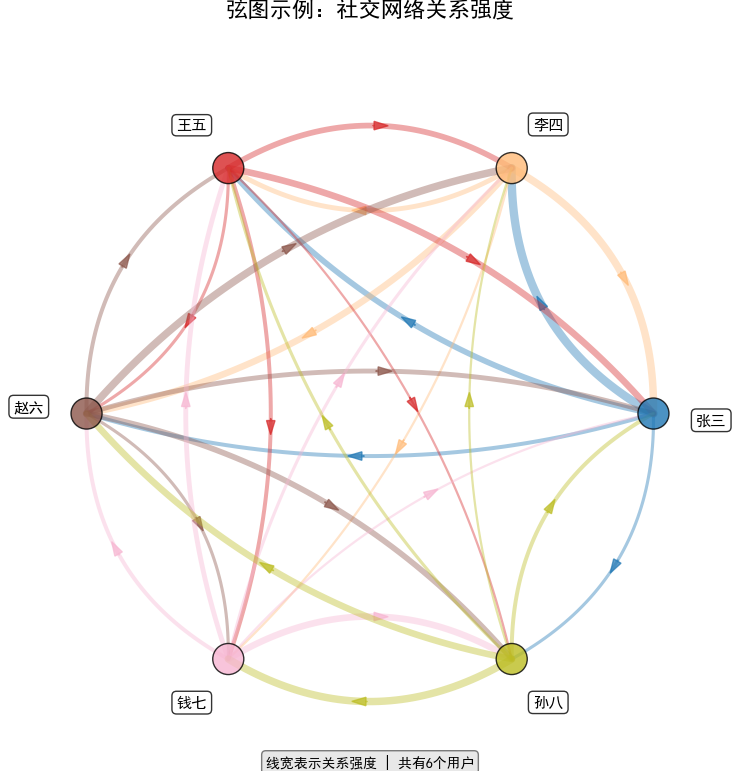
| 观察 | 说明 |
|---|---|
| 李四→赵六 的线最粗 | 李四与赵六互动最频繁,关系最强。 |
| 钱七 的线普遍细 | 钱七与其他人互动较少,可能性格内向。 |
| 孙八→钱七 的线很粗 | 孙八主动与钱七频繁互动,是钱七的主要联系人。 |
| 张三→李四 双向都粗 | 张三与李四互相高频互动,是“强双向关系”。 |
三、桑基图实例
桑基图绘制流程:先计算所有节点的总流量再确定每个节点的垂直位置(按流量比例分配)再 绘制节点(矩形)然后绘制连接线(带状多边形)最后添加标签和装饰。
matplotlib.sankey.Sankey 模块,只能画“单排/单侧”的桑基条,不能画“左右/多阶段”的完整桑基图,本实例选择用 Plotly模块绘制。
1. 数据基础
桑基图需要三个核心数据维度:
(1)来源节点(From)
(2)目标节点(To)
(3)流量值(Value)
在代码中体现为:
flow_data = [
    ['北京仓', '华北转运', 3000],  # 从北京仓到华北转运,3000件
    ['华北转运', '家庭', 1200],    # 从华北转运到家庭,1200件   # ...]
2. 守恒原则
桑基图遵循质量守恒定律:
流入节点的总流量 = 流出节点的总流量
代码通过 node_totals 字典追踪每个节点的总流量
3. 核心部分
(1)计算每个节点的垂直位置
node_positions = {}
for node in warehouse_nodes:
    total = node_totals.get(node, 0)
    height = total * 0.0002  # 根据流量计算高度
    node_positions[node] = {
        'x': stages['发货仓库'],  # 固定水平位置
        'y_start': y_pos,        # 起始Y坐标
        'y_end': y_pos + height, # 结束Y坐标
        'y_center': y_pos + height / 2,  # 中心点(关键!)
    }
    y_pos += height + 0.03  # 累加位置,避免重叠
(2)流线绘制(贝塞尔曲线+多边形填充)
1. 计算贝塞尔曲线控制点
cx = (x1 + x2) / 2
cy = (y1 + y2) / 2
control_x = cx
control_y = cy + bend_factor  # 弯曲因子
# 2. 二次贝塞尔曲线公式
curve_x = (1 - t)**2 * x1 + 2*(1 - t)*t * control_x + t**2 * x2
curve_y = (1 - t)**2 * y1 + 2*(1 - t)*t * control_y + t**2 * y2
# 3. 创建带状多边形(使线有宽度)
dx = np.gradient(curve_x, t)  # 计算导数
dy = np.gradient(curve_y, t)
norm = np.sqrt(dx**2 + dy**2)
nx = -dy / (norm + 1e-8) * width / 2000  # 法线向量
ny = dx / (norm + 1e-8) * width / 2000
# 4. 填充多边形形成带宽度的线
poly_x = np.concatenate([upper_x, lower_x[::-1]])
poly_y = np.concatenate([upper_y, lower_y[::-1]])
ax.fill(poly_x, poly_y, ...)
(3)流量比例可视化(宽度映射)
base_width = flow * 0.005  # 放大系数
min_width = 1.0
max_width = 25.0
width = min(max(base_width, min_width), max_width)  # 限制范围,流量越大 → 线宽越大,形成直观对比。
完整代码如下:
import matplotlib.pyplot as plt
import numpy as np
plt.rcParams['font.sans-serif'] = ['SimHei', 'Microsoft YaHei']  # 中文
plt.rcParams['axes.unicode_minus'] = False
def create_custom_sankey():
    """创建自定义桑基图(不使用Sankey模块)"""
    fig, ax = plt.subplots(figsize=(14, 9))
    ax.set_title('快递包裹静态桑基图:从哪里来?到哪里去?', fontsize=18, fontweight='bold', pad=25)
    # 颜色方案
    colors = {
        '北京仓': '#2ca02c',  # 绿色
        '上海仓': '#ff7f0e',  # 橙色
        '广州仓': '#d62728',  # 红色
        '华北转运': '#8c564b',  # 棕色
        '华东转运': '#e377c2',  # 粉色
        '华南转运': '#7f7f7f',  # 灰色
        '家庭': '#1f77b4',  # 蓝色
        '公司': '#9467bd',  # 紫色
        '学校': '#bcbd22'  # 橄榄色
    }
    # 定义三个阶段的位置
    stages = {
        '发货仓库': 0.1,
        '转运中心': 0.5,
        '收货地址': 0.9
    }
    # 定义节点和流量数据 - 调整流量值以增加差异
    flow_data = [
        # 第一阶段:仓库 -> 转运中心
        ['北京仓', '华北转运', 3000],  # 增加
        ['上海仓', '华东转运', 4000],  # 增加
        ['广州仓', '华南转运', 3200],  # 增加
        # 第二阶段:转运中心 -> 收货地址
        ['华北转运', '家庭', 1200],  # 家庭
        ['华北转运', '公司', 1400],  # 公司最多
        ['华北转运', '学校', 400],  # 学校最少
        ['华东转运', '家庭', 1800],  # 家庭最多
        ['华东转运', '公司', 1500],  # 公司
        ['华东转运', '学校', 700],  # 学校
        ['华南转运', '家庭', 900],  # 家庭
        ['华南转运', '公司', 1600],  # 公司最多
        ['华南转运', '学校', 700]  # 学校
    ]
    # 1. 计算所有节点的总流量(用于确定节点大小)
    node_totals = {}
    for src, tgt, flow in flow_data:
        node_totals[src] = node_totals.get(src, 0) + flow
        node_totals[tgt] = node_totals.get(tgt, 0) + flow
    # 2. 计算每个阶段节点的Y位置
    node_positions = {}
    # 发货仓库节点
    warehouse_nodes = ['北京仓', '上海仓', '广州仓']
    y_pos = 0
    for node in warehouse_nodes:
        total = node_totals.get(node, 0)
        height = total * 0.0002  # 增加高度缩放
        node_positions[node] = {
            'x': stages['发货仓库'],
            'y_start': y_pos,
            'y_end': y_pos + height,
            'y_center': y_pos + height / 2,
            'total': total,
            'stage': '发货仓库'
        }
        y_pos += height + 0.03  # 增加间距
    # 转运中心节点
    transport_nodes = ['华北转运', '华东转运', '华南转运']
    y_pos = 0
    for node in transport_nodes:
        total = node_totals.get(node, 0)
        height = total * 0.0002
        node_positions[node] = {
            'x': stages['转运中心'],
            'y_start': y_pos,
            'y_end': y_pos + height,
            'y_center': y_pos + height / 2,
            'total': total,
            'stage': '转运中心'
        }
        y_pos += height + 0.03
    # 收货地址节点
    address_nodes = ['家庭', '公司', '学校']
    y_pos = 0
    for node in address_nodes:
        total = node_totals.get(node, 0)
        height = total * 0.0002
        node_positions[node] = {
            'x': stages['收货地址'],
            'y_start': y_pos,
            'y_end': y_pos + height,
            'y_center': y_pos + height / 2,
            'total': total,
            'stage': '收货地址'
        }
        y_pos += height + 0.03
    # 3. 绘制连接线 - 重点改进:显著增加线宽差异
    for src, tgt, flow in flow_data:
        if src in node_positions and tgt in node_positions:
            src_pos = node_positions[src]
            tgt_pos = node_positions[tgt]
            base_width = flow * 0.005  # 增大5倍,显著增强差异
            # 确保线宽有明显区分
            min_width = 1.0  # 最小线宽
            max_width = 25.0  # 最大线宽(增大)
            width = min(max(base_width, min_width), max_width)
            # 起点和终点
            x1, y1 = src_pos['x'] + 0.02, src_pos['y_center']
            x2, y2 = tgt_pos['x'] - 0.02, tgt_pos['y_center']
            # 创建贝塞尔曲线
            t = np.linspace(0, 1, 50)
            # 控制点使曲线平滑
            cx = (x1 + x2) / 2
            cy = (y1 + y2) / 2
            # 弯曲因子
            bend_factor = 0.04
            # 计算二次贝塞尔曲线
            control_x = cx
            control_y = cy + bend_factor
            curve_x = (1 - t) ** 2 * x1 + 2 * (1 - t) * t * control_x + t ** 2 * x2
            curve_y = (1 - t) ** 2 * y1 + 2 * (1 - t) * t * control_y + t ** 2 * y2
            # 创建带宽度的带状多边形
            if width > 0:
                # 计算法线向量
                dx = np.gradient(curve_x, t)
                dy = np.gradient(curve_y, t)
                norm = np.sqrt(dx ** 2 + dy ** 2)
                # 归一化法向量
                nx = -dy / (norm + 1e-8) * width / 2000
                ny = dx / (norm + 1e-8) * width / 2000
                # 创建带状多边形的边界
                upper_x = curve_x + nx
                upper_y = curve_y + ny
                lower_x = curve_x - nx
                lower_y = curve_y - ny
                # 填充多边形
                poly_x = np.concatenate([upper_x, lower_x[::-1]])
                poly_y = np.concatenate([upper_y, lower_y[::-1]])

                ax.fill(poly_x, poly_y,
                        color=colors.get(src, '#cccccc'),
                        alpha=0.75,
                        edgecolor='black',
                        linewidth=0.5,
                        zorder=1)
            # 添加流量标签
            if flow > 300:  # 降低阈值
                mid_idx = len(t) // 2
                # 根据流量设置标签样式
                if flow > 2000:
                    label_bg = '#FFD700'  # 金色
                    label_size = 11
                elif flow > 1000:
                    label_bg = '#FFFACD'
                    label_size = 10
                else:
                    label_bg = 'white'
                    label_size = 9
                ax.text(curve_x[mid_idx], curve_y[mid_idx],
                        f'{flow}',
                        ha='center', va='center',
                        fontsize=label_size,
                        fontweight='bold',
                        bbox=dict(boxstyle='round,pad=0.4',
                                  facecolor=label_bg,
                                  edgecolor='darkgray',
                                  alpha=0.95,
                                  linewidth=1.5))
    # 4. 绘制节点
    for node, pos in node_positions.items():
        # 绘制矩形节点
        rect_x = pos['x'] - 0.02
        rect_width = 0.04
        rect_y = pos['y_start']
        rect_height = pos['y_end'] - pos['y_start']
        ax.fill([rect_x, rect_x + rect_width, rect_x + rect_width, rect_x],
                [rect_y, rect_y, rect_y + rect_height, rect_y + rect_height],
                color=colors.get(node, '#cccccc'),
                edgecolor='black',
                linewidth=2.5,
                alpha=0.9,
                zorder=3)
        # 添加节点标签
        label_x = pos['x'] + 0.045 if pos['x'] < 0.5 else pos['x'] - 0.045
        ha = 'left' if pos['x'] < 0.5 else 'right'
        ax.text(label_x, pos['y_center'],
                f"{node}\n{pos['total']}件",
                ha=ha, va='center',
                fontsize=10,
                fontweight='bold',
                bbox=dict(boxstyle='round,pad=0.4',
                          facecolor='white',
                          edgecolor='gray',
                          alpha=0.95,
                          linewidth=1.5))
    # 5. 添加阶段标签
    for stage_name, x_pos in stages.items():
        ax.text(x_pos, -0.06, stage_name,
                ha='center', va='top',
                fontsize=14,
                fontweight='bold',
                bbox=dict(boxstyle='round,pad=0.4',
                          facecolor='#E3F2FD',
                          edgecolor='#1E88E5',
                          alpha=0.9,
                          linewidth=2))
    # 6. 添加箭头表示流向
    arrow_x = [0.15, 0.5, 0.85]
    arrow_y = -0.12
    for i in range(len(arrow_x) - 1):
        ax.annotate('',
                    xy=(arrow_x[i + 1], arrow_y),
                    xytext=(arrow_x[i], arrow_y),
                    arrowprops=dict(arrowstyle='->',
                                    color='#333333',
                                    lw=4,
                                    shrinkA=5,
                                    shrinkB=5))
    # 7. 设置图形属性
    ax.set_xlim(0, 1)
    max_y = max(pos['y_end'] for pos in node_positions.values())
    ax.set_ylim(-0.25, max_y + 0.15)
    ax.set_aspect('auto')
    ax.axis('off')
    # 8. 添加统计信息
    total_packages = sum(flow for _, _, flow in flow_data)
    # 计算各收货地址的包裹数量
    home_packages = sum(flow for _, tgt, flow in flow_data if tgt == '家庭')
    company_packages = sum(flow for _, tgt, flow in flow_data if tgt == '公司')
    school_packages = sum(flow for _, tgt, flow in flow_data if tgt == '学校')
    stats_text = f"📦 总计: {total_packages} 件包裹\n"
    stats_text += f"🏠 家庭: {home_packages} 件 ({home_packages / total_packages * 100:.1f}%)\n"
    stats_text += f"🏢 公司: {company_packages} 件 ({company_packages / total_packages * 100:.1f}%)\n"
    stats_text += f"🏫 学校: {school_packages} 件 ({school_packages / total_packages * 100:.1f}%)"
    ax.text(0.02, 0.98, stats_text,
            transform=ax.transAxes,
            fontsize=11,
            fontweight='bold',
            verticalalignment='top',
            bbox=dict(boxstyle='round',
                      facecolor='#E8F5E9',
                      edgecolor='#4CAF50',
                      alpha=0.9,
                      linewidth=2))
    # 9. 添加线宽示例图
    example_y = 0.75
    line_examples = [
        (4000, "超粗线:极大量包裹", '#FF4500'),
        (1800, "粗线:大量包裹", '#1E90FF'),
        (900, "中等线:一般包裹", '#32CD32'),
        (400, "细线:少量包裹", '#888888')
    ]
    for flow, label, color in line_examples:
        # 计算示例线宽
        example_width = min(max(flow * 0.005, 1.0), 25.0)
        # 绘制示例线
        ax.plot([0.02, 0.08], [example_y, example_y],
                color=color,
                linewidth=example_width,
                alpha=0.9,
                transform=ax.transAxes,
                solid_capstyle='round')
        ax.text(0.09, example_y, f"{label} ({flow}件)",
                transform=ax.transAxes,
                fontsize=9,
                va='center',
                fontweight='bold')
        example_y -= 0.04
    # 10. 添加图例说明
    legend_text = "🎨 颜色说明:\n"
    legend_text += "🟢 绿色:北京仓\n"
    legend_text += "🟠 橙色:上海仓\n"
    legend_text += "🔴 红色:广州仓\n"
    legend_text += "🟤 棕色:华北转运\n"
    legend_text += "💗 粉色:华东转运\n"
    legend_text += "⚪ 灰色:华南转运\n"
    legend_text += "🔵 蓝色:家庭地址\n"
    legend_text += "🟣 紫色:公司地址\n"
    legend_text += "🟡 黄色:学校地址"
    ax.text(0.98, 0.98, legend_text,
            transform=ax.transAxes,
            fontsize=10,
            verticalalignment='top',
            horizontalalignment='right',
            bbox=dict(boxstyle='round',
                      facecolor='#F3E5F5',
                      edgecolor='#9C27B0',
                      alpha=0.9,
                      linewidth=2))
    plt.tight_layout()
    return fig, ax
# 创建自定义桑基图
fig, ax = create_custom_sankey()
plt.show()
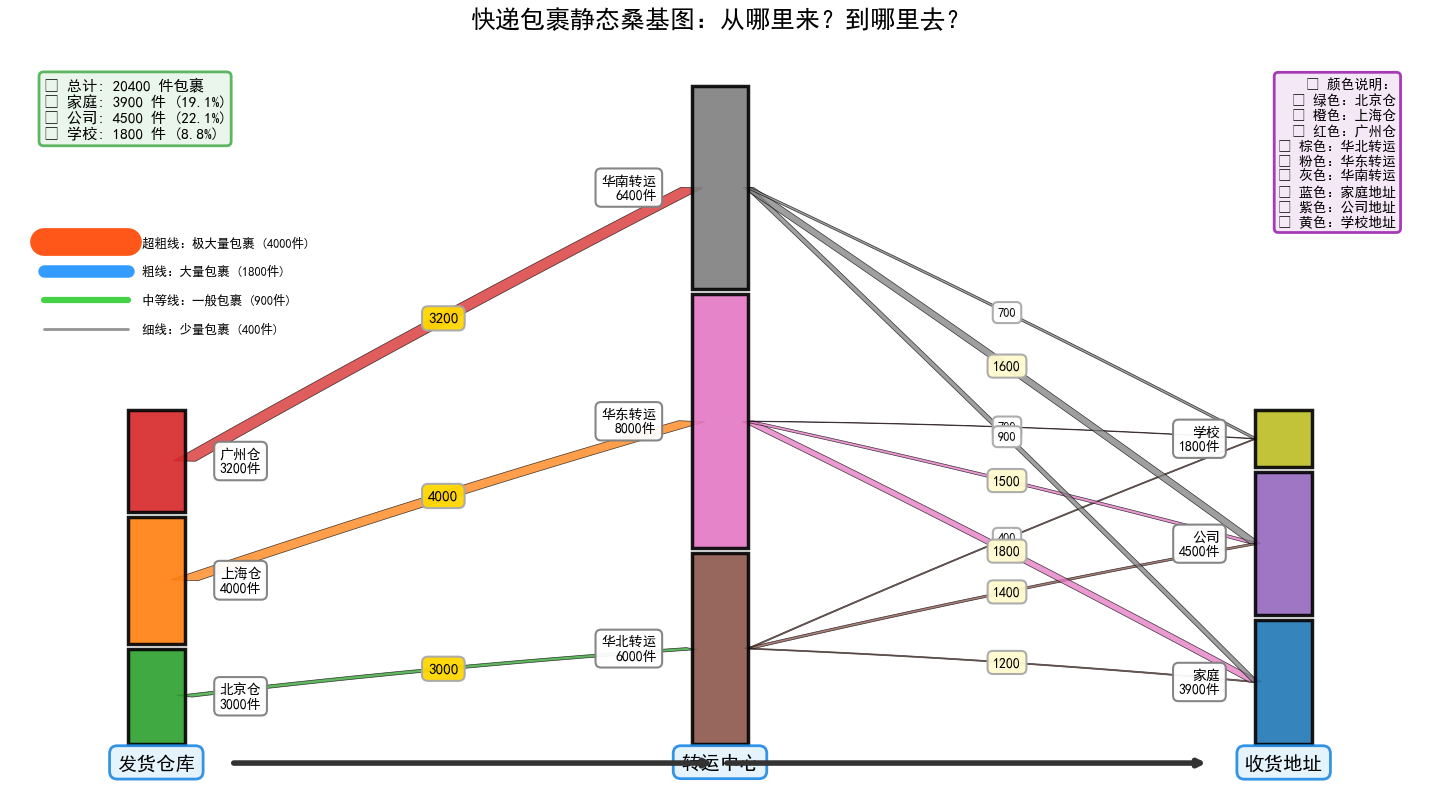
| 观察 | 说明 |
|---|---|
| 最粗的橙色河流 | 上海仓 → 华东转运 → 家庭,4000 件,是整个系统的“主动脉”。 |
| 家庭收货总量最多 | 三条蓝条相加 ≈ 3900 件,占比 19 %,是第一大收货场景。 |
| 学校最边缘 | 三条黄色条最细,总计仅 1800 件(8.8 %),需求最小。 |
| 广州仓最清闲 | 红色条最短,出库仅 3200 件,远低于上海、北京。 |
| 无包裹消失 | 仓库出库总量 = 转运中心过站总量 = 收货总量,无丢失。 |
四、弦图与桑基图的对比
| 对比维度 | 弦图(Chord) | 桑基图(Sankey) |
|---|---|---|
| 核心用途 | 看“谁和谁有关系 + 关系强弱” | 看“从哪来到哪去 + 流量大小” |
| 数据类型 | 对称方阵(张三→李四 = 李四→张三?) | 三列清单(源-目标-流量) |
| 布局 | 节点均匀分布在圆周 | 节点排成三竖列(左-中-右) |
| 河流形状 | 圆弧弦,无固定方向 | 贝塞尔带,从左到右 |
| 箭头含义 | 箭头仅提示“主动方”,可双向 | 箭头即物流方向,单向 |
| 一眼结论 | 谁是最活跃的人、谁被孤立 | 哪条路径最忙、有无丢包 |
| 适用场景 | 社交网络、贸易互补、角色关系 | 快递、能源、资金流、生产流程 |
总结
弦图和桑基图都是可视化复杂关系的强大工具,但服务目的不同:弦图像一个“朋友圈”,展示谁和谁关系密切(如社交网络中的互动频率),节点分布在圆周上,弧线宽度表示关系强度;桑基图则像一条“河流”,追踪物品、资金或能量的流动路径(如快递从仓库到家庭的配送过程),强调流向和流量守恒,线条宽度代表流量大小。简单来说,弦图回答“谁和谁关系好”,桑基图回答“东西从哪里来到哪里去”。

DAMO开发者矩阵,由阿里巴巴达摩院和中国互联网协会联合发起,致力于探讨最前沿的技术趋势与应用成果,搭建高质量的交流与分享平台,推动技术创新与产业应用链接,围绕“人工智能与新型计算”构建开放共享的开发者生态。
更多推荐

 25
25 0
0- 0


 已为社区贡献1条内容

所有评论(0)