面向自主移动机器人的英特尔® 边缘软件设备认证(英特尔® ESDQ)
Intel® Edge Software Device Qualification (Intel® ESDQ) for Autonomous Mobile Robots
Overview
Intel® Edge Software Device Qualification (Intel® ESDQ) for Autonomous Mobile Robots (AMR) provides customers with the capability to run an Intel provided test suite at the target system, with the goal of enabling partners to determine their platform’s compatibility with the Edge Insights for Autonomous Mobile Robots (EI for AMR).
The information below is specific to the Intel® ESDQ for Autonomous Mobile Robots (AMR) package. For documentation on the Intel® ESDQ CLI binary, refer to Intel® Edge Software Device Qualification (Intel® ESDQ) Overview.
Edge Insights for Autonomous Mobile Robots (EI for AMR) offers containerized software packages and pre-validated hardware modules for sensor data ingestion, classification, environment modelling, action planning, and action control. Based on the Robot Operating System (ROS) 2 framework, it also includes the OpenVINO™ toolkit, Intel® oneAPI Base Toolkit (Base Kit), Intel® RealSense™ SDK, and other software dependencies in a container, along with the source code, as well as reference algorithms and deep learning models as working examples.
Select Configure & Download to download Intel® ESDQ for AMR and refer to Get Started for installation steps.
Target System Requirements
Supported Intel® CPU Processors:
- Intel Atom® processor with Intel® SSE4.1 support
- Intel® Pentium® processor N4200/5, N3350/5, N3450/5 with Intel® HD Graphics
- 6th - 11th generation Intel® Core™ processors
- Intel® Xeon® processor E3, E5, and E7 family
- 2nd Generation Intel® Xeon® Scalable Processors
- 3rd Generation Intel® Xeon® Scalable Processors
Other System Requirements:
- At least 8 GB RAM
- At least 64 GB hard drive
- Intel® RealSense™ camera D435i
- Accelerator: Intel® Movidius™ Myriad™ X VPU (optional)
- An Internet connection
- Ubuntu* 20.04 LTS
- Kernel version 5.10.47
- Host has internet connection and can install packages via apt
- For MIPI cameras with the Tiger Lake platform, Sony* IMX390 sensors (optional)
- Slamtec* RPLIDAR A3 2D LIDAR
Knowledge/Experience:
- You are familiar with executing Linux* commands.
- You have basic Docker* experience.
- ROS/ROS2 background recommended.
How It Works
The EI for AMR interacts with the Intel® ESDQ CLI through a common test module interface layer (TMI) which is part of the Intel® ESDQ binary.
Intel® ESDQ generates a complete test report in HTML format, along with detailed logs packaged as one zip file, which you can manually choose to email to the ESH support team.
For more details about EI for AMR, go to How it works.
AMR Test Modules
Intel® ESDQ for AMR contains the following test modules.
Docker Container
This module verifies that the EI for AMR comes as a compilable Docker container and it can run on the target platform.
For more information on Docker, go to: https://docs.docker.com/
The test is considered Pass if:
- The Docker container can be opened.
Intel® RealSense™ Camera
This module verifies the capabilities of the Intel® RealSense™ technology on the target platform.
For more information on Intel® RealSense™, go to: https://www.intelrealsense.com/
The tests within this module verify that the following features are installed properly on the target platform and that EI for AMR and the Intel® RealSense™ camera are functioning properly:
- The camera is detected and is working.
- Intel® RealSense™ SDK.
The tests are considered Pass if:
- The camera is detected and is working.
- The Intel® RealSense™ SDK 2.0 libraries are present in Docker container.
- A simple C++ file can be compiled using g++ and -lrealsense2 flag.
- Intel® RealSense™ Topics are listed and published.
- The number of FPS (Frames Per Second) are as expected.
Intel® oneAPI
This module verifies some basic capabilities of Intel® oneAPI on the target platform:
For more information on Intel® OneAPI, go to: https://software.intel.com/content/www/us/en/develop/tools/oneapi.html#gs.cjvm2h
The tests within this module verify that the following features are functioning properly on the target platform:
- DPC++ compiler
- CUDA to DPC++ converter
This test is considered Pass if:
- A simple C++ file can be compiled using the DPC++ compiled and it runs as expected.
- CUDA can be installed.
- A CUDA specific file can be converted to DPC++ and it runs as expected.
OpenVINO™ Toolkit
- This module verifies two core features of the OpenVINO™ Toolkit:
- Object detection using TensorFlow*
The test is considered Pass if:
- The OpenVINO™ model optimizer is capable to transform a TensorFlow
Get Started
Intel® ESDQ 5.0 CLI tool is installed as part of the EI for AMR.
Prepare the Target System
EI for AMR requires a host system with Ubuntu* 20.04 and Kernel version 5.10.47.
Detailed steps on how to set it up can be found in the EI for AMR Documentation Get Started Guide.
See Install Edge Insights for Autonomous Mobile Robots sections:
• Step 1: Prepare the Target System
• Step 2: Update the Kernel to Version 5.10.47
Download and Install Intel® ESDQ for EI for AMR
- Select Configure & Download to download Intel® ESDQ for EI for AMR and then follow the steps below to install it.
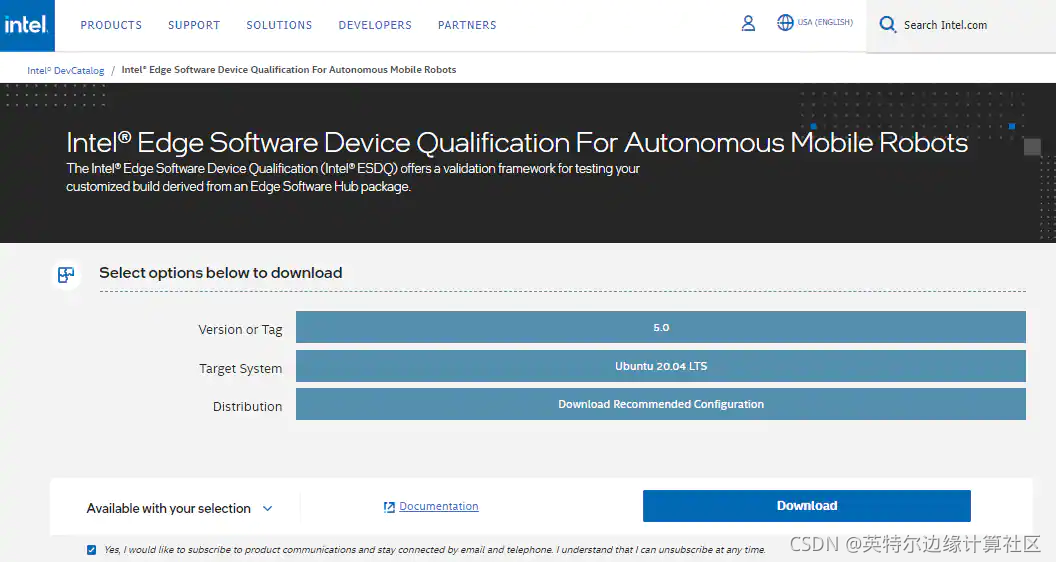
Figure 1. Configure & Download
- Click the Download button on the displayed configuration window.
- Select Accept Edge Software Hub License Agreement in the pop-up window, then follow the instructions below.
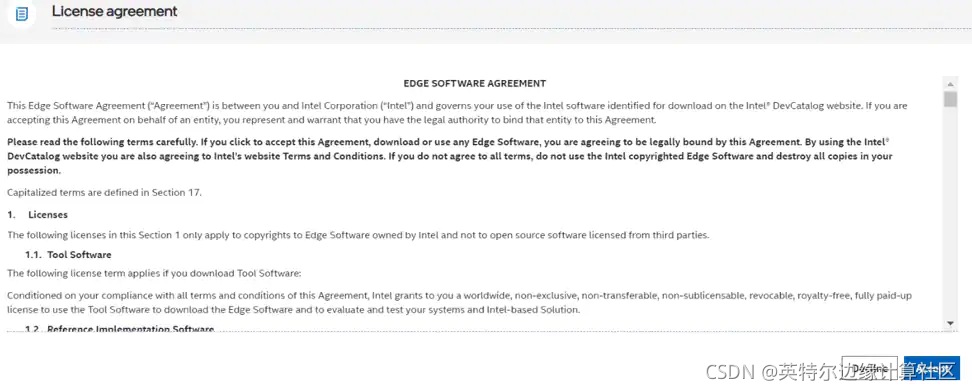
Figure 3. Accept License Agreement
- Copy and Save the Product Key.
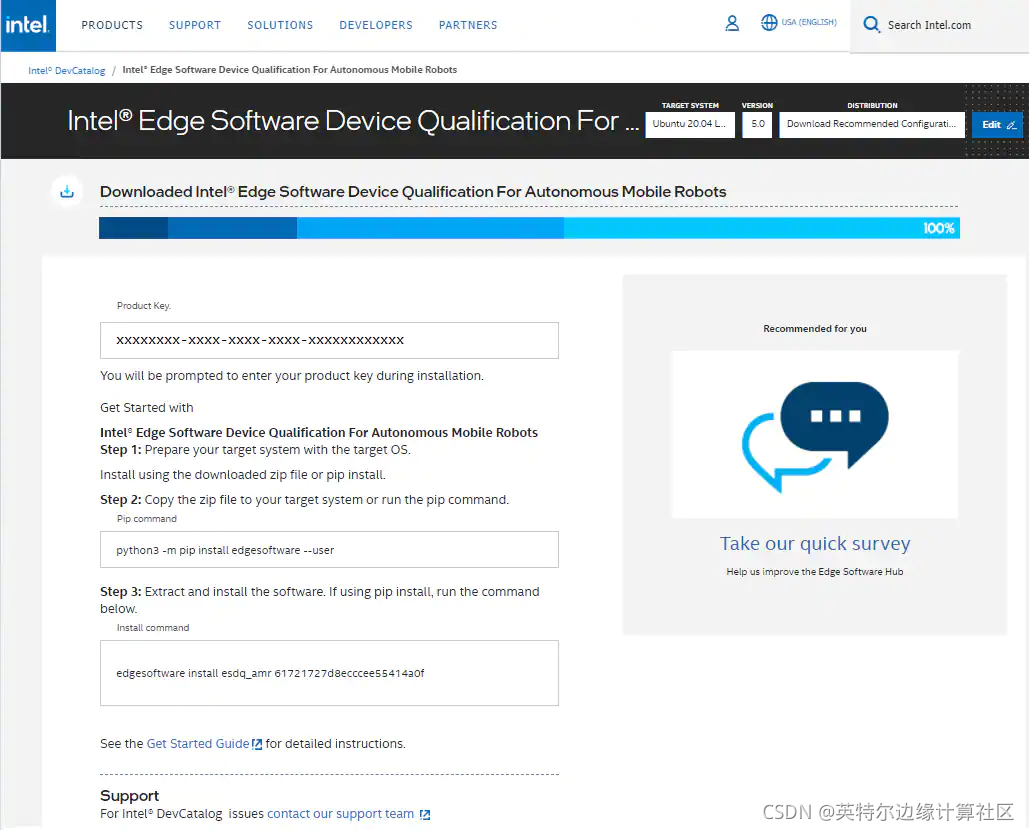
Figure 4. Product Key
- Transfer the downloaded ESDQ EI for AMR package to the target Ubuntu 20.04 system.
- View the edgesoftware_configuration.xml included in the edge software zip package and look for the Intel® ESDQ ingredient and test modules for EI for AMR.
<project path="installation/src" id="61390027fc7d8e002b3f35c5" version="1.0" label="esdq/AMR_Test_Module"/>
- Provide executable permission to edgesoftware.
chmod +x ./edgesoftware
- Run the command below to install Intel® ESDQ 4.0 and ESDQ EI for AMR.
./edgesoftware install
Note: If the installer is blocked at checking internet connection, or
if you encounter any Docker* pull-related issues during the
installation process, refer to the Troubleshooting section at the end
of this document.
9.During the installation, you will be prompted for the Product Key. The Product Key is contained in the email you received from Intel confirming your download (or from the saved Product Key in the step above).
10.When the installation is complete, you see the message “Installation of package complete” and the installation status for each module.
11.Find the module ID for the Intel® ESDQ by running the command:
./edgesoftware list --default
Example output: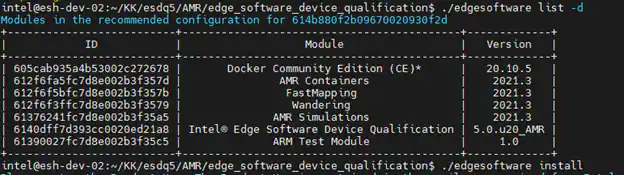
Figure 5. Edgesoftware List
- Copy the source code for Wandering, FastMapping, and gazebo_world in the AMR containers folder, and prepare the setup for the Docker* images build:
1.cd Edge_Insights_for_Autonomous_Mobile_Robots<version>/
2.sudo cp -rf FastMapping/ AMR_Simulations/gazebo_world/ AMR_containers/ amr_ubuntu2004_ros2_foxy_sdk_env/
3.sudo cp -rf Wandering/ AMR_containers/amr_ubuntu2004_openvino_sdk_env/
4.cd AMR_containers/
5.sudo chmod +x amr_ubuntu2004_ros2_foxy_sdk_env/docker_entrypoint.sh
- Build the Docker* images by running a Docker* build for each container. (Update the proxies according to your network requirements; if no proxies are needed, remove them from the command.)
```c
1.docker build --tag amr-ubuntu2004-ros2-foxy-sdk:2021.3 --build-arg http_proxy=<http_proxy> --build-arg https_proxy=<https_proxy> --no-cache -- file amr_ubuntu2004_ros2_foxy_sdk_env/Dockerfile amr_ubuntu2004_ros2_foxy_sdk_env
2.
3.docker build --build-arg base_image=amr-ubuntu2004-ros2-foxy-sdk:2021.3 --tag amr-ubuntu2004-openvino-sdk:2021.3 --build-arg http_proxy=<http_proxy> -- build-arg https_proxy=<https_proxy> --file amr_ubuntu2004_openvino_sdk_env/ Dockerfile amr_ubuntu2004_openvino_sdk_env
4.
5.docker build --build-arg base_image=amr-ubuntu2004-openvino-sdk:2021.3 -- build-arg http_proxy=<http_proxy> --build-arg https_proxy=<https_proxy> --tag amr-ubuntu2004-full-flavour-sdk:2021.3 --file amr_ubuntu2004_full_flavour_sdk_env/Dockerfile amr_ubuntu2004_full_flavour_sdk_env
The total build time is approximately 60 minutes. The time varies depending on the testing system’s capabilities.
Verify that all Docker* images were created:
> docker image list
You will see output similar to:
Figure 6. Docker Image List
- After module installation is completed successfully, reboot the system:
reboot
Run the Application
For the complete Intel® ESDQ CLI, refer to Intel® ESDQ CLI Overview. The test modules are already available in the target system.
- Change directory to:
cd $HOME/edge_software_device_qualification/Edge_Software_Device_Qualification_For_AMR_5.0/esdq
- Run Intel® ESDQ test and generate report:
./esdq run –r
The test report should look like the following example.
Note: The results shown below are for illustration only.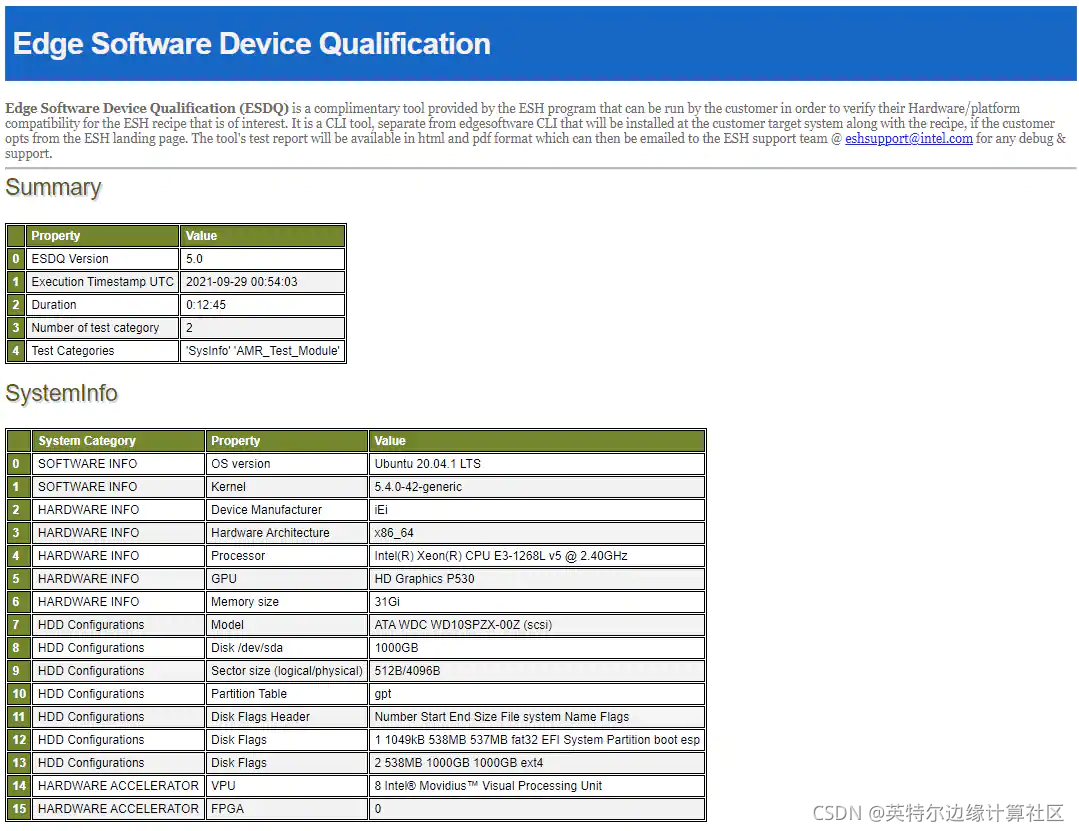
Figure 6. Test Report - Part 1
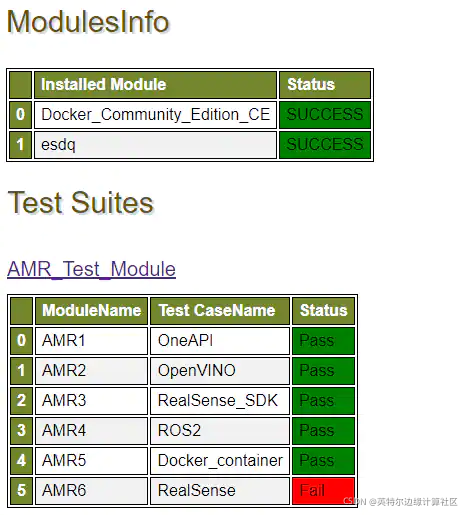
Figure 7. Test Report - Part 2
Release Notes
Version: 1.0
New in this Release
Initial features for recommended configuration.
Known Issues
- The Intel® RealSense™ Camera test will fail if there is no Intel® RealSense™ Camera attached to the Target System.
The test will report the following error message:
[ERROR]: No RealSense devices were found
For the test to PASS, Intel® RealSense™ camera D435i needs to be connected to the Target System. - The AMR Docker image build is failing in PRC network. An update will be made to this document once there is a resolution.
Troubleshooting
- If the proxies are set using the export command, sudo will not use them unless you use the -E argument to install the package as shown below:
sudo -E ./edgesoftware
- Make sure you have an active internet connection during the full installation. If you lose Internet connectivity at any time, the installation might fail.
- For the following error message, go to Docker* hub download rate limit:
docker: Error response from daemon: toomanyrequests: You have reached your pull rate limit.
Support Forum
If you’re unable to resolve your issues, contact the Support Forum.

DAMO开发者矩阵,由阿里巴巴达摩院和中国互联网协会联合发起,致力于探讨最前沿的技术趋势与应用成果,搭建高质量的交流与分享平台,推动技术创新与产业应用链接,围绕“人工智能与新型计算”构建开放共享的开发者生态。
更多推荐
 0
0 0
0- 0


 已为社区贡献20条内容

所有评论(0)